Motivation: collaboration and ownership
It’s amazing how easily we can collaborate online nowadays. We use Google Docs to collaborate on documents, spreadsheets and presentations; in Figma we work together on user interface designs; we communicate with colleagues using Slack; we track tasks in Trello; and so on. We depend on these and many other online services, e.g. for taking notes, planning projects or events, remembering contacts, and a whole raft of business uses.
Today’s cloud apps offer big benefits compared to earlier generations of software: seamless collaboration, and being able to access data from any device. As we run more and more of our lives and work through these cloud apps, they become more and more critical to us. The more time we invest in using one of these apps, the more valuable the data in it becomes to us.
However, in our research we have spoken to a lot of creative professionals, and in that process we have also learned about the downsides of cloud apps.
When you have put a lot of creative energy and effort into making something, you tend to have a deep emotional attachment to it. If you do creative work, this probably seems familiar. (When we say “creative work,” we mean not just visual art, or music, or poetry — many other activities, such as explaining a technical topic, implementing an intricate algorithm, designing a user interface, or figuring out how to lead a team towards some goal are also creative efforts.)
In the process of performing that creative work, you typically produce files and data: documents, presentations, spreadsheets, code, notes, drawings, and so on. And you will want to keep that data: for reference and inspiration in the future, to include it in a portfolio, or simply to archive because you feel proud of it. It is important to feel ownership of that data, because the creative expression is something so personal.
Unfortunately, cloud apps are problematic in this regard. Although they let you access your data anywhere, all data access must go via the server, and you can only do the things that the server will let you do. In a sense, you don’t have full ownership of that data — the cloud provider does. In the words of a bumper sticker: “There is no cloud, it’s just someone else’s computer.”
When data is stored on “someone else’s computer”, that third party assumes a degree of control over that data. Cloud apps are provided as a service; if the service is unavailable, you cannot use the software, and you can no longer access your data created with that software. If the service shuts down, even though you might be able to export your data, without the servers there is normally no way for you to continue running your own copy of that software. Thus, you are at the mercy of the company providing the service.
Before web apps came along, we had what we might call “old-fashioned” apps: programs running on your local computer, reading and writing files on the local disk. We still use a lot of applications of this type today: text editors and IDEs, Git and other version control systems, and many specialized software packages such as graphics applications or CAD software fall in this category.
In old-fashioned apps, the data lives in files on your local disk, so you have full agency and ownership of that data: you can do anything you like, including long-term archiving, making backups, manipulating the files using other programs, or deleting the files if you no longer want them. You don’t need anybody’s permission to access your files, since they are yours. You don’t have to depend on servers operated by another company.
To sum up: the cloud gives us collaboration, but old-fashioned apps give us ownership. Can’t we have the best of both worlds?
We would like both the convenient cross-device access and real-time collaboration provided by cloud apps, and also the personal ownership of your own data embodied by “old-fashioned” software.
Seven ideals for local-first software
We believe that data ownership and real-time collaboration are not at odds with each other. It is possible to create software that has all the advantages of cloud apps, while also allowing you to retain full ownership of the data, documents and files you create.
We call this type of software local-first software, since it prioritizes the use of local storage (the disk built into your computer) and local networks (such as your home WiFi) over servers in remote datacenters.
In cloud apps, the data on the server is treated as the primary, authoritative copy of the data; if a client has a copy of the data, it is merely a cache that is subordinate to the server. Any data modification must be sent to the server, otherwise it “didn’t happen.” In local-first applications we swap these roles: we treat the copy of the data on your local device — your laptop, tablet, or phone — as the primary copy. Servers still exist, but they hold secondary copies of your data in order to assist with access from multiple devices. As we shall see, this change in perspective has profound implications.
Here are seven ideals we would like to strive for in local-first software.
1. No spinners: your work at your fingertips
Much of today’s software feels slower than previous generations of software. Even though CPUs have become ever faster, there is often a perceptible delay between some user input (e.g. clicking a button, or hitting a key) and the corresponding result appearing on the display. In previous work we measured the performance of modern software and analyzed why these delays occur.
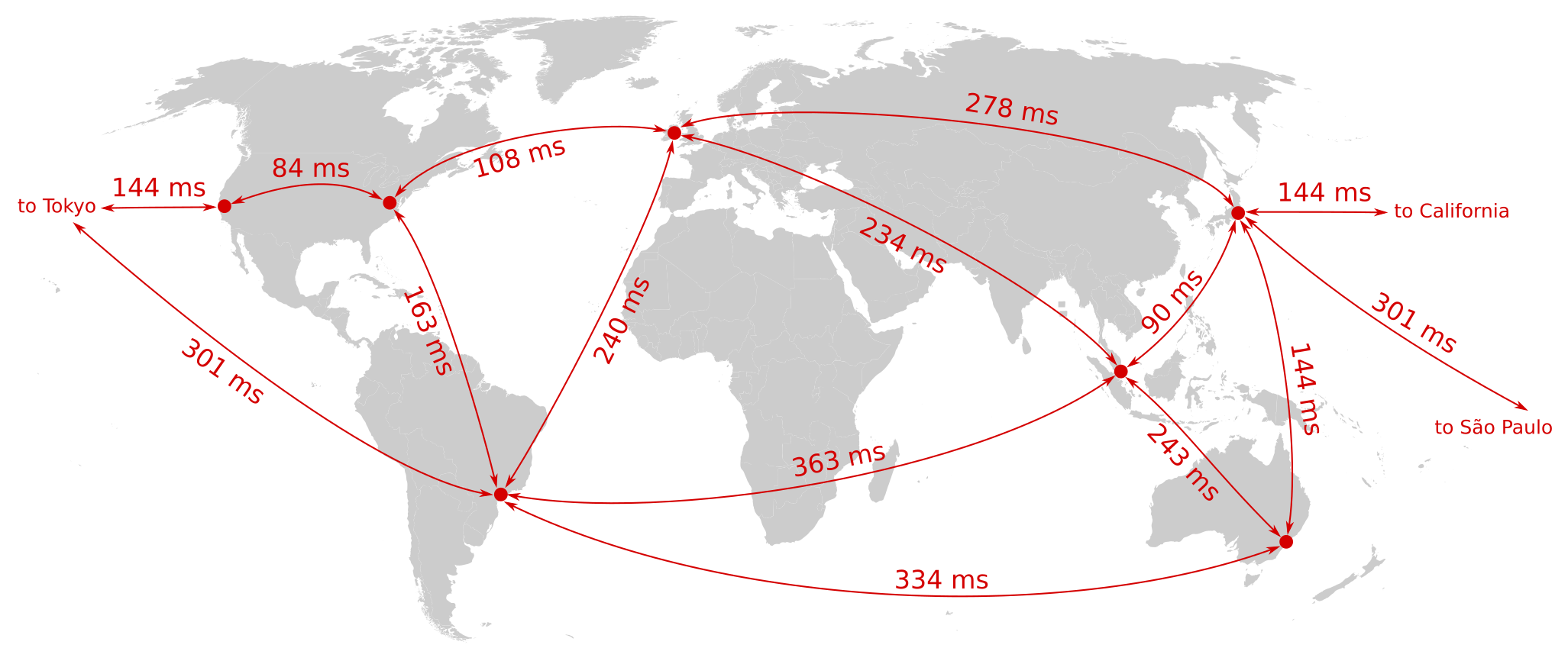
Server-to-server round-trip times between AWS datacenters in various locations worldwide. Data from: Peter Bailis, Aaron Davidson, Alan Fekete, et al.: “Highly Available Transactions: Virtues and Limitations,” VLDB 2014.
With cloud apps, since the primary copy of the data is on a server, all data modifications, and many data lookups, require a round-trip to a server. Depending on where you live, the server may well be located on another continent, so the speed of light places a limit on how fast the software can be.
Local-first software is different: because it keeps the primary copy of the data on the local device, there is never a need for the user to wait for a request to a server to complete. All operations can be handled by reading and writing files on the local disk, and data synchronization with other devices happens quietly in the background.
While this by itself does not guarantee that the software will be fast, we expect that local-first software has the potential to respond near-instantaneously to user input, never needing to show you a spinner while you wait, and allowing you to operate with your data at your fingertips.
2. Your work is not trapped on one device
Users today rely on several computing devices to do their work, and modern applications must support such workflows. For example, users may capture ideas on the go using their smartphone, organize and think through those ideas on a tablet, and then type up the outcome as a document on their laptop.
This means that while local-first apps keep their data in local storage on each device, it is also necessary for that data to be synchronized across all of the devices on which a user does their work. Various data synchronization technologies exist, and we discuss them in detail in a later section.
Most cross-device sync services also store a copy of the data on a server, which provides a convenient off-site backup for the data. These solutions work quite well as long as each file is only edited by one person at a time. If several people edit the same file at the same time, conflicts may arise, which we discuss in the section on collaboration.
3. The network is optional
Personal mobile devices move through areas of varying network availability: unreliable coffee shop WiFi, while on a plane or on a train going through a tunnel, in an elevator or a parking garage. In developing countries or rural areas, infrastructure for Internet access is sometimes patchy. While traveling internationally, many mobile users disable cellular data due to the cost of roaming. Overall, there is plenty of need for offline-capable apps, such as for researchers or journalists who need to write while in the field.
“Old-fashioned” apps work fine without an Internet connection, but cloud apps typically don’t work while offline. For several years the Offline First movement has been encouraging developers of web and mobile apps to improve offline support, but in practice it has been difficult to retrofit offline support to cloud apps, because tools and libraries designed for a server-centric model do not easily adapt to situations in which users make edits while offline.
Since local-first applications store the primary copy of their data in each device’s local filesystem, the user can read and write this data anytime, even while offline. It is then synchronized with other devices sometime later, when a network connection is available. The data synchronization need not necessarily go via the Internet: local-first apps could also use Bluetooth or local WiFi to sync data to nearby devices.
Moreover, for good offline support it is desirable for the software to run as a locally installed executable on your device, rather than a tab in a web browser. For mobile apps it is already standard that the whole app is downloaded and installed before it is used.
4. Seamless collaboration with your colleagues
Collaboration typically requires that several people contribute material to a document or file. However, in old-fashioned software it is problematic for several people to work on the same file at the same time: the result is often a conflict. In text files such as source code, resolving conflicts is tedious and annoying, and the task quickly becomes very difficult or impossible for complex file formats such as spreadsheets or graphics documents. Hence, collaborators may have to agree up front who is going to edit a file, and only have one person at a time who may make changes.
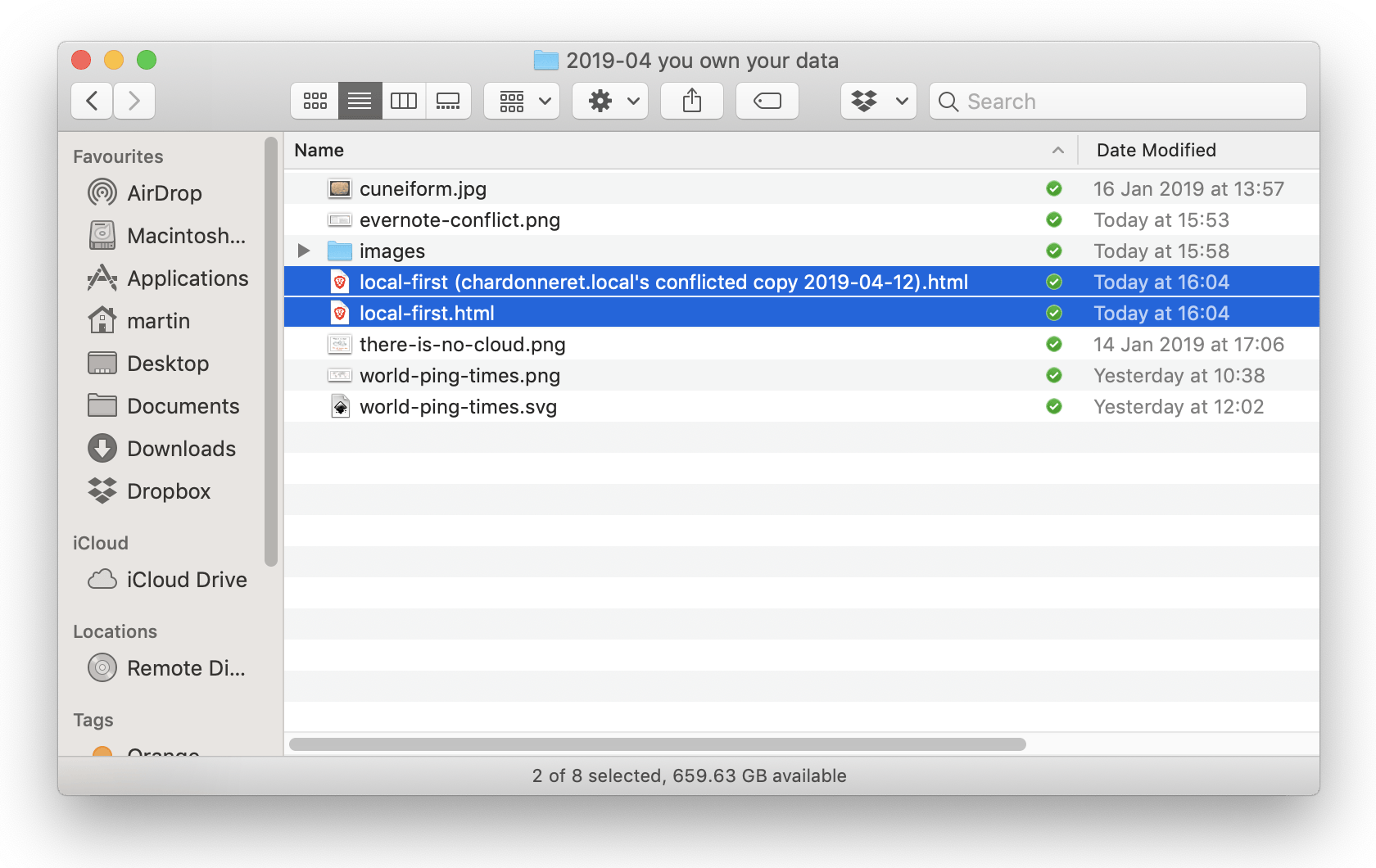
A “conflicted copy” on Dropbox. The user must merge the changes manually.
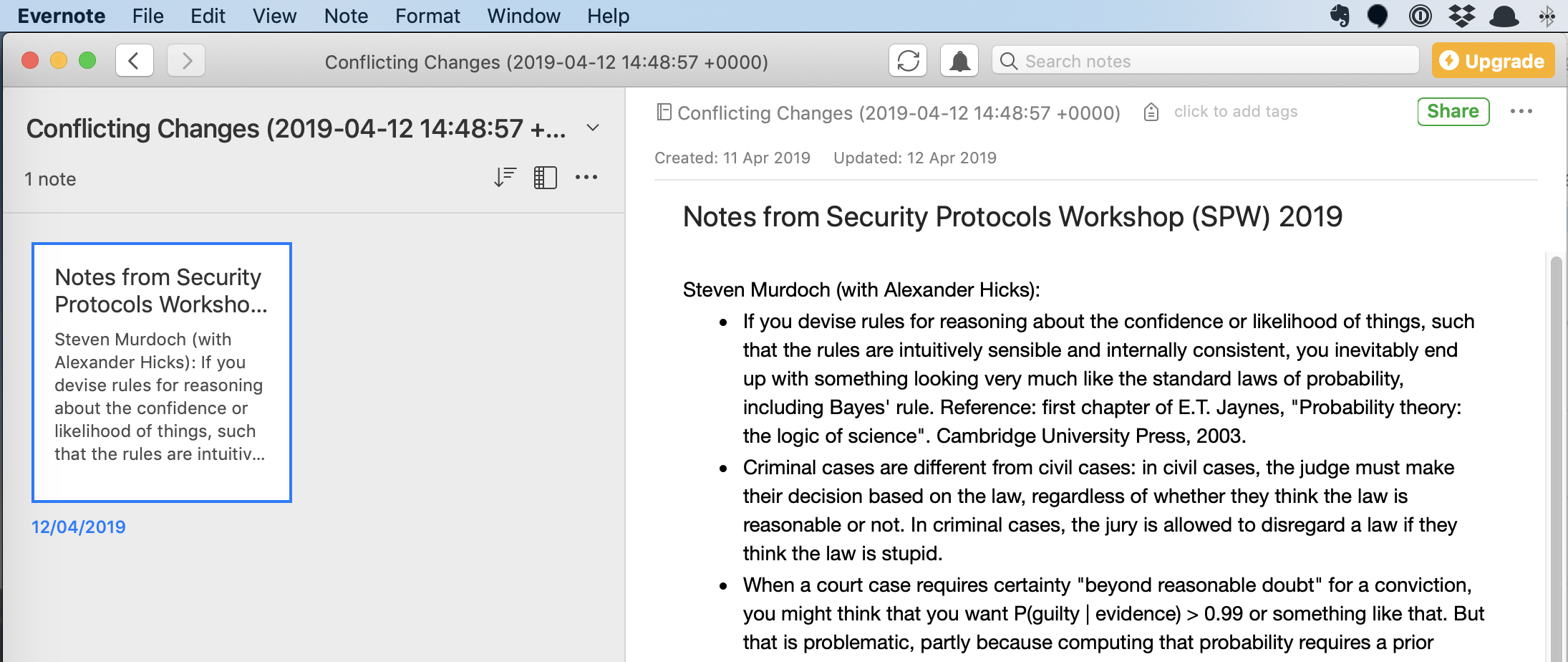
In Evernote, if a note is changed concurrently, it is moved to a “conflicting changes” notebook, and there is nothing to support the user in resolving the situation — not even a facility to compare the different versions of a note.
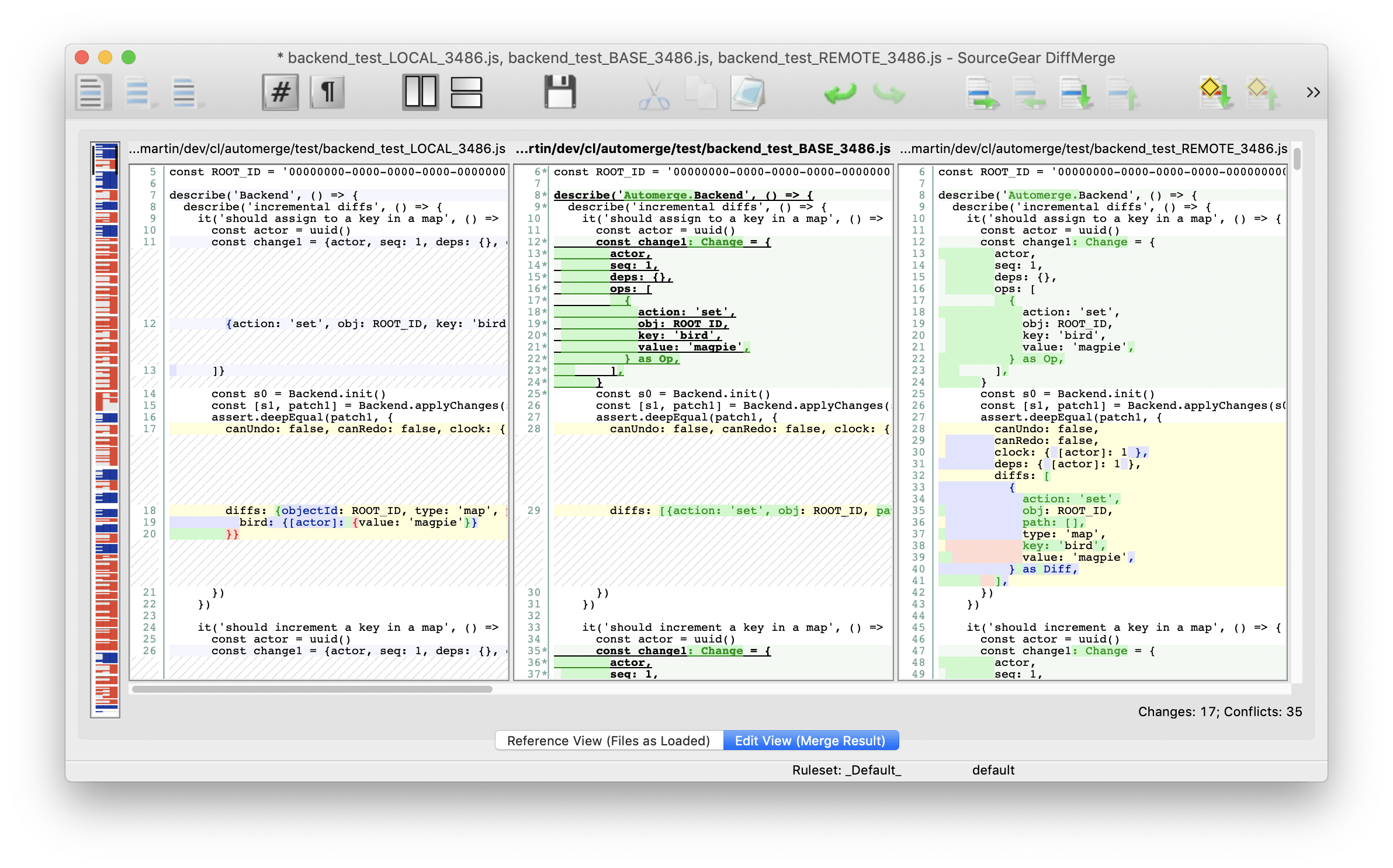
In Git and other version control systems, several people may modify the same file in different commits. Combining those changes often results in merge conflicts, which can be resolved using specialized tools (such as DiffMerge, shown here). These tools are primarily designed for line-oriented text files such as source code; for other file formats, tool support is much weaker.
On the other hand, cloud apps such as Google Docs have vastly simplified collaboration by allowing multiple users to edit a document simultaneously, without having to send files back and forth by email and without worrying about conflicts. Users have come to expect this kind of seamless real-time collaboration in a wide range of applications.
In local-first apps, our ideal is to support real-time collaboration that is on par with the best cloud apps today, or better. Achieving this goal is one of the biggest challenges in realizing local-first software, but we believe it is possible: in a later section we discuss technologies that enable real-time collaboration in a local-first setting.
Moreover, we expect that local-first apps can support various workflows for collaboration. Besides having several people edit the same document in real-time, it is sometimes useful for one person to tentatively propose changes that can be reviewed and selectively applied by someone else. Google Docs supports this workflow with its suggesting mode, and pull requests serve this purpose in GitHub.
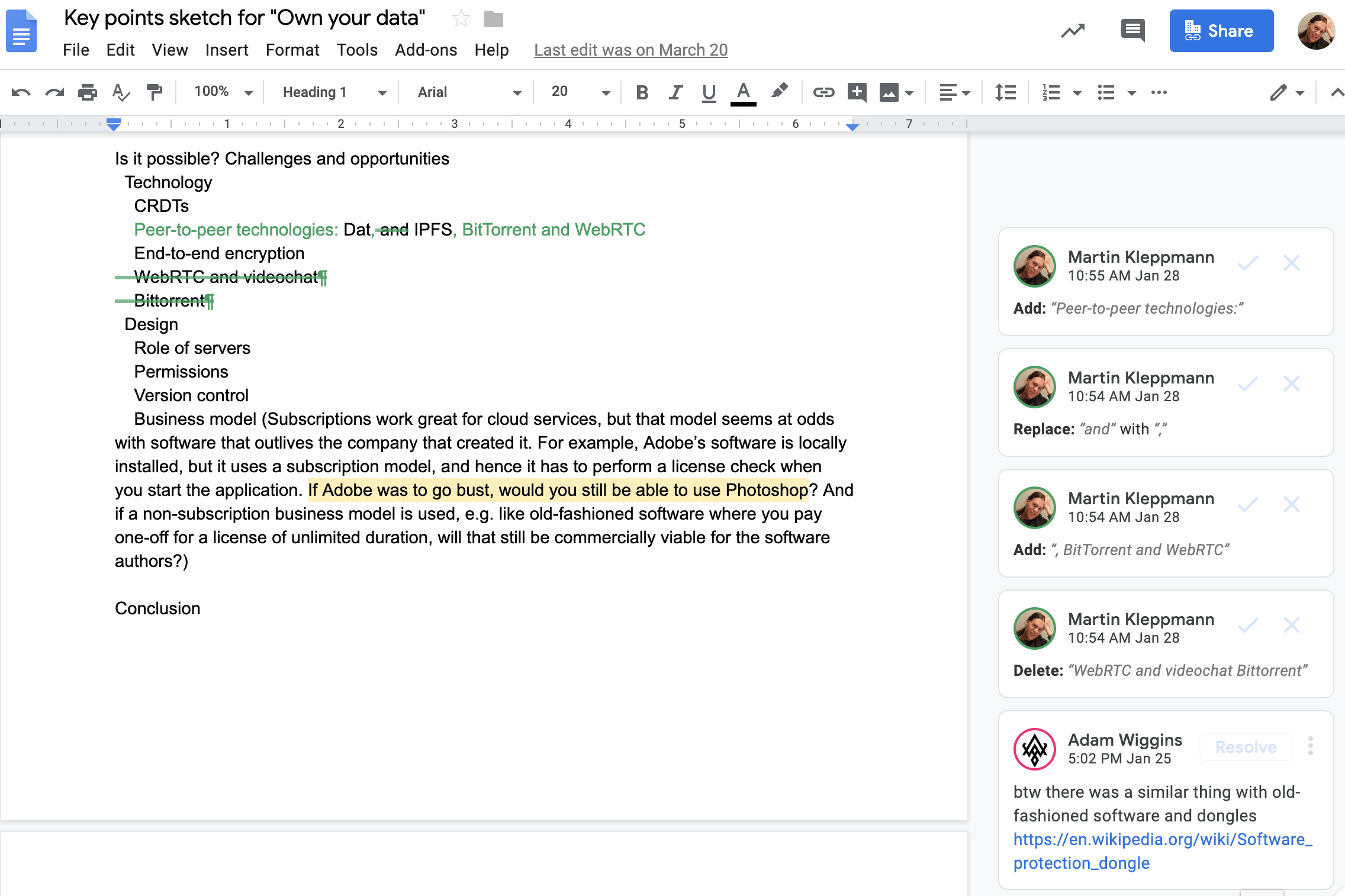
In Google Docs, collaborators can either edit the document directly, or they can suggest changes, which can then be accepted or rejected by the document owner.
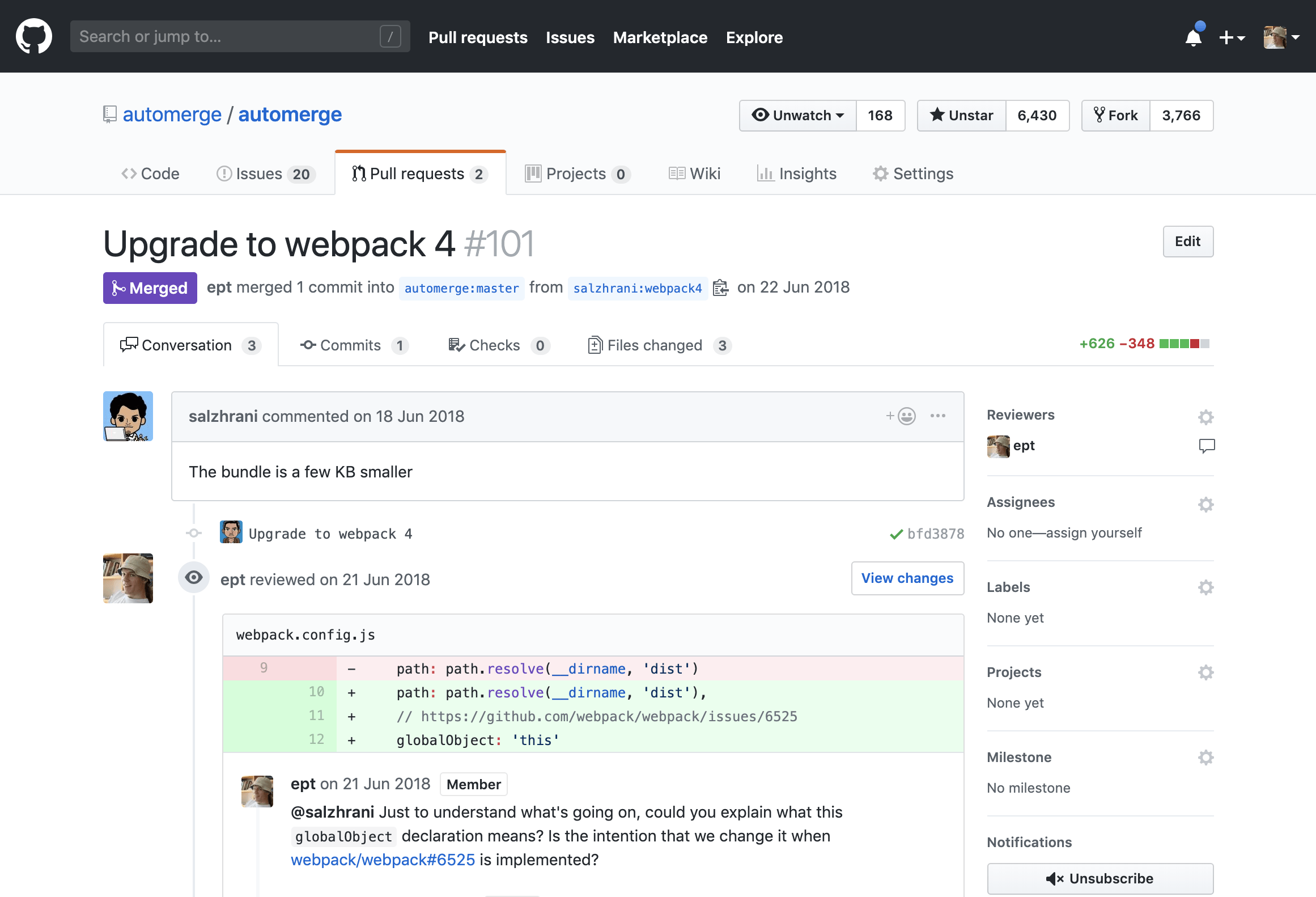
The collaboration workflow on GitHub is based on pull requests. A user may change multiple source files in multiple commits, and submit them as a proposed change to a project. Other users may review and amend the pull request before it is finally merged or rejected.
5. The Long Now
An important aspect of data ownership is that you can continue accessing the data for a long time in the future. When you do some work with local-first software, your work should continue to be accessible indefinitely, even after the company that produced the software is gone.

Cuneiform script on clay tablet, ca. 3000 BCE. Image from Wikimedia Commons

“Old-fashioned” apps continue to work forever, as long as you have a copy of the data and some way of running the software. Even if the software author goes bust, you can continue running the last released version of the software. Even if the operating system and the computer it runs on become obsolete, you can still run the software in a virtual machine or emulator. As storage media evolve over the decades, you can copy your files to new storage media and continue to access them.
On the other hand, cloud apps depend on the service continuing to be available: if the service is unavailable, you cannot use the software, and you can no longer access your data created with that software. This means you are betting that the creators of the software will continue supporting it for a long time — at least as long as you care about the data.
Although there does not seem to be a great danger of Google shutting down Google Docs anytime soon, popular products do sometimes get shut down or lose data, so we know to be careful. And even with long-lived software there is the risk that the pricing or features change in a way you don’t like, and with a cloud app, continuing to use the old version is not an option — you will be upgraded whether you like it or not.
Local-first software enables greater longevity because your data, and the software that is needed to read and modify your data, are all stored locally on your computer. We believe this is important not just for your own sake, but also for future historians who will want to read the documents we create today. Without longevity of our data, we risk creating what Vint Cerf calls a “digital Dark Age”.
Some file formats (such as plain text, JPEG, and PDF) are so ubiquitous that they will probably be readable for centuries to come. The US Library of Congress also recommends XML, JSON, or SQLite as archival formats for datasets. However, in order to read less common file formats and to preserve interactivity, you need to be able to run the original software (if necessary, in a virtual machine or emulator). Local-first software enables this.
6. Security and privacy by default
One problem with the architecture of cloud apps is that they store all the data from all of their users in a centralized database. This large collection of data is an attractive target for attackers: a rogue employee, or a hacker who gains access to the company’s servers, can read and tamper with all of your data. Such security breaches are sadly terrifyingly common, and with cloud apps we are unfortunately at the mercy of the provider.
While Google has a world-class security team, the sad reality is that most companies do not. And while Google is good at defending your data against external attackers, the company internally is free to use your data in a myriad ways, such as feeding your data into its machine learning systems.
Maybe you feel that your data would not be of interest to any attacker. However, for many professions, dealing with sensitive data is an important part of their work. For example, medical professionals handle sensitive patient data, investigative journalists handle confidential information from sources, governments and diplomatic representatives conduct sensitive negotiations, and so on. Many of these professionals cannot use cloud apps due to regulatory compliance and confidentiality obligations.
Local-first apps, on the other hand, have better privacy and security built in at the core. Your local devices store only your own data, avoiding the centralized cloud database holding everybody’s data. Local-first apps can use end-to-end encryption so that any servers that store a copy of your files only hold encrypted data that they cannot read.
7. You retain ultimate ownership and control
With cloud apps, the service provider has the power to restrict user access: for example, in October 2017, several Google Docs users were locked out of their documents because an automated system incorrectly flagged these documents as abusive. In local-first apps, the ownership of data is vested in the user.
To disambiguate “ownership” in this context: we don’t mean it in the legal sense of intellectual property. A word processor, for example, should be oblivious to the question of who owns the copyright in the text being edited. Instead we mean ownership in the sense of user agency, autonomy, and control over data. You should be able to copy and modify data in any way, write down any thought, and no company should restrict what you are allowed to do.
In cloud apps, the ways in which you can access and modify your data are limited by the APIs, user interfaces, and terms of service of the service provider. With local-first software, all of the bytes that comprise your data are stored on your own device, so you have the freedom to process this data in arbitrary ways.
With data ownership comes responsibility: maintaining backups or other preventative measures against data loss, protecting against ransomware, and general organizing and managing of file archives. For many professional and creative users, as introduced in the introduction, we believe that the trade-off of more responsibility in exchange for more ownership is desirable. Consider a significant personal creation, such as a PhD thesis or the raw footage of a film. For these you might be willing to take responsibility for storage and backups in order to be certain that your data is safe and fully under your control.
Existing data storage and sharing models
We believe professional and creative users deserve software that realizes the local-first goals, helping them collaborate seamlessly while also allowing them to retain full ownership of their work. If we can give users these qualities in the software they use to do their most important work, we can help them be better at what they do, and potentially make a significant difference to many people’s professional lives.
However, while the ideals of local-first software may resonate with you, you may still be wondering how achievable they are in practice. Are they just utopian thinking?
In the remainder of this article we discuss what it means to realize local-first software in practice. We look at a wide range of existing technologies and break down how well they satisfy the local-first ideals. In the following tables, ✓ means the technology meets the ideal, — means it partially meets the ideal, and ✗ means it does not meet the ideal.
As we shall see, many technologies satisfy some of the goals, but none are able to satisfy them all. Finally, we examine a technique from the cutting edge of computer science research that might be a foundational piece in realizing local-first software in the future.
How application architecture affects user experience
Let’s start by examining software from the end user’s perspective, and break down how well different software architectures meet the seven ideals for local-first software. In the next section we compare storage technologies and APIs that are used by software engineers to build applications.
Files and email attachments
| 1. Fast | 2. Multi-device | 3. Offline | 4. Collaboration | 5. Longevity | 6. Privacy | 7. User control | |
|---|---|---|---|---|---|---|---|
| Files + email attachments | ✓ | — | ✓ | ✗ | ✓ | — | ✓ |
Viewed through the lens of our seven goals, traditional files have many desirable properties: they can be viewed and edited offline, they give full control to users, and they can readily be backed up and preserved for the long term. Software relying on local files also has the potential to be very fast.
However, accessing files from multiple devices is trickier. It is possible to transfer a file across devices using various technologies:
- Sending it back and forth by email;
- Passing a USB drive back and forth;
- Via a distributed file system such as a NAS server, NFS, FTP, or rsync;
- Using a cloud file storage service like Dropbox, Google Drive, or OneDrive;
- Using a version control system such as Git.
Of these, email attachments are probably the most common sharing mechanism, especially among users who are not technical experts. Attachments are easy to understand and trustworthy. Once you have a copy of a document, it does not spontaneously change: if you view an email six months later, the attachments are still there in their original form. Unlike a web app, an attachment can be opened without any additional login process.
The weakest point of email attachments is collaboration. Generally, only one person at a time can make changes to a file, otherwise a difficult manual merge is required. File versioning quickly becomes messy: a back-and-forth email thread with attachments often leads to filenames such as Budget draft 2 (Jane's version) final final 3.xls.
Nevertheless, for apps that want to incorporate local-first ideas, a good starting point is to offer an export feature that produces a widely-supported file format (e.g. plain text, PDF, PNG, or JPEG) and allows it to be shared e.g. via email attachment, Slack, or WhatsApp.
Web apps: Google Docs, Trello, Figma, Pinterest, etc.
| 1. Fast | 2. Multi-device | 3. Offline | 4. Collaboration | 5. Longevity | 6. Privacy | 7. User control | |
|---|---|---|---|---|---|---|---|
| Google Docs | — | ✓ | — | ✓ | — | ✗ | — |
| Trello | — | ✓ | — | ✓ | — | ✗ | ✗ |
| ✗ | ✓ | ✗ | ✓ | ✗ | ✗ | ✗ |
At the opposite end of the spectrum are pure web apps, where the user’s local software (web browser or mobile app) is a thin client and the data storage resides on a server. The server typically uses a large-scale database in which the data of millions of users are all mixed together in one giant collection.
Web apps have set the standard for real-time collaboration. As a user you can trust that when you open a document on any device, you are seeing the most current and up-to-date version. This is so overwhelmingly useful for team work that these applications have become dominant. Even traditionally local-only software like Microsoft Office is making the transition to cloud services, with Office 365 eclipsing locally-installed Office as of 2017.
With the rise of remote work and distributed teams, real-time collaborative productivity tools are becoming even more important. Ten users on a team video call can bring up the same Trello board and each make edits on their own computer while simultaneously seeing what other users are doing.
The flip side to this is a total loss of ownership and control: the data on the server is what counts, and any data on your client device is unimportant — it is merely a cache. Most web apps have little or no support for offline working: if your network hiccups for even a moment, you are locked out of your work mid-sentence.
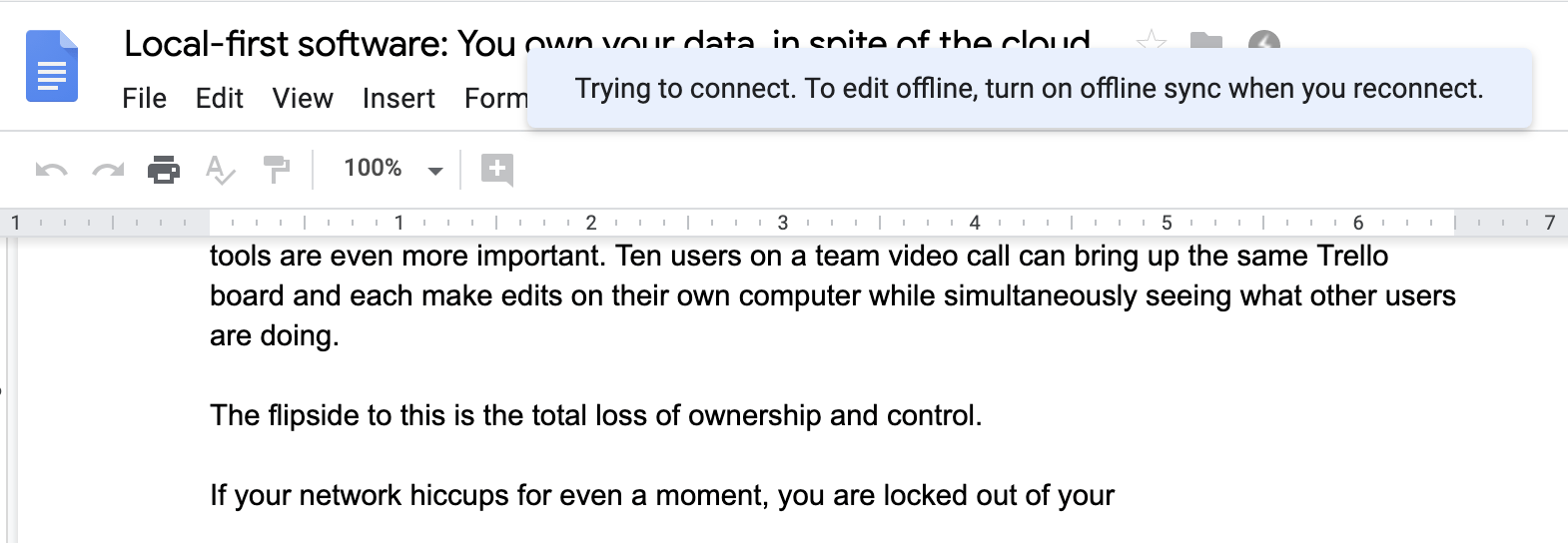
If Google Docs detects that it is offline, it blocks editing of the document.
A few of the best web apps hide the latency of server communication using JavaScript, and try to provide limited offline support (for example, the Google Docs offline plugin). However, these efforts appear retrofitted to an application architecture that is fundamentally centered on synchronous interaction with a server. Users report mixed results when trying to work offline.

A negative user review of the Google Docs offline extension.
Some web apps, for example Milanote and Figma, offer installable desktop clients that are essentially repackaged web browsers. If you try to use these clients to access your work while your network is intermittent, while the vendor’s servers are experiencing an outage, or after the vendor has been acquired and shut down, it becomes clear that your work was never truly yours.
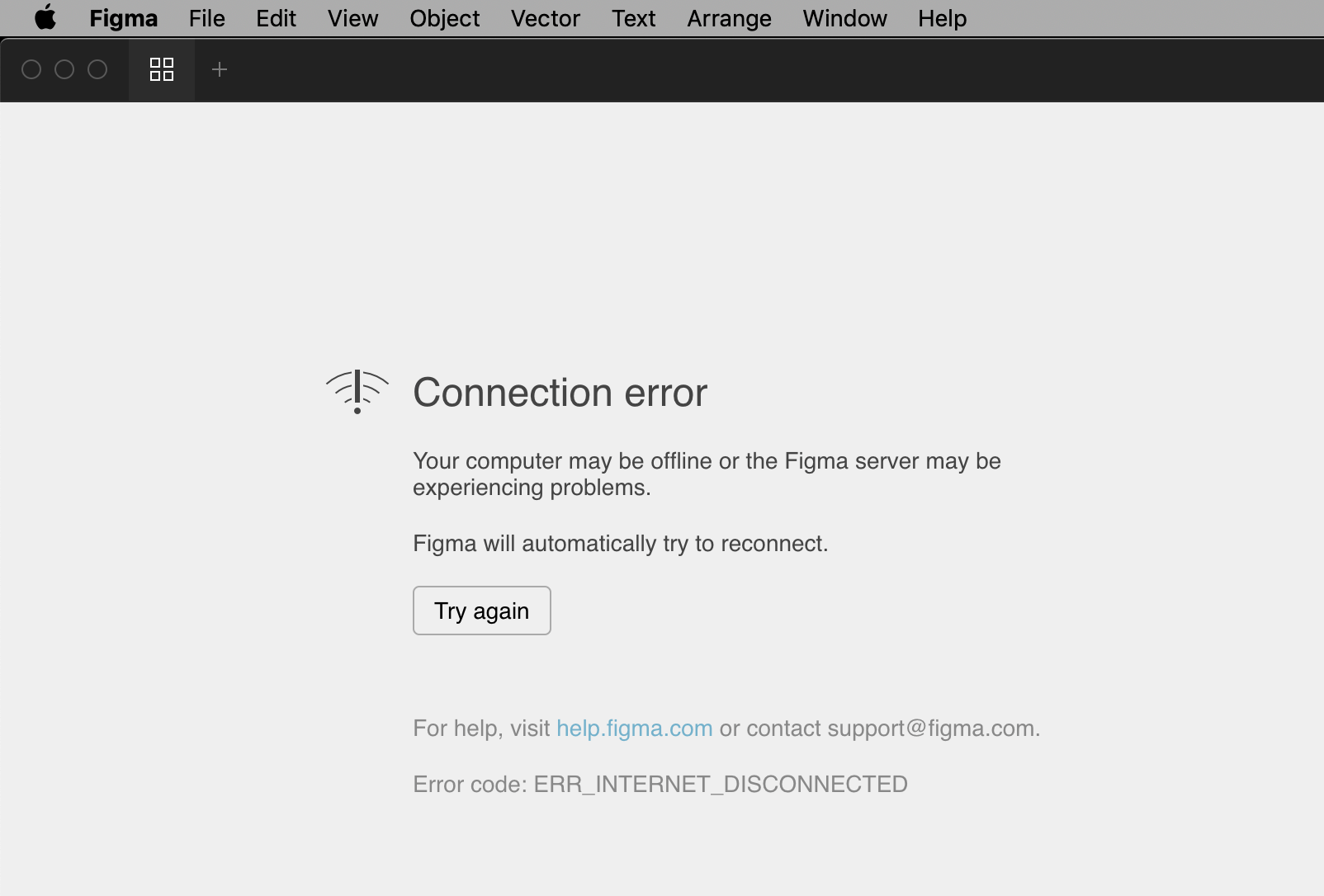
The Figma desktop client in action.
Dropbox, Google Drive, Box, OneDrive, etc.
| 1. Fast | 2. Multi-device | 3. Offline | 4. Collaboration | 5. Longevity | 6. Privacy | 7. User control | |
|---|---|---|---|---|---|---|---|
| Dropbox | ✓ | — | — | ✗ | ✓ | — | ✓ |
Cloud-based file sync products like Dropbox, Google Drive, Box, or OneDrive make files available on multiple devices. On desktop operating systems (Windows, Linux, Mac OS) these tools work by watching a designated folder on the local file system. Any software on your computer can read and write files in this folder, and whenever a file is changed on one computer, it is automatically copied to all of your other computers.
As these tools use the local filesystem, they have many attractive properties: access to local files is fast, and working offline is no problem (files edited offline are synced the next time an Internet connection is available). If the sync service were shut down, your files would still remain unharmed on your local disk, and it would be easy to switch to a different syncing service. If your computer’s hard drive fails, you can restore your work simply by installing the app and waiting for it to sync. This provides good longevity and control over your data.
However, on mobile platforms (iOS and Android), Dropbox and its cousins use a completely different model. The mobile apps do not synchronize an entire folder — instead, they are thin clients that fetch your data from a server one file at a time, and by default they do not work offline. There is a “Make available offline” option, but you need to remember to invoke it ahead of going offline, it is clumsy, and only works when the app is open. The Dropbox API is also very server-centric.
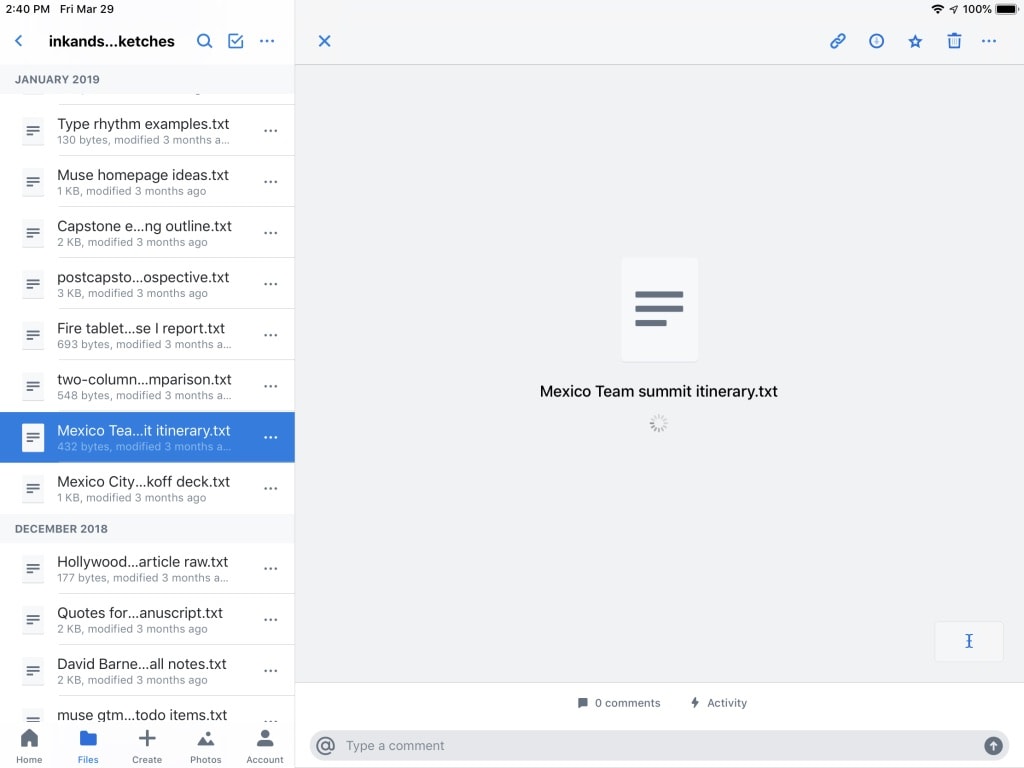
Users of the Dropbox mobile app spend a lot of time looking at spinners, a stark contrast to the at-your-fingertips feeling of the Dropbox desktop product.
The weakest point of file sync products is the lack of real-time collaboration: if the same file is edited on two different devices, the result is a conflict that needs to be merged manually, as discussed previously. The fact that these tools synchronize files in any format is both a strength (compatibility with any application) and a weakness (inability to perform format-specific merges).
Git and GitHub
| 1. Fast | 2. Multi-device | 3. Offline | 4. Collaboration | 5. Longevity | 6. Privacy | 7. User control | |
|---|---|---|---|---|---|---|---|
| Git+GitHub | ✓ | — | ✓ | — | ✓ | — | ✓ |
Git and GitHub are primarily used by software engineers to collaborate on source code. They are perhaps the closest thing we have to a true local-first software package: compared to server-centric version control systems such as Subversion, Git works fully offline, it is fast, it gives full control to users, and it is suitable for long-term preservation of data. This is the case because a Git repository on your local filesystem is a primary copy of the data, and is not subordinate to any server.
A repository hosting service like GitHub enables collaboration around Git repositories, accessing data from multiple devices, as well as providing a backup and archival location. Support for mobile devices is currently weak, although Working Copy is a promising Git client for iOS. GitHub stores repositories unencrypted; if stronger privacy is required, it is possible for you to run your own repository server.
We think the Git model points the way toward a future for local-first software. However, as it currently stands, Git has two major weaknesses:
- Git is excellent for asynchronous collaboration, especially using pull requests, which take a coarse-grained set of changes and allow them to be discussed and amended before merging them into the shared master branch. But Git has no capability for real-time, fine-grained collaboration, such as the automatic, instantaneous merging that occurs in tools like Google Docs, Trello, and Figma.
- Git is highly optimized for code and similar line-based text files; other file formats are treated as binary blobs that cannot meaningfully be edited or merged. Despite GitHub’s efforts to display and compare images, prose, and CAD files, non-textual file formats remain second-class in Git.
It’s interesting to note that most software engineers have been reluctant to embrace cloud software for their editors, IDEs, runtime environments, and build tools. In theory, we might expect this demographic of sophisticated users to embrace newer technologies sooner than other types of users. But if you ask an engineer why they don’t use a cloud-based editor like Cloud9 or Repl.it, or a runtime environment like Colaboratory, the answers will usually include “it’s too slow” or “I don’t trust it” or “I want my code on my local system.” These sentiments seem to reflect some of the same motivations as local-first software. If we as developers want these things for ourselves and our work, perhaps we might imagine that other types of creative professionals would want these same qualities for their own work.
Developer infrastructure for building apps
Now that we have examined the user experience of a range of applications through the lens of the local-first ideals, let’s switch mindsets to that of an application developer. If you are creating an app and want to offer users some or all of the local-first experience, what are your options for data storage and synchronization infrastructure?
Web app (thin client)
| 1. Fast | 2. Multi-device | 3. Offline | 4. Collaboration | 5. Longevity | 6. Privacy | 7. User control | |
|---|---|---|---|---|---|---|---|
| Web apps | ✗ | ✓ | ✗ | ✓ | ✗ | ✗ | ✗ |
A web app in its purest form is usually a Rails, Django, PHP, or Node.js program running on a server, storing its data in a SQL or NoSQL database, and serving web pages over HTTPS. All of the data is on the server, and the user’s web browser is only a thin client.
This architecture offers many benefits: zero installation (just visit a URL), and nothing for the user to manage, as all data is stored and managed in one place by the engineering and DevOps professionals who deploy the application. Users can access the application from all of their devices, and colleagues can easily collaborate by logging in to the same application.
On the other hand, a web app that needs to perform a request to a server for every user action is going to be slow. It is possible to hide the round-trip times in some cases by using client-side JavaScript, but these approaches quickly break down if the user’s internet connection is unstable.
Despite many efforts to make web browsers more offline-friendly (manifests, localStorage, service workers, and Progressive Web Apps, among others), the architecture of web apps remains fundamentally server-centric. Offline support is an afterthought in most web apps, and the result is accordingly fragile. In many web browsers, if the user clears their cookies, all data in local storage is also deleted; while this is not a problem for a cache, it makes the browser’s local storage unsuitable for storing data of any long-term importance.
Relying on third-party web apps also scores poorly in terms of longevity, privacy, and user control. It is possible to improve these properties if the web app is open source and users are willing to self-host their own instances of the server. However, we believe that self-hosting is not a viable option for the vast majority of users who do not want to become system administrators; moreover, most web apps are closed source, ruling out this option entirely.
All in all, we speculate that web apps will never be able to provide all the local-first properties we are looking for, due to the fundamental thin-client nature of the platform. By choosing to build a web app, you are choosing the path of data belonging to you and your company, not to your users.
Mobile app with local storage (thick client)
| 1. Fast | 2. Multi-device | 3. Offline | 4. Collaboration | 5. Longevity | 6. Privacy | 7. User control | |
|---|---|---|---|---|---|---|---|
| Thick client | ✓ | — | ✓ | ✗ | — | ✗ | ✗ |
iOS and Android apps are locally installed software, with the entire app binary downloaded and installed before the app is run. Many apps are nevertheless thin clients, similarly to web apps, which require a server in order to function (for example, Twitter, Yelp, or Facebook). Without a reliable Internet connection, these apps give you spinners, error messages, and unexpected behavior.
However, there is another category of mobile apps that are more in line with the local-first ideals. These apps store data on the local device in the first instance, using a persistence layer like SQLite, Core Data, or just plain files. Some of these (such as Clue or Things) started life as a single-user app without any server, and then added a cloud backend later, as a way to sync between devices or share data with other users.
These thick-client apps have the advantage of being fast and working offline, because the server sync happens in the background. They generally continue working if the server is shut down. The degree to which they offer privacy and user control over data varies depending on the app in question.
Things get more difficult if the data may be modified on multiple devices or by multiple collaborating users. The developers of mobile apps are generally experts in end-user app development, not in distributed systems. We have seen multiple app development teams writing their own ad-hoc diffing, merging, and conflict resolution algorithms, and the resulting data sync solutions are often unreliable and brittle. A more specialized storage backend, as discussed in the next section, can help.
Backend-as-a-Service: Firebase, CloudKit, Realm
| 1. Fast | 2. Multi-device | 3. Offline | 4. Collaboration | 5. Longevity | 6. Privacy | 7. User control | |
|---|---|---|---|---|---|---|---|
| Firebase, CloudKit, Realm | — | ✓ | ✓ | — | ✗ | ✗ | ✗ |
Firebase is the most successful of mobile backend-as-a-service options. It is essentially a local on-device database combined with a cloud database service and data synchronization between the two. Firebase allows sharing of data across multiple devices, and it supports offline use. However, as a proprietary hosted service, we give it a low score for privacy and longevity.
Firebase offers a great experience for you, the developer: you can view, edit, and delete data in a free-form way in the Firebase console. But the user does not have a comparable way of accessing, manipulating and managing their data, leaving the user with little ownership and control.
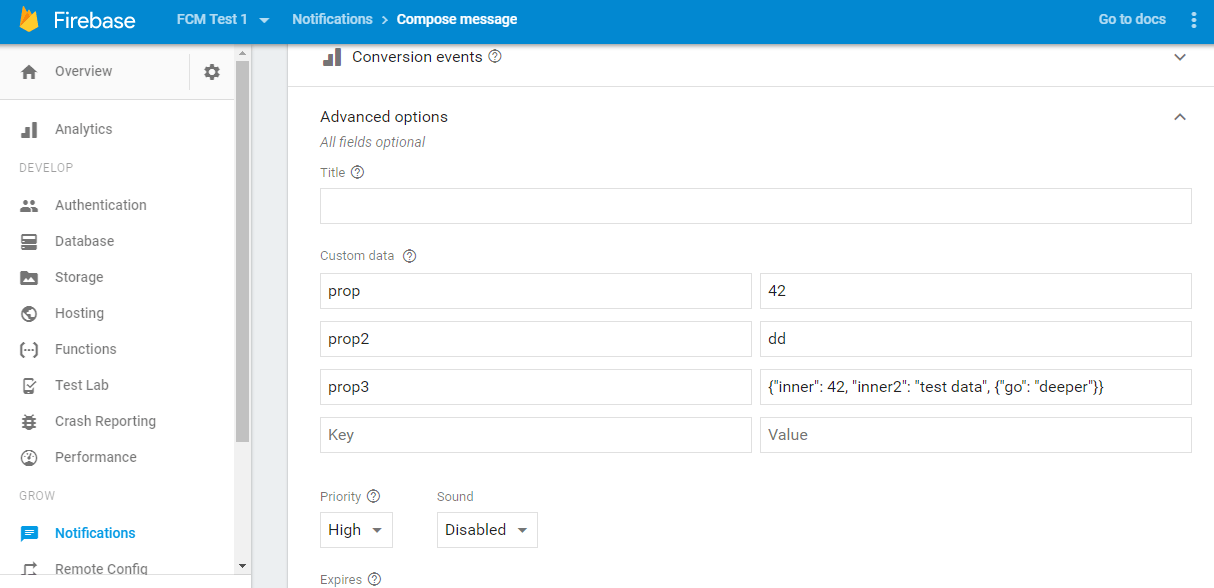
The Firebase console: great for developers, off-limits for the end user.
Apple’s CloudKit offers a Firebase-like experience for apps willing to limit themselves to the iOS and Mac platforms. It is a key-value store with syncing, good offline capabilities, and it has the added benefit of being built into the platform (thereby sidestepping the clumsiness of users having to create an account and log in). It’s a great choice for indie iOS developers and is used to good effect by tools like Ulysses, Bear, Overcast, and many more.
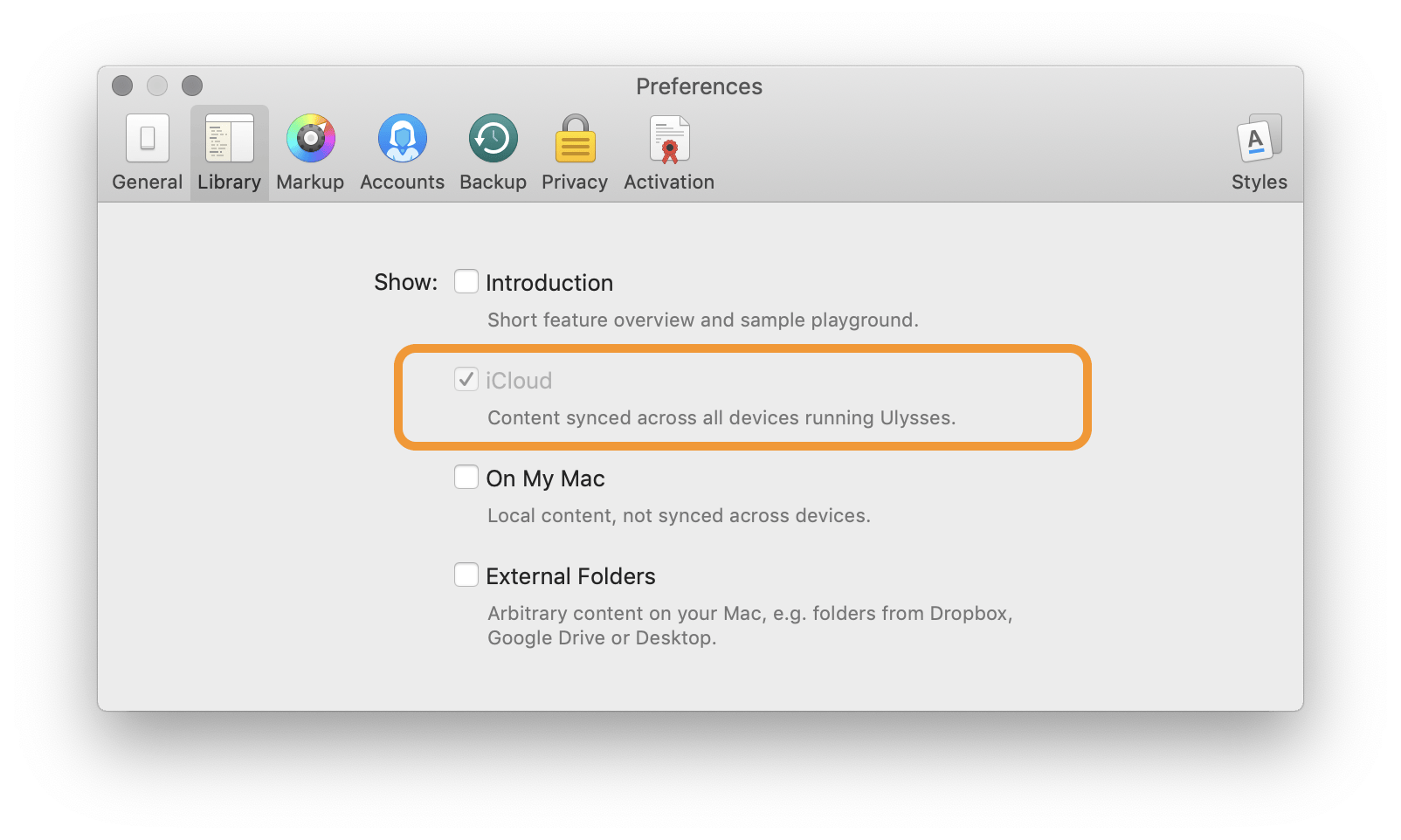
With one checkbox, Ulysses syncs work across all of the user’s connected devices, thanks to its use of CloudKit.
Another project in this vein is Realm. This persistence library for iOS gained popularity compared to Core Data due to its cleaner API. The client-side library for local persistence is called Realm Database, while the associated Firebase-like backend service is called Realm Object Server. Notably, the object server is open source and self-hostable, which reduces the risk of being locked in to a service that might one day disappear.
Mobile apps that treat the on-device data as the primary copy (or at least more than a disposable cache), and use sync services like Firebase or iCloud, get us a good bit of the way toward local-first software.
CouchDB
| 1. Fast | 2. Multi-device | 3. Offline | 4. Collaboration | 5. Longevity | 6. Privacy | 7. User control | |
|---|---|---|---|---|---|---|---|
| CouchDB | — | — | ✓ | ✗ | — | — | — |
CouchDB is a database that is notable for pioneering a multi-master replication approach: several machines each have a fully-fledged copy of the database, each replica can independently make changes to the data, and any pair of replicas can synchronize with each other to exchange the latest changes. CouchDB is designed for use on servers; Cloudant provides a hosted version; PouchDB and Hoodie are sibling projects that use the same sync protocol but are designed to run on end-user devices.
Philosophically, CouchDB is closely aligned to the local-first principles, as evidenced in particular by the CouchDB book, which provides an excellent introduction to relevant topics such as distributed consistency, replication, change notifications, and multiversion concurrency control.
While CouchDB/PouchDB allow multiple devices to concurrently make changes to a database, these changes lead to conflicts that need to be explicitly resolved by application code. This conflict resolution code is difficult to write correctly, making CouchDB impractical for applications with very fine-grained collaboration, like in Google Docs, where every keystroke is potentially an individual change.
In practice, the CouchDB model has not been widely adopted. Various reasons have been cited for this: scalability problems when a separate database per user is required; difficulty embedding the JavaScript client in native apps on iOS and Android; the problem of conflict resolution; the unfamiliar MapReduce model for performing queries; and more. All in all, while we agree with much of the philosophy behind CouchDB, we feel that the implementation has not been able to realize the local-first vision in practice.
Towards a better future
As we have shown, none of the existing data layers for application development fully satisfy the local-first ideals. Thus, three years ago, our lab set out to search for a solution that gives seven green checkmarks.
| 1. Fast | 2. Multi-device | 3. Offline | 4. Collaboration | 5. Longevity | 6. Privacy | 7. User control | |
|---|---|---|---|---|---|---|---|
| ??? | ✓ | ✓ | ✓ | ✓ | ✓ | ✓ | ✓ |
We have found some technologies that appear to be promising foundations for local-first ideals. Most notably are the family of distributed systems algorithms called Conflict-free Replicated Data Types (CRDTs).
CRDTs as a foundational technology
CRDTs emerged from academic computer science research in 2011. They are general-purpose data structures, like hash maps and lists, but the special thing about them is that they are multi-user from the ground up.
Every application needs some data structures to store its document state. For example, if your application is a text editor, the core data structure is the array of characters that make up the document. If your application is a spreadsheet, the data structure is a matrix of cells containing text, numbers, or formulas referencing other cells. If it is a vector graphics application, the data structure is a tree of graphical objects such as text objects, rectangles, lines, and other shapes.
If you are building a single-user application, you would maintain those data structures in memory using model objects, hash maps, lists, records/structs and the like. If you are building a collaborative multi-user application, you can swap out those data structures for CRDTs.
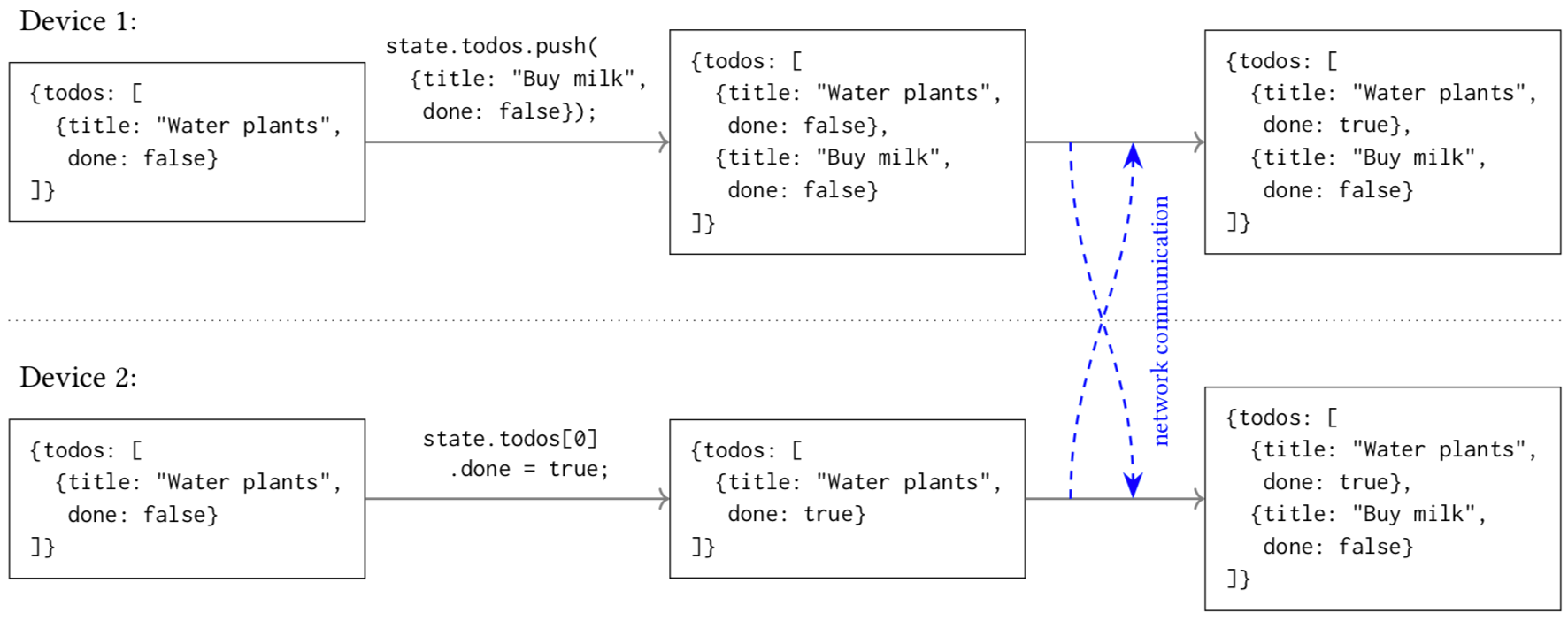
Two devices initially have the same to-do list. On device 1, a new item is added to the list using the .push() method, which appends a new item to the end of a list. Concurrently, the first item is marked as done on device 2. After the two devices communicate, the CRDT automatically merges the states so that both changes take effect.
The diagram above shows an example of a to-do list application backed by a CRDT with a JSON data model. Users can view and modify the application state on their local device, even while offline. The CRDT keeps track of any changes that are made, and syncs the changes with other devices in the background when a network connection is available.
If the state was concurrently modified on different devices, the CRDT merges those changes. For example, if users concurrently add new items to the to-do list on different devices, the merged state contains all of the added items in a consistent order. Concurrent changes to different objects can also be merged easily. The only type of change that a CRDT cannot automatically resolve is when multiple users concurrently update the same property of the same object; in this case, the CRDT keeps track of the conflicting values, and leaves it to be resolved by the application or the user.
Thus, CRDTs have some similarity to version control systems like Git, except that they operate on richer data types than text files. CRDTs can sync their state via any communication channel (e.g. via a server, over a peer-to-peer connection, by Bluetooth between local devices, or even on a USB stick). The changes tracked by a CRDT can be as small as a single keystroke, enabling Google Docs-style real-time collaboration. But you could also collect a larger set of changes and send them to collaborators as a batch, more like a pull request in Git. Because the data structures are general-purpose, we can develop general-purpose tools for storage, communication, and management of CRDTs, saving us from having to re-implement those things in every single app.
For a more technical introduction to CRDTs we suggest:
- Alexei Baboulevitch’s Data Laced with History
- Martin Kleppmann’s Convergence vs Consensus (slides)
- Shapiro et al.'s comprehensive survey
- Attiya et al.'s formal specification of collaborative text editing
- Gomes et al.'s formal verification of CRDTs
Ink & Switch has developed an open-source, JavaScript CRDT implementation called Automerge. It is based on our earlier research on JSON CRDTs. We have then combined Automerge with the Dat networking stack to form Hypermerge. We do not claim that these libraries fully realize local-first ideals — more work is still required.
However, based on our experience with them, we believe that CRDTs have the potential to be a foundation for a new generation of software. Just as packet switching was an enabling technology for the Internet and the web, or as capacitive touchscreens were an enabling technology for smartphones, so we think CRDTs may be the foundation for collaborative software that gives users full ownership of their data.
Ink & Switch prototypes
While academic research has made good progress designing the algorithms for CRDTs and verifying their theoretical correctness, there is so far relatively little industrial use of these technologies. Moreover, most industrial CRDT use has been in server-centric computing, but we believe this technology has significant potential in client-side applications for creative work.
This was the motivation for our lab to embark on a series of experimental prototypes with collaborative, local-first applications built on CRDTs. Each prototype offered an end-user experience modeled after an existing app for creative work such as Trello, Figma, or Milanote.
These experiments explored questions in three areas:
- Technology viability. How close are CRDTs to being usable for working software? What do we need for network communication, or installation of the software to begin with?
- User experience. How does local-first software feel to use? Can we get a seamless Google Docs-like real-time collaboration experience without an authoritative centralized server? How about a Git-like, offline-friendly, asynchronous collaboration experience for data types other than source code? And generally, how are user interfaces different without a centralized server?
- Developer experience. For an app developer, how does the use of a CRDT-based data layer compare to existing storage layers like a SQL database, a filesystem, or Core Data? Is a distributed system harder to write software for? Do we need schemas and type checking? What will developers use for debugging and introspection of their application’s data layer?
We built three prototypes using Electron, JavaScript, and React. This gave us the rapid development capability of web technologies while also giving our users a piece of software they can download and install, which we discovered is an important part of the local-first feeling of ownership.
Kanban board
Trellis is a Kanban board modeled after the popular Trello project management software.
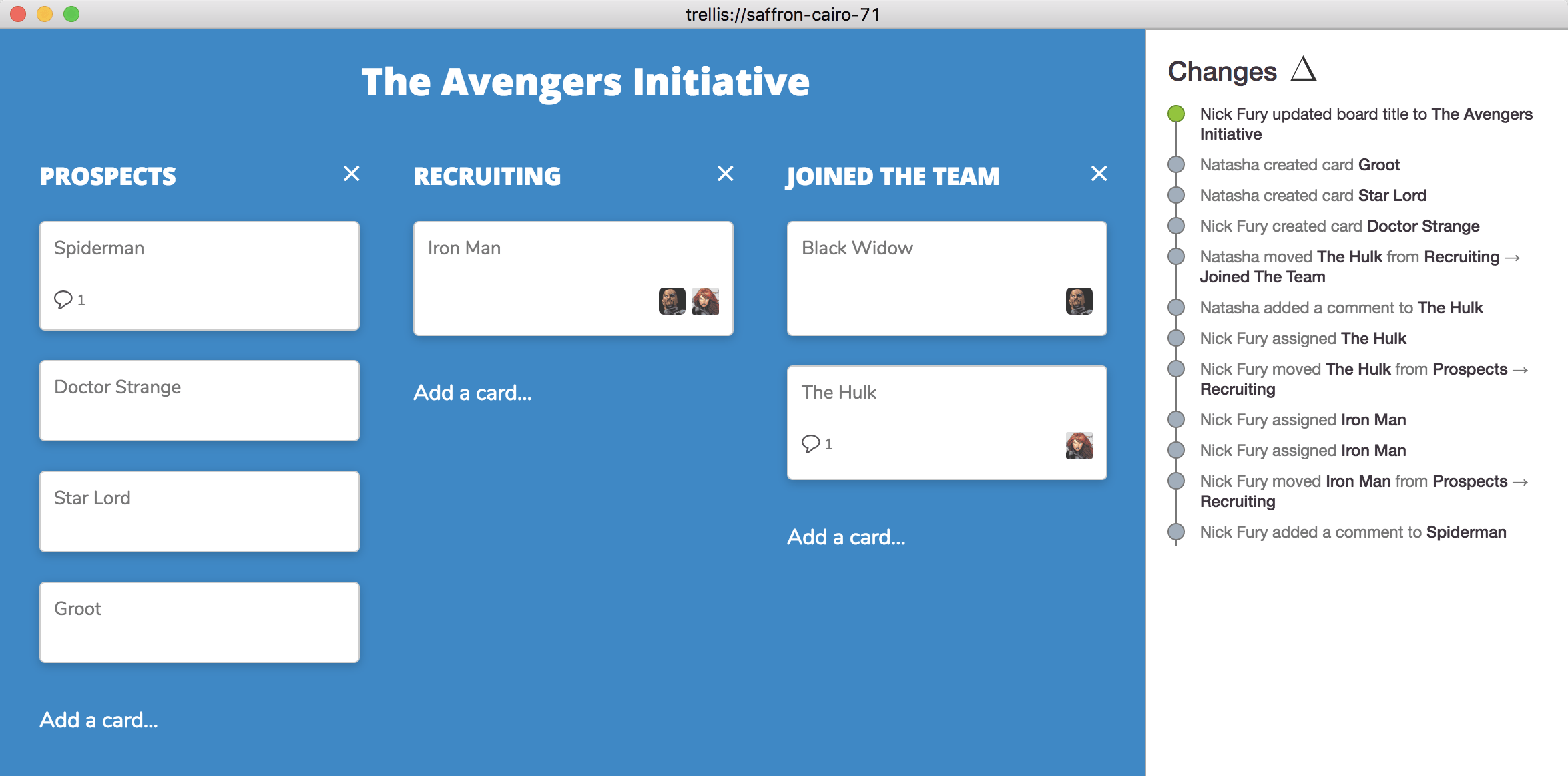
Trellis offers a Trello-like experience with local-first software. The change history on the right reflects changes made by all users active in the document.
On this project we experimented with WebRTC for the network communication layer.
On the user experience side, we designed a rudimentary “change history” inspired by Git and Google Docs’ “See New Changes” that allows users to see the operations on their Kanban board. This includes stepping back in time to view earlier states of the document.
Watch Trellis in action with the demo video or download a release and try it yourself.
Collaborative drawing
Pixelpusher is a collaborative drawing program, bringing a Figma-like real-time experience to Javier Valencia’s Pixel Art to CSS.
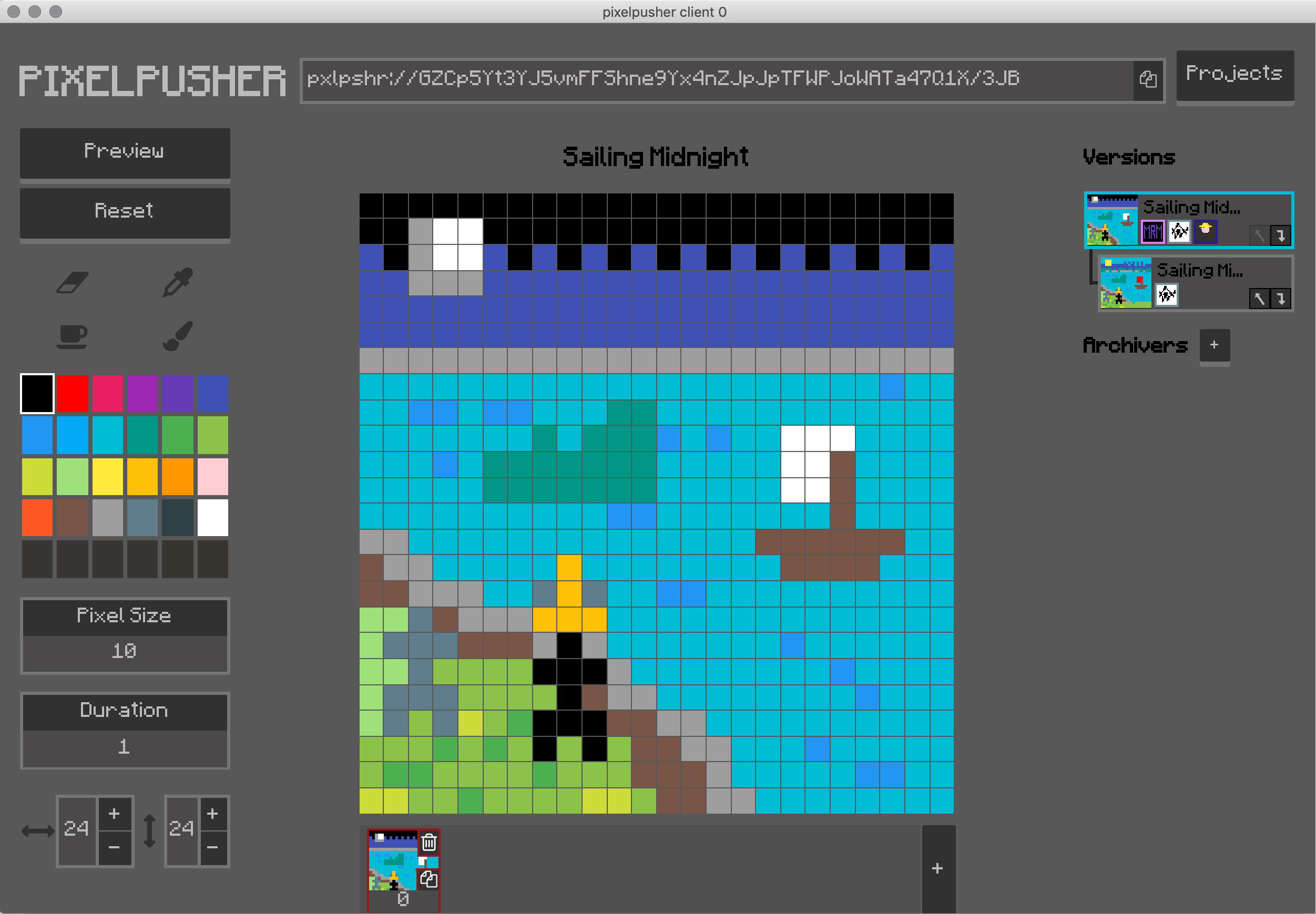
Drawing together in real-time. A URL at the top offers a quick way to share this document with other users. The “Versions” panel on the right shows all branches of the current document. The arrow buttons offer instant merging between branches.
On this project we experimented with network communication via peer-to-peer libraries from the Dat project.
User experience experiments include URLs for document sharing, a visual branch/merge facility inspired by Git, a conflict-resolution mechanism that highlights conflicted pixels in red, and basic user identity via user-drawn avatars.
Read the full project report or download a release to try it yourself.
Media canvas
PushPin is a mixed media canvas workspace similar to Miro or Milanote. As our third project built on Automerge, it’s the most fully-realized of these three. Real use by our team and external test users put more strain on the underlying data layer.
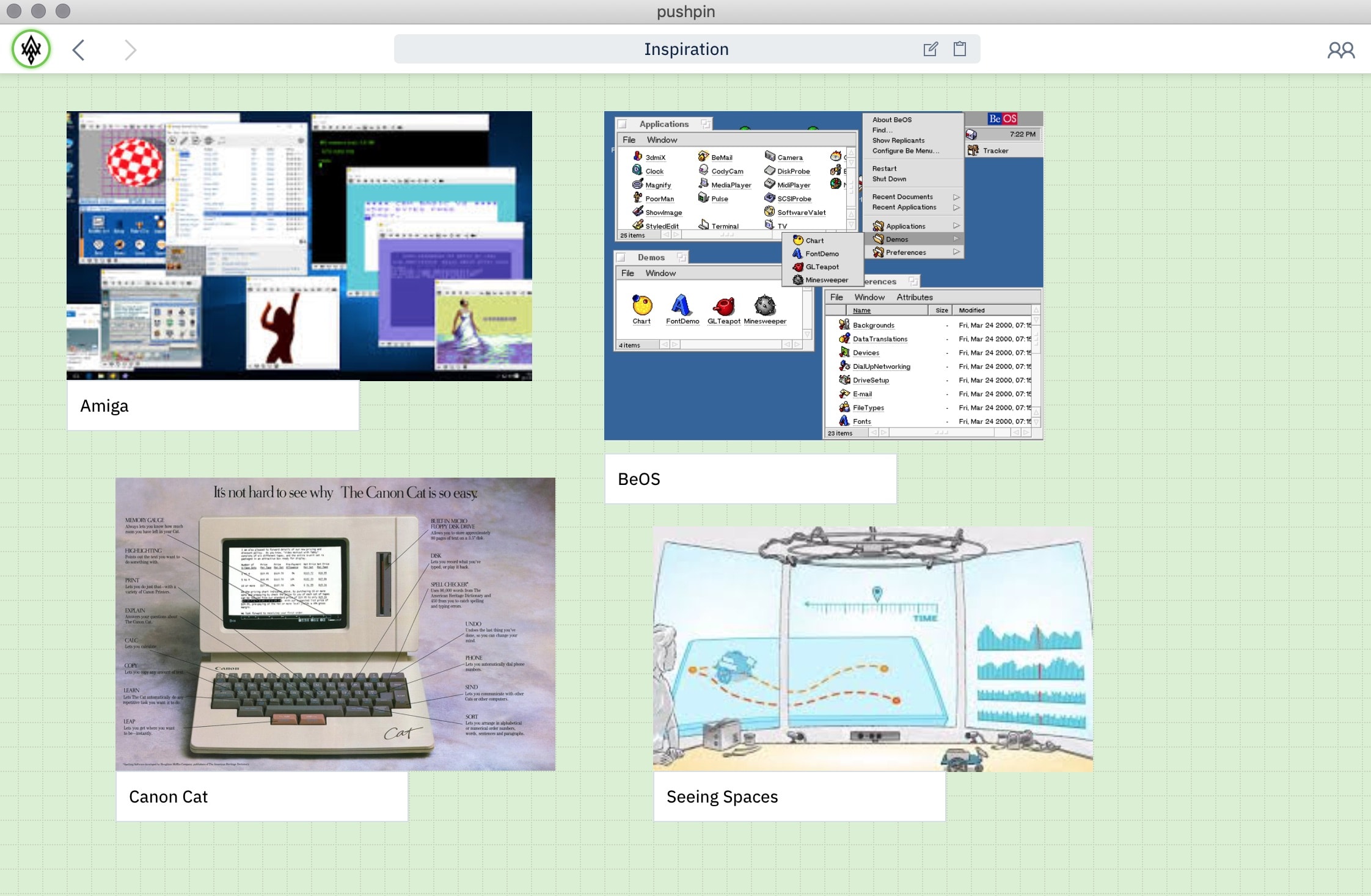
PushPin’s canvas mixes text, images, discussion threads, and web links. Users see each other via presence avatars in the toolbar, and navigate between their own documents using the URL bar.
PushPin explored nested and connected shared documents, varied renderers for CRDT documents, a more advanced identity system that included an “outbox” model for sharing, and support for sharing ephemeral data such as selection highlights.
Watch the PushPin demo video or download a release and try it yourself.
Findings
Our goal in developing the three prototypes Trellis, Pixelpusher and PushPin was to evaluate the technology viability, user experience, and developer experience of local-first software and CRDTs. We tested the prototypes by regularly using them within the development team (consisting of five members), reflecting critically on our experiences developing the software, and by conducting individual usability tests with approximately ten external users. The external users included professional designers, product managers, and software engineers. We did not follow a formal evaluation methodology, but rather took an exploratory approach to discovering the strengths and weaknesses of our prototypes.
In this section we outline the lessons we learned from building and using these prototypes. While these findings are somewhat subjective, we believe they nevertheless contain valuable insights, because we have gone further than other projects down the path towards production-ready local-first applications based on CRDTs.
CRDT technology works.
From the beginning we were pleasantly surprised by the reliability of Automerge. App developers on our team were able to integrate the library with relative ease, and the automatic merging of data was almost always straightforward and seamless.
The user experience with offline work is splendid.
The process of going offline, continuing to work for as long as you want, and then reconnecting to merge changes with colleagues worked well. While other applications on the system threw up errors (“offline! warning!”) and blocked the user from working, the local-first prototypes function normally regardless of network status. Unlike browser-based systems, there is never any anxiety about whether the application will work or the data will be there when the user needs it. This gives the user a feeling of ownership over their tools and their work, just as we had hoped.
Developer experience is viable when combined with Functional Reactive Programming (FRP).
The FRP model of React fits well with CRDTs. A data layer based on CRDTs means the user’s document is simultaneously getting updates from the local user (e.g. as they type into a text document) but also from the network (as other users and other devices make changes to the document).
Because the FRP model reliably synchronizes the visible state of the application with the underlying state of the shared document, the developer is freed from the tedious work of tracking changes arriving from other users and reconciling them with the current view. Also, by ensuring all changes to the underlying state are made through a single function (a “reducer”), it’s easy to ensure that all relevant local changes are sent to other users.
The result of this model was that all of our prototypes realized real-time collaboration and full offline capability with little effort from the application developer. This is a significant benefit as it allows app developers to focus on their application rather than the challenges of data distribution.
Conflicts are not as significant a problem as we feared.
We are often asked about the effectiveness of automatic merging, and many people assume that application-specific conflict resolution mechanisms are required. However, we found that users surprisingly rarely encounter conflicts in their work when collaborating with others, and that generic resolution mechanisms work well. The reasons for this are:
- Automerge tracks changes at a fine-grained level, and takes datatype semantics into account. For example, if two users concurrently insert items at the same position into an array, Automerge combines these changes by positioning the two new items in a deterministic order. In contrast, a textual version control system like Git would treat this situation as a conflict requiring manual resolution.
- Users have an intuitive sense of human collaboration and avoid creating conflicts with their collaborators. For example, when users are collaboratively editing an article, they may agree in advance who will be working on which section for a period of time, and avoid concurrently modifying the same section.
When different users concurrently modify different parts of the document state, Automerge will merge these changes cleanly without difficulty. With the Kanban app, for example, one user could post a comment on a card and another could move it to another column, and the merged result will reflect both of these changes. Conflicts arise only if users concurrently modify the same property of the same object: for example, if two users concurrently change the position of the same image object on a canvas. In such cases, it is often arbitrary how they are resolved and satisfactory either way.
Automerge’s data structures come with a small set of default resolution policies for concurrent changes. In principle, one might expect different applications to require different merge semantics. However, in all the prototypes we developed, we found that the default merge semantics to be sufficient, and we have so far not identified any case requiring customised semantics. We hypothesise that this is the case generally, and we hope that future research will be able to further test this hypothesis.
Visualizing document history is important.
In a distributed collaborative system another user can deliver any number of changes to you at any moment. Unlike centralized systems, where servers mediate change, local-first applications need to find their own solutions to these problems. Without the right tools, it can be difficult to understand how a document came to look the way it does, what versions of the document exist, or where contributions came from.
In the Trellis project we experimented with a “time travel” interface, allowing a user to move back in time to see earlier states of a merged document, and automatically highlighting recently changed elements as changes are received from other users. The ability to traverse a potentially complex merged document history in a linear fashion helps to provide context and could become a universal tool for understanding collaboration.
URLs are a good mechanism for sharing.
We experimented with a number of mechanisms for sharing documents with other users, and found that a URL model, inspired by the web, makes the most sense to users and developers. URLs can be copied and pasted, and shared via communication channels such as email or chat. Access permissions for documents beyond secret URLs remain an open research question.
Peer-to-peer systems are never fully “online” or “offline” and it can be hard to reason about how data moves in them.
A traditional centralized system is generally “up” or “down,” states defined by each client by their ability to maintain a steady network connection to the server. The server determines the truth of a given piece of data.
In a decentralized system, we can have a kaleidoscopic complexity to our data. Any user may have a different perspective on what data they either have, choose to share, or accept. For example, one user’s edits to a document might be on their laptop on an airplane; when the plane lands and the computer reconnects, those changes are distributed to other users. Other users might choose to accept all, some, or none of those changes to their version of the document.
Different versions of a document can lead to confusion. As with a Git repository, what a particular user sees in the “master” branch is a function of the last time they communicated with other users. Newly arriving changes might unexpectedly modify parts of the document you are working on, but manually merging every change from every user is tedious. Decentralized documents enable users to be in control over their own data, but further study is needed to understand what this means in practical user-interface terms.
CRDTs accumulate a large change history, which creates performance problems.
Our team used PushPin for “real” documents such as sprint planning. Performance and memory/disk usage quickly became a problem because CRDTs store all history, including character-by-character text edits. These pile up, but can’t easily be truncated because it’s impossible to know when someone might reconnect to your shared document after six months away and need to merge changes from that point forward.
We continue to optimize Automerge, but this is a major area of ongoing work.
Network communication remains an unsolved problem.
CRDT algorithms provide only for the merging of data, but say nothing about how different users’ edits arrive on the same physical computer.
In these experiments we tried network communication via WebRTC; a “sneakernet” implementation of copying files around with Dropbox and USB keys; possible use of the IPFS protocols; and eventually settled on the Hypercore peer-to-peer libraries from Dat.
CRDTs do not require a peer-to-peer networking layer; using a server for communication is fine for CRDTs. However, to fully realize the longevity goal of local-first software, we want applications to outlive any backend services managed by their vendors, so a decentralized solution is the logical end goal.
The use of P2P technologies in our prototypes yielded mixed results. On one hand, these technologies are nowhere near production-ready: NAT traversal, in particular, is unreliable depending on the particular router or network topology where the user is currently connected. But the promise suggested by P2P protocols and the Decentralized Web community is substantial. Live collaboration between computers without Internet access feels like magic in a world that has come to depend on centralized APIs.
Cloud servers still have their place for discovery, backup, and burst compute.
A real-time collaborative prototype like PushPin lets users share their documents with other users without an intermediating server. This is excellent for privacy and ownership, but can result in situations where a user shares a document, and then closes their laptop lid before the other user has connected. If the users are not online at the same time, they cannot connect to each other.
Servers thus have a role to play in the local-first world — not as central authorities, but as “cloud peers” that support client applications without being on the critical path. For example, a cloud peer that stores a copy of the document, and forwards it to other peers when they come online, could solve the closed-laptop problem above.
Similarly, cloud peers could be:
- an archival/backup location (especially for phones or other devices with limited storage);
- a bridge to traditional server APIs (such as weather forecasts or a stock tickers);
- a provider of burst computing resources (like rendering a video using a powerful GPU).
The key difference between traditional systems and local-first systems is not an absence of servers, but a change in their responsibilities: they are in a supporting role, not the source of truth.
How you can help
These experiments suggest that local-first software is possible. Collaboration and ownership are not at odds with each other — we can get the best of both worlds, and users can benefit.
However, the underlying technologies are still a work in progress. They are good for developing prototypes, and we hope that they will evolve and stabilize in the coming years, but realistically, it is not yet advisable to replace a proven product like Firebase with an experimental project like Automerge in a production setting today.
If you believe in a local-first future, as we do, what can you (and all of us in the technology field) do to move us toward it? Here are some suggestions.
For distributed systems and programming languages researchers
Local-first software has benefited tremendously from recent research into distributed systems, including CRDTs and peer-to-peer technologies. The current research community is making excellent progress in improving the performance and power of CRDTs and we eagerly await further results from that work. Still, there are interesting opportunities for further work.
Most CRDT research operates in a model where all collaborators immediately apply their edits to a single version of a document. However, practical local-first applications require more flexibility: users must have the freedom to reject edits made by another collaborator, or to make private changes to a version of the document that is not shared with others. A user might want to apply changes speculatively or reformat their change history. These concepts are well understood in the distributed source control world as “branches,” “forks,” “rebasing,” and so on. There is little work to date on understanding the algorithms and programming models for collaboration in situations where multiple document versions and branches exist side-by-side.
We see further interesting problems around types, schema migrations, and compatibility. Different collaborators may be using different versions of an application, potentially with different features. As there is no central database server, there is no authoritative “current” schema for the data. How can we write software so that varying application versions can safely interoperate, even as data formats evolve? This question has analogues in cloud-based API design, but a local-first setting provides additional challenges.
For Human-Computer Interaction (HCI) researchers
For centralized systems, there are ample examples in the field today of applications that indicate their “sync” state with a server. Decentralized systems have a whole host of interesting new opportunities to explore user interface challenges.
We hope researchers will consider how to communicate online and offline states, or available and unavailable states for systems where any other user may hold a different copy of data. How should we think about connectivity when everyone is a peer? What does it mean to be “online” when we can collaborate directly with other nodes without access to the wider Internet?
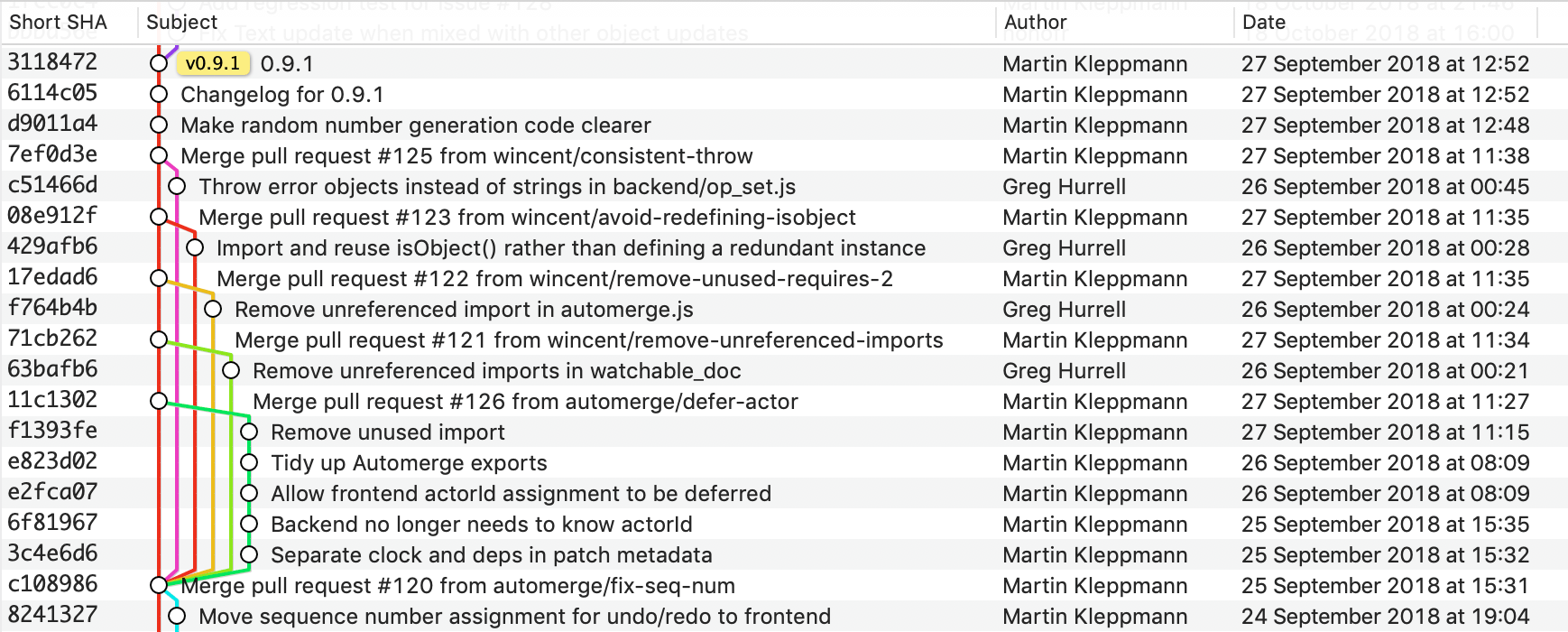
The “railroad track” model, as used in GitX for visualizing the structure of source code history in a Git repository.
When every document can develop a complex version history, simply through daily operation, an acute problem arises: how do we communicate this version history to users? How should users think about versioning, share and accept changes, and understand how their documents came to be a certain way when there is no central source of truth? Today there are two mainstream models for change management: a source-code model of diffs and patches, and a Google Docs model of suggestions and comments. Are these the best we can do? How do we generalize these ideas to data formats that are not text? We are eager to see what can be discovered.
While centralized systems rely heavily on access control and permissions, the same concepts do not directly apply in a local-first context. For example, any user who has a copy of some data cannot be prevented from locally modifying it; however, other users may choose whether or not to subscribe to those changes. How should users think about sharing, permissions, and feedback? If we can’t remove documents from others’ computers, what does it mean to “stop sharing” with someone?
We believe that the assumption of centralization is deeply ingrained in our user experiences today, and we are only beginning to discover the consequences of changing that assumption. We hope these open questions will inspire researchers to explore what we believe is an untapped area.
For practitioners
If you’re a software engineer, designer, product manager, or independent app developer working on production-ready software today, how can you help? We suggest taking incremental steps toward a local-first future. Start by scoring your app:
| 1. Fast | 2. Multi-device | 3. Offline | 4. Collaboration | 5. Longevity | 6. Privacy | 7. User control | |
|---|---|---|---|---|---|---|---|
| Your app |
Then some strategies for improving each area:
- Fast. Aggressive caching and downloading resources ahead of time can be a way to prevent the user from seeing spinners when they open your app or a document they previously had open. Trust the local cache by default instead of making the user wait for a network fetch.
- Multi-device. Syncing infrastructure like Firebase and iCloud make multi-device support relatively painless, although they do introduce longevity and privacy concerns. Self-hosted infrastructure like Realm Object Server provides an alternative trade-off.
- Offline. In the web world, Progressive Web Apps offer features like Service Workers and app manifests that can help. In the mobile world, be aware of WebKit frames and other network-dependent components. Test your app by turning off your WiFi, or using traffic shapers such as the Chrome Dev Tools network condition simulator or the iOS network link conditioner.
- Collaboration. Besides CRDTs, the more established technology for real-time collaboration is Operational Transformation (OT), as implemented e.g. in ShareDB.
- Longevity. Make sure your software can easily export to flattened, standard formats like JSON or PDF. For example: mass export such as Google Takeout; continuous backup into stable file formats such as in GoodNotes; and JSON download of documents such as in Trello.
- Privacy. Cloud apps are fundamentally non-private, with employees of the company and governments able to peek at user data at any time. But for mobile or desktop applications, try to make clear to users when the data is stored only on their device versus being transmitted to a backend.
- User control. Can users easily back up, duplicate, or delete some or all of their documents within your application? Often this involves re-implementing all the basic filesystem operations, as Google Docs has done with Google Drive.
Call for startups
If you are an entrepreneur interested in building developer infrastructure, all of the above suggests an interesting market opportunity: “Firebase for CRDTs.”
Such a startup would need to offer a great developer experience and a local persistence library (something like SQLite or Realm). It would need to be available for mobile platforms (iOS, Android), native desktop (Windows, Mac, Linux), and web technologies (Electron, Progressive Web Apps).
User control, privacy, multi-device support, and collaboration would all be baked in. Application developers could focus on building their app, knowing that the easiest implementation path would also given them top marks on the local-first scorecard. As litmus test to see if you have succeeded, we suggest: do all your customers’ apps continue working in perpetuity, even if all servers are shut down?
We believe the “Firebase for CRDTs” opportunity will be huge as CRDTs come of age. We’d like to hear from you if you’re working on this.
Conclusions
Computers are one of the most important creative tools mankind has ever produced. Software has become the conduit through which our work is done and the repository in which that work resides.
In the pursuit of better tools we moved many applications to the cloud. Cloud software is in many regards superior to “old-fashioned” software: it offers collaborative, always-up-to-date applications, accessible from anywhere in the world. We no longer worry about what software version we are running, or what machine a file lives on.
However, in the cloud, ownership of data is vested in the servers, not the users, and so we became borrowers of our own data. The documents created in cloud apps are destined to disappear when the creators of those services cease to maintain them. Cloud services defy long-term preservation. No Wayback Machine can restore a sunsetted web application. The Internet Archive cannot preserve your Google Docs.
In this article we explored a new way forward for software of the future. We have shown that it is possible for users to retain ownership and control of their data, while also benefiting from the features we associate with the cloud: seamless collaboration and access from anywhere. It is possible to get the best of both worlds.
But more work is needed to realize the local-first approach in practice. Application developers can take incremental steps, such as improving offline support and making better use of on-device storage. Researchers can continue improving the algorithms, programming models, and user interfaces for local-first software. Entrepreneurs can develop foundational technologies such as CRDTs and peer-to-peer networking into mature products able to power the next generation of applications.
Today it is easy to create a web application in which the server takes ownership of all the data. But it is too hard to build collaborative software that respects users’ ownership and agency. In order to shift the balance, we need to improve the tools for developing local-first software. We hope that you will join us.
We welcome your thoughts, questions, or critique: @inkandswitch or hello@inkandswitch.com.
Acknowledgments
Martin Kleppmann is supported by a grant from The Boeing Company. Thank you to our collaborators at Ink & Switch who worked on the prototypes discussed above: Julia Roggatz, Orion Henry, Roshan Choxi, Jeff Peterson, Jim Pick, and Ignatius Gilfedder. Thank you also to Heidi Howard, Roly Perera, and to the anonymous reviewers from Onward! for feedback on a draft of this article.