> The redemption period ends August 31, 2026. For full details, visit https://www.asus.com/content/asus-offers-adobe-creative-clou....
Well, the monitor is €8,999, so maybe it’d be more than two taps for me:
> The monitor is scheduled to be available by October 2025 and will costs €8,999 in Europe (including VAT)
Why is this? 5k/6k at 27" would be the sweet spot for me, and potentially 8k at 32". However, I'm not willing to drop $2k per monitor to go from a very nice 27" 4k to 27" 5k.
You can get 8K TVs for <$1000 now. And an Quest 3 headset has 2 displays at far higher PPI for $600.
My main "monitor" right now is an 85" 8K TV, that I absolutely love, but it would be nice to have something smaller for my upstairs desk.
I now run 2 3:2 Displays (BenQ RD280U) at home (more in the office, but I never go there) and love my vertical real estate. (No, portrait mode won't work out)
I’ve done a lot of color-calibrated work, and, for the most part, don’t like working in a calibrated system. I prefer good ol’ sRGB.
A calibrated system is a “least common denominator” system, where the least capable element dictates what all the others do. So you could have one of these monitors, but, if your printer has a limited gamut, all your images will look like mud, anyway, and printer technology is still pretty stagnant. There was a big burst of improvement in inkjets, but there hasn’t been much progress in a long time. Same with scanners. I have a 12-year-old HP flatbed that is still quite valid.
A lot of folks get twisted over a 60Hz refresh rate, but that’s not something I worry about. I’m old, and don’t game much. I also watch entertainment on my TV; not my monitor. 60Hz is fine, for me. Lots of room is my priority.
This is far too coarse to accurately resolve fine differences in HDR brightness, e.g. from lamps, car lights, street lights, specular highlights etc.
Perhaps the background LEDs are still relatively costly? Or customers just don't care enough to justify putting in significantly more? Which is unfortunate, since although OLED monitors have perfect fine HDR contrast, the overall achievable screen brightness is quite low compared to LED LCDs.
Which makes both technologies suboptimal for HDR content, for different reasons.
Any domain experts know how that actually squares in practice against automated colorimeter calibration?
27" 1440p is much easier to drive and live with day to day. I can still edit 4k+ content on this display. It's not like I'm missing critical detail going from 4k=>qhd. I can spot check areas by zooming in. There's a lot of arguments for not having to run 4k/8k displays all day every day. The power savings can be substantial. I am still gaming on a 5700xt because I don't need to push that many pixels. As long as I stay away from 4K I can probably use this GPU for another 5 years.
I wouldn’t be surprised if it comes in at a similar price point.
The sustained 1,000 nit HDR and Dolby Vision support suggest their target market is very specifically film color grading.
am i the only one who thinks that this would make sense?
That’s not the problem of using this monitor for creating the work, that’s the problem of not also using a more typical monitor (or, better, an array covering the common use cases, but which is practical depends on whether you are talking about a solo creator or a bigger team) for validating the work.
Just as with software, developers benefit from a more powerful machine for developing, but the product benefits from also being tested on machines more like the typical end-user setup.
When all you use for testing is Browserstack, local emulators and whatnot and only the latest iPhone and Samsung S-series flagship, your Thing will be unusable for wide parts of the population.
Always, always use at the very least the oldest iPhone Apple still supports, the cheapest and oldest (!) Samsung A-series models still being sold in retail stores as "new", and at least one Huawei and Xiaomi device. And then, don't test your Thing only on wifi backed by your Gbit Wifi 7 router and uplink. Disable wifi and limit mobile data to 2G or whatever is the lowest your phone provider supports.
And then, have someone from QA visit the countryside with long stretches of no service at all or serious degradation (think packet loss rates of 60% or more, latencies of 2 seconds+). If your app survives this with minimal loss of functionality, you did good.
A bunch of issues will only crop up in real world testing. Stuff like instead of keeping a single socket to the mothership open, using fresh from scratch SSL connections for each interactions is the main bummer... latency really really eats such bottlenecks alive. Forgotten async handling leading to non-responsiveness of the main application. You won't catch that, not even with Chrome's network inspector - you won't feel the sheer rage of the end user having a pressing need and be let down by your Thing - even if you're not responsible for their shitty phone service, they will associate the bad service with your app.
Oh, and also test out getting interrupted while using your Thing on the cheap-ass phones. Whatsapp and FB Messenger calls, for example - these gobble so much RAM that your app or browser will get killed by OOM or battery saver, and when the user has their interruption finished, if you didn't do it right your Thing's local state will have gotten corrupted or removed, leading the user having to start from scratch!
Developers writing software on 64GB M4 Macs often don't realize the performance bottlenecks of the software they write.
Developers working over 1gbps Internet connections often don't realize the data gluttony of the software they write.
Developers writing services over unlimited cloud budgets often don't realize the resource wastes into which their software incurrs.
And to extend this to society in general.
Rich people with nice things often alienate themselves from the reality of the majority of people in the World.
Had reported many issues where to reproduce they needed to enable 10x throttling in the browser. Or use a Windows machine.
The solution here is wide device testing, not artificially limiting individual developers to the lowest common denominator of shitty displays.
OSX does great at scaling UIs for high resolutions
And second for doing writing and research, because recently I had to get a certificate for which I had to write a portfolio of old-fashioned essays. 32" but even 40" is extremely helpful for this. Basically I kept my screen organized in three columns with the word processor on the left, and two PDFs in the middle and on the right.
High quality normal DPI monitors are so cheap these days that even if multi-monitor isn't one's cup of tea there's not really a good reason to not have one (except maybe space restrictions, in which case a cheap ~16" 1080p/1200p portable monitor from Amazon will serve the purpose nicely).
My only complaint is that the KVM leaves a bit to be desired. One input can be Thunderbolt, but the other has to be HDMI/DisplayPort. That means I need to use a USB-C cable for real KVM when switching between my two laptops. I'd like two cables, but four cables isn't the end of the world.
https://griffindavidson.com/blog/mac-displays.html has a good rundown.
I don't want to ever go back but I got this 2020 Dell for 200. I don't want to pay 800-1400 if I ever have to replace it
macOS is optimized for PPIs at the sweet spot in which Asus's 5K 27" (PA27JCV) and 6K 32" (PA32QCV) monitors sit. Asus seemed to be one of the few manufacturers that understand a 27" monitor should be 5K (217ppi), not 4K (163ppi). 4K will show you pixels at most common distances. But if you follow that same 217ppi up to 8K, that leads to 40.5" not 32".
My wife has a triple vertical PA27JCV setup and it's amazing. I've been able to borrow it for short stints, and it's nearly everything I've ever wanted from a productivity monitor setup.
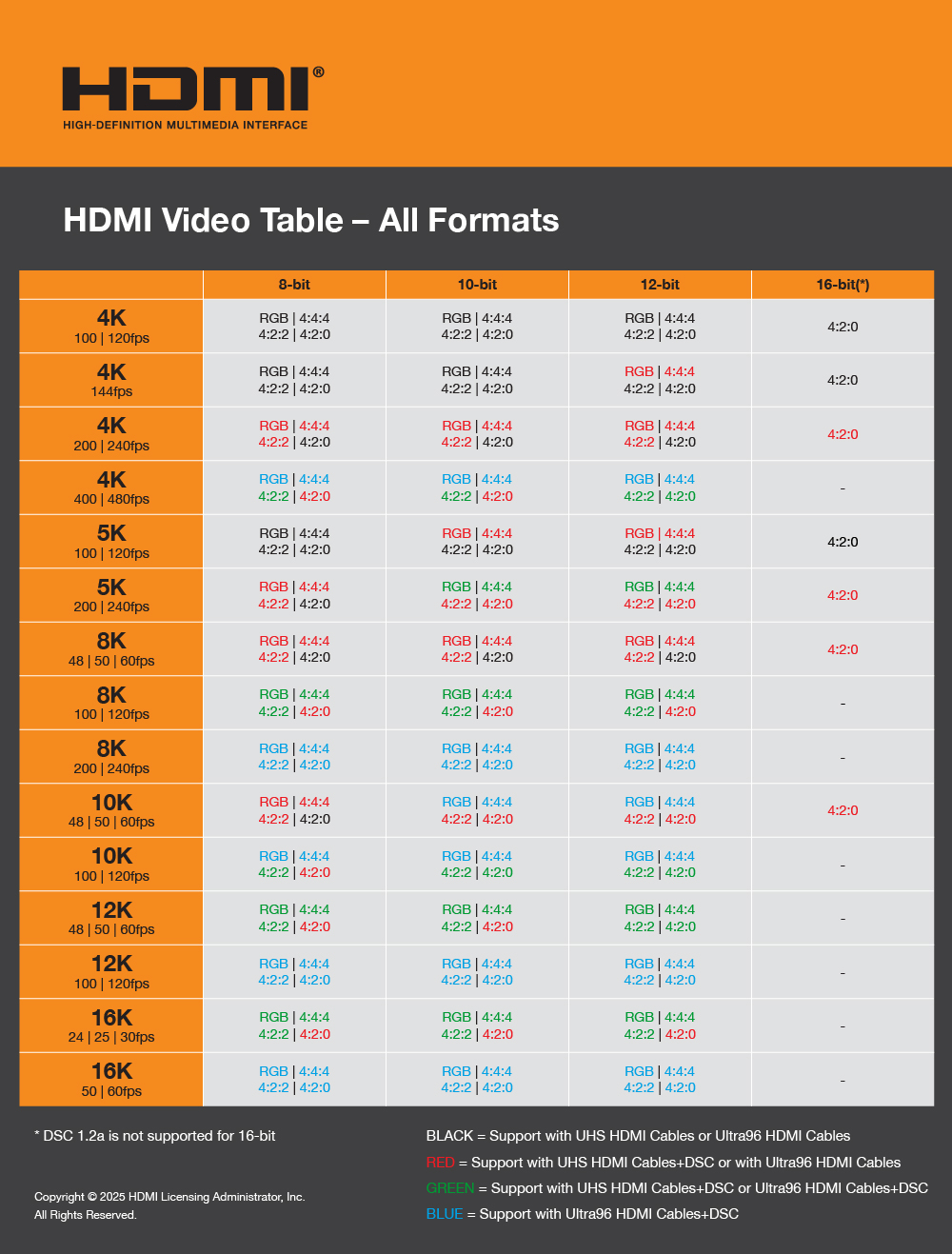
DisplayPort over USB4@4x2/TB5 at 120Gbps would be required for uncompressed 12bpp.
This 8k is bit overkill, but I suppose makes some sense to use a standard resolution instead of some random number.
If 4K reaches mass-market for those, the specs will shift down and there will be room in the (much smaller) Premium-Tier monitor segment
Heck, even if you just want USB-C and an integrated webcam on an average display, the price-hike compared to one without it is crazy, because everything except those basic office-monitors is still niche-production...
It's mostly because the improvement over 4k is marginal. In fact, even from 1920x1080 it's not so big of a deal, which is why people keep buying such monitors in 2025.
A the worse is that the higher spending consumer segment of PC parts, the gamers, can't really use high resolution display at their full potential because it puts such a burden on the GPU (DLSS helps, but the results is even smaller of an improvement over 1920x1080 than regular 4k is)
Only downside are the massive borders by todays standards, but it still has the Apple aesthetics, the 5k resolution is beautiful for my use cases (spreadsheets, documents, photo editing), and has HDMI inputs so I can play PS5 on it.
So basically, YMMV. They make good stuff, and they make awful stuff.
8K, 32inch, 275ppi, 60Hz 2 Thunderbolt 4, 1 DisplayPort 2.1
No idea about prices, but, assuming they follow the usual conventions for model codes, that's a 32" unit.
For Laptops 16:10 (and with the framework and surface even 15:10/3:2) is already quite common, while in the desktop market 16:9 and these ultrawides are dominant.
With 16:9 the whitespace on websites even with Tabs on the side is simply to high ;)
Conversely, it opens up a niche for "poor world" people to develop local solutions for local challenges, like mobile payments in India and some of Africa.
Spotify's webapp, for example, won't even work on my old computer, whereas YouTube and other things that you'd think would be more resource intensive work without any issue whatsoever.
Stands out like a sore thumb.
I’ll wait till 8k becomes more of the norm for say 1-1.5k
There's been a bit of a 'renaissance' of 5K@27" in the last ~year:
> In just the past few months, we've taken a look at the ASUS ProArt Display 5K, the BenQ PD2730S, and the Alogic Clarity 5K Touch with its unique touchscreen capabilities, and most recently I've been testing out another new option, the $950 ViewSonic VP2788-5K, to see how it stacks up.
* https://www.macrumors.com/review/viewsonic-vp2788-5k-display...
There are 15 monitors discussed in this video:
* https://www.youtube.com/watch?v=EINM4EysdbI
The ASUS ProArt PA27JCV is USD 800 (a lot less than $2k):
8K at jumbo TV size has relatively large pixels compared to an 8K desktop monitor. It’s easier to manufacture.
> And an Quest 3 headset has 2 displays at far higher PPI for $600
Those displays are physically tiny. Easier to deal with lower yields when it’s only taking a few square inches.
Ultra high resolution desktop monitors would exist in the middle: Very small pixel sizes but also relatively large unit area.
However, the demand side is also not there. There are already a number of 5K, 6K, and 8K monitors on the market. They’re just not selling well. Between difficult software support for scaling legacy apps, compatibility issues with different graphics cards and cables, and the fact that normal monitors are good enough, the really high resolution monitors don’t sell well. That doesn’t incentivize more.
If we get to a place where we could reliably plug a 6K monitor into any medium to high end laptop or desktop and it just works, there might be more. Until then, making a high res monitor is just asking for an extremely high return rate.
What's your actual use-case for this? I run a 32" 4K, and I have to stick my nose within a foot (~30cm) of the display to actually spot individual pixels. Maybe my eyesight isn't what it used to be
I'd kill for a 40" 5k or 6k to be available - that's significantly more usable desktop real estate, and I still wouldn't be able to see the pixels.
Relatedly, I also don’t understand why a half-trillion dollar company makes it so hard to give them my money. There’s no option to order ASUS directly on the UK site. I’m forced to check lots of smaller resellers or Amazon.
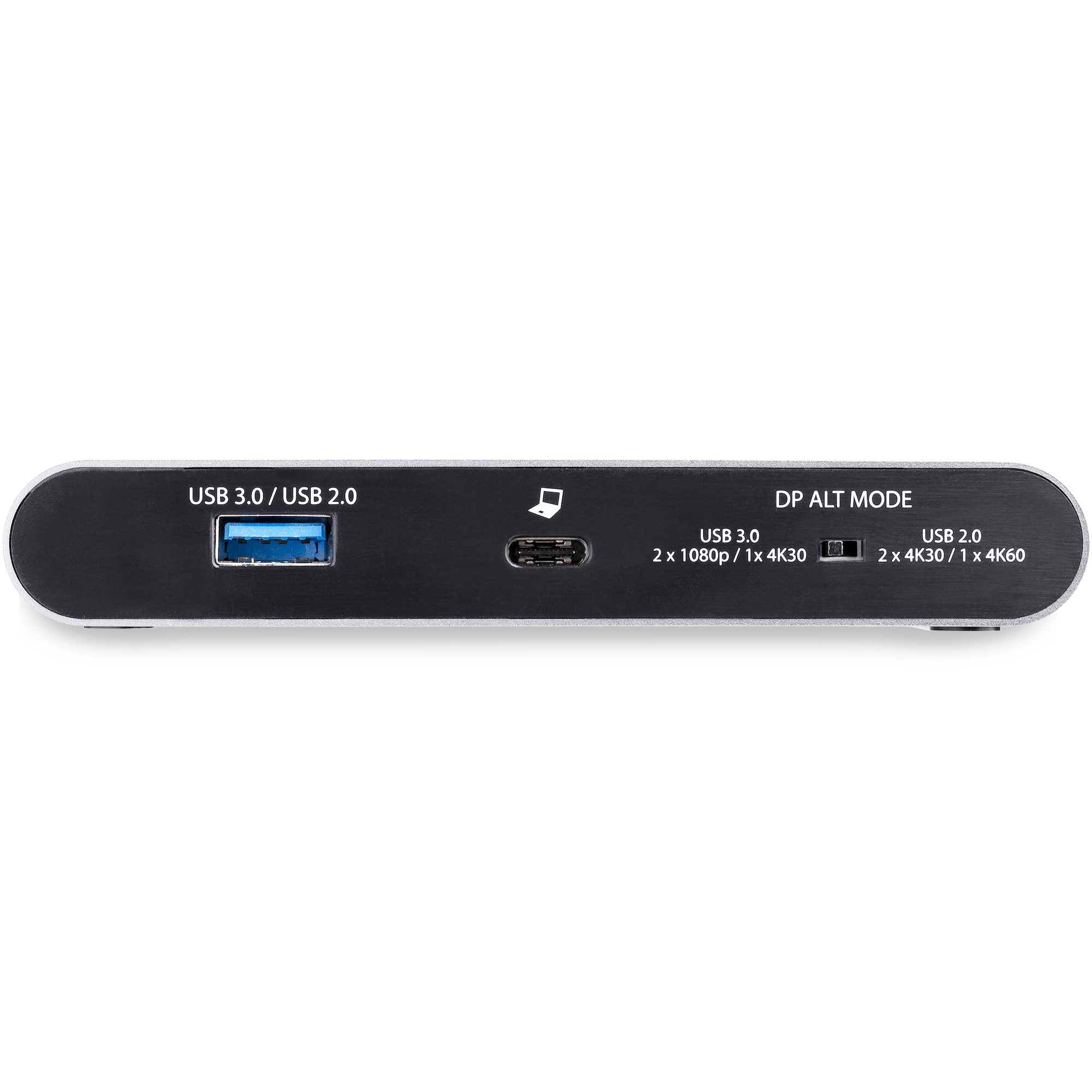
[0] https://media.startech.com/cms/products/gallery_large/dk30c2...
I had an Asus laptop, but the frequent security firmware updates for one of the Dell laptop that I had makes me think it might make a good candidate in terms of keeping up with security updates.
Not sure for the current latest models for Asus/Dell/HP/etc., but I liked the fact that disassembly manuals are provided for older Dell and HP. I can hardly find disassembly manuals for Asus when I have to do maintenance such as swapping out thermal paste/pads and clearing out the heatsink fins.
[8k@120Hz Gaming on HDMI 2.1 with compression](https://wccftech.com/8k-120hz-gaming-world-first-powered-by-...)
> With the HDMI 2.2 spec announced at CES 2025 and its official release scheduled for later this year, 8K displays will likely become more common thanks to the doubled (96 Gbps) bandwidth.
I'm working on a few wide gamut art pieces, and so far the test prints have been less than stellar. Disclaimer - I'm an amateur in this field.
A number of times I've had to have a framing discussion with a dev that eventually gets to me asking "what kind of computer do your (grand)parents use? How might X perform there" around some customer complaint. Other times, I've heard devs comment negatively after the holidays when they've tried their product on a family computer.
Still, if you were to make an analogy you should target for a few devices that represent the "average", just as its done for (most) pop music production.
Part of what QA testing should be about: performance regressions.
As a developer and AirBnB owner, what I’ve also noticed is the gluttony of the toolchain as well. I’ve had complaints about a 500/30 connection from remote working devs (very clear from the details they give) which is the fastest you can get for much of the metro I am in.
At home I can get up to 5/5 on fiber because we’re in a special permitting corridor and AT&T can basically do whatever they want with their fiber using an on old discontinued sewer run as their conduit.
I stick to the 1/1 and get 1.25 for “free” since we’re so over-provisioned. The fastest Xfinity provides in the same area as my AirBnB is an unreliable 230/20 which means my “free” excess bandwidth is higher than what many people near me can pay for.
I expect as a result of all this, developers on very fast connections end up having enough layers of corporate VPN, poorly optimized pipelines, a lot of dependency on external servers, etc that by the time you’re connected to work your 1/1 connection is about 300/300 (at least mine is) so the expectation is silently set that very fast internet will exist for on-Corp survival and that the off-corp experience is what others have.
ASUS ProArt PA169CDV, UPerfect 184T01, Lipa AX-60 (and AX-60T), UPerfect UFilm A17, UPerfect UGame J5, and two portable screens by Verbatim, just to name a few.
5k is appealing, but I'll take a 4k with a much nicer panel, much better anti-reflective coating, faster refresh rate etc.
A bunch of TVs don't actually support 4:4:4 chroma subsampling, and at 4:2:2 or 4:2:0 text is bordering on unreadable.
And a bunch of OLEDs have weird sub-pixel layouts that break ClearType. This isn't the end of the world, but you end up needing to tweak the OS text rendering to clean up the result.
https://www.viewsonic.com/us/vx4381-4k-43-4k-uhd-monitor-wit...
They're available, but they never seem to have become a mass-market product at mass-market prices. The cheapest 5k monitor is at least double the price of the cheapest 4k monitor. And it was more like 4x until recently.
You're probably right that we're starting to hit the point where people don't care though.
With 8K small pixels you could pick a number of resolutions up to 4K or higher and you wouldn’t even notice that the final product was scaled on your monitor.
People with Macs with retina displays have been doing this for years. It’s really nice once you realize how flexible it is.
It's simple math. A 32" 4K monitor is about 130 PPI. Retina displays (where you could reasonably say the pixels are not noticeable, and the text is sharp enough to not strain the eyes) start at 210 PPI.
Subjectively, the other problem with 32" 4K (a very popular and affordable size now) is that the optimal scaling is a fractional multiple of the underlying resolution (on MacOS - bizarrely I think Windows and Linux both know how to do this better than MacOS). Which again causes blur and a small performance hit.
I myself still use an old 43" 4K monitor as my main one, but I know it's not great for my eyes and I'd like to upgrade. My ideal would be a 40" or 42" 8K. A 6K at that size would not be enough.
I am very excited about this 32" 6K Asus ProArt that came out earlier this year: https://www.asus.com/displays-desktops/monitors/proart/proar... - it finally gets Retina-grade resolution at a more reasonable price point. I will probably switch to two of these side-by-side once I can get them below $1K.
>8K at jumbo TV size has relatively large pixels compared to an 8K desktop monitor. It’s easier to manufacture.
I don't think that's true.
I've been using a 8k 55" TV as my main monitor for years now. It was available for sub-800 USD before all such tv's vanished from the market. Smaller pixels were not more expensive even then, the 55"s were the cheapest.
4k monitors can be had for sub-200 usd, selling 4x the area of the same panel should be at most 4x that price. And it was, years ago.
So they were clearly not complicated or expensive to manufacture - but there was no compelling reason for having 8k on a TV so they didn't sell. However, there IS a compelling reason to have 8K on a desktop monitor!
That such monitors sell for 8000 usd+ is IMO a very unfortunate situation caused by a weird incompetence in market segmentation by the monitor makers.
I firmly believe that they could sell 100x as many if they cut the price to 1/10th, which they clearly could do. The market that never appeared for tv's is present among the world's knowledge workers, for sure.
The main problem was parts. She had a fan that was defective and noisy, and the Asus parts store didn't have it in stock, and there was one on ebay for $30.
But the replacement was easy, the construction was solid, and there have been no issues since.
>Asus when I have to do maintenance such as swapping out thermal paste/pads and clearing out the heatsink fins.
If you have to do this more than once or twice over a ten year lifespan of a laptop, you probably should invest in air cleaning systems. Mid range consumer laptops are way less thermally constrained than they used to be. Ryzen CPUs are essential for that, though I think Intel now has usable cool laptop CPUs
Only electronic device I’ve ever returned.
Also they tend to have stronger than necessary backlights. It might be possible to calibrate around this issue, but the thing is designed to be viewed from the other side of a room. You are at the mercy of however low they decided to let it go.
There are a number of 40” 5K wide monitors on the market. They have the same vertical resolution as a 4K but with more horizontal pixels.
Televisions are also more prone to updates that can break things and often have user hostile 'smart' software.
Still, televisions can make a decent monitor and are definitely cheaper per inch.
With the greatest of respect, this is a deeply silly way to think of it.
The way you should be thinking of it is:
> I'm not buying a new monitor that requires DSC to run at native resolution. That's fucking garbage.
Since DP 1.4, the only thing the DisplayPort version indicates that an end-user gives a shit about is the maximum supported speed link speed. So, if all you need is HRB3 to drive a display at its native resolution, refresh rate, and maximum bit depth without fucking DSC, then DisplayPort 1.4 will be just fine. And if DSC doesn't bother you, then your range of acceptable displays is magically widened!
With inkjets, though, you need to keep using them. Otherwise, the ink clogs.
Expensive process printers have wide gamuts. Laser printers basically suck. Xerox used to make decent color laser printers, but they had an odd “waxy” ink. Not sure if they still do it.
I don’t think anyone does dye-sub printers, anymore. They used to be good.
Nvidia quotes 8K@165Hz over DP for their latest generation. AMD has demoed 8K@120hz over HDMI but not on a consumer display yet.
https://en.wikipedia.org/wiki/DisplayPort#Refresh_frequency_...
https://en.wikipedia.org/wiki/HDMI#Refresh_frequency_limits_...
https://www.nvidia.com/en-gb/geforce/graphics-cards/compare/
The IBM T220 4k monitor required 4 DVI cables.
Many audio engineers live by the mantra "if it sounds good on NS-10s, it'll sound good on anything".
We need such a touchstone for software engineers.
It is extremely useful if your work ends up in paper. For photography (edit: film and broadcast, too) would be great.
My use case are comics and illustration, so a self-color-correcting cintiq or tablet would be great for me.
Otherwise I had okay Dell or Lenovo laptops. Avoid HP, even the high end Zbook ones. A framework might be worth a try if you have a lot of money.
If I were to use a TV, it would be an OLED. That being said, the subpixel layout is not great: https://pcmonitors.info/articles/qd-oled-and-woled-fringing-...
I really don't know why it's not more common. If you get a Samsung TV it even has a dedicated "PC Mode".
They do when you move them (scroll)
I worked for a popular company and went to visit family during the winter holidays. I couldn't believe how many commercials there were for said company's hot consumer product (I haven't had cable or over-air television since well before streaming was a thing, so this was a new experience in the previous five years).
I concluded that if I had cable and didn't work for the company, I'd hate them due to the bajillion loud ads. My family didn't seem to notice. They tuned out all the commercials, as did a friend when I was at his place around a similar time
All it takes is a change in perspective to see something in an entirely new light.
With more people being remote, this either doesn't happen, or is much more limited. Support teams have to repro issues or walk through scenarios across web, iOS, and Android. Sometimes they only have their own device. Better places will have some kind of program to get them refurb devices. Most times though people have to move the customer to someone who has an iPhone or whatever.
I'm still happy with it, would kill for an 8K 43" 120hz monitor but that's still a ways away.
I suspect the ProArt can be calibrated, but when I do photo editing, I just use the Studio.
Particularly for the people doing video an 8k display is great - that means you can have full resolution 4k video on screen with space around it for a user interface, or you can have a display with the 8k source material on it if the film was shot at that resolution.
If you go slightly bigger, there are the ASUS ProArt PA24US, Japannext JN-IPS2380UHDR-C65W-HSP, ViewSonic VP2488-4K, AG Neovo EM2451, and the UPerfect UColor T3.
Network performance can be trivially measured in your users; and most latency/performance/bandwidth issues can be identified clearly.
Philosophically I am with you, e-waste and consumerism are bad, but pragmatically it is not worth punishing yourself from a dollars and cents standpoint.
You can jump on Amazon and buy a mini PC in the $300 range that’s got an 8 core 16 thread AMD 6800H CPU, 16GB RAM, 500GB SSD, basically a well above-average machine, with upgradable RAM and storage. $240 if you buy it on AliExpress.
You can grab a MacBook Air M2 for around $500.
Why suffer with slow hardware? Assuming that using a computer is at least somewhat important to your workflow.
For Macs, 220DPI absolutely is the average.
32" 4K isn't much better than pre-Retina iPhone, even after accounting for viewing distance between say, ~18" for phone, and 2-3 feet for desktop.
I agree for many people, I might even go so far as to say "normies", this sort of thing doesn't matter. But after many years of poking at this, I strongly believe it's not because their eyes can't see the difference, it's because they don't understand the question we're asking (i.e. about overall quality rather than detail density, and when you try explaining detail density, they think you're asking if a monitor "looks real" which sounds ~impossible)
This whole thing is disappointing because all I've wanted for a decade is 27" 5K to be mainstream and ubiqituous, that hits a sweet spot - surprisingly, only slightly less PPI than this, but a much more reasonable price. They of course exist, its just, consistently fringe and Mac-focused, presumably due to vagaries of HDMI.
Was this the case even after enabling the TVs "game mode" that disables a lot of the latency inducing image processing (e.g. frame interpolation).
It's also incorrectly applied math. You need to take into account the viewing distance - the 210 PPI figure often quoted is for smartphone displays (at the distance one typically holds a smartphone).
For a 32" monitor, if your eyeballs are 36" away from the monitor's surface, you are well beyond the limit of normal visual acuity (and the monitor still fills a massive 42 degrees of your field of view).
Very interesting, I might consider Asus laptops if repair manuals can be easily found.
Can you point me a direction to find it?
From my experience, Asus does not provide any official repair manuals on the specific laptop site. Googling for model keywords doesn't seem to provide any good sources, aside from the typical YouTube videos but these sometimes misses/skips specific instructions/techniques that are mentioned in official Dell/HP repair guides. Will be glad to finally have reliable sources to get Asus repair manuals.
---
> If you have to do this more than once or twice over a ten year lifespan of a laptop, you probably should invest in air cleaning systems.
If you're referring to home/work area air filters I don't think its possible since the mentioned laptops are not mine. Unless you mean there's a heatsink cleaning tool that cleans the exhaust fins without disassembly? I'll gladly consider this tool if it means I don't have to do a disassembly.
Unfortunately (or fortunately?), I'm the go-to repair guy in the family. Not unusual to find the fans spinning at high with clogged exhaust + likely old thermal paste (not sure for thermal pads helped much but I used new ones anywhare while the laptops disassembled anyway).
While typing this, I recalled one of the old Dells that had to have the bottom cover assembly replaced more than once, the plastic part of the bottom cover holding the metal hinge mechanism is absolutely terrible. Thankfully the specific part numbers in the repair manuals made it easy to order replacement parts.
I wish the 55" 8k TVs still existed (or that the announced 55" 8k monitors were ever shipped). I make do with 65", but it's just a tad too large. I would never switch back to 4k, however.
To address a question elsewhere, personally, I don't see the benefit to pushing 4x the pixels when ~ 100 DPI works fine for me. My eyes aren't what they were 20 years ago, and it's just extra expense at every level.
5K requires a lot of bandwidth; some 5K monitors required two HDMI connections, and Thunderbolt was Mac-specific and generally costly.
You could get somewhat close by looking at what was a middle of the road consumer laptop from Dell/HP/Lenovo 5 years ago and buying one of those though.
Then I bought a real display and realized oh my god there's a reason they cost so much more.
"Game mode" has no set meaning or standard, and in lots of cases can make things worse. On my TV, it made the display blurry in a way I never even noticed until I fixed it. It's like it was doing N64 style anti-aliasing. I actually had to use a different mode, and that may have had significant latency that I never realized.
Displays are tricky, because it can be hard to notice how good or bad one is without a comparison, which you can't do in the store because they cheat display modes and display content, and nobody is willing to buy six displays and run tests every time they want to buy a new display.
Two clarify, there are two options for allocating bandwidth:
* 80Gbps both up- and downstream
* 120Gbps in one direction (up or down), and 40 in the opposite
See:
* https://en.wikipedia.org/wiki/Thunderbolt_(interface)#Thunde...
Shit, I think I lied! I think I may have just found a youtube video that opened it up. Maybe I found a manual, but you are correct that ASUS does not seem to easily provide those manuals!
>If you're referring to home/work area air filters I don't think its possible since the mentioned laptops are not mine
Duh, that make sense. I once worked tech support at our college and the state some people would get their laptops in was crazy. I once pulled a baseball sized clump of fur out of a small laptop fan.
Really sorry for misleading you. Working there gave me some amount of confidence to just open up random computers.
I've mostly read that TV's don't make great monitors. I have a TLC Mini LED TV which is great as a TV though.
If it looks good on a mac laptop screen/imac and the scopes look right, it’s good for 99%+ of viewers. You can basically just edit visually off any Mac laptop from the last 10 years and you’ll probably be happy tbh.
Did you choose the T line or X1 line of Thinkpad? What do you think of your current Thinkpad?
The P Thinkpads hardware looks great but is out of my budget, and I don't see how I'll use it at the moment.
Maybe I might need for local usage in the future, but currently I did most model training on Google Colab A100 and general purpose code editing are done remotely.
Can you provide a ROI point for scrolling photos at 120Hz+ ?
> For a 32" monitor, if your eyeballs are 36" away from the monitor's surface
Why are you assuming 36"? Nobody I know uses 32" monitors at 36" away. Most people use less than half that distance for their laptops, and just over half for desktops.
> the 210 PPI figure often quoted is for smartphone displays
The 210 PPI figure is a minimum, it was used as marketing when Apple first started offering Retina displays. Apple's modern iPhone displays have far higher PPI. Apple's own marketing was challenged by critics who noted that visual acuity may top out closer to 200 ppd.
Perhaps Retina doesn't matter to you - that's OK. But for most of us, 32" 4K is nowhere near the limit of our vision, and by staring at these monitors all day, we are slowly degrading it.
How far away do you sit from it? Does it sit on top of your desk? What do you put on all this space, how do you handle it?
I don’t think you’re maximizing one browser window over all 33 million pixels
If the game doesn't offer that, then I've found that the HUD/UI uglification isn't too bad when one sets the output resolution to 1440p.
If Windows is getting in the way of doing this, and most or all of your games have been purchased through Steam, give Linux a try. I've heard good things about the Fedora variant known as Bazzite, but have never, ever tried it myself. [1]
[0] And shockingly few do! There's all sorts of automagic "AI" upscaling shit with mystery-meat knobs to turn, but precious few bog-standard "render everything but the HUD and UI with this many fewer pixels" options.
[1] I've been using Gentoo for decades and (sadly) see no reason to switch. I strongly disrecommend Gentoo as a first Linux distro for most folks, and especially for folks who primarily want to try out Linux for video gaming.
One is hard-put to buy a developer-power laptop with a sub-2K display these days, even in the Windows world, and >2K displays have been cheap on desktop for a really long time.
you can think 'but thats inhumanly fast, you wont notice it' but in reality, this is _very_ noticeable in games like counter-strike where hand-eye coordination, speed and pinpoint accuracy are key. if you play such games a lot then you will feel it if the latency goes above 1ms.
E.g. a 21:9 ultrawide variant of 4k should really be 5040x2160. Instead they are nearly all 3840x1600. That may well be cost/price optimal for certain folks, I'm not saying it's bad for the product itself to exist, but nobody was looking at a 1600p monitor thinking "man, I wish they'd make a wider variant!" they started with 4k and decided it would be nice if it were permanently shortened.
There's no content
Average bitrate from anything not a Bluray for even HD is not good, so you do not benefit from more pixels anyway. Sure, you are decompressing and displaying 8K worth of pixels, but the actual resolution of your content is more like 1080p anyway, especially in color space.
Normally, games are the place where arbitrarily high pixel counts could shine, because you could literally ensure that every pixel is calculated and make real use of it, but that's actually stupidly hard at 4k and above, so nvidia just told people to eat smeary and AI garbage instead, throwing away the entire point of having a beefy GPU.
I was even skeptical of 1440p at higher refresh rates, but bought a nice monitor with those specs anyway and was happily surprised with the improvement, but it's obvious diminishing returns.
Another great option is 22" nominal (a 21.5" 4K display has 204ppi), also running at @2x. This is better if you keep the monitor closer to the keyboard side of your desk, or if your desk is not very deep. These are hard to find, and even when you do they're likely to be a portable monitor. Asus has a page for a PQ22UC but I can't tell if it is no longer available, or no longer sold in the US.
But, that’s 8K DSC or.. 24fps maybe? then. Weird oversight/compromise for such a pro color-focused monitor, perhaps Asus reused their legacy monitor platform. “8K HDR” at 24fps could be a niche for theater movie mastering, perhaps?
It was one of the few laptops I could find that wasn't absurdly expensive and had a 4k screen, so I was kind of pigeonholed into it, but I've been really happy. It was one of the easiest Linux installs I've ever done, and it's been holding up fine. The only thing I don't like about it is that the speakers are kind of shit, but for a laptop that doesn't bother me too much since if I want to listen to music I probably wouldn't use a laptop speaker regardless.
[1] https://www.lenovo.com/us/outletus/en/p/laptops/thinkpad/thi... I'm not sure they sell the 64GB model anymore.
With an ultra wide you lose the screen concept for managing area and it gets awful because you lose grouping windows on different screens, picking per-monitor workspaces, moving windows across screens.
Either monitors need to present themselves as multiple screens, or window managers need to come up with virtual screens to regain the much needed screen abstraction.
I don’t play a lot of fast paced games and I am not good enough at any of them to where a frame of latency would drastically affect my performance in any game, and I don’t think two frames of latency is really noticeable when typing in Vim or something.
Light grey text on a white background looks good on a Mac, but pretty much unreadable for most users.
I don't really know how you expect that to translate into a ROI point.
Audio engineers are for sure taking all this into account, and more (:
For newer gpus (nvidia 3000+ or equivalent) and high end (or M4+) macs hdmi 2.1 works fine but Linux drivers have some licensing issue that makes hdmi 2.1 problematic.
It works with certain nvidia drivers but I ended up getting a DP to HDMI 8K cable which was more reliable. I think it could work with AMD and Intel also but I haven't tried.
In my case I have a 55 and sit normal monitor distance away. I made a "double floor" on my desk and a cutout for the monitor so the monitor legs are some 10cm below the actual desk, and the screen starts basically at the level of the actual desk surface. The gap between the desk panels is nice for keeping usb hubs, drives, headphone amps and such. And the mac mini.
I usually have reference material windows upper left and right, coding project upper center, coding editor bottom center, and 2 or 4 terminals, teams, slack and mail on either side of the coding window. The center column is about tice as wide as the sides. I also have other layouts depending on the kind of work.
I use layout arrangers like fancyzones (from powertoys) in windows and a similar mechanism in KDE, and manual window management on the mac.
I run double scaling, so I get basically 4K desktop area but at retina (ish) resolution. 55 is a bit too big but since I run doubling I can read stuff also in the corners. 50" 8K would be ideal.
Basically the biggest problem with this setup is it spoils you and it was only available several years ago. :(
It’s horrible.
I hope you mean lower? An OLED pixel updates roughly instantly while liquid crystals take time to shift, with IPS in particular trading away speed for quality.
I have a couple of budget vertical Samsung TVs in my monitor stacks.
The quality isn't good enough for photo work, but they're more than fine for text.
Yes, but that is probably accelerated more by sitting closer to screens than is healthy for too long, than it is by the resolution of the screen. It's anecdata so maybe truly everyone you know does sit 45cm away from a desktop monitor - but I can't say I've ever experienced that.
Of course if you do sit that close then higher resolution is resolvable. Perhaps what your statement actually should be is: "Perhaps Retina doesn't matter if you sit at a (perfectly comfortable and healthy) further distance away from the screen - that's OK", otherwise I can a reader may think you are trying to imply the OP is somehow inferior, but really the only thing that differs is your viewing distance.
I suppose it's still true that nobody you know uses monitors of that size three feet away, but I'm very definitely one of those people.
Why on earth would you put the monitor so close to your face that you have to turn your head to see all of it? That'd be obnoxious as all hell.
> ...by staring at these monitors all day, we are slowly degrading it.
No, that's age. As you age, the tissues that make up your eye and the muscles that control it fail more and more to get rebuilt correctly. I think the colloquial term for this is that they "wear out". It sucks shit, but we're currently too bad at bioengineering to really stop it.
This is exactly why 8K tv's failed in the market, but the point here is that your computer desktop is _great_ 8k content.
The tv's that were sold for sub-1000 usd just a few years ago should be sold as monitors instead. Replace the TV tuners, app support, network cards and such and add a displayport.
Having a high-resolution desktop that basically covers your useable FOV is great, and is a way more compelling use case than watching TV on 8K ever was.
32" 4K at 36" is 91 ppd. Which I guess is good enough, seeing as I'm well the far side of 25 year old.
> Why are you assuming 36"? Nobody I know uses 32" monitors at 36" away.
36" is the point where I can see all 4 corners of the monitor at the same time (and significantly too close to focus on one corner and have the other 3 corners in view at the same time).
40 degrees of FoV is massive for a single monitor! I'm sitting here wondering how much you have to turn your head to use this size monitor up close
Although for sim racing I've been thinking about getting a single ultra wide and high refresh rate monitor, but I'd probably go for a dedicated setup with a seat, monitor and speakers. It gets pricey, but cheaper than crashing IRL.
> One is hard-put to buy a developer-power laptop with a sub-2K display these days, even in the Windows world
I personally see a lot of 1080p screens on new gaming laptops too. Lots of people get those for work from what I see with my peers. When I sold my RTX 3060 laptop with a 1080p screen, most buyers wanted it for professional work, according to them.
> I'm honestly not sure where all these hackernews commenters with low-dpi displays are coming from
If anything, this is exactly the place where I'd expect a bunch of people to be rocking an older Thinkpad. :)
Modern OSes also scale fine.
It’s really not an issue.
doesn't that make everything blurry? that's the gripe i have with circa post-2020 PC gaming, barely any pc can run a AAA or AA game in native resolution and instead has to use artificial upscaling and whatnot. haven't specifically tried it.
also can't test it anymore, as my gaming monitor is now our TV (48 inch OLED gaming TV, what a blast it was). now using my "old" 32in 2560x1440 IPS display, really miss OLED :( which is why i want to buy a new monitor. but i can't decide if i should take a 27in one (seems to be the 16:9 standard right now, but seems so small to me) or a ultrawide one. i switch games very frequently and also sometimes like to play old(er) games, so a bit scared of the "ultrawides are cool if your game supports it"-vibe...
> I've heard good things about the Fedora variant known as Bazzite
haha, this message was written on Bazzite, so i got that part covered :D switched about a month ago, funny to get the recommendation now.
Phone and laptop have higher DPI screens of course, but I'm not close enough to my desktop monitor for a higher DPI to matter.
On the flip side I would love to get rid of physically managing three individual pieces of hardware that wasn't made to work together as one setup.
Rtings basically gives you a number that represents average lag without screen tearing. If you measure at the top of your screen and/or tolerate tearing then the numbers get significantly smaller, and a lot of screens can in fact beat 1ms.
The 5:4 aspect ratio is weird, especially in this era of everything 16:9, but it's a second monitor so usually only has one thing open
I'm glad the low resolution monitors work for you. I just don't want people to proclaim that everything about displays is solved - it's not. There are meaningful, physiologically relevant improvements to be made. It's been over a decade since 4k60 became the standard. A lot of younger people would really benefit from mass produced 6k120 monitors.
The failing hubs were either driving cheap office displays connected through HDMI or high resolution mobile displays connected through USB-C. Few of those support anything like daisy chaining or at least simple PD passthrough so that you can use the same port for driving the display and powering the laptop, and I absolutely do want dual mobile displays. Even if only so that I can carry them screen to screen for mutual protection of the glass.
It’s gotta be the most commonly mixed up things I’ve seen in the last twenty years as an enthusiast.
You move your eyes, not your head. Plus or minus 20 degrees is a trivial amount of eye movement.
Most people are fine with this. Your requirement to comfortably see everything with minimal eye/head movement is atypical.
Even if you do have to move your head, that’s not a bad thing. A little head movement during long computing sessions is helpful.
https://store.steampowered.com/hwsurvey/Steam-Hardware-Softw...
It's really hard to buy one given how expensive / badly specced they are compared to 4k monitors, even as someone who value the vertical pixels.
My experience for the 3D parts of a great many games that my 5700 XT can't reasonably run at panel-native resolution is that the game's art style is to blur up the picture with all sorts of postprocessing (and sometimes (especially with UE5 games) with the ever-more-popular "it looks so bad it makes you wonder if the renderer is totally busted unless you leave TAA on" rendering technique). Sometimes this blurring ends up looking absolutely great, and other times it's just lazy, obnoxious, and awful.
So, not that I notice? For the games that permit it, the HUD and menus stay nice and sharp, and the 3D stuff that's going to be all smudged up no matter what you do just renders at a higher frame rate.
For games that don't have independent 2D and 3D render resolutions, I find 1440p to be quite tolerable, and (weirdly) 1080p to be much less tolerable... despite the fact that you'd expect it to fit nicely on the panel. I guess I'm expecting a much more crisp picture with integer scaling than I get? Or maybe this is like what some games did way back when where they totally change the font and render style of the UI once they get past some specific breakpoint. [0] I haven't looked closely at what's going on, so I don't have any even vaguely-reasonable explanation for it.
> [ultrawide monitors]
I like the comment someone else made somewhere that described them as "ultrashort" monitors. Personally, even if I was willing to move my head around enough to scan the whole damn monitor, I'm unwilling to lose so much vertical resolution. But as always, one should definitely choose what one likes.
Personally, I find a 32" 3840 pixel wide monitor to be good. It's really great for doing work on, and perfectly acceptable for playing video games.
> [Linux]
Gratz on moving to Linux for gaming. Hope you don't have much trouble with it, and any trouble you have is either caused by super-invasive kernel-level anticheat that will never, ever work on Linux, or is trouble that's easy and/or fun to resolve.
[0] One such game that sticks out in my memory is the OG Deus Ex game. At 1024x768, the font for the in-game UI switched from what -at lower resolutions- seemed a lot like a bitmapped font to what seemed a lot like a proper vector font. The difference was dramatic.
TAIPEI, Taiwan, October 15, 2025 — ASUS today announced that ProArt Display 8K PA32KCX will be available by October 2025. PA32KCX is the world’s first 8K HDR mini LED professional monitor, offering 4032-zone local dimming, 1200 nits peak brightness, and up to 1000 nits sustained brightness without partial patch limitation. Ideal for content creators, the monitor is factory pre-calibrated to an industry-leading Delta E<1 color difference and has a built-in motorized colorimeter to ensure professional-grade color accuracy. PA32KCX also includes ASUS Auto Calibration and ASUS Self-Calibration features, and supports ASUS ProArt Calibration software along with both Calman and Light Illusion ColourSpace CMS professional hardware-calibration software for professional-grade color accuracy. In addition, PA32KCX has two Thunderbolt™ 4 ports plus other connectivity options for efficient and seamless creative workflows.
ASUS has partnered with Adobe to empower creative workflows. Every purchase of a ProArt Display PA32KCX in select regions includes a free three-month subscription to Adobe Creative Cloud®, Adobe Substance 3D and Adobe Acrobat (valued at up to US$397.44). The Creative Cloud subscription can be applied to a new or existing account and can be redeemed via the registration site. The redemption period ends August 31, 2026. For full details, visit https://www.asus.com/content/asus-offers-adobe-creative-cloud.
The 8K HDR (7680 x 4320) panel of PA32KCX boasts 275 pixels per inch — more than double that of a 32-inch 4K display and up to 300% more onscreen space compared to similarly-sized 4K UHD displays. Higher pixel density results in sharper text for better readability as well as enhanced visual clarity that’s ideal for creators working on detailed design projects. In addition, the latest mini LED technology utilizes a new LED light profile that focuses the backlight more directly and precisely to dramatically reduce visual artifacts and the halo effect.
Within PA32KCX are numerous control integrated chips (IC) that independently manage the backlight zones to effectively minimize onscreen flicker during transitions, ensuring high levels of sustained brightness. The monitor can achieve a peak brightness of 1200 nits and an industry-leading 1000 nits of full-screen sustained brightness, allowing for outstanding contrast between the deepest blacks and gleaming whites.
PA32KCX exceeds industry color reproduction standards with its 95% Adobe® RGB, 97% DCI-P3, 100% sRGB, 100% Rec. 709 color gamut, making it ideal for video editing and post-production. Its true 10-bit IPS panel is able to showcase more than 1.07 billion colors to give content creators a vast color spectrum to work with.
Each ProArt display is factory pre-calibrated using a new three-scale process to guarantee industry-leading color fidelity. The display then undergoes stringent testing using ASUS advanced grayscale tracking technology to ensure smoother color gradations, better uniformity and high color accuracy with a Delta E<1 color difference value.
To maintain professional-level accuracy over the long term, PA32KCX benefits from a built-in motorized flip colorimeter that moves into place when required, making it easy to calibrate the display. The colorimeter has a standalone self-calibration feature that’s compatible with any operating system and doesn’t require additional calibration software. Users may run the calibration process at any time, or schedule it during off hours through the OSD menu.
Built-in ASUS ProArt Calibration technology saves all color parameter profiles directly on the monitor’s internal scaler IC chip. The monitor can be calibrated and the look-up table subsequently rewritten, allowing users to connect it to devices with different operating systems or applications without needing to adjust settings. Users can also use ProArt Calibration to schedule regular calibration intervals.
In addition, ProArt Color Center software offers remote group control and calibration tools, allowing users to run vital tasks from a centralized location. Calibration schedules and customized color parameters can be set to maintain consistent, professional-level accuracy.
The built-in colorimeter also works seamlessly with Calman and Light Illusion ColourSpace CMS professional hardware-calibration software.
ASUS Smart HDR technology enables PA32KCX to support multiple HDR formats, including Dolby Vision®1, HLG, and HDR10. Dolby Vision transforms the viewing experience with unmatched levels of brightness, contrast, and colors. HLG allows users to view and create material for broadcast and satellite TV platforms such as BBC iPlayer, Japan NHK TV, and DirecTV. HDR10 support ensures compatibility with existing streaming video services and a growing list of HDR-enabled games.
PA32KCX features an ambient light sensor that automatically dims or brightens the display depending on environmental lighting, and a proximity sensor automatically dims the display when it detects no user in front of the monitor.
Dual Thunderbolt 4 ports, DisplayPort™ 2.1, and two HDMI® 2.1 ports ensure compatibility with current and future displays and peripherals. One of the Thunderbolt 4 ports provides up to 96-watt Power Delivery to charge devices while the other port allows users to daisy-chain multiple displays—without the need for a hub or switch.
Built-in auto KVM allows for effortless switching and control between two connected laptops or PCs with a single keyboard and mouse, enabling easier multitasking.
PA32KCX also supports Picture-by-Picture (PbP) and Picture-in-Picture (PiP). The former allows users to view content from up to four input sources simultaneously, with two of the windows’ color engines configurable to sRGB, Adobe RGB, DCI-P3, or BT.2020. Three user-specified modes are also available. PiP mode places content from a second input source in a smaller window that can be placed in any corner of the display.
The ergonomic monitor stand of PA32KCX offers tilt, swivel, pivot, and height adjustments for the perfect viewing position. The ability to pivot the screen 90° clockwise or counter-clockwise to portrait orientation comes in handy when working with posters, playbills, and other large-format projects. In addition, a quick-release feature allows users to VESA mount the monitor to a wall to save desktop space.
PA32KCX includes a wraparound hood to reduce on-screen reflections from nearby light sources, enabling users to work comfortably in any location.
https://www.nvidia.com/content/Control-Panel-Help/vLatest/en...
https://www.amd.com/en/resources/support-articles/faqs/DH3-0...
https://www.intel.com/content/www/us/en/support/articles/000...
I don't know what the situation is on Mac and Linux, but all of the Windows drivers offer it.
Maybe this varies a lot between humans, because I'm trying the experiment, and any closer than 24 inches requires physically moving my head to comfortably read text in the corner of the 32" display.
Even at 36" it's fatiguing to focus on a corner of the display solely through eye-movement for more than a few seconds.
> Your requirement to comfortably see everything with minimal eye/head movement is atypical
I don't think it's by any means an uncommon requirement. Movie-watchers want to be able to see the whole screen at once (with the exception of some intentionally-over-the-top IMAX theatres), gamers want to be able to see their radar/heath/ammo/etc in the corners of the screen. I'd like to be able to notice notifications arriving in the corner of the screen.
The idea is to make the pixels so small that your eyes aren’t resolving individual pixels anyway. Interpolation appears correct to your eyes because you’re viewing it through a low-pass filter (the physical limit of your eyes) anyway.
Reverting to nearest neighbor at high PPI would introduce new artifacts because the aliasing effects would create unpleasant and unnatural frequencies in the image.
Most modern GPU drivers (nVidia in particular) will do fixed multiple scaling if that’s what you want. Nearest neighbor is not good though.
Whether it matters is a bigger issue, 30 to 60Hz I notice a huge difference, 60 to 144Hz@4K I can't tell but I'm old and don't play esports games.
the part of feeling the difference in response times, that's true though, but I must say, the experience is a bit dated ^^ i see more high resolution monitors have generally quite slow response times.
<1ms was from CRT times :D which was my main counter-striker days. I do find noticable 'lag' still on TV vs. monitor though but i've only tested on HD (1080p) - own only 1 4k monitor and my own age-induced-latency by now far exceeds my display's latency :D
yeah, maybe i should give this way of setting the graphics a try. should try to find a game which looks great with it.
> I find a 32" 3840 pixel wide monitor to be good
just looked them up, surprised that they're quite a bit more expensive (800+ vs 600-750 for an ultrawide), but i guess the panels are more expensive due to the higher resolution. but your comment now makes me think what path i want to go. gotta read up on some opinions :D
> Hope you don't have much trouble with it
luckily i work on and with unix systems, so the new things are just the those related to gaming. but bazzite really has been very nice so far :) and as you say, the only times i had to boot up the windows on a separate disk are when i wanted to play games which don't run on linux at all, especially the kernel-level anticheat slopware.
but enough is enough. i've kept using windows at home just because of gaming, but i'm sick of M$. can't spend the whole day making fun of windows and then go home and game on it, feels dirty.
It's always been a weird topic - science (appears to, due to the aforementioned misconception) say one thing, and yet I have eyes and see a difference that the science says I shouldn't see.
I still use CRTs :) However more than input lag, for me its motion. Which is driven by panel response times and I just cant stand even the best modern OLEDs for motion unless its 240hz and up.
> I do find noticable 'lag' still on TV vs. monitor though
Yeah you likely will to be honest. Most even average monitors will be single digit, 1-2ms maybe at most. Depending upon TV model, game mode may only get you to low double digits. High end panels should get you to pretty low single digits though, like 4-5ms.
> I'm honestly not sure where all these hackernews commenters with low-dpi displays are coming from
I still see 1080p fairly often on new setups/laptops, basically, although 1440p and 4K are becoming more common on higher-end desktops. Then again, 1440p at 27" or 32" isn't really high dpi.