Even if someone's security is awful as the consumer and their account gets hacked because of these leaks, what are the actual consequences of that? Oh bummer, they need to reset their password and make a few phone calls to their bank to reverse the fraudulent charges then life goes on. Techies view that as unacceptable but most don't really care.
Checked my password on https://haveibeenpwned.com/Passwords :-
This password has been seen 1 times before in data breaches!
_Great_.There is no perfect solution. Obviously, we don't want to give everybody an easy form where you can enter an email address and see all of the password it found. But I'm not going to reset 500+ password because one of them might have been compromised. It seems like we must rely on our password managers (BitWarden, 1Password, Chrome's built-in manager, etc.) to tell us if individual passwords have been compromised.
Reporting from the time seems to all be about one or multiple leaks/attacks involving:
- Credential stuffing with data from other breaches
- A leak of data (including email addresses) to "certain business partners" between April 9, 2020 and November 12, 2020.
On April 2, 2020 somebody logged in to my Spotify account (which had a very weak password) from a US IP address. This account used an email address only ever used to sign up to Spotify years earlier, and the account had been unused for years by that point. I changed the password minutes later. A few hours after that Spotify also sent an automatic password reset because of "suspicious activity". At no point have I ever been notified by Spotify that my data had been leaked, though it obviously had, and now said email finally shows up on HIBP.
I now use strong passwords stored in bitwarden to try to at least keep on top of that one piece. I'm sure there are unfortunately random old accounts on services I don't use anymore with compromised passwords out there.
Not really sure what if anything can be done at this point. I wish my info wasn't out there but it is.
Sign in with Google/Apple/Facebook/Microsoft/Github, whatever, could have been a solution, but I don't believe any of them to trustworthy long term.
> During 2025, the threat-intelligence firm Synthient aggregated 2 billion unique email addresses disclosed in credential-stuffing lists found across multiple malicious internet sources. Comprised of email addresses and passwords from previous data breaches, these lists are used by attackers to compromise other, unrelated accounts of victims who have reused their passwords. The data also included 1.3 billion unique passwords, which are now searchable in Pwned Passwords.
(Edit: this is also directly linked in TFA. Well, I guess the site was still somewhat successfully advertised here...)
So, this doesn't seem to comprise new information, and doesn't imply that your email has been associated with your password by the hackers.
Although they probably do have passwords for a couple of services I don't use any more, which I have not reused.
Could at least some of those cracked passwords be hash collisions for really weak choices of hash? I once looked up an email of mine on a database leak, and found an actual outdated password except for random typos that I suspect hashed the same.
I'm managing a domain search dashboard for a company, and for one domain all the recent stealer log breaches contained addresses with the domain - but all the local/user parts were bogus - for example, fabuchoy@example.org where fabuchoy was never a user, the email never existed.
So nothing is in danger but where do these bogus addresses come from? Is someone just trying to log in somewhere with random addresses (with our domain) and then the (failed) login attempt gets sniffed by some malware and ends up in the breach dumps? Or are the cybercriminals just padding their dumps with made-up addresses?
Yes.
I guess what I want to say is beware that even something as innocuous as an email being leaked can cause problems, and make sure you delete any unused addresses from your accounts!
If I'd realized that jumping through the hoops to get onto the site was just going to tell me I'd need a paid account I'd have saved myself a few minutes. As it was it made the whole experience feel like I fell for a sales email.
def email_compromised(email):
return TrueIs there a way around this?
Edit: to answer my own question, I should read a bit more rather than click on the first link, the answer is here:
https://haveibeenpwned.com/API/v3?ref=troyhunt.com#PwnedPass...
Which uses:
As with roughly a quarter of the planet, I was in this breach. My 1Password Watchtower is green. I cycle important passwords regularly. Back 10-15 years ago my passwords like most peoples were much shorter and not randomly generated. All of them for everything show up in the passwords search.
The utility of Have I Been Pwned approaches zero the longer you have been on the internet, and I have been on the internet since the late 1990s.
We're left in a place where everyone but the victim knows the compromised account, and that's just kind of absurdly useless.
Proton Pass feels too new for me but eagerly awaiting good feedbacks / reviews. However, "don't put all your eggs in one basket" might apply here.
Went with Bitwarden instead of 1Password since its open source, and I imagine (in my uninformed opinion) that a larger userbase by being free means more issues might be encountered and ironed out.
Law enforcement should provide this kind of service as a public good. They don’t, but if you do instead, I don’t think it’s cool to unilaterally privatize the service and turn it into a commercial one.
I voted with my feet but this post feels like a good enough place to soapbox a bit!
I even wrote a tiny little local only web app that I can use to generate a masked email on my phone, so when I need an email for an in person thing I can just show them my brand new weird email directly on my phone.
I'm using my own domain right now, but that can only uncover who has leaked my data; does not provide additional privacy.
Notifying our subscribers is another problem... in terms of not ending up on a reputation naughty list or having mail throttled by the receiving server .... Not such a biggy for sending breach notices, but a major problem for people trying to sign into their dashboard who can no longer receive the email with the "magic" link.
And this observation he got from someone:
the strategy I've found to best work with large email delivery is to look at the average number of emails you've sent over the last 30 days each time you want to ramp up, and then increase that volume by around 50% per day until you've worked your way through the queue
the data challenge is interesting here. there's clearly a lot of data - but really its just emails and passwords you need to keep track of. SQL feels like overkill that will be too slow and cost you too much. are there better solutions?
15 billion records of email+password, assume ~40bytes thats roughly 600GB
should be searchable with a an off-the-shelf server.
of course, im oversimplifying the problem. but I'm not clear why any solution to insert new records would take 2 weeks...
You should be using a unique randomly-generated password for each website. That way, one breach doesn't lead to multiple accounts getting hijacked AND you'll know which passwords were breached solely based on the website list. The only passwords I still keep in my head are:
1. The password to my password manager
2. The password to my gmail account
3. The passwords for my full disk encryption
All of those passwords are unique and not used anywhere else. Everything else is in my password manager with a unique randomly generated password for each account. And for extra protection, I enable 2fa on any site that supports u2f/webauthn.I used to reuse the same password for everything, and that lead to a pretty miserable month where suddenly ALL of my accounts were compromised. I'd log in to one account and see pizzas I never ordered. Then I'd open uber and see a ride actively in-progress on the other side of the country. It was not fun.
If it has, it is either a simple password that multiple people are using, or a complex secure password that can make you pretty confident it is your password that has been published.
1Password just does the same thing for all of your passwords - it doesn’t check against your account name either. That information isn’t stored so they can’t become a new source of breached accounts (as explained at the site).
Also started migrating old accounts in free time.
Now its pretty easy to tell the source of leak by email addresses as well as sources of spam.
---
Per-account alias might sound much, but using sieve filtering [1] is amazing, and you can get a comprehensive filtering solution going with 'envelope to' (the actual address receiving the email) + 'header to' (the recipient address you see, sometimes filtering rules don't filter for BCC or sometimes recipients are alias instead of your actual email) that are more comprehensive than normal filtering rules to sort your emails into folders.
[1]: https://datatracker.ietf.org/doc/html/rfc5228
---
Amusingly, I've managed to recover old accounts from emails that contains my old passwords with demands for crypto payment, it just provided me enough help to recall old variations of my passwords.
Telephone number? There used to be phone books. And I still instinctively think they should be public.
The article mentions some of the challenges, like 1.9e9 sha1 hashes. And 1.9e9 row updates performing poorly in-place, so they created a separate table for the results. Then they got rate limited by email providers when they wanted to tell people about their pwnage
I'm in a similar situation, just make sure your credit is frozen with the 3 major US companies. I had someone steal like $50 of cable TV with my info in another state and it was a major pain to get off of my credit report.
It was leaked through no fault of my own. There are 0 actual consequences to companies doing it. So what am I going to do - stew about it??
Does anyone still care?
I like how the Apple Password app informs you about Compromised Passwords so you can you know... go in and fix it, get a new password etc.
Nice little cute idea.
I got 717 warnings. Seven hundred seven teen.
No I will never be able to fix this
It gives you as much information as you should be given. Any more information would just be spreading around the hacked dataset.
It does give you an awful lot of information about the specific hacks that exposed your information, and what was the content of that exposure. You may have been owned, but the way you were owned doesn't really matter e.g. I don't care that my firstname.lastname@gmail.com was exposed as being me. I may not care that my username@yahoo.com account was exposed as being username at archive.org. If that's it, I can keep using them. But a lot of hacks are a lot worse, and you might have to rearrange things or close them down. haveibeenpwned gives you enough information to make all those decisions.
Also, your second paragraph seems to imply that the site doesn't tell you if passwords were compromised for an email address. It definitely does by identifying the hack and describing its extent. You don't need the actual password to know that you need to change it. Likely, the hacked site forced you to change it anyway.
I've got over 200 users in a domain search (edit: for this particular incident), and nearly all of them were in previous credential breaches that were probably stuffed into this one. I'm not going to put them through a forced annoyance given how likely it is the breached password is not their current one, and I'm urging people to start moving in this direction unless you obtain a more concrete piece of advice.
> The websites the stealer logs were captured against are searchable via the HIBP dashboard.
There is no way to use the HIBP dashboard to figure out what domains my email address appears against.
Am I meant to change all passwords associated with that email address? Or do I need to get a paid subscription to query the API to figure out exactly what password(s) to change?
This has always confused me. On the one hand, HIBP is an invaluable service, but, on the other, it does nothing more than stating you’re in trouble, with no clear way forward.
Definitely the wrong technology, and was almost certainly picked only because Troy Hunt is a "Microsoft Regional Director and MVP".
Many other technologies scale better for this kind of workload. Heck, you could ask ChatGPT to write a short C# CLI tool to process the data on one machine, you don't even need a huge box.
This kind of thing comes up here regularly on HN for problems such as duplicate password detection, leaked password filtering, etc...
After previous brainstorming sessions the general consensus was that it's really hard to beat a binary file that contains the sorted SHA hashes. I.e.: if you have 1 billion records to search and you're using a 20-byte SHA1 hash, then create a file that is exactly 20 billion bytes in size. Lookup is (naively) just binary search, but you can do even better by guessing where in the file a hash is likely to be by utilising the essentially perfectly random distribution of hashes. I.e.: a hash with a first byte value of "25" is almost certainly going to be 10% of the way into the file, etc...
It's possible to create a small (~1 MB) lookup table that can guarantee lookups into the main file with only one I/O operation of a fixed size, such as 64 KB.
Sorting the data is a tiny bit fiddly, because it won't fit into memory for any reasonably interesting data size. There's tricks to this, such as splitting the data into 65,536 chunks based on the first two bytes, then sorting the chunks using a very ordinary array sort function from the standard library.
On blob storage this is super cheap to implement and host, about 50x cheaper than Azure SQL Hyperscale, even if it is scaled down to the minimum CPU count.
That way the breach impact can quickly be limited.
Troy probably would share that information for a price. Not sure whom to pay though - the "good" guy who won't say a word, or a criminal who will happily share it with me?
It's possible the latter would be cheaper too.
It's super-easy to figure out who leaks my emails to whom, so I can easily disable both the leaker and the people who leaked.
Much more user-friendly than Apple's hide-my-email.
"Forget Hackers! Phone Company Delivers Your Private Info—Including Your Home Address—Directly to Strangers!"
As per my understanding the only possible threat it saves against is someone trying to brute force for your password against the application. And may be ease the cognitive burden of remembering different passwords.
Speaking as someone who has had companies give away my PII and then other companies open accounts with it without contacting me until bills are due.
None of this should be the fault of innocent individuals.
I mean if your 1Password is green then HIBP has definitely helped.
First of all, without HIBP, you wouldn't have Watchtower.
HIBP has raised awareness on having unique passwords per site.
HIBP has achieved that multiple services now can and check if particular password is leaked or not.
Of course you could argue that since your security hygiene is so good you don't need HIBP. True. Let's pretend every people on planet will be generating unique passwords per service. Great. HIBP will have achieved enourmous job of making the planet more secure.
And still a notification if you appear in some breach that can be attributed to a service - good signal to change password.
Hats off for you cycling the password.. Have you ever ran into problems with that? Say you kinda rotated password but it no longer is accepted or something?
1Password is really nice, but it's also expensive, compared to Bitwarden.
I've been on 1Password for years and am wondering if I'm missing anything.
For a week I've been using KeePassXC + Syncthing between four devices. Syncthing is also syncing my Obsidian vaults which has replaced Apple-only Notes.app.
Bitwarden is definitely more polished, and Syncthing is definitely (much) more fiddly than using Bitwarden's and Obsidian's ($5/mo) native syncing tools.
But I like the idea of having the same syncing solution across all apps on all devices. Curious if anybody can recommend this setup or if collisions will make it unbearable.
Proton also has a separate 2fa totp app.
For people who want to do this, be sure to get it right. I run a SaaS with a free tier, and I see people register with "fancy+nospam+servicename@gmail.com" addresses. Many of those become undeliverable or are left unread forever because of filtering rules. So when my system sends a warning E-mail that the account will be deleted due to inactivity, it doesn't get read, which leads to suboptimal outcomes for everyone involved.
> Per-account alias might sound much
Not only does this not sound too much, this is a feature Apple offers called Hide My Email: https://support.apple.com/en-us/102548
I do too (anything@mysubdomain.example.com), but but online services collude with data brokers to share so much information [0] that I don't doubt that many of these "separate" profiles have been aggregated.
Unfortunately the services that supposedly offer to have your personal data removed from data brokers don't seem to support aliasing, so no straightforward way to either find out or have the data removed.
[0] Just look at the scary list of third-party cookies you can't opt out of on Coursera [1], for example:
Match and combine data from other data sources 419 partners can use this feature Always Active
Identify devices based on information transmitted automatically 546 partners can use this feature Always Active
Link different devices 358 partners can use this feature Always Active
Deliver and present advertising and content 582 partners can use this special purpose Always Active
20-something-ish years ago I setup qmail in my VPS and a .qmail-default file captures all my me-sitename@vps emails. If they send me junk I echo '#' > .qmail-sitename and that's the end of it.
Other things that get a mixture like someone annoying who harvested my ebay/paypal addresses or something, I'll sift out the good (stuff I need) via maildrop and everything else gets junked.
Honestly one of the best, but annoying, things I've done, well worth the time invested as I have a nice clean mailbox.
I used to think the same. Around here I feel until a few years ago most people I knew with secret phones were people I would prefer to have fewer interactions with: people who frequently got into trouble, tried to scam others etc.
These days I’m more in the camp of layered security. Whatever I can do to make it harder for an attacker, the better.
> I have used https://www.fastpeoplesearch.com/ a couple of times to search for people's addresses and it really works.
Tangential:
Sorry, you have been blocked You are unable to access fastpeoplesearch.com
(Safari on a stock iPhone, mobile broadband from the biggest and most well known telecom company in my country, ipv6 address.)
Edit: others are pointing out that it’s only free for domains with fewer than 10 pwned addresses. I have 8.
The one I use for random crap has 9 hits though.
It's not just email addresses. It's address + password combos.
But also, how did 2 billion email addresses get exposed? Assuming I give an email address to a company (and only that company) if someone gets access to that email addresss they either got it from me or that company. Knowing the company has sold, lost, or poorly protected my email address tells me they are maybe not worth working with in the future.
My 2012 Dropbox leak still shows up for my account.
For those of us who don't want to entrust this to Apple and who'd like to use our own domain?
I haven't really looked at anything else but I found >2 years ago the UI of BitWarden to be ordinary. And it was more awkward to manage a company.
Went with 1Password in the end, and that you get a free Family account with a Business account is great.
Your position on how BitWarden is open source should contribute to any decision you make though.
I hate hyperbolic news headlines about data breaches, but for the "2 Billion Email Addresses" headline to be hyperbolic, it'd need to be exaggerated or overstated - and it isn't. It's rounded up from the more precise number of 1,957,476,021 unique email addresses, but other than that, it's exactly what it sounds like. Oh - and 1.3 billion unique passwords, 625 million of which we'd never seen before either. It's the most extensive corpus of data we've ever processed, by a significant margin.
Edit: Just to be crystal clear about the origin of the data and the role of Synthient (who you’ll read about in the next paragraph): this data came from numerous locations where cybercriminals had published it. Synthient (run by Ben during his final year of college) indexed that data and provided it to Have I Been Pwned solely for the purpose of notifying victims. He’s the good guy shining a light on the bad guys, so keep that in mind as you read on. (Some of the feedback Ben has received is exactly what I foreshadowed in the final paragraph of this post.)
A couple of weeks ago, I wrote about the 183M unique email addresses that Synthient had indexed in their threat intelligence platform and then shared with us. I explained that this was only part of the corpus of data they'd indexed, and that it didn't include the credential stuffing records. Stealer log data is obtained by malware running on infected machines. In contrast, credential stuffing lists usually originate from other data breaches where email addresses and passwords are exposed. They're then bundled up, sold, redistributed, and ultimately used to log in to victims' accounts. Not just the accounts they were initially breached from, either, because people reuse the same password over and over again, the data from one breach is frequently usable on completely unrelated sites. A breach of a forum to comment on cats often exposes data that can then be used to log in to the victim's shopping, social media and even email accounts. In that regard, credential stuffing data becomes "the keys to the castle".
Let me run through how we verified the data, what you can do about it and for the tech folks, some of the hoops we had to jump through to make processing this volume of data possible.
The first person whose data I verified was easy - me 😔 An old email address I've had since the 90s has been in credential stuffing lists before, so it wasn't too much of a surprise. Furthermore, I found a password associated with my address, which I'd definitely used many eons ago, and it was about as terrible as you'd expect from that era. However, none of the other passwords associated with my address were familiar. They certainly looked like passwords that other people might have feasibly used, but I'm pretty sure they weren't mine. One was even just an IP address from Perth on the other side of the country, which is both infeasible as a password I would have used, yet eerily close to home. I mean, of all the places in the world an IP address could have appeared from, it had to be somewhere in my own country I've been many times before...
Moving on to HIBP subscribers, I reached out to a handful and asked for support verifying the data. I chose a mix of subscribers with many who'd never been involved in any data breach we'd ever seen before; my experience above suggested that there's recycled data in there, and we had previously verified that when investigating those other incidents. However, is the all-new stuff legitimate? The very first response I received was exactly what I was looking for:
#1 is an old password that I don't use anymore. #2 is a more recent password. Thanks for the heads up, I've gone and changed the password for every critical account that used either one.
Perfectly illustrating most people's behaviour with passwords, #2 referred to above was just #1 with two exclamation marks at the end!! (Incidentally, these were simple six and eight-character passwords, and neither of them was in Pwned Passwords either.) He had three passwords in total, which also means one of them, like with my data, was not familiar. However, the most important thing here is that this example perfectly illustrates why we put the effort into processing data like this: #2 was a real, live password that this guy was actively using, and it was sitting right next to his email address, being passed around among criminals. However, through this effort, that credential pair has now become useless, which is precisely what we're aiming for with this exercise, just a couple of billion times over.
The second respondent only had one password against their address:
Yes that was a password I used for many years for what I would call throw away or unimportant accounts between 20 and 10 years ago
That was also only eight characters, but this time, we'd seen it in Pwned Passwords many times before. And the observation about the password's age was consistent with my own records, so there's definitely some pretty old data in there.
The following response was not at all surprising:
I am familiar with that password... I used it almost 10 years ago... and cannot recall the last time I used it.
That was on a corporate account, too, and the owner of the address duly forwarded my email to the cybersecurity team for further investigation. The single password associated with this lady's email address had a massive nine characters, and also hadn't previously appeared in Pwned Passwords.
Next up was a respondent who replied inline to my questions, so I'll list them below with the corresponding answers:
Is this familiar? Yes
Have you ever used it in the past? Yes and is still on some accounts I do not use any longer.
And if so, how long ago? Unfortunately, it is still on some active accounts that I have just made a list of to change or close immediately.
This individual's eight-character password with uppercase, lowercase, numbers and a "special" character also wasn't in Pwned Passwords. Similarly, as with the earlier response, that password was still in active use, posing a real risk to the owner. It would pass most password complexity criteria and slip through any service using Pwned Passwords to block bad ones, so again, this highlights why it was so important for us to process the data.
The next person had three different passwords against rows with their email address, and they came back with a now common response:
Yes, these are familiar, last used 10 years ago
We'd actually seen all three of them in Pwned Passwords before, many times each. Another respondent with precisely the kind of gamer-like passwords you'd expect a kid to use (one of which we hadn't seen before), also confirmed (I think?) their use:
maybe when i was a kid lol
Responses that weren't an emphatic "yes, that's my data" were scarce. The two passwords against one person's name were both in Pwned Passwords (albeit only once each), yet it's entirely possible that neither of them had been used by this specific individual before. It's also possible they'd forgotten a password they'd used more than a decade ago, or it may have even been automatically assigned to them by the service that was subsequently breached. Put it down as a statistical anomaly, but I thought it was worth mentioning to highlight that being in this data set isn't a guarantee of a genuine password of yours being exposed. If your email address is found in this corpus then that's real, of course, so there must be some truth in the data, but it's a reminder that when data is aggregated from so many different sources over such a long period of time, there's going to be some inconsistencies.
As a brief recap, we load passwords into the service we call Pwned Passwords. When we do so, there is absolutely no association between the password and the email address it appeared next to. This is for both your protection and ours; can you imagine if HIBP was pwned? It's not beyond the realm of possibility, and the impact of exposing billions of credential pairs that can immediately unlock an untold number of accounts would be catastrophic. It's highly risky, and completely unnecessary when you can search for standalone passwords anyway without creating the risk of it being linked back to someone.
Think about it: if you have a password of "Fido123!" and you find it's been previously exposed (which it has), it doesn't matter if it was exposed against your email address or someone else's; it's still a bad password because it's named after your dog followed by a very predictable pattern. If you have a genuinely strong password and it's in Pwned Passwords, then you can walk away with some confidence that it really was yours. Either way, you shouldn't ever use that password again anywhere, and Pwned Passwords has done its job.
Checking the service is easy, anonymous and depending on your level of technical comfort, can be done in several different ways. Here's a copy and paste from the last Synthient blog post:

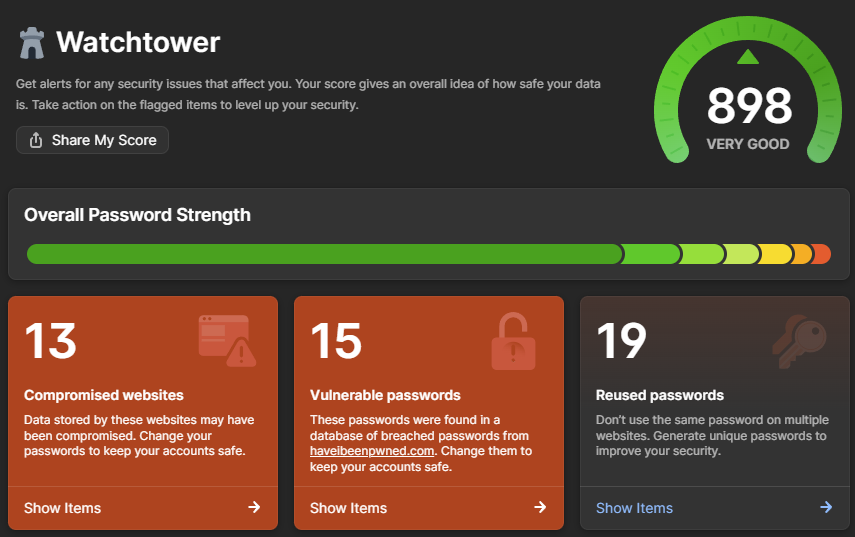
My vested interest in 1Password aside, Watchtower is the easiest, fastest way to understand your potential exposure in this incident. And in case you're wondering why I have so many vulnerable and reused passwords, it's a combination of the test accounts I've saved over the years and the 4-digit PINs some services force you to use. Would you believe that every single 4-digit number ever has been pwned?! (If you're interested, the ABC has a fantastic infographic using a heatmap based on HIBP data that shows some very predictable patterns for 4-digit PINs.)
It pains me to say it, but I have to, given the way the stealer logs made ridiculous, completely false headlines a couple of weeks ago:
This story has suddenly gained *way* more traction in recent hours, and something I thought was obvious needs clarifying: this *is not* a Gmail leak, it simply has the credentials of victims infected with malware, and Gmail is the dominant email provider: https://t.co/S75hF4T1es
— Troy Hunt (@troyhunt) October 27, 2025
There are 32 million different email domains in this latest corpus, of which gmail.com is one. It is, of course, the largest and has 394 million unique email addresses on it. In other words, 80% of the data in this corpus has absolutely nothing to do with Gmail, and the 20% of Gmail addresses have absolutely nothing to do with any sort of security vulnerability on Google's behalf. There - now let reporting sanity prevail!
I wanted to add this just to highlight how painful it has been to deal with this data. This corpus is nearly 3 times the size of the previous largest breach we'd loaded, and HIBP is many times larger than it was in 2019 when we loaded the Collection #1 data. Taking 2 billion records and adding the ones we hadn't already seen in the existing 15 billion corpus, whilst not adversely impacting the live system serving millions of visitors a day, was very non-trivial. Managing the nuances of SQL Server indexes such that we could optimise both inserts and queries is not my idea of fun, and it's been a pretty hard couple of weeks if I'm honest. It's also been a very expensive period as we turned the cloud up to 11 (we run on Azure SQL Hyperscale, which we maxed out at 80 cores for almost two weeks).
A simple example of the challenge is that after loading all the email addresses up into a staging table, we needed to create SHA1 hashes of each. Normally, that would involve something to the effect of "update table set column = sha1(email)" and you're done. That crashed completely, so we ended up doing "insert into new table select email, sha1(email)". But on other occasions the breach load required us to do updates on other columns (with no hash creation), which, on mulitple occasions, we had to kill after a day or more of execution with no end in sight. So, we ended up batching in loops (usually 1M records at a time), reporting on progress along the way so we had some idea of when it would actually finish. It was a painful process of trial, waiting ages, error then taking a completely different approach.
Notifying our subscribers is another problem. We have 5.9 million of them, and 2.9 million are in this data 🫨 Simply sending that many emails at once is hard. It's not so much hard in terms of firing them off, rather it's hard in terms of not ending up on a reputation naughty list or having mail throttled by the receiving server. That's happened many times in the past when loading large, albeit much smaller corpuses; Gmail, for example, suddenly sees a massive spike and slows down the delivery to inboxes. Not such a biggy for sending breach notices, but a major problem for people trying to sign into their dashboard who can no longer receive the email with the "magic" link.
What we've done to address that for this incident is to slow down the delivery of emails for the individual breach notification. Whilst I'd originally intended to send the emails at a constant rate over the period of a week, someone listening to me on my Friday live stream had a much better suggestion:
the strategy I've found to best work with large email delivery is to look at the average number of emails you've sent over the last 30 days each time you want to ramp up, and then increase that volume by around 50% per day until you've worked your way through the queue
Which makes a lot of sense, and stacked up as I did more research (thanks Joe!). So, here's what our planned delivery schedule now looks like:
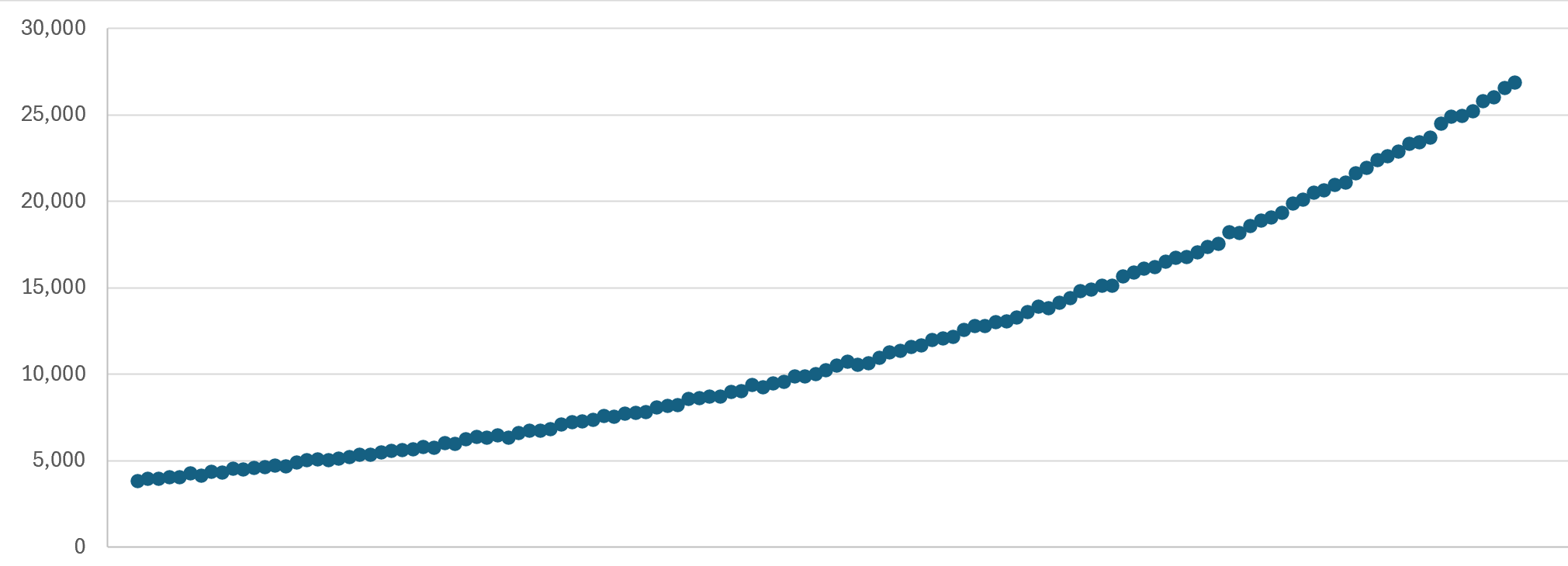
That's broken down by hour, increasing in volume by 1.015 times per hour, such that the emails are spread out in a similar, gradually increasing cadence. On a daily basis, that works out at a 45% increase in each 24-hour period, within Joe's suggested 50% threshold. Plus, we obviously have all the other mechanisms such as a dedicated IP, properly configured DKIM, DMARC and SPF, only emailing double-opted-in subscribers and spam-friendly message body construction. So, it could be days before you receive a notification, or just run a haveibeenpwned.com search on demand if you're impatient.
We've sent all the domain notification emails instantly because, by definition, they're going to a very wide range of different mail servers; it's just the individual ones we're drop-feeding.
Lastly, if you've integrated Pwned Passwords into your service, you'll now see noticeably larger response sizes. The numbers I mentioned in the opening paragraph increase the size of each hash range by an average of about 50%, which will push responses from about 26kb to 40kb. That's when brotli compressed, so obviously, make sure you're making requests that make the most of the compression.
This data is now searchable in HIBP as the Synthient Credential Stuffing Threat Data. It's an entirely separate corpus from that previous Synthient data I mentioned earlier; they're discrete datasets with some crossover, but obviously, this one is significantly larger. And, of course, all the passwords are now searchable per the Pwned Passwords guidance above.
If I could close with one request: this was an extremely laborious, time-consuming and expensive exercise for us to complete. We've done our best to verify the integrity of the data and make it searchable in a practical way while remaining as privacy-centric as possible. Sending as many notifications as we have will inevitably lead to a barrage of responses from people wanting access to complete rows of data, grilling us on precisely where it was obtained from or, believe it or not, outright abusing us. Not doing those things would be awesome, and I suggest instead putting the energy into getting a password manager, making passwords strong and unique (or even better, using passkeys where available), and turning on multi-factor auth. That would be an awesome outcome for all 😊
Edit: I've closed off comments on this blog post. As you'll see below, there was a constant stream of questions that have already been answered in the post itself, plus some comments that were starting to verge on precisely what I predicted in the last para above. Reading, responding and engaging is time-consuming and at this point, all the answers are already here both above and below this edit in the comments.
No it doesn't. Enter <old email address> → 5 data breaches → first one says:
> During 2025, the threat-intelligence firm Synthient aggregated 2 billion unique email addresses disclosed in credential-stuffing lists found across multiple malicious internet sources
It doesn't tell me which site or which of the many passwords used together with that address. Just that it has been in a generic data dump.
Stefán (the other HIBP developer) here :)
There are good reasons for the tech we picked. I’ll elaborate in a more detailed answer later today or tomorrow.
I love good nerd discussions.
They even got my kids social security numbers.
It's becoming less and even languages with a "strong legacy body" like PHP have sane defaults nowadays, but I do see them around when I do consultancy or security reports.
"Never fix something that aint broken" also means that after several years or a decade or more, your "back then best security practices" are now rediculously outdated and insecure. That Drupal setup from 2011 at apiv1docs.example.com could very well have unsalted hashes now. The PoC KPI dashboard that long gone freelancer built in flask 8 years ago? probably unsalted hashes. And so on.
In some cases the email address combined with the name of that site that leaked it can be enough to get people in trouble. E.g. "niche" dating sites.
What is the URL to your free HIBP alternative?
I use it with Vault/Bitwarden, which lets me generate email addresses of format `<uuid>@my.domain.com` when I create new login info for services.
Just be careful, you must press Save after or else you'll lose it.
I don't think there's any limit on gmail + codes.
The only way to fix the ToS issue you raised is through regulation protecting it.
Unfortunately we're going the other direction, with efforts like verified ID gaining traction in some parts of the world.
It's ironic because in most cases anonymity (or allowing an alternate identity that has its own built-up reputation) would offer real protection, while the verification systems are arguably security theatre.
I don't care what technical genius is built into your architecture, as soon as you force a user to plug their ID information into it, they've forked over control along with any agency to protect their own safety.
For others, I try to stay anonymous / aliased where possible.
This is exactly why so many do not want passkey, the recovery options aren't exactly great.
In the almost 10 years I've been running this setup, I think I hit a conflict one single time. I don't quite remember the details, but I think I accidentally edited something in the mobile app, and before saving, edited something else in the desktop app or vice-versa. So it was pretty much my fault.
Other than that, literally never had an issue. Password managers are by their nature mostly reads, and very occasional writes, so it's very hard to put yourself in a situation where conflicts happen, even if you don't pay attention to it. I've made an identical setup for my (fairly savvy but non-technical) fiancee, and she's never hit an issue either. I had to insist a bit for her to get on board, but years later she actually loves using KeePass. She's thanked me multiple times for how convenient it is not having to remember passwords anymore!
1password works in all the places, it's just not open source.
The individual plan is $10 a year. I've been a happy user for many years. I converted the last business I was at to exclusively using Bitwarden for Business as well.
If I follow the recommended best practice, I have a different password for every website or service. That could be hundreds of them. Am I supposed to rotate all of them every time there’s a breach?
Where? In what service? Did my password got leaked too? I can't change password / delete the account if I don't know where.
Did any other data got leaked? Anything sensitive? Do I have to cancel my credit card? Were any files leaked as well? My home location?
At this point HIBP is next to useless.
And how showing me WHAT is in the database about the email I proved I own would be spreading it? At this point if I want to learn it I need to either try to find the torrent with it (spreading it further!) or pay the criminals.
password: 46,628,605
your password: 609
good password: 22
long password: 2
secure password: 317
safe password: 29
bad password: 86
this password sucks: 1
i hate this website: 16
username: 83,569
my username: 4
your username: 1
let me login: 0
admin: 41,072,830
abcdef: 873,564
abcdef1: 147,103
abcdef!: 4,109
abcdef1!: 1,401
123456: 179,863,340
hunter2: 50,474
correct horse battery staple: 384
Correct Horse Battery Staple: 19
to be or not to be: 709
all your base are belong to us: 1
This service is toxic tbh.
So, here's a small blurb to clear up some misunderstandings. Excuse the typos since I'm writing in a bit of a hurry.
Most of the data processing is actually done in CLI tools we created and not in Azure SQL HyperScale. That includes things like:
* Extracting email addresses (from either csv or other delimited files). This can be problematic because it turns out people that gather this data aren't always thinking about encoding etc. so very often we need to jump through hoops to get it to work mostly correct. And when we see files like this huge breach that contains multi-terabyte CSVs, you need a tool that is both fast and memory efficient. For this breach we actually wrote our own to do this since other tools we tried often choked with out-of-memory errors or simply ran too slow. We will likely be open sourcing some of these tools.
* Extracting emails is one thing, extracting passwords is another and has totally different requirements.
Emails we need to extract in a case-insensitive way, for stealer logs we also need to parse the domains associated with the email. We need to hash the email because the hashes are used for k-anonymity purposes as well as batching purposes for internal processes.
Passwords we need to also hash (SHA1 and NTLM) for Pwned Passwords, but that also needs to make sure that we use consistent encoding. We also need to dedupe AND count them for prevalence purposes.
This we can all mostly do without touching Azure SQL HyperScale.
Once we have prepared the data, it needs to be inserted into the DB. It's not a case of creating simple binary lookup tables because we have different requirements and have at least three different ways of looking up an email address.
1. The full email (alias + domain)
2. Domain lookups (just domain)
3. K-anonymity lookups (first 6 chars of the SHA1 of the full email address)
This requires emails to not just be indexed based on the alias and the domain (which we denormalize into a domain-id). We also need indexes on things like the SHA1 prefix and we need to take into account when people have opted out of having their emails loaded.
Reasons for Azure SQL HyperScale: The email and domain search data used to be stored in Azure Table Storage. It was very convenient since it was fast to look up (partition keys and row keys) and cheap to store. There was one big drawback though. Azure Table Storage has no backup or point-in-time restore strategy. The only way to back up/restore data is to download it and reupload as a restore mechanism. Which is easy enough, except downloading the data was starting to take a week, even running in a VM in the same datacenter as the Table Storage account. And for a service like Have I Been Pwned, if we had a disaster or messed up a breahc load and had to roll-back, taking everything offline or having the wrong data for a week is unacceptable.
That's where Azure SQL HyperScale came in. The reason it was picked is not because Troy has a Microsoft RD or me being an MVP. We simply picked it because we both know MS SQL very well, we have good access to people that know it even better than us (for support purposes) and it has a very good, tried and tested backup/restore scenarios.
We do know that there are certainly better DBs that we can use, and it would probably be cheaper to run our own Postgres on our own hardware, or something on that note, but since it's just two people actively working on this and we hardly have time for development of new features and breach loads as it is, we simply couldn't spend valuable time on learning the ins and outs of a new DB engine, what it takes to run/maintain/optimize and all the other SRE responsibilities that come with it.
So in the end, it came down to convenience and what our time is best spent on doing.
Rest assured though, with everything we learned processing this breach, we will be much quicker to process the next really large breach, since we have taken a ton of learnings, new tools and processes that we'll be implementing. I'd expect the next breach of this size to take just a couple of days to process. Most other breaches take a lot less since they are a fraction of the size of this one.
Binary files: Pwned passwords is currently stored in blob storage containing just the first 5 chars of the hash in the filename and the rest in a line delimited, ordered fashion. I have already done some tests on having them binary files (since the hashes are always a fixed size, and the prevlance is just an int). So we could technically have each hash entry be 17 bytes (rest of the hash) + 4 bytes for the prevalence (unsigned 32-bit int) so just 21 bytes for each hash entry, and we skip newlines. And we might actually go that route in the not to distant future since it's easy to do.
Hope that clears up some of our thoughts here :) I'm planning on writing a blog soon with most of the things we learned so that might shed further light and insights on how we process this.
If the attacker steals the entire password table undetected, they have a large amount of time to generate soft collisions. After all they don’t need to hack any particular account, just some 50% of the accounts.
The time can be increased by some coefficient via salting, but the principles remain the same.
If you can pay by some method that doesn’t require name or address then go ahead and use a fake name.
I just trialled it but got a refund
I still recommend Bitwarden for password management for any "laypeople" since it will just work. Also worth noting that the basic functionality is free.
Fucked up my Costco registration, a variety of other things.
This sort of quasi-pseudonymity is required for basic security/privacy in 2025; It's the only way to get a handle on who's allowed to send you email, since we've never bothered to fix spoofing or impose a cost on spam. I've been trying to use it since Sneakemail was a free service back in the pre-Gmail days.
Also, they don’t always know where your info has leaked. Some datasets are aggregates.
Edit:
louvre: 7,219
https://en.wikipedia.org/wiki/Office_of_Personnel_Management...
edit: the relevant text is below
> The data breach compromised highly sensitive 127-page Standard Form 86 (SF 86) (Questionnaire for National Security Positions).[8][18] SF-86 forms contain information about family members, college roommates, foreign contacts, and psychological information. Initially, OPM stated that family members' names were not compromised,[18] but the OPM subsequently confirmed that investigators had "a high degree of confidence that OPM systems containing information related to the background investigations of current, former, and prospective federal government employees, to include U.S. military personnel, and those for whom a federal background investigation was conducted, may have been exfiltrated."
But I'm not sure. While maybe good password management is starting to soak into common computer usage, I don't think disk encryption is all that common just yet across the average user. It should be. But the average user is just moving to their phone anyway, with face id and encryption by default, instead of maintain their own personal device.
Corporate devices seem to be a bit better in this regard, though.
I've started using grouped aliases instead for a bunch of things.
but other than that I'm sure it's a good idea.
The list contains emails which have been part of some other breaches. In my domain I have 2 emails that were exposed that weren't my normal email address. One of them was a typo that I used sign up for one service which was later breached. The other one was something someone used to register to service that I have never used & that service was later breached. Those emails have never been used for anything else as far as I'm aware.
Of course judging from what posted there are likely some other services as well which were breached but wasn't noticed/published until now.
Hashing is so fast that you can hand-wave it away as zero cost relative to the time taken to read such a large amount of data. Also, you only have to do it once for the whole input, which means that it's O(n) time where 'n' is the gigabytes of passwords you have.
Sorting is going to need about O(n * log n) time even if it's entirely in memory, but more if it has to spool to disk storage then it'll take much longer than the hashing step.
PS: I just realised that 2 billion passwords is not actually that much data -- only 40 GB of hashes -- that's well within the range of what's "easy" to sort in-memory by simply creating an array of hashes that size and calling a standard library sort function.
(If I'm wrong their interface is very confusing and I cannot find the free access.)
Specifically it says this:
> Insufficient subscription. Only subscription-free breaches will be returned for this domain.
So I'm able to see 37 email addresses on my domain have been breaches, but I can't see which without paying $22 / month - https://haveibeenpwned.com/Subscription
> Domain search restricted: You don't have an active subscription so you're limited to searching domains with up to 10 breached addresses (excluding addresses in spam lists). Only results for subscription-free breaches are shown below, upgrade your subscription to run a complete domain search. If you believe you're seeing this message in error, make sure you're signing in to the dashboard with the correct email address (check your latest receipt if you're unsure).
I got a confirmation mail from System76, because apparently they feel the need to validate my credit card can’t be used without my approval, but my back does this by default…
This does help in filtering spam though
I would say they could fuck all the way off, but there are legitimate reasons to not let people sign up with an alias (like one person signing up for multiple free trials)
I can opt out of all of them. The only third party cookie I can't is a cloudfront one for crsf.
* blackmail the account owner
* make up an illness, create a donation page and get all their friends to donate
* find all connections over a certain age and disguise a phishing vector as literally anything!
* so many more
My observation is that in the last year or so the relative weight of these contributions has shifted massively because of AI code authoring.
It’s so fast and easy to whip up a few hundred lines of code with something like Gemini Pro 2.5 that I got it to make me a sorting benchmark tool just so I’d have a data point for a comment in this thread! I never would have had the time years ago.
For relatively “small” and isolated problems like password hash lookup tables, it’s amazing what you can do in mere hours with AI assistance.
If I was approaching this same problem just two years ago I would have picked SQL Hyperscale too, for the same(ish) reasons.
Now? I feel like many more avenues have been opened up…
If either ever stop period, especially one day to the next, FML...
I solved this by having /home for desktops/workstations on my NAS, but laptops had their own /home (with the NAS /home mounted somewhere locally). It’s not perfect but was way easier than dealing with the offline case.
It's a shame, IMO, that the Basic Auth never got updated or superceded by something with a better UX and with modern security.
Do you have a source for this claim of multiple past breaches? The only one I know of is the Okta breach.
For me they're still firmly in the 'one of the best options out there' category because cross-platform usability is incredibly good imho. I will admit it's been quite a while since I migrated from KeyPass so maybe these other options have improved too.
(go-)pass automatically does a push/pull due to several operations which keeps the password store in sync and Syncthing does its thing with the bare repos.
This has reduced my maintenance burden on my spouse's devices down to practically zero. The worst case to fix things is I need to `git pull --rebase` in the bare repo. The pass repo format uses individual encrypted files for each password entry (for better or worse) so I have yet to run into a conflict in the same entry.
Why not just push/pull git branches normally? I had previously been doing that but if you want devices to sync that may not always be online, then you must involve an always online git server (which isn't a great idea due to one of pass's weaknesses).
I suppose I can avoid the issue with some discipline.
Forcing a read/write right before and after each edit probably simplifies the sync scenario for them but I don't like relying on permanent internet access in my life since it's just not the case.
That being said, this is a good list:
https://www.reddit.com/r/privacy/comments/108wzvg/what_is_th...
Not sure I trust the longevity of some of them, though. I do use https://temp-mail.org/en/ or other similar services for some logins for some services I'm not afraid to lose access to, though (especially for places likely to spam me).
As some other comment suggested, these rules are easy to tackle by motivated spammers.
What they do have is a searchable password list not connected to any usernames.
My bank (I mean, they use SMS, but pretend they use TOTP) just care about not having to spend money on support because I used "password1!" as my password for every account and lose all my money.
I just want to log in to my bank.
If I've got a long, random, unique, securely-stored password, I don't actually care about having a second factor, I'm just enabling TOTP so that I don't have to copy/paste codes from my email or phone.
Without spaces, it's 681.
"You need an active subscription in order to provision an API key".
This is minimum $4.50 pm. Of course it's not a lot but let's not move the goalposts by discussing whether it's a fair price or not.
I don't want to say it's a lie, because I assume you didn't know.
API is a paid service, not free.
Separately, if I open the dashboard link while being logged out, the Web page promises:
"viewing stealer log entries that captured your email address"
Needless to say, this is also false (maybe true with a paid subscription?). If I click on the Stealer Logs in the dashboard it only shows "discord.com" (old account I used with this email was deleted years ago), and nothing else. Even though Breaches suggests there's something else.
This is not "logs" by any stretch of imagination.
Most banks in America indeed do offer (for free) the option to be notified for each transactions if you want.
One's employment history is not a factor in the score at all (contrast this with Europe).
Furthermore, privacy in the USA is so bad, the leaking of one's personal details which criminals can use to fraudulently obtain credit and ruin said score and possibly also one's finances is a major concern. Hence, "credit monitoring" exists in order to catch this kind of criminal activity in the act, and I don't know, become completely exasperated with the amount of ass pain that dealing with this then causes.
> The easiest approach in that case is to take out the subscription, then immediately cancel it. It'll still last the full month, more here: https://support.haveibeenpwned.com/hc/en-au/articles/7707041...
Sure it is, but at least you do get later, post leak, a slight chance find out where leak originated.
Data stealers seldom strip out that +extension part before the selling or otherwise dump it somewhere. And while it's passed on, you get to see address as you gave to that party that had leak. Reason seller don't strip of it is perhaps because they sell by number of unique addresses and while +extension usage is quite rare they make more money when they don't strip it off too.
Information where it leaked can be very useful information to pass leaker at least up till point they have announced they know about the compromise happened. I've done that since turn of century too many times I've lost count already and been quite many times the first to get them know that they had a problem there.
And sure I've received thank you emails that I gave them early head-up info about the issue.
Since we're all using a unique password for every service - <cough> we are doing that, aren't we (!!) - then how does that help?
Just having a family, kids, bills, schools, jobs, credit cards, banks, investments, insurance, shopping etc etc - the number of accounts many of us pick up can easily get into the hundreds.
The other good news in the meantime is that the EU (who originally mandated cookie consent) has finally woken up to the ridiculousness of leaving it up to the site, and will require browsers to enforce it instead.
If the thing suggests the EMAIL (+ associated password) has been compromised for some unknown account then to do a risk assessment I would have find which account it belongs to, not which currently-in-use passwords match the same datasets.
Those are different queries, providing different bits of information.
> Authorisation is required for all APIs that enable searching HIBP by email address or domain, namely retrieving all breaches for an account, retrieving all pastes for an account, retrieving all breached email addresses for a domain and retrieving all stealer log domains for a breached email addresses. There is no authorisation required for the free Pwned Passwords API.
And searching by account wouldn't tell you anything useful. It would just say "Synthient Credential Stuffing Threat Data". It wouldn't tell you what password to change, because HIBP doesn't know what site the password(s) that it found in "Synthient Credential Stuffing Threat Data" were associated with, and HIBP doesn't maintain a database linking passwords to emails.
So no, I don't think "in this day and age" necessarily. And I believe that the vast majority of "normal" users don't do full drive encryption either. But yes, we should.
On some level, my employer uses emails as the primary key for customer accounts, the baseline identifier which all information is filed under. It's quite ridiculous.
I have such a hard time understanding why people think e-mail addresses are some kind of special thing hard to come by.
At that point, frankly, I am gaining nearly nothing from external TOTP for most services. If you have access to my Vault, and were able to fill my password from it, I am already so far beyond pwned that it’s not even worth thinking about. My primary goal is now to get the website to stop moaning at me about how badly I need to configure TOTP (and maybe won’t let me use the service until I do). If it’s truly so critical I MUST have another level of auth after my Vault, it needs to be a physical security key anyway.
I was begging every site ever to let me use TOTP a decade ago, and it was still rare. Oh the irony that I now mostly want sites to stop bugging me for multiple factors again.
I get amazing convince with this setup, and it’s still technically two factor. To get into my Bitwarden account you need to know both my Bitwarden password and have my yubikey. If you can get into my Bitwarden, then I am owned. But for most of us who are not say, being specifically targeted by state agents, this setup provides good protection with very good user experience.
1. On firefox first start-up is slow after unlocking to actually find a password for a site. The interface says, "No logins for xyz.com" for maybe 5 seconds before the login loads.
2. Along those lines when I open it first thing in FF the box for its password isn't focused and I have to click it.
3. The keyboard combo to open it also only works in Chrome.
4. To add a new login I have to go to the site. I haven't figured out how to do it from within the plugin.
5. We get alerts at least once a week about service disruptions but they don't seem to actually affect me.
6. I like Bitwarden's command line tool but I bet 1Password has something at least as good that I haven't found yet.
With Apple's approach, I'd have to go through each account and move it from something@icloud to something@new-domain.
However, for people who don't want to mess around with custom domain names and e-mail providers, apple's approach is very practical. You just need to tell it to "hide your email" when you register somewhere and you're good to go.
They're hard to explain to users, the implementations want to lock people to specific devices and phones, you can't tell someone a passkey nor type it in easily over a serial link or between two devices which don't have electronic connectivity.
I'm not comfortable with my entire online identity being protected by a single line of defence which is a company that I'm paying a few dollars a month to. Not having to type 6 digits off a phone is a pretty minor convenience for me.
You don't need to query old passwords, only current passwords. If you're talking about accounts that you've forgotten the password to: then do you care about those accounts? If yes, probably best to do a password reset and set a new password. If you don't care about the account, then why bother?
As for why HIBP doesn't provide an API linking passwords to emails: HIBP has no database that links passwords and emails. So they can't provide any way to query that. They don't want to be in the business of linking passwords to emails.
However, that approach assumes a slowly changing list where you don't mind that there's a delay of maybe a few hours to merge in a new list. Large lists of password leaks are infrequent, so this works fine for this usecase.
A two-layer approach with a small frequently updated hash set on top of the large infrequently built sorted list is more generally applicable to a wider range of problems.
Bloom filters are probabilistic, and aren't much faster to create than a sorted list. They also require 'k' random reads to test, where k is a small constant such as 3 to 5. If the filter is large (gigabytes), then you can't efficiently load it into many front-end web servers. If you query it over the network as a blob, you need 3-5x the I/O operations. You can wrap it in an API service that holds it in-memory, but that's still much more complex than simply storing and querying a blob in S3 or Azure Storage directly.
"Clever" algorithms like min-heaps or whatever are likely not worth the trouble. My decade-old PC can sort 2 billion hashes in about 30 seconds using the Rust "Rayon" crate. There are cloud VMs available for about $2/hr that have about a terabyte of RAM that could sort any reasonable sized list (10s of billions) in a few minutes at most.
The original article mention a week of 80 vCores of SQL Hyperscale, which is about $6,000 at PayG rates!
Sure, developer time is expensive, blah blah blah, but waiting a week ain't cheap either, and these days an AI can bang out the code for a password file hashing and sorting utility in a minute or two.
How's this for making it actionable:
Regardless of whether or not someone can associate it with your email, if your password has been seen in the wild, change it.
There you go.
Every other endpoint requires a subscription. This is very far from “The API is free”.
> searching by account wouldn't tell you anything useful
The API can return the domains listed in stealer logs for a specific email address: https://haveibeenpwned.com/API/v3#StealerLogsForEmail
I've lost track of the number of places that use the e-mail as an unchangeable identifier. Bonus points for my company liking to change domain names for sport, which just confuses support.
And even big tech companies, who should know better, do this. Like the big blue CDN that's in the middle of half the web's traffic. Who also, for some reason, can't be arsed to send e-mails reliably if you need to change your account.
That's why services like Firefox Relay exists. Just generates a new email address for you whose inbox gets relayed to your regular email, no fuss needed. I don't personally pay for it but I do use the heck out of the free email addresses they provided.
Had to get an engineer involved.
The phone support person was confused about that symbol too, what an odd email.
You're right that the API for stealer log info isn't free.
However, the dashboard can provide you information about stealer logs for free.
Server-side (assuming weak password storage or weak in-transit encryption) or phishing (more advanced phishers may get the codes too but only single instance of the code, not the base key).
> What is stopping webmasters from using 100FA?
The users would hunt them down and beat them mercilessly?
what are you talking about? after I'm dead?