People wrongly think passkeys are like Bitcoin wallets, where losing them means there's absolutely nothing you can do, your account is simply lost forever.
Losing a passkey is exactly like losing your password, which is to say, that for 99% of services, you can reset your password/passkey really easily. There's a prominent "Reset Password" button right on the login form. It sends you an email or an SMS, you click it, and it lets you reset right then and there. You can reset your passkey in exactly the same way.
It is not that easy to reset if you lose your password to your Apple, Google, Facebook, etc. They all have a bunch of factors that they use to authenticate you if you reset your password, and they don't even document which ones they use.
So, if you care about those accounts, you've got to make sure you have backup access. They all let you generate and print "backup codes" (emergency passwords) and store them in a fireproof safe or a literal bank vault. Do that!
As everybody knows, you can't store all of your passwords in a password manager. You need something outside of the password manager to login to the manager itself. That's why 1Password/LastPass is called that; you still need one last password that you keep and manage yourself.
That's true of passkeys, too. You can login to Google with passkey, but if Google is your password manager that stores your passkey, you need something else outside of Google's password manager to login to Google. Whether it's a password, a backup code, a YubiKey, whatever, you need one more thing to login to Google, ideally more than one, so you can back it up and keep it safe.
Security engineers are prioritizing preventing key copying over lockout issues, unilaterally, on literally billions of people. It improves their metrics internally, at the cost of an externality on the entire world. This kind of stuff invites odious regulation as more and more stories of lockout with no recourse surface.
And unlike passwords, there is no good provider migration story. There is a roach motel issue. Yes it is being 'worked on', but passkeys and such have been out for many years, the willful denial whenever you ask people running these standards about these issues is incredibly irritating. The fact they tend to avoid questions about this like politicians decreases trust in the motives of such standards.
Stop the insanity.
That said, if you have a mac with a fingerprint scanner they sure are very convenient option.
And don't get me started on terrible vendors like Rippling that only support a single passkey! Madness.
I’m a technical guy, but I really don’t understand what the fuck is going on when I use a passkey. All I know is one day it appeared as an option and it let me login to things. I don’t really understand where it lives, what device it’s tied to, how scanning a QR code on Google Chrome on my phone magically logs me in, etc etc.
The user was not educated on this. Hacker News is the top 1% of computer power users. You gotta understand to someone’s grandma or mom or brother who works in real estate none of this makes any sense nor will they educate themselves on what it is.
I also think there's still an enormous ignorance from passkey devs that lots of people want to occasionally log into personal services from locked down corporate machines, and the flow to deal this is at best terrible but more often non-existent, and developers with typically enhanced privileges just aren't able to conceive how difficult this is.
Passkeys, stored in Bitwarden, give a lot of the same convenience, but without the vendor lock-in. We shouldn't be scaring people away from passkeys, when commonly used alternatives are much worse.
>The unfortunate piece is that your product choices can have both positive and negative impacts on the ecosystem as a whole. I've already heard rumblings that KeepassXC is likely to be featured in a few industry presentations that highlight security challenges with passkey providers
Until service providers are no longer allowed to:
1) force the type of passkey stores used (e.g. hardware vs software) when I am providing the passkey store
2) force me to MFA (e.g. forcing touch ID, entering pin or unlock password, etc) when attempting to use a passkey
I'll continue to stick to plain old boring password + TOTP. I fully understand the security trade-offs like phishing resistance but password + TOTP is secure enough for me.Since it's been a few days, sometimes I am logged out of either bank/traders and also the password manager.
So it's open the bank site, click on login/password, password manager browser extension asks to login. Type password manager password. It asks for 2FA. Unlock phone with face. Find app, open app, unlock app with face. Approve password manager login. Click on bank login/password again. I am in! No, bank wants to 2FA with mobile. Unlock phone with face. Open bank mobile app, unlock with face. Get code or approve login. Back to computer, type code or click approve.
Repeat that 12 times for all the accounts, and by the end of it I have neck pain with all the "pick up phone to face unlock" motions.
I am a bit paranoid so I turn on 2FA and passkeys and whatnot, but all of this makes me want to use `123password` everywhere and never change it.
1. Passkey prompts asking if I want to use a phone or security key when I only have one (or neither!) registered. The UI for this gets in the way and should only ever present itself if I happen to have both kinds of devices registered.
2. Passkeys should have had the portability and flexibility that ssh keys have from the start. Making it so your grandparents can use public key cryptography and gain a significant advantage in securing their accounts in a user friendly manner should have been the priority. Seems like vendor lock-in was the goal from the start.
I dont want to use google/apple/microsoft for any credential manager because: google is evil; apple has locked me out of my apple id (and lost things like the recordings of conversations with my father during his hospice); microsoft keeps getting worse and more annoying to use.
So ok, I need some credential manager. I used keepass previously... but how do I vet other credential managers? I dont want an online backup. I want my credentials to only be on my computers. So now I gotta learn about which apps are ok, don't have cloud synching, can export files, and be compatible with MacOS.
And I have to learn what is FIDO? Like FICO? why do I need to synch with FIDO? what is it? will it give my credential store to others?
How is this easier or more convenient than a user/pass with 2fa?
I feel like I am going to accidentally leak my credentials and have no way of knowing
On Apple devices I get neat experience out of the box, on Linux (+Firefox) I forced to use Bitwarden because Mozilla is being Mozilla.
Never had any issues ever with passkeys.
Succumbing to lock-in can smooth some (but not all) rough edges and creates it's own restrictions and risks.
TOTP for the win --- it's the simpler practical alternative.
It's now late into 2025, and just over a year since I wrote my last post on Passkeys. The prevailing dialogue that I see from thought leaders is "addressing common misconceptions" around Passkeys, the implication being that "you just don't understand it correctly" if you have doubts. Clearly I don't understand Passkeys in that case.
And yet, I am here to once again say - yep, it's 2025 and Passkeys still have all the issues I've mentioned before, and a few new ones I've learnt! Let's round up the year together then.
The major change in the last 12 months has been the introduction of the FIDO Credential Exchange Specification.
Most people within the tech community who have dismissed my claim that "Passkeys are a form of vendor lockin" are now pointing at this specification as proof that this claim is now wrong.
"See! Look! You can export your credentials to another Passkey provider if you want! We aren't locking you in!!!"
I have to agree - this is great if you want to change which walled-garden you live inside. However it doesn't assist with the day to day usage of Passkeys when you have devices from different vendor ecosystems. Nor does it make it easier for me to use a Passkey provider outside of my vendors platform provider.
Example: Let's say that I have an Windows Desktop and a Macbook Pro - I can sign up a Passkey on the Macbook Pro but I can't then use it on the Windows Desktop. FIDO Credential Exchange lets me copy from Apple's Keychain to whatever provider I use on the Windows machine. But now I have to do that exchange every time I enrol a new Passkey. Similar I would need to do the reverse from Windows to Mac every time that I sign up on the Windows machine.
So day to day, this changes very little - but if I want to go from "all in on Apple" to "all in on Google" then I can do a big-bang migration and jump from once garden to the next. But if you have mixed device ecosystems (like uhhh ... you know. Most of the world does) then very little will change for you with this.
But if I use my own Credential Manager (e.g. Vaultwarden) then I can happily work between multiple ecosystems.
Today I saw this excellent quote in the context of why Passkeys are better than Password+TOTP in a Password Manager:
Individuals having to learn to use password management software and be vigilant against phishing is an industry failure, not a personal success.
Even giving as much benefit of the doubt to this statement, and that the "and" might be load bearing we have to ask - Where are passkeys stored?
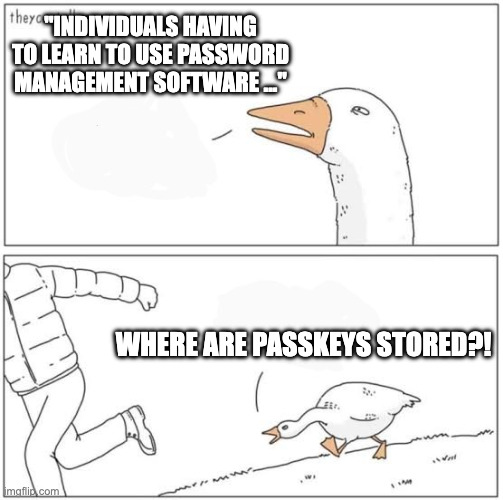
So we still have to teach individuals about password (credential) managers, and how Passkeys work so that people trust them. That fundamental truth hasn't changed.
But not only this - if a person is choosing a password+TOTP over a Passkey, we have to ask "why is that"? Do we think that it's truly about arrogance? Do we think that this user believes they are more important? Or is there and underlying usability issue at play? Why might we be recommending this to others? Do we really think that Passkeys come without a need of education?
Maybe I'm fundamentally missing the original point of this comment. Maybe I am completely misinterpretting it. But I still think we need to say if a person chooses password and TOTP over a Passkey even once they are informed of the choices, then Passkeys have failed that user. What could we have done better?
Perhaps one could interpret this statement as you don't need to teach users about Passkeys if they are using their ✨ m a g i c a l ✨ platform Passkey manager since it's so much nicer than a password and TOTP. And that leads to ...
In economics, vendor lock-in, [...] makes a customer dependent on a vendor for products, unable to use another vendor without substantial switching costs.
See, the big issue that the thought leaders seem to get wrong is that they believe that if you can use FIDO Credential Exchange, then you aren't locked in because you can move between Passkey providers.
But if we aren't teaching our users about credential management, didn't we just silently lock them into to our platform Passkey manager?
Not only that, when you try to go against the platform manager, it's the continual friction at each stage of the users experience. It makes the cost to switch high because at each point you encounter friction if you deviate from the vendors intended paths.
For example, consider the Apple Passkey modal:
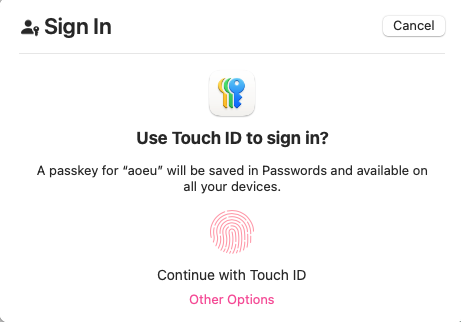
MacOS 15.7.1 taken on 2025-10-29
The majority of this modal is dedicated to "you should make a Passkey in your Apple Keychain". If you want to use your Android phone or a Security Key, where would I click? Oh yes, Other Options.
Per Apple's Human Interface Guidelines:
Make buttons easy for people to use. It’s essential to include enough space around a button so that people can visually distinguish it from surrounding components and content. Giving a button enough space is also critical for helping people select or activate it, regardless of the method of input they use.
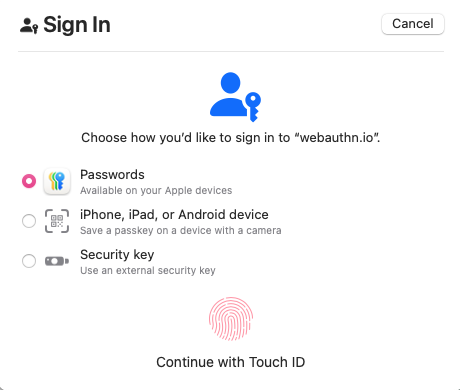
MacOS 15.7.1 taken on 2025-10-29
When you select Other Options this is what you see - see how Touch ID is still the default, despite the fact that I already indicated I don't want to use it by selecting Other Options? At this point I would need to select Security Key and then click again to use my key. Similar for Android Phone.
And guess what - my preferences and choices are never remembered. I guess it's true what they say.
Software engineers don't understand consent, and it shows.
Google Chrome has a similar set of Modals and nudges (though props to Chrome, they at least implicitly activate your security key from the first modal so a power user who knows the trick can use it). So they are just as bad here IMO.
This is what I mean by "vendor lockin". It's not just about where the private keys are stored. It's the continual friction at each step of the interaction when you deviate from the vendors intended path. It's about making it so annoying to use anything else that you settle into one vendors ecosystem. It's about the lack of communication about where Passkeys are stored that tricks users into settling into their vendor ecosystem. That's vendor lock-in.
We still get reports of people losing Passkeys from Apple Keychain. We similarly get reports of Android phones that one day just stop creating new Passkeys, or stop being able to use existing ones. One exceptional story we saw recently was of an Android device that stopped using it's onboard Passkeys and also stopped accepting NFC key. USB CTAP would still function, and all the historical fixes we've seen (such as full device resets) would not work. So now what? I'm not sure of the outcome of this story, but my assumption is there was not a happy ending.
If someone ends up locked out of their accounts because their Passkeys got nuked silently, what are we meant to do to help them?
Dr Paris Buttfield-Addison was locked out of their Apple account.
I recommend you read the post, but the side effect - every Passkey they had in an Apple keychain is now unrecoverable.
There is just as much evidence about the same practices with Google / Android.
I honestly don't think I have to say much else, this is terrifying that every account you own could be destroyed by a single action where you have no recourse.
We still have issues where services that are embracing Passkeys are communicating badly about them. The gold standard of miscommunication came to me a few months ago infact (2025-10-29) when a company emailed me this statement:
Passkeys use your unique features – known as biometrics – like your facial features, your fingerprint or a PIN to let us know that it’s really you. They provide increased security because unlike a password or username, they can’t be shared with anyone, making them phishing resistant.
As someone who is deeply aware of how webauthn works I know that my facial features or fingerprint never really leave my device. However asking my partner (context: my partner is a veternary surgeon, and so I feel justified in claiming that she is a very intelligent and educated woman) to read this, her interpretation was:
So this means a Passkey sends my face or fingerprint over the internet for the service to verify? Is that also why they believe it is phishing resistant because you can't clone my face or my fingerprint?
This is a smart, educated person, with the title of doctor, and even she is concluding that Passkeys are sending biometrics over the internet. What are people in other disciplines going to think? What about people with a cognitive impairment or who not have access to education about Passkeys?
This kind of messaging that leads people to believe we are sending personal physical features over the internet is harmful because most people will not want to send these data to a remote service. This completely undermines the trust in Passkeys because we are establishing to people that they are personally invasive in a way that username and passwords are not!
And guess what - platform Passkey provider modals/dialogs don't do anything to counter this information and often leave users with the same feeling.
A past complaint was that I had encountered services that only accepted a single Passkey as they assumed you would use a synchronised cloud keychain of some kind. In 2025 I still see a handful of these services, but mostly the large problem sites have now finally allowed you to enrol multiple Passkeys.
But that doesn't stop sites pulling tricks on you.
I've encountered multiple sites that now use authenticatorAttachment options to force you to use a platform bound Passkey. In other words, they force you into Google or Apple. No password manager, no security key, no choices.
I won't claim this one as an attempt at "vendor lockin" by the big players, but it is a reflection of what developers believe a Passkey to be - they believe it means a private key stored in one of those vendors devices, and nothing else. So much of this comes from the confused historical origins of Passkeys and we aren't doing anything to change it.
When I have confronted these sites about the mispractice, they pretty much shrugged and said "well no one else has complained so meh". Guess I won't be enrolling a Passkey with you then.
One other site that pulled this said "instead of selecting continue, select this other option and you get the authenticatorAttachment=cross-platform setting. Except that they could literally do nothing with authenticatorAttachment and leave it up to the platform modals allowing me the choice (and fewer friction burns) of choosing where I want to enrol my Passkey.
Another very naughty website attempts to enroll a Passkey on your device with no prior warning or consent when you login, which is very surprising to anyone and seems very deceptive as a practice. Ironically same vendor doesn't use your passkey when you go to sign in again anyway.
Yep, Passkeys Still Have Problems.
But it's not all doom and gloom.
Most of the issues are around platform Passkey providers like Apple or Google.
The best thing you can do as a user, and for anyone in your life you want to help, is to be educated about Credential Managers. Regardless of Passwords, TOTP, Passkeys or anything else, empowering people to manage and think about their online security via a Credential Manager they feel they control and understand is critical - not an "industry failure".
Using a Credential Manager that you have control over shields you from the account lockout and platform blow-up risks that exist with platform Passkeys. Additionally most Credential Managers will allow you to backup your credentials too. It can be a great idea to do this every few months and put the content onto a USB drive in a safe location.
If you do choose to use a platform Passkey provider, you can "emulate" this backup ability by using the credential export function to another Passkey provider, and then do the backups from there.
You can also use a Yubikey as a Credential Manager if you want - modern keys (firmware version 5.7 and greater) can store up to 150 Passkeys on them, so you could consider skipping software Credential Managers entirely for some accounts.
The most critical accounts you own though need some special care. Email is one of those - email generally is the path by which all other credential resets and account recovery flows occur. This means losing your email access is the most devastating loss as anything else could potentially be recovered.
For email, this is why I recommend using hardware security keys (yubikeys are the gold standard here) if you want Passkeys to protect your email. Always keep a strong password and TOTP as an extra recovery path, but don't use it day to day since it can be phished. Ensure these details are physically secure and backed up - again a USB drive or even a print out on paper in a safe and secure location so that you can "bootstrap your accounts" in the case of a major failure.
If you are an Apple or Google employee - change your dialogs to allow remembering choices the user has previously made on sites, or wholesale allow skipping some parts - for example I want to skip straight to Security Key, and maybe I'll choose to go back for something else. But let me make that choice. Similar, make the choice to use different Passkey providers a first-class citizen in the UI, not just a tiny text afterthought.
If you are a developer deploying Passkeys, then don't use any of the pre-filtering Webauthn options or javascript API's. Just leave it to the users platform modals to let the person choose. If you want people to enroll a passkey on sign in, communicate that before you attempt the enrolment. Remember kids, consent is paramount.
But of course - maybe I just "don't understand Passkeys correctly". I am but an underachiving white man on the internet after all.
EDIT: 2025-12-17 - expanded on the password/totp + password manager argument.
I'm curious what the "good provider migration story" you're referring to here for passwords is?
Password managers by-and-large haven't agreed on a standardised interchange format for import/export - a few of them have some compatibility helpers for importing from specific popular competitors but they're all in different formats, no consistent formats.
The above goes for passkeys as it does passwords - import/export will include your passkeys - so I don't see much difference in the provider migration story.
On the other hand, the FIDO Credential Exchange Format does solve the above problem (if/when providers choose to adopt it), so passkeys are at least further along the path of creating a "good provider migration story" than passwords ever were.
1. First I get redirected to a special sign-in page.
2. Then I sign-in with my email only.
3. Then it finally asks me for a password, even for services that would never reasonably use SSO or have another post-email receive process.
4. Then I get redirected again to enter 2fa.
5. Then these websites ask if I want to create a passkey. No, I never want to create a passkey, and you keep asking me anyway.
6. Then, and only then, do I get to finally go back to using the service I wanted, and by then, you've lost whatever my `?originalUrl=` was, and I have to find it again.
No, don't send me a magic link. Because then I have to go do 4 more steps with Gmail or another mailbox provider and now signing in has become 10 or more steps.
No, don't tell me getting rid of passwords will help most of the population, and then force all of us to do the above, and blatantly lie to us that it's better.
Stop it. Get some help.
Passwords right now are outright better.
And by the way, door keys could be copied.
People keep falsely imagining that Google is setting people up with passkey-only accounts, with no way to backup their login credentials. Gosh, wouldn't that be terrible?
That would be like 1Password letting you create a passkey-only account with no password, storing the only passkey in 1Password. The whole idea makes no sense. 1Password doesn't do that, and neither does Apple, Google, Microsoft, etc. (We can all imagine them doing something that stupid, but, it turns out, they don't.)
Pre-passkeys, the most common lost-credential scenario was creating a fresh Gmail address on a new device (an Android phone) with a password and forgetting both your Google password and your password for your cellular-phone carrier (AT&T, T-Mobile, etc). Your Google password would be stored locally on your phone and in Google's cloud, but when you lose your phone and forget your passwords, no backups remain.
At that point, you're pretty much screwed. Google can't email you a reset-password link, because Gmail is your email. Google can't send you a 2FA SMS until you get a new phone with the same number, but you can't convince AT&T to do that, because they want to send a reset-password link to your email, which you don't have, or SMS to your phone, which you don't have.
(The cellular carriers don't even allow you to show government ID at a physical store. They don't allow you to take over a phone number that way, because people could then threaten/bribe a T-Mobile store representative to falsely claim that you presented valid government ID, taking over other people's accounts. If you walk into a store, they'll just put you on the phone with customer service, where they'll insist that you provide your AT&T password, or reset your password via email or SMS. If you've lost your email and your phone and all your passwords, you're completely out of luck.)
If Google allowed you to create a passkey-only account, with no SMS 2FA and no way to backup your passkey, that would be even worse.
But, luckily for all of us, they don't even allow that, and they're certainly not pushing it unilaterally on billions of people.
If I log in to a site from my machine, and set up a passkey, but then log into that site from another machine, it'll just see no passkey present and ask for my password, yes?
A passkey is a local password on a device that could be shared through all the password manager gymnastics, but its not required as I understand it.
As a tech-savvy user fully aware of the underlying machinations involved with passkeys, I greatly prefer their simple, fast login experience over: username submit password submit TOTP submit, and especially over the much-worse "we've emailed you a code" login slog.
If someone passes away, their family members can use the Emergency Kit to gain access to and use all their credentials - including their passkeys.
(The Emergency Kit is also intended to allow your to recover your passkeys and other credentials in the event you forget your master passphrase or lose all your devices.)
If he can't get his account back in any reasonable amount of time what chance do I have?
(I see I missed a big HN discussion on this: https://news.ycombinator.com/item?id=46252114 - 1038 comments)
I don't want a passkey on my logins but there is no way to disable this prompt on the 3 websites that constantly annoy me for them.
Drives me batty. The company I work for is already paying you for the service I'm using. We use SSO for EVERYTHING, I've already 2FA Authenticated the login, and even if I set up a passkey I will still have to 2FA the login.
I don't use these sites in any personal capacity, and I would never use a site that harasses me in any way if I was not absolutely required to in order to earn a paycheck.
You're not going to get any money out of me, why are you torturing me?
You can't back up your passkeys and wind up with something you put in a safe on a USB key or something and vendors have been aggressively trying to make that harder.
This is usually a bad idea, and is sometimes expressly forbidden.
But. more generally, there must be a flow for accessing your account when the passkey is not available, and possibly cannot be recovered.
It would be nice if you could use some legal apparatus to ratchet these agreements into a trust. Corps would hate it though, so it will probably be illegal to do.
The default, built-for-the-masses implementation of passkeys is called "synced passkeys". They are designed to sync between all your enrolled devices, ideally using end-to-end encryption.
You authenticate with whatever device you happen to be using at the time - phone, tablet, laptop, desktop - doesn't matter. If you lose one, you replace that device and re-enroll - then all your passkeys magically re-appear on the new device.
If you're cross-platform, modern password managers work across ecosystems - for example, 1Password syncs passkeys between Mac, Windows, iOS, Android, and Linux. If you're all-in on Apple, their native passkey implementation syncs passkeys between all your Apple devices. I thought Google and Microsoft do something similar now.
It's a real mystery why people believe passkeys have to be stored on your phone only.
Corporate installs disable all USB functionality, and remove the ability to sync profiles? Something like that?
I disagree. It is very annoying when some service fails to show an option on the grounds that I can't use it. It makes it difficult to resolve problems. If the option is just missing, I have no way to tell whether the company doesn't provide the option, whether the company made some sort of mistake (they can't provide an email option because they lost my email), whether I made a mistake, or whether the company just has a bad UI that tries to hide the option. And don't forget the situation where I tried to google online for some help in using the UI, I found a 6 month old Reddit post showing the option, and I can't figure out if the company changed the UI in the past six months.
They should show it greyed out with a note "no key of this type registered".
If you had multiple devices set up on the site (each site must have done this individually), you just use a different device.
If you had synced your passkeys somewhere (note that the spec allows sites to block this, though I'm not aware of any actually doing so), you sync them to the new thing and log in normally.
If you did none of those, it's gone forever. Do the account recovery process, if one exists.
So it degrades to equal or worse than passwords in all cases (which cannot block backups or syncing, and you can enter them individually by hand so you're not exposing all your passwords to the device, and you can communicate them over the phone or in writing), for device loss purposes.
Restoring access in this scenario is imo one of their worst qualities.
FIDO is a standards body which produces specifications used by these systems.
Instead we've got Passkeys and the general promise by omission that I will be banned from using Keepass to store and backup my passwords as I see fit on my own devices.
People want me to trust the corporate overlords who at every turn have practiced lock in and rent seeking tactics.
Which probably looks a lot like a password.
https://chromewebstore.google.com/detail/lazyotp/eoihmklnjkn...
A tech-savvy relative of such a user should help them generate rescue codes, write them on a piece of paper, and store them along with all other important documents. Ideally the paper should also read: "Call me before using any of these codes! <phone number>."
I don't think requiring an encrypted backup (with a key or secret that YOU control) by default is "preventing users from being able to export their own private keys".
Exactly. The passkey vendors state that the goal was to make phishing not just difficult but impossible. This means plaintext access to your credentials is forbidden forever, regardless of your level of expertise, and regardless of the complexity of the process to export/import them. The purpose of the so-called "secure credential exchange" is once again to prevent you from directly accessing your credentials. You can go from one passkey vendor to another, but you're always locked in to one passkey vendor or another.
Any credential system that makes it impossible to write something down on a piece of paper, take it to a new computer, and login to a website is just a gateway to vendor lock-in. You can manually manage your own ssh keys but for some reason not your passkeys.
As an Apple Mac user, what annoys me the most is that the use of passkeys in Safari requires iCloud Keychain, which of course requires iCloud and an Apple Account. [EDIT: Obviously I'm talking about built-in support. I'm well aware of third-party software, so everyone can stop replying to this now, please!] You can't do local-only passkeys, not even if you take responsibility for backing up your own Mac.
The passkey vendors took some good theoretical ideas, such as site-specific credentials and public-key cryptography, and totally mangled the implementation, making it hostile to everyone except themselves.
For phishing protection, passkey as a single factor is better than memorized password + TOTP/SMS two factor.
On the other hand, I thought I had fully researched how passkeys work and literally never came across it.
So it kind of just continues to support my concern that passkeys are just too complicated to understand. If I'm at another device I need to log into, I would have just assumed I couldn't.
There needs to be a simple mental model for users. I'm not saying passkeys can't underlie that, but I think the UX still just hasn't been fully figured out yet.
Passwords on a piece of paper for better or worse do not have that problem.
> Add a passkey? "amazon.com" supports passkeys, a stronger alternative to passwords that cannot be leaked or stolen. A passkey for "xxxxx@xxxxx.com" will be saved in "Passwords". Touch ID to Save Passkey Cancel
I don't have the slightest idea what "Passwords" is as the destination. My iCloud keychain? My Google account? My 1Password?
The government can, though. I’m not sure if there’s any existing laws pertaining to transfer of or access to general accounts after death (as opposed to bank accounts which I’m pretty sure there are laws about).
My will says that my executor can access my accounts which alleviates Apple from legal risk if they do grant access but I’m pretty sure they are not obligated to do so.
And on a separate note, I fundamentally disagree for political reasons with the idea that the websites should be able to block specific passkey providers.
a key based approach is great. Knowing (the passphrase) and Having (the key) is a good way to authenticate.
Care to cite this statement?
> As an Apple Mac user, what annoys me the most is that the use of passkeys in Safari requires iCloud Keychain, which of course requires iCloud and an Apple Account. You can't do local-only passkeys, not even if you take responsibility for backing up your own Mac.
You can use any credential manager you choose. You don't have to use Apple Passwords / iCloud Keychain.
You’re still not platform locked…
I use bitwarden, Google and a yubikey for passkeys. Which of these am I locked into?
This is not true - browsers including Safari support passkeys managed by third-party password managers.
I'm using 1Password with browser extensions for Safari and Chrome on macOS and iOS and it works seamlessly with my passkeys, which are not stored in iCloud Keychain.
> you're always locked in to one passkey vendor or another.
This will change: https://1password.com/blog/fido-alliance-import-export-passk...
But again, kicking the can down the road.
For the general public, they already rely on either Google or Apple for pretty much all of their digital life. Nothing wrong with extending this to passkeys, it's convenient and makes sense for them.
I’ll accept that the attestation parts of the protocol may have had some ulterior motives (though I’m skeptical), but not having to reveal your credential to the verifying party is the entire benefit of passkeys and hugely important to stop phishing. I think it’s disingenuous to argue that this is somehow unnecessary.
Completely untrue, Safari on both Mac and iOS supports third-party password managers for both traditional passwords and passkeys.
Bitwarden is my personal choice.
which is why at the very least your email provider gives you a recovery kit to print out (the equivalent of the notebook) and if you can get back into that account you'll likely be able to get into whatever else you signed up for.
There's no difference here between passkeys and any other central storage be it a password manager or a physical notebook. If you lose that access, well you're screwed. But it always beats having hotdog123 as your password for 70 different sites.
Apple's native passkey implementation doesn't require doesn't require you to install extra software, and the passkeys sync by default. I thought Google's and Microsoft's were similar - but I haven't tried them.
> And even if you do, it’s discouraged
Really? Where is it discouraged? I thought synced passkeys are intended as the solution for consumers.
> the spec is allowed to deny you access
Yeah but I thought that's for enterprise use cases, not consumer. E.g. employers that want to enforce device type restrictions on their employees.
If I’m using a passkey to login to my Gmail via chrome browser but used my phone what just happened - did it save in chrome? My Google account? My iPhone?
All sync seamlessly and support the major (and often minor) browsers.
I can't speak for other platforms; I stopped helping ${EXTENDED_FAMILY} with non-Apple questions because the crap I had to diagnose, debug and deal with for Windows and Android was worse than ${DAY_JOB}.
A passkey basically offloads user identification to the OS (especially a mobile OS). It should not be the only way to identify though.
An ssh-style key + password is fine. A username + password + TOTP should also be fine. But 99.9% of passwords should be in a password manager anyway.
Rescue codes should always be generated and written down when activating a passkey or similar, but this requires certain discipline, some feeling of importance. And many web sites that require registration don't seem important for users, especially one-time users. What makes sense for your Google account, or your bank account, feels like too much ceremony for a low-stakes login like a random online store; losing a login to it does not feel like a big loss to many people.
And even if they're not, if they have a computer or tablet, the passkey will still be available there assuming they share an account.
You can also recover your iCloud Keychain via a designated/trusted Recovery Contact (e.g. spouse, who presumably hasn't destroyed their phone at the exact same time), or via iCloud Keychain escrow.
https://support.apple.com/guide/iphone/passwords-devices-iph...
It was rather frustrating to watch: "You're a huge fan of X but don't know how X works?"
For example, two people can't make a contract between them that gives one the right to visit the other in a hospital, nor the right to make medical-care/power-of-attorney decisions. You also can't contract-away the guardianship (or ownership) of children, etc.
I think you know what I meant and are just being pedantic here for no good reason.
Do you think I'm unaware of 1Password? I don't want to use 1Password any more than I want to use iCloud Keychain.
Technically, pendantically, Safari "supports" anything that third-party Safari extensions support. I'm a Safari extension developer myself. But this is totally different from how Safari supports the use of passwords, which is all built in, requires no third-party software, can be local-only, allows plaintext export/import, etc.
> This will change: https://1password.com/blog/fido-alliance-import-export-passk...
This is literally what I meant by the so-called "secure credential exchange" in my previous comment.
I don't want to use a Yubikey. It's a pain in the butt. I just want to use my Mac, with no more damn dongles.
Keepass is a vendor, and one who doesn't even have a Safari extension.
> Nothing wrong with extending this to passkeys, it's convenient and makes sense for them.
I didn't say there was anything wrong with extending this to passkeys. The problem is the lock-in, e.g., Safari requires iCloud keychain for passkeys, but not for passwords. And there is no plaintext export/import, unlike with passwords.
Nobody can convince me that passkeys are good when I buy a Mac and use the built-in Safari but can't even use passkeys to log in to websites unless I give my passkeys to a cloud sync service or have to install some third-party "solution" (for a problem that should not exist in the first place). That experience is so much worse than passwords.
https://news.ycombinator.com/item?id=46252114 https://news.ycombinator.com/item?id=42350245
They closed my PayPal account for TOS violation after donating to The OpenBSD Foundation. I wouldn't trust them as far as I could throw them.
I think you misunderstood what I was talking about. The credential exchange protocol is for exporting passkeys from one credentials manager and importing them into another credentials manager. It has nothing to do with the relying party.
On the other hand, you can understand why that is not remotely clear from the message. It's a generic term in quotes. If it said it would be saved "in the Passwords application (and synced to iCloud)", then I'd actually understand it.
So Apple is either being intentionally obtuse or incompetently confusing here, and I don't know which is worse. And it's UX crap like this which is why I still won't use passkeys, because I don't know where anything is going.
1. https://fidoalliance.org/specs/cx/cxf-v1.0-ps-20250814.html#...
Repeating this doesn’t make it true. https://developer.apple.com/documentation/authenticationserv...
All of the 3rd party credential managers I’ve used that support passkeys work with safari, and through the APIs that Apple offers the credential managers you can even pick your default CM and never think about iCloud again…
I've already addressed this pedantry: https://news.ycombinator.com/item?id=46304137
No, this is a passkeys problem. Safari does not force lock-in of passwords.
Why in the world would I want to ditch my web browser just to use passkeys? I'd rather ditch passkeys.