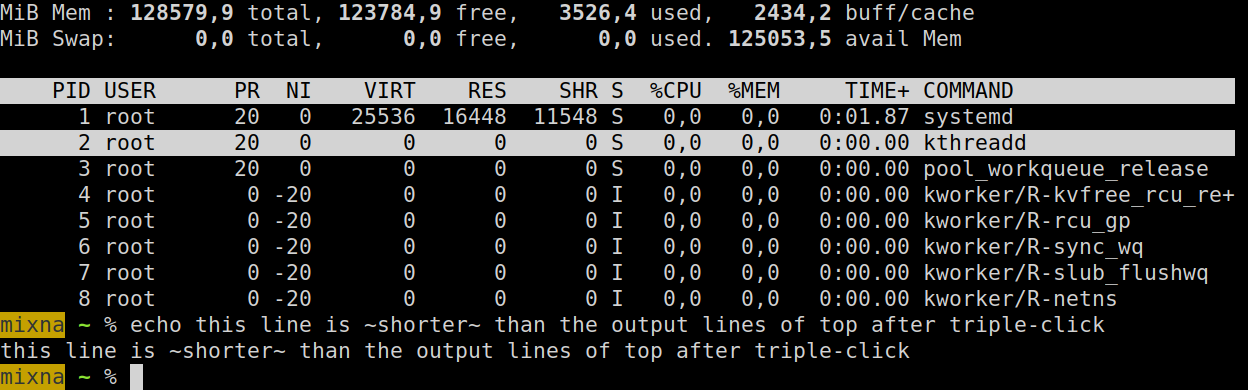
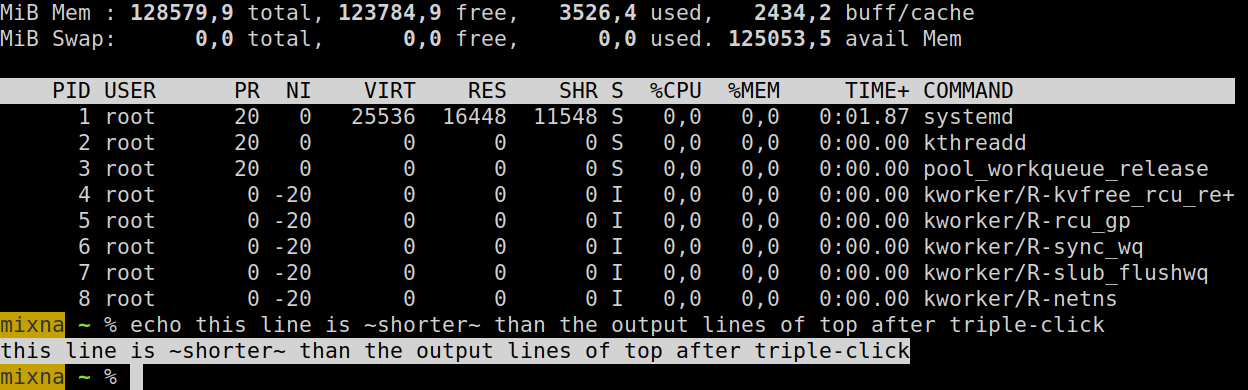
Arguably my hardware is a lot simpler and I don't use Nvidia. But I just want to point out that, for all the flak wayland receives, it can work quite well.
But I'm also running all AMD hardware, that may be a factor. Life is too short for nvidia bullshit on Linux.
I feel like the biggest issue for Wayland is the long tail of people using alternative WMs. A lot of those projects don't have manpower to do what amounts to a complete rewrite.
I honestly don't have a preference between Wayland and X, but I feel very strongly about keeping my current WM. XWayland supposedly works, but I'm not in any hurry to add an extra piece of software and extra layer of configuration for something I already have working exactly the way I want. If Wayland offered some amazing advantages over X, it might be different, but I haven't seen anything to win me over.
I know that it wasn't originally conceived to do what it does today, but I've never had any problem using it, and when I tried Wayland I didn't notice any difference whatsoever.
Is it just that it's a pain to write apps for it..?
Windows and Mac Os, for all their faults, are unquestionably ready to use in 2026. If you are a Linux on desktop advocate, read the comments and see why so many are still hesitating.
Wayland fixes that, so that part is a huge improvement to me. Unfortunately this also limited my choice of Distros as not all of them use Wayland. I landed on Ubuntu again, despite some issues I have with it. The most annoying initially was that the Snap version of Firefox didn't use hardware acceleration, which is just barely usable.
This is a common mischaracterizarion of what happened. This API, GBM, was a proprietary API that was a part of Mesa. Nvidia couldn't add GBM to their own driver as it is a Mesa concept. So instead Nvidia tried to make a vendor neutral solution that any graphics drivers could use which is where you see EGLStreams come into the picture. Such an EGL API was also useful for other nonwayland embedded usecases. In regards to Nvidia's proprietary driver's GBM support, Nvidia themselves had to add support to the Mesa project to support dynamically loading new backends that weren't precompiled into Mesa. Then they were able to make their own backend.
For some reason when this comes up people always phrase it in terms of Nvidia not supporting something instead of the freedesktop people not offering a way for the Nvidia driver to work, which is a prerequisite of Nvidia following such guidance.
You don't always have to replace something that works with something that doesn't but is "modern."
My guess is that we'll only start seeing Wayland adoption when distributions start forcing it or making it a strong default, like what happened with systemd.
Good news: My laptop (Lenovo P53) can now suspend / resume successfully. With Ubuntu 25.04 / Wayland it wouldn't resume successfully, which was a deal breaker.
Annoying thing: I had a script that I used to organize workspaces using wmctrl, which doesn't work anymore so I had to write a gnome-shell extension. Which (as somebody who's never written a gnome-shell extension before) was quite annoying as I had to keep logging out and in to test it. I got it working eventually but am still grumpy about it.
Overall: From my point of view as a user, the switch to Wayland has wasted a lot of my time and I see no visible benefits. But, it seems to basically work now and it seems like it's probably the way things are headed.
Edit: Actually I've seen some gnome crashes that I think happen when I have mpv running, but I can't say for sure if that's down to Wayland.
One of the obstacle that I faced is wrong resolution. On Xorg I could just add new mode and get up and running quickly. On Wayland, I have to either do some EDID changes or go through even worse.
Don’t know what the deal is with Linux desktop experience. I have encountered various forms of perfection and had them taken away.
Once on my XPS M1330 I clicked to lift a window and then three finger swiped to switch workspace and the workspace switched and I dropped the window. It was beautiful. I didn’t even notice until after I’d done it what an intuitive thing it felt like.
Then a few years later I tried with that fond memory and it didn’t work. Where did the magic go?
Probably some accidental confluence of features broken in some change.
And is it possible to get fullscreen but within a container (e.g. get rid of browser gui to see more in a small container)
Sounds like someone made a listener that listens on key events, but didn't bother to check the state of the event, meaning it hits releases as well. Should be easy to verify by keeping them pressed long enough to trigger the key repeat events.
> I also noticed that font rendering is different between X11 and Wayland! The difference is visible in Chrome browser tab titles and the URL bar, for example:
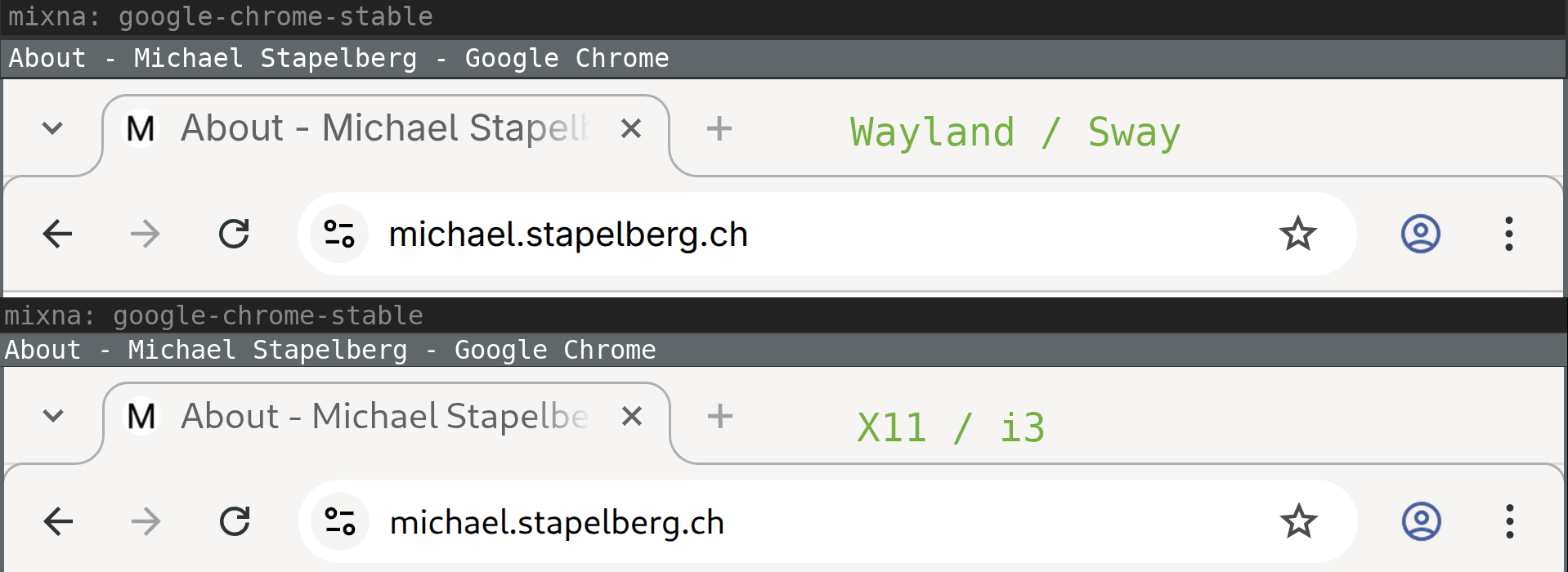
Tab title display is not owned by wayland unless you are running with the client side decor extension, which Gnome is not. So looking at the application or GUI framework (GTK in this case) are really the two only choices.
You might want to give wayshot a "shot"? https://github.com/waycrate/wayshot
Turns out: absolutely no problem. The tooling around Wayland and adjacent programs is way more modern and functional. Great experience. Can recommend switching in 2026.
For me, the unintuitive truth with Linux is: once you’re on a rolling release, most problems just vanish. I still love Debian for prod, but for experimenting and development, rolling release any day.
No. Wayland still has hilariously terrible bugs and can't adequately do very basic things we have been doing for ~30 years on X, even in 2026, and because it's not compatible with anything it requires ditching all your stable, well-tested, solid software that you've been using for decades to replace it with incompatible software that doesn't work half the time.
To summarise the summary: it's in pretty much the same place as it was in 2025. And 2020. And 2016.
For instance, a compositor may not support a clipboard, and the "data" related interfaces must be queried for availability (those interface are stable in core) and the client must disable such functionality if not there (for instance, wterm terminal is faulty because it forces a compositor to have such interfaces... but havoc terminal is doing it right). I don't know yet if libSDL3 wayland support "behaves" properly. wterm fix is boring but should be easy.
As wayland usage, it is probably almost everwhere (and Xwayland is there for some level of legacy compatibility).
(I am currently writting my own compositor for AMD GPUs... in risc-v assembly running on x86_64 via an interpreter)
I screen share and video call with Slack and Google Meet.
I use alacritty/zsh/tmux as my terminal. I use chromium as my browser, vscode and sublime text as code editors.
Slack, Spotify, my studio mic, my Scarlett 2i2, 10gbe networking, thunderbolt, Logitech unifying receiver…. Literally everything “just works” and has been a joy to use.
Only issues I’ve ever faced have been forcing an app to run native Wayland not xwayland (varies from app to app but usually a cli flag needed) and Bluetooth pairing with my Sony noise canceling which is unrelated to Wayland. Periodically I get into a dance where it won’t pair, but most of the time it pairs fine.
This should ideally be solved at the kernel level - and I would argue it is solved there. Linux has the DRM abstraction for this very reason. Wayland actually builds on top of this abstraction, while Xorg was sitting in a strange position, not squarely in userspace.
There isn't any technical reason we couldn't have a single standardized library, at the abstraction level of wlroots.
I'm having more issues with games/websites/programs that didn't take high display refresh rate into account, than Wayland, at this point.
You will also note many items in the post above are papercuts that might go unnoted like input feeling a little worse or font issues.
I had an old Chromebook which had Lubuntu on it - screen tearing was driving me crazy so I switched to Wayland and it is buttery smooth. No mean feat given the decrepit hardware.
I'm sure someone will be along to tell me that I'm wrong - but I've yet to experience any downsides, other than people telling me I'm wrong.
I have a 7,000 word blog post and demo videos coming out this Tuesday with the details but I think I uncovered a driver bug having switched to native Linux a week ago with a low GPU memory card (750 Ti).
Basically on Wayland, apps that request GPU memory will typically crash if there's no more GPU memory to allocate where as on X11 it will transparently offload those requests to system memory so you can open up as much as you want (within reason) and the system is completely usable.
In practice this means opening up a few hardware accelerated apps in Wayland like Firefox and most terminals will likely crash your compositor or at the very least crash those apps. It can crash or make your compositor unstable because if it in itself gets an error allocating GPU memory to spawn the window it can do whatever weird things it was programmed to do in that scenario.
I reported it here: https://github.com/NVIDIA/egl-wayland/issues/185
Some end users on the NVIDIA developer forums looked into it and determined it's likely a problem for everyone, it's just less noticeable if you have more GPU memory and it's especially less noticeable if you reboot daily since that clears all GPU memory leaks which is also apparent in a lot of Wayland compositors.
This post is a lot more relatable.
As an aside, regarding remote Emacs - I can attest that Waypipe does indeed work fantastically for this. Better than X11 ever worked over the network for me.
I, too, suffer from the pgtk is slow issue (only a 4k monitor though it's mitigable and manageable for me)
1) Hugely enjoyable content - as usual - by Michael Stapelberg: relevant, detailed, organized, well written.
2) I am also an X11 + i3 user (and huge thanks to Michael for writing i3, I'm soooo fast with it), I also keep trying wayland on a regular basis because I don't want to get stuck using deprecated software.
I am very, very happy to read this article, if only because it proves I'm not the only one and probably not crazy.
Same experience he has: everytime I try wayland ... unending succession of weird glitches and things that plain old don't work.
Verdict: UNUSABLE.
I am going to re-iterate something I've said on HN many times: the fact that X11 has designs flaws is a well understood and acknowledged fact.
So is the fact that a new solution is needed.
BUT, because Wayland is calling themselves the new shite supposed to be that solution DOES NOT AUTOMATICALLY MEAN they actually managed to solve the problem.
As a matter of fact, in my book, after so many years, they completely and utterly failed, and they should rethink the whole thing from scratch.
And certainly not claim they're the replacement until they have reached feature and ease of use parity.
Which they haven't as Michael's article clearly points out.
The Chrome crashes when resizing a window doesn't makes any sense, apart from being a WM fault. The Xwayland scaling, again, has native scaling support on Gnome. Same for the monitor resolution problem (which he acknowledged). Same for font rendering. Idk.
Actually, GPU acceleration was why I initially switched. For whatever reason, this GPU (Radeon VII) crashes regularly under X11 nearly every time I open a new window, but is perfectly stable under wayland. Really frustrating! So, I had some encouragement, and I was waiting for plasma-wayland to stabilize enough to try it properly. I still have the X11 environment installed as a fallback, just in case, but I haven't needed to actually use it for months.
Minor pain points so far mostly include mouse acceleration curves being different and screen capture being slightly more annoying. Most programs do this OS-level popup and then so many follow that up with their own rectangle select tool after I already did that. I had some issues with sdl2-compat as well, but I'm not sure that was strictly wayland's fault, and it cleared up on its own after a round of updates. (I develop an SDL2 game that needs pretty low latency audio sync to run smoothly)
This stuff has been flawless on AMD systems for a while a couple of years now, with the exception of the occasional archaic app that only runs on X11 (thus shoved in a container).
Maybe in another decade or so.
Hopefully AnyDesk and Remmina will address this issue before KDE ends it's mainline X11 support next year.
>So from my perspective, switching from this existing, flawlessly working stack (for me) to Sway only brings downsides.
Kudos to Michael for even attempting it. Personally nowadays unless my working stack stops, well, working, or there're significant benefits to be found, don't really feel even putting the effort to try the shiny new things out.
Is this specific to the WM he used or does HW acceleration straight up not work in browsers under Wayland? That to me seems like a complete deal breaker.
Because both have their own portal implementation/compositor with their own issues and service spec implementations. KDE has xdg-desktop-portal-kde, and GNOME has xdg-desktop-portal-gnome. On top of that each (still) has their own display server; KDE has KWin, and GNOME has Mutter.
> The reference compositor, Weston, is not really usable as a daily driver.
Weston is probably good for two things: Running things in Kiosk mode and showcasing how to build a compositor.
That's why you should at least use xdg-desktop-portal if you are not running KDE or GNOME. But this is a vanilla compositor (without implementations of any freedesktop desktop protocols), and as-is has no knowledge of things like screenshots or screensharing.
If you run any wlroots based compositor except Hyprland you should run xdg-desktop-portal-wlr which does implement the desktop protocols org.freedesktop.impl.portal.Screenshot and org.freedesktop.impl.portal.ScreenCast.
If you use Hyprland you should run its fork xdg-desktop-portal-hyprland instead which additionaly has things like file picking built in. Additionally you can/should run xdg-desktop-portal-gtk and/or xdg-desktop-portal-kde to respectively get GTK ("GNOME") and QT ("KDE") specific implementations for desktop protocols. And you absolutely should use xdg-desktop-portal-gtk instead of xdg-desktop-portal-gnome, because xdg-desktop-portal-gnome really doesn't like to share with others.
> With Wayland the each desktop is reinventing the wheel
Not really true, as I mentioned earlier there's still a DE specific display server running in the background (like Mutter and KWin-X11 for X11), and graphics in each compositor is driven directly by the graphics driver in the kernel (through KMS/DRM).
In fact, on paper and in theory, the architecture looks really good: https://wayland.freedesktop.org/architecture.html. However, in practice, some pretty big chunks of functionality on the protocol level is missing but the freedesktop contributors, and the GNOME and KDE teams will get there eventually.
2026 and you will still run into plenty of issues with random behaviour, especially if you run anything based on wlroots. Wine apps will randomly have pointer location issues if you run multiple displays. Crashes, video sharing issues with random apps, 10 bit issues. Maybe in 2027 we'll finally make it. But I feel like these 20 years of development could have been better spent on something that doesn't end up with 4 or more implementations.
People who are thinking of a Wayland replacement at this stage, mostly because they don't like it, will waste their time reinventing the mature parts instead of thinking about how to solve the remaining problems.
There is also a misunderstanding of the ideology the Wayland developers subscribe to. They want Wayland to be display only, but that doesn't mean they would oppose an input protocol or a window protocol. They just don't want everything to be under the Wayland umbrella like systemd.
I switched to get support for different scaling on different outputs and I have gone back.
But.. why? How many WM is feasible to have? Is it really an area where we want a "wide waist"? Should a WM be its own thing? Why not just make it an extension/plugin of a desktop environment, and have only a few of the latter? Being a library call is more efficient and easier to maintain, over maintaining an IPC API (especially that with X, X is just a dumb proxy to the compositor).
> And it shows in complexity and even in power use
You surely mean that X is more complex and has a higher power use, right?
The big thing to me is, Wayland servers have way way less responsibility than X. X had a huge Herculean task, of doing everything the video card needed. It was a big honking display server because it took up a huge chunk of the stack to run a desktop.
Wayland servers all use kernel mode setting kernel buffers, so much more. So much of the job is done. There is a huge shared code base that Wayland has that X never had, good Kernel's with actual drivers for GPUs.
If we wanted one stable platform that we could not innovate on, that was what it was and we all had to deal with it... We'd all just use Mac. punchyHamster is saying The Cathedral is the right model and The Bazaar is the bad model, of the famous Cathedral vs Bazaar.
But the model really does not enable fast iteration & broader exploration of problem spaces. The ask doesn't even make sense: there are incredibly good libraries for making Wayland servers (wlroots, smithay, more). And they're not always even huge, but do all the core protocols. Some people really want professional industrial direct software that they never have to think about that only works one way and will only evolve slowly and deliberately. I'm thankful as fuck Wayland developers aren't catering to these people, and I think that's the wrong abstraction for open source and the wrong excitement to allow timeless systems to be built grown and evolved. We should avoid critical core dependencies, so that we can send into the future, without being tied to particular code-bases. That seems obvious and proposing otherwise to consign ourselves to small limp fates.
Now, if only people deciding to replace X11 with Wayland heeded your suggestion...
so, as Douglas Adams put it: someone elses problem.
Looking at your github, it seems you use StumpWM. It seems they are also working on a wayland version under the name Mahogany. Development seems pretty active: https://github.com/stumpwm/mahogany
> I'll probably switch, grudgingly, to XWayland whenever X gets removed from Debian.
FWIW I think "wayback" is the project for this. It seems to be trying to use XWayland to run full X11 desktop environments on top of Wayland: https://gitlab.freedesktop.org/wayback/wayback
Other way around: Maintaining Xorg itself is awful.
>Windows and Mac Os, for all their faults, are unquestionably ready to use in 2026.
Quite ironically there're people refusing to leave Windows 7, which has been EOS since 2020, because they find modern Windows UI unbearable. Windows 11 being considered that bad that people are actually switching OSes due to it. Have seen similar comments about OSX/macOS.
The big difference between those and Linux is that Linux users have a choice to reject forced "upgrades" and build very personalized environments. If had to live with Wayland could do it really, even if there're issues, but since my current environment is fine don't really need/care to. And it's having a personalized environment such a change is a chore. If was using a comprehensive desktop environment like GNOME (as many people do), maybe wouldn't even understand something changed underneath.
For example there's tons of legacy cruft in there intended for working with hardware that hasn't been in use since circa 1992. Things like monochrome 3D displays with weird resolutions like 1200x240 and non-square pixels. Having that stuff in there makes supporting more modern hardware more difficult than it needs to be (and is also part of the reason behind why e.g eliminating tearing is very difficult), and it adds huge complexity to the codebase for no benefit on modern systems, which makes it much more difficult (but NOT impossible, as some love to claim) to maintain.
There's also the wayland fanboy's go-to criticism: there are also some security shortcomings in the protocol. You can find details on this shortcoming which I have never in 30 years seen exploited in the opening paragraphs of every pro-wayland article on the internet. (it is a legit shortcoming. There have been multiple suggestions on how to address it over the decades without starting over from scratch. xlibre is working on one of these)
But over the years I've slowly become more and more convinced that the biggest issue people have with X is that it's not shiny and new.
I'm expecting them to announce a rewrite in rust any day now ;)
Everything actually feels significantly more solid/stable/reliable than modern Windows does. I can install updates at my own pace and without worrying that they'll add an advert for Candy Crush to my start menu.
I also run Bazzite-deck on an old AMD APU minipc as a light gaming HTPC. Again, it's a much better experience than my past attempts to run Windows on an HTPC.
As with everything, the people having issues will naturally be heard louder than the people who just use it daily without issues.
Windows uses _you_.
But with Linux being mostly hobbyist-friendly a number of folks have custom setups and do not want to be forced into the standardized mold for the sake of making it super smooth to transition from Windows.
I have such a setup (using FVWM with customized key bindings and virtual layout that I like, which cannot work under Wayland), so can I donate some money to Microsoft to keep Windows users less grumpy and not bringing yet another eternal September to Linux. I like my xorg, thank you very much :).
Well, I will be honest, I have had enough "edit this xorg.conf files to boot to a black screen" for a lifetime, so that's not the rebuttal you think it is.
If anything, the (gnu/)linux desktop has certainly matured over the years and on well-selected hardware it more often than not "just works" nowadays, which was certainly not something you could tell before.
That's fine as long as it goes both ways. If Wayland works for you, great. Equally, for some of us it doesn't work.
It works nicely for me but as it uses /dev/input/eventX i don't know if it's consistent across reboots for hardcoded scripts (although so far it worked without issues)
I'd be investigating that issue instead, should have errors in systemd/journalctl or whatever you use for managing daemons. I'm using ydotool on Arch, pretty much all defaults, together with a homegrown voice dictation thing, and it's working 100% of the times.
> By the way, when I mentioned that GNOME successfully configures the native resolution, that doesn’t mean the monitor is usable with GNOME! While GNOME supports tiled displays, the updates of individual tiles are not synchronized, so you see heavy tearing in the middle of the screen, much worse than anything I have ever observed under X11. GNOME/mutter merge request !4822 should hopefully address this.
I use it extensively, it's easy to use, UI is compact but clear, works perfectly all the time. I honestly don't care that it is unmaintained at this point.
After an Nvidia graphics driver release everything cleared up to be very usable (though occasionally stuff still crashed, like once or twice a week). I heavily dislike Nvidia and went with AMD just around a month ago, zero issues.
I'm curious to hear about what hardware you have.
To me the biggest issue of Wayland is that it aimed, on purpose, to imitate Windows or OS X or any GUI that is not built on the idea of a client/server protocol.
From TFA:
> I’ll also need a solution for running Emacs remotely.
If only there was something conceived from the start as a client/server display protocol...
I noticed it's far far more work to build a wm for Wayland than it is for Xorg.
Outside of the domain of Firefox/Chromium, screencasting is much seamless. But 90% of the screen-sharing happens in browsers.
So much NVidia hate, but in 23 years the only problems I've had with NVidia on Linux were when they dropped support for old GPUs. Even on proprietary hardware like iMacs and MacBooks.
But to each their own.
https://www.youtube.com/watch?v=GWQh_DmDLKQ
https://people.freedesktop.org/~daniels/lca2013-wayland-x11....
It makes sand-boxing security impossible. The moment a process has access to the Xorg socket, it has access to everything. It is weird that this oftentimes misses from the discussion though.
LOL
I installed a new windows 11 yesterday on a fairly powerful machine, everything lags so much on a brand new install it's unreal. Explorer takes ~2-3 seconds to be useable. Any app that opens in the blink of an eye under Linux on the same machine takes seconds to start. Start menu lags. It's just surrealistic. People who say these things work just have never used something that is actually fast.
For me, Wayland seems to work OK right now, but only since the very latest Ubuntu release. I'm hoping at this point we can stop switching to exciting new audio / graphics / init systems for a while, but I might be naive.
Edit: I guess replacing coreutils is Ubuntu's latest effort to keep things spicy, but I haven't seen any issues with that yet.
Edit2: I just had the dispiriting thought that it's about twenty years since I first used Ubuntu. At that point it all seemed tantalizingly close to being "ready for primetime". You often had to edit config files to get stuff working, and there were frustrating deficits in the application space, but the "desktop" felt fine, with X11, Alsa, SysV etc. Two decades on we're on the cusp of having a reliable graphics stack.
I don't entirely love MacOS (mostly because I can't run it on my desktop, lol). But it does fractional scaling so well, I always choose the "looks like 1440p" scaling on 4K resolution, and literally every app looks perfect and consistent and I don't notice any performance impact.
On windows the same thing, except some things are blurry.
On Linux yeah I just have to bear huge UI (x2 scaling) or tiny UI (X1) or live with a noticeable performance delay that's just too painful to work with.
OTOH though, there are a lot of reasons for projects like GNOME and KDE to want to switch to Wayland, and especially why they want to drop X11 support versus maintaining it indefinitely forever, so it is beneficial if we at least can get a hold on what issues are still holding things up, which is why efforts like the ones outlined in this blog post are so important: it's hard to fix bugs that are never reported, and I especially doubt NVIDIA has been particularly going out of their way to find such bugs, so I can only imagine the reports are pretty crucial for them.
So basically, this year the "only downsides" users need to at least move into "no downsides". The impetus for Wayland itself is mainly hinged on features that simply can be done better in a compositor-centric world, but the impetus for the great switchover is trying to reduce the maintenance burden of having to maintain both X11 and Wayland support forever everywhere. (Support for X11 apps via XWayland, though, should basically exist forever, of course.)
But, I am stuck on Xorg only because of one app that I have to use to work.
> My guess is that we'll only start seeing Wayland adoption when distributions start forcing it or making it a strong default, like what happened with systemd.
This is already happening. in my knowledge, Archlinux, Ubuntu already switched to Gnome 49, which do not support X without recompilation. So most likely, any distro using Gnome 49 upwards will not provide Xorg by default. KDE also going to do it soon.
Xorg is going away pretty soon
I believe its step to the right direction, only issue is some annoying app holding us back
Right now with X11, IIRC, if one application has access to your display they can read what is going on in other applications running on the same display.
If browser tabs were able to do that, all hell would break loose. So why do we accept it from applications?
Anyway, despite this, I still use X11 instead of Wayland because of all the shortcomings.
https://forums.tomshardware.com/threads/nvidias-name-change....
When I got to know their products, they were nVidia.
FWIW, I have a KDE Wayland box and OBS works for screen recording. Slightly more complex than simplescreenrecorder, but not bad.
There's just no way to make that make sense.
Freedesktop.org really looks like a Microsoft subsidiary. Only if they could learn from the past.
You need this amount of control to be able to properly filter and secure things. Wayland actually learnt that from X security extensions failure.
To me, Wayland failures are more on the organisational and change management part. In inside, it would probably have been better to provide a core library rather a reference implementation. Also, a lot of pieces needed to fall into place once the ball started rolling and some of them like PipeWire took quite some time to be ready.
The sorry fragmentation and complete unwillingness to work together of the various Linux DE also didn't help. I think Gnome constant NIH syndrome and overall capture of Freedesktop has a lot to do with where we are.
Not always. In my experience Zoom screencasting is much, much worse than on browsers in Wayland. But that isn't terribly surprising given how generally bad Zoom UX is on Linux.
May I suggest Xephyr, which will give you the X11 sandboxing that wayland people like to claim is impossible under X, using tech that's been around for about 20 years.
And you won't even need to replace your entire software stack with incompatible beta-quality software.
But then I try and focus on what each author thinks is important to them and it’s often wildly different than what’s important to me.
But a lot of internet discussion turns into very ego-centric debate including on here, where a lot of folks who are very gung-ho on the adoption of something (let’s say Linux, but could be anything) don’t adequately try and understand that people have different needs and push the idea of adoption very hard in the hopes that once you’re over the hump you might not care about what you lost.
I feel the same and find it a bit strange. I am happy with hyprland on wayland since a few months back but somehow it reminds me of running enlightenment or afterstep in the 90s. My younger self would have expected at least a decade of "this is how the UI works in Linux and it's great" by now.
Docker and node both got started after wayland and they are mature enterprise staples. What makes wayland such a tricky problem?
Windows:
- Per-display scaling can be set to multiple of 25% (you can set more precise scaling ONLY if you apply it to all displays)
- Windows across monitors with different scaling look weird
- Mouse cursor movement across monitors based on screen pixels rather than scaled, which is inaccurate to physical distances when using monitors with different DPI
- Under the hood handles all monitors with one rectangular logical monitor, which renders a lot of unnecessary pixels in any multi monitor setups where the monitors don't form a perfect rectangle
- All monitors use the underlying refresh rate of the primary monitor for everything other than the mouse cursor (for example, if you have a secondary 60Hz monitor, timings on it will not be smooth unless your primary monitor refresh rate is a multiple of 60)
Wayland:
- Per-display scaling can be set to multiple of 5%
- Windows do not span across monitors. This can be a downside in case you want to span a window across multiple monitors with the same scaling, but is mostly an upside
- Mouse movements across screen boundaries based on actual scaled distance, so you can tune it perfectly to the physical screen distances
- Each monitor can have its own refresh rate, and windows in each monitor actually update at the refresh rate of that monitor
- Each monitor is logically separate, no unnecessary pixels rendered
MacOS:
- Similar to Wayland but per-display scaling is much more restrictive for external displays, sometimes there isn't any way to set a scale between 100% and 200% without blurring the screen
- Apple Silicon hardware also limits number of total monitors supported, so it is impossible to use big multi-monitor setups on all but the most expensive hardware
That's an easy way to excuse bad design. Look at the designs of other operating systems designed by professionals and you won't see windows managers having to handle raw inputs or being in the same process as the compositor.
Well, I think you should blame Google and Mozilla for that.
KDE (through Discover, https://apps.kde.org/discover/) and GNOME (through Software, https://apps.gnome.org/Software/) both have innate support for Flatpak.
So, given that the majority of normie Linux users will use Flatpak to install a browser, they will just use and support that in the browser (because the underlying DE wil more than likely have Flatpak support integrated too) and go on with their day to day.
Means that people who don't want to deal with Flatpak have to deal with Flatpak (or at least parts of it) too unfortunately.
The better path on Linux was always AMD, and still is, to this day, since it simply works without me needing to care about driver versions, or open vs closed source, at all.
Linux is faster in some places, maybe. But still with many issues like some applications not being drawn properly or just some applications not available (nice GUI for monitor control over ddc)
I don't get why X11 shouldn't work forever. It works today. As you said, there's no obvious reason for an end user to switch to Wayland if there isn't any particular problems with their current setup. "Because it's modern" and "Because it's outdated" just aren't compelling reasons for anyone besides software developers. And "because we're going to drop support so you have to switch eventually" is an attitude I'd expect out of Apple, not Linux distributions.
I don't know what to do. The outpouring of negative energies are so severe. But I think it's so incredibly un-representative, is so misleading. The silent majority problem is so real. Come to the better place.
It doesn't really matter if you like or dislike wayland, the major DE have decided they don't like X11 and they are making the switch to wayland. X11 code is actively being removed from these desktop environments.
If you want to use X11, you can either stay on an old unmaintained DE or switch to a smaller one that supports X11. But you should realize that with wayland being the thing major DEs are targeting, your experience with X11 will likely degrade with time.
Even today if you use the API your program has to link to Mesa's libgbm.so as opposed to linking to a library provided by the graphics driver like libEGL.so.
Does XWayland help?
Because I don't run random untrusted apps all the time. Whereas I do visit random untrusted websites all the time.
"The name of this corporation is NVIDIA Corporation." - 1995 amendment.
At some point I'll get irritated enough to seek out more alternatives and give them a whirl. Such is fate :)
It's absolutely an essential characteristic for long term survival, for long term excellence. To not be married to one specific implementation forever.
Especially in open source! What is that organizational model for this Authoritarian path, how are you going to - as Wayland successfully has - get every display server person onboard? Who would had the say on what goes into The Wayland Server? What would the rules be?
Wayland is the only thing that makes any sense at all. A group of peers, fellow implementers, each striving for better, who come together to define protocols. This is what made the internet amazing what made the web the most successful media platform, is what creates the possibility for ongoing excellence. Not being bound to fixed decisions is an option most smart companies lust but somehow when Wayland vs X comes up, everyone super wants there to be one and only one path, set forth three decades ago that no one can ever really overhaul or redo.
It's so unclear to me how people can be so negative and so short and so mean on Wayland. There's no viable alternative organization model for Authoritarian display servers. And if somehow you did get people signed up, this fantasy, there's such a load of pretense that it would have cured all ills? I don't get it.
And for taking the time to thoroughly document real issues.
So you've managed to get redhat to commit to continue to package an X server, then? I'm impressed by this achievement and send my thanks for your efforts - they've been trying to drop it for a while now, it's only wayland's continuing status as unusable vapourware that stops them.
I imagine there's a "real" hyper modifier but I haven't attempted to use it. For my sake, since I use GUI Emacs I find that I have enough mappings without it (I'm also a dirty evil user). A friend makes extensive use of it because he primarily uses Emacs via a terminal and Hyper avoids all other terminal keybind conflicts he might otherwise run into. But, he uses X11, too so no PGTK Emacs even if/when he does run GUI Emacs.
I'll try to dig into this some though and see if I can (a) determine a way to map a "true" hyper to my keyboard and (b) use it in PGTK Emacs and follow up with you.
So good or bad idea, Wayland is slowly shifting to being the default in virtue of being the most maintained up to date compositor.
I'm very happy with Wayland, but what a strange comparison to make if you're not. IPv6 is objectively an enormous improvement over IPv4, and the only gripe with it is that it's still not ubiquitous.
Also, software stores show both native and flatpak or on Ubuntu snap. One can easily install the system package of chrome if one doesn't want to deal with flatpak.
When AMD bought ATI they started work on the open source drivers and improved the situation, but they had already lost me as a GPU customer by that point.
Maybe now in the 2020s AMD has caught up, and I'll keep them in mind next time I buy a GPU, but I've been happy with NVidia for a long time.
It would be nice if the NVidia driver were in the kernel and open source, but the Debian package has just worked for a very long time now.
Viewed from the Other Side, I'm far more inclined to think that NVidia actually knows what they are doing and the authors of Wayland do not.
I want to see a screen + sound / video recording.
Attracting new contributors is an existential problem in OSS.
Sure, assuming nothing else changes around it maybe. It'll work in the sense retrocomputing works.
However, the people who used to maintain Xorg are the ones who created Wayland. Xorg is largely neglected now, it still works mostly by luck.
https://en.wikipedia.org/wiki/Desktop_Window_Manager
The Desktop Window Manager is a compositing window manager, meaning that each program has a buffer that it writes data to; DWM then composites each program's buffer into a final image.
https://web.archive.org/web/20040925095929/http://developer....
The Quartz Compositor layer of Mac OS X comprises the window server and the (private) system programming interfaces (SPI) implemented by the window server. In this layer are the facilities responsible for rudimentary screen displays, window compositing and management, event routing, and cursor management.
The window server is a single system-wide process that coordinates low-level windowing behavior and enforces a fundamental uniformity in what appears on the screen. It is a lightweight server in that it does not do any rendering itself, but instead communicates with the client graphics libraries layered on top of it. It is “agnostic” in terms of a drawing model.
The window server has few dependencies on other system services and libraries. It relies on the kernel environment’s I/O Kit (specifically, device drivers built with the I/O Kit) in order to communicate with the frame buffer, the input infrastructure, and input and output devices.
I don’t know how GPU acceleration would have fit in, but I bet it would have been trivial provided the drivers were sufficient.
All of Rio in Plan9 is 6K lines of code and it’s a more powerful display protocol and window manager (all of the fundamentals are there but none of the niceties) than anything else I’ve ever seen.
The defacto way to remote into a Plan9 system from any OS even today is to use a client side program which implements it all the same way Plan9 does.
For those who want to complain how lack of choice between multiple implementations is an obvious problem and deviates from UNIX tradition, please wait until the next systemd thread.
Source: Was burned many times by ATI's promises to deliver functioning software over the years. Been using Nvidia on Linux and Freebsd for as long as can recall now.
Any extra effort on X11 might help to buy more time, but will in the end be for nothing. And in this time of supply-chain attacks, vs-code plugins, npm packages, agents and what-not, X11 is just too dangerous.
Supporting legacy stuff is universally difficult, and makes it significantly harder to implement new things.
X11 as a display server will continue to work ~forever as long as someone maintains a display server that targets Linux.
KDE and GNOME will not support X11 forever because it's too much work. Wayland promises to improve on many important desktop use cases where X.org continues to struggle and where the design of X11 has proven generally difficult to improve. The desktop systems targeting Linux want these improvements.
> "Because it's modern" and "Because it's outdated" just aren't compelling reasons for anyone besides software developers.
I can do you one better: that's also not really compelling to software developers either most of the time. I beg you to prove that the KDE developers pushed Wayland hard because they badly wanted to have to greatly refactor the aging and technical debt heavy KWin codebase, just for the hell of it. Absolutely not.
The Wayland switchover that is currently ongoing is entirely focused on end users, but it's focused on things they were never able to do well in X11, and it shows. This is the very reason why Wayland compositors did new things better before they handled old use cases at parity. The focus was on shortcomings of X11 based desktops.
> And "because we're going to drop support so you have to switch eventually" is an attitude I'd expect out of Apple, not Linux distributions.
Yeah. Except Apple is one of the five largest companies in the United States and GNOME and KDE are software lemonade stands. I bet if they could they would love to handle this switchover in a way that puts no stress on anyone, but as it is today it's literally not feasible to even find the problems that need to be solved without real users actually jumping on the system.
This isn't a thing where people are forcing you to switch to something you don't want under threat of violence. This is a thing where the desktop developers desperately want to move forward on issues, they collectively picked a way forward, and there is simply no bandwidth (or really, outside of people complaining online, actual interest) for indefinitely maintaining their now-legacy X11-based desktop sessions.
It actually would have been totally possible, with sufficient engineering, to go and improve things to make it maintainable longer term and to try to backport some more improvements from the Wayland world into X11; it in fact seems like some interested people are experimenting with these ideas now. On the other hand though, at this point it's mostly wishful thinking, and the only surefire thing is that Wayland is shipping across all form factors. This is no longer speculative, at this point.
If you really want to run X.org specifically, that will probably continue to work for a decently long time, but you can't force the entire ecosystem to all also choose to continue to support X.org anymore than anyone can force you to switch to Wayland.
It reminds me of things like the pack-in software you get with Windows. It's convenient because it all comes in one place and more or less works together, but not much of it is particularly best-of-breed.
I guess they've sucked a lot of air out of some niches though-- I suspect a lot of utilities for things like system configuration and file management have turned into parts of the desktop environment rather than standalone tools.
I see it as a win for both developers and users in the long run.
For learning XKB, I recommend the Unreliable Guide to XKB[0]. XKB is sorely underdocumented, so guides like these are the best way to learn it.
[0]: https://www.charvolant.org/doug/xkb/html/xkb.html
Please don't feel like you have to look into it, though. I was just wondering, since you mentioned that you used PGTK.
It’d be very handy if we had a performant remote desktop option for Linux. I could resume desktop sessions on my workstation from my laptop and I could pair program with remote colleagues more effectively.
In the past I’d boot into Windows and then boot my Linux system as a raw disk VM just so I could use Windows’s Remote Desktop. Combined with VMware Workstation’s support for multiple monitors, I had a surprisingly smooth remote session. But, it was a lot of ceremony.
https://forum.endeavouros.com/t/linux-des-resource-usage-com...
What used to be maintained in one codebase by Xorg devs is now duplicated in at least three major compositors, each with their own portal implementation and who knows what else. And those are primarily maintaned by desktop environment devs who also have the whole rest of the DE to worry about.
How can you call all of that a mischaracterization? In my humble opinion, and I am not anything more than a bystander in this with only superficial knowledge of the domain, it's you that is trying to mischaracterize the situation.
I can’t find a low-effort, high-portability, low-menory way to do it with Wayland.
Local and also in CI pipelines.
Btw, everybody who I know, and I too, changes the font size, and leaving the DPI scaling on 100%, or maybe 200% on X11.
However, my comparison is end-user focused (ie. the Linux desktop experience). I should have been more clear about the scope perhaps.
Both IPv6 and Wayland have increased complexity and surface area for pain (cost) without an obvious benefit for the end-user.
Also: wrt IPv6 specifically, I don’t believe every device on a private network should be publicly addressable/routable. To me that’s a bug, not a feature, and again does not serve the consumer, only the producer.
It was easy to fix, but issues like this prevent common folk of using Linux.
2. Could be nicer. All it does shows edit fields and that's it
Since then, I found kde actually supports direct control of monitor brightness from its UI. That's what I call nice!
Currently dual 3090s in this box and nvidia is still as simple as just installing the distro package.
There was a period in the mid 2010s where trying to get better battery life on laptops by optionally using the discrete gpu vs the integrated was a real pain (bumblebee/optirun were not so solid), but generally speaking for desktop machines that need GPU support... Nvidia was the route.
Don't love their company politics so much, although I think they're finally getting on board now that so many companies want to run GPU accelerated workloads on linux hosts for LLMs.
But ATI sucked. They seem to have finally gotten there, but they were absolutely not the best choice for a long time.
Hell - I still have a machine in my basement running a GTX970 from 2015, and it also works fine on modern linux. It currently does the gpu accel for whisper speech to text for HA.
No, the orignal developers judged that they couldn't be bothered saving it. This has no relationship with whether it can be saved.
> Any extra effort on X11 might help to buy more time, but will in the end be for nothing. And in this time of supply-chain attacks, vs-code plugins, npm packages, agents and what-not, X11 is just too dangerous
Wow, this is some impressive vague fearmongering. Please explain what npm packages, vs-code plugins, and "agents" have to do with X11 being "just too dangerous"?
Here, I'll try one:
"Even in 2026 the developer of the i3 window manager says wayland isn't ready for real use. Any effort poured into wayland might delay it's inevitable collapse but in these days of nodejs, rising authoritarianism, and climate change it's clear that it will never actually gain wide acceptance"
Window management on MacOS is done by Dock which talks to Quartz Compositor where the underlying windows live.
> There are many race conditions that must be dealt with in input and window management because of the asynchronous nature of event handling. [...] However, not all race conditions have acceptable solutions within the current X design. For a general solution it must be possible for the manager to synchronize operations explicitly with event processing in the server. For example, a manager might specify that, at the press of a button, event processing in the server should cease until an explicit acknowledgment is received from the manager.
[1] https://web.mit.edu/6.033/2006/wwwdocs/papers/protected/xwin...
Similarly, tearing gets pixels to the screen faster.
https://donhopkins.medium.com/the-x-windows-disaster-128d398...
https://news.ycombinator.com/item?id=22491561
https://news.ycombinator.com/item?id=15035419
https://news.ycombinator.com/item?id=28522534
https://news.ycombinator.com/item?id=44045304
https://news.ycombinator.com/item?id=29964737
https://news.ycombinator.com/item?id=15327339
https://www.donhopkins.com/home/catalog/unix-haters/x-window...
https://blog.dshr.org/2024/07/x-window-system-at-40.html
David Rosenthal wrote:
>There is a certain justice in The UNIX-HATERS Handbook's description of my efforts:
Ice Cube: The Lethal Weapon
One of the fundamental design goals of X was to separate the window manager from the window server. “Mechanism, not policy” was the mantra. That is, the X server provided a mechanism for drawing on the screen and managing windows, but did not implement a particular policy for human-computer interaction. While this might have seemed like a good idea at the time (especially if you are in a research community, experimenting with different approaches for solving the human-computer interaction problem), it can create a veritable user interface Tower of Babel.
If you sit down at a friend’s Macintosh, with its single mouse button, you can use it with no problems. If you sit down at a friend’s Windows box, with two buttons, you can use it, again with no problems. But just try making sense of a friend’s X terminal: three buttons, each one programmed a different way to perform a different function on each different day of the week — and that’s before you consider combinations like control-left-button, shift-right-button, control-shift-meta-middle-button, and so on. Things are not much better from the programmer’s point of view.
As a result, one of the most amazing pieces of literature to come out of the X Consortium is the “Inter Client Communication Conventions Manual,” more fondly known as the “ICCCM”, “Ice Cubed,” or “I39L” (short for “I, 39 letters, L”). It describes protocols that X clients must use to communicate with each other via the X server, including diverse topics like window management, selections, keyboard and colormap focus, and session management. In short, it tries to cover everything the X designers forgot and tries to fix everything they got wrong. But it was too late — by the time ICCCM was published, people were already writing window managers and toolkits, so each new version of the ICCCM was forced to bend over backwards to be backward compatible with the mistakes of the past.
The ICCCM is unbelievably dense, it must be followed to the last letter, and it still doesn’t work. ICCCM compliance is one of the most complex ordeals of implementing X toolkits, window managers, and even simple applications. It’s so difficult, that many of the benefits just aren’t worth the hassle of compliance. And when one program doesn’t comply, it screws up other programs. This is the reason cut-and-paste never works properly with X (unless you are cutting and pasting straight ASCII text), drag-and-drop locks up the system, colormaps flash wildly and are never installed at the right time, keyboard focus lags behind the cursor, keys go to the wrong window, and deleting a popup window can quit the whole application. If you want to write an interoperable ICCCM compliant application, you have to crossbar test it with every other application, and with all possible window managers, and then plead with the vendors to fix their problems in the next release.
In summary, ICCCM is a technological disaster: a toxic waste dump of broken protocols, backward compatibility nightmares, complex nonsolutions to obsolete nonproblems, a twisted mass of scabs and scar tissue intended to cover up the moral and intellectual depravity of the industry’s standard naked emperor.
I don't really care about this but here's an example:
I have 2 27" screens, usually connected to a windows box, but while working they're connected to a MBP.
Before the MBP they were connected to several ThinkPads where I don't remember what screen size or scaling, I don't even remember if I used X11 or Wayland. But the next ThinkPad that will be connected will probably be HiDPI and with Wayland. What will happen without buying a monitor? No one knows.
I guess HDR support, 10/12bit colors, displays with different dpi/refresh rate etc is just not really an obvious benefit to you?
Yes, it does and it is different the the well defined meaning when talking in regards to the software itself. OpenGL is an open API, but the source code for an implementation isn't necessarily open.
>Nvidia was not willing to implement an API for their drivers
They couldn't because this API is a part of Mesa itself. As I mentioned programs link to a Mesa library directly.
>since Mesa is not an actual GPU vendor
They are a driver vendor.
>the other vendors (Intel and AMD at this point), which have already implemented GBM
Support was added to Mesa itself and not to the driver's by those companies. The proprietary, now deprecated, AMD kernel module still doesn't support GBM.
>should switch too in the name of this
I think it is beneficial for standards to be implemented by multiple vendors, so I think they should implement it at least.
>How can you call all of that a mischaracterization?
What people think as Nvidia needing to implement an API is actually an ask for Nvidia to make a Mesa API work.
From my perception essentially the ask was that Nvidia needed to open source the kernel driver like AMD did and then eventually a nvidia gbm backend would be built into Mesa for it. For obvious reasons this was never going to happen. The fact that no agreeable solution was figured out in about a decade, and then Nvidia has to code up that solution for the Mesa project is a failure on Mesa's end. A lot of user pain happened due due to them not willing to work together with proprietary software and focusing solely on supporting open source drivers.
I switched in 2018 and was surprised I couldn’t use fractional scaling on one monitor like I’d been doing for years on windows.
Doesn't work if your screens are too different (e.g. 4k laptop screen and 32" desktop monitor).
So to be clear, you're saying that you've spoken to the management at my company and convinced them to switch away from redhat?
If you could post a link to a copy of the email from the higher-ups, just so I have it in writing, that'd be rad. Thanks! :)
I'd argue the opposite: IPv6 has lowered complexity for the end user: SLAAC, endless addresses, no need for CIDR – these are all simplifications for the end user.
> Also: wrt IPv6 specifically, I don’t believe every device on a private network should be publicly addressable/routable. To me that’s a bug, not a feature,
Some would argue it's a feature. But let's say it's not useful. It's still surely not a bug. An address being publicly routeable doesn't mean you have to route traffic to it. Just don't, if you don't want to.
> and again does not serve the consumer, only the producer.
I'd argue that it simplifies some things for the consumer (see above), and also lets the consumer be a producer more easily. I'd argue that that's a good thing, more in the spirit of the internet. But even if the end user doesn't care, it's not a detriment.
Don't forget, wayland is fully dynamic.
[1] https://dx.doi.org/10.1002/spe.4380201409, https://people.freedesktop.org/~ajax/WhyX.pdf or http://os.4uj.org/WhyX.pdf
My point is that, now that bare fillrate and framebuffer memory haven’t been a limiting factor for 15 to 20 years, it is a reasonable choice to build a desktop graphics system with the invariant of every frame being perfect—not even because of the user experience, but because that allows the developer to unequivocally classify every imperfect frame as a bug. Invariants are nice like that. And once that decision has been made, you cannot have asynchronous out-of-process window management. (I’m not convinced that out-of-process but synchronous is useful.) A reasonable choice is not necessarily the right choice, but neither is it moronic, and I’ve yet to see a discussion of that choice that doesn’t start with calling (formerly-X11) Wayland designers morons for not doing the thing that X11 did (if in not so many words).
To be clear, I’m still low-key pissed that a crash in my desktop shell, which was deliberately designed as a dynamic-language extensibility free-for-all in the vein of Emacs or TeX, crashes my entire graphical session, also as a result of deliberate design. The combination of those two reasonable decisions is, in fact, moronic. But it didn’t need to be done that way even on Wayland.
I’ll try again this month!
Table of contents
Wayland is the successor to the X server (X11, Xorg) to implement the graphics stack on Linux. The Wayland project was actually started in 2008, a year before I created the i3 tiling window manager for X11 in 2009 — but for the last 18 years (!), Wayland was never usable on my computers. I don’t want to be stuck on deprecated software, so I try to start using Wayland each year, and this articles outlines what keeps me from migrating to Wayland in 2026.
For the first few years, Wayland rarely even started on my machines. When I was lucky enough for something to show up, I could start some toy demo apps in the demo compositor Weston.
Around 2014, GNOME started supporting Wayland. KDE followed a few years later. Major applications (like Firefox, Chrome or Emacs) have been slower to adopt Wayland and needed users to opt into experimental implementations via custom flags or environment variables, until very recently, or — in some cases, like geeqie — still as of today.
Unfortunately, the driver support situation remained poor for many years. With nVidia graphics cards, which are the only cards that support my 8K monitor, Wayland would either not work at all or exhibit heavy graphics glitches and crashes.
In the 2020s, more and more distributions announced looking to switch to Wayland by default or even drop their X11 sessions, and RHEL is winding down their contributions to the X server.
Modern Linux distributions like Asahi Linux (for Macs, with their own GPU driver!) clearly consider Wayland their primary desktop stack, and only support X11 on a best-effort basis.
So the pressure to switch to Wayland is mounting! Is it ready now? What’s missing?
I’m testing with my lab PC, which is a slightly upgraded version of my 2022 high-end Linux PC.
I describe my setup in more details in stapelberg uses this: my 2020 desk setup.
Most importantly for this article, I use a Dell 8K 32" monitor (resolution: 7680x4320!), which, in my experience, is only compatible with nVidia graphics cards (I try other cards sometimes).
Hence, both the lab PC and my main PC contain an nVidia GPU:
(In case you’re wondering why I use the older card in my PC: I had a crash once where I suspected the GPU, so I switched back from the 4070 to my older 3060.)
For many years, nVidia drivers were entirely unsupported under Wayland.
Apparently, nVidia refused to support the API that Wayland was using, insisting that their EGLStreams approach was superior. Luckily, with nVidia driver 495 (late 2021), they added support for GBM (Generic Buffer Manager).
But, even with GBM support, while you could now start many Wayland sessions, the session wouldn’t run smoothly: You would see severe graphics glitches and artifacts, preventing you from getting any work done.
The solution for the glitches was explicit sync support: because the nVidia driver does not support implicit sync (like AMD or Intel), Wayland (and wlroots, and sway) needed to get explicit sync support.
Sway 1.11 (June 2025) and wlroots 0.19.0 are the first version with explicit sync support.
With the nVidia driver now working per se with Wayland, unfortunately that’s still not good enough to use Wayland in my setup: my Dell UP3218K monitor requires two DisplayPort 1.4 connections with MST (Multi Stream Transport) and TILE support. This combination worked just fine under X11 for the last 8+ years.
While GNOME successfully configures the monitor with its native resolution of 7680x4320@60, the monitor incorrectly shows up as two separate monitors in sway.
The reason behind this behavior is that wlroots does not support the TILE property (issue #1580 from 2019). Luckily, in 2023, contributor EBADBEEF sent draft merge request !4154, which adds support for the TILE property.
But, even with the TILE patch, my monitor would not work correctly: The right half of the monitor would just stay black. The full picture is visible when taking a screenshot with grim, so it seems like an output issue. I had a few exchanges about this with EBADBEEF starting in August 2025 (thanks for taking a look!), but we couldn’t figure out the issue.
A quarter later, I had made good experiences regarding debugging complex issues with the coding assistant Claude Code (Opus 4.5 at the time of writing), so I decided to give it another try. Over two days, I ran a number of tests to narrow down the issue, letting Claude analyze source code (of sway, wlroots, Xorg, mesa, …) and produce test programs that I could run manually.
Ultimately, I ended up with a minimal reproducer program (independent of Wayland) that shows how the SRC_X DRM property does not work on nVidia (but does work on Intel, for example!): I posted a bug report with a video in the nVidia forum and hope an nVidia engineer will take a look!
Crucially, with the bug now identified, I had Claude implement a workaround: copy the right half of the screen (at SRC_X=3840) to another buffer, and then display that buffer, but with SRC_X=0.
With that patch applied, for the first time, I can use Sway on my 8K monitor! 🥳
By the way, when I mentioned that GNOME successfully configures the native resolution, that doesn’t mean the monitor is usable with GNOME! While GNOME supports tiled displays, the updates of individual tiles are not synchronized, so you see heavy tearing in the middle of the screen, much worse than anything I have ever observed under X11. GNOME/mutter merge request !4822 should hopefully address this.
During 2025, I switched all my computers to NixOS. Its declarative approach is really nice for doing such tests, because you can reliably restore your system to an earlier version.
To make a Wayland/sway session available on my NixOS 25.11 installation, I added the following lines to my NixOS configuration file (configuration.nix):
# GDM display manager (can launch both X11/i3 and Wayland/Sway sessions)
services.displayManager.gdm.enable = true;
services.displayManager.gdm.autoSuspend = false;
# enable GNOME (for testing)
services.desktopManager.gnome.enable = true;
programs.sway = {
enable = true;
wrapperFeatures.gtk = true;
extraOptions = [ "--unsupported-gpu" ];
};
I also added the following Wayland-specific programs to environment.systemPackages:
environment.systemPackages = with pkgs; [
# …
foot # terminal emulator
wtype # replacement for xdotool type
fuzzel # fuzzy matching program starter
wayland-utils # for wayland-info(1)
gammastep # redshift replacement
];
Note that activating this configuration kills your running X11 session, if any.
Just to be sure, I rebooted the entire machine after changing the configuration.
With this setup, I spent about one full work day in a Wayland session. Trying to actually get some work done uncovers issues that might not show in casual testing. Most of the day was spent trying to fix Wayland issues 😅. The following sections explain what I have learned/observed.
Many years ago, when Wayland became more popular, people asked on the i3 issue tracker if i3 would be ported to Wayland. I said no: How could I port a program to an environment that doesn’t even run on any of my computers? But also, I knew that with working a full-time job, I wouldn’t have time to be an early adopter and shape Wayland development.
This attitude resulted in Drew DeVault starting the Sway project around 2016, which aims to be a Wayland version of i3. I don’t see Sway as competition. Rather, I thought it was amazing that people liked the i3 project so much that they would go through the trouble of creating a similar program for other environments! What a nice compliment! 😊
Sway aims to be compatible with i3 configuration files, and it mostly is.
If you’re curious, here is what I changed from the Sway defaults, mostly moving key bindings around for the NEO keyboard layout I use, and configuring input/output blocks that I formerly configured in my ~/.xsession file:
my changes to the default Sway config
--- /home/michael/src/sway/config.in 2025-09-24 19:08:38.876573260 +0200
+++ /home/michael/.config/sway/config 2025-12-31 15:50:38.616697542 +0100
@@ -9,19 +9,76 @@
# Logo key. Use Mod1 for Alt.
set $mod Mod4
# Home row direction keys, like vim
-set $left h
-set $down j
-set $up k
-set $right l
+set $left n
+set $down r
+set $up t
+set $right d
# Your preferred terminal emulator
set $term foot
# Your preferred application launcher
-set $menu wmenu-run
+set $menu fuzzel
+
+font pango:Bitstream Vera Sans Mono 8
+
+titlebar_padding 4 2
+
+# Make Xwayland windows recognizeable:
+for_window [shell="xwayland"] title_format "%title [Xwayland]"
+
+workspace_layout stacking
+
+# Open two terminal windows side-by-side on new workspaces:
+# https://github.com/stapelberg/workspace-populate-for-i3
+exec ~/go/bin/workspace-populate-for-i3
+
+exec gammastep -l 47.31:8.50 -b 0.9
+
+input * {
+ xkb_layout "de"
+ xkb_variant "neo"
+ repeat_delay 250
+ repeat_rate 30
+}
+
+input * {
+ accel_profile adaptive
+ pointer_accel 0.2
+}
### Output configuration
#
-# Default wallpaper (more resolutions are available in @datadir@/backgrounds/sway/)
-output * bg @datadir@/backgrounds/sway/Sway_Wallpaper_Blue_1920x1080.png fill
+output * bg /dev/null fill #333333
+output * scale 3
#
# Example configuration:
#
@@ -33,14 +90,41 @@
#
# Example configuration:
#
-# exec swayidle -w \
-# timeout 300 'swaylock -f -c 000000' \
-# timeout 600 'swaymsg "output * power off"' resume 'swaymsg "output * power on"' \
-# before-sleep 'swaylock -f -c 000000'
+exec swayidle -w \
+ before-sleep '~/swaylock.sh' \
+ lock '~/swaylock.sh'
#
# This will lock your screen after 300 seconds of inactivity, then turn off
# your displays after another 300 seconds, and turn your screens back on when
# resumed. It will also lock your screen before your computer goes to sleep.
+bindsym $mod+l exec loginctl lock-session
+
+ # Notifications
+ bindsym $mod+period exec dunstctl close
### Input configuration
#
@@ -63,11 +147,13 @@
# Start a terminal
bindsym $mod+Return exec $term
# Kill focused window
- bindsym $mod+Shift+q kill
+ bindsym $mod+Shift+x kill
# Start your launcher
- bindsym $mod+d exec $menu
+ bindsym $mod+a exec $menu
# Drag floating windows by holding down $mod and left mouse button.
# Resize them with right mouse button + $mod.
@@ -142,12 +228,11 @@
bindsym $mod+v splitv
# Switch the current container between different layout styles
- bindsym $mod+s layout stacking
+ bindsym $mod+i layout stacking
bindsym $mod+w layout tabbed
- bindsym $mod+e layout toggle split
# Make the current focus fullscreen
- bindsym $mod+f fullscreen
+ bindsym $mod+e fullscreen
# Toggle the current focus between tiling and floating mode
bindsym $mod+Shift+space floating toggle
@@ -156,7 +241,7 @@
bindsym $mod+space focus mode_toggle
# Move focus to the parent container
- bindsym $mod+a focus parent
+ bindsym $mod+u focus parent
#
# Scratchpad:
#
@@ -192,37 +277,25 @@
bindsym Return mode "default"
bindsym Escape mode "default"
}
-bindsym $mod+r mode "resize"
+#bindsym $mod+r mode "resize"
#
# Status Bar:
#
# Read `man 5 sway-bar` for more information about this section.
bar {
- position top
# When the status_command prints a new line to stdout, swaybar updates.
# The default just shows the current date and time.
- status_command while date +'%Y-%m-%d %X'; do sleep 1; done
+ status_command i3status
}
I encountered the following issues with Sway:
I don’t know how I can configure the same libinput settings that I had before. See xinput-list-props-mx-ergo.txt for what I have on X11. Sway’s available accel_profile settings do not seem to match what I used before.
The mouse cursor / pointer seems laggy, somehow?! It seems to take longer to react when I move the trackball, and it also seems to move less smoothly across the screen.
Simon Ser suspects that this might be because hardware cursor support might not work with the nVidia drivers currently.
No Xwayland scaling: programs started via Xwayland are blurry (by default) or double-scaled (when setting Xft.dpi: 288). This is a Sway-specific limitation: KDE fixed this in 2022. From Sway issue #2966, I can tell that Sway developers do not seem to like this approach for some reason, but that’s very unfortunate for my migration: The backwards compatibility option of running older programs through Xwayland is effectively unavailable to me.
Sometimes, keyboard shortcuts seem to be executed twice! Like, when I focused the first of five Chrome windows in a stack and moved that window to another workspace, two windows would be moved instead of one. I also see messages like this one (not exactly correlated with the double-shortcut problem, though):
[ERROR] [wlr] [libinput] event0 - https: kinT (kint36): client bug: event
processing lagging behind by 32ms, your system is too slow
…and that seems wrong to me. My high-end Linux PC certainly isn’t slow by any measure.
When I first started GTK programs like GIMP or Emacs, I noticed all fonts were way too large! Apparently, I still had some scaling-related settings that I needed to reset like so:
gsettings reset org.gnome.desktop.interface scaling-factor
gsettings reset org.gnome.desktop.interface text-scaling-factor
Debugging tip: Display GNOME settings using dconf dump / (stored in ~/.config/dconf).
Some programs like geeqie apparently need an explicit export GDK_BACKEND=wayland environment variable, otherwise they run in Xwayland. Weird.
I also noticed that font rendering is different between X11 and Wayland! The difference is visible in Chrome browser tab titles and the URL bar, for example:
At first I thought that maybe Wayland defaults to different font-antialiasing and font-hinting settings, but I tried experimenting with the following settings (which default to font-antialiasing=grayscale and font-hinting=slight), but couldn’t get things to render like they did before:
gsettings set org.gnome.desktop.interface font-antialiasing 'rgba'
gsettings set org.gnome.desktop.interface font-hinting 'full'
Update: Thanks to Hugo for pointing out that under Wayland, GTK3 ignores the ~/.config/gtk-3.0/settings.ini configuration file and uses dconf exclusively! Setting the following dconf setting makes the font rendering match:
gsettings set org.gnome.desktop.interface font-name 'Cantarell 11'
The obvious replacement for i3lock is swaylock.
I quickly ran into a difference in architecture between the two programs:
i3lock shows a screen locker window. When you kill i3lock, the screen is unlocked.
When you kill swaylock, you end up in a Red Screen Of Death.
To get out of this state, you need to restart swaylock and unlock. You can unlock from the command line by sending SIGUSR1 to the swaylock process.
This was very surprising to me, but is by (Wayland) design! See Sway issue #7046 for details, and this quote from the ext-session-lock-v1 Wayland protocol:
“The compositor must stop rendering and provide input to normal clients. Instead the compositor must blank all outputs with an opaque color such that their normal content is fully hidden.”
OK, so when you start swaylock via SSH for testing, remember to always unlock instead of just cancelling swaylock with Ctrl+C. And hope it never crashes.
I used to start i3lock via a wrapper script, which turns off the monitor (input wakes it up):
#!/bin/sh
# Turns on DPMS, mutes all output, locks the screen.
# Reverts all settings on unlock, or when killed.
revert() {
xset dpms 0 0 0
pactl set-sink-mute @DEFAULT_SINK@ 0
}
trap revert SIGHUP SIGINT SIGTERM
xset +dpms dpms 15 15 15
(sleep 1 && xset dpms force off) &
pactl set-sink-mute @DEFAULT_SINK@ 1
i3lock --raw 3840x2160:rgb --image ~/i3lock-wallpaper-3840x2160.rgb -n
revert
With Wayland, the DPMS behavior has to be implemented differently, with swayidle:
#!/bin/sh
# Turns on DPMS, mutes all output, locks the screen.
# Reverts all settings on unlock, or when killed.
swayidle -w \
timeout 5 'swaymsg "output * dpms off"' \
resume 'swaymsg "output * dpms on"' &
swayidle=$!
revert() {
kill $swayidle
pactl set-sink-mute @DEFAULT_SINK@ 0
}
trap revert SIGHUP SIGINT SIGTERM
pactl set-sink-mute @DEFAULT_SINK@ 1
swaylock --image ~/i3lock-wallpaper-3840x2160.jpg
revert
The i3 window manager can be extended via its IPC interface (interprocess communication).
I use a few small tools that use this interface.
I noticed the following issues when using these tools with Sway:
Tools using the go.i3wm.org/i3/v4 Go package need a special socket path hook currently. We should probably include transparent handling in the package to ease the transition.
Tools started with exec from the Sway config unexpectedly keep running even when you exit Sway (swaymsg exit) and log into a new session!
My workspace-populate-for-i3 did not work:
[con_id] criteria. There’s pull request #8980 (posted independently, five days ago) to fix that.My wsmgr-for-i3 worked partially:
wsmgr restore) worked.rename workspace command implementation does not seem to pick up workspace numbers from the target name.On X11, I use the rxvt-unicode (URxvt) terminal emulator. It has a couple of quality-of-life features that I don’t want to lose, aside from being fast and coming with a minimal look:
In earlier experiments, I tried Alacritty or Kitty, but wasn’t happy with either.
Thanks to anarcat’s blog post “Wayland: i3 to Sway migration”, I discovered the foot terminal emulator, which looks like a really nice option!
I started a foot.ini config file to match my URxvt config, but later I noticed that at least some colors don’t seem to match (some text lines with green/red background looked different). I’m not sure why and have not yet looked into it any further.
I noticed the following issues using foot:
Pressing Ctrl+Enter (which I seem to do by mistake quite a bit) results in escape sequences, whereas URxvt just treats Ctrl+Enter like Enter.
This can be worked around in your shell (Zsh, in my case), see foot issue #628 for details.
Double-clicking on part of a URL with the mouse selects the URL (as expected), but without the https: scheme prefix! Annoying when you do want to use the mouse.
I can hold Ctrl to work around this, which will make foot select everything under the pointer up to, and until, the next space characters.
Starting screen(1) in foot results in not having color support for programs running inside the screen session. Probably a terminfo-related problem somehow…? I can also reproduce this issue with GNOME terminal. But with URxvt or xterm, it works.
Selecting text highlights the text within the line, but not the entire line. This is different from other terminal emulators I am used to, but I don’t see an option to change it.
Here’s a screenshot showing foot after triple-clicking on the right of “kthreadd”:
But triple-clicking on an echo output line highlights only the contents, not the whole line:
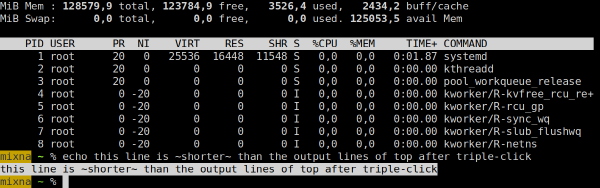
I find Emacs’s Wayland support rather disappointing. The standard version of Emacs only supports X11, so on Sway, it starts in Xwayland. Because Sway does not support scaling with Xwayland, Emacs shows up blurry (top/background window):
Native Wayland support (bottom/foreground window) is only available in the pgtk Emacs version (emacs-pgtk on NixOS). pgtk used to be a separate branch, but was merged in Emacs 29 (July 2023). There seem to be issues with pgtk on X11 (you get a warning when starting Emacs-pgtk on X11), so there have to be two separate versions for now…
Unfortunately, the pgtk text rendering looks different than native X11 text rendering! The line height and letter spacing seems different:
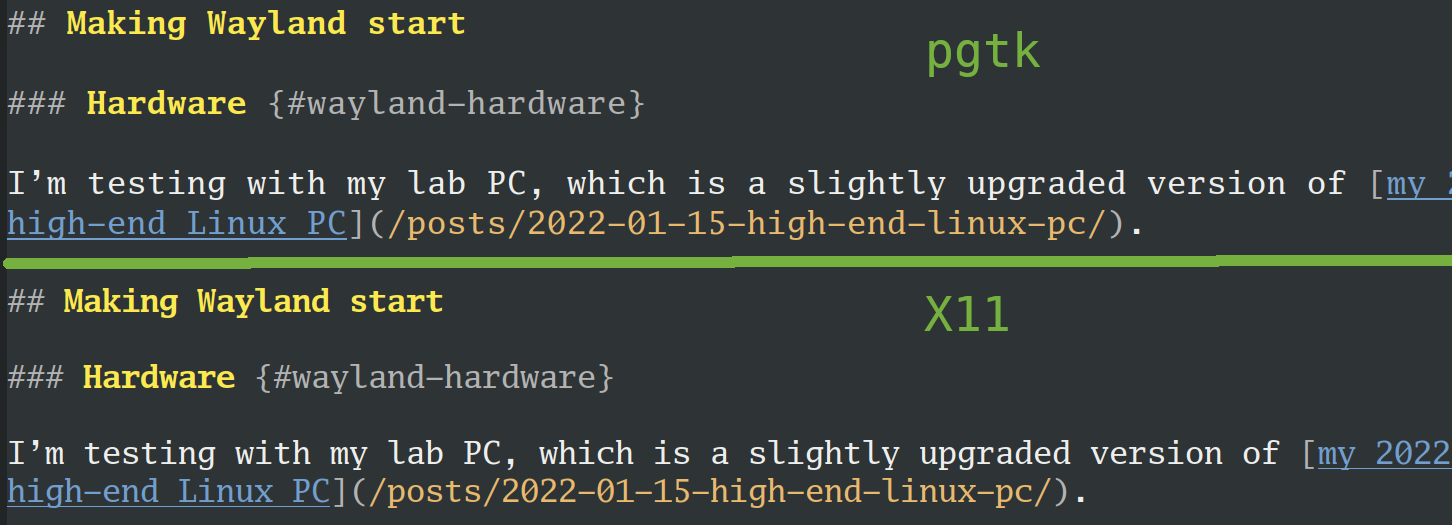
I’m not sure why it’s different! Does anybody know how to make it match the old behavior?
Aside from the different text rendering, the other major issue for me is input latency: Emacs-pgtk feels significantly slower (less responsive) than Emacs. This was reported on Reddit multiple times (thread 1, thread 2) and Emacs bug #71591, but there doesn’t seem to be any solution.
I’ll also need a solution for running Emacs remotely. Thus far, I use X11 forwarding over SSH (which works fine and with low latency over fiber connections). I should probably check out waypipe, but have not yet had a chance.
When starting Chrome and checking the chrome://gpu debug page, things look good:
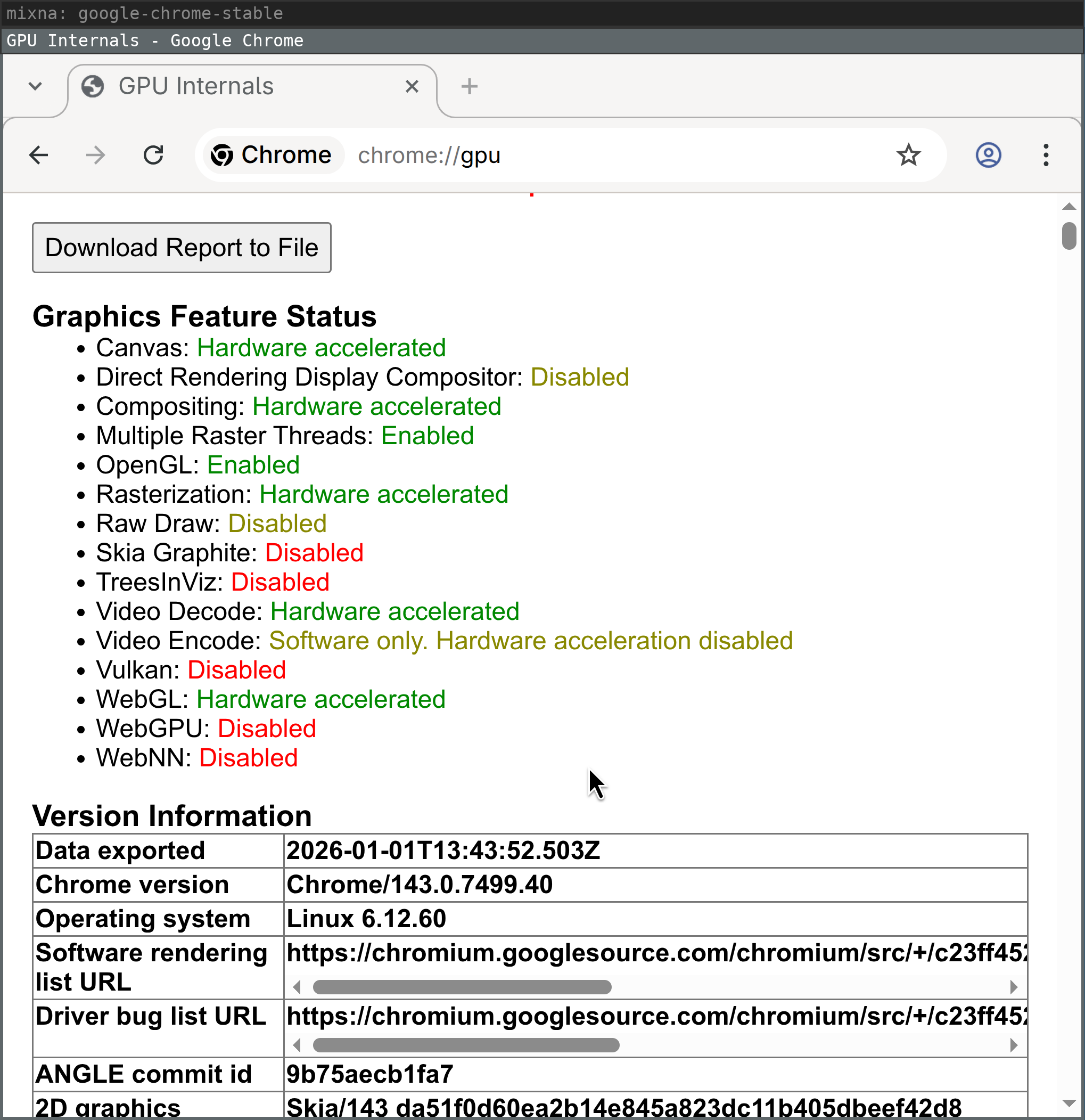
But rather quickly, after moving and resizing browser windows, the GPU process dies with messages like the following and, for example, WebGL is no longer hardware accelerated:
ERROR:ui/ozone/platform/wayland/gpu/gbm_pixmap_wayland.cc:95] Cannot create bo with format=RGBA_8888 and usage=Scanout|Rendering|Texturing
ERROR:ui/gfx/linux/gbm_wrapper.cc:405] Failed to create BO with modifiers: Invalid argument (22)
ERROR:ui/ozone/platform/wayland/gpu/gbm_pixmap_wayland.cc:95] Cannot create bo with format=RGBA_8888 and usage=Texturing
ERROR:gpu/command_buffer/service/shared_image/shared_image_factory.cc:981] CreateSharedImage: could not create backing.
ERROR:gpu/command_buffer/service/shared_image/shared_image_manager.cc:397] SharedImageManager::ProduceSkia: Trying to Produce a Skia representation from a non-existent mailbox.
ERROR:components/viz/service/gl/exit_code.cc:13] Restarting GPU process due to unrecoverable error. Context was lost.
R:gpu/ipc/client/command_buffer_proxy_impl.cc:321] GPU state invalid after WaitForGetOffsetInRange.
ERROR:content/browser/gpu/gpu_process_host.cc:1005] GPU process exited unexpectedly: exit_code=8704
Of course, using a browser without hardware acceleration is very frustrating, especially at high resolutions. Starting Chrome with --disable-gpu-compositing seems to work around the GPU process exiting, but Chrome still does not feel as smooth as on X11.
Another big issue for me is that Sway does not open Chrome windows on the workspace on which I closed them. Support for tracking and restoring the _NET_WM_DESKTOP EWMH atom was added to i3 in January 2016 and to Chrome in May 2016 and Firefox in March 2020.
I typically have 5+ workspaces and even more Chrome windows at any given point, so having to sort through 10+ Chrome windows every day (when I boot my work computer) is very annoying.
Simon Ser said that this would be addressed with a new Wayland protocol (xdg-session-management, merge request !18).
I work remotely a lot, so screen sharing is a table-stakes feature for me. I use screen sharing in my browser almost every day, in different scenarios and with different requirements.
In X11, I am used to the following experience with Chrome. I click the “Window” tab and see previews of my windows. When I select the window and confirm, its contents get shared:
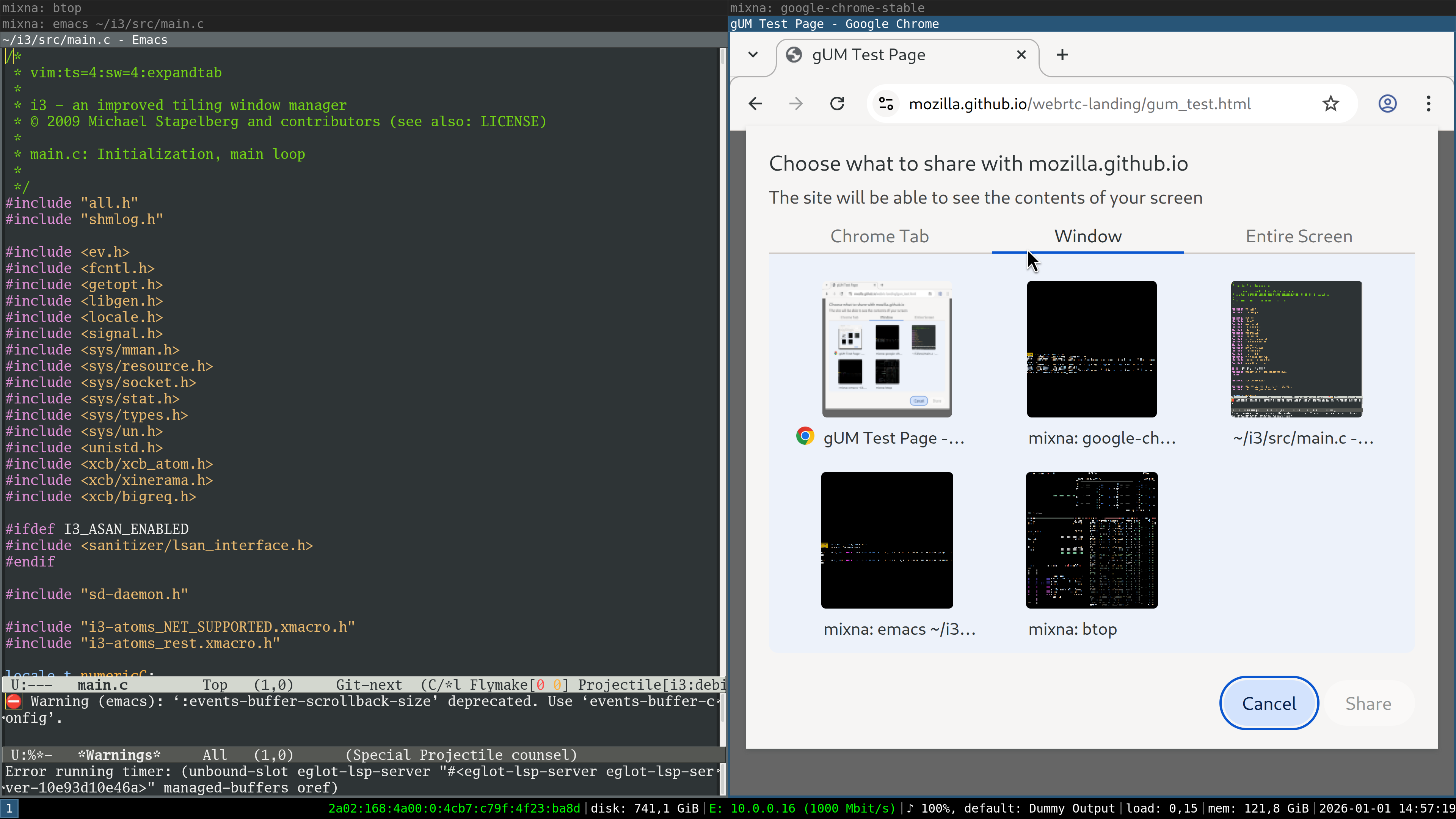
To get screen sharing to work in Wayland/sway, you need to install xdg-desktop-portal and xdg-desktop-portal-wlr (the latter is specific to wlroots, which sway uses).
With these packages set up, this is the behavior I see:
This is a limitation of xdg-desktop-portal-wlr (and others), which should be addressed with the upcoming Sway 1.12 release.
I changed my NixOS configuration to use sway and wlroots from git to try it out. When I click on the “Window” tab, I see a chooser in which I need to select a window:
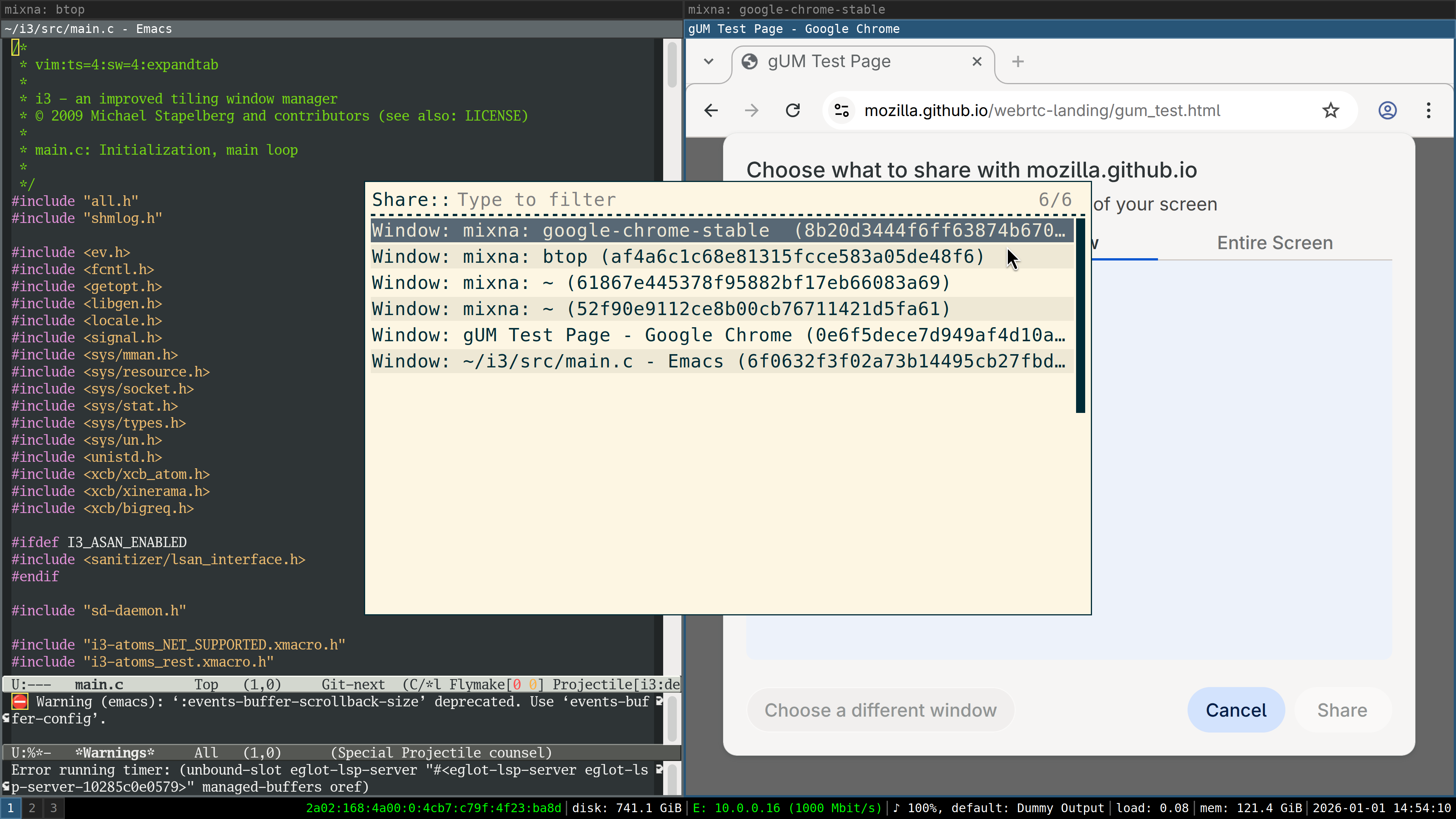
After selecting the window, I see only that window’s contents previewed in Chrome:
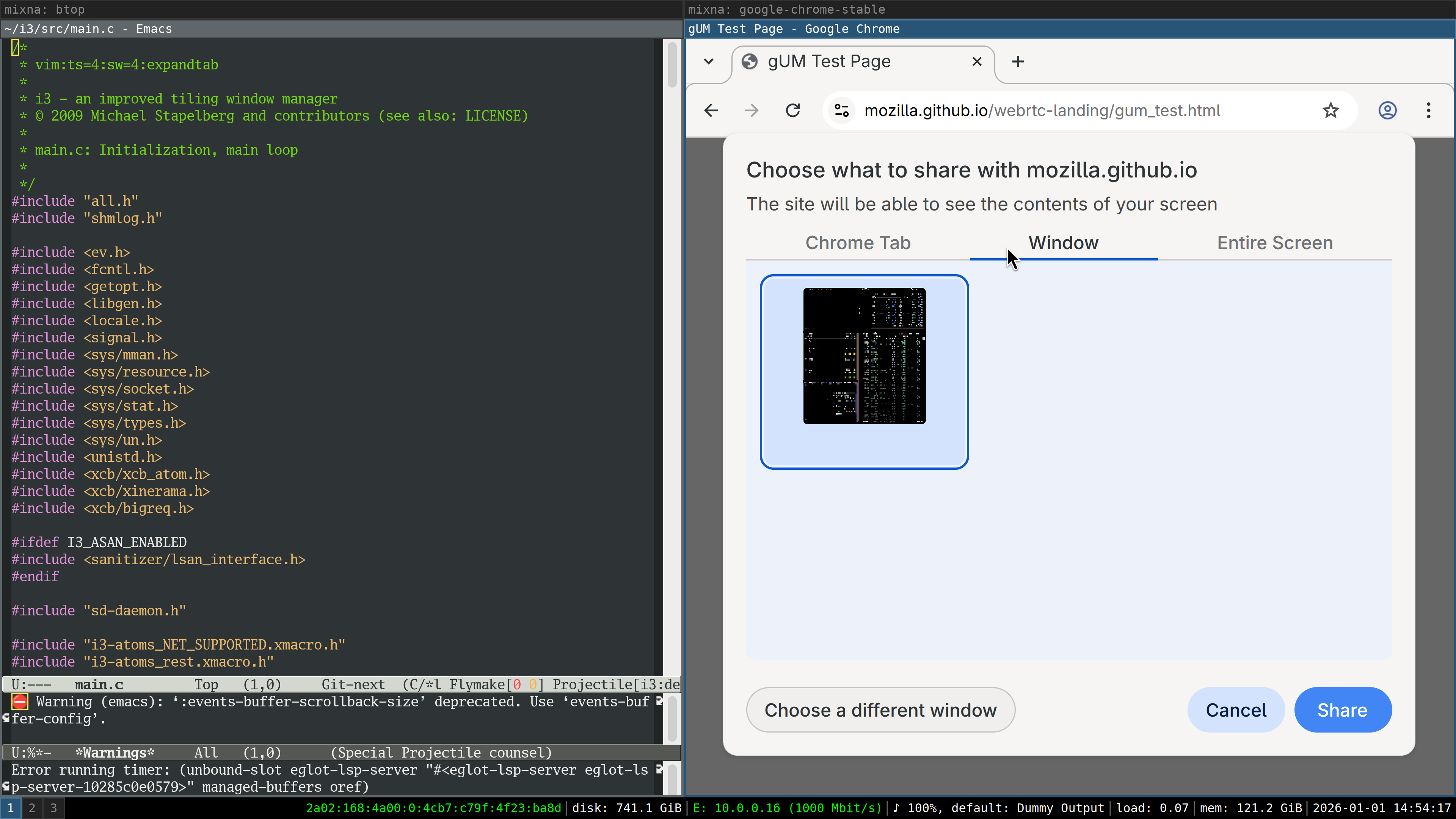
After confirming, I get another chooser and need to select the window again. Notably, there is no connection between the previewed window and the chosen window in this second step — if I chose a different window, that’s what will be shared:
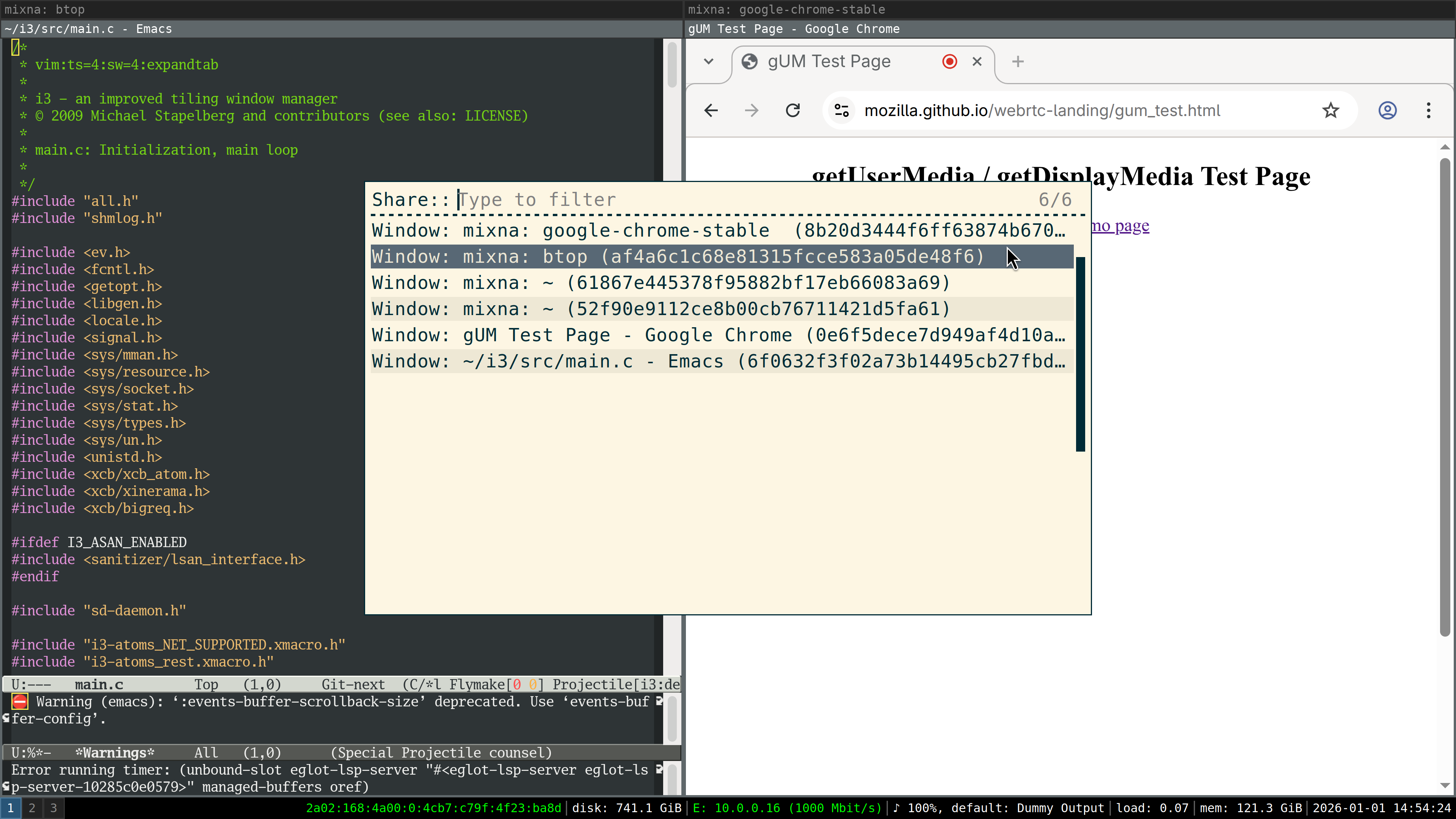
Now that window is screenshared (so the feature now works; nice!), but unfortunately in low resolution, meaning the text is blurry for my co-workers.
I reported this as xdg-desktop-portal-wlr issue #364 and it seems like the issue is that the wrong scale factor is applied. The patch provided in the issue works for me.
But, on a high level, the whole flow seems wrong: I shouldn’t see a chooser when clicking on Chrome’s “Window” tab. I should see previews of all windows. I should be able to select the window in Chrome, not with a separate chooser.
I also noticed a very annoying glitch when output scaling is enabled: the contents of (some!) windows would “jump around” as I was switching between windows (in a tabbed or stacked container) or between workspaces.
I first noticed this in the foot terminal emulator, where the behavior is as follows:
foot terminal by changing workspaces, or by switching focus within a stacked or tabbed container.foot terminal shows up with its text contents slightly offset.foot’s text jumps to the correct position.I captured the following frame with my iPhone just as the content was moving a few pixels, shortly after switching focus to this window:
Later, I also noticed that Chrome windows briefly show up blurry after switching.
My guess is that because Sway sets the scale factor to 1 for invisible windows, when switching focus you see a scale-1 content buffer until the application provided its scale-3 content buffer.
dunst supports Wayland natively. I tried dunst 1.13 and did not notice any issues.
rofi works on Wayland since v2.0.0 (2025-09-01).
I use rofi with rofimoji as my Emoji picker. For text input, instead of xdotool, wtype seems to work. I didn’t notice any issues.
Instead of my usual choice maim(1) , I tried grim(1) , but unfortunately grim’s -T flag to select the window to capture is rather cumbersome to use (and captures in 1x scale).
Does anyone have any suggestions for a good alternative?
Finally I made some progress on getting a Wayland session to work in my environment!
Before giving my verdict on this Wayland/sway experiment, let me explain that my experience on X11/i3 is really good. I don’t see any tearing or other artifacts or glitches in my day-to-day computer usage. I don’t use a compositor, so my input latency is really good: I once measured it to approximately 763 μs in Emacs on X11 with my custom-built keyboard (plus output latency), see kinX: latency measurement (2018).
So from my perspective, switching from this existing, flawlessly working stack (for me) to Sway only brings downsides. I observe new graphical glitches that I didn’t have before. The programs I spend most time in (Chrome and Emacs) run noticeably worse. Because of the different implementations, or because I need to switch programs entirely, I encounter a ton of new bugs.
For the first time, an on-par Wayland experience seems within reach, but realistically it will require weeks or even months of work still. In my experience, debugging sessions quickly take hours as I need to switch graphics cards and rewire monitors to narrow down bugs. I don’t have the time to contribute much to fixing these numerous issues unfortunately, so I’ll keep using X11/i3 for now.
For me, a Wayland/Sway session will be ready as my daily driver when:
pgtk variant fixes its input latency issues and can be made to render text the same as before somehow.Did you like this post? Subscribe to this blog’s RSS feed to not miss any new posts!
I run a blog since 2005, spreading knowledge and experience for over 20 years! :)
If you want to support my work, you can buy me a coffee.
Thank you for your support! ❤️
I did welcome happily the revert of all his code.
Just as I am oblivious to whether this is posted over ipv4 or 6.
That they all have to implement the protocol seems like 20 years of wayland might actually have hurt Linux more than it fixed - without it something else would have happened. Think of how many man hours have been wasted doing the same thing for KDE, gnome, sway, hyprland, etc.
(also I agree about the publicly available thing, it's a bug for me as well. Companies will harvest everything they can and you better believe defaults matter - aka publicly available, for the producer, but they will say your security, of course)
And reacting is one thing, big black rectangles blinking on screen is another.
This is not a given, though. It's entirely feasible to have a stable "display manager/server" with an extension/plugin system where your WM of choice would sit. Crashing the latter should not bring down the former.
Well, I guess this is the crux of the problem, and for open-source enthusiasts like me this is not obvious at all. What we can surmise is that Nvidia refused to collaborate, therefore they were the party to blame for the status of their video cards not being supported as well as others' vendors on linux.
The post is from the Dev of i3wm an x11 window manager complaining among other things about how well his 8k monitor works under x11 and how poorly it works under Wayland.
You can also consult the arch wiki article on high DPI which is broadly applicable beyond arch
I was open minded toward Wayland when the project was started... in 2008. We are 18 years down the road now. It has failed to deliver a usable piece of software for the desktop. That's long enough for me to consider it a failed project. If it still exists, it's probably for the wrong reasons (or at the least, reasons unrelated to any version of desktop Linux I want to run, like perhaps it has use in the embedded space).
Citation needed. Windows has its own share of graphics bugs, even on "corporate" hardware (HP).
I saw more effort on Nvidia's side trying to collaborate than on the Wayland side. I think it's unfair to not call out the people who had a hardline stance of only caring about open source drivers and didn't want to do the work to onboard Nvidia.
Also, 200% on an FHD 14" laptop means 960x540 px equivalent. That's too big to the point of rendering the laptop unusable. Also, X11 doesn't support switching DPI on the fly AFAIK, and I don't want to restart my session whenever I plug or unplug the external monitor, which happens multiple times a day when I'm at the office.
Like, ok, its 2030 and X11 is dead, no one works on it anymore and 90% of Linux users use Wayland, what did they gain? I know they did employ Pottering but not anymore, and AFAIK they contribute a non-trivial amount of code up stream to, Linux, Gnome? KDE? If more users are on wayland they can pressure Gnome to ... what?
I sort of get an argument around systemd and this, in that they can push I guess their target feature sets into systemd and force the rest of the eco-system to follow them, but, well I guess I don't get that argument either, cause they can already put any special sauce they want in Redhat's shipped systemd implementation and if its good it will be picked up, if its bad it wont be?
I guess, if Redhat maintains systemd & wayland, then they could choke out community contributions by ignoring them or whatever, but wouldn't we just see forks? Arch would just ship with cooler-systemd or whatever?
Ten years ago there were cursor clipping issues, cursor coordinates issues and crashes and I've been home-baking patches for that.
Also it was impossible for one X session to span across two GPUs. Dunno if that was improved.
Now it's bit better, but for sure your amdgpu will entertain you with little nice crashes when you run something heavy on a scaled display.
I'm not even talking about VRR, HDR and all that stuff.
Save money on the monitor, save money on the gpu (because it's pushing fewer pixels, you don't need as much oomph), save frustration with software.
Most high-DPI displays are simply the same thing with exactly twice the density.
We settled on putting exactly twice as many pixels in the same panels because it facilitates integer scaling
(and just to head off your next comment, no, it's not my choice, because I happen to like food and shelter)
Thanks for playing
Mesa did discuss EGL but felt it wasn’t the right choice. https://mesa-dev.freedesktop.narkive.com/qq4iQ7RR/egl-stream...
In much the same way that NVIDIA may have felt that EGL was the better choice.
However none of your description of the way things are explains why NVIDIA couldn’t have made their own libgbm that matched the symbols of mesa and worked on standardizing the api by de facto.
This really isn't this far off. If we imagined the screens overlayed semi-transparently an 16 pixel letter would be over a 14 pixel one.
If one imagines an ideal font size for a given user's preference for physical height of letterform one one could imagine a idealized size of 12 on another and 14 on the other and setting it to 13 and being extremely close to ideal.
>So if you zoom at 300%, it will scroll by a lot at a time, whereas 200% is still usable.
This is because it's scrolling a fixed number of lines which occupy more space at 300% zoom notably this applies pretty much only to people running high DPI screens at 100% because if one zoomed to 300% otherwise the letter T would be the size of the last joint on your thumb and legally blind folks could read it. It doesn't apply to setting the scale factor to 200% nor the setting for Firefox's internal scale factor which is independent from the desktop supports fractional scaling in 0.05 steps and can be configured in about:config
layout.css.devPixelsPerPx
- Maintaining X requires a lot of time, expertise and cost, it's a hard codebase to work with, deprecating X saves them money
- Wayland is simpler and achieves greater security by eliminating features of the desktop that most users value, but perhaps Redhat's clients in security-conscious fields like healthcare, finance and government are willing to live without
So I suspect it comes down to saving money and delivering something they have more control of which is more tailored to their most lucrative enterprise scenarios; whereas X is an old mess of cranky unix guys and their belligerent libre cruft.
There are some parallels to systemd I guess, in that its design rejected the Unix philosophy, and this was a source of concern for a lot of people. Moreover at the time systemd was under development, my impression of Poettering was that he was as incompetent as he was misguided and belligerent - he was also advocating for abandoning POSIX compatibility, and PulseAudio was the glitchiest shit on my desktop back then. But in the end systemd simply appeared on my computer one day and nothing got worse, and that is the ultimate standard. If they forced wayland on me tomorrow something on my machine would break (this is the main point of the OP), and they've had almost 20 years to fix that but it may arguably never get fixed due to Wayland's design. So Wayland can go the way of the dodo as far as I'm concerned.
The same goal any group of savvy corporate employees has when their marquee project has proved to be far more difficult, taken way longer, and required far more resources than anticipated to get within artillery distance of its originally-stated goal?
I've personally seen this sort of thing play out several times during my tenure in the corporate environment.
The totality of my education on the topic was reading the arch wiki on hidpi once.
AFAIK one cannot span one x session across multiple GPUs although AMD had something that it once referred to as "eyefinity" for achieving this.
It is rarely needed discreet GPU often support 3 or even 4 outputs
One may wonder if you tried this a very long time ago back when AMD sucked and Nvidia worked well in 2005-2015
To maintain a clean 200% scale you need a 27" 5K panel instead, which do exist but are vastly more expensive than 4K ones and perform worse in aspects other than pixel density, so they're not very popular.
if all your programs are KDE or GNOME programs. BTW, can you run GNOME programs in KDE in Wayland or do you have to switch to GNOME ?
I guess I just don't get how the third E in EEE plays out in an open source environment.
If I am not too mistaken there are several "remote desktop network protocols", maybe the dev teams behind them could agree on a common network protocol.
And the more compositor implementations, the merrier, a bit like the x11 window managers.
I am coding mine for linux and AMD GPUs, as a hobby, in RISC-V assembly running on x86_64 via an interpreter (thanks to wayland being an IPC interface)... well until very recently, it has been more some kind of research and development of a "method" to code modular assembly projects with a minimal SDK, in other words to decide on various technical compromises requiring coding _real life_ software in order to hit the right sweet spot.
2. You’re provably wrong even if someone followed your description because you can kill the dock or explorer process and still be able to switch between windows and move them around. Killing explorer is a little more heavy handed than killing the dock but it doesn’t take down the window manager.
While you can move, resize, minimize, maximize, and switch between windows without Explorer running, other window management features are limited or nonfunctional without it:
1. Explorer is responsible for the taskbar, and thus the only useful way to view minimized windows.
2. Alt+Tab still switches between windows without Explorer, but the window switching UI does not appear.
3. Virtual desktops still exist without Explorer, but there's no obvious way to switch between or otherwise interact with them.
4. Snapped windows retain their positions without Explorer, but window snapping functionality is not available, and resizing snapped windows does not resize adjacent windows as it normally does.
5. Without Explorer, desktop backgrounds and desktop icons do not appear.
5. Explorer is responsible for handling many system level keyboard shortcuts, including shortcuts for features not obviously related to Explorer or missing window management functionality (e.g., game bar, snipping tool, emoji panel).
The parent, misunderstanding the discussion on compositors, diverted to a discussion about user interfaces. It's an understandable point of confusion given that Microsoft chose to name their compositor “Desktop Window Manager”, when the term “window manager” is typically scoped to user interface.