- workspace agent runner apps (like Conductor) get more and more obsolete
- "vibe working" is becoming a thing - people use folder based agents to do their work (not just coding)
- new workflows seem to be evolving into folder based workspaces, where agents can self-configure MCP servers and skills + memory files and instructions
kinda interested to see if openai has the ideas & shipping power to compete with anthropic going forward; anthropic does not only have an edge over openai because of how op their models are at coding, but also because they innovate on workflows and ai tooling standards; openai so far has only followed in adoption (mcp, skills, now codex desktop) but rarely pushed the SOTA themselves.
To me this still feels like the wrong way to interact with a coding agent. Does this lead people to success? I've never seen it not go off the rails in some way unless you provide clear boundaries as to what the scope of the expected change is. It's gonna write code if you don't even want it to yet, it's gonna write the test first or the logic first, whichever you don't want it to do. It'll be much too verbose or much too hacky, etc.
Once this app (or a similar app by Anthropic) will allow me to have the same level of "orchestration" but on a remote machine, I'll test it.
One cool thing about this: upon installing it immediately found all previous projects I've used with Codex and has those projects in the sidebar with all of the "threads" (sessions) I've had with Codex on these projects!
That being said, the app is stuck at the launch screen, with "Loading projects..." taking forever...
Edit: A lot of links to documentation aren't working yet. E.g.: https://developers.openai.com/codex/guides/environments. My current setup involves having a bunch of different environments in their own VMs using Tart and using VS Code Remote for each of them. I'm not married to that setup, but I'm curious how it handles multiple environments.
Edit 2: Link is working now. Looks like I might have to tweak my setup to have port offsets instead of running VMs.
Begs the question if Anthropic will follow up with a first-class Claude Code "multi agent" (git worktree) app themselves.
But overall it does seem to be consistently improving. Looking to see how this makes it easier to work with.
Using slash commands and agents has been a game changer for me for anything from creating and executing on plans to following proper CI/CD policies when I commit changes.
To Codex more generally, I love it for surgical changes or whenever Claude chases its tail. It's also very, very good at finding Claude's blindspots on plans. Using AI tools adversarially is another big win in terms of getting things 90% right the first time. Once you get the right execution plan with the right code snippets, Claude is essentially a very fast typer. That's how I prefer to do AI-assisted development personally.
That said, I agree with the comments on tokens. I can use Codex until the sun goes down on $20/month. I use the $200/month pro plan with Claude and have only maxxed out a couple times, but I do find the volume to quality to be better with Claude. So far it's worth the money.
The Open button and then codex resume --last is good, but it's a waste and The Wrong Abstraction not to make instantiable conversation windows from the get-go.
So much valuation, so much intern competetion and shenanigans than the creatives left.
From the video, I can see how this app would be useful in:
- Creating branches without having to open another terminal, or creating a new branch before the session.
- Seeing diff in the same app.
- working on multiple sessions at once without switching CLI
- I quite like the “address the comments”, I can see how this would be valuable
I will give it a try for sure
So many of the things that pioneered the way for the truly good (Claude, Gemini) to evolve. I am thankful for what they have done.
But the quality is gone, and they are now in catch-up mode. This is clear, not just from the quality of GPT-5.x outputs, but from this article.
They launch something new, flashy, should get the attention of all of us. And yet, they only launch to Apple devices?
Then, there are typos in the article. Again. I can't believe they would be sloppy about this with so much on the line. EDIT: since I know someone will ask, couple of examples - "7MM Tokens", "...this prompt initial prompt..."
And why are they not giving the full prompt used for these examples? "...that we've summarized for clarity" but we want to see the actual prompt. How unclear do we need to make our prompts to get to the level that you're showing us? Slight red flag there.
Anyway, good luck to them, and I hope it improves! Happy to try it out when it does, or at the very least, when it exists for a platform I own.
Apple is great but this is OpenAI devs showing their disconnect from the mainstream. Its complacent at best, contemptuous at worst.
SamA or somebody really needs to give the product managers here a kick up the arse.
Here's the Codex tech stack in case anyone was interested like me.
Framework: Electron 40.0.0
Frontend:
- React 19.2.0
- Jotai (state management)
- TanStack React Form
- Vite (bundler)
- TypeScript
Backend/Main Process:
- Node.js
- better-sqlite3 (local database)
- node-pty (terminal emulation)
- Zod (validation)
- Immer (immutable state)
Build & Dev:
- pnpm (package manager)
- Electron Forge
- Vitest (testing)
- ESLint + Prettier
Native/macOS:
- Sparkle (auto-updates)
- Squirrel (installer)
- electron-liquid-glass (macOS vibrancy effects)
- Sentry (error tracking)
What I like is that the sessions are highly configurable from their plan.md which translates a md document into a process. So you can tweak and add steps. This is similar to some of the other workflow tools I've seen around hooks and such -- but presented in a way that is easy for me to use. I also like that it can update the plan.md as it goes to dynamically add steps and even add "hooks" as needed based on the problem.
I know/hope some OpenAI people are lurking in the comments and perhaps they will implement this, or at least consider it, but I would love to be able to use @ to add files via voice input as if I had typed it. So when I say "change the thingy at route slash to slash somewhere slash page dot tsx", I will get the same prompt as if I had typed it on my keyboard, including the file pill UI element shown in the input box. Same for slash commands. Voice is a great input modality, please make it a first class input. You are 90% there, this way I don't need my dictation app (Handy, highly recommended) anymore.
Also, I see myself using the built in console often to ls, cat, and rg to still follow old patterns, and I would love to pin the console to a specific side of the screen instead of having it at the bottom and pls support terminal tabs or I need to learn tmux.
It's slow and stupid. It does not do proper research. It does not follow instructions. It randomly decides to stop being agentic, and instead just dumps the code for me to paste. It has the extremely annoying habit of just doing stuff without understanding what I meant, making a mess, then claiming everything is fine. The outdated training data is extremely annoying when working with Nuxt 4+. It is not creative at solving problems. It dosent show the thinking. The Undo code does not give proper feedback on the diff and if it actually did "undo." And I hate the personality. It HAS to be better than it comes off for me because I am actually in a bad mood after having worked with it. I would rather YOLO code with Gemini 3 flash, since it's actually smarter in my assessment, and at least I can iterate faster, and it feels like it has better common sense.
Just as an example, I found an old, terrible app I made years ago for our firm that handles room reservations. I told it to update from Bootstrap to Flowbite UI. Codex just took forever to make a mess, installed version 2.7 when 4.0.1 is the latest, even when I explicitly stated that it should use the absolute latest version. Then it tried to install it and failed, so it reverted to the outdated CDN.
I gave the same task to Claude Code. Same prompt. It one-shotted it quickly. Then I asked it to swap out ALL the fetch logic to have SPA-like functionality with the new beta 4 version of HTMX, and it one-shot that too in the time Codex spent just trying to read a few files in the project.
This reminds me of the feeling I had when I got the Nokia N800. It was so promising on paper, but the product was so bad and terrible to use that I knew Nokia was done for. If this was their take on what an acceptable smartphone could be, it proves that the whole foundation is doomed. If this is OpenAI's take on what an agentic coding assistant should be—something that can run by itself and iterate until it completes its task in an intelligent and creative way.... OpenAI is doomed.
Last week, I decided to try building the site myself using Codex (the terminal one). I chose Astro as the framework because I wanted to learn about it. I fed it some marketing framework materials (positioning statements and whatnot) and showed it some website designs that we like. I then asked it to produce a first cut and it one-shotted a pretty decent bit of output.
AGI is definitely a few more years away, because I’ve since invested probably 30 hours of iteration to make the site into something that is closer to what I eventually want to launch. But here’s the thing: I never intended for Codex to produce THE final website. But now I’m thinking, “maybe we can?” On my team, we have just enough expertise and design know-how to at least know what looks good and we are developers so we definitely know what good code looks like. And Codex is nailing it on both those fronts.
As I said, we’re far from AGI. There’s no way I can one-shot something like this. It requires iteration with humans who have years of “context” built up. But maybe the days of hiring a designer and just praying that they somehow get it right are behind us.
Is there more information about it? For how long and what are the limits?
I created this using PLANS.md and it basically replicates a kanban/scrum process with gated approvals per stage, locked artifacts when it moves to next stage, etc. It works very well and it doesnt need a UI. Sure, I could have several agents running at the same time, but I believe manual QA is key to keeping the codebase clean, so time spent on this today means that future requirements can be implemented 10x faster than with a messy codebase.
I am glad to not depend on AI. It would annoy me to no ends how it tries to assimilate everything. It's like systemd on roids in this aspect. It will swallow up more and more tasks. Granted, in a way this is saying "then it was not necessary to have this things anymore now that AI solves it all", but I am skeptical of "the praised land" here. Skynet was not trusted back in 1982 or so. I don't trust AI either.
My experience with Cursor is generally good and I like that it gives me UX of using VS Code and also allows selection of multiple models to choose if one model is stuck on the prompt and does not work.
I keep coming back to my basic terminal with tmux running multiple sessions. I recently though forked this https://github.com/tiann/hapi and been loving using tailscale to expose my setup on my mobile device for convenience (plus the voice input there)
Claude yes, but Codex is much better than Gemini in every way that matters except speed in my experience.
Gemini 3 Flash is an amazing model, but Gemini 3 Pro isn't great. It can do good work, but it's pretty random if it will or it will go off the rails and do completely the wrong thing. OTOH GPT 5.2 Codex with high thinking is the best model currently available (slightly better than Opus 4.5)
Codex gets complex tasks right and I don't keep hitting usage limits constantly. (this is comparing the 20$ ChatGPT to the 200$ Claude Pro Max plans fwiw)
The tooling around ChatGPT and Codex is less, but their models are far more dependable imo than Antropic's at this very moment.
Saying gpt-3.5-turbo is better than gpt-5.2 makes me think something you got some of them hidden motives.
https://code.claude.com/docs/en/common-workflows#use-extende...
Who told you that? You can write entire C libraries and call them from Electron just fine. Browser is a native application after all. All this "native applications" debate boils down to the UI implementation strategy. Maintaining three separate UI stacks (WinUI, SwiftUI, GTK/Qt) is dramatically more expensive and slower to iterate on than a single web-based UI with shared logic
We already have three major OSes, all doing things differently. The browsers, on the other hand, use the same language, same rendering model, same layout system, and same accessibility layer everywhere, which is a massive abstraction win.
You don't casually give up massive abstraction wins just to say "it's native". If "just build it natively" were actually easier, faster, or cheaper at scale, everyone would do just that.
- UE5 has its own custom UI framework, which definitely does not feel "native" on any platform. Not really any better than Electron.
- You can easily call native APIs from Electron.
I agree that Electron apps that feel "web-y" or hog resources unnecessarily are distasteful, but most people don't know or care whether the apps they're running use native UI frameworks, and being able to reassign web developers to work on desktop apps is a significant selling point that will keep companies coming back to Electron instead of native.
On MacOS is much better. But most of the team either ended up with locked in Mac-only or go cross platform with Electron.
This is what you get when you build with AI, an electron app with an input field.
My ire was provoked by this following on from the Windows ChatGPT app that was just a container for the webpage compared to the earlier bells and whistles Mac app. Perceptions are built on those sorts of decisions.
1. Turing test UX's, where a chat app is the product and the feature (Electron is fine) 2. The class of things LLMs are good at that often do not need a UI, let alone a chat app, and need automation glue (Electron may cause friction)
Personally, I feel like we're jumping on capabilities and missing a much larger issue of permissioning and security.
In an API or MCP context, permissions may be scoped via tokens at the very least, but within an OS context, that boundary is not necessarily present. Once an agent can read and write files or executed commands as the logged in user, there's a level of trust and access that goes against most best practices.
This is probably a startup to be hatched, but it seems to me this space of getting agents to be scoped properly and stay in bounds, just like cursor has rules, would be a prereq before giving access to an OS at all.
I think these subtle issues are just harder to provide a "harness" for, like a compiler or rigorous test suite that lets the LLM converge toward a good (if sometimes inelegant) solution. Probably a finer-tuned QA agent would have changed the final result.
What I struggle with is the legal overhead of e.g. collecting money for an app/website. I have a semi-finished app which I know I could delploy within a few hours but to collect money, living in Germany is a minefield from what I understand. I don't want my name made public with the app. GmbH (LLCs) cost thousands (?). The whole GDPR minefield, google-font usage scam etc. makes me hold back.
Googling/reddit only gives so much insights.
If someone has a good reference about starting a SaaS/App from within EU/Germany with all the legalities etc. I'd be super interested!
Importantly I want full voice control over the app and interactions not just dictating prompts.
What I didn't realize though, is that the limit doesn't reset each 5 hours as is the case for claude. I hit the limit of the free tier about 2 hours in, and while I was expecting to be able to continue later today, it alerts me that I can continue in a week.
So my hype for the amount of tokens one gets compared to claude was a bit too eager. Hitting the limit and having to wait a week probably means that we get a comparable token amount vs the $20 claude plan. I wonder how much more I'd get when buying the $20 plus package. The pricing page doesn't make that clear (since there was no free plan before yesterday I guess): https://developers.openai.com/codex/pricing/
the big boys probably don't want people who don't know sec deploying on their infra lol.
I wonder what it was doing with all those tokens?
For people suggesting it’s a skill issue: I’ve been using Claude Code for the past 6 months and I genuinely want to make Codex work - it was highly recommended by peers and friends. I’ve tried different model settings, explicitly instructed it to plan first and only execute after my approval, tested it on both Python and TypeScript backend codebases. Results are consistently underwhelming compared to Claude Code.
Claude Code just works for me out of the box. My default workflow is plan mode - a few iterations to nail the approach, then Claude one-shots the implementation after I approve. Haven’t been able to replicate anything close to that with Codex
But what is your concept of "stages"? For me, the spec files are a MECE decomposition, each file is responsible for its unique silo (one file owns repo layout, etc), with cross references between them if needed to eliminate redundancy. There's no hierarchy between them. But I'm open to new approaches.
If you need it to be up to date with your version of a framework, then ask it to use the context7 mcp server. Expecting training data to be up to date is unreasonable for any LLM and we now have useful solutions to the training data issue.
If you need it to specify the latest version, don't say "latest". That word would be interpreted differently by humans as well.
Claude is well known at its one-shotting skills. But that's at the expense of strict instruction following adherence and thinner context (it doesn't spend as much time to gather context in larger codebases).
Is it in the main Codex build? There doesn’t seem to be an experiment for it.
I've recently had an issue "add VNC authentication" which covers adding vnc password auth to our inhouse vnc server at work.
This is not hard, but just a bit of tedious work getting the plumbing done, adding some UI for the settings, fiddle with some bits according to the spec.
But it's (at least to me) not very enjoyable, there is nothing to learn, nothing new to discover, no much creativity necessary etc. and this is where Codex comes in. As long as you give it clearly scoped tasks in an environment where it can use existing structures and convetions, it will deliver. In this case it implemented 85% of the feature perfectly and I only had to tweak minor things like refactor 1-2 functions. Obviously I read and understood and checked everything it wrote, that is an absolute must for serious work.
So my point is, use AI as the "code monkey". I believe most developers enjoy the creative aspects of the job, but not the "type C++ on your keyboard". AI can help with the latter, it will type what you tell it and you can focuse on the architecture and creative part of the whole thing.
You don't have to trust AI in that sense, use it like autocompletion, you can program perfectly fine without it but it makes your fingers hurt more.
Then there will be the AI wranglers who act almost like DevOps engineers for the AI - producing software in a different way ...
also this feels like a unique opportunity to take some of that astronomical funding and point it towards building the right tooling for building a performant cross-platform UI toolkit in a memory-safe language—not to mention a great way for these companies to earn some goodwill from the FOSS community
The browser is compiled to native code. It wasn't that long ago that we had three seperate web browsers who couldn't agree on the same set of standards either.
Try porting your browser to Java or C# and see how much faster it is then. The OS the browser and the server run on are compiled to native code. Sun gave up on HotJava web browser in the 1990's, because it couldn't do %10 or %20 of what Netscape or IE could do, and was 10 x slower.
Not everybody is running a website selling internet widgets. Some of us actually have more on the line if our systems fail or are not performant than "oooh our shareholders are gonna be pissed".
People running critical emergency response systems day in, day out.
The very system you typed this bullshit on is running native code. But oh no, thats "too hard" for the webdev crowd. Everyone should bend to accomodate them. The OS should be ported to run inside the browser, because the browser is "so good".
Good one. It's hilarious to see this Silicon Valley/Bay Area, chia-seed eating bullshit in cheap spandex riding their bikes while the trucks shipping shit from coast to coast passing them by.
Exactly. Years go by and HN keeps crying about this despite it being extremely easy to understand for anyone. For such a smart community, it's baffling how some debates are so dumb.
The only metric really worth reviewing is resource usage (and perhaps appearance). These factors aren't relevant to the general population as otherwise, most people wouldn't use these apps (which clearly isn't the case).
Use native for osx Use .Net framework for windows Use whatever on Linux.
Its just being lazy and ineffective. I also do not care about whatever "business" justification anyone can come up with for half assing it.
I guess you get an Electron app if you don't prompt it otherwise. Probably because it's learned from what all the humans are putting out there these days.
That said.. unless you know better, it's going to keep happening. Even moreso when folks aren't learning the fundamentals anymore.
E.g. just say "write a c++ gui widget library using dx11 and win32 and copy flutters layout philosophy, use harfbuzz for shaping, etc etc"
LLM output is called slop for a reason.
[1] https://firebase.google.com/docs/ai-assistance/mcp-server
UPDATE: without AI usage at all (just to clarify).
E.g. I wouldn't be surprised if identifying the lack of touch screen support on the menu, feeding it in, and then regenerating the menu code sometime between 800k and 7MM took a lot of tokens.
You are correct in that this mode isn't "out of the box" as it is with Claude (but I don't use it in Claude either).
My preference is to have smart models generate a plan with provided source. I wrote (with AI) a simple python tool that'll filter a codebase and let me select all files or just a subset. I then attach that as context and have a smart model with large context (usually Opus, GPT-5.2, and Gemini 3 Pro in parallel), give me their version of a plan. I then take the best parts of each plan, slap it into a single markdown and have Codex execute in a phased manner. I usually specify that the plan should be phased.
I prefer out-of-CLI planning because frankly it doesn't matter how good Codex or Claude Code dive in, they always miss something unless they read every single file and config. And if they do that, they tip over. Doing it out of band with specialized tools, I can ensure they give me a high quality plan that aligns with the code and expectations, in a single shot (much faster).
Then Claude/Codex/Gemini implement the phased plan - either all at once - or stepwise with me testing the app at each stage.
But yeah, it's not a skill issue on your part if you're used to Plan -> Implement within Claude Code. The Experimental /collab feature does this but it's not supported and more experimental than even the experimental settings.
00: Iterate on requirements with ChatGPT outside of the IDE. Save as a markdown requirements doc in the repo
01: Inside the IDE; Analysis of current codebase based on the scope of the requirements
02: Based on 00 and 01, write the implementation plan. Implement the plan
03: Verification of implementation coverage and testing
04: Implementation summary
05: Manual QA based on generated doc
06: Update global STATE.md and DECISIONS.md that documents the app, and the what and why of every requirement
Every stage has a single .md as output and after the stage is finished the doc is locked. Every stage takes the previous stages' docs as input.
I have a half-finished draft with more details and a benchmark (need to re-run it since a missing dependency interrupted the runs)
https://dilemmaworks.com/implementing-recursive-language-mod...
I got invites to seven AI-centered meetings late last week.
Value prop of product quality aside, isn't the AI claim that it helps you be more productive? I would expect that OpenAI would run multiple frontends and that they'd use Codex to do it.
Ie are they using their own AI (I would assume it's semi-vibe-coded) to just get out a new product or using AI to create a new product using the productivity gains to let them produce higher quality?
You reduce development effort by a third, it is ok to debate whether a company so big should invest into a better product anyway but it is pretty clear why they are doing this
I haven't touched desktop application programming in a very long time and I have no desire to ever do so again after trying to learn raw GTK a million years ago, so I'm admittedly kind of speaking out of my ass here.
It's weird that we don't have a unified "React Native Desktop" that would build upon the react-native-windows package and add similar backends for MacOS and Linux. That way we could be building native apps while keeping the stuff developers like from React.
A full fledged app, that does everything I want, is ~ 10MB. I know Tauri+Rust can get it to probably 1 MB. But it is a far cry from these Electron based apps shipping 140MB+ . My app at 10MB does a lot more, has tons of screens.
Yes, it can be vibe coded and it is especially not an excuse these days.
Microsoft Teams, Outlook, Slack, Spotify? Cursor? VsCode? I have like 10 copies of Chrome in my machine!
You don't need to use microsoft's or apple's or google's shit UI frameworks. E.g. see https://filepilot.tech/
You can just write all the rendering yourself using metal/gl/dx. if you didn't want to write the rendering yourself there are plenty of libraries like skia, flutter's renderer, nanovg, etc
May be an app that is as complex as Outlook needs the pixel-perfect tweaking of every little button that they need to ship their own browser for exact version match. But everything else can use *system native browser*. Use Tauri or Wails or many other solutions like these
That said, I do agree on the other comments about TUIs etc. Yes, nobody cares about the right abstractions, not even the companies that literally depend on automating these applications
c Do this programming task for me.
Even a full-featured TUI like Claude Code is highly limited compared to a visual UI. Conversation branching, selectively applying edits, flipping between files, all are things visual UI does fine that are extremely tedious in TUI.
Overall it comes down to the fact that people have to use TUI and that’s more important than it being easy to train, and there’s a reason we use websites and not terminals for rich applications these days.
I think most people start off overusing these tools, then they find the few small things that genuinely improve their workflows which tend to be isolated and small tasks.
Moltbot et al, to me, seems like a psyop by these companies to get token consumption back to levels that justify the investments they need. The clock is ticking, they need more money.
I'd put my money on token prices doubling to tripling over the next 12-24 months.
It would be nice if someone made a way to write desktop apps in JavaScript with a consistent, cross-platform modern UI (i.e. swipe to refresh, tabs, beautiful toggle switches, not microscopic check boxes) but without resorting to rendering everything inside a bloated WebKit browser.
It's very obvious that while their AI teams are top notch, their product teams are very middle of the road. Including design. Even though they apparently engaged Jony Ive, I can't actually see his 'touch' on anything they have. You'd expect them to have a much higher level of ambition when it comes to their own products. But they seem stuck getting even the basics shipping. I use Chat GPT for Desktop. It's alright but it seems to have stagnated a bit and it has some annoying bugs and flakiness. Random shit seems to break regularly with releases as well.
Another good example of the lack of vision/product management is the #1 and oldest use case for LLMs since day 1: generating text. You'd expect somebody to maybe have come up with the genius idea of "eh, hmm, you know, I wonder if we can do better than pasting blobs of markdown rendered HTML to and/from a word processor from a f**ing sidebar".
Where's the ultimate agentic word processor? The ultimate writing experience? It's not there. Chat GPT is hopelessly clumsy doing even the most basic things in word processors. It can't restructure your document. It can't insert/delete bits of text. It can't use any of the formatting and styling controls. It can't do that in the UI. It can't do that at the file level. It's just not very good at doing anything more than generating bits of text with very basic markdown styling that you might copy paste to your word processor. It won't match the styling you have. Last time I checked Gemini in Google docs it was equally useless. I don't have MS Office but I haven't heard anything that suggests it is better.
For whatever reason, this has not been a priority (bad product management?) or they simply don't have the creativity to see the rather obvious integration issues in front of them.
Yes making those is a lot of work and requires a bit of planning. But wasn't the point of agentic coding that that's now easy? Apparently not.
Our IDE does this: common code / logic, then a native macOS layer and a WPF layer. Yes, it takes a little more work (less than you'd think!) but we think it is the right way to do it.
And what I hope is that AI will let people do the same -- lower the cost and effort to do things like this. If Electron was used because it was a cheap way to get cross-platform apps out, AI should now be the same layer, the same intermediate 'get stuff done' layer, but done better. And I don't think this prevents doing things faster because AI can work in parallel. Instead of one agent to update the frontend, you have two to update both frontends, you know?
We're building an AI agent, btw. Initially targeting Delphi, which is a third party's product we try to support and provide modern solutions for. We'll be adding support for our own toolchains too.
What I fear is that people will apply AI at the wrong level. That they'll produce the same things, but faster: not the same things, but better (and faster.)
It comes back to fundamental programming guidelines like DRY (Don't Repeat Yourself) - if you have three separate implementations in different languages for everything, changes will be come harder and you will move slower. These golden guidelines still stand in a vibe-code world.
Sorry to nitpick, but this should be "by three" or "by two thirds", right?
These strategies are fine for toy apps but you cannot ship a production app to millions or even thousands of people without these basics.
Even though OpenAI has a lot of cash to burn, they're not in a good position now and getting butchered by Anthropic and possibly Gemini later.
If any major player in this AI field has the power to do it's probably Google. But again, they've done the Flutter part, and the result is somewhat mixed.
At the end of the day, it's only HN people and a fraction of Redditors who care. Electron is tolerated by the silent majority. Nice native or local-first alternatives are often separate, niche value propositions when developers can squeeze themselves in over-saturated markets. There's a long way before the AI stuff loses novelty and becomes saturated.
Eric Schmidt has spoken a lot recently about how it's one of the biggest advances in human history and it's hard to disagree with him, even if some aspects make me anxious.
Done by the company which sells software which is supposed to reduce it tenfold?
That’s actually why we're working on Slint (https://slint.dev): It's a cross-platform native UI toolkit where the UI layer is decoupled from the application language, so you can use Rust, JavaScript, Python, etc. for the logic depending on what fits the project better.
Yes that would take much disk space, but it takes 50Mb or 500Mb isn't noticeable for most users. Same goes for memory, there is a gain for sure but unless you open your system monitor you wouldn't know.
So even if it's something the company could afford, is it even worth it?
Also it's not just about cost but opportunity cost. If a feature takes longer to implement natively compared to Electron, that can cause costly delays.
Qt is also pretty memory-hungry; maybe rich declarative (QML) skinnable adaptable UIs with full a11y support, etc just require some RAM no matter what. And it also looks a wee bit "non-native" to purists, except on Windows, where the art of uniform native look is lost.
Also, if you ever plan extensions / plugin support, you already basically have it built-in.
Yes, a Qt-based program may be wonderfully responsive. But an Electron-based app can be wonderfully responsive, too. And both can feel sluggish, even on great hardware. It all depends on a right architecture, on not doing any (not even "guaranteed fast") I/O in the GUI thread, mostly. This takes a bit of skill and, most importantly, consideration; both are in short supply, as usual.
The biggest problem with Electron apps is their size. Tauri, which relies on the system-provided web view component, is the reasonable way.
One of Electron's main selling points is that you control the browser version. Anything that relies on the system web view (like Tauri and Wails) will either force you to aggressively drop support for out-of-date OS versions, or constantly check caniuse.com and ship polyfills like you're writing a normal web app. It also forces you to test CSS that touches form controls or window chrome on every supported major version of every browser, which is just a huge pain. And you'll inevitably run into bugs with the native -> web glue that you wouldn't hit with Electron.
It is absolutely wasteful to ship a copy of Chrome with every desktop app, but Tauri/Wails don't seem like viable alternatives at the moment. As far as I can tell, there aren't really any popular commercial apps using them, so I imagine others have come to the same conclusion.
So if you want a multiplatform desktop app also supporting Linux, React Native isn't going to cut it.
It's not about money. It's not a tradeoff in cost vs quality - it's a tradeoff in development speed. Shipping N separate native versions requires more development time for any given change: you must implement everything (at least every UI) N times, which drastically increases the design & planning & coordination required vs just building and shipping one implementation.
Do you want to move slower to get "native feel", or do you want to ship fast and get N times as much feature dev done? In a competitive race while the new features are flowing, development speed always wins.
Once feature development settles down, polish starts to matter more and the slowdown becomes less important, and then you can refocus.
I insist on good UI as well, and, as a web developer, have spent many hours hand rolling web components that use <canvas>. The most complicated one is a spreadsheet/data grid component that can handle millions of rows, basically a reproduction of Google Sheets tailored to my app's needs. I insist on not bloating the front-end package with a whole graph of dependencies. I enjoy my NIH syndrome. So I know quality when I see it (File Pilot). But I also know how tedious reinventing the wheel is, and there are certain corners that I regularly cut. For example there's no way a blind user could use my spreadsheet-based web app (https://github.com/glideapps/glide-data-grid is better than me in this aspect, but there's no way I'm bringing in a million dependencies just to use someone else's attempt to reinvent the wheel and get stuck with all of their compromises).
The answer to your original question about why these billion dollar companies don't create artisanal software is pretty straightforward and bleak, I imagine. But there are a few actually good reasons not to take the artisanal path.
You will be outcompeted if you waste your time reinventing the wheel and optimizing for stuff that doesn't matter. There is some market for highly optimized apps like e.g. Sublime Text, but you can clearly see that the companies behind them are struggling.
- Good cross platform support (missing in filepilot)
- Want applications to feel native everywhere. For example, all the obscure keyboard shortcuts for moving around a text input box on mac and windows should work. iOS and Android should use their native keyboards. IME needs to work. Etc
- Accessibility support for people who are blind and low vision. (Screen readers, font scaling, etc)
- Ergonomic language bindings
Hitting these features is more or less a requirement if you want to unseat electron.
I think this would be a wonderful project for a person or a small, dedicated team to take on. Its easier than it ever used to be thanks to improvements in font rendering, cross platform graphics libraries (like webgpu, vulcan, etc) and improvements in layout engines (Clay). And how much users have dropped their standards for UI consistency ever since electron got popular and microsoft gave up having a consistent UI toolkit in windows.
There are a few examples of teams doing this in house (eg Zed). But we need a good opensource project.
That's only for Windows though, it seems? Maybe the whole "just write all the rendering yourself using metal/gl/dx" is slightly harder than you think.
edit: [link](https://github.com/simonw/llm)
I suspect that final(*) UI is much more similar to TUI: being kind of conversational (human <> AI). Current GUIs provided by your bank/etc are much less effective/useful for us, comparing to conversation way: 'show/do me sth which I just need'. Not to mention (lack of) walled garden effect, and attention grabbing not in the user interest (popups, self-promo, nagging). Also if taking into account age factor. Also that we do not have to learn, yet another GUI (teach a new bank to your mom ;). So at least 4 distinct and important advantages for TUI.
My bet: TUI/conversation win (*).
*) there will be some UI where graphical information density is important (air controller?) especially in time critical environments. yet even there I suspect it's more like conversation with dynamic image/report/graph generated on the go. Not the UI per se.
All I see is hype blog posts and pre-IPO marketing by AI companies, not much being shipped though.
Chinese open weights models make this completely infeasible.
Part of this (especially the CPU) is teams under-optimizing their Electron apps. See the multi-X speedup examples when they look into it and move hot code to C et al.
Replacing workers with things you can’t beat, sue, intimidate, or cajole? Someone is gonna do something to make that not cool in MBA land. I think if one of my employees LL-MessedUp something, and I were upset, watching that same person stealing my money haplessly turn to an LLM for help might land me in jail.
I kinda love LLMs, I’ve always struggled to write emails without calling people names. There’s some clear coding tooling utility. But some of this current hype wave is insano-balls from a business perspective. Pets.com X here’s-my-ssh-keys. Just wild.
- Native apps integrate well with the native OS look and feel and native OS features. I'd say it's nice to have, but not a must have, especially considering that the same app can run on multiple platforms.
- Native apps use much less RAM than Electron apps. I believe this one is a real issue for many users. Running Slack, Figma, Linear, Spotify, Discord, Obsidian, and others at the same time consumes a lot of memory for no good reason.
Which makes me wonder: Is there anything that could removed from Electron to make it lighter, similar to what Qt does?
This is a new era where “if it works more or less well, ux/dx is fine, let’s ship it” has more moat than ever. Everything else is really secondary.
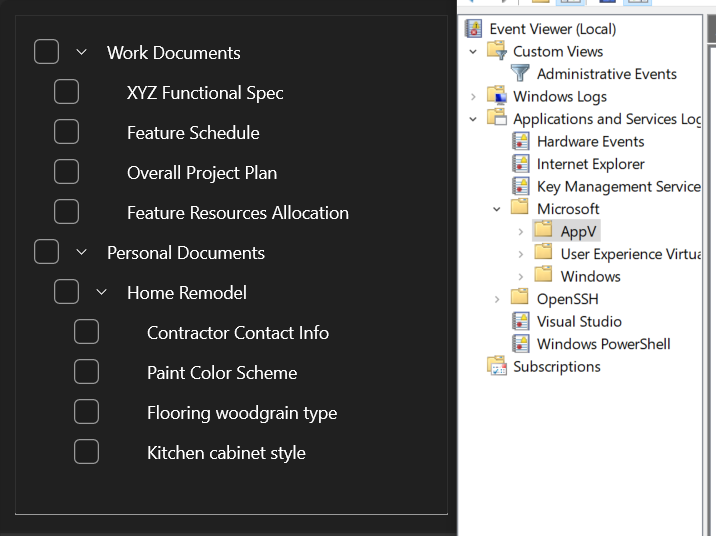
Just look at this TreeView in WinUI2 (w/ fluent design) vs a TreeView in the good old event viewer. It just wastes SO MUCH space!
https://f003.backblazeb2.com/file/sharexxx/ShareX/2026/02/mm...
And imo it's just so much easier to write a webapp, than fiddle with WinUI. Of course you can still build on MFC or Win32, but meh.
But sure, you could have some specific need, but I find it hard to believe for these simple apps.
Value is value, and levers are levers, regardless of the resources you have or the difficulty of the problem you're solving.
If they can save effort with Electron and put that effort into things their research says users care about more, everyone wins.
I have a MacBook with 16GB of RAM and I routinely run out of memory from just having Slack, Discord, Cursor, Figma, Spotify and a couple of Firefox tabs open. I went back to listening to mp3s with a native app to have enough memory to run Docker containers for my dev server.
Come on, I could listen to music, program, chat on IRC or Skype, do graphic design, etc. with 512MB of DDR2 back in 2006, and now you couldn’t run a single one of those Electron apps with that amount of memory. How can a billion dollar corporation doing music streaming not have the resources to make a native app, but the Songbird team could do it for free back in 2006?
I’ve shipped cross platform native UIs by myself. It’s not that hard, and with skyrocketing RAM prices, users might be coming back to 8GB laptops. There’s no justification for a big corporation not to have a native app other than developer negligence.
I'm not saying this is a huge problem for me even if it bothers me personally. But if you're here on HN advocating native over Electron, then it seems logical to me that you would care about being truly native instead of merely "using native controls while feeling off".
This is even before getting to the point that Qt isn't truly native. They just draw controls in a style that looks native, they don't actually use native controls. wxWidgets uses native controls but they don't behave better despite that.
[1] https://www.qt.io/blog/speed-up-qt-development-with-qml-hot-...
Nothing is worse than reading something like this. A good software developer cares. It’s wrong to assume customers don't care simply because they don't know what's going on under the hood. Considering the downsides and the resulting side effects (latency, more CPU and RAM consumption, fans spinning etc.), they definitely do care. For example, Microsoft has been using React components in their UI, thinking customers wouldn’t care, but as we have been seeing lately, they do care.
They are not.
A good iOS app is not 1:1 equivalent to what a good Android app would be for the same goal. Treating them as such just gives users a lowest common denominator product.
> reinventing the wheel
what exactly are you inventing by using a framework "invented" decades ago and used by countless apps in all those years?
When was the last time complaining about this did anything?
[1] https://survey.stackoverflow.co/2025/technology/#1-computer-...
Doesn't this get thrown out the window now that everyone claims you can be 10x, 50x, 100x more productive with AI? Hell people were claiming you can ask a bunch of AI agents to build a browser from scratch, so surely the dev speed argument no longer applies.
React Native Skia allegedly runs on Linux too
I see complains about RAM and slugginess against Slack and countless others Electron apps every fucking day, same as with Adobe forcing web rendered UI parts in Photoshop, and other such cases. Forums are full of them, colleagues always complain about it.
I've got a medical doctor handwriting decipherer, a board game simulator that takes a PDF of the rulebooks as input and an accounting/budgeting software that can interface with my bank via email because my bank doesn't have an API.
None of that is of any use to you. If you happen to need a similar software, it will be easier for you to ask your own AI to make a custom one for you rather than adapt the ones I had my AI make for me.
Under the circumstances, I would feel bad shipping anything. My users would be legitimately better off just vibe coding their own versions.
Would genuinely love your thoughts if you try it. Early users have been surprised by how native it feels!
Some things aren't common sense yet so I'm trying my part to make them so.
But using the same model through pi, for example, it's super smart because pi just doesn't have ANY safeguards :D
If you add a dialectic between Opus 4.5 and GPT 5.2 (not the Codex variant), your workflow - which I use as well, albeit slightly differently [1] - may work even better.
This dialectic also has the happy side-effect of being fairly token efficient.
IME, Claude Code employs much better CLI tooling+sandboxing when implementing while GPT 5.2 does excellent multifaceted critique even in complex situations.
[1]
- spec requirement / iterate spec until dialectic is exhausted, then markdown
- plan / iterate plan until dialectic is exhausted, then markdown
- implement / curl-test + manual test / code review until dialectic is exhausted
- update previous repo context checkpoint (plus README.md and AGENTS.md) in markdown
Anthropic and OpenAI could open source their models and it wouldn't make it any cheaper to run those models.. You still need $500k in GPUs and a boatload of electricity to serve like 3 concurrent sessions at a decent tok/ps.
There are no open source models, Chinese or otherwise that are going to be able to be run profitably and give you productivity gains comparable to a foundation model. No matter what, running LLMs is expensive and the capex required per tok/ps is only increasing, and the models are only getting more compute intensive.
The hardware market literally has to crash for this to make any sense from a profitability standpoint, and I don't see that happening, therefor prices have to go up. You can't just lose billions year after year forever. None of this makes sense to me. This is simple math but everyone is literally delusional atm.
Argument feels more like FUD than something rooted in factual reality.
For teams comfortable with C++ or with existing C++ libraries to integrate, it can of course still be a strong choice, just not the preferred one for most current teams.
Which parts in particular do you think electron misses from this list?
What a weird comparison, one is free, another one is a premium app, of course a lot of people prefer some suffering over paying money
i agree that CC seems like a better harness, but I think GPT is a better model. So I will keep it all inside the Codex VSCode plugin workflow.
The LLM gets the data from Sentry using Sentry MCP.
Would I love to see swiftui on macos, wpf/winui om windows, whatever qt hell it is on linux? Sure. But it is what it is.
I am glad the codex-cli is rust and native. Because claude code and opencode are not: react, solidjs and what have you for a tree layer.
—
Then again, if codex builds codex, let it cook and port if AI is great. Otherwise, it’s claim chowder
Microsoft makes a new UI framework every couple of years, liquid glass from apple and gnome has a new gtk version every so often.
https://openrouter.ai/moonshotai/kimi-k2.5
It's a fantasy to believe that every single one of these 8 providers is serving at incredibly subsidized dumping prices 50% below cost and once that runs out suddenly you'll pay double for 1M of tokens for this model. It's incredibly competitive with Sonnet 4.5 for coding at 20% of the token price.
I encourage you to become more familiar with the market and stop overextrapolating purely based on rumored OpenAI numbers.
Ask Linus Torvalds.
It seems odd to me that the software world has gone in the direction of "quick to write - slow to run". It should be the other way around. Things of quality (eg. paintings by Renaissance masters) took time to create, despite being quick to observe.
It also seems proven that releasing software quickly ("fast iteration") doesn't lead to quality - see how many releases of the YouTube app or Netflix there are on iOS or Android; if speedy releases are important, it is valuing rush to production over quality, much like a processed food version of edible content.
In a world that is also facing energy issues, sluggish and inefficient performance should be shunned, not welcomed?
I suppose this mentality is endemic, and why we see a raft of cruddy slow software these days, where upcoming developers ("current teams") no longer value performance over ease of their job. It can only get worse if the "it's good enough" mentality persists. It's quite sad.
The productivity comparison must be made between how long it takes to ship a certain amount of stuff.
do you think i as a software engineer like using Jira? Outlook? etc? Heck even the trendy stuff is broken. Anthropic took took 6 months to fix a flickering claude code. -_-
There's plenty of competition for VSCode too.
Don't forget that these Electron apps outcompeted native apps. Figma and VSCode were underdogs to native apps at one point. This is why your supply side argument doesn't make any sense.
Edit: I'm not going to keep addressing your comment if you keep editing it. You asked for an example & I found two very easily. I am certain there are many others so at this point the onus is on you to figure out what exactly it is you are actually arguing.
I don't quite understand the obsession with shipping fancy enterprise b2b saas solutions. That was the correct paradigm for back when developing custom code was expensive. Now it is cheap.
Why pay for Salesforce when you only use 1% of Salesforce's features? Just vibe code the 1% of features that you actually need, plus some custom parts to handle some cursed bespoke business logic that would be a pain in the ass to do in Salesforce anyway.
Or "create an extension to..." and it'll write the whole-ass extension and install it :D
https://openai.com/index/unrolling-the-codex-agent-loop/ https://platform.openai.com/docs/guides/conversation-state#c...
Context management is the new frontier for these labs.
Shock horror, the waste adds up, and it adds up extremely quickly.
But there isn't, not if you include all the extensions and remember the price
The second example is twitter post of a crypto bro asking people to build something using his crypto API. Nothing shipped.
Literally nothing shipped, just twitter posts of people selling a coding bootcamp and crypto.
That's an incredibly bold claim that would need quite a bit of evidence, and just waving "$500k in gpus" isn't it. Especially when individuals are reporting more than enough tps at native int4 with <$80k setups, without any of the scaling benefits that commercial inference providers have.
I know you need to cope because your competency is 1:1 correlated to the quality and quantity of tokens you can afford, so have fun with your Think for me SaaS while you can afford it. You have no clue the amount of engineering that goes into provide inference at scale. I wasn't even including the cost of labor.
> You still need $500k in GPUs and a boatload of electricity to serve like 3 concurrent sessions at a decent tok/ps.
as being patent bullshit, after which the burden is squarely on you to back up the remainder of your claims.
If it was a hindrance, why did it win?
Seems clear to me that Electron's higher RAM usage did not affect adoption. Instead, Electron's ability to write once and ship in any platform is what allowed VSCode to win.
No, differently
> If it was a hindrance, why did it win?
Because reality is not as primitive as you portray it to be, you can have hindrances and boosts with the overall positive even winning effect? That shouldn't be that hard!
> Seems clear to me that Electron's higher RAM usage did not affect adoption.
Again, it only seems clear because you ignore all the dirt, including basic things (like here, it's not just ram, is disk use, startup speed, but also like before with competition) and strangely don't consider many factors.
> Instead, Electron's ability to write once and ship in any platform is what allowed VSCode to win.
So nothing to do with it using the most popular web stack, meaning the largest pool of potential contributors to the editor or extensions??? What about other cross platform frameworks that also allowed that??? (and of course it's not any platform, just 3 desktop ones where VSc runs)
So nothing to do with it using the most popular web stack, meaning the largest pool of potential contributors to the editor or extensions??? What about other cross platform frameworks that also allowed that??? (and of course it's not any platform, just 3 desktop ones where VSc runs)
Are you arguing that Electron helped VSCode win or what? Because Electron being able to use a popular web stack is also a benefit.
What is your point?