Meanwhile, 2 weeks ago:
Windows Notepad App Remote Code Execution Vulnerability
Microsoft has already positioned VS Code as its code editor and OneNote as its notetaking app. Why should Notepad compete with these offerings?
Maybe I'd mind it less if they put the new MS Edit in Windows by default, so again, there's a minimal plain text editor in the box.
Surprisingly, some of the projects such as AkelPad are still alive.
Win32 made things easier, as well as things like Delphi and Scintilla later.
Just checked my archives, and my own naive but functioning attempt measures whole whopping 36520 bytes, though not without the help of an executable packer, which was a fashion then.
Mostly works fine under Wine, though it is about the legal US drinking age.
https://github.com/reactos/reactos/tree/master/base/applicat...
I tried to take advantage of it, but the implementation felt really clunky (formatting seemed to be via menus only), so I’ve stuck with .txt files.
Notepad should be last thing they should be fiddling with.
I am sad that we have to install 3rd parties for basics now.
- Notepad: Plain Text
- Wordpad: Rich Text
- Word: Documents
Seriously? Markdown is the preferred method for rich text these days, so why didn't they just turn WordPad into a WYSIWYG Markdown editor?
They also shove Copilot into it, but that's a whole different problem. Who is this current iteration of Notepad actually made for?
Lately I've been doing the same for other small utilities. Roughly half the little tools I use are ones I generated and kept because they’re predictable and easy to audit.
The point isn't replacing built-ins; it's reducing dependence on shifting defaults. I want to care less about what the software/os vendor changes this time.
Oh boy.
This tool would have been so useful 25 years ago when I had to manually recolour every pixel in the contour of the cool photo I was editing for my new desktop background because the fill tool didn't recognise the background properly.
What's next, in a few years we're rocking EDLIN when we need to operate on a text file safely?
Markdown presents a chicken-&-egg scenario that has dragged on for decades: tons of Markdown documents, but almost nothing with which to simply view (not edit) them as intended. Mystifying.
20260211 https://news.ycombinator.com/item?id=46971516 Windows Notepad App Remote Code Execution Vulnerability (804 points, 516 comments)
20260210 https://msrc.microsoft.com/update-guide/vulnerability/CVE-20...
> "An attacker could trick a user into clicking a malicious link inside a Markdown file opened in Notepad"
Other recent Notepad issues:
20260207 https://news.ycombinator.com/item?id=46927098 Microsoft account bugs locked me out of Notepad – Are thin clients ruining PCs? (187 points, 284 comments)
20260127 https://news.ycombinator.com/item?id=46780451 Windows 11 January Update Breaks Notepad (60 points, 25 comments)
Article: People systematically overlook subtractive changes - https://www.nature.com/articles/s41586-021-03380-y
They are convinced it needs to be a worse vscode when all I want is something to edit plain text files.
recent vuln asside (big caveat ill admit) idk why you would use notepad at all when N++ exists
step 2: omg there's demand for features
step 3: turn notepad, whose point was to be a dumb simple thing, into a wordpad
step 4: get a raise because you "solved" the problem
(2004 is the year Markdown was invented. Notepad got introduced in 1983 and actually predates Windows)
(Modulo CR/LF, of course.)
Written By published January 21, 2026
Hello Windows Insiders, today we are beginning to roll out updates for Notepad and Paint apps to Windows Insiders in the Canary and Dev Channels on Windows 11.
In this update, we’re introducing multiple improvements to Notepad.
First, we are expanding support of lightweight formatting to include additional Markdown syntax features. This includes strikethrough formatting and nested lists. To get started, explore these new options in the formatting toolbar, keyboard shortcuts, or by editing the Markdown syntax directly.
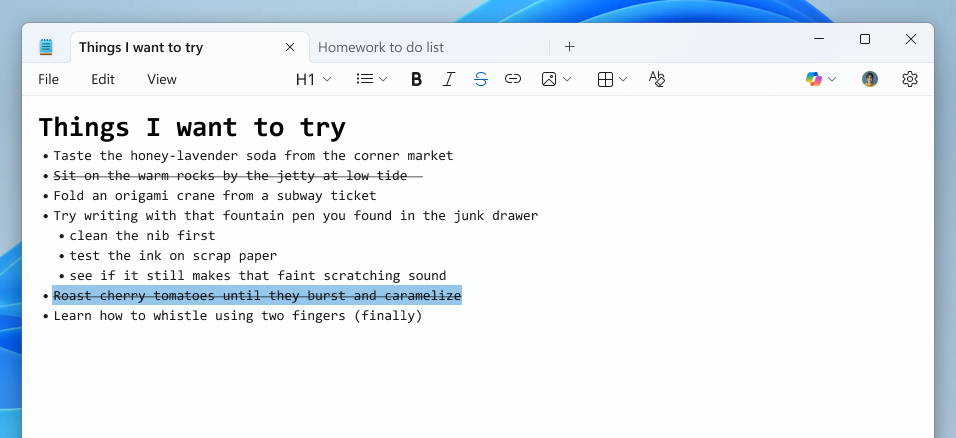
Notepad app screenshot of a nested list and strikethrough formatted created using the Increase indent command.
We are also introducing a new welcome experience in Notepad designed to help users discover and learn about the app’s latest and most useful features. This dialog provides a quick overview of what’s possible in Notepad and serves as a helpful starting point for both new and returning users. You can close it anytime and revisit it later by clicking the megaphone icon in the top-right corner of the toolbar.
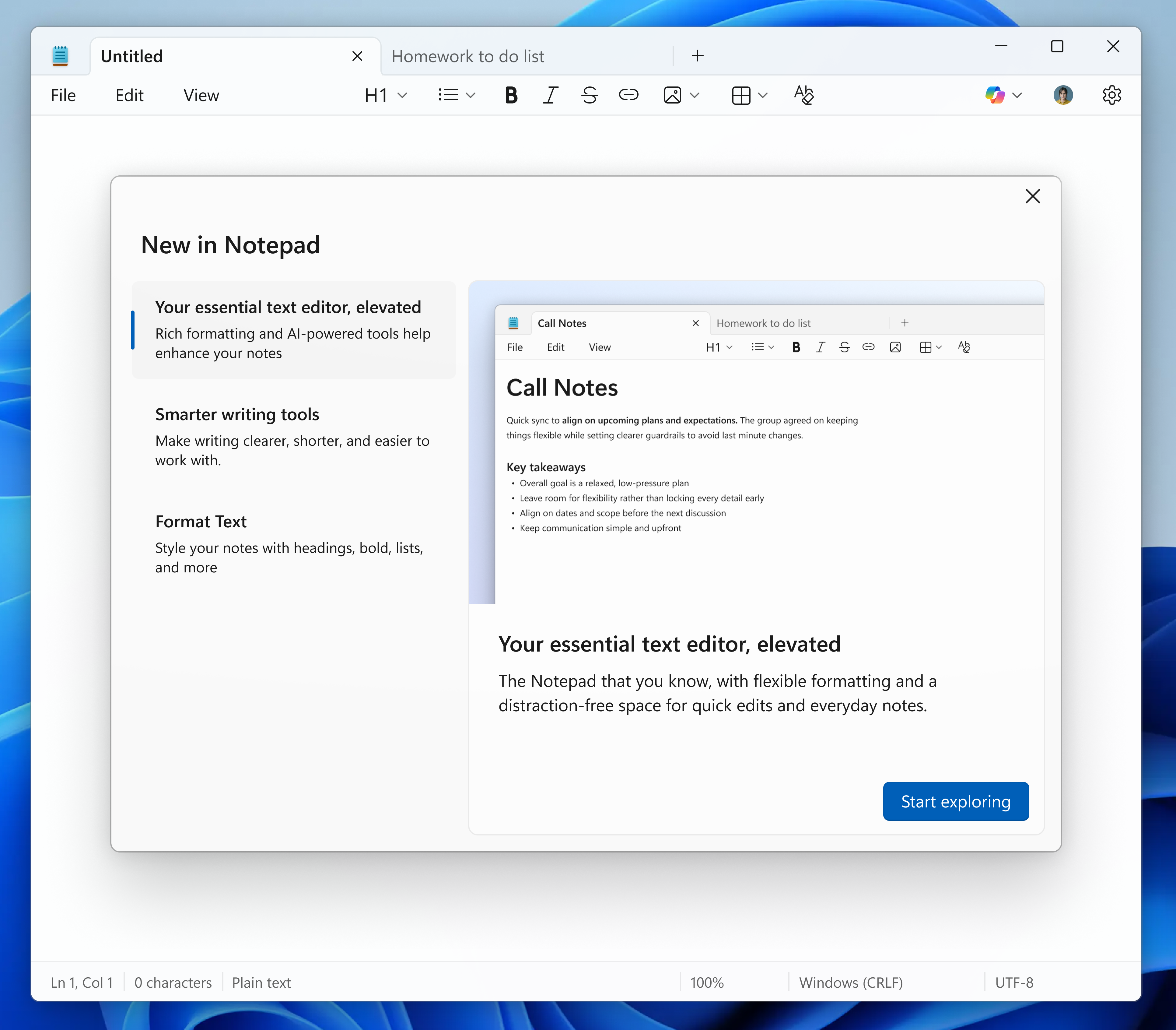
Notepad app screenshot of the updated “What’s New” first run experience.
Finally, we are expanding support for streaming results for AI text features. Whether generated locally or in the cloud, results for Write, Rewrite, and Summarize will start to appear quicker without the need to wait for the full response, providing a preview sooner that you can interact with. To use Write, Rewrite, and Summarize in Notepad, you will need to sign in with your Microsoft account.
FEEDBACK: Please file feedback in Feedback Hub (WIN + F) under Apps > Notepad.
In this update, we’re introducing two new features to Paint, Coloring book and fill tolerance slider.
Coloring book, an AI-powered feature that lets you create unique coloring book pages from a text prompt. To get started, open Paint and select the Coloring book option from the Copilot menu. Once the side panel is open, type in a description of the coloring book you want to create, like “a cute fluffy cat on a donut” or “a house with a garden and fence” and hit the Generate button. Paint will then generate a set of unique coloring book pages based on your prompt. Once the coloring book pages are generated, you can click on any one of them to Add to canvas, copy, or save it for later use.
Paint app showing a cat on a donut coloring book page.
Coloring book will be available only on Copilot+ PCs. To use Coloring book, you will need to sign in with your Microsoft account.
We’re also adding a fill tolerance slider, giving you control over how precisely the Fill tool applies color. To get started, select the Fill tool and use the slider on the left side of the canvas to adjust the tolerance to your desired level. Experiment with different tolerance settings to achieve clean fills or creative effects.
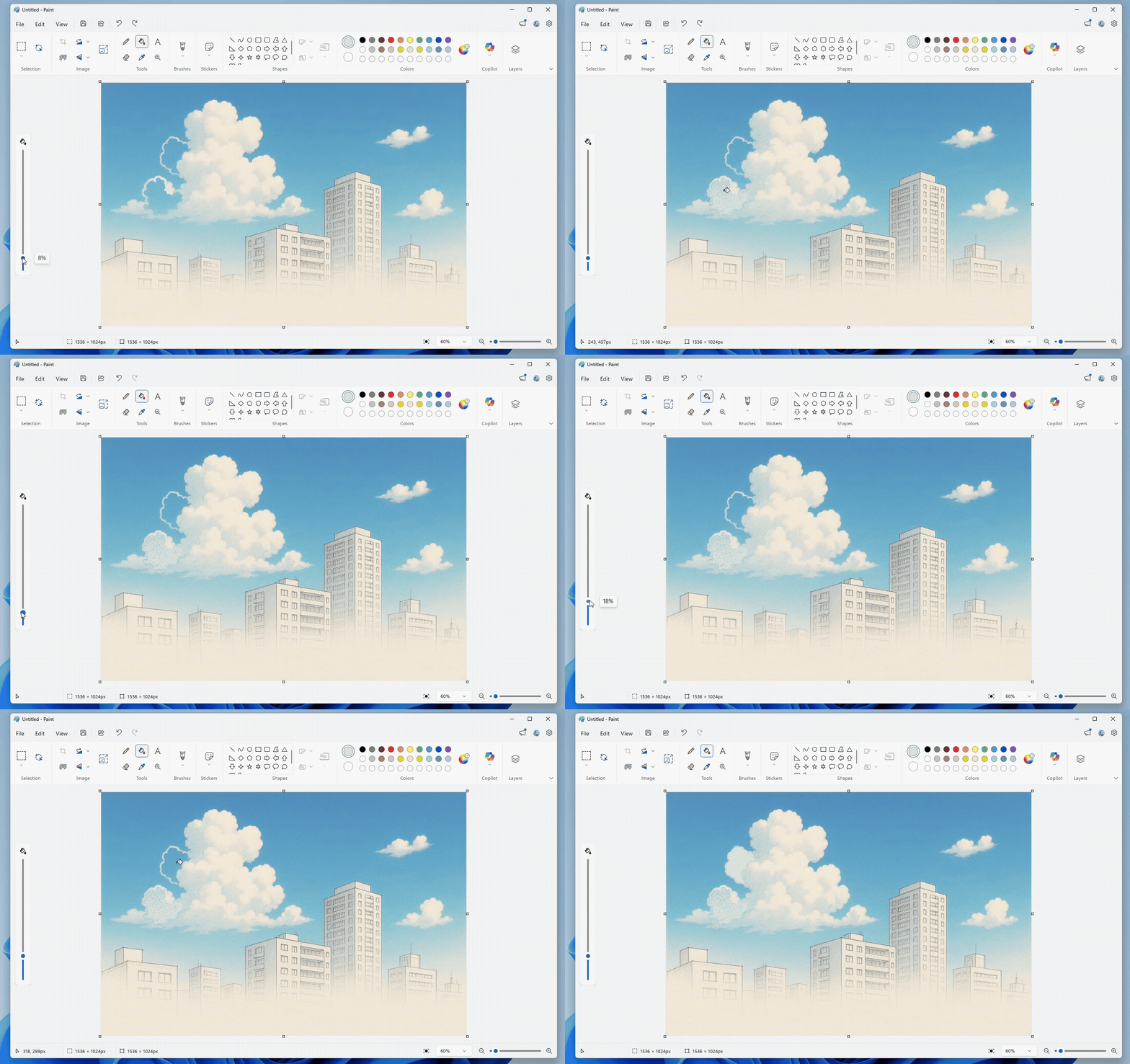
Paint app showing Fill tool with tolerance set to 8% versus 18%.
FEEDBACK: Please file feedback in Feedback Hub (WIN + F) under Apps > Paint.
As always, we love getting feedback from the community and we will be looking out for your thoughts and suggestions on these updates!
Thanks,
Dave Grochocki, Principal Group Product Manager – Windows Inbox Apps
And WordPad was built on top of the "RICHEDIT" window class, and exposed lots of the OLE features provided by the rich text control. "Insert Object" is a powerful and potentially dangerous feature with a lineage going back to the Windows 3.1 days. As long as your DLL is registered correctly, any document in an OLE-capable program can cause objects from that DLL to become instantiated and deserialized.
Getting rid of documents able to instantiate arbitrary OLE controls is a good reason to try to remove WordPad. It's not just some simple styled text editor.
Do you need to log in to notepad now? What in the actual hell is going on?
This doesn't seem like a good idea.
I’m willing to bet that adding markdown to Notepad was a lot simpler than trying to make it work in Wordpad, especially since you’d probably still have to support rich text.
I hope they give notepad a keyboard shortcut to transition to ascii only like textedit has on the Mac
Adding RTF and a wysiwyg markdown editor is the last thing that I want from something like notepad. When I open notepad, I still want to see the characters that are present. Heck, I'd like to be able to see the difference between a space and a tab. I'd want to be able to see which type of line ending are being used (and switch to the correct one, \n) Hiding characters is antithetical to the reason I'd use notepad in the first place.
I want to be able to search text and see text. Not compose a document or talk to an LLM.
For a UI I’ve been using VSCode. It is quite quick when you disable all extensions and most settings.
I think this explains the lack of viewers; they are simply not needed.
But in the world we seem to be heading toward, where you can only log into Windows with a Microsoft account, and where your Microsoft 365 subscription state controls which "edition" or "desktop experience" of Windows you get as said logged-in user (regardless of which machine you're logged into)... there'd be no need for Wordpad.
In that world, Word the software package would always be pre-installed. (Why? Because even if you aren't paying for M365, someone who is could always log into your PC as a roaming user; and that person would want Word to work immediately without having to wait for it to download+install.)
And in a world where Word the software package is always preinstalled, then Microsoft could just let anyone launch Word (whether they have an M365 subscription or not); and then, at launch, rather than just putting a paywall in the face of anyone without an M365 subscription, Word could instead use the logged-in user's M365 licensing state to determine whether the spun-up Word process should run the full-fat Word UI, or some kind of degraded unpaid-mode Word UI.
And "Word running with some kind of degraded unpaid-mode UI" could be every bit the "Word lite" offering that Wordpad is. Which makes Wordpad itself redundant.
(The only weird part to me, is that they deprecated/removed Wordpad before pulling the trigger on all of this.)
wordpad is all-included on its own
I've spent a long time building up my muscle memory. I don't want my tools changing out from under me. If they wanted to ship an "enhanced" notepad they should have called its something else.
edit.exe[1,2] actually. And it runs on Linux too! Linux had a real lack of good text editors.
I know there are others and there are fine points. I would like to see a couple minor additions to support image placement (that aligns with Medium's editor) and finally a strike-through text notation. But that's about it.
Notepad was never fancy, but it was a reliable tool to strip formatting or take a quick note, and now I cannot even count on that.
https://msrc.microsoft.com/update-guide/vulnerability/CVE-20...
But we think we're right and still we thought they were wrong.
If we were in a PHP forum, this would be my signature: I'm getting too old for this shit.
Let's just say I haven't concluded my testing yet, it's ongoing :)
You need to buy 5 regular Windows licenses and then you'll be able to unlock the LTSC option. It works out to about $300.
I do think notepad recently got those, but for a long time it was a compelling reason to use notepad++.
And you can avoid copilot.
So the people taking pot shots at the developers, I guess, maybe be more specific with what they did wrong and what they should have done instead. Because if you actually understand the history/circumstances (and the fact it was a third-party hosting provider compromised), one would expect more blame on the systemic under-funding of OSS than "developers bad."
Are people wanting them to create a business, monetize Notepad++, so that they no longer have issues with hosting/certificates? I'm guessing not.
For example, a prompt when opening the file like: "It's unclear what kind of data this is, here are a few options with a preview, pick which one you'd like me to use."
Annoying, but them's the breaks when you're making software and aren't willing to put in hard requirements about what it is expected to (not) operate on.
20260202 https://news.ycombinator.com/item?id=46851548 Notepad++ hijacked by state-sponsored actors (917 points, 543 comments)
20260203 https://news.ycombinator.com/item?id=46878338 Notepad++ supply chain attack breakdown (384 points, 198 comments)
20250630 https://news.ycombinator.com/item?id=44426049 High-Severity Vulnerability in Notepad++ (39 points, 14 comments)
20230904 https://news.ycombinator.com/item?id=37385920 Multiple Notepad++ Flaws Let Attackers Execute Arbitrary Code (83 points, 39 comments)
20230830 https://news.ycombinator.com/item?id=37320304 Buffer Overflows in Notepad++ (68 points, 61 comments)
20230829 https://news.ycombinator.com/item?id=37311068 Notepad++ v8.5.6 still vulnerable to possible arbitrary code execution (18 points, 3 comments)
20211209 https://news.ycombinator.com/item?id=29499002 StrongPity variant hides behind Notepad++ installation (45 points, 28 comments)
20191030 https://news.ycombinator.com/item?id=21395251 Notepad++ issues attacked by Chinese commenters (237 points, 110 comments)
20191030 https://news.ycombinator.com/item?id=21400526 Notepad++ repository is being spammed after “Free Uyghur” release (82 points, 36 comments)
20190317 https://news.ycombinator.com/item?id=19329330 Notepad++ drops code signing for its releases (496 points, 327 comments)
20170308 https://news.ycombinator.com/item?id=13824032 Notepad++ V 7.3.3 – Fix CIA Hacking Notepad++ Issue (1101 points, 291 comments)
20150112 https://news.ycombinator.com/item?id=8876823 Notepad ++ hacked for Je Suis Charlie comments(web archive link) (65 points, 74 comments)
Theyre also very political and giving them access to my machine now feels even more risky.
> eMacs
I love Emacs, but I don't see how a Lisp platform with a web browser, a Tetris implementation, and 4 terminal emulators (shell, term, ansi-term, eshell) can be considered 'lightweight'.
This isn't bad at all given how most other software evolved in thr the intervening 30 years.
The creator is also very selective about the type of politics he supports.
https://en.wikipedia.org/wiki/Notepad%2B%2B#Political_messag...
The possibility of software being a personal, creative, expressive endeavor (which often includes politics), something I believed in back when I was in university twenty years ago, is a feeling that's receded deeply into the past. That might be as much about me as it is about the world, but I miss it.
Windows 10 explorer.exe is 100x faster than Windows 11 explorer, it's not even close.
It also signals the death knell for Windows native apps. Microsoft can't make them anymore. It won't be long until even Excel is a Electron sloplication.
but i dont think most people here are complaining because of security risk... otherwise they wouldnt be recommending things like notepad++, other obscure editors, or editors with way larger code bases.
Just make your own damn notepad if it bothers you lol.
A key benefit of it is that it's not an electron app. It's an old C++ app that's still just chuggin' along.
Plus this Markdown preview functionality just caused Notepad to have a Remote Code Execution Vulnerability in it.
As someone famous said, "everything is relative" :) Compared to the new applications that have been coming out, Emacs and vim are a paragon of lightness.
Why would someone express political messages without being selective? It’s understandable not wanting overt politics in your software, but this line is odd.
I have a hard time believing this. I'm pretty sensitive to performance losses and I haven't noticed any difference between those. It wouldn't make sense either, given they should both host the same shell icon views. Are you sure the difference you're seeing is in explorer.exe? As opposed to something else, like a new shell extension or a new filesystem filter driver on Windows 11?
the moment software stops being neutral, it becomes a target
That said, if software is a personal creative expression, one must be prepared for the possibility that some people aren't going to like what one has to say. Often when the politics angle comes up with Notepad++, people will say "it's his software project, he has the right to put in political messages if he wants" as if that somehow compels people to be ok with the political messages. The author certainly has the right to use Notepad++ as a platform for his political opinions, and I would never dream of saying otherwise. I don't want him to go to jail, or get fired by his employer, or anything like that. But I similarly have the right to decide that I don't want to see his political opinions and use another piece of software. You pick up both ends of the stick, as the old saying says.
Confused the hell out of me recently when I was looking for Office 365 on their website.
If you use many different machines throughout your workday, this means you have to carry a copy of your bespoke solution with you on a memory stick or something, and hope that the machine you want to use it on allows the use of memory sticks or unapproved software.
It's far better to use an application that you can count on already existing on the machines.
(Also, a lot of that stuff comes bundled with Emacs out-of-the-box, further disqualifying it. Having a scripting engine is one thing, but having a scripting engine along with the whole rest of the jet is something else entirely!)
On that note, why are the keybindings for vi on a “modern” Ubuntu different from fedoras? I remember having to mess with ^H in a vimrc or something to that effect to mimic the behavior I was expecting.
But, at the same time, that's exactly the sort of thinking that's killed off that feeling I'm sentimental for. As a free human being, I don't want to live in fear of expressing my political views; and as someone who wants to view the software I make as a form of art or expression, I don't want to be afraid to express my political views through my software either. Should a writer avoid being political for fear of becoming a target? For fear of their books or readers becoming a target?
I even worked on an app in a relatively secure environment where the work around for an early SPA and IE6-8 company wide, was for the systems analysts using our app to use a portable firefox browser on the user desktop. IE6-8 in particular were really bad when you had an SPA as you had events tied to dom elements across the COM bridge that wouldn't release unless all dom and script references were freed up. jQuery actually did this, if you managed everything through it, but our app was an early version of extjs... so after 3-4 hours it would just run out of memory and die.
20231109 https://news.ycombinator.com/item?id=38212453 Windows 11 Update 23H2 is stealing users' IMAP credentials (666 points, 278 comments)
> the new Outlook is a thin wrapper around the cloud version, so the IMAP sync happens in the cloud, not locally
Somehow in this timeline AI can only be used to make things worse and sloppier
They can add as much AI and Markdown as they want to Wordpad as far as I'm concerned. Just leave my dumb featureless utility alone.
as a program that tries to be used by others - stay in your lane, you are not an opinion cesspool, you are here to do work and let others do it too
Btw, just before that I found this page regarding Edge, and this is why I paid more attention to these things: https://learn.microsoft.com/en-us/legal/microsoft-edge/priva...
That list is way too long for my taste, and it really indicated me that Windows became completely adversarial.