Posted on February 25, 2026 • 5 minutes • 912 words
Most people interact with BuildKit every day without realizing it. When you run docker build, BuildKit is the engine behind it. But reducing BuildKit to “the thing that builds Dockerfiles” is like calling LLVM “the thing that compiles C.” It undersells the architecture by an order of magnitude.
BuildKit is a general-purpose, pluggable build framework. It can produce OCI images, yes, but also tarballs, local directories, APK packages, RPMs, or anything else you can describe as a directed acyclic graph of filesystem operations. The Dockerfile is just one frontend. You can write your own.
The architecture
BuildKit’s design is clean and surprisingly understandable once you see the layers. There are three key concepts.
LLB: the intermediate representation
At the heart of BuildKit is LLB (Low-Level Build definition). Think of it as the LLVM IR of build systems. LLB is a binary protocol (protobuf) that describes a DAG of filesystem operations: run a command, copy files, mount a filesystem. It’s content-addressable, which means identical operations produce identical hashes, enabling aggressive caching.
When you write a Dockerfile, the Dockerfile frontend parses it and emits LLB. But nothing in BuildKit requires that the input be a Dockerfile. Any program that can produce valid LLB can drive BuildKit.
Frontends: bring your own syntax
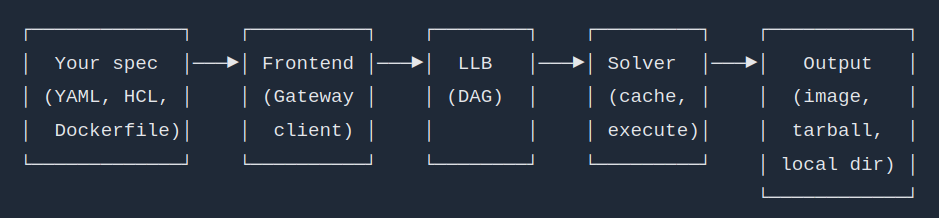
A frontend is a container image that BuildKit runs to convert your build definition (Dockerfile, YAML, JSON, HCL, whatever) into LLB. The frontend receives the build context and the build file through the BuildKit Gateway API, and returns a serialized LLB graph.
This is the key insight: the build language is not baked into BuildKit. It’s a pluggable layer. You can write a frontend that reads a YAML spec, a TOML config, or a custom DSL, and BuildKit will execute it the same way it executes Dockerfiles.
You’ve actually seen this mechanism before. The # syntax= directive at the top of a Dockerfile tells BuildKit which frontend image to use. # syntax=docker/dockerfile:1 is just the default. You can point it at any image.
Solver and cache: content-addressable execution
The solver takes the LLB graph and executes it. Each vertex in the DAG is content-addressed, so if you’ve already built a particular step with the same inputs, BuildKit skips it entirely. This is why BuildKit is fast: it doesn’t just cache layers linearly like the old Docker builder. It caches at the operation level across the entire graph, and it can execute independent branches in parallel.
The cache can be local, inline (embedded in the image), or remote (a registry). This makes BuildKit builds reproducible and shareable across CI runners.
┌─────────────┐    ┌──────────┐    ┌────────┐    ┌─────────┐    ┌────────────┐
│  Your spec  │───▶│ Frontend │───▶│  LLB   │───▶│ Solver  │───▶│   Output   │
│ (YAML, HCL, │    │ (Gateway │    │ (DAG)  │    │ (cache, │    │  (image,   │
│  Dockerfile)│    │  client) │    │        │    │ execute)│    │  tarball,  │
└─────────────┘    └──────────┘    └────────┘    └─────────┘    │ local dir) │
                                                                └────────────┘
Not just images
BuildKit’s --output flag is where this gets practical. You can tell BuildKit to export the result as:
type=image— push to a registry (the default fordocker build)type=local,dest=./out— dump the final filesystem to a local directorytype=tar,dest=./out.tar— export as a tarballtype=oci— export as an OCI image tarball
The type=local output is the most interesting for non-image use cases. Your build can produce compiled binaries, packages, documentation, or anything else, and BuildKit will dump the result to disk. No container image required.
Projects like Earthly , Dagger , and Depot are all built on top of BuildKit’s LLB. It’s a proven pattern.
Building APK packages with a custom frontend
To demonstrate this concretely, I built apkbuild : a custom BuildKit frontend that reads a YAML spec and produces Alpine APK packages. No Dockerfile involved. The entire build pipeline — from source compilation to APK packaging — runs inside BuildKit using LLB operations. Think of this like a dummy version of Chainguard’s melange
I chose YAML for familiarity, but the spec could be anything you want (JSON, TOML, a custom DSL) as long as your frontend can parse it.
My package YAML spec looks like this:
name: hello
version: "1.0.0"
epoch: "0"
url: https://example.com/hello
license: MIT
description: Minimal CMake APK demo

sources:
  app:
    context: {}

build:
  source_dir: hello
That’s it. No Dockerfile. No shell scripts. BuildKit reads this spec through the custom frontend and produces a .apk file.
Running it
Build the frontend image:
docker build -t tuananh/apkbuild -f Dockerfile .
Then use it to build an APK package:
cd example
docker buildx build \
  -f spec.yml \
  --build-arg BUILDKIT_SYNTAX=tuananh/apkbuild \
  --output type=local,dest=./out \
  .
You should be able to see the APK package in the out folder like below
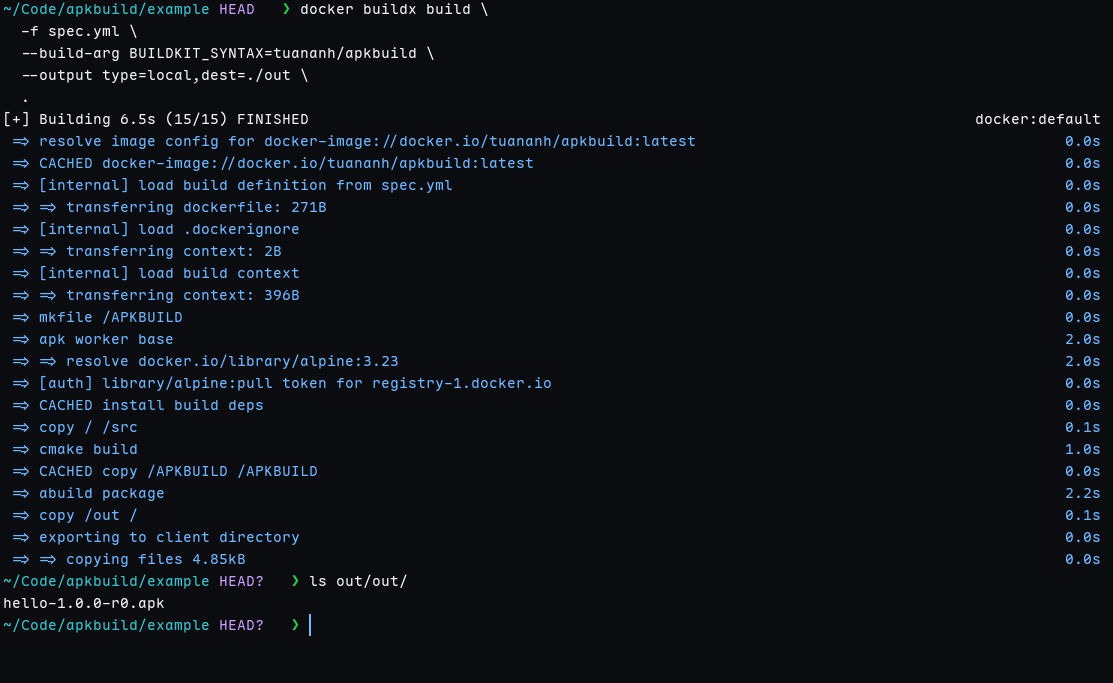
BUILDKIT_SYNTAX tells BuildKit to use our custom frontend instead of the default Dockerfile parser. The --output type=local dumps the resulting .apk files to ./out. No image is created. No registry is involved.
Why this matters
BuildKit gives you a content-addressable, parallelized, cached build engine for free. You don’t need to reinvent caching, parallelism, or reproducibility. You write a frontend that translates your spec into LLB, and BuildKit handles the rest.
This is relevant beyond toy demos. Dagger uses LLB as its execution engine for CI/CD pipelines. Earthly compiles Earthfiles into LLB. The pattern is proven at scale.
If you’re building a tool that needs to compile code, produce artifacts, or orchestrate multi-step builds, consider BuildKit as your execution backend. The Dockerfile is just the default frontend. The real power is in the engine underneath.