I’ve been running parallel coding agents with a lightweight setup for a few months now with tmux, Markdown files, bash aliases, and six slash commands. These are vanilla agents - no subagent profiles or orchestrators, but I do use a role naming convention per tmux window:
- Planner: Build Markdown specs for new features or fixes
- Worker: Implement from a finished spec
- PM: Backlog grooming and idea dumping
Most actual code writing happens from a finished spec I call Feature Designs (FDs). An FD is just an md file that has:
- the problem we are trying to solve
- all solutions that were considered including pros and cons for each
- the final solution with an implementation plan including what files need to be updated
- verification steps
Since I adopted this, I am able to work in parallel with 4 to 8 agents. After 8+ agents it’s hard to keep up and the quality of my decisions suffer.
I built this setup by hand in one project where I did 300+ of these specs. As I started new projects, I wanted to port the same system over, so I made a slash command /fd-init that bootstraps the full setup into any repo.
Feature Design tracking
Each FD gets a numbered spec file (FD-001, FD-002…) which is tracked in an index across all FDs and managed through slash commands for the full lifecycle. The file lives in docs/features/ and moves through 8 stages:
| Stage | What it means |
|---|---|
| Planned | Identified, not yet designed |
| Design | Actively designing the solution |
| Open | Designed, ready for implementation |
| In Progress | Currently being implemented |
| Pending Verification | Code complete, awaiting runtime verification |
| Complete | Verified working, ready to archive |
| Deferred | Postponed indefinitely |
| Closed | Won’t do |
Six slash commands handle the lifecycle:
| Command | What it does |
|---|---|
/fd-new |
Create a new FD from an idea dump |
/fd-status |
Show the index: what’s active, pending verification, and done |
/fd-explore |
Bootstrap a session: load architecture docs, dev guide, FD index |
/fd-deep |
Launch 4 parallel Opus agents to explore a hard design problem |
/fd-verify |
Proofread code, propose a verification plan, commit |
/fd-close |
Archive the FD, update the index, update the changelog |
Every commit ties back to its FD: FD-049: Implement incremental index rebuild. The changelog accumulates automatically as FDs complete.
A typical FD file looks like this:
FD-051: Multi-label document classification

Status: Open          Priority: Medium
Effort: Medium        Impact: Better recall for downstream filtering

## Problem
Incoming documents get a single category label, but many span
multiple topics. Downstream filters miss relevant docs because
the classifier forces a single best-fit.

## Solution
Replace single-label classification with multi-label:

1. Use an LLM to assign confidence scores per category.
2. Accept all labels above 0.90 confidence.
3. For ambiguous scores (0.50-0.90), run a second LLM pass with few-shot examples to confirm.
4. Store all labels with scores so downstream queries can threshold flexibly.

## Files to Modify
- src/classify/multi_label.py (new: LLM-based multi-label logic)
- src/classify/prompts.py (new: few-shot templates for ambiguous cases)
- sql/01_schema.sql (add document_labels table with scores)
- sql/06_classify_job.sql (new: scheduled classification after ingestion)

## Verification
1. Run classifier on staging document table
2. Verify no errors in operation log, run health checks
3. Spot-check: docs with known multi-topic content have expected labels
4. Run tests, confirm downstream filters respect confidence threshold
The FEATURE_INDEX.md tracks status across all FDs:
## Active Features
| FD     | Title                               | Status               | Effort | Priority |
|--------|-------------------------------------|----------------------|--------|----------|
| FD-051 | Multi-label document classification | Open                 | Medium | Medium   |
| FD-052 | Streaming classification pipeline   | In Progress          | Large  | High     |
| FD-050 | Confidence-based routing            | Pending Verification | Medium | High     |

## Completed
| FD     | Title                               | Completed  | Notes          |
|--------|-------------------------------------|------------|----------------|
| FD-049 | Incremental index rebuild           | 2026-02-20 | 45 min → 2 min |
| FD-048 | LLM response caching                | 2026-02-18 |                |
Run /fd-init in any repo and it:
Infers project context from CLAUDE.md, package configs, and git log
Creates the directory structure (
docs/features/,docs/features/archive/)Generates a
FEATURE_INDEX.mdcustomized to the projectCreates an FD template
Installs the slash commands (
/fd-new,/fd-status,/fd-explore,/fd-deep,/fd-verify,/fd-close)Appends FD lifecycle conventions to the project’s CLAUDE.md
FD System Initialized
Files Created
- docs/features/FEATURE_INDEX.md — Feature index
- docs/features/TEMPLATE.md — FD file template
- docs/features/archive/ — Archive directory
- CHANGELOG.md — Changelog (Keep a Changelog format)
- CLAUDE.md — Project conventions with FD management section
- .claude/commands/fd-new.md — Create new FD
- .claude/commands/fd-explore.md — Project exploration
- .claude/commands/fd-deep.md — Deep parallel analysis
- .claude/commands/fd-status.md — Status and grooming
- .claude/commands/fd-verify.md — Verification workflow
- .claude/commands/fd-close.md — Close and archive FD with changelog update
Next Steps
- Run /fd-new to create your first feature design
- Run /fd-status to check the current state
The development loop
Planning
I spend most of the time working with Planners. Each one starts with /fd-explore to load codebase context and past work so the agent doesn’t start from zero. For the original project where FDs were born, this slash command grew organically and now includes architecture docs, dev guide, readmes, and core code files. For my new projects, I created the generic version (the one I am sharing in this article), and my plan is to customize it for my new projects.
Once /fd-explore completes, I’ll usually point the Planner to an existing FD file and chat back and forth until I’m satisfied with the spec:
on fd14 - can we move the batch job to event-driven? what does the retry logic look like if the queue backs up?
In Boris Tane’s How I Use Claude Code, he describes how he uses inline annotations to give Claude feedback. I adapted this pattern for complex FDs where conversational back-and-forth can be imprecise. I edit the FD file directly in Cursor and add inline annotations prefixed with %%:
## Solution

Replace cron-based batch processing with an event-driven pipeline.
Consumer pulls from the queue, processes in micro-batches of 50.

%% what's the max queue depth before we start dropping? need backpressure math

Run both in parallel for 48h, compare outputs, then kill the cron job.
Failures go to the dead-letter queue.

%% what happens to in-flight items during cutover? need to confirm drain behavior
Then in Claude Code:
fd14 - check %% notes.
Sometimes a feature is quite complex, a problem doesn’t have an obvious solution, or I don’t know the technologies I’m working with well enough. In those cases, I may do two things:
- I cross-check the FD plan in Cursor with the gpt-5.3-codex xhigh (or whatever latest SoTA model)
- A special skill:
/fd-deepthat launches 4 Opus agents in parallel (inspired from GPT Pro’s parallel test-time compute1) to explore different angles:
if we switch to async processing, what happens to the retry queue when the consumer crashes mid-batch? use
/fd-deep.
/fd-deep runs each of the agents on Explore mode with a specific angle to investigate (algorithmic, structural, incremental, environmental, or whatever fits the problem). The orchestrator then verifies each of their outputs and recommends next steps.
Complex planning sessions can span multiple context windows. I often ask Claude to checkpoint the plan since compaction doesn’t do a great job to keep the relevant context in the new session.
Worker execution
When an FD is ready, I’ll launch a brand new agent in a separate tmux window. I point it at the FD with “plan mode on” so Claude builds a line-level implementation plan then run with “accept edits on” and let it run. When an FD has a big blast radius, I’ll instruct the Worker to create a worktree which Claude Code handles natively.
Compaction tends to work better with Workers probably because the FD has granular plan details that a newborn Worker can attend to.
Verification
Each FD has a verification plan, however Claude tends to find bugs with its own code when prompted to double check its work, so I kept typing the same things over and over:
proofread your code end to end, must be airtight
check for edge cases again
commit now, then create a verification plan on live test deployment.
So I built /fd-verify - it commits current state, does a proofread pass and executes a verification plan.
In my original project, I also created dedicated testing slash commands like /test-cli that run full verification against live data. The agent executes live queries and commands and reasons about whether the results are correct and writes Markdown files with tables, timestamps, and diagnostic notes. What’s great about this is that the agent can investigate issues on the spot so by the end, the result comes back diagnosed.
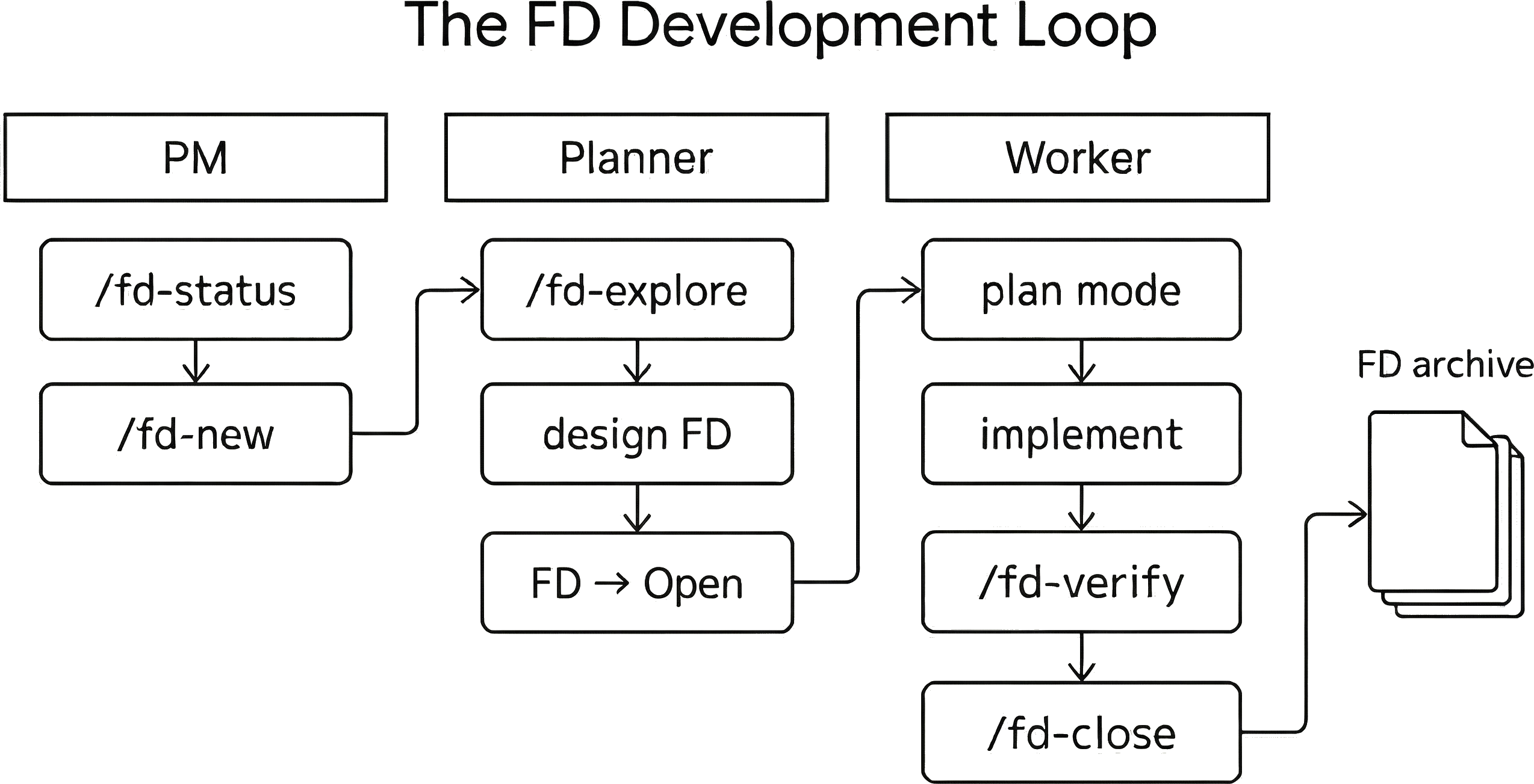
PM window:
1. /fd-status                      ← What's active and pending
2. Pick an FD (or /fd-new)         ← Groom the backlog or dump a new idea

Planner window (new agent session):
3. /fd-explore                     ← Load project context
4. Design the FD                   ← if stuck /fd-deep and cross-check in Cursor
5. FD status → Open                ← Design is ready for implementation

Worker window (fresh agent session):
6. /fd-explore                     ← Fresh context load
7. "implement fd-14" (plan mode)   ← Claude builds a line-level implementation plan
8. Implement with atomic commits   ← FD-XXX: description
9. /fd-verify                      ← Proofread and verification
10. Test on real deployment        ← Verification skills or manual
11. /fd-close                      ← Archive, update index, changelog
FD files as decision traces
In my original project, I now have 300+ FD files each with a problem statement, solutions considered, and what was implemented. An emergent property of this system is that agents frequently rediscover past FDs on their own with /fd-explore /fd-deep or when they launch Explore agents with plan mode. The added context of what was considered prior helps the agents plan better, and also remind me of relevant work I may have forgotten about (with all the context switching between tabs and the increased speed of work I am less capable of remembering what I have done).
The dev guide
Coding agents are insanely smart for some tasks but lack taste and good judgement in others. They are mortally terrified of errors, often duplicate code, leave dead code behind, or fail to reuse existing working patterns. My initial approach to solving this was an ever-growing CLAUDE.md which eventually got impractically long, and many of the entries didn’t always apply universally and felt like a waste of precious context window. So I created the dev guide (docs/dev_guide/). Agents read a summary on session start and can go deeper into any specific entry when prompted to do so. In my original project the dev guide grew organically, and I plan to extend the same concept to my new projects. Here’s an example of what a dev_guide might include:
| Entry | What it covers |
|---|---|
| No silent fallback values | Config errors fail loudly instead of hiding behind defaults |
| DRY: extract helpers and utilities | Don’t rewrite the same parser or validation logic twice |
| No backwards compatibility | All deployments are test environments, no migration code necessary |
| Structured logging conventions | Uniform log format across all features |
| Embedding handling | Always normalize embeddings at ingestion, never trust raw format from the database driver |
| Deployment safety | Destructive ops must wait for running tasks to complete before deploying |
| LLM JSON parsing | Always parse with lenient mode and regex fallback, never raw json.loads() |
My CLAUDE.md stays lean with stuff like commit style, Python and SQL conventions, FD lifecycle rules, etc.
Navigating the context switching
┌────────────────────────┬────────────────────────┬────────────────────────┐
│                        │                        │                        │
│  Cursor (IDE)          │  Ghostty Terminal 1    │  Ghostty Terminal 2    │
│                        │  tmux                  │  tmux                  │
│                        │                        │                        │
│  Visual browsing       │  Window 1: PM          │  Window 1: Worker      │
│  Hand edits            │  Window 2: Planner     │  Window 2: Worker      │
│  Cross-model checks    │  Window 3: Planner     │  Window 3: Worker      │
│                        │  Window 4: Planner     │  Window 4: bash        │
│                        │                        │                        │
└────────────────────────┴────────────────────────┴────────────────────────┘
When I work at home I have three panels across an ultrawide monitor:
- Cursor (left) for code browsing, edits, and cross-checking plans with other models
- Two Ghostty terminals (middle and right) each running a tmux session
Two coding agents across the terminals:
- Claude Code is my daily driver for general-purpose coding.
- Cortex Code is Snowflake’s coding agent - similar to Claude Code but with deeper Snowflake integration.
I use mostly vanilla tmux to navigate: Ctrl-b n/p to cycle windows, Ctrl-b , to rename them (planner, worker-fd038, PM), Ctrl-b c to spin up a new agent, Ctrl-b s to browse sessions. A few custom additions: Shift-Left/Right to reorder windows, m to move a window between sessions, and renumber-windows on so closing a tab doesn’t leave gaps.
I got tired of typing full paths so I created g* aliases (“go to”) for instant navigation:
| Alias | Project |
|---|---|
gapi |
~/workspace/services/api-service |
gpipeline |
~/workspace/services/data-pipeline |
gdatakit |
~/workspace/tooling/datakit |
gclaude |
~/.claude |
Claude reads them too. I tell Claude:
run the eval in gpipeline
and it resolves the alias to the actual path.
When running 3+ agents I needed a way to know when each window needs my input. I setup tmux windows to change color when an agent is idle:
| Layer | File | What it does |
|---|---|---|
| Claude Code | ~/.claude/settings.json |
Notification hook (matcher: idle_prompt) sends bell (\a) to terminal |
| tmux | ~/.tmux.conf |
monitor-bell on, bell-action any, window-status-bell-style reverse |
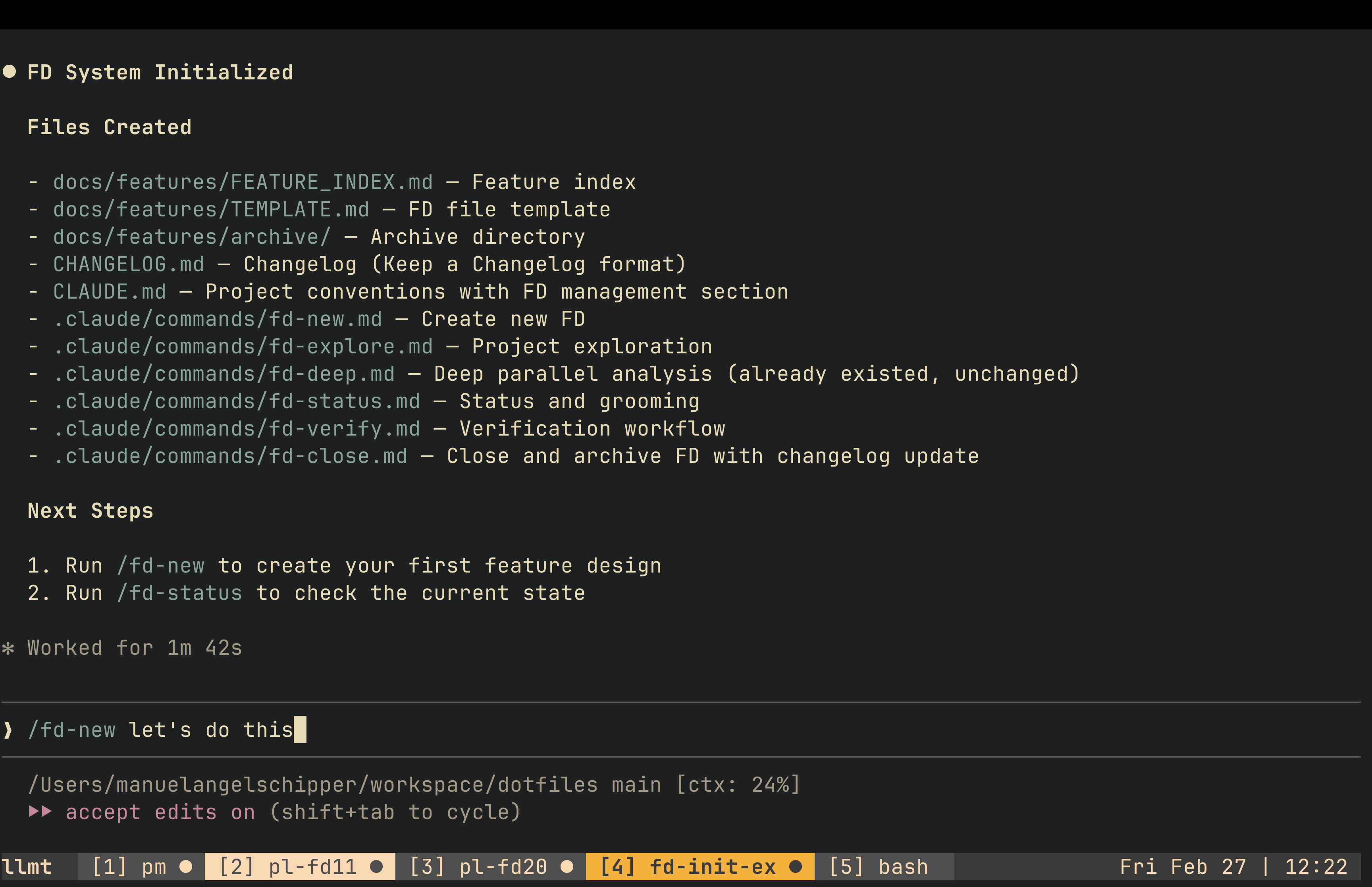
tmux tabs showing active agent sessions: PM, planners, and an fd-init run. Tabs change color when an agent goes idle. (click to enlarge)
What’s hard
With 6+ agents running, there’s always something waiting for me, like a Planner with design questions or a Worker ready for verification. Managing that is where the system starts to strain.
Cognitive load. Around 8 agents is my practical max. Past that, I lose track of what each one is doing and design decisions suffer. When I have to prompt an agent to “summarize its work” I know I need to dial it back.
Not everything parallelizes. Some features have sequential dependencies. While I could force parallelism in some features with worktrees and then try and merge things, it creates merge conflicts and can lead to confusion which leads to more work and bad merges. I prefer to keep things atomic and incremental to avoid spending too much time fighting a merge conflict in a codebase I barely recognize.
Context window limits. I like to approach problems holistically so I frequently ask Planners to explore multiple angles, consider edge cases, double check plans against the code, and explain things to me until I understand them. So I burn through context windows fast. I noticed that compaction can drop good context or even the decisions made during planning, so now I checkpoint FD progress often. This adds time to the planning cycle but results in tighter plans.
Deny list anxiety. Claude Code’s permission system has evaluation order issues where blanket Bash allows override of the ask list. This unfortunate bug has led me to do away with the ask list and instead use a deny list. I deny destructive commands (rm, git reset --hard, DROP) but the agent keeps finding creative ways to override them: unlink, python -c "import os; os.remove()", find ... -delete. I recently added an instruction in CLAUDE.md to not do that, so far so good but I don’t fully trust it.
Translating business context into FDs is still manual. Since this is a personal setup, I don’t collaborate with others via FDs. Instead, we use ticket tracking systems, messaging platforms, documents with product decisions and meeting notes etc. I’m the bridge between all of that and FDs. Eventually I’d love to experiment with a dedicated subagent profile with MCPs.
- OpenAI describes GPT-5 Pro as using "scaled but efficient parallel test-time compute." Nathan Lambert on Lex Fridman #490 discusses the broader pattern of inference-time scaling: giving models more compute at generation time to explore multiple reasoning paths. ↩
If you try this, please do share your ideas or feedback. You can find me at: [email protected]