

Your app has a card with an image. You want the back of the card to be a solid colour that is somewhat representative of the image and also visually pleasant. How would you do that?
A company I consult for did that by resizing the entire image to 1x1 (a single pixel) and using the colour of the pixel. This is a super popular approach! However, the colours were often dull and muddy even when the original image had vivid colours. It irked me, so I spent a weekend searching for prior art and trying a few tricks to do better. Then, I wrote a library. Inspired by Oklab's naming, it's called Okmain because it looks for an OK main colour:
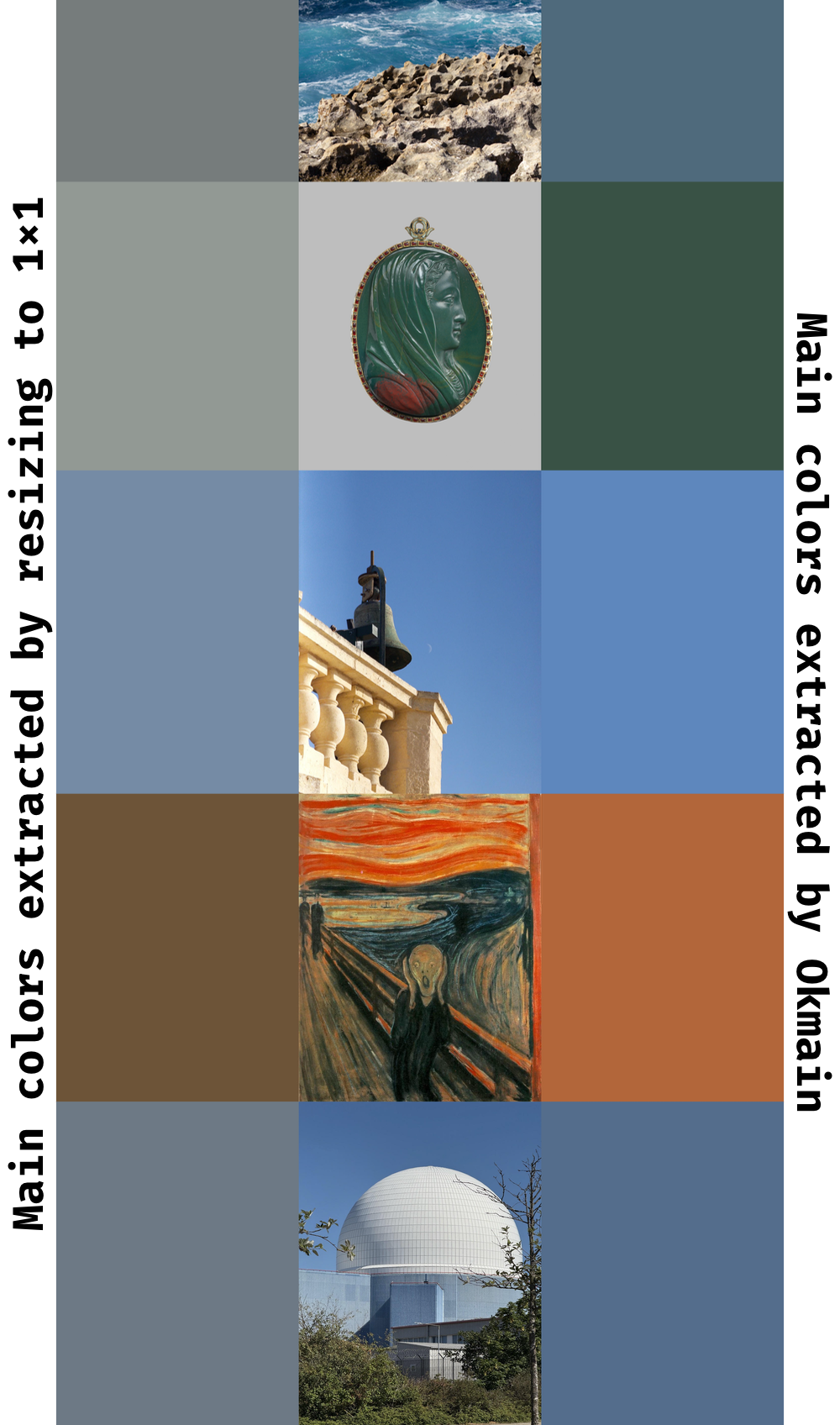
Here are the tricks I came up with:
- colour clustering
- Oklab colour calculations
- chroma + position cluster sorting
The rest is just implementing the tricks in Rust, writing a Python wrapper, making everything fast and robust, writing documentation, releasing to crates.io and PyPI, and writing this blogpost. Easy1!
Colour clustering
Most images have multiple clusters of colours, so simply averaging all colours into one doesn't work well. Take this image: while the green of the field and the blue of the sky are beautiful colours, simply averaging the colours produces a much less exciting colour (source):

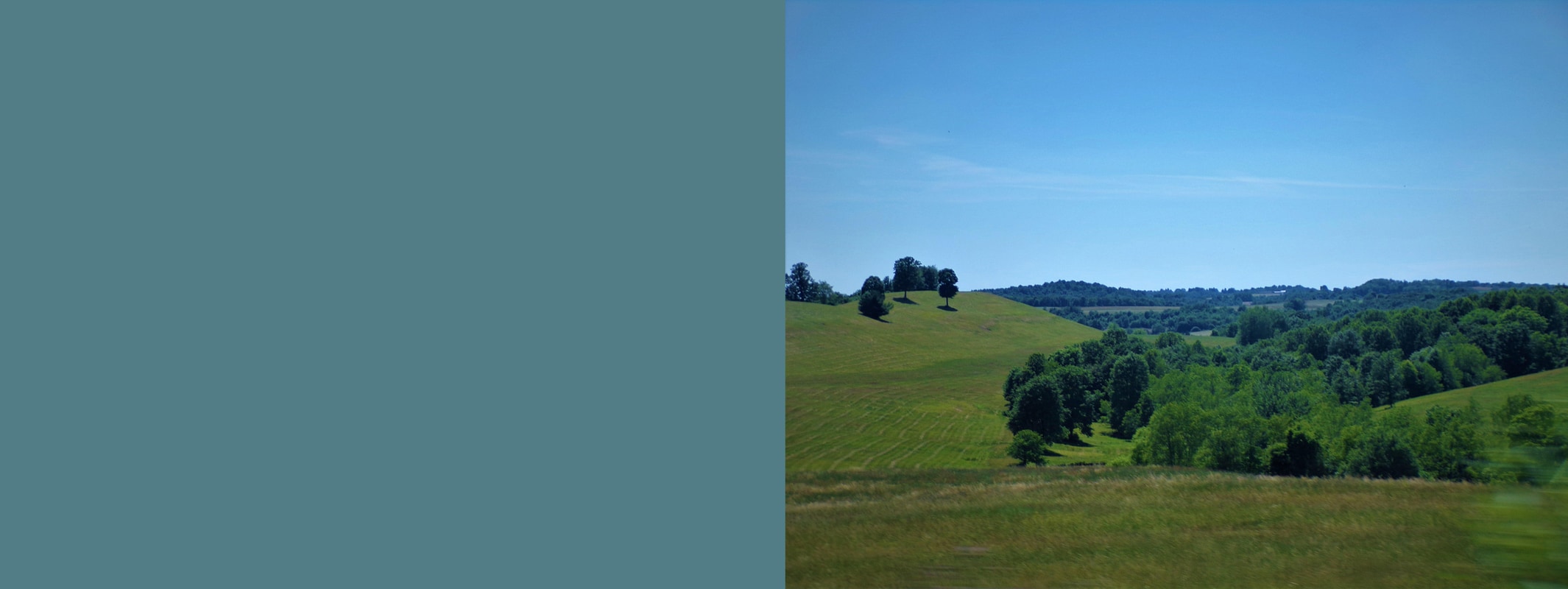
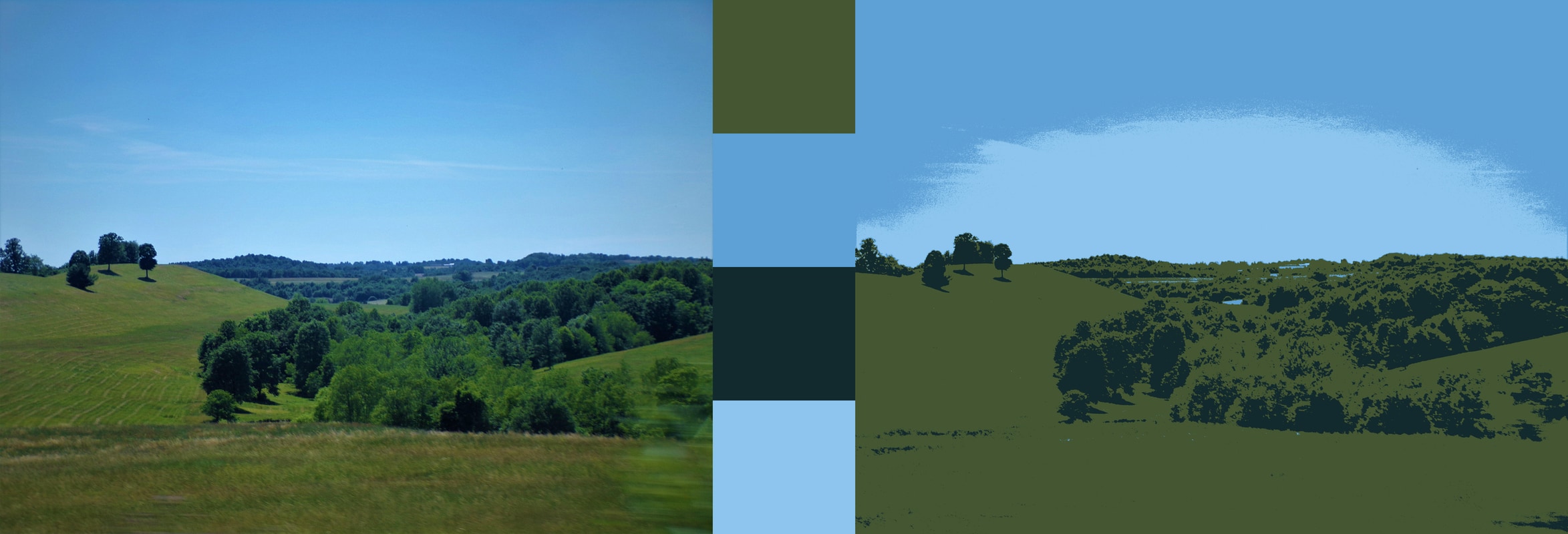
Instead, we can find groups of similar colours and average inside the group. K-means is a well-known algorithm for exactly that. We can run it on all pixels, clustering their colours and ignoring the pixel positions (for now).
For Okmain, I decided to only allow up to four clusters. In my testing, it was enough for decent quality, and limiting the number was handy to make clustering more performant. We will come to that later.
Here's how the image looks after colour clustering (including the extracted groups as swatches):
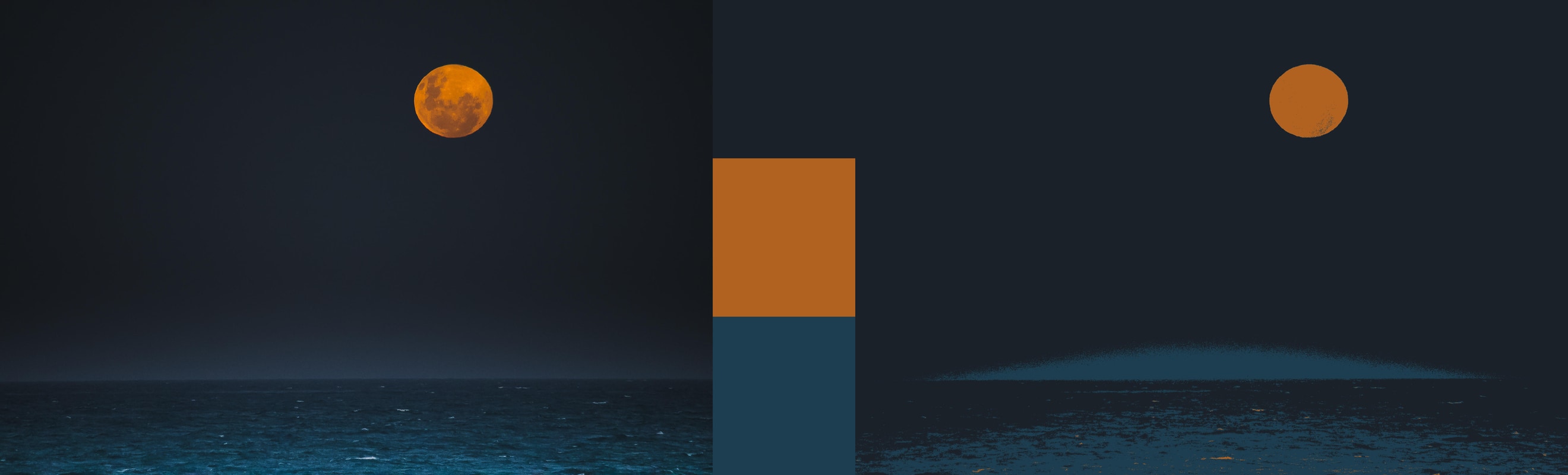
Note, however, that not all images have four meaningfully distinct clusters. Picking the number of clusters in a general case is a non-trivial problem. However, with just four colours it's simple enough to check if all clusters have different enough colours and re-run with fewer clusters if some clusters are too similar. Here's an example of an image with three distinct clusters (source):

Oklab
Another reason for the muddiness is the resizing library operating directly on sRGB colours.
In either clustering or resizing, colours need to be averaged. In a naïve implementation, this is done in the same colour space the image is in, which is most likely to be sRGB: red, green, and blue subpixel values with gamma correction applied. This is not ideal for two reasons.
First, gamma correction is non-linear, and applying linear operations over the correction leads to incorrect results.
Second, perceived colour intensity is also non-linear, which is why a sweep through all colours without correcting for perceptual differences produces vertical strips in the gradient (source):

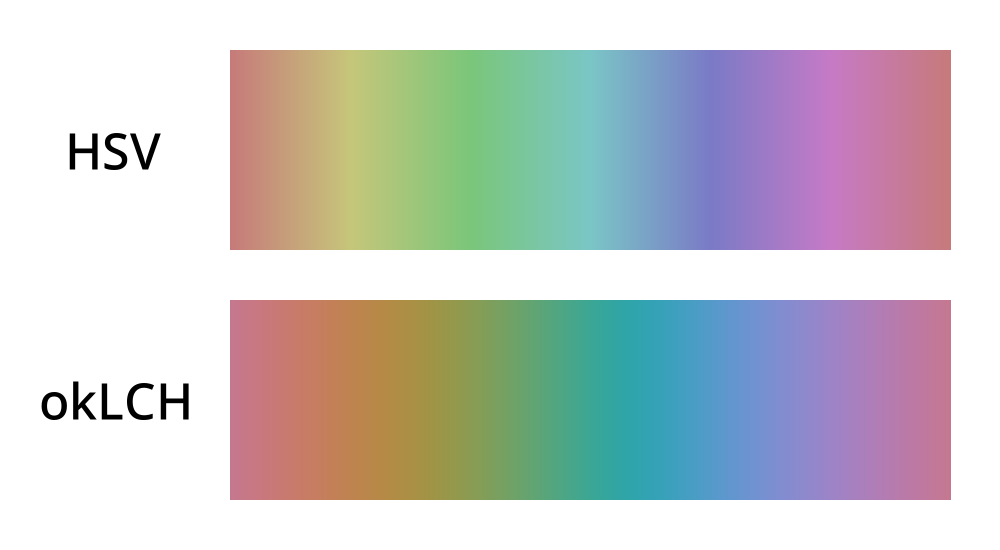
To solve both problems at once, Okmain operates in the Oklab colour space.
The result of averaging colours in Oklab is smoother mixing with fewer muddy browns:
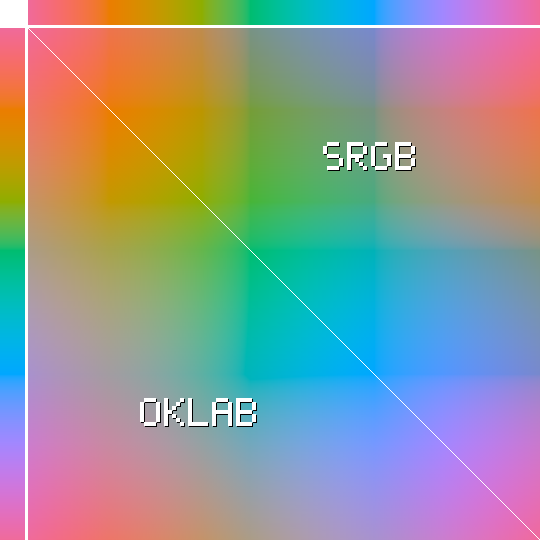
Here, a pixel at (X, Y) is a mix of colour X (from the top gradient) with colour Y (from the left gradient). In the top right triangle, I'm mixing the two colours in sRGB. In the bottom left, the colours are first transformed to Oklab, mixed, and then transformed back to sRGB. The sRGB triangle is visibly less smooth, with too many muddy browns in green+yellow and blue+orange areas.
This over-representation is what skews sRGB-averaged "main colours" towards unattractive, dirty-looking colours.
Cluster sorting
After colours are clustered in Oklab, the clusters need to be sorted by their visual prominence. After all, the user likely wants the more prominent, dominant colour and not just four colours with no idea which one is more prominent.
I came up with three heuristics for how prominent a cluster is:
- how many pixels are in the cluster?
- how central the pixels are?
- how visually prominent the colour is in itself?
Okmain combines the first two heuristics into one and calculates the number of pixels per cluster, discounting pixels that are closer to the periphery using a mask that looks like this (by default):

Intuitively, pixels that are closer to the centre of the image are more prominent, but only to an extent. If a pixel is central enough, it doesn't matter where it is exactly.
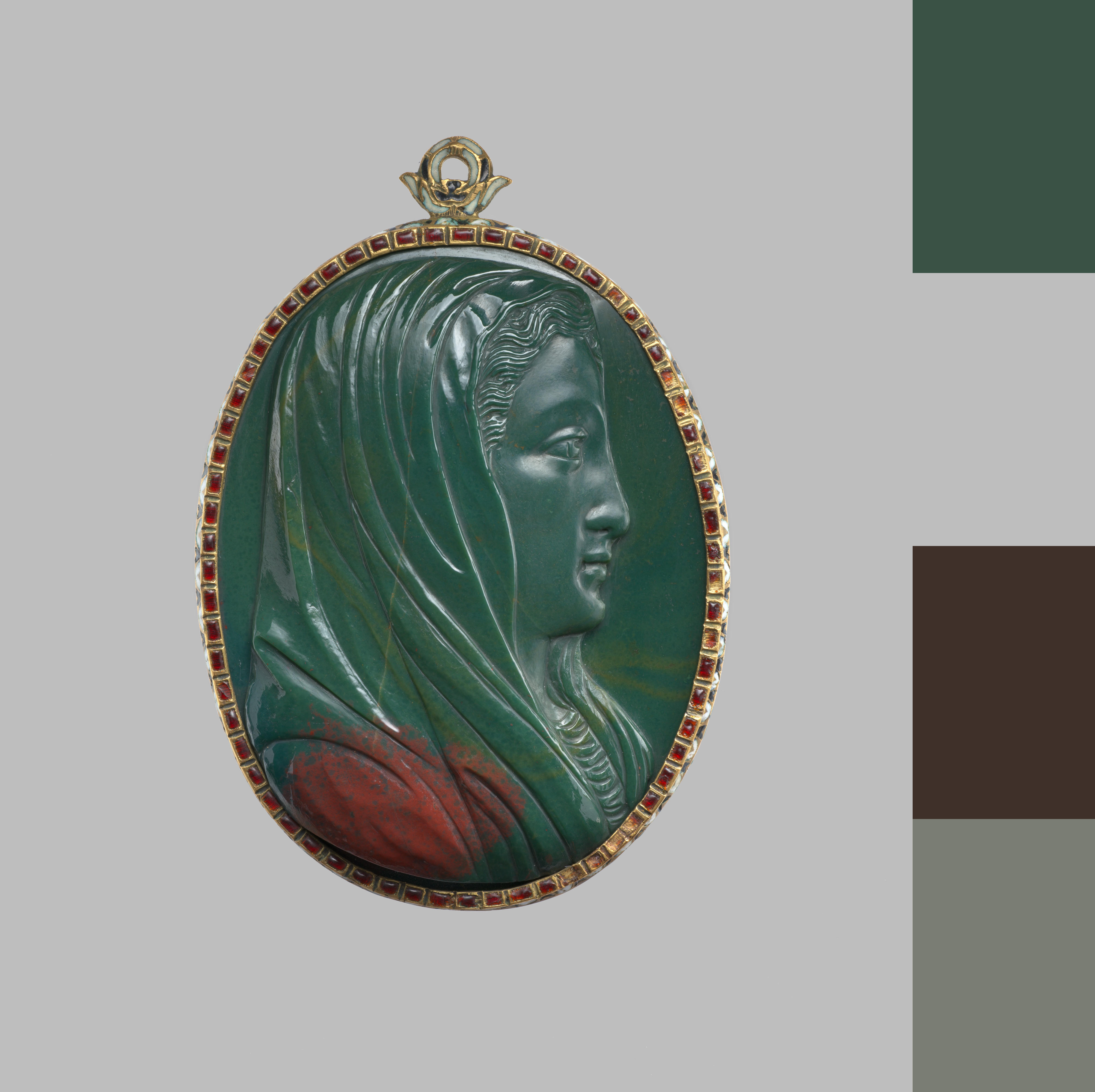
This weighting ensures that the most prominent colour on an image like this is the foreground green and not the background grey. The swatches are sorted top-down, the most prominent at the top (source):
Finally, Okmain tries to guess how visually prominent a particular colour is. This is tricky because prominence depends on how much a colour contrasts with other colours. However, using Oklab chroma (saturation) as a proxy for prominence seems to help on my test set, so it's now a factor in Okmain.
Performance
I wanted Okmain to not just produce nice colours but also be reasonably fast, ideally comparable to a simple 1x1 resize. I spent some time optimising it.
The simplest optimisation is to reduce the amount of data. Okmain downsamples the image by a power of two until the total number of pixels is below 250,000, simply averaging pixel values in Oklab. This also helps to remove noise and "invisible colours": on a photo of an old painting, paint cracks can create their own colour cluster, but ideally they should be ignored.
The downsampling is also an opportunity to de-interleave the pixels from an RGBRGBRGB… array into a structure-of-arrays (three separate arrays of L, a, and b floats), which helps to make a lot of downstream code trivially auto-vectorisable. Having a low fixed number of clusters that fits into a SIMD register (f32x4) seems to help, too.
One of the biggest hurdles for auto-vectorisation is Rust's insistence on correct floating point math. This is a great default, but it's impossible to opt out on stable Rust yet.
Another complexity is runtime dispatch based on the available instruction set. Rust defaults to a very conservative SIMD instruction set (SSE2), and it's a correct solution for a library like Okmain. However, AVX2 seems to help even for auto-vectorisation, so eventually I'll just add a dispatch with something like target_feature_dispatch. For now, Okmain is fast enough, extracting dominant colours from multi-megapixel images in around 100ms.
Initially, I implemented mini-batch k-means clustering, but for this particular case it proved slower after accounting for the sampling step. The entire dataset is small enough to fit into the cache, so going through the full dataset is quicker than having to first extract a mini-batch with unpredictable branching, even if the mini-batch itself is much smaller. K-means++ initialisation, on the other hand, helps a lot, despite the upfront cost of picking good starting points.
A tangent on LLMs
I was curious how LLM agents would work on this project. It felt like a good fit for agentic development: a small, well-constrained problem, greenfield development, and a lot of pre-existing data in the training set since k-means is a very popular algorithm. Armed with Opus (4.5 and 4.6) and sprites.dev for sandboxed, accept-everything autonomous development, I tried to retrace Mitchell Hashimoto's steps. The results are mixed, but I learned a lot.
With a good explanation and the planning mode, the very first version was ready really quickly. Unfortunately, it was subtly wrong in several places, and the code was awkward and hard to read. Additionally, I tried to make the code autovectorisation-friendly, and Opus seems confidently wrong about autovectorisation more often than it's right. Closing the loop with cargo asm helped, but the loop ate tokens frighteningly fast, and Opus was still struggling to be both idiomatic and verifiably vectorised.
After a few evenings and many tokens of trying to make Opus write as cleanly as I wanted, I gave up and rewrote the most crucial parts from scratch. In my opinion, the manual rewrite is cleaner and clearer, and this is a part where readability matters, since it's the hottest part of the library.
It seems that even frontier LLMs are struggling with intentful abstraction. LLMs split things out in the most mechanical way possible, instead of trying to communicate the intent with how things are split.
On the other hand, with the core API settled, Opus saved me a lot of time working autonomously on "debug" binaries that are easy to read through and don't need to be developed any further. I suppose that's exactly what Mitchell meant by "outsourcing slam dunks" — this works very well.
Throughout this experience, Sprites' stability was a thorn in my side. The UX and the idea are great when it works, but I had my sprite slow down to a crawl every few days. Once it went completely down and was unconnectable for most of the day. I hope fly.io folks make Sprites more stable. It's a super convenient way to run agents.
Good for now
I'm pretty satisfied with how this project turned out. You all got a decent library, and I learned more about k-means, SIMD, releasing mixed Python/Rust libraries, productive greenfield LLM use, and general performance.
Now go and extract all the main colours!
P.S. / Shameless plug: are you a manager at Apple London? Let's talk.
- The non-code bits took about 70% of the time 😔 ↩