I've been using Emacs since one of professors/mentors converted me over a decade ago back when I was attending university. As the years have progressed, I have found myself reaching for Emacs less and less. I still maintain my config and use it fairly often. I cannot use Emacs at my employer either, so that doesn't help.
However, I have always wanted to do what the author has demonstrated. I would love to be liberated from the all package dependencies I currently have. I just do not have the time nor self-discipline to do something like this. Even if the functionality would be less than or equal parity with 3rd-party packages, I would prefer the Devil I know over the ones I don't.
Also, with LLMs driving so much of current development it potentially makes Emacs even more competitive relative to modern IDEs. Development can be driven primarily by an agent like Claude Code from the command line, then navigating and tweaking the code, handling Git commits, etc with Emacs.
I imagine an LLM would be very good at writing Elisp to leverage EMacs’ strong core functionality to make Emacs work exactly how you want. This author managed to do it by hand, but I imagine someone starting now with an LLM could get there much faster.
I wish we would someday be able to edit in xref too, wgrep having landed in Emacs 30 (especially since project.el grep goes to xref by default).
By the way, anyone more informed know about any work on getting a graphical browser to work on latest Emacs, now that webkit xwidgets is dead for Emacs 30+? (Have tried EAF; extremely buggy on Mac)
In all seriousness very impressive and cool. Great information and post.
It's crazy to me how out of the box when you edit nginx file at /etc/nginx/sites-enabled/foo it creates another file foo~ there and nginx tries to load that too
When I tried to ask emacs reddit community they started attacking me for changing the default that only I need and fits everyone perfectly.
Still can't believe I'm the only one finding that default amazingly bad.
There's also no reason why you have to literally write everything yourself either. You can find open source licensed packages, read them to understand them, and then copy them into your config. Doing everything from scratch is a waste of time unless you enjoy the process (in which case go nuts).
It's roughly equivalent to trying to discover all of our scientific knowledge yourself from scratch vs taking "for granted" the knowledge discovered by your forebears. There is no shame or disadvantage in doing so.
Also, a critical objection:
> Writing your own packages is the best way to learn Elisp
Absolutely not. Reading a language is crucial. If all you do is write, you will pigeonhole into weird practices and generally fail to improve. Only by reading stuff written by others can you learn, as you're exposed to what other people do right and wrong, both of which will be different from you.
Of course, writing your own packages is also necessary, but not sufficient alone.
This resonates with me so hard. I'm not a "no external packages" purist, but there are a number of pieces of functionality that I wrote for myself because there wasn't anything quite like what I wanted.
One example is a function to expand the region (selection) to any arbitrary set of pairing delimiters that I define in a defvar (parens, quotes, brackets, or I can can supply a custom left/right regex for matching). Then, when I execute the function, it waits for a second keypress, which is the trigger key I've defined for that matching pair, and it will expand the region to the left and the right until it meets the applicable delimiter.
Repeating the same key presses results in selecting the left and right delimiters themselves, and another repeat will extend to the next set of matching delimiters, and so on.
Even though I use a treesitter-based expand-region plug-in, my custom function is still invaluable for when I want to jump past a series of valid treesitter object expansions, or when certain text objects are just not defined in treesitter.
Some of the helpful custom expansions I have defined are:
"w" to select what Vim considers a lowercase-w word
Space to select what Vim considers an uppercase-W word
"$" to select ${...}-style expressions
"/" to select everything between forward slashes
"*" to select between asterisks (useful when editing markdown)
It's really an invaluable function for me, personally, but I always talk myself out of trying to open-source it because it has some gotchas and limitations, and I just don't want to be on the hook for trying to make everyone who uses it happy.
I’m a GUI guy though. As soon as I try delving in, I abort when I see things like “just type c-C dingle bob to do x thing.” I’m happy these people found something that works with their brains. I just want a GUI that works like what they use.
I recently saw a Zed fork stripped of AI stuff but there’s no binaries yet (you gotta compile and get an Apple dev account and I don’t care enough). Zed and Sublime Text are the closest to my stylistic sensibilities but I’m always on the lookout for something better.
If you’re one of these EMacs freaks who also love GUIs, sign me up to your app!
Is there some reason Lisp is superior to any other general-purpose programming language for text editing? I'm skeptical because to my knowledge, Emacs is the only major text editor written in Lisp.
And no - vim isn't any better either. I always felt that in the emacs-versus-vim debate there were two losing sides.
First thing I do any time I install emacs.
Note that tramp will kvetch if you do this, but it still works fine.
(setq backup-directory-alist '(("." . ".~")))I don't think the post implied that this package writing activity was a write-only activity where reading and learning is strictly forbidden.
> You can find open source licensed packages, read them to understand them, and then copy them into your config. Doing everything from scratch is a waste of time unless you enjoy the process (in which case go nuts).
The post clearly indicates the relatively large set of open source packages they looked at and understood before doing their own packages. The author graciously acknowledges them and their influence on the work:
"Emacs Solo doesn't install external packages, it is deeply influenced by them. diff-hl, ace-window, olivetti, doom-modeline, exec-path-from-shell, eldoc-box, rainbow-delimiters, sudo-edit, and many others showed me what was possible and set the bar for what a good Emacs experience looks like. Where specific credit is due, it's noted in the source code itself."
I think of it more like building stuff out of Lego without following any instructions.
It seems pretty clear that the "why" is "because it's there"
[1]: https://gist.github.com/imiric/812398910c59cf00ab43d9172fe42...
> It's roughly equivalent to trying to discover all of our scientific knowledge yourself from scratch vs taking "for granted" the knowledge discovered by your forebears.
The author do have another config with all the bells and whistles. But Emacs does come with a lot of packages and tweaking them isn't that much work compared to building a full suite like Helm, especially with the awesome documentation system. Getting a v0.x of anything can be a matter of minutes. And then you wake up one day and you've built a whole OS for your workflows.
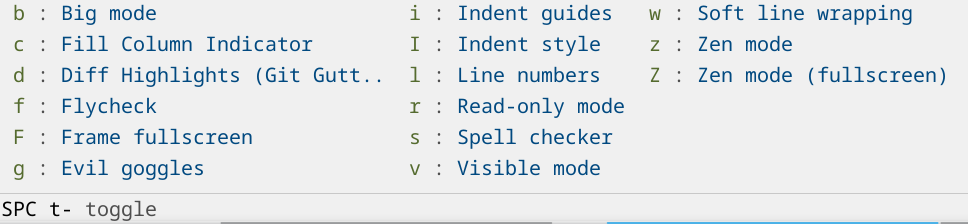
You do have that somewhat with packages like which-key that will show you a menu of options every time you press a key. You then learn the keybinds that you use the most. You can also search for them by name and see the keybind like you do with VS Code etc..
Here's what doom-emacs looks like when I press space and then space-t:
I don't think this is really possible. The thing that makes it special is that there are key binds for all the 100s of things you could want to do. So it becomes sort of like playing a instrument where you use your muscle memory instead of thinking specifically about the keys. If you make a bunch of menus and buttons to do the things it would be a mess and probably not very nice to use. Emacs actually has buttons and GUI controls for lots of the functionality, but it kind of sucks to use it that way.
These setups are impressive specifically because the creator has put in the time and effort to become an expert at using their editor. There is just no way to hand that over to someone else as-is without any investment from the recipient in skill development.
What was the Apple Dev account needed for? Previously I remember it was only needed for submitting apps to the App Store, not running Dev builds locally.
You can think of Emacs as a kind of software Lisp machine with an emphasis on editing. Although that analogy only works well if you squint or if you don't know a lot about Lisp machines.
As someone who first learned Lisp through Emacs Lisp, I found it fun, well-documented, and powerful. Once you grok the basics of how the system is dynamically glued together, infinitely hackable, and self-documenting it's kind of mind-blowing.
purely for text editing? No. But that's not what distinguishes Emacs, it's famously very mediocre at it. The point of Emacs is to be a fully transparent, inspectable, dynamic and changeable environment. In spirit similar to Smalltalk systems like Pharo. And for that a Lisp is not the only choice but a very good one.
There's very few languages and environments that facilitate jumping into any place, making a change, compiling or evaluating a block of code or treating it as data and continuing seamlessly.
(setq make-backup-files nil)
?!? Wtf does this mean and how did vi come up
The fact it can do multi-hop edits is far too much power for us mere mortals.
I've been maintaining Emacs Solo for a while now, and I think it's time to talk about what happened in this latest cycle as the project reaches its two-year mark.
For those who haven't seen it before, Emacs Solo is my daily-driver Emacs configuration with one strict rule: no external packages. Everything is either built into Emacs or written from scratch by me in the lisp/ directory. No package-install, no straight.el, no use-package :ensure t pointing at ELPA or MELPA. Just Emacs and Elisp. I'm keeping this post text only, but if you'd like to check how Emacs Solo looks and feels, the repository has screenshots and more details.
Why? Partly because I wanted to understand what Emacs actually gives you out of the box. Partly because I wanted my config to survive without breakage across Emacs releases. Partly because I was tired of dealing with package repositories, mirrors going down in the middle of the workday, native compilation hiccups, and the inevitable downtime when something changed somewhere upstream and my job suddenly became debugging my very long (at the time) config instead of doing actual work. And partly, honestly, because it's a lot of fun!
This post covers the recent refactor, walks through every section of the core config, introduces all 35 self-contained extra modules I've written, and shares some thoughts on what I've learned.
Now, I'll be the first to admit: this config is long. But there's a principle behind it. I only add features when they are not already in Emacs core, and when I do, I try to build them myself. That means the code is sketchy sometimes, sure, but it's in my control. I wrote it, I understand it, and when it breaks, I know exactly where to look. The refactor I'm about to describe makes this distinction crystal clear: what is "Emacs core being tweaked" versus what is "a really hacky outsider I built in because I didn't want to live without it".
The single biggest change in this cycle was architectural. Emacs Solo used to be one big init.el with everything crammed together. That worked, but it had problems:
— It was hard to navigate (even with outline-mode)
— If someone wanted just one piece, say my Eshell config or my VC extensions, they had to dig through thousands of lines
— It was difficult to tell where "configuring built-in Emacs" ended and "my own hacky reimplementations" began
The solution was clean and simple: split the config into two layers.
init.el (Emacs core configuration)This file configures only built-in Emacs packages and features. Every use-package block in here has :ensure nil, because it's pointing at something that ships with Emacs. This is pure, standard Emacs customization.
The idea is that anyone can read init.el, find a section they like, and copy-paste it directly into their own config. No dependencies. No setup. It just works, because it's configuring things Emacs already has.
lisp/ (Self-contained extra modules)These are my own implementations: replacements for popular external packages, reimagined as small, focused Elisp files. Each one is a proper provide/require module. They live under lisp/ and are loaded at the bottom of init.el via a simple block:
If you don't want one of them, just comment out the require line. If you want to use one in your own config, just copy the .el file into your own lisp/ directory and require it. That's it.
This separation made the whole project dramatically easier to maintain, understand, and share.
The init.el file is organized into clearly labeled sections (using outline-mode-friendly headers, so you can fold and navigate them inside Emacs). Here's every built-in package and feature it touches, and why.
The emacs use-package block is the largest single section. It sets up sensible defaults that most people would want:
— Key rebindings: M-o for other-window, M-j for duplicate-dwim, C-x ; for comment-line, C-x C-b for ibuffer
— Window layout commands bound under C-x w (these are upcoming Emacs 31 features: window-layout-transpose, window-layout-rotate-clockwise, window-layout-flip-leftright, window-layout-flip-topdown)
— Named frames: C-x 5 l to select-frame-by-name, C-x 5 s to set-frame-name, great for multi-frame workflows
— Disabling C-z (suspend) because accidentally suspending Emacs in a terminal is never fun
— Sensible file handling: backups and auto-saves in a cache/ directory, recentf for recent files, clean buffer naming with uniquify
— Tree-sitter auto-install and auto-mode (treesit-auto-install-grammar t and treesit-enabled-modes t, both Emacs 31)
— delete-pair-push-mark, kill-region-dwim, ibuffer-human-readable-size, all the small quality-of-life settings coming in Emacs 31
A full abbrev-mode setup with a custom placeholder system. You define abbreviations with ###1###, ###2### markers, and when the abbreviation expands, it prompts you to fill in each placeholder interactively. The ###@### marker tells it where to leave point after expansion. I wrote a whole article about it.
Configures auth-source to use ~/.authinfo.gpg for credential storage. Simple but essential if you use Gnus, ERC, or any network-facing Emacs feature.
Makes buffers automatically refresh when files change on disk. Essential for any Git workflow.
Configuration file mode settings and a compilation-mode setup with ANSI color support, so compiler output actually looks readable.
Custom window management beyond the defaults, because Emacs window management out of the box is powerful but needs a little nudging.
Tab-bar configuration for workspace management. Emacs has had tabs since version 27, and they're genuinely useful once you configure them properly.
Two IRC clients, both built into Emacs, both configured. ERC gets the bigger treatment: logging, scrolltobottom, fill, match highlighting, and even inline image support (via one of the extra modules). The Emacs 31 cycle brought nice improvements here too, including a fix for the scrolltobottom/fill-wrap dependency issue.
This is where Emacs Solo's completion story lives. Instead of reaching for Vertico, Consult, or Helm, I use icomplete-vertical-mode, which is built into Emacs. With the right settings it's surprisingly capable:
I've also been contributing patches upstream to improve icomplete's vertical rendering with prefix indicators. Some of those features are already landing in Emacs 31, which means the polyfill code I carry today will eventually become unnecessary.
A heavily customized Dired setup. Custom listing switches, human readable sizes, integration with system openers (open on macOS, xdg-open on Linux), and the dired-hide-details-hide-absolute-location option from Emacs 31.
Writable Dired, so you can rename files by editing the buffer directly.
This one I'm particularly proud of. Emacs Solo's Eshell configuration includes:
— Shared history across all Eshell buffers: Every Eshell instance reads from and writes to a merged history, so you never lose a command just because you ran it in a different buffer
— Custom prompts: Multiple prompt styles you can toggle between with C-c t (full vs. minimal) and C-c T (lighter vs. heavier full prompt)
— A custom welcome banner with keybinding hints
— History size of 100,000 entries with deduplication
Enhanced incremental search with sensible defaults.
This is one of the largest sections and one I'm most invested in. Emacs's built-in vc is an incredible piece of software that most people overlook in favor of Magit. I'm not saying it replaces Magit entirely, but with the right configuration it covers 95% of daily Git operations:
— Git add/reset from vc-dir: S to stage, U to unstage, directly in the vc-dir buffer. Admittedly, I almost never use this because I'm now used to the Emacs-style VC workflow: C-x v D or C-x v =, then killing what I don’t want, splitting what isn’t ready yet, and finishing with C-c C-c. Amending with C-c C-e is awesome. Still useful once or twice a semester.
— Git reflog viewer: A custom emacs-solo/vc-git-reflog command with ANSI color rendering and navigation keybindings
— Browse remote: C-x v B opens your repository on GitHub/GitLab in a browser; with a prefix argument it jumps to the current file and line
— Jump to current hunk: C-x v = opens the diff buffer scrolled to the hunk containing your current line
— Switch between modified files: C-x C-g lets you completing-read through all modified/untracked files in the current repo
— Pull current branch: A dedicated command for git pull origin <current-branch>
— Emacs 31 settings: vc-auto-revert-mode, vc-allow-rewriting-published-history, vc-dir-hide-up-to-date-on-revert
Merge conflict resolution and diff viewing. Ediff configured to split windows sanely (side by side, not in a new frame).
Documentation at point, with eldoc-help-at-pt (Emacs 31) for showing docs automatically.
The LSP client that ships with Emacs. Configured with:
— Auto-shutdown of unused servers
— No event buffer logging (for performance)
— Custom server programs, including rassumfrassum for multiplexing TypeScript + ESLint + Tailwind (I wrote a whole post about that)
— Keybindings under C-c l for code actions, rename, format, and inlay hints
— Automatic enabling for all prog-mode buffers except emacs-lisp-mode and lisp-mode
Diagnostics, spell checking, and whitespace visualization. All built-in, all configured.
The Emacs newsreader and email client. Configured for IMAP/SMTP usage.
Manual page viewer settings.
Fine-tuned minibuffer behavior, including completion-eager-update from Emacs 31 for faster feedback during completion.
RSS/Atom feed reader built into Emacs. Customized with some extras I build my self for dealing with youtube feeds: thumbnail, transcripts, sending to AI for a quick summary, and so on.
Auto-closing brackets and parenthesis highlighting.
Process manager (like top, but inside Emacs).
Org-mode configuration, because of course.
File tree navigation in a side window. With Emacs 31, speedbar gained speedbar-window support, so it can live inside your existing frame instead of spawning a new one.
World clock with multiple time zones, sorted by ISO timestamp (Emacs 31).
Buffer name disambiguation when you have multiple files with the same name open.
Key discovery. Built into Emacs since version 30.
Quick web searches from the minibuffer. Configured with useful search engines.
Specific configurations for every language I work with, organized into three areas:
Common Lisp: inferior-lisp and lisp-mode with custom REPL interaction, evaluation commands, and a poor man's SLIME/SLY setup that actually works quite well for basic Common Lisp development.
Non-Tree-sitter: sass-mode for when tree-sitter grammars aren't available.
Tree-sitter modes: ruby-ts-mode, js-ts-mode, json-ts-mode, typescript-ts-mode, bash-ts-mode, rust-ts-mode, toml-ts-mode, markdown-ts-mode (Emacs 31), yaml-ts-mode, dockerfile-ts-mode, go-ts-mode. Each one configured with tree-sitter grammar sources (which Emacs 31 is starting to define internally, so those definitions will eventually become unnecessary).
This is where the fun really is. Each of these is a complete, standalone Elisp file that reimplements functionality you'd normally get from an external package. They're all in lisp/ and can be used independently.
I call them "hacky reimplementations" in the spirit of Emacs Solo: they're not trying to be feature-complete replacements for their MELPA counterparts. They're trying to be small, understandable, and good enough for daily use while keeping the config self-contained.
Custom color themes based on Modus. Provides several theme variants: Catppuccin Mocha, Crafters (the default), Matrix, and GITS. All built on top of Emacs's built-in Modus themes by overriding faces, so you get the accessibility and completeness of Modus with different aesthetics.
Custom mode-line format and configuration. A hand-crafted mode-line that shows exactly what I want: buffer state indicators, file name, major mode, Git branch, line/column, and nothing else. No doom-modeline, no telephone-line, just format strings and faces.
Enhanced navigation and window movement commands. Extra commands for moving between windows, resizing splits, and navigating buffers more efficiently.
Configurable format-on-save with a formatter registry. You register formatters by file extension (e.g., prettier for .tsx, black for .py), and the module automatically hooks into after-save-hook to format the buffer. All controllable via a defcustom, so you can toggle it on and off globally.
Frame transparency for GUI and terminal. Toggle transparency on your Emacs frame. Works on both graphical and terminal Emacs, using the appropriate mechanism for each.
Sync shell PATH into Emacs. The classic macOS problem: GUI Emacs doesn't inherit your shell's PATH. This module solves it the same way exec-path-from-shell does, but in about 20 lines instead of a full package.
Rainbow coloring for matching delimiters. Colorizes nested parentheses, brackets, and braces in different colors so you can visually match nesting levels. Essential for any Lisp, and helpful everywhere else.
Interactive project finder and switcher. A completing-read interface for finding and switching between projects, building on Emacs's built-in project.el.
Vim-like keybindings and text objects for Viper. If you use Emacs's built-in viper-mode (the Vim emulation layer), this extends it with text objects and additional Vim-like commands. No Evil needed.
Highlight TODO and similar keywords in comments. Makes TODO, FIXME, HACK, NOTE, and similar keywords stand out in source code comments with distinctive faces. A small thing that makes a big difference.
Git diff gutter indicators in buffers. Shows added, modified, and deleted line indicators in the margin, like diff-hl or git-gutter. Pure Elisp, using vc-git under the hood.
Quick window switching with labels. When you have three or more windows, this overlays single-character labels on each window so you can jump to any one with a single keystroke. A minimal reimplementation of the popular ace-window package.
Centered document layout mode. Centers your text in the window with wide margins, like olivetti-mode. Great for prose writing, Org documents, or any time you want a distraction-free centered layout.
Upload text and files to 0x0.st. Select a region or a file and upload it to the 0x0.st paste service. The URL is copied to your kill ring. Quick and useful for sharing snippets.
Edit files as root via TRAMP. Reopen the current file with root privileges using TRAMP's /sudo:: prefix. A reimplementation of the sudo-edit package.
Multi-file regexp replace with diff preview. Perform a search-and-replace across multiple files and see the changes as a diff before applying them. This one turned out to be more useful than I expected.
Weather forecast from wttr.in. Fetches weather data from wttr.in and displays it in an Emacs buffer. Because checking the weather shouldn't require leaving Emacs.
Cryptocurrency and fiat exchange rate viewer. Query exchange rates and display them inside Emacs. For when you need to know how much a bitcoin is worth but refuse to open a browser tab.
Query cheat.sh for programming answers. Ask "how do I do X in language Y?" and get an answer from cheat.sh displayed right in Emacs. Like howdoi but simpler.
AI assistant integration (Ollama, Gemini, Claude). Send prompts to AI models directly from Emacs. Supports multiple backends: local Ollama, Google Gemini, and Anthropic Claude. The response streams into a buffer. No gptel, no ellama, just url-retrieve and some JSON parsing.
Git status indicators in Dired buffers. Shows Git status (modified, added, untracked) next to file names in Dired, using colored indicators in the margin. Think diff-hl-dired-mode but self-contained.
Audio player for Dired using mpv. Mark audio files in Dired, hit C-c m, and play them through mpv. You get a persistent mpv session you can control from anywhere with C-c m. A mini music player that lives inside your file manager.
File type icon definitions for Emacs Solo. The icon registry that maps file extensions and major modes to Unicode/Nerd Font icons. This is the foundation that the next three modules build on.
File type icons for Dired buffers. Displays file type icons next to file names in Dired. Uses Nerd Font glyphs.
File type icons for Eshell listings. Same as above but for Eshell's ls output.
File type icons for ibuffer. And again for the buffer list.
Container management UI for Docker and Podman. A full tabulated-list-mode interface for managing containers: list, start, stop, restart, remove, inspect, view logs, open a shell. Works with both Docker and Podman. This one started small and grew into a genuinely useful tool.
M3U playlist viewer and online radio player. Open .m3u playlist files, browse the entries, and play them with mpv. RET to play, x to stop. Great for online radio streams.
System clipboard integration for terminals. Makes copy/paste work correctly between Emacs running in a terminal and the system clipboard. Solves the eternal terminal Emacs clipboard problem.
Eldoc documentation in a child frame. Shows eldoc documentation in a floating child frame near point instead of the echo area. A reimplementation of the eldoc-box package.
Khard contacts browser. Browse and search your khard address book from inside Emacs. Niche, but if you use khard for contact management, this is handy.
Flymake backend for ESLint. Runs ESLint as a Flymake checker for JavaScript/TypeScript files. Disabled by default now that LSP servers handle ESLint natively, but still available if you prefer the standalone approach.
Inline images in ERC chat buffers. When someone posts an image URL in IRC, this fetches and displays the image inline in the ERC buffer. A small luxury that makes IRC feel more modern.
YouTube search and playback with yt-dlp and mpv. Search YouTube from Emacs, browse results, and play videos (or just audio) through mpv. Because sometimes you need background music and YouTube is right there.
GitHub CLI interface with transient menu. A transient-based menu for the gh CLI tool. Browse issues, pull requests, run actions, all from a structured Emacs interface without memorizing gh subcommands.
Throughout the config you'll see comments tagged ; EMACS-31 marking features that are coming (or already available on the development branch). Some highlights:
— Window layout commands: window-layout-transpose, window-layout-rotate-clockwise, and flip commands. Finally, first-class support for rearranging window layouts
— Tree-sitter grammar sources defined in modes: No more manually specifying treesit-language-source-alist entries for every language
— markdown-ts-mode: Tree-sitter powered Markdown, built-in
— Icomplete improvements: In-buffer adjustment, prefix indicators, and better vertical rendering
— Speedbar in-frame: speedbar-window lets the speedbar live inside your frame as a normal window
— VC enhancements: vc-dir-hide-up-to-date-on-revert, vc-auto-revert-mode, vc-allow-rewriting-published-history
— ERC fixes: The scrolltobottom/fill-wrap dependency is finally resolved
— native-comp-async-on-battery-power: Don't waste battery on native compilation
— kill-region-dwim: Smart kill-region behavior
— delete-pair-push-mark: Better delete-pair with mark pushing
— World clock sorting: world-clock-sort-order for sensible timezone display
I tag these not just for my own reference, but so that anyone reading the config can see exactly which parts will become cleaner or unnecessary as Emacs 31 stabilizes. Some of the polyfill code I carry today, particularly around icomplete, exists specifically because those features haven't landed in a stable release yet.
This latest cycle of working on Emacs Solo taught me a few things worth sharing.
Emacs gives you more than you think. Every time I set out to "reimplement" something, I discovered that Emacs already had 70% of it built in. vc is far more capable than most people realize. icomplete-vertical-mode is genuinely good. tab-bar-mode is a real workspace manager. proced is a real process manager. The gap between "built-in Emacs" and "Emacs with 50 packages" is smaller than the community often assumes.
Writing your own packages is the best way to learn Elisp. I learned more about Emacs Lisp writing emacs-solo-gutter and emacs-solo-container than I did in years of tweaking other people's configs. When you have to implement something from scratch, you're forced to understand overlays, process filters, tabulated-list-mode, transient, child frames, and all the machinery that packages usually hide from you.
Small is beautiful. Most of the modules in lisp/ are under 200 lines. Some are under 50. They don't try to handle every edge case. They handle my edge cases, and that's enough. If someone else needs something different, the code is simple enough to fork and modify.
Contributing upstream is worth it. Some of the things I built as workarounds (like the icomplete vertical prefix indicators) turned into upstream patches. When you're deep enough in a feature to build a workaround, you're deep enough to propose a fix.
Emacs Solo started as a personal challenge: can I have a productive, modern Emacs setup without installing a single external package?
The answer, after this cycle, is a definitive yes.
Is it for everyone? Absolutely not. If you're happy with Doom Emacs or Spacemacs or your own carefully curated package list, that's great. Those are excellent choices.
But if you're curious about what Emacs can do on its own, if you want a config where you understand every line, if you want something you can hand to someone and say "just drop this into ~/.emacs.d/ and it works", then maybe Emacs Solo is worth a look.
The repository is here: https://github.com/LionyxML/emacs-solo
It's been a lot of fun. I learned more in this cycle than in any previous one. And if anyone out there finds even a single module or config snippet useful, I'd be happy.
That's the whole point, really. Sharing what works.
None of this exists in a vacuum, and I want to give proper thanks.
First and foremost, to the Emacs core team. The people who maintain and develop GNU Emacs are doing extraordinary work, often quietly, often thanklessly. Every built-in feature I configure in init.el is the result of decades of careful engineering. The fact that Emacs 31 keeps making things better in ways that matter (tree-sitter integration, icomplete improvements, VC enhancements, window layout commands) is a testament to how alive this project is.
While working on Emacs Solo I also had the opportunity to contribute directly to Emacs itself. I originally wrote markdown-ts-mode, which was later improved and integrated with the help and review of Emacs maintainers. I also contributed changes such as aligning icomplete candidates with point in the buffer (similar to Corfu or Company) and a few fixes to newsticker.
I'm very grateful for the help, reviews, patience, and guidance from people like Eli Zaretskii, Yuan Fu, Stéphane Marks, João Távora, and others on the mailing lists.
To the authors of every package that inspired a module in lisp/. Even though Emacs Solo doesn't install external packages, it is deeply influenced by them. diff-hl, ace-window, olivetti, doom-modeline, exec-path-from-shell, eldoc-box, rainbow-delimiters, sudo-edit, and many others showed me what was possible and set the bar for what a good Emacs experience looks like. Where specific credit is due, it's noted in the source code itself.
A special thanks to David Wilson (daviwil) and the System Crafters community. David's streams and videos were foundational for me in understanding how to build an Emacs config from scratch, and the System Crafters community has been an incredibly welcoming and knowledgeable group of people. The "Crafters" theme variant in Emacs Solo exists as a direct nod to that influence.
To Protesilaos Stavrou (Prot), whose work on Modus themes, Denote, and his thoughtful writing about Emacs philosophy has shaped how I think about software defaults, accessibility, and keeping things simple. The fact that Emacs Solo's themes are built on top of Modus is no coincidence.
And to Gopar (goparism), whose Emacs content and enthusiasm for exploring Emacs from the ground up resonated deeply with the spirit of this project. It's encouraging to see others who believe in understanding the tools we use.
To everyone who I probably forgot to mention, who has opened issues, suggested features, or just tried Emacs Solo and told me about it: thank you. Open source is a conversation, and every bit of feedback makes the project better.