
Especially for rebasing, subset rebases (using --onto, see https://git-scm.com/book/en/v2/Git-Branching-Rebasing#_more_...) are a breeze with Magit. I can't remember the order of branches to use on the CLI, in Magit it's just "r s" basically. It's really magic.
This lets you add a single-line change to a commit way back somewhere in the log.
I would encourage anyone who relies on magit to sponsor tarsius to make his fantastic work sustainable.
A patch is an idea, not some snapshot of time. git allows for ideas manipulation. The rebase operation is adjusting ideas to fit a context. And with the reflog (which tracks every operations), you have undo for ideas manipulation.
Native-comp was a good step forward, but Emacs is still so much slower than Neovim, even in the case of launching and immediately quitting, with no config:
$ time emacs -Q -e kill-emacs
/Applications/Emacs.app/Contents/MacOS/Emacs -nw -Q -e kill-emacs 0.18s user 0.03s system 98% cpu 0.213 total
$ time nvim -es --cmd 'vim.cmd("q")'
nvim -es --cmd 'vim.cmd("q")' 0.02s user 0.01s system 82% cpu 0.034 total
Even with a very minimal set of packages, text insertion, etc. is slower, and opening Magit (when it hasn't been loaded yet) takes about a second due to slow package loading.Emacs is my favorite editor, full stop.
But every time I open Neovim or Sublime for quick tasks, it's always painfully apparent how much faster they are when I CMD+Tab back to Emacs.
Over the years I opted to substitute most tools with simpler, UI-based ones (like LogSeq for org-mode) but I never found a good substitution for Magit.
Having a whole spacemacs setup just for one tool is a bit overkill though, so I just use basic git and accept having to deal with interactive rebases manually.
I finally gave it a try when I came across the majutsu package, which is a magit-like interface for jujutsu. I recommend it for Emacs/magit users wanting to try `jj`!
"It's super easy! Just do l-Akqr␍=u2025-06-01␍-s--tests␍b!"
Most people think it's "just another interface on top of git" — without several in-depth examples it's difficult to realize that it actually allows you to complete really complex tasks quickly. I've seen this superficial take many times.
The exception is maybe diffing, where I just use meld as the difftool.
Unfortunately, for most people the fact that it's part of Emacs is a blocker.
And because most people use worse Git tools, they tend to use workflows that are easier with more cumbersome tools; generally just committing all kinds of junk commits to a branch, and using the "squash and merge" feature of GitHub or GitLab to clean everything in a PR/MR up into a single commit.
So yeah, it's sad that people don't use Git to its full potential because almost no other Git interface works as well, and most people aren't going to learn Emacs just for a Git UI.
My primary reason for using it is reviewing and staging commits. The non-linear staging with line granularity (which also lets you revert changes at the same time) is so, so very good when you care about crafting commits.
;; Speed up magit status by removing some things
(remove-hook 'magit-status-sections-hook 'magit-insert-tags-header)
(remove-hook 'magit-status-sections-hook 'magit-insert-status-headers)
(remove-hook 'magit-status-sections-hook 'magit-insert-unpushed-to-pushremote)
(remove-hook 'magit-status-sections-hook 'magit-insert-unpulled-from-pushremote)
(remove-hook 'magit-status-sections-hook 'magit-insert-unpulled-from-upstream)
(remove-hook 'magit-status-sections-hook 'magit-insert-unpushed-to-upstream-or-recent)As a sibling said, you can disable much of that.
The kind of person who would try a tool like Magit and use it to discover git would have found a different route if Magit didn't exist. The type of person who doesn't care isn't going to learn something just because a tool is available.
Maybe it's due to muscle memory from my CLI Git setup (nothing special, just some aliases, scmpuff, delta, etc.), or Magit forcing you into its own quirky UI, but it never clicked for me. For 99% of things I use Git for, I don't have any issues with my workflow, nor wish to improve it. For the other (very) rare occasions, I can always ask an LLM to help me figure out the right command.
This is also why I don't see any value in Jujutsu either, or any of the GUI/TUI wrappers. The Git CLI porcelain with some minor customizations just hasn't been a problem I need solving.
I agree, but there's ways around it. On my machine the Emacs daemon is ready before I even log-in (lingering [^0]).
I think I only restart the daemon when I update emacs and its packages, and yeah, Emacs and Spacemacs are slow, but do not slow me down.
[^0]: https://wiki.archlinux.org/title/Systemd/User#Automatic_star...
So the miniscule increase in start time is a non issue
For me, the best performance improvement has been handling long lines; e.g. Emacs used to become unusable if it was given a line of around 1MB. Since I run lots of shell-mode buffers, that would happen frustratingly-often. My workaround was to make my default shell a script that pipes `bash` through a pared-down, zero-allocation copy of GNU `fold`, to force a newline after hitting a certain length (crossing a lower threshold would break at the next whitespace; hitting an upper threshold would force a break immediately). That piping caused Bash to think it wasn't interactive, which required another work-around using Expect.
Thankfully the last few versions of Emacs have fixed long-line handling enough for me to get rid of my awful Rube-Goldberg shell!
Only exception is resolving conflicts.
The most important point for every gut IDE integration to me is that it cleanly maps to the file system and CLI state.
OT but i've learned the hard way not to push people into emacs.
a few years ago i made the very stupid mistake of pushing some colleague to trying/learning emacs and then i found myself having to explain the same person everything as well as fix his elisp code from his ~/.emacs .
Reality is, i didn't want to have that role and that colleague wasn't interested in gnu emacs in the first place.
That was a very stupid mistake on my side.
Nowadays i just say things like "yeah it's magit, an emacs plugin" or "ah yeah, it's nice because you spend some time learning it and then you can bring it over from company to company, no licenses involved or other annoyances".
Some people are intrigued, most other absolutely aren't... And it's fine.
Magit is not even close to be on the same level.
Any insane operation you want at your fingertips.
I would single out the following for Magit:
1. Single key strokes for actions and toggles 2. Discoverability through "slide-ins" (TFA also explains this)
For 2, this means I press "c" for commit, this opens a popup showing me the next keypresses and what they do. So I can build up muscle memory for commands I know that are fast due to 1, and I can discover options that might help me due to 2.
If I don't know what to do at all, there's Ctrl+c, Ctrl+c to discover "entry-points" for Magit shortcuts.
$ gtime /opt/homebrew/bin/emacs --batch --eval '(princ (format "%s\n" emacs-version))'
30.2
0.07user 0.03system 0:00.13elapsed 78%CPU (0avgtext+0avgdata 46064maxresident)k
$ /usr/bin/time ~/bin/emacs --batch -eval '(princ (format "%s\n" emacs-version))'
30.2
0.02user 0.01system 0:00.04elapsed 95%CPU (0avgtext+0avgdata 57728maxresident)kAltough I'm not using Emacs.app.
On my old Ryzen 3600X running Arch it's a lot faster. Does the UI eat so much performance on OSX?
$ time emacs -Q -e kill-emacs
real 0m0.076s
user 0m0.058s
sys 0m0.018s
$ time nvim -es --cmd 'vim.cmd("q")'
real 0m0.028s
user 0m0.005s
sys 0m0.003s
vim still is a lot faster though.A couple of things I tend to notice:
- In magit, I can run a raw git shell commands by pressing `:`; majutsu doesn't seem to have that, so I use Emacs ordinary `M-!`
- The default view in majutsu (log) isn't as slick as magit's. With magit, I'll routinely open it up to look at the repo status, browse through the diffs (expanding/collapsing), staging/unstaging, etc. With majutsu, most of that requires first opening up the log, then opening up the diff of a commit.
- Staging/unstaging in magit is quite nice. The analogous workflow in jj seems to be splitting/squashing, but that feels clunkier in majutsu.
I've not opened bugs or PRs for these things, since it's mostly vibes and I don't have actual solutions to offer ;-)
EDIT: Oh, I also remembered that `jj` ignores $PAGER and uses its own built-in paging by default. That tries to act like `less`, and doesn't work well in Emacs. It can't use env vars either, unless we set its pager to something like `sh -c "$PAGER"` (see https://docs.jj-vcs.dev/latest/config/#pager ). Since my $PAGER is always `cat`, I've just set that as jj's pager directly too.
Either way, this only addresses startup time too. The rest of the issues: text insertion lag, `project-find-file` being slow in large repos, etc. all remain.
> vim still is a lot faster though.
you might want to make sure you're comparing apples to apples though. the "emacs" command most likely is going to load the GUI emacs so a lot of gui libraries (if you're running a recent emacs then even GTK libraries) whereas the nvim command isn't going to load gui libraries at all.
maybe try with a non-gui version of emacs (or maybe calling emacs -nw)
Magit surfaces all available commands and options for you, along with key shortcuts as well as the actual git cli counterparts if you want to learn the raw command, too.
> That looks complicated, but remember how we built it: we looked at the hints and selected one option at a time. Now, if this is a log type we’ll use often, we are going to start to be able to write out that incantation without even looking at the hints. It’s both discoverable and efficient.
And I'm saying this as someone who has exclusively programmed in Emacs with Magit for the last 5 years in my job.
So the software is mac-only, you haven't used a mac in over 20 years so you haven't used this software and yet... you claim it's better than magit?
i mean, it's very dishonest at best.
But I typically start emacs at boot, and then it runs until I reboot. I usually have one GUI frame, and one tui frame running in tmux so I can easily attach to my emacs session from a different computer. I have an emacsclient wrapper that opens stuff from the command line in my running emacs (and also mail wrappers, so clicking on a mail link in a browser opens a mail compositor in emacs).
I'm using eyebrowse with a bunch of own convenience features for workspaces in emacs - stuff like "when I switch to a buffer it'll switch to the workspace wher e that buffer is open unless I tell it I want it here". Combine that with some custom SSH entry points and especially on the notebook where I only have one screen it's way more comfortable to use than the OS window management for a terminal/ssh session messy like me.
There's no reason why it shouldn't. You seem to think that the interface obliges a program into a certain performance pattern. No such obligation exists. And Emacs isn't a TUI program, it only happens to have a terminal interface among many others.
Anyway, you can start N emacs instances and they can all have individual buffer states.
Emacs is not primarily a TUI program (although it does have a TUI with the -nw). The TUI version of emacs lacks visual customizability and introduces unnecessary overhead (terminal!). Use the GUI.
Text insertion lag is something I haven't experienced since 2019. Config issue?
project-find-file might be slow because of low gc-cons-threshold. I know consult gets around this by temporarily raising the threshold. These days, you can use the feature/igc branch to make these operations faster (although they are pretty fast anyway).
If you think emacs lacks <fundamental feature X>, think again!
As someone who mostly lives in Emacs, I like it. If I'm away from a machine, I can SSH into it and carry on with whatever I was in the middle of.
It's also nice to set emacsclient as EDITOR, so that e.g. running `git commit` will open up a buffer in the existing Emacs session. This is especially useful since I use shell-mode, and it would be confusing/weird to have new Emacs instances popping up when I'm already in an editor! (They open in a "window" (i.e. pane) in the existing "frame" (i.e. window) instead)
Yeah, it feels a bit weird to not have some isolation.
Spacemacs offers layouts[^1] that give you some buffer-isolation. Each window has a "layout", and layouts have sets of buffers. It works well, but you can run into extra prompts if you open the same buffer from two layouts and try to kill it from one of them (kill the buffer (for all layouts)? just remove from this layout? In my mind the latter should just be the default).
[^1]: https://www.spacemacs.org/doc/DOCUMENTATION.html#layouts-and...
Maybe, but I'd like to hear why you think this is such an antifeature for a single-threaded application.
Given the extra resources available these days, for example, why not just bring up a stand-alone ERC instance for chatting, if shared state is a concern?
If that's the case, it also seems like you can do jj duplicate and repeat -o if you just want to create a branch to temporarily test against another branch and main.
Like what? Emacs is written in C and there are ports of it out there (all half-abandoned). Emacs, the way it exists, works very well.
But exactly this was the point where I realized that even IntelliJ's pretty good VCS integration for git can be easily replaced with a simpler mental model.
Still, should even have included that because I do add and commit from the IDE out of convenience, too.
For adding selected hunks, I also use the CLI less often than IntelliJ I guess.
I didn't like that they've adopted a more aggressive stance on keeping in-memory changes for open tabs when it comes to modifying the file system using git CLI (or any other tool), similar to VSCode.
But they implemented this pretty well so that it's not as confusing as in VSCode.
I still hate it when the dialogue jumps at me after switching branches and having done something before on the CLI (such as `git stash push` etc).
But I have to say that they're doing a very good job, and I'm thankful not having to deal with VSCode git integrations that only seem to confuse people, who then cannot use git without VSCode.
Not what he said. You misparsed.
Only in the past years have I started customizing it
My attraction to Emacs is stability and I can use it in text or GUI mode.
Many editors have come and gone in that time, many employers insist I use this or that piece of over designed, under done GUI. When I have the chance, back to Emacs
I think all software (or at least, any text editor) regardless of interface type should launch instantly. But it's more unjustifiable with TUI programs.
Can you elaborate on this? I tend to use emacs exclusively in the terminal, since I'm often using them on remote workstations. For remote workstations, I can (a) open files using TRAMP, (b) open a remote GUI with X11 forwarding over SSH, or (c) open a remote TUI. TRAMP doesn't always play nicely with LSP servers, and remote TUIs are much, much more responsive than X11 forwarding.
Locally, the performance of emacs depends far more on the packages I load than on the GUI vs TUI, so I'm interested in hearing what overhead there would be.
$ time nvim -es --cmd 'vim.cmd("q")'
real 0m0.057s
user 0m0.016s
sys 0m0.017s
$ time emacs -Q -e kill-emacs
real 0m0.230s
user 0m0.165s
sys 0m0.064s
$ time emacs -nw -Q -e kill-emacs
real 0m0.095s
user 0m0.057s
sys 0m0.017sNot for the parts of it I use.
But none of them that I've tried have ever come close to the workflow.
I can stage and unstage individual hunks, do complex interactive rebases, squash commits, break apart commits, etc. much faster in Magit than I can in other Git GUIs.
Maybe you're hung up on the "G" part; perhaps I should have just said "UI" rather than "GUI".
So no, I haven't tried that one because it's Mac only, but I'm not really seeing from the screen recordings the kind of workflow that I find so powerful in Magit.
Tried it anyways, looks the same:
$ time emacs -nw -Q -e kill-emacs
real 0m0.075s
user 0m0.062s
sys 0m0.013s
I read Ian Whitlock’s article on why he can’t quit Magit and it inspired me to share more about Magit from my perspective. This article will focus on rebasing.
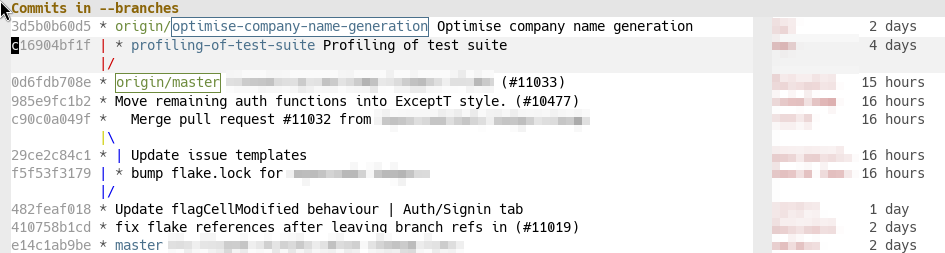
Here I have opened the git log11 I’m sorry about the mouse cursor – it’s an artifact of selecting the area to screenshot., by first opening Magit (which I have bound to the F3 key), and then pressing lL. The first l is the prefix key for dealing with the git log, and the second L is to to view the log for all local branches (and the remote branches they track.)
Hypothetically, if we wanted to run a more complicated log command, it is very easy to do that in Magit. When we press the first l and pause for a moment, Magit shows us unintrusive hints for all options that are available:
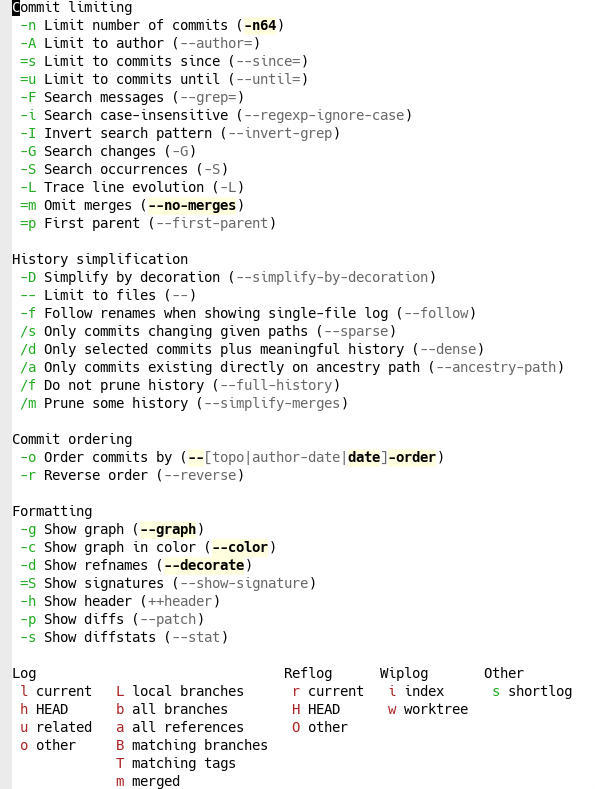
This means we don’t have to remember exactly which options there are because if we need them, Magit will remind us. Some examples:
-A and then Magit gives us a fuzzy-matching list of all repository authors. We can either browse that list, or type the name of the author we are interested in and press return to confirm.=u and then Magit gives us a calendar view in which we can select a date, or type one manually.-s.tests subdirectory, so we type -- to limit to files and then type tests and confirm with return.With this configuration, we want to look at all branches, including remote ones. We get that view by finally pressing b.
This is a high level of discoverability for git! I have always been that guy listed in git.txt, but Magit’s discoverability still teaches me a lot of new ways to use git. But it’s not only discoverable, it’s also quick. Here’s the full sequence of keypresses, with ␍ standing for confirming with return:
l-Akqr␍=u2025-06-01␍-s--tests␍b
That looks complicated, but remember how we built it: we looked at the hints and selected one option at a time. Now, if this is a log type we’ll use often, we are going to start to be able to write out that incantation without even looking at the hints. It’s both discoverable and efficient.
The corresponding git command in the shell would have been
In[1]:
$ git log --branches --remote --author=kqr --until=2025-06-01 \ --graph --color --decorate --no-merges --stat -- tests
How do I know? Because it’s right there in the Magit log hints! If Magit hadn’t told me, I would have to spend a lot of time going back and forth between the man page and the command line.
People worry that if you use more interactive interfaces to git, you’ll get worse at managing the git command line. Not so with Magit. Magit is completely transparent and encourages you to understand which git commands it is executing under the hood.
This might seem like an excessive rant about the git log in an article ostensibly about rebasing, but there’s a reason for that: the git log is how we’ll understand the structure of our repo. And because in Magit, the git log is interactive.
As a reminder, this was what we were working with.

We want to rebase the profiling-of-test-suite branch on top of optimise-company-name-generation. We can tell that the current branch is optimise, because it’s surrounded by a blue box.
We have placed the text cursor over the profiling branch (it is highlighted in grey), so we can switch to that branch by pressing bb␍. The first b is for checking out, the second b is for branch, and the fuzzy-matching list will default to the branch under the cursor in the log view. When we have done so, the box will jump over to the profiling branch, indicating we have switched to it.
Then we move the cursor up to the optimise branch, and press re␍. The r is for rebase, the e is for “elsewhere” (i.e. not on top of the upstream), and the fuzzy-matching list again defaults to the commit under the cursor in the log view, so we can confirm with return.22 As a reminder, if we’re ever unsure, we can type only the first letter and Magit will show us hints. (For example, adding -i will make the rebase interactive.)
That’s it! The log updates to show the profiling branch on top of optimise.
If we have a more complicated, interactive rebase, we get an editable list of commits with convenient hotkeys for performing rebase operations, like k to discard, f to fixup, w to reword, s to squash, etc. There’s also a list of supported operations under the commit list, if we forget what operations are available.33 For example, I almost never create new commits when I rebase, nor do I create merge commits. But you can do it.
If we want to know which command Magit executed, we can press $ and we get the Magit command log, where Magit lists every git command it executes. In this case, it will show
git checkout profiling-of-test-suite git rebase --autostash optimise-company-name-generation
… huh, what is --autostash and why does Magit default to it? Let’s look it up in man git-rebase:
--autostash
Automatically create a temporary stash entry before the operation begins, and apply it after the operation ends. This means that you can run rebase on a dirty worktree. However, use with care: the final stash application after a successful rebase might result in conflicts.
Okay, yeah, that does make sense as a default. I frequently rebase with a dirty worktree and it’s nice to not have to stash manually.
This is another way in which Magit can teach us to be better at git. I would not have known about --autostash if Magit hadn’t defaulted to it. This is also how I learned that --force-with-lease is strictly better than --force, but few people know about it.
This was not a complicated operation. We could have done this through the git command line. It would have been trivial, in fact – we just saw the two commands Magit executed under the hood. But by doing it through the interactive Magit log view, we gain a much better intuition and understanding for what effect the commands have. When we get comfortable with Magit, we will start to execute more complicated commands, which we might not have the confidence to do without the clear presentation of the interactive Magit log.
Of course, there are other graphical git interfaces, and we could have done this rebase through any of them. But then we wouldn’t have learned as much about git as we did.
Magit sits at a perfect point in the solution space where it is basically just a thin wrapper around the git command line, and is not ashamed of that. Yet it augments the git command line with interactivity, discoverability, and efficiency that is difficult to find elsewhere.
We have seen only a glimpse of it here – wait ’till you hear about how easily Magit lets us stage, unstage, revert, reset files, hunks, or even parts of hunks interactively.