Also, how does this handle terminal resizing? Are there options to anchor elements to the left/right etc, or will narrowing the terminal window just make everything fall off the side, or worse, all the text wraps?
The UX actually matters, and TUIs are generally built for effectiveness and power (lazygit being an excellent example). But once you start adding mouse clickable tabs, buttons, checkboxes etc. you left the UX for TUIs behind and applied the UX expected for GUIs, it has become a GUI larping as a TUI.
> Design once, generate production-ready code for your framework of choice. Switch targets without touching your design. Alpha notice: Code export is not functional yet. We're actively working on it — check back soon.
In other words, it isn't at all usable right now. You can't produce a TUI with it, not even a limited one.
I find the search [2] also helpful.
I would have expected a TUI editor to be itself a TUI.
Also wheres the Linux version? You've Mac, windows, and docker. When someone says terminal to me I default to Linux.
On the other hand, for this work as they describe, it needs to be a complete UI framework across a bunch of languages and built on top of a bunch of existing frameworks. That seems... ambitious. Building one UI framework for one language is plenty hard enough.
VB's back, tell a friend.
That being said, I could see a niche market for a designer persona who is used to building in tools like figma.
It completely misses the reason people like current TUIs.
Also if TUIs are so great, why isn't this a TUI app?
I'd much rather terminals emulator provide a webview directly, and maybe use https://webtui.ironclad.sh/ if you really want the look.
I think it makes more sense for a cli to offer a mini webserver instead.
Think `fish_config`, but opened in the terminal directly [0].
[0]: like https://iterm2.com/browser-plugin.html
I mean yes, code editor are great for this but a lot of the TUIs I see are so slow it begs the question why they exist to begin. CLIs are supposed to be remixable and scriptable.
I think a better architecture would be to generally keep CLIs work like CLIs and have separate processes that add terminal rendering functionalities for those that need / want it but in general it is an anti-pattern to start from this as default.
also
> Gatekeeper blocks the app immediately. You'll see either "TUIStudio cannot be opened because it is from an unidentified developer" or "TUIStudio is damaged and can't be opened" on newer macOS after quarantine flags the binary. To get past it: right-click the .app → Open → Open anyway — or go to System Settings → Privacy & Security → "Open Anyway".
Something like this could genuinely help for the layout/positioning phase, even if you still hand-write the interaction logic. The debate about whether these are "real TUIs" kind of misses the point imo. Textual and Ratatui already blur that line with mouse support and rich widgets. The ship sailed on pure keyboard-only text interfaces a while ago.
What I'd actually want from a tool like this is to export to multiple TUI frameworks. Right now you're locked into one ecosystem and the code export isn't even working yet, which makes the whole thing feel premature.
This is really cool though.
Browsers are ubiquitous and I can just tell ai to build a web page. I can't really see a use case other than novelty.
Ah yes, it says clearly that on the github page. Still, if its works, I am then impressed by the LLM.
Edit: It does, in fact, NOT work for code export. Level of impressiveness massively dropped.
Well, except:
> a 1:1 representation of the concept within character cells.
TUI is build from text, and living within its constraints and what it's engine (usually the terminal) allows. GUI is build from graphics, and has basically a pixel perfect control of its own. This is a very notable difference, especially at the time when these terms were coined.
> TUIs are generally built for effectiveness and power
No, this is a result of different architectures and their constraints.
> But once you start adding mouse clickable tabs, buttons, checkboxes etc. you
TUI and mouse are predating the GUI (more or less). We had them already 40-50 years ago at the dawn of interfaces. We are now just moving back to them for practical reasons.
Unfortunately, they are often artificially differentiated by the style of the UX interaction: TUIs promote the keyboard actions, and GUIs prefer mouse without corresponding keyboard shortcuts. Unfortunately for GUIs, their designers are often so enamored with WIMP that they omit the keyboard shortcuts or make them awkward. I hate it when, even if the ACTION button is available by keyboard traversal at all, it requires some unknown number of widget traversals instead of being one tab away.
Since the keyboard is almost always used for the textual data, it makes sense to me to always enable it for command execution. Well designed GUIs and TUIs provide both WIMP and keyboard UX, which sadly is not the norm today, so here's my vote to make them larp for each other more.
You can be effective and powerful in any kind of interface, Just like you can be ineffective and weak in any kind of interface. People like TUIs because they're cool, and work over SSH.
Hard disagree. Borland TurboVision [0] was one of the greatest TUI toolkits of the DOS era, had all of these:
> Turbo Vision applications replicate the look and feel of these IDEs, including edit controls, list boxes, check boxes, radio buttons and menus, all of which have built-in mouse support.
Well, I can’t remember if it had tabs.
A lot of the recent TUI apps are really not old-school in any way. Not all apps need the feature-set of a browser engine. And compared to native mac/linux desktop apps, TUIs get cross-platform support by default.
> Also if TUIs are so great, why isn't this a TUI app?
We all know the answer to this
Probably a bad omen of things to come for the internet.
Sadly the project is not really in a usable state at the moment. The documentation is incomplete riddled with errors, the code has some pretty glaring bugs, and it's close to abandoned. It's a shame because you can do some really amazing stuff with it.
You can build great things using AI agents, and you can build trash.
Your ideological opposition to that is not shared by as wide a percentage of developers as you may think based on some highly self selected online corners.
That's literally what TUI's looked like starting from the late 1980s and throughout the 1990s... You have a pointing device, might as well make use of it to enhance discoverability.
>can't wait to see where it goes!
Fall into this toxic positivity nonsense at your own peril.
Zellij among is a great example, I can do everything with my keyboard, but every now and them I'm already with the mouse and just click a tab or pane, no functionality lost, just added, why the need to make a cutoff philosophical/semantic hard argument?
Just `bun run dev`
But I wish we'd just make fast GUIs instead of giving up and building TUIs instead.
No. All you've done is make a low-resolution GUI.
But hey, if the screen is drawn 24 x 80 with extended ascii, it's TUI. And man, loved the "absolute" keyword in turbo pascal. Instant screen writes when writing to a 2 dimensional array.
It clearly cannot. Have you even tested it?
Interesting. In what ways? I haven't heard anyone express this concern before.
Agents aren't picky with UI, so most effort will always be spent designing for humans, even if they are not the primary consumers.
I too remember running `rails new MyGreatApp` and having hoop dreams of being the next billionaire entrepreneur, but a boilerplate app is a boilerplate app.
Your ideological opposition to that is not shared by as wide a percentage of developers as you may think based on some highly self selected online corners.
Opinions do not win by "high score". Asserting the validity of opinions based on how widely they are held is dumb.If 30% of devs love openclaw, I'm not re-examining my informed opinion, I am forming a new one about that 30% cohort.
https://developer.mozilla.org/en-US/docs/Web/HTML/Reference/...
> controls
> If this attribute is present, the browser will offer controls to allow the user to control video playback, including volume, seeking, and pause/resume playback.
Edit: I misunderstood, you are asking
> how they'd managed to hide the video context menu
Not sure, but it works in FF for me
Let's imagine one do. What do you think can actually happen that is so negative? Toxic TUI will hunt you in dreams?
A Figma-like visual editor for TUI applications. Drag-and-drop components, edit properties in real-time, and export to 6 frameworks with one click. SOON
Apple Silicon · M1 M2 M3 M4 Can't run it? It's safe — see how to open it ↓
Features
All the tools a terminal app designer needs — in one visual environment.
▦
Visual Canvas
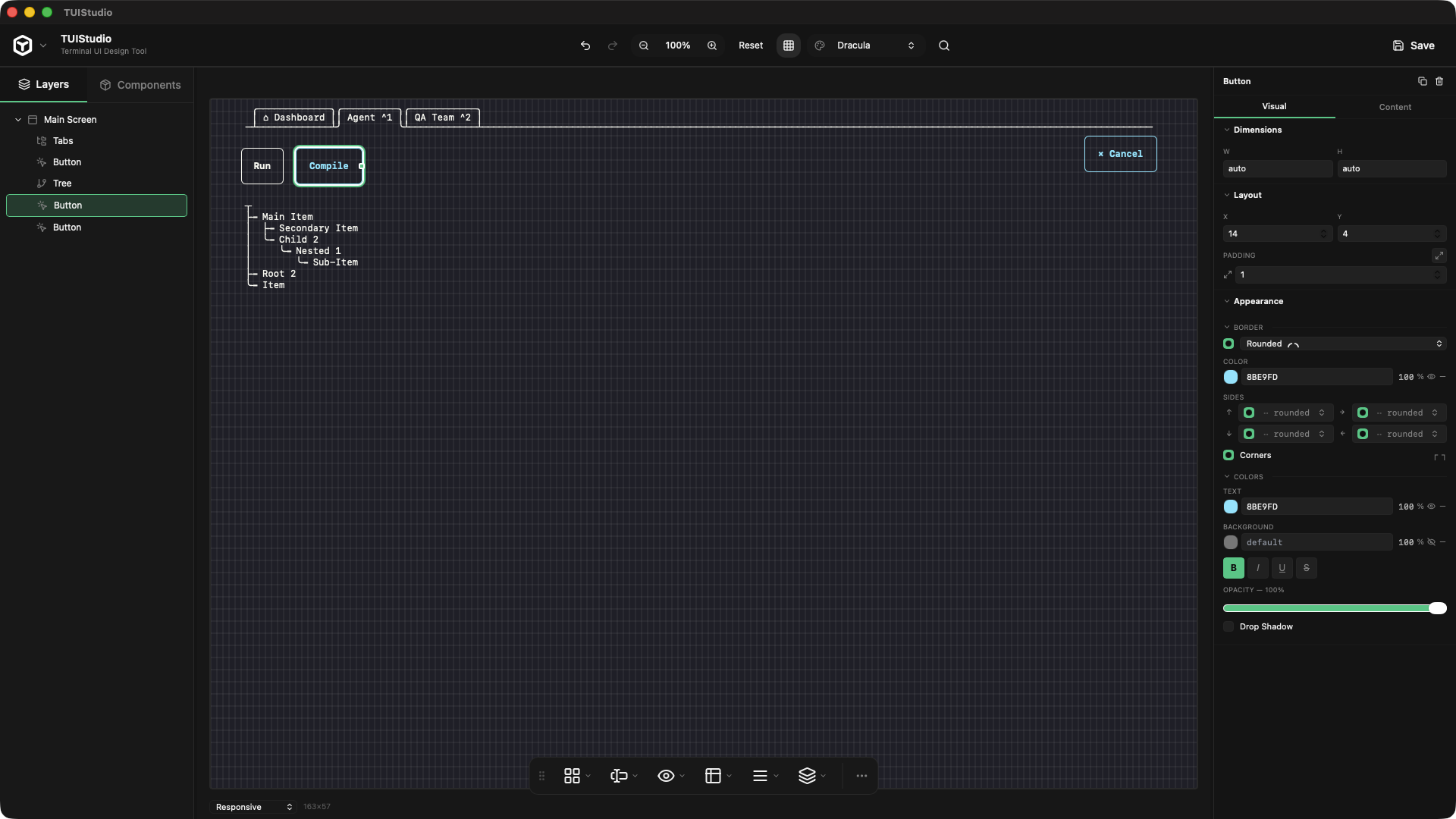
Drag-and-drop components onto a live canvas with real-time ANSI preview at configurable zoom levels.
⊕
20+ TUI Components
Screen, Box, Button, TextInput, Table, List, Tree, Tabs, Modal, Spinner, ProgressBar, and more.
⊞
Layout Engine
Absolute, Flexbox, and Grid layout modes with full property control — just like CSS in the browser.
◑
8 Color Themes
Dracula, Nord, Solarized, Monokai, Gruvbox, Tokyo Night, Nightfox, Sonokai — updating the canvas live.
→
Multi-Framework Export
Generate production-ready code for Ink, BubbleTea, Blessed, Textual, OpenTUI, and Tview.
⊡
Save / Load
Projects saved as portable .tui JSON files. Open from anywhere, share with your team.
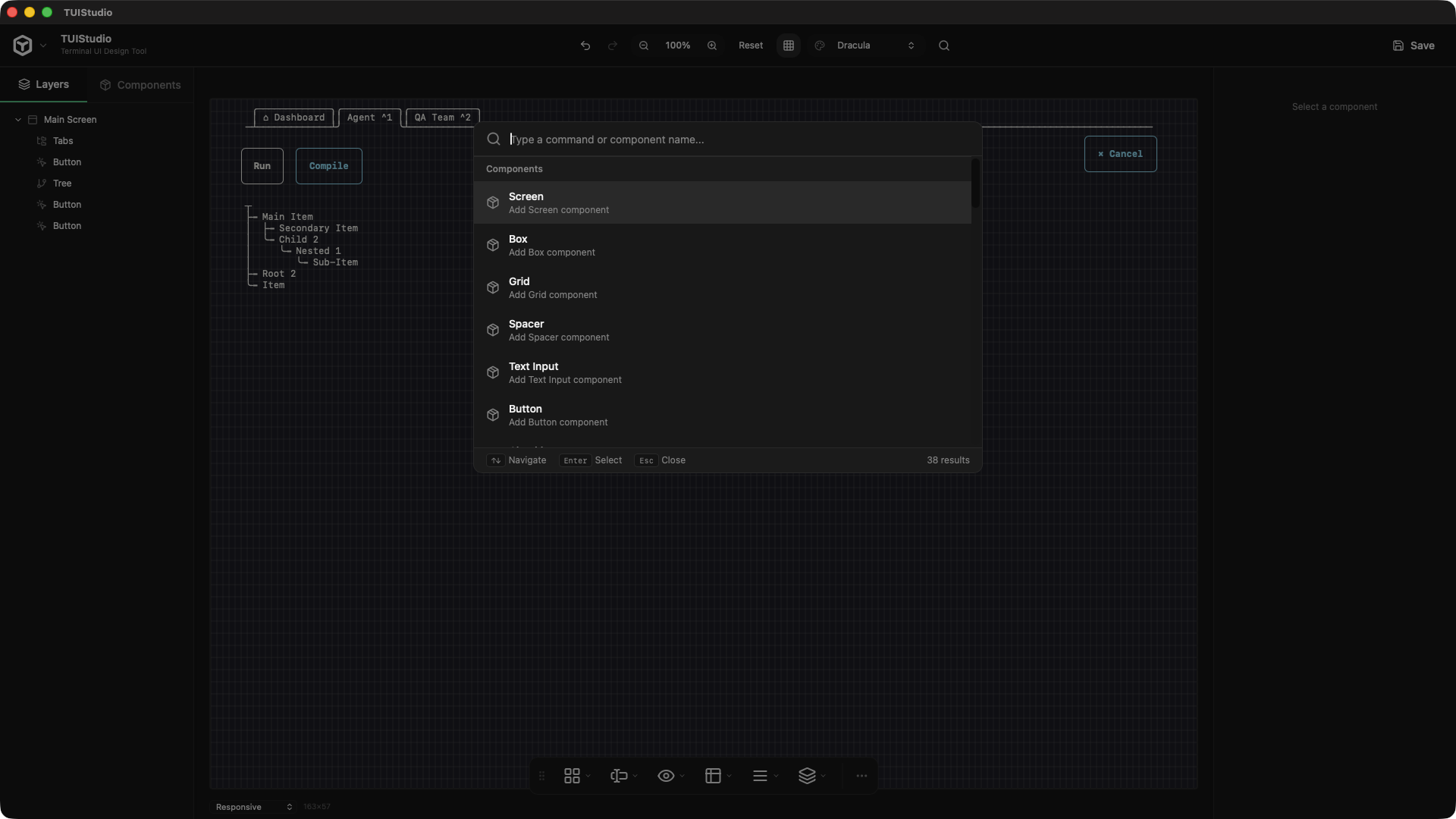
// Command Palette
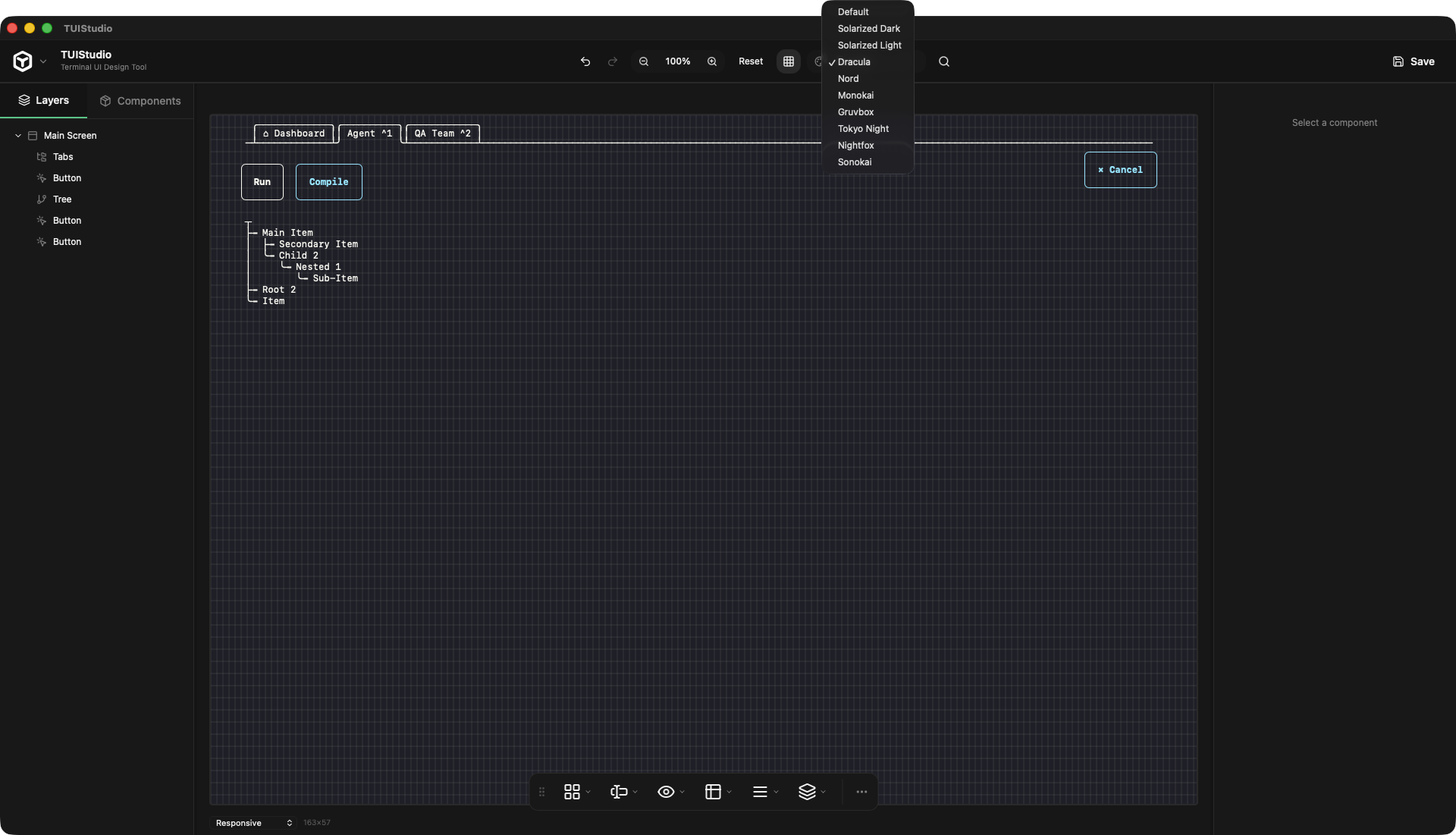
// Theme Switcher
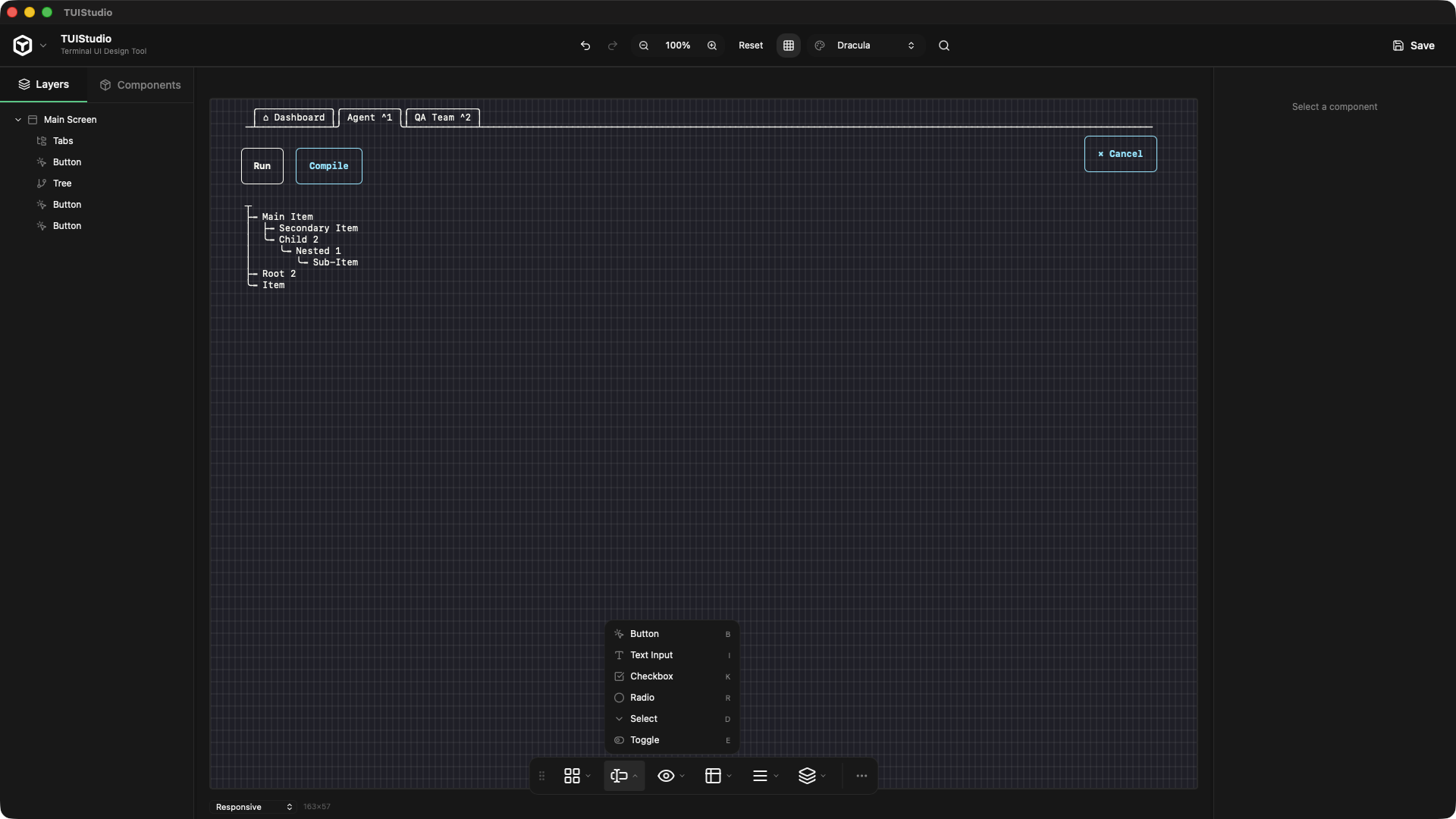
// Component Toolbar
Export
Design once, generate production-ready code for your framework of choice. Switch targets without touching your design.
⚠ Alpha notice: Code export is not functional yet. We're actively working on it — check back soon.
Ink TypeScript
BubbleTea Go
Blessed JavaScript
Textual Python
OpenTUI TypeScript
Tview Go
Components
All the building blocks for a full terminal application.
components — 21 items
Screen
Box
Button
TextInput
Checkbox
Radio
Select
Toggle
Text
Spinner
ProgressBar
Table
List
Tree
Menu
Tabs
Breadcrumb
Modal
Popover
Tooltip
Spacer
+ more soon
FAQ
Everything you need to know before hitting download.
A TUI (Text User Interface) is an interactive application that runs entirely in the terminal — like htop, lazygit, or k9s. Instead of a web browser or native window, the UI is built from characters, colors, and ANSI escape codes. TUIStudio lets you design these visually instead of hand-coding every layout.
With no code-signing configured, each platform behaves differently:
macOS
Gatekeeper blocks the app immediately. You'll see either "TUIStudio cannot be opened because it is from an unidentified developer" or "TUIStudio is damaged and can't be opened" on newer macOS after quarantine flags the binary.
To get past it: right-click the .app → Open → Open anyway — or go to System Settings → Privacy & Security → "Open Anyway".
Windows
SmartScreen shows "Windows protected your PC". Click More info → Run anyway. Less fatal than macOS, but still alarming to non-technical users.
Linux
No such gate. dpkg -i TUIStudio-amd64.deb or double-click in a file manager — just works.
TUIStudio is currently in Alpha — exports are not functional yet. We're actively working on it.
When ready, the following 6 frameworks will be supported:
Switch export targets at any time without touching your design.
TUIStudio is currently in early access. The core editor is free to download and use. A pro tier with team features, cloud sync, and priority support is planned for later.
Yes. Projects are saved as portable .tui JSON files you can open from anywhere, commit to git, or share with your team. No account or cloud required.
Get Started
Native Mac app for Apple Silicon.
No install fuss — download and start designing immediately.
Apple Silicon · M1 M2 M3 M4
I admit I don't always pay the most attention to it, as the UI components I tend to use do a good enough job of this. But I'm usually pretty consistent with it.
How about those text games that used ASCII art and you typed in commands like "look" and "go north"?
I would say using text mode is the primary requirement for a TUI. The other requirement being some kind of human-machine connection, IE a User Interface.
I do agree Unicode is better than code pages, or doing alt + num pad codes.
What do you mean by this? I have never heard these terms before. I can launch and interact with a GUI from a text application, or a text application from a GUI.
It's a GUI that works over SSH. There is a very valid use case for that.
A GUI that is built with Text, and intended to be used in a Terminal, is what a TUI is, colloquially AND definitionally.
What do you think qualifies as a TUI?
Web browsers offer the DOM to tools such as screen readers (OSs offer their own accessibility sdks). Someday perhaps the TUI application could talk to the terminal emulator that would itself talk to the accessibility sdk of the OS and that info would somehow then be accessible.
There was a beginning of discussion at bubble tea[0] about this for example.
That is what HN is for!
Gatekeeper blocks the app immediately. You'll see either "TUIStudio cannot be opened because it is from an unidentified developer" or "TUIStudio is damaged and can't be opened" on newer macOS after quarantine flags the binary.
To get past it: right-click the .app → Open → Open anyway — or go to System Settings → Privacy & Security → "Open Anyway".
A trusting, highly positive person could really be taken advantage of here. enter ~C -L 8080:localhost:80(I think terminal-based GUIs are neat just for fluidity of use- you can pop one open during a terminal session and close it without switching to mouse or shifting your attention away from the terminal. They can also be a nice addon to a primarily CLI utility without introducing big dependencies)
Is it pixel or vector mapped, designed to run in a graphics terminal? GUI.
Of course strictly speaking TUI is a subset of possible graphical user interfaces, but the term GUI was coined to denote interfaces other than the already-ubiquitous text terminal interfaces.
TUIs have since absorbed GUI interface elements like buttons, checkboxes, and even pointer input, which I think is causing the terminology complaint here. Classical TUIs like Norton Commander are more about keyboard input and navigation. But being text-mapped is the identifying feature of a TUI, I think most people accept.
Your terminal windows (whether that's "Terminal" or "cmd.exe" or anything else) are still fundamentally graphical programs that emulate such a text session.
- https://en.wikipedia.org/wiki/Linux_console - https://en.wikipedia.org/wiki/Windowing_system#Display_serve...
My point is that it’s not a given that having one means you have the other.
TUIs are wonderful for the first case.
From their github it appears all the code is llm-generated
Beyond this, without remote X properly configured, again, most don't and probably shouldn't.. you aren't running remote gui applications over an SSH session. Richer TUIs were pretty common in ye old days of DOS and other OSes before rich GUIs become the norm. DOSShell, Edit.com, etc. The IDEs of days past and Word Perfect even. These all interacted with Mice and were considered the norm. The features that allow this over a remote terminal today are pretty great IMO, the harder part is properly handling window sizes/resizes, etc.
With graphical extensions, there are even nice app explorers with image previews via TUI. It pushes the boundaries. For that matter, I often wonder what could have come with RIPscrip/RIPTerm if the leap to web didn't happen the way it did...
I think the single hardest part of TUI is dealing with wide characters and secondary fonts for color emojii that don't quite render in 2 spaces completely in a lot of termianls... it makes the line drawing harder too.
But if this thing requires you to just tab a lot through lots of pointless and rarely used fields to get to a "button" so you can activate it, because it's really all designed to be used with a mouse, then it's a bad text-based UI.
There are some incredibly good text-based UIs around, some going back to mainframe stuff from the 70s. Most of them are optimised for speed of control via keyboard rather than for looking pretty. Almost none of them would be quicker to use with a mouse.
The issue is not the text. It's the WIMP interface.
Of course you can use the primitives of TUI, especially with mouse support, to reproduce a large amount (if not all) of the standard GUI interaction paradigms.
But it's bizarre, and missing the point from a UX perspective.
As an extreme example, we can imagine a program that displays the borders of a 40x15 "window" in the middle of a console, with box-drawing characters, putting a "close box" in an upper corner, with text like "File Edit Help" in the top left. We can imagine it responding to a click on the "File" text by popping out a "menu"; we can imagine a drag starting from the "title bar" causing the window position to be update (and the entire terminal window redrawn).
A lot of those kinds of functions, ironically enough, might make sense for a TUI editor implemented as a TUI (except the "windows" might just be understood as panels where the ultimate program displays parts of its output). But as an emulation of GUI windows, it'd be a strange, impractical novelty.
I guess the headline and website was enough to get all these upvotes. Quite disappointing as someone in the early stages of making a TUI tutorial myself.
(Ultimately unhelpful though because I use mosh everywhere these days and that doesn't appear to have anything fancy like this.)
Then colour my suprise when it popped up on my screen right there. Slow as molasses but still. Wow. Magic.
It's a shame Wayland dropped this. Yes I know there's waypipe but it's not the same.
Even in your example, it's pretty clear cut. If the window is built with text and served in a terminal emulator, it's a TUI. If you build it with a graphical framework that now needs X11 or whatever, it's a GUI.
This is just needlessly pedantic.
Technically, you don't have to press enter if you've not typed anything (try it in a new SSH session - as soon as you are logged in, type ~? to get the SSH help output), but since the comment was about doing this during an active session without ending it, I figured noting that pressing enter first to be sure you're on a new line wouldn't hurt
The main advantage of x forwarding for me was when I'd randomly need it and had nothing set up ahead of time. Hopefully it starts getting installed in distros by default eventually.
It... really isn't. Like you said, remote X was barely usable even over an entirely local network. Most applications these days are also not designed for it, using loads of bitmap graphics instead of efficient, low-level primitives. So you end up being just one tiny step away from simply streaming a video of your windows. We have better tools for doing things remotely these days, there's a reason approximately no one has used remote X after the mid-90s. It's a neat party trick, but I don't blame the Wayland authors for not wanting to support it.
100 percent agree. I personally love what the openTUI folks have been up to. As weird as this might be to say, we're still in the early, early stage of TUI adoption.
In the time when wayland was invented it made sense because we did everything purely local. But now it's as outdated as X11 was in 2010.
And yes I still use it a lot. It works well. Networks have become a lot better and even most cloud compute I use is geographically nearby.
What made it slow back then was that I only had a 128kbit uplink at home. And the uni had 2 mbit for the whole computer science building :)
In the 80s/90s this wasn't feasible due to network latency and bandwidth, but it's pretty common now to do exactly this, with VNC and other remote desktop protocols.
With a web app, you can slice and dice processing between local and remote by running JS locally. Most processing usually happens remotely though, and only the display and command logic is run in the browser.
People complained of no forwarding in Wayland when it was invented.
For example, the remote mail client usecase I was replying to is simply done with a webmail client today.
But this doesn't work on your phone, or on a Windows or macOS device, right? That's what I meant by flexible, X forwarding fits a pretty narrow set of usecases, while on the other hand keeping programs on the clients and data centrally located on a server allows for a whole lot more options for how to interface with that data.
(To be clear, nothing wrong with X forwarding! It's a cool tech and I'm glad you have a use for it! I'm just arguing that it's fine for Wayland to not try to support that kind of thing, because we've got other ways of working remotely now.)
There is not a web tool for every use. And web tools are not better for every use.