I’m a Windows guy; I always have been. One of my first programming books was Beginning Visual C++ 6, which crucially came with a trial version of Visual C++ that my ten-year-old self could install on my parents’ computer. I remember being on a family vacation when .NET 1.0 came out, working my way through a C# tome and gearing up to rewrite my Neopets cheating programs from MFC into Windows Forms. Even my very first job after university was at a .NET shop, although I worked mostly on the frontend.
While I followed the Windows development ecosystem from the sidelines, my professional work never involved writing native Windows apps. (Chromium is technically a native app, but is more like its own operating system.) And for my hobby projects, the web was always a better choice. But, spurred on by fond childhood memories, I thought writing a fun little Windows utility program might be a good retirement project.
Well. I am here to report that the scene is a complete mess. I totally understand why nobody writes native Windows applications these days, and instead people turn to Electron.
What I built
The utility I built, Display Blackout, scratched an itch for me: when playing games on my three-monitor setup, I wanted to black out my left and right displays. Turning them off will cause Windows to spasm for several seconds and throw all your current window positioning out of whack. But for OLED monitors, throwing up a black overlay will turn off all the pixels, which is just as good.
To be clear, this is not an original idea. I was originally using an AutoHotkey script, which upon writing this post I found out has since morphed into a full Windows application. Other | incarnations of the idea are even available on the Microsoft Store. But, I thought I could create a slightly nicer and more modern UI, and anyway, the point was to learn, not to create a commercial product.
For our purposes, what’s interesting about this app is the sort of capabilities it needs:
- Enumerating the machine’s displays and their bounds
- Placing borderless, titlebar-less, non-activating black windows
- Intercepting a global keyboard shortcut
- Optionally running at startup
- Storing some persistent settings
- Displaying a tray icon with a few menu items
Let’s keep those in mind going forward.
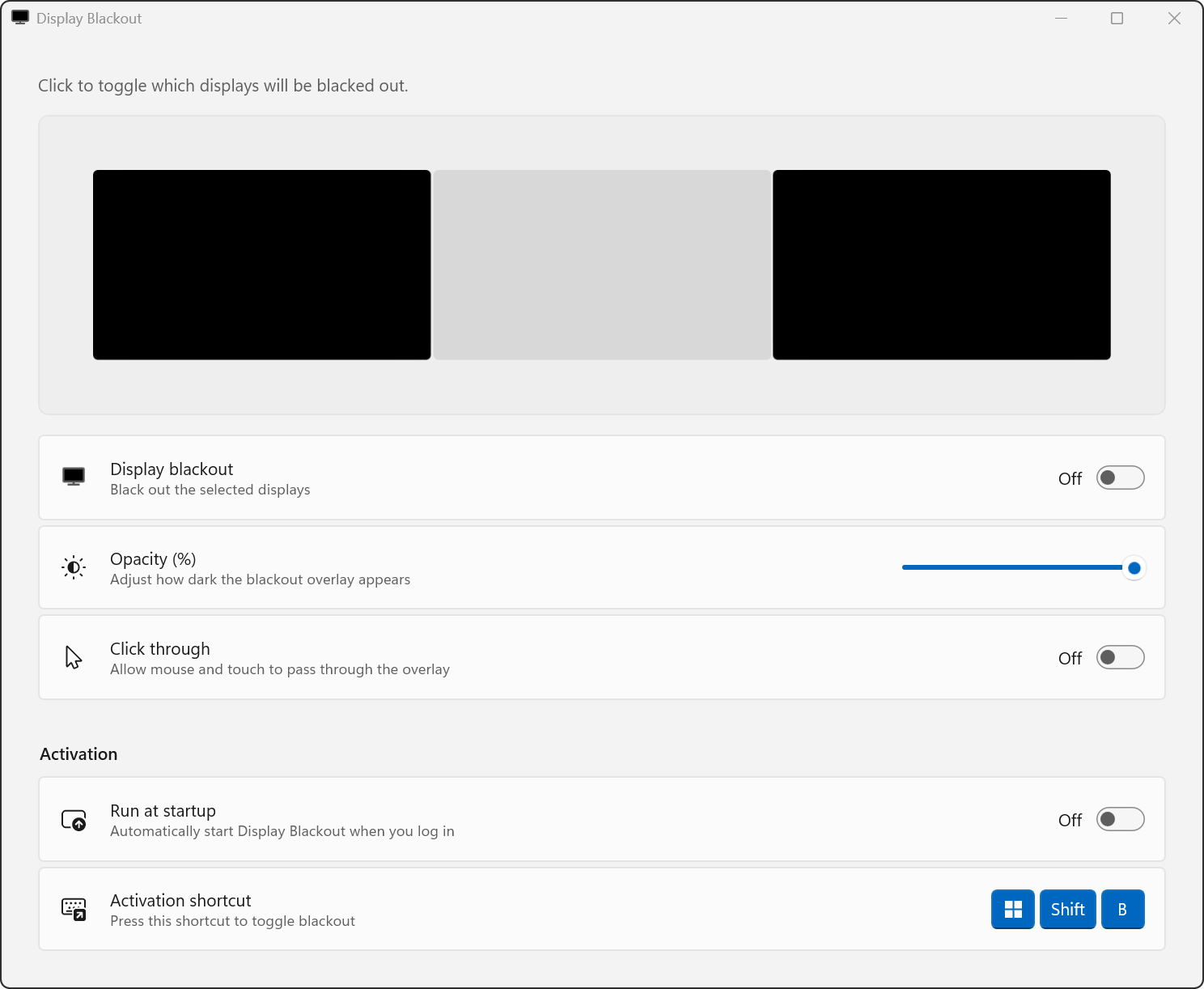
Look at this beautiful UI that I made. Surely you will agree that it is better than all other software in this space.
A brief history of Windows programming
In the beginning, there was the Win32 API, in C. Unfortunately, this API is still highly relevant today, including for my program.
Over time, a series of abstractions on top of this emerged. The main pre-.NET one was the MFC C++ library, which used modern-at-the-time language features like classes and templates to add some object-orientation on top of the raw C functions.
The abstraction train really got going with the introduction of .NET. .NET was many things, but for our purposes the most important part was the introduction of a new programming language, C#, that ran as JITed bytecode on a new virtual machine, in the same style as Java. This brought automatic memory management (and thus memory safety) to Windows programming, and generally gave Microsoft a more modern foundation for their ecosystem. Additionally, the .NET libraries included a whole new set of APIs for interacting with Windows. On the UI side in particular, .NET 1.0 (2002) started out with Windows Forms. Similar to MFC, it was largely a wrapper around the Win32 windowing and control APIs.
With .NET 3.0 (2006), Microsoft introduced WPF. Now, instead of creating all controls as C# objects, there was a separate markup language, XAML: more like the HTML + JavaScript relationship. This also was the first time they redrew controls from scratch, on the GPU, instead of wrapping the Win32 API controls that shipped with the OS. At the time, this felt like a fresh start, and a good foundation for the foreseeable future of Windows apps.
The next big pivot was with the release of Windows 8 (2012) and the introduction of WinRT. Similar to .NET, it was an attempt to create new APIs for all of the functionality needed to write Windows applications. If developers stayed inside the lines of WinRT, their apps would meet the modern standard of sandboxed apps, such as those on Android and iOS, and be deployable across Windows desktops, tablets, and phones. It was still XAML-based on the UI side, but with everything slightly different than it was in WPF, to support the more constrained cross-device targets.
This strategy got a do-over in Windows 10 (2015) with UWP, with some sandboxing restrictions lifted to allow for more capable desktop/phone/Xbox/HoloLens apps, but still not quite the same power as full .NET apps with WPF. At the same time, with both WinRT and UWP, certain new OS-level features and integrations (such as push notifications, live tiles, or publication in the Microsoft Store) were only granted to apps that used these frameworks. This led to awkward architectures where applications like Chrome or Microsoft Office would have WinRT/UWP bridge apps around old-school cores, communicating over IPC or similar.
With Windows 11 (2021), Microsoft finally gave up on the attempts to move everyone to some more-sandboxed and more-modern platform. The Windows App SDK exposes all the formerly WinRT/UWP-exclusive features to all Windows apps, whether written in standard C++ (no more C++/CLI) or written in .NET. The SDK includes WinUI 3, yet another XAML-based, drawn-from-scratch control library.
So did you catch all that? Just looking at the UI framework evolution, we have:
Win32 C APIs → MFC → WinForms → WPF → WinRT XAML → UWP XAML → WinUI 3
Forks in the road
In the spirit of this being a learning project, I knew I wanted to use the latest and greatest first-party foundation. That meant writing a WinUI 3 app, using the Windows App SDK. There ends up being three ways to go about this:
- C++
- C#/XAML, with “framework-dependent deployment”
- C#/XAML, with .NET AOT
This is a painful choice. C++ will produce lean apps, runtime-linked against the Windows APP SDK libraries, with easy interop down into any Win32 C APIs that I might need. But, in 2026, writing a greenfield application in a memory-unsafe language like C++ is a crime.
What would be ideal is if I could use the system’s .NET, and just distribute the C# bytecode, similar to how all web apps share the same web platform provided by the browser. This is called “framework-dependent deployment”. However, for no reason I can understand, Microsoft has decided that even the latest versions of Windows 11 only get .NET 4.8.1 preinstalled. (The current version of .NET is 10.) So distributing an app this way incurs a tragedy of the commons, where the first app to need modern .NET will cause Windows to show a dialog prompting the user to download and install the .NET libraries. This is not the optimal user experience!
That leaves .NET AOT. Yes, I am compiling the entire .NET runtime—including the virtual machine, garbage collector, standard library, etc.—into my binary. The compiler tries to trim out unused code, but the result is still a solid 9 MiB for an app that blacks out some monitors.
(“What about Rust?” I hear you ask. A Microsoft-adjacent effort to maintain Rust bindings for the Windows App SDK was tried, but they gave up.)
There’s a similar painful choice when it comes to distribution. Although Windows is happy to support hand-rolled or third-party-tool-generated setup.exe installers, the Microsoft-recommended path for a modern app with containerized install/uninstall is MSIX. But this format relies heavily on code signing certificates, which seem to cost around $200–300/year for non-US residents. The unsigned sideloading experience is terrible, requiring a cryptic PowerShell command only usable from an admin terminal. I could avoid sideloading if Microsoft would just accept my app into their store, but they rejected it for not offering “unique lasting value”.
The tragedy here is that this all seems so unnecessary. .NET could be distributed via Windows Update, so the latest version is always present, making framework-dependent deployment viable. Or at least there could be a MSIX package for .NET available, so that other MSIX packages could declare a dependency on it. Unsigned MSIX sideloads use the same crowd-sourced reputation system that EXE installers get. Windows code signing certs could cost $100/year, instead of $200+, like the equivalent costs for the Apple ecosystem. But like everything else about modern Windows development, it’s all just … half-assed.
Left behind
It turns out that it’s a lot of work to recreate one’s OS and UI APIs every few years. Coupled with the intermittent attempts at sandboxing and deprecating “too powerful” functionality, the result is that each new layer has gaps, where you can’t do certain things which were possible in the previous framework.
This is not a new problem. Even back with MFC, you would often find yourself needing to drop down to Win32 APIs. And .NET has had P/Invoke since 1.0. So, especially now that Microsoft is no longer requiring that you only use the latest framework in exchange for new capabilities, having to drop down to a previous layer is not the end of the world. But it’s frustrating: what is the point of using Microsoft’s latest and greatest, if half your code is just interop goop to get at the old APIs? What’s the point of programming in C#, if you have to wrap a bunch of C APIs?
Let’s revisit the list of things my app needs to do, and compare them to what you can do using the Windows App SDK:
Enumerating the machine’s displays and their bounds: can enumerate, as long as you use a
forloop instead of aforeachloop. But watching for changes requires P/Invoke, because the modern API doesn’t actually work.Placing borderless, titlebar-less, non-activating black windows: much of this is doable, but non-activating needs P/Invoke.
Intercepting a global keyboard shortcut: nope, needs P/Invoke.
Optionally running at startup: can do, with a nice system-settings-integrated off-by-default API.
Storing some persistent settings: can do.
Displaying a tray icon with a few menu items: not available. Not only does the tray icon itself need P/Invoke, the concept of menus for tray icons is not standardized, so depending on which wrapper package you pick, you’ll get one of several different context menu styles.
But these are just the headline features. Even something as simple as automatically sizing your app window to its contents was lost somewhere along the way from WPF to WinUI 3.
Given how often you need to call back down to Win32 C APIs, it doesn’t help that the interop technology is itself undergoing a transition. The modern way appears to be something called CsWin32, which is supposed to take some of the pain out of P/Invoke. But it can’t even correctly wrap strings inside of structs. To my eyes, it appears to be one of those underfunded, perpetually pre-1.0 projects with uninspiring changelogs, on track to get abandoned after a couple years.
And CsWin32’s problems aren’t just implementation gaps: some of them trace back to missing features in C# itself. The documentation contains this darkly hilarious passage:
Some parameters in win32 are
[optional, out]or[optional, in, out]. C# does not have an idiomatic way to represent this concept, so for any method that has such parameters, CsWin32 will generate two versions: one with allreforoutparameters included, and one with all such parameters omitted.
The C# language doesn’t have a way to specify a foundational parameter type of the Win32 API? One which is a linear combination of two existing supported parameter types? One might think that an advantage of controlling C# would be that Microsoft has carefully shaped and coevolved it to be the perfect programming language for Windows APIs. This does not appear to be the case.
Indeed, it’s not just in interop with old Win32 APIs where C# falls short of its target platform’s needs. When WPF first came out in 2006, with its emphasis on two-way data binding, everyone quickly realized that the boilerplate involved in creating classes that could bind to UI was unsustainable. Essentially, every property needs to become a getter/setter pair, with the setter having a same-value guard and a call to fire an event. (And firing an event is full of ceremony in C#.) People tried various solutions to paper over this, from base classes to code generators. But the real solution here is to put something in the language, like JavaScript has done with decorators and proxies.
So when I went to work on my app, I was astonished to find that twenty years after the release of WPF, the boilerplate had barely changed. (The sole improvement is that C# got a feature that lets you omit the name of the property when firing the event.) What has the C# language team been doing for twenty years, that creating native observable classes never became a priority?
Conclusion
Honestly, the whole project of native Windows app development feels like it’s not a priority for Microsoft. The relevant issue trackers are full of developers encountering painful bugs and gaps, and getting little-to-no response from Microsoft engineers. The Windows App SDK changelog is mostly about them adding new machine learning APIs. And famously, many first-party apps, from Visual Studio Code to Outlook to the Start menu itself, are written using web technologies.
This is probably why large parts of the community have decided to go their own way, investing in third-party UI frameworks like Avalonia and Uno Platform. From what I can tell browsing their landing pages and GitHub repositories, these are better-maintained, and written by people who loved WPF and wished WinUI were as capable. They also embrace cross-platform development, which certainly is important for some use cases.
But at that point: why not Electron? Seriously. C# and XAML are not that amazing, compared to, say, TypeScript/React/CSS. As we saw from my list above, to do most anything beyond the basics, you’re going to need to reach down into Win32 interop anyway. If you use something like Tauri, you don’t even need to bundle a whole Chromium binary: you can use the system webview. Ironically, the system webview receives updates every 4 weeks (soon to be 2?), whereas the system .NET is perpetually stuck at version 4.8.1!
It’s still possible for Microsoft to turn this around. The Windows App SDK approach does seem like an improvement over the long digression into WinRT and UWP. I’ve identified some low-hanging fruit around packaging and deployment above, which I’d love for them to act on. And their recent announcement of a focus on Windows quality includes a line about using WinUI 3 more throughout the OS, which could in theory trickle back into improving WinUI itself.
I’m not holding my breath. And from what I can tell, neither are most developers. The Hacker News commentariat loves to bemoan the death of native apps. But given what a mess the Windows app platform is, I’ll pick the web stack any day, with Electron or Tauri to bridge down to the relevant Win32 APIs for OS integration.