When you buzz the apartment from the intercom it connects to a dedicated landline phone, That landline is setup to automatically go straight to voicemail, and then the voicemail message is just a recording of the tone required to open the door.
Then I have a smart power socket that the landline phone gets its power from - which I can toggle in the home app.
So if you turn on the power socket and dial the apartment code at the entrance, it buzzes you straight in. Or turn the power socket off and it doesn't.
[0] https://doorman.azon.ai/ [1] https://doorman.azon.ai/guide/features/ring-to-open
> I bought the cheapest compatible BTicino intercom device (BT 344232 for 32 €) that I could find on eBay, then soldered in 4 wires and added microcontrollers to make it smart. It now connects to my Nuki Opener Smart Intercom IOT device, and to my local MQTT Pub/Sub bus (why not?).
I love the future so far.
That aside, I enjoyed this read and it's such a niche thing that there is almost no way they'll step on the toes of another resident wanting to do the same thing
Here is the installation documentation I have the 4-wire system. I installed it using Cat-5 and standard 548B wiring layout. The rest of the electronic door locks uses the Identiv Liberty key fob system. This was the only system I could find that allowed self-hosting.
I wouldn't mind another layer of integration that would add smartphone access control. The way the 2 systems are currently deployed I could ignore the TekTone side and just integrate the key fobs with the smartphones. I think this might already be possible be possible as the key fob readers already react to the NFC radios on my smartphone.
https://www.tektone.com/pdf_files/manuals/IL826_PK543A_insta...
No native apple home - homebridge handles that.
BS.
I'm unsure if I should post the link or not as it's specific to Romania, but I love how janky the buids are: https://www.olx.ro/d/oferta/automatizare-interfon-electra-cu...
Why aren’t there more ‘semi dumb’ Ethernet or wifi products that just let you announce that dinner is ready? It doesn’t need to be a fully ruggedised commercial system like this one or a fully integrated cloud managed solution like ring.
The cheap no name wireless ones can’t handle comms between rooms, let alone across a house.
The security implications aren’t insurmountable - you could use pairing codes if there are multiple on the network.
I’ve accepted that it’s a niche market, and that the only solution is to use Asterix with a some cheapo voip phones.
I'm tempted to have a remote controlled screw driver that can twist the knob remotely or something.
Edit: undergrad shenanigans from ten years ago:
Our university student-run electronics lab had an issue: technically anyone with a student card was allowed on premises at any given time, but the department only gave us a small set of keys that we had to share with the rest of the student associations. Obviously we needed a solution.
We did some snooping and found that the request-to-exit button wire was running on a cable tray alongside all the other wiring and plumbing, as the lab was in the basement. We picked a suitably dark, inconspicuous spot and wired up a Raspberry Pi driving a transistor and in turn a relay which we then wired in parallel with that button. Users could then connect to the local lab wifi and then SSH into the device. Login shell was replaced with a script that pulsed the GPIO line for half a second and subsequently caused the door to open.
We never got caught and apparently all the evidence was destroyed when the building was renovated a few years later.
Those Doorkings have had to get replaced at so many buildings in Seattle now that criminals figured out how easy they were to override.
The first step is getting speakers in a room: there are tons of products that do this, apple, google, Sonos.
Most of them have the audio quality of a bag of instruments.
There are tons of class D amps that you can hook up to speakers: Wiim, acrylic and so on... this will run you anywhere from 100 bucks to 500 and thats before you buy the speakers. Most of these will be great for playing music and projecting your voice.
The moment you involve a TV... well things get ugly because your going to want arc for HDMI and your going to want a center channel cause with out it your likely in subtitle hell half the time. This will get expensive a Sonos sound bar is a few hundred and if you want something better well... Let's say you can get to the point of making a GPU look affordable real quick.
Now that you can play audio, how do you hear it... well your phone works and there are tons of satellites out there.
You're now going to need to run home assistant to "interrupt" what ever is playing (if something is) to play your message and then return what ever it was to its current state.
After trying out WIIM, Acrylic, some high end stereo gear I just settled on half assed audio quality and bought more Sonos gear. I kept a single WIIM unit, cheap amp, decent speakers and a sub around for when I want to really listen to music but other than that I tolerate sonos' middling quality for day to day use (and I am, by no means an audiophile).
They're almost always incredibly simple at the furnace/boiler - you just need to make sure that you never turn the heat on without the pump/blower or whatever is required.
My complicated Eco controller ends up with three outputs: blower on, heat on, cooling on. Three wires.
But there absolutely are options to record such Signals and then replicate them via home assistant - I used them before to control a ceiling fan and various infrared devices (same idea, but not a radio there instead a "blaster" - I think it was called)
I didn't set it up again after my last move though, as I couldn't mount the ceiling fan in this apartment and the Infrared devices were just my media center (tv, audio), which are hardly in use currently
edit: although mine was an ancient system from the early 90s. It was just replaced with a modern system a couple months ago. At my previous apartment I had wanted to set up a system that would allow either my then partner or I to activate the callbox and have it set for a VOIP number since we could only put one number on the box.
Here’s hoping nobody decides to bother them about this. I’m not a lawyer but this appears to this layperson at the very least a CFAA violation by accessing the router and resetting its root password, as well as possibly criminal mischief as well as whatever stealing AC power is.
You couldn’t pay me to do a writeup like this, and I’d be wearing gloves the whole time.
Eventually I got a Nuki Opener which works with all kinds of intercoms and is way less effort. Janky builds are awesome but better for the playground than as a solution you really want to be reliable for the whole family.
P.S. The code from the article should be linked more prominently [0], for anyone who wants to tinker.
Because of 2 reasons
1) this is very antisocial behavior.
2) so many people have a mobile phone at arm's reach a majority of the time so there you have your intercom.
Well educated members of an household would know when dinner is ready because they would actually help make it ready for everyone. Occasionally one teenager could legitimately focus on homework but it is not actually a bad thing that someone has to move its ass and walk upstairs to knock at their door and tell them. We call that free exercise, much cheaper than a fitness subscription.
When I hear about home assistant and domotic in general, the only image that comes to me is those scenes in Wall-E where people live in a flying armchair with a holo screen in front of their face 24/7, their only interaction with a physical world being to only move their arms once in a while to grab a soda.
When I was a kid I remember a house we rented for a while came with intercom using the electrical lines. Past the initial novelty, they mostly collected dust and ended up being unplugged.
To respond is similarly cumbersome and soon you give up completely. I can only assume it was designed by someone whose parents were killed in an intercom-related disaster and has sworn revenge.
I bought a mini for my office with this purpose in mind, but it has been a total waste.
We have seen similar trade-offs working on binary encoding for our alerting systems; even a few hundred bytes difference per message changes what's feasible over BLE or LoRa. What protocol the intercom uses natively and how much of the HomeKit overhead is format vs transport?
I was hoping they'd mention something about the legality (or lack thereof), but I guess that's an exercise left to the reader who wants to try this out at their own apartment.
Setting timers works well though
To be honest, I'm honestly sick of Google Home's approach to this since the Gemini update has turned everything really slow and I'm getting close to the point where I'd rather home-roll a full system myself that works reliably instead of the crapshoot that this is. Home Assistant seems to have a functionality bridge to Google Home connected devices like my blinds or cameras so I should be able to retain the edge devices but I have half a mind to just dump the whole thing and start over.
I’m genuinely confused why you would think that.
> Well educated members of an household would know when dinner is ready because they would actually help make it ready for everyone.
This is one of the most obnoxious things I have read all year.
My mum's neighbours buy milk and bread and turn the heating on! I don't quite trust my own neighbour to do that but it's awesome for her
Anecdotally, I've had a relay fail on when I inadvertently pulled more amps through it than it was rated for, so it's definitely possible.
But it also supports more complicated setups like digital intercoms where it will hook on the bus and learn the various codes that are sent for different operations, or enable the voice function through the phone app.
The biggest benefit is that if your intercom is compatible, it just works. It's the convenience, not that you can't get the same with a janky solution with enough elbow grease. No need to tinker with the firmware, the batteries last forever, and even in the most basic setup you'll have a few more advanced features.
I'd love to know the % of Alexa Dots (whatever the small ones are called now) that are used for anything more than this.
Maybe I'm just not creative enough, but I don't see anything else I would want it to do.
And then people will complain that children these days spend their time in front of a screen...
I think @prmoustache is also referring to manners in general.
This is Siri’s primary use case, at least I assume so based on my experience.
As long as the timer isn’t for 50 minutes.
For repairing a broken thing? After provably trying in vain to get the landlord to fix it?
I guess my age is showing, but isn't it just a mono speaker? so much is lost in music without stereo imaging. it's one of the main eyebrow raising things to me about most bluetooth portable speakers. If you're mainly listening to podcasts or playing lulabyes to a kids room, sure, but we're adults here and personally I like listening to stereo way to much for these to be an option.
And it's definitely possible to get in trouble for "fixing" something if you're not authorized to fix it.
I would call this "bypassing building controls to allow unauthorized access to the building." Frank has access to the building through the allowed means per his lease, not through any means. If his lease is like mine there's a whole page to initial about being granted access through the gates or pool or whatever with only the complex-assigned keys and RFID tags.
(I presume Frank lives in the US, and his state's tenancy laws similar to mine apply.)
In my case the cabin is actually in the town where I grew up, and used as a way to be closer to home and family without overstaying my welcome and also be a bit more free when here (heh). So I do have family that now helps with this, it was mostly in a "can I pay a little not inconvenience them". I arrived here sunday with the heat on and some easter eggs and bunnies on the table put there by my mother, so it's not all bad. :)
Down the hallway from my office used to be the management of a small hotel chain. We often had lunch together and I got to hear a bunch of interesting anecdotes over the years.
Way back when they started up and didn't yet have enough cash to actually own the buildings they operated in, they rented. One of the buildings turned out to have numerous issues (holes in the roof, gaps near exterior walls, etc...). To the point that they eventually didn't pass a fire inspection. They repeatedly asked the owner to have it fixed. Pressed for time, they themselves eventually payed someone, out of their own pocket, so it would at least be up to code for the fire inspection.
From what I was told, the owner threw a tantrum over them modifying the building, terminated the contract and sued them. Successfully.
If you are a tenant in a rental apartment, you'd probably have more leniency on the legal side (compared to a company renting a business property). But still, I'd be very careful making any assumptions about the legal situation rather than risking some sort of Kafkaesque legal mess.
Over here at least, it is very common in apartment complexes that the apartment owner is a different person/entity than the building owner and only the later has the rights to mess with stuff installed in the walls (e.g. plumbing) and especially stuff elsewhere in the building (e.g. an external intercom system). If you ask the landlord to fix it, the best they could do is forward that request to the building owner. If you pulled a stunt like the OP did, there's a good chance that the building owner will sue your landlord.
I don't know if this would apply to a commercial tenant.
But it would definitely not apply to non-violating conditions like the OP's case.
A useful device to know about is the Relay In A Box line.[2] This is exactly what it says - a relay in a box, for when you need to switch power with a low-voltage control signal. UL and CE approvals, fits standard electrical conduit fittings, and will pass code inspection. Rated for 10 million cycles. Boring, but useful.
[1] https://www.alldatasheet.com/html-pdf/1132639/SONGLERELAY/SR...
[2] https://www.functionaldevices.com/category/building-automati...
Was the unauthorized modification permanent or undoable? If the latter, I think some people should really get their judge card (or landlord card) revoked.
Did the judge at least suggest what alternative action the tenant should have taken to comply with the law and code?
Whether or not it's worth all the trouble and time is a different matter. For most people, I'd say reporting to relevant authorities to make the landlord's life harder without needing much continuing effort is probably worth doing, but the lawsuit side is likely to be a huge time and money sink and it's almost always easier to just move. Let the city sue them for continuing to accrue complaints of unsafe living conditions.
In the same way, a landlord cannot evict you themself if you just fail to pay rent, but there are multiple legal mechanisms to eventually get the sheriff to do it for them. Basically, if landlord-tenant negotiation fails, I think the only legal recourse is to involve governmental third parties unless you technically open yourself up to legal reprisal.
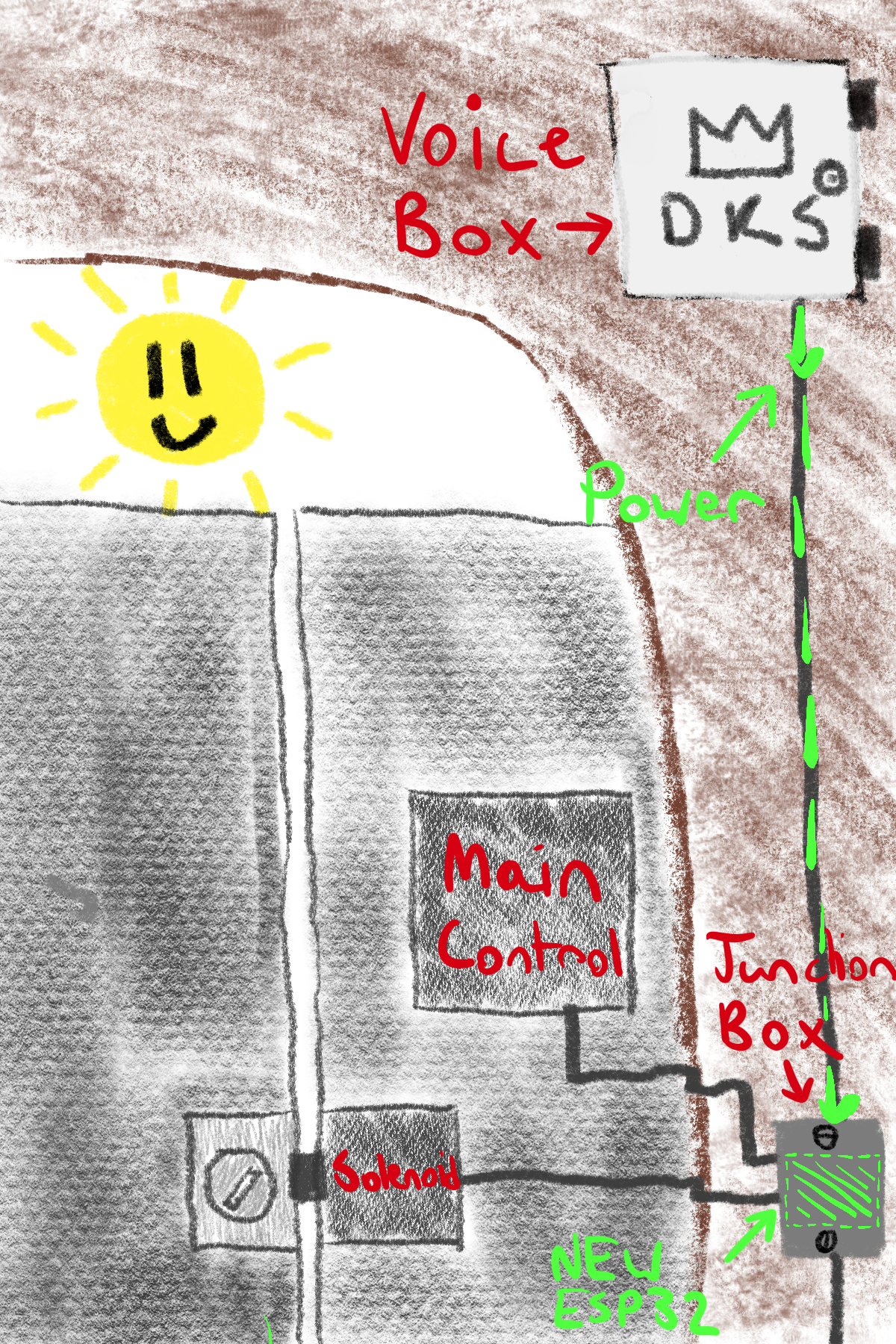
My friend Frank (not his real name) hosts a lot of guests at his apartment, and his complex’s intercom is what ushers them inside. You’ve probably seen them before, they look like this:
The Doorking 1834-080 intercom at Frank's apartment.
Up until recently, guests could find Frank’s number in the system and give it a call. If Frank recognized the people on the line, he would press a number on his dial pad, which the controller would interpret as a signal to unlock the gate.
Then, management got lazy. The complex Frank lives in failed to renew their intercom’s cellular service, so it could no longer make calls for the voice system. Even after months of asking his landlord to fix it, nothing was done.
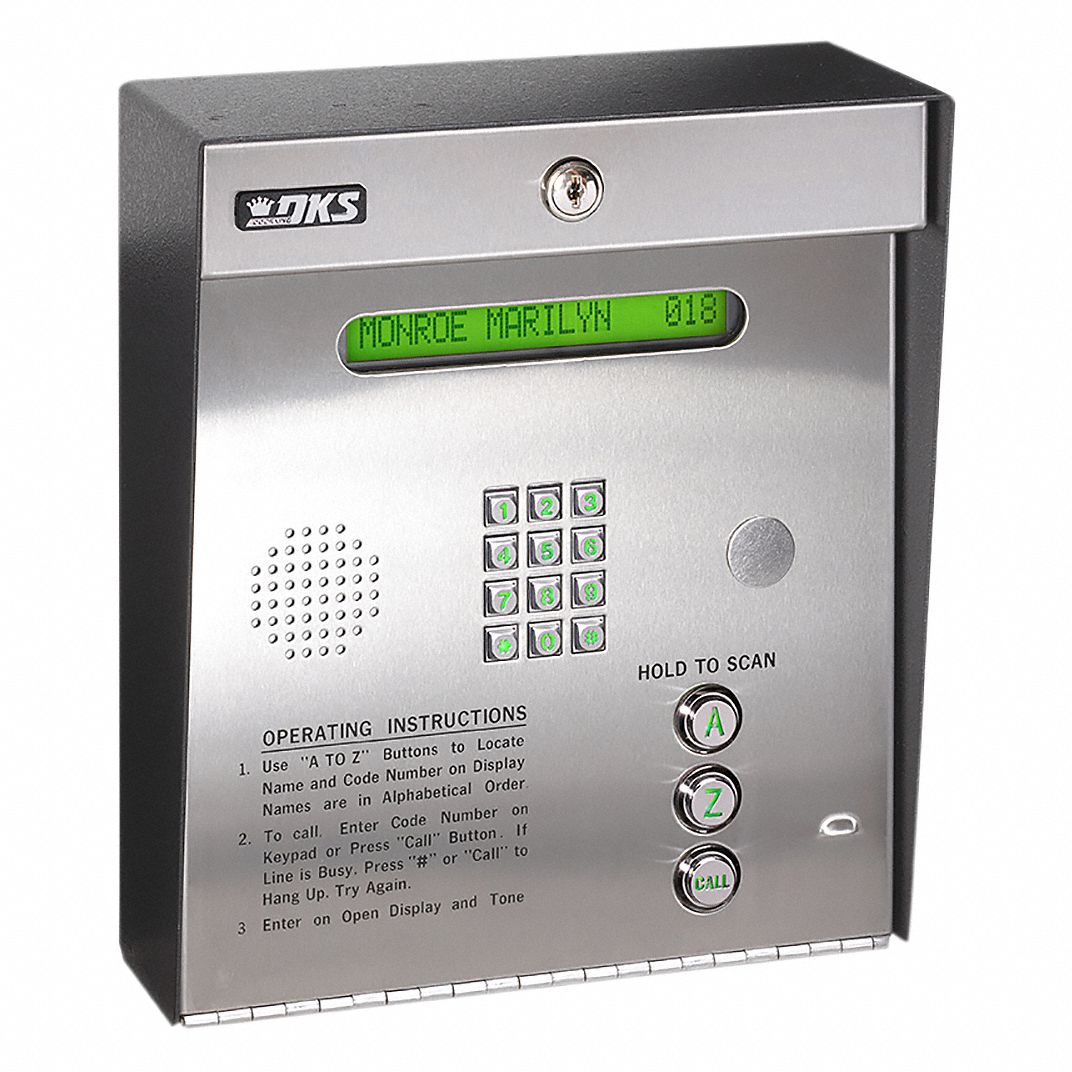
My other friend Hazel and I arrived to visit Frank during this outage period, and he asked us to see what we could do. Here’s what we saw:
A diagram of what we saw.
We inspected the top box closer, giving a promising result: it was unlocked! The general layout of the box is as follows:
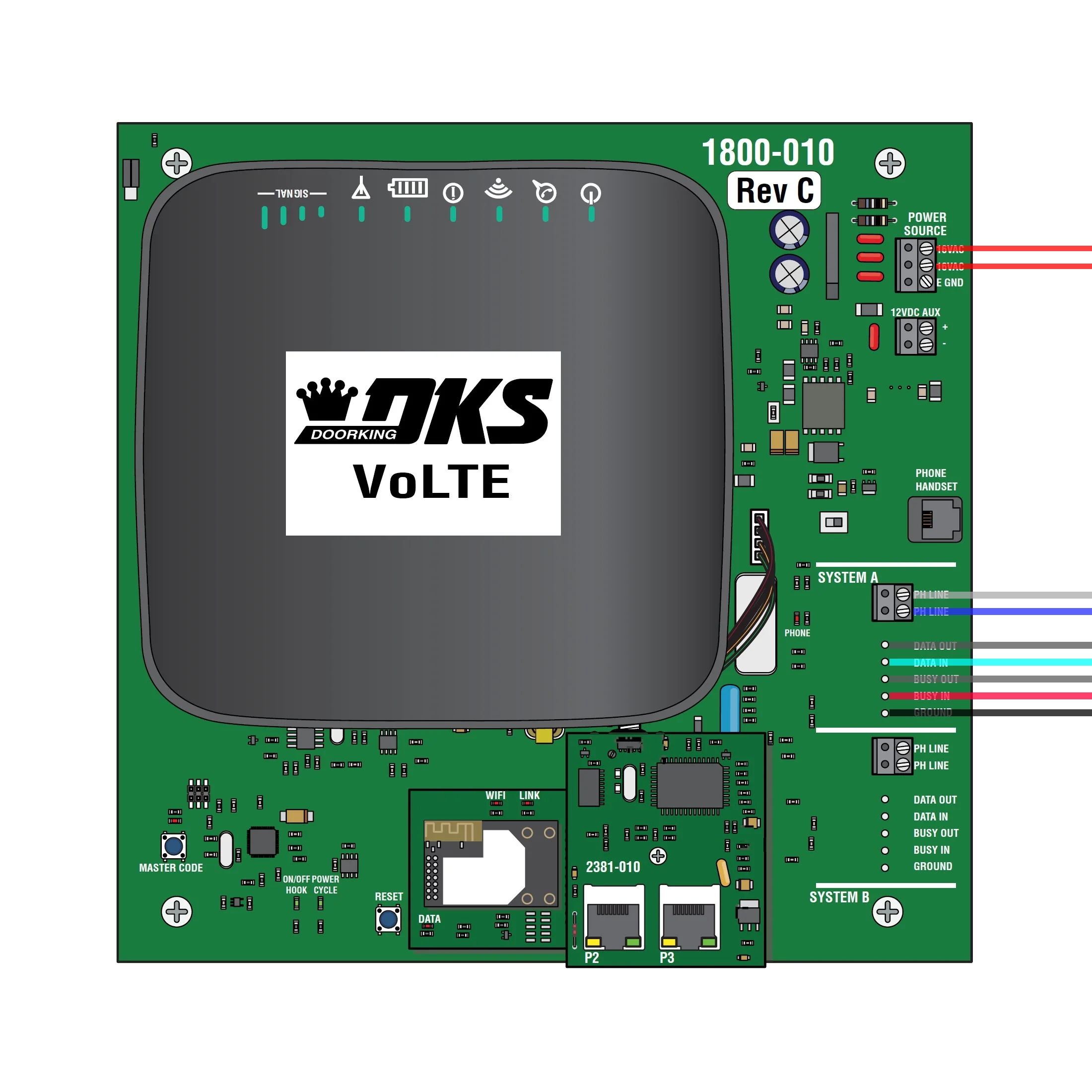
A diagram of the voice box with wires shown.
It was impossible to ignore the massive Wi-Fi/cell router in the top corner with its admin password printed right on it (not pictured). Of course, I had to investigate.
I quickly found the network and entered the login credentials shown. Of course, they weren’t changed from the defaults. I had full admin access to the router, which was awesome, until I realized that I couldn’t do very much with its basic, locked-down interface. This almost ended my exploration, but then I realized: what about SSH?
AT&T, the company that makes the routers for Doorking, is smarter than a bag of rocks in that SSH is protected on their router. Sadly for them, they lose to the bag of rocks in providing a way to download their entire system configuration from the web interface, containing a way to reset the root password to whatever you want:
# This file is an exported configuration from NetComm Bovine platform based device.
# Private fields are encrypted but any configuraiton entry can be manually replaced by
# a plain-text variable or URI-encoded text.
admin.firewall.enable;1
admin.local.enable_http;1
admin.local.enable_https;1
admin.local.ssh_enable;1
admin.local.telnetenable;1
admin.open.port;
admin.password;
admin.user.admin;$aM9VdmCoc5vuekVU70/Gl8iJTOujxMQo
admin.user.root;$DDDgp0GJy6nB29UX7pDlrUUKDkWYqp84
Wow. I now see why router vulnerabilities are so common.
This was certainly a promising avenue, but we realized something: even if we gained code execution on the router, we would have to figure out its custom serial protocol to even have a chance at talking to the main control box. This wasn’t something Hazel and I wanted to spend our entire vacation doing, so we decided to look elsewhere.
Looking at the other terminals within the box, we saw the PH LINE phone connectors for each system. This was promising, since Frank’s existing intercom system used DTMF signals to open the gate back when it was working.
However, it was unlikely that the main control box would blindly accept any phone commands while not actively listening for them after a user had asked it to. It would’ve been possible to test this hypothesis, but we were again left with the reality of extremely limited debugging capabilities, in addition to minimal knowledge of phone signaling systems.
Hazel and I knew there had to be some vulnerability in the system that would allow us to inject our own commands into the gate control system. We were correct, but we first needed a change in perspective. Our initial assumption was that we needed to take top-down control over the system to make it do what we wanted. After our previous failures to do so, we changed our goal to take bottom-up control of the system: undermining it at its core.
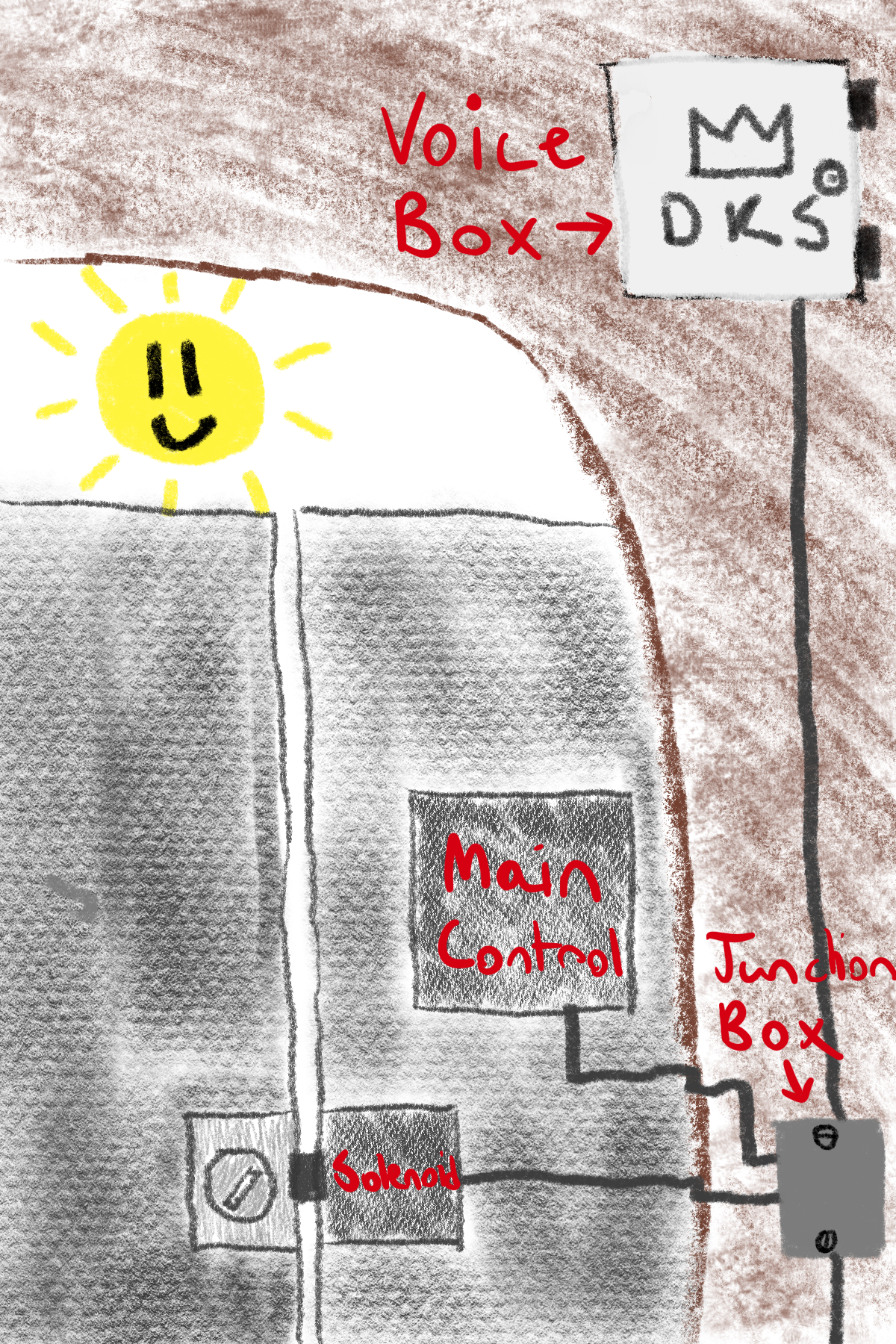
We expanded our search past the voice box to the main junction box that routed the wires between the voice box and the (inaccessible) main controller. After unscrewing two flathead screws, we were met with an interesting surprise: an extra cable we didn’t expect. Tracing the cable led to a revelation: the main control box controls the solenoid, the mechanical device responsible for unlocking the gate, through the junction box!
Having access to the solenoid control wire changed our approach dramatically. Solenoids are just electromagnets that have two states: unpowered (locked) and powered (unlocked); no security measures, no protocols to snoop. With this easy access point, we could just apply our own power to the solenoid to unlock the gate. In addition, the 12 volt DC auxiliary power from a terminal in the voice box would be perfect to power a microcontroller.
Here is the plan we came up with:
A diagram of the layout once we added the ESP32.
It was time to order parts. Thankfully Hazel found an ESP32 relay board that did exactly what we wanted, having two relays to control the solenoid. The circuit ended up looking like this:
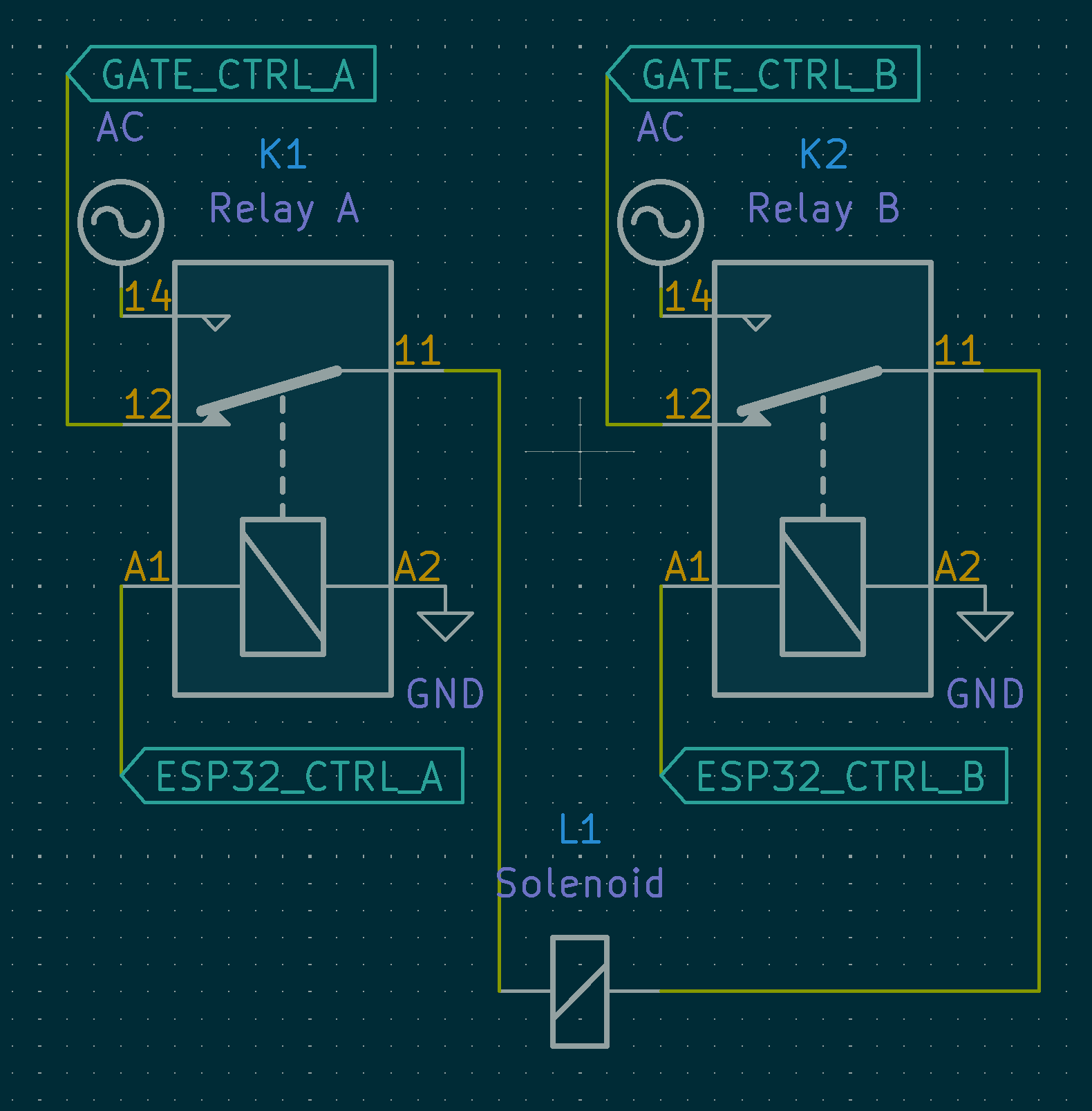
The circuit we used.
This setup ensures that if our circuit were to fail, the system would still remain fully functional since the gate control commands are passed through when no power is applied to the relay.1
Once we had the hardware set, next up was the software. We chose to use a Matter library written in Rust with specializations for the ESP32. This would allow us to use an open standard (with freely accessible specs, no filetype:pdf digging necessary!) to connect to Frank’s Apple Home setup.
The software can be described by this state machine:
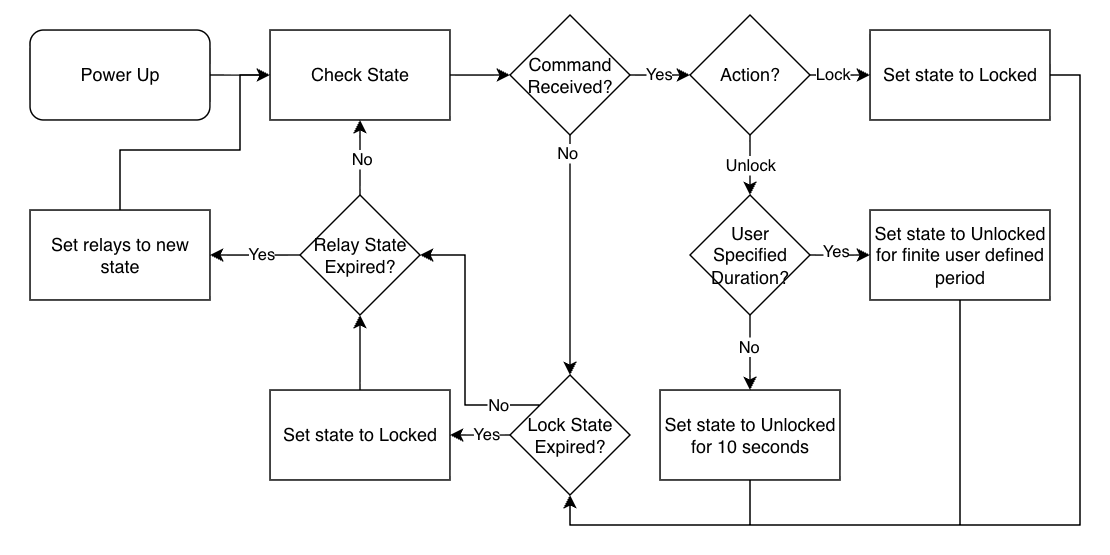
The software state machine.
It’s pretty simple. Startup and connect to the network. Once connected, start listening for commands from the home. When instructed, unlock the gate for a certain amount of time (user configurable with a default time of ten seconds), then re-lock the gate. Importantly, the software will never let the gate stay unlocked indefinitely, ensuring the system remains secure. You can look at the code yourself here.
One particularly infuriating issue we encountered during development was the ESP32’s very limited RAM space. Launching both the Wi-Fi and Bluetooth stacks together would almost always cause memory corruption due to overallocation, leading to a hard reset after invalid memory access. The Matter implementation we used utilized the ESP32’s older Bluedroid Bluetooth stack instead of the newer NimBLE, making the problem even worse. After manually tweaking the size of the stack for a long time, even with the help of Claude Code we were unable to get it stable. However, there was a solution in store: only enable either Wi-Fi or Bluetooth, and have Claude dump a bunch of memory-saving config settings into sdkconfig.defaults. Bluetooth is only necessary for the provisioning process, and Wi-Fi is only necessary for regular operation. There is a small window during the provisioning process where both need to be active, but this is short enough to not cause problems. Now, in normal operation the ESP32 immediately disables Bluetooth, eliminating the problem.
Once we handled all of the edge cases, the device showed up in Apple Home!
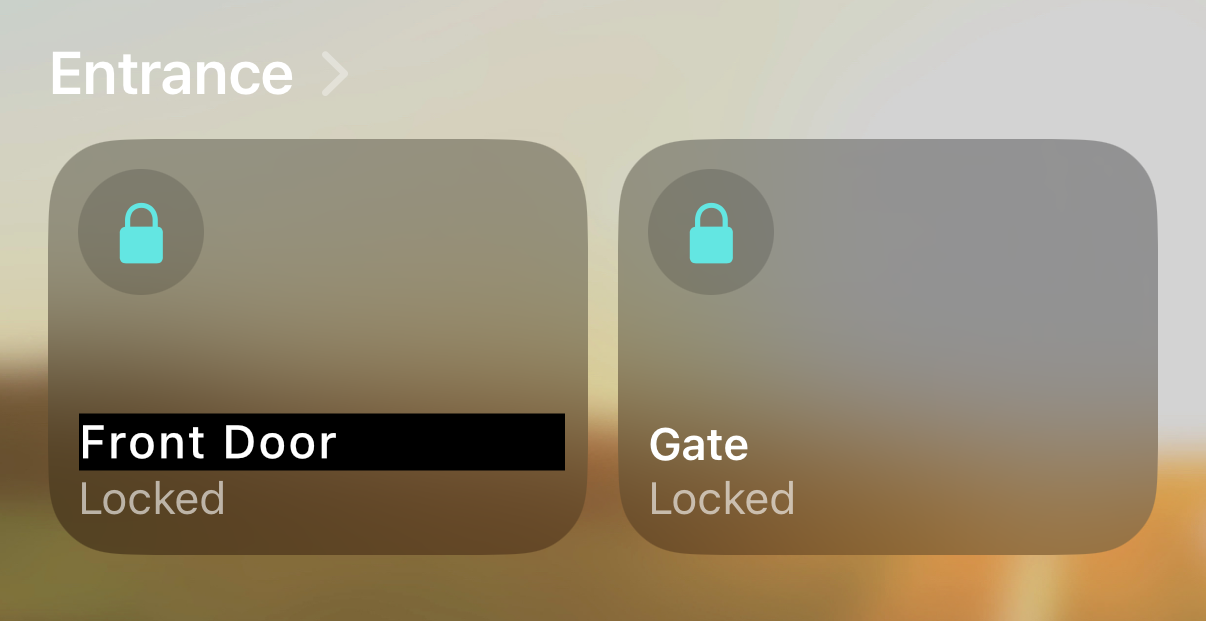
The gate lock alongside the front door lock in Apple Home.
Fun fact, you can set the manufacturer information to whatever you’d like:
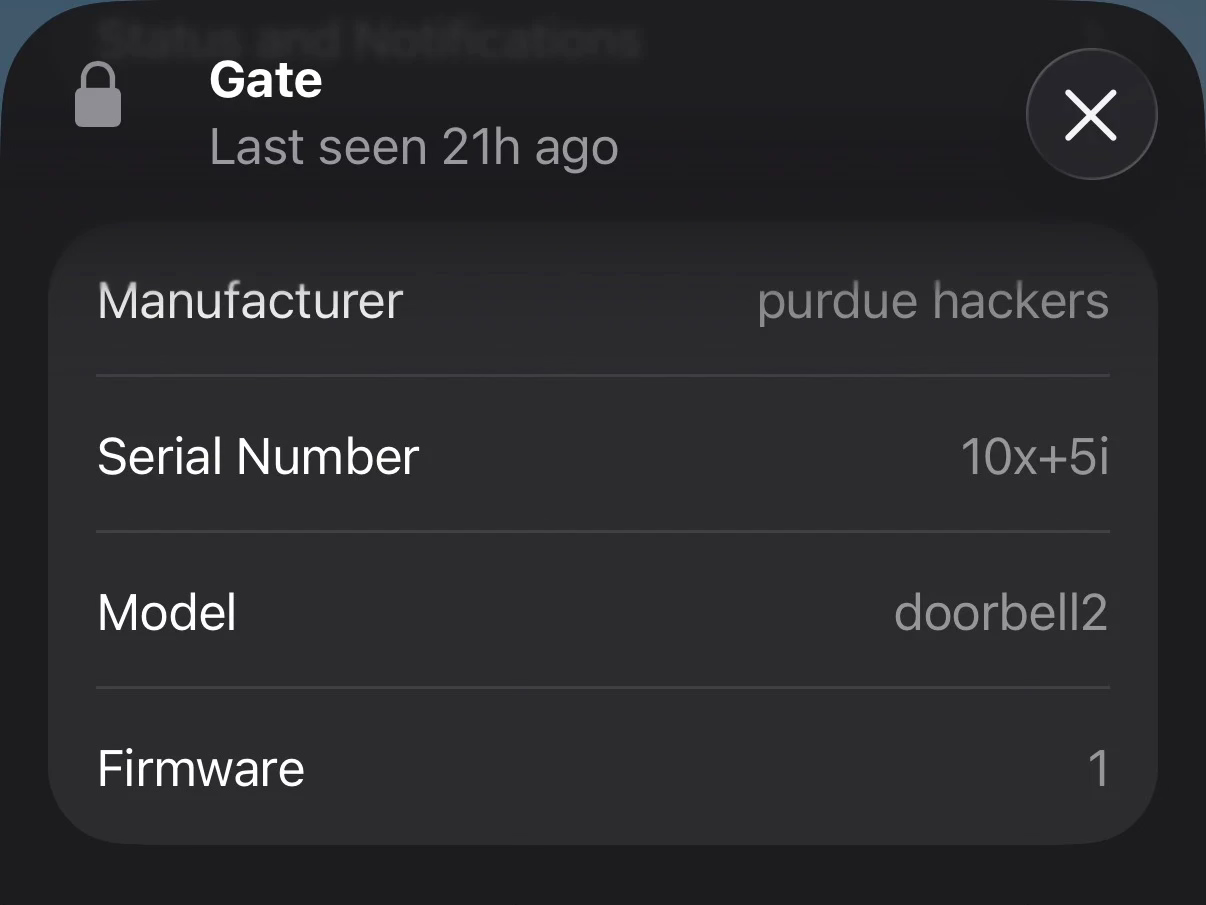
The manufacturer info we chose.
Once we had the software running perfectly, we moved on to deploying the device. Luckily, the board we bought fit perfectly into the small junction box that started us down this path, so it would be completely invisible to anyone who passed by. Hazel had already run power lines from the voice box to the junction box, and we had already purchased a Wi-Fi extender to ensure the signal was strong, so all we needed to do is hook things in. After a lot of careful splicing by Hazel, it was installed! We connected power in the voice box, aaaaannnnnndddddd… nothing. No power.
This was bad. Something had bucked our expectations, but we had no idea what. Frank didn’t have a multimeter, so we were stuck trying to figure out if there was a fray in the power wire, or if there was maybe a blown component on our board, or any number of other potential problems. Eventually I got an idea: Frank owns a cordless drill. After rummaging around in his tool closet, I found what I was looking for: a cordless drill battery, rated to output 20 volts. I ran downstairs, connected it to the power wires, and eureka! It worked! The board fired up and connected to Apple Home. This was a wild feeling, being able to unlock the gate before I even got to it.
While it felt really good to know that the project could work, we needed to figure out what was going on with the power. After some digging I came across the service manual for the voice box, and I found something that should’ve been obvious: the 12 volt aux port was an input, not an output, for power sources such as solar panels. It was frustrating for us to discover this fact, but at least our board was functional. After a quick search I ordered a rectifying regulator that converts the 18 volt AC input to 12 volts DC. Shipping took forever, but once it arrived it fit right in alongside the ESP32 board inside the junction box. I connected it to the known-working AC power for the voice box, and power started flowing! We closed everything up, and we were done.
Hazel and I are super proud of our little box of secrets, and Frank couldn’t be happier. With his newfound capability to unlock the gate through Apple Home,
As a bonus, the assembly is very discreet: it’s just one ESP32 and a small power device hidden in a screw-secured junction box that doesn’t interfere with the building’s primary access control system, giving it a much better chance of avoiding discovery.
This was such a fun project to work on, and it allowed me to dip my toes into circuit hacking, something I don’t get to do nearly enough. The components for this project are all super simple, so if you’re in the same position as Frank, give it a try! Tag me on Twitter if you get it working!