When I am doing network management on my weekends, I’m so glad I’m not stuck in the Linux terminal learning about networking internals and can instead just go to a webui and configure my router.
Any computer with a single network interface, maybe even an (old) laptop, can be used. Anything x86 from at least the last 10 years is energy efficient and fast enough to route at gigabit speed. If you don't care about energy usage, any x86-based computer from the last 20 years is fast enough.
The magic trick is to use VLANs, which require switches that support VLANs, which can be had for cheap. VLANS also allows you to create separate isolated networks for IoT or other 'less secure' or untrusted devices.
I’ve always made my own routers by using low-power devices running Linux (Debian) with IPtables and now NFtables.
No special router OS or software required.
Highly recommend.
P.S. that single network interface is very likely never a bottleneck because network interfaces are full-duplex. Only when your router is also your file server (not recommended), internet traffic and file server traffic could start to compete with each other.
I get by without it, but I can imagine some won't be able to.
Ideally the PI also should to what the extra DSL Modem does… but I guess that's where the dram must stop. :D
I'd be willing to bet, though, that the overwhelming majority of people who use consumer routers aren't doing anything remotely advanced. A how-to that covers the majority of use cases is valuable even when it excludes advanced use cases.
VLAN hopping is only possible due to misconfiguration. I'd like to be proven otherwise if that's not the case. VLANs are used EVERYWHERE where it matters. And no, the single port is absolutely not a bottleneck because the port is full-duplex.
Anyone with translate.kagi can find it and translate
I ended up with an Opnsense box. It's an m920q (i5-8500), with riser card and a dual SFP+ nic in it. All in, it was less than 200 bucks (now it would be closer to three). I ended up with a cheap, Chinese "media converter" (from aliexpress because the same thing on amazon is 3x the price) that just had two SFP+ ports on it. That let me go from an SPF+ copper ethernet module to a DAC and not dump a bunch of heat into the 1L pc.
I have to say that the functionality made it a worth while investment: traffic shaping, wireguard and the like have been mostly a joy. And the documentation for Opnsense made the setup and use (mostly) easy.
Both get 500Mbit.
Bottleneck.
As much as I love hostapd... the performance using commodity hardware has always sucked for me. I can get 150MB/s over wifi with my proprietary AP!
Anyone actually measured this? I see a lot of bandwidth/etc style tests but few that can show the actual impact of enabling disabling deep packet inspection and a few of the other metrics that I actually care about. Serve the home seems to have gotten some fancy test HW but they don't seem to be running these kinds of tests yet.
I recommend the free home version of Sophos for the least painful way to do it. Buy a Palo Alto with a full subscription if you are really serious.
The first two versions of 225 have packet drop issues and it’s unclear to me whether v3 third time lucky fixed it. And getting the stepping info out of aliexpress supplier is hard so 226 is safer
The extreme difficulty of setting up networking and routers is (obviously?) a weird endgame result of how companies and safety and capitalism and restriction intersect* and given the relatively insane regulatory ideas we're seeing these days, time for another look at all of this.
*edit, and not, e.g. an inherent property of "networking technology," it does NOT have to be this hard.
I encourage everyone to run a hardware router. A cheap dedicated wired router can be had for $50. Run PfSense or the vendor firmware . It’s very rewarding. Also a long term investment since routers tend to last for many years while wifi standards are revised every year or so .
Also, if you have ever used docker or virtual machines with NAT routing (often the default), you've done exactly the same things.
If you have ever enabled the wifi hotspot on an android phone also, you've done pretty much what the article describes on your phone.
All of these use the same Linux kernel features under the hood. In fact there is a good chance this message traversed more than one Linux soft router to get to your screen.
It's a shell script that allows you to turn any ol' Linux computer into a WiFi router in one quick command-line:
By default, it will setup your WiFi card as an access point (allows WPA2/3, MAC filtering, etc), setup packet forwarding and routing, and run a DHCP and DNS server. It will generally pick sensible defaults, but it's also highly customizable. If your WiFi card supports simultaneous AP and client mode, it will allow that.
Its requirements are extremely minimal: basically just Linux, a compatible wireless card, and a few common configuration packages (hostapd, iw, iproute2, iptables, dnsmasq). No NetworkManager needed.
I used it as my own home Internet gateway for many years, running on an ancient fanless Atom mini-PC.
Because it can quickly setup and teardown WiFi networks on-the-fly, it's also a valuable tool for setting up test networks when reverse-engineering IoT devices. I use it frequently for this purpose (see https://snowpatch.org/posts/i-can-completely-control-your-sm...).
Edit: And ofc best cheap device imo is OrangePI R1 LTS and a whatever usb wifi dongle. Came in clutch a few times, such a nice little device.
Would you have a picture of the ExpressCard laptop connector?
But I've never even tried to set up my own access point, I just pay Unifi for that [1]. The software part is doable but I don't want to learn to handle the signal issues.
[1] Switched to Unifi in anger after my first consumer level 5 Ghz wifi needed reboots weekly because it was overheating. Do yourself a favour and get the semi pro stuff, Unifi or others.
Why not? I use an old gaming PC as a "router" (machine exposed to the WAN), and run dozens of services on it besides the firewall/NAT (iptables). Among others: email, Web server, multiple game servers, and many internal services (DNS, hostapd, loads of Docker containers).
if you could show all the wiring and label it (according to the table below) i think it would add a lot of value for someone less familiar with these kinds of setups (like me)
What’s the simplest way to spin up a simple „cattle, not pet“ routing VM? I don’t want to mess with any state, I just want version controllable config files. Ideally, if applying a version fails, it would automatically roll back to the previous state.
OpenWRT seems like it fits my description most closely, but maybe someone here is a fan of something more flashy/modern.
What a dumb timeline.
Is the concern mainly things like botnets and DDoS activity, weak default credentials on network equipment, or compromised business networks where poorly secured routers or attached NAS devices could expose sensitive or proprietary data? In other words, is the concern less about decrypting traffic and more about using the router as a foothold for surveillance, disruption, or access to poorly secured internal systems?
Some more idiocy from the FCC chair.
I have an Orbi AX system which works reliably, but now I want to upgrade the radio to WiFi 7 and that means I need to upgrade all the hardware.
Hoping to move to using off the shelf parts so in the future I can just change the radio (ideally bunch of USB sticks).
I understand this is not strictly just the router. I can (and used to have) a router as separate device, but any mesh WiFi right now that I can find need a pricy router that acts as the coordinator, essentially negates the economic benefits.
I've been very interested in some of Radxa's boards in the ~$30-70 range, like the E52C [0] and the E20C [1], but they don't have many distributors and seem to have stocking issues [2].
[0] https://radxa.com/products/network-computer/e52c/
[1] https://radxa.com/products/network-computer/e20c/
[2] https://shop.allnetchina.cn/products/radxa-e52c?variant=5034...
Like is the "free" laptop going to cost you more in the long-run then a nice little power-sipping ARM like a Pi5? Or do you need those extra operations-per-second that the more power-hungry x86 CPU gets you?
:-)
Let me guess, ".*@.*\..*"?
My point isn't that there isn't anybody that could use information for how to support mesh networking in a homebrew router, it's that this article wasn't intending to address that segment of users.
My home router was an old Thinkpad for a while, but then I switched over to a slightly newer Dell Optiplex that my work was throwing out. The plus side of that is that the i7 is total overkill for routing so I can also have my "router" run some VMs for network services and cut down on the number of boxen in my homelab rack.
Alpine is a great distro for this.
net.ipv4.ip_early_demux = 0
net.ipv4.tcp_early_demux = 0
net.ipv4.udp_early_demux = 0
in /etc/sysctl.d/10_router.conf to slightly reduce overhead when being used primarily as a router. There are many other router related knobs but those I would always set especially if trying to reduce overhead for VoIP/Gaming setups. There are many other knobs I tune such as gro_flush_timeout and napi_defer_hard_irqs, sch_cake tuning, lowat and output limits and hundreds more but those rabbit holes would require a large write-up. My overall goal is to give family members latency, jitter and throughput numbers that improve their quality of life and gaming scores of course.Such things do not preclude additional tuning on the client and server sides as well but those are even bigger topics.
The perfect machine back then was a 100MHz Pentium, in a slimline desktop case. At the time, the Pentium III was the current desktop chip, so you'd have a pile of early Pentium-class machines to use. And even a 10mb ISA network card (3Com if possible) would have plenty of power for the internet connections of the day. But 100mb PCI cards were still fairly cheap.
Install two NICs, load your favorite Linux distro, and then follow the IP-Masquerading HOWTO and you've got internet access for the whole apartment building, office, or LAN party.
Eventually I moved on to Linux Firewalls by Robert Ziegler for a base to build on.
After that I started piling other services on, like a spam filter, Squid cache, it was amazing to get so much use out of hardware that was going to just get thrown out.
Windows PCs had (have?) that Internet connection sharing feature for a long time. It was really just a checkbox to enable NAT too.
Sometimes I think combining a firewall/router/switch/AP/file server/etc into a device called a "router" really confuses people. Even people who should know better.
A year or two back, I was able to get a brand-new fanless Intel N150 with 4x2.5G ports with 16 GB memory for about $150 from AliExpress. I run Proxmox on it, with OpnSense and a couple other things in virtual machines. These days, due to tariffs and the memory shortage, that is more like $440 now, unfortunately. I am kicking myself for not buying two, not so much because of the price increase, but because it would have come in handy multiple times to have a second one on-hand for random experiments.
Given that CPU performance does _not_ tend to be critical for firewall/NAS use cases, if I had to replace it tomorrow, I would go onto eBay and get the highest-spec'd used Dell or HP mini workstation I could find for $120 and plug in a USB3 1gig ethernet dongle for the WAN side.
If you want maximum speed a Lenovo Thinkcentre m720q has a desktop Intel CPU and a PCIe slot. You can add a 2x SFP+ NIC and PCIe riser to get 10G.
I am not really sure about it. My ISP provided AP can do a gigabit over wifi.
I need to change it because the ISP hardcodes the dns for spying reasons.
But sadly to match that performance I need to spend like $180 to get an AP with that performance
- Soekris net4501 (x86, 486-class CPU) (discontinued)
- PCEngines alix2d3 (x86, AMD Geode LX800) (discontinued)
- PCEngines APU (x86, AMD T40E) (my current router/firewall) (discontinued)
I'm also currently using an APU2 as one of my wireless access points (with hostapd).
All of these have been solid machines that have given me zero problems.
The next system I plan to use is going to be a Banana Pi R4 (ARM Cortex A73), it's a solid choice for a simple router/firewall/DNS/DHCP box. It has a built-in 4-port gigabit switch where each interface can be used as normal Linux interfaces, as well as 2 SFP+ ports that are capable of supporting up to 10 gig ethernet.
It's also one of the few systems that offers true hardware offloading for connection tracking, so things like netfilter flowtables don't have to use any main CPU processing.
I'm currently experimenting with a Banana Pi R4 as a Wifi7 access point (running Debian with hostapd), however the current state of the wifi7 module for it (BPI-R4-NIC-BE14) and Linux driver (mt7996e) is still pretty young and a bit buggy (i.e., limiting transmit power to 6 dBm without patching the driver to override it, and there's apparently a lack of RF shielding which can contribute to low SNR on the receiving end). With the proper patches in place it makes a decent Wifi 6 access point. I'm hoping these issues get ironed out in the future and I can use it as a true Wifi7 AP. frank-w is doing outstanding work to help support the open source community with this new hardware.
That snowballed into “we want a website do you know how to do that?” and. Well, no, but it had Apache available and I … figured things out enough to take the skills elsewhere.
Repeated the same trick with a place in Wisconsin, who initially shared a 56k dialup connection with all their dispatchers and were impressed the thing had stayed up for 900 days without even redialing. 90% of their work was done in an on-prem wyse terminal anyway, dialup used to do the job for email or googling an address.
27, 28 years later I’m still dragged in front of them once in a while to ask how they can accomplish something cheaply with Linux, bubble gum, paper clips, or whatever . The times and technology have changed, but not how cheap they are!
I've always found fq_codel to be good enough for gaming through my router. But I have a 10gbps uplink.
I was doing the same. Router and firewall on old Pentium CPUs. I don't have these machines anymore but I still have HDDs from back then with post-it notes on them saying stuff like: "Linux firewall / HDD 120 GB". For whatever reason my HDDs adapter that can read just about everything doesn't have the correct pin out for those HDDs. Would be a blast if they were to still boot: at some point I'll just buy a compatible adapter and see what I can find on those HDDs. I was very likely also saving some backups there.
But really my best memory was years (I think) before 120 GB HDDs became an affordable thing, in the super early Slackware days, on a dial-up connection: I had a 486 desktop computer and I'd share the Internet connection to a very old laptop (!) using... PLIP. A printer cable and the Parallel Line Internet Protocol. Amazing hack: my brother and I could then both use Netscape at the same time and to us this felt like a glimpse into the future.
The old one is getting really old now, nearly 25 years ago [2].
[1] Book Review: Linux Routers - A Primer for Network Administrators, 2nd Ed:
These are networks of controlled devices. They're hard to eradicate, as shown by the fact that they haven't been eradicated: they're still active and being used to compromise systems, including defense and intelligence systems, power systems, financial systems, identity systems, etc.
Is banning foreign gear going to fix this? No. Security isn't a product. It is, however, a process, and in a process you take steps. I think this: we (individuals and institutions) enjoy tremendous liberty in the use of communications equipment in the US and most of the West. Taking that for granted is a mistake. If part of keeping this means the US has to spin up a domestic supply of network gear, or carefully modulate where such gear comes from, then lets do that. Otherwise, The Powers That Be will leverage its concerns into far worse steps.
Before Thunderbolt was common, people attempted to use external GPUs with this sort of expander, but it worked really poorly.
* WAN connection comes in by coax, into my cheapo cable modem (off screen), and then by Ethernet into the franken-NIC sitting on top of the laptop.
* The NIC on top is a normal PCIe card, but with the bracket missing. The ExpressCard riser [1] is connected by a mini-HDMI cable, the flat black cable, which curves up, around, and back in from the left side into the laptop
* Then, the blue cable on the side of the laptop is a VLAN trunk going into the Cisco switch on port 23/24, outside the picture.
* From there, another port on the switch is setup as an access/untagged port going into one of the LAN ports on the D-Link acting as the access switch
I don't think it was set up here, but at one point I also had a dock under the ThinkPad, with the serial adapter wired up to the switch's console port so I could manage everything by ssh'ing into the router.
[1] https://www.ebay.com/itm/115721630079
Also note that all the cables were hand-crimped because I was too cheap to buy new patch cables at the time.
I was in college, and truly had more time than money back then. it's the kind of doohickey made by only somebody very young, very crazy, or a bit of both. ;)
I kind of feel like that's cheating though; I've outsourced the hardest part of the project to someone else. Maybe one of these days I'll take an old NUC or something and buy a decent wifi antenna for it and try and do it properly.
[1] Initially pfsense, then OpnSense, then ClearOS, and now some custom firewall rules in NixOS.
E.g. is your pf-based load balancer running its rules before or after the global filtering rules? And if they're running first are they SNATing incoming traffic so the LAN rules allow the traffic through or does it need explicit exceptions for external IPs to traverse to a LAN endpoint?
If you're comfortable with more advanced networking then it's fine to run it all on one box. If you just want to open ports for internal LAN services then that is a very canned and well-supported feature for a gateway firewall.
E.g. see AirSnitch which resulted in large part from mixing too many complex networking rules in single devices.
Version control is in the GUI, you can adapt for your needs the number of changes you need. automatic config.xml backup also possible.
Ran openbsd for a few years like that, the base OS included everything needed. I recall it used 24MB of ram and closer to 30MB if ssh'd in. It was very handy to have a local login when playing with firewall rules.
If this were really about computer security they would follow California’s example of requiring unique passwords. Maybe make manufacturers liable for not patching known remote exploitable security vulnerabilities. It doesn’t matter if the source of a DDoS is a Huawei box or a Netgear box.
That should probably be the technical concern. Even if you have traffic protected by TLS, you still typically have enough metadata to cause some problems for users individually, but the assumption that foreign equipment is back-doored by some security service or other is probably safe.
- Access to data (dns/ips, domain names (if not using ESNI), amount of traffic, etc) of sites you are visiting
- Access to the inside of your network where it can attack machines that may not be secure
- DDoS
- The ability to shut down your internet
I'm sure there are more.
After I upgraded to a 10GbE ethernet card in my previous router, my card didn't work correctly with FreeBSD-based stuff anymore. I changed to ClearOS and that was actually comparably easy to Pfsense...maybe even easier? I recommend checking that one out.
It seems like you weren't really asking, but I'll answer anyway.
It's bad security practice, and opens up your network to attack and/or compromise, you're massively increasing the attack surface, and a compromise of one of those components leaves the attacker sat on your edge router, at which point your entire network is fair game.
Generally speaking you shouldn't expose anything on your edge router / firewall, it's a safety barrier.
You can sit things behind it in a "DMZ" and port-forward and isolate them etc so that there's no packets terminating on the actual edge device itself.m, that lowers the risk of a full network level compromise.
Chances are you might be fine and never have a problem, but it's still recommended against.
Imagine everyone had their routers disabled simultaneously. I don't know if the cell networks could function with the surge in standard traffic that would happen, and then you've effectively plunged all or part of the country into a communication blackout.
I think "turn it off permanently by bricking it" is almost as bad as "leverage for DDoS".
I worked on Bot Mitigation at Amazon, and we once saw a ton of traffic that was heavily distributed amongst consumer devices world-wide, but surprisingly in the US too. We suspected compromised routers that were using the home page as a health check. There was a lot of investigation I did, and the short realization after talking with the network engineers is that the amount of traffic, and distribution of sources, would be impossible to stop. There merely isn't enough bandwidth in the world to stop so many residential device if it hits a specific target. To be clear, this was coming from less than half of active Amazon customers, not everyone in the US.
Anyway, it wasn't routers, but it was a consumer device, and it wasn't nefarious, it was incompetence (in code), as usual.
Then there's the roaming issue. This is largely what the commercial "mesh" systems try to solve: deciding / helping inform when clients should switch APs. There are many solutions and none of them are without issues, including the commercial ones. Here's a starting point: https://openwrt.org/docs/guide-user/network/wifi/roaming
I don’t like to cover “current events” very much, but the American government just revealed a truly bewildering policy effectively banning import of new consumer router models. This is ridiculous for many reasons, but if this does indeed come to pass it may be beneficial to learn how to “homebrew” a router.
Fortunately, you can make a router out of basically anything resembling a computer.
I’ve used a linux powered mini-pc as my own router for many years, and have posted a few times before about how to make linux routers and firewalls in that time. It’s been rock solid stable, and the only issue I’ve had over the years was wearing out a $20 mSATA drive. While I use Debian typically, Alpine linux probably works just as well, perhaps better if you’re familiar with it. As long as the device runs Linux well and has a couple USB ports, you’re good to go. Mini-PCs, desktop PCs, SBCs, rackmount servers, old laptops, or purpose built devices will all work.
To be clear, this is not meant to be a practical “solution” to the US policy, it’s to show people a neat “hack” you can do to squeeze more capability out of hardware you might already own, and to demonstrate that there’s nothing special about routers - They’re all just computers after all.
My personal preference is a purpose-made mini PC with a passively cooled design.
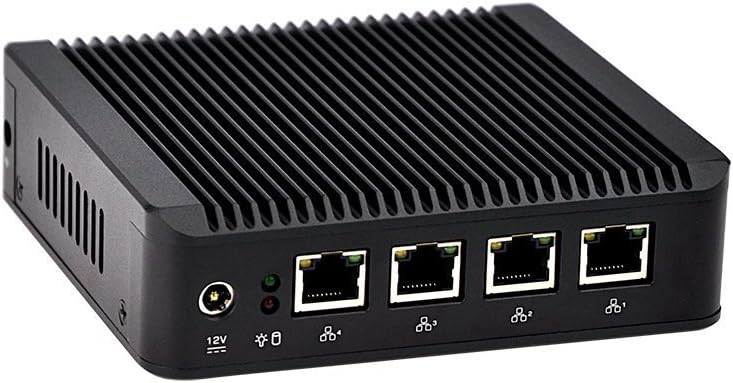
However, basically anything will work. It should have two Ethernet interfaces, but a standard USB-Ethernet dongle will also do the trick. It won’t be as reliable as an onboard interface, but will probably be good enough. For example, this janky pile of spare parts can easily push 820-850mbps on the wired LAN and ~300 mbps on the wireless network:
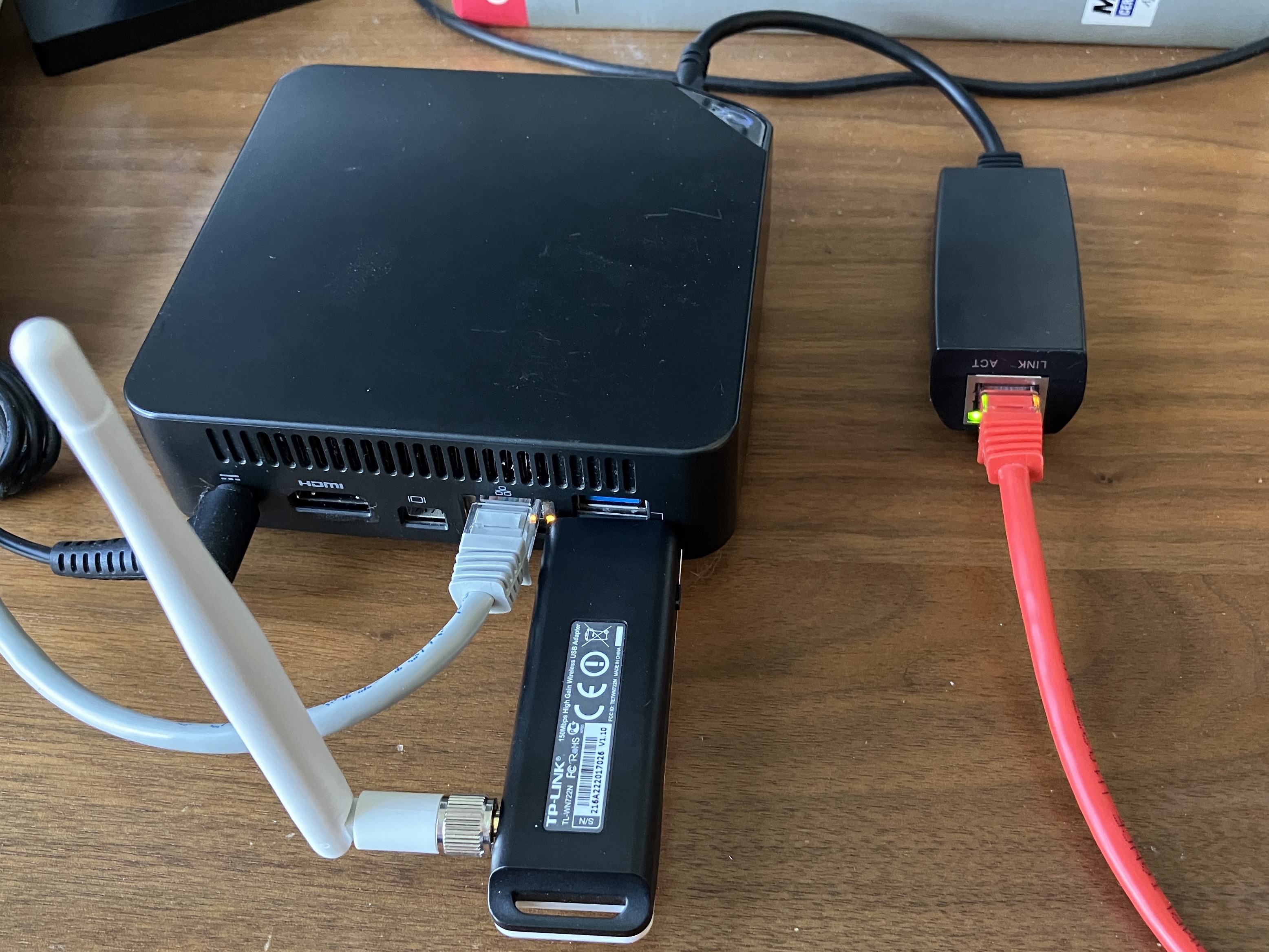
This particular device is a Celeron 3205U dual core running at a blistering 1.5 GHz. Even that measly chip is more than capable of routing an entire house or small business worth of traffic.
Going back even further, this was my setup for the first couple weeks of the fall 2016 semester:
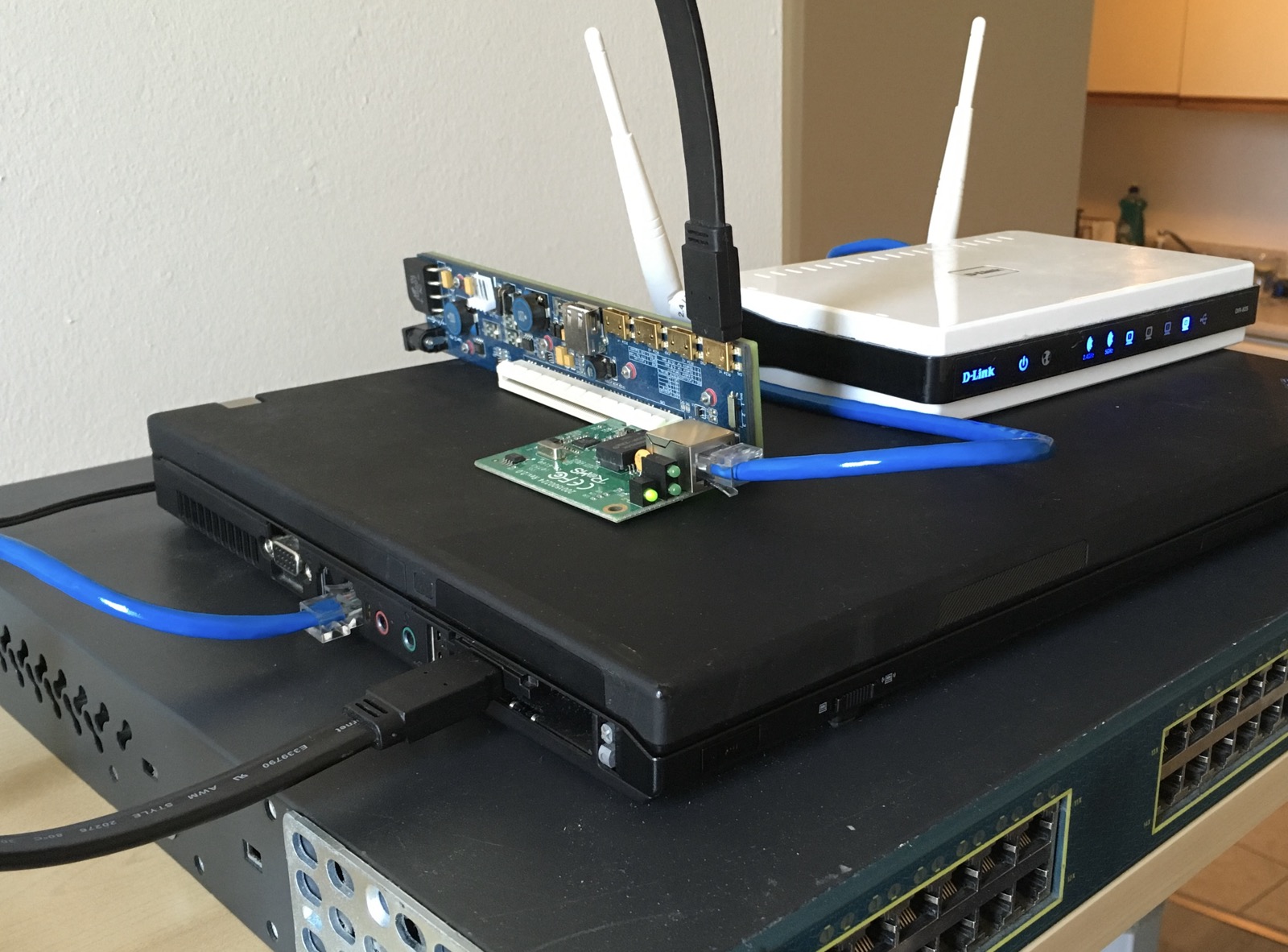
It might be hard to tell what’s going on here by looking, so let me break it down:
Yes, this is indeed a router! It probably looks like a pile of junk, because it is, but it’s junk that’s perfectly able to perform the job I gave it!
When set up, the system will be configured like this:
| Interface | Network |
|---|---|
| eth0 | WAN |
| eth1 | LAN (Wired) |
| wlan0 | LAN (Wireless) |
Both LAN interfaces will be bridged together, meaning that devices on the wired and wireless networks will be able to communicate normally. If one LAN port isn’t enough, you can plug in as many USB Ethernet dongles as you need and bridge ’em all together. It won’t be quite as fast as a “real” switch, but if you’re looking for performance you might’ve come to the wrong place today.
As mentioned before, this will run Debian as the operating system, and uses very few pieces that don’t come with the base install:
hostapd - For creating the Wi-Fi networkdnsmasq - For DNS & DHCPbridge-utils - For combinding ports into a common networkAlso, I should mention that I’ll only be setting up IPv4 here. IPv6 works great for stuff like mobile devices, but I still find it too frustrating inside a LAN. Perhaps my brain is too calcified already, but I’ll happily hold out on IPv4 for now.
Overall, it’s a pretty standard Debian install. A couple things I should mention:
non-free-firmware repository enabledDepending on your wireless hardware, you may need to install an additional firmware package.
For Intel devices:
sudo apt install firmware-iwlwifi
For Realtek devices:
sudo apt install firmware-ath9k-htc
Or if you have something truly ancient like I do:
sudo apt install firmware-atheros
After the initial install is done, there are some additional utilities to install:
sudo apt install bridge-utils hostapd dnsmasq
In terms of software, that’s about all that’s needed. There should be about 250 packages on the system in total.
In modern Linux systems, the network interface names are named based on physical connection and driver type, like enp0s31f6. I find the old format, like ethX much simpler, so each interface gets a persistent name.
For each network interface, create a file at /etc/systemd/network/10-persistent-ethX.link
[Match]
MACAddress=AA:BB:CC:DD:00:11
[Link]
Name=ethX
This uses a USB Wi-Fi dongle to act as an access point, creating a network for other devices to join. This will not work as well as a purpose built device, but it’s better than nothing. I’ve had reasonably good results with this, but I also live in a very small building where I’m rarely more than 10m away from the router. If you rely heavily on your wireless network working properly, try to find a dedicated access point device. An old router, even from over a decade ago, will probably work fine for this by just connecting to its LAN port (not the WAN port!).
To set up the onboard wi-fi network, create a config file at /etc/hostapd/hostapd.conf
interface=wlan0
bridge=br0
hw_mode=g
channel=11
ieee80211d=1
country_code=US
ieee80211n=1
wmm_enabled=1
ssid=My Cool and Creative Wi-Fi Name
auth_algs=1
wpa=2
wpa_key_mgmt=WPA-PSK
rsn_pairwise=CCMP
wpa_passphrase=mysecurepassword
By default the hostapd service is not startable, so we unmask it before enabling the service.
sudo systemctl unmask hostapd
sudo systemctl enable --now hostapd
The “outside” interface will be the WAN, and the “inside” will be the LAN. Note that the LAN interface does not get a default gateway.
/etc/network/interfaces
allow-hotplug eth0
allow-hotplug eth1
auto wlan0
auto br0
iface eth0 inet dhcp
iface br0 inet static
bridge_ports eth1 wlan0
address 192.168.1.1/24
After this step, the device should have a quick reboot. It should come back up nicely. If it doesn’t confirm that the previous steps were done correctly, and check for errors by running journalctl -e -u networking.service
If it all worked correctly, the output of this command should be the same:
$ sudo brctl show br0
bridge name bridge id STP enabled interfaces
br0 8000.xxxxx no eth1
wlan0
Create /etc/sysctl.d/10-forward.conf and add this line to enable IP forwarding:
net.ipv4.ip_forward=1
Apply the changes:
sudo systemctl restart systemd-sysctl.service
The firewall rules and NAT configuration are both handled by the new netfilter system in Linux. We manage this using nftables.
/etc/nftables.conf
#!/usr/sbin/nft -f
flush ruleset
table inet filter {
chain input {
type filter hook input priority 0; policy drop;
ct state { established,related } counter accept
ip protocol icmp counter accept
iifname "br0" tcp dport { 22, 53 } counter accept
iifname "br0" udp dport { 53, 67, 68 } counter accept
counter
}
chain forward {
type filter hook forward priority 0; policy drop;
iifname "eth0" oifname "br0" ct state { established,related } counter accept
iifname "br0" oifname "eth0" ct state { new,established,related } counter accept
counter
}
chain output {
type filter hook output priority 0; policy accept;
counter
}
}
table ip nat {
chain postrouting {
type nat hook postrouting priority 100; policy accept;
oifname "eth0" counter masquerade
}
}
This performs NAT, denies all inbound traffic from outside the network, and allows the router device to act as a DNS, DHCP, and SSH server (for management). Pretty much a bog standard firewall config.
Enable this for the next boot:
sudo systemctl enable nftables.service
Unlike my previous devices, this will use dnsmasq instead of isc-dhcp-server and bind9. It’s smaller, easier to configure, and works just as well for the purposes of a small device like this. The configuration file is ridiculously simple, and you can’t argue with that!
/etc/dnsmasq.conf
interface=br0
listen-address=0.0.0.0
dhcp-range=192.168.1.50,192.168.1.250,255.255.255.0,6h
dhcp-option=option:router,192.168.1.1
dhcp-option=option:dns-server,192.168.1.1
cache-size=10000
The service can be enabled for next boot.
sudo systemctl enable dnsmasq
If your device has an onboard serial or console port, it’s a super handy way to manage the router without having to find a monitor and keyboard to plug into it. This is extremely common in the enterprise network space, but there’s no reason a home device shouldn’t have the same capability!
Modify /etc/default/grub
GRUB_CMDLINE_LINUX='console=tty0 console=ttyS0,115200n8'
GRUB_TERMINAL=serial
GRUB_SERIAL_COMMAND="serial --speed=115200 --unit=0 --word=8 --parity=no --stop=1"
Then enable the Getty service to run on the port:
sudo systemctl enable [email protected]
Update the grub bootloader config, and restart the box.
sudo update-grub
After it’s all configured, give the device a couple restarts to make sure everything will come up reliably.
The status of the firewall can be checked to make sure traffic is moving through the network:
$ sudo nft list ruleset
table inet filter {
chain input {
type filter hook input priority filter; policy drop;
ct state { established, related } counter packets 1546 bytes 138508 accept
ip protocol icmp counter packets 1 bytes 84 accept
iifname "br0" tcp dport { 22, 53 } counter packets 4 bytes 240 accept
iifname "br0" udp dport { 53, 67, 68 } counter packets 92 bytes 6658 accept
counter packets 2110 bytes 128536
}
chain forward {
type filter hook forward priority filter; policy drop;
iifname "eth0" oifname "br0" ct state { established, related } counter packets 52964 bytes 479878687 accept
iifname "br0" oifname "eth0" ct state { established, related, new } counter packets 78017 bytes 54802223 accept
counter packets 0 bytes 0
}
chain output {
type filter hook output priority filter; policy accept;
counter packets 1650 bytes 155966
}
}
table ip nat {
chain postrouting {
type nat hook postrouting priority srcnat; policy accept;
oifname "eth0" counter packets 101 bytes 15882 masquerade
}
}
Before making any changes to the firewall config, be sure to validate the config file:
sudo nft -c -f /etc/nftables.conf
A nice advantage of nftables over the older iptables is the ability to reload the service to update the ruleset without disruption:
sudo systemctl reload nftables.service
The DHCP server can be checked by looking at its log, and checking the lease file:
sudo less /var/lib/misc/dnsmasq.leases
sudo journalctl -eu dnsmasq.service
At this point, the device should work pretty much perfectly. If desired, there are a few more features that can be configured or added with additional packages:
The beauty of something like this is the simplicity and reliability. While it may seem appealing, I would highly recommend against installing loads of software right on the router, and instead forward traffic to a device in a DMZ or VLAN.
We have the power to make anything into a router. Try it! Find a pile of e-waste, look for some pieces that work, and build a new router based on free software!
There are steps in the middle :)
I'm running OpenWRT on the recent WRT3200ACM and it's going beautifully.
It depends on what kind of packet rate one is pushing through the device, what type of hardware is being used as the router and how sensitive ones applications are to such things but if you want a better scientific answer run as many load tests as you can that measure packet rates, lag and jitter then disable them and run your tests again. I should add this is just one tunable related to routing. If bored dig into this a lot deeper and one will find there are many things that can be adjusted at the NIC, in the OS network stack and so much more.
Some people like defaults because it is less cognitive load and some like to tweak things until they can't get better results. I believe that everyone should be able to choose their own path to satisfaction. If the defaults and fq_codel work for you then that is probably the right answer.
It just wouldn't die.
The suspicion was because the electricity going to it cleaner than average, in a datacenter, the normal wear and tear on electronics may have been reduced.
Respect was paid at it's decommissioning to convert it into a vm, knowing it's luck, chances are it would still boot up and keep on running.
This made me chuckle, I'm definitely going to quote this the next time our K8S cluster has issues
Beyond getting support for devices completely absent on freebsd, quality of drivers, bugs much more rapidly squashed, and general misc features absent on the bsd side like NBASE-T.
I don't believe physical separation really buys you much here. At most, if may reduce downtime if you do indeed get pwned, but I think that you can achieve the same objective through a combination of containers, VMs, and UNIX users. And running multiple, somewhat redundant machines also has obvious downsides such as increased power consumption, increased maintenance burden, additional space and cabling, etc.
IME cell networks definitely can't cope with a loss of all routers in an area, given how mobile data becomes basically unusable when there's a power outage. That said, "everyone had their routers disabled" is probably not realistic, given that there are plenty of non-chinese router vendors.
Though you'd still need a switch or two. And a fiber modem which already has a router and a switch built-it. Oops.
You can do a lot of routing on a $70 Mikrotik, although they might not be "easy".
Virtualization means you now have multiple layers of drivers and privileged code in the mix to add and amplify bugs, it can and should work but if you are doing this in the name of stability that is a bit curious.
The reason Netflix can do what they do is they have good relationship with their HW vendors, NVIDIA(Mellanox) and Chelsio. If they were on Linux, they'd need the same level of support.
I use Linux for my router now because my server is NixOS, so I was able to consolidate my router into my server and turn off a machine (and thus save a little power), and I have so thoroughly drunk the Kool-aid for NixOS that I kind of want to put it everywhere. I run the latest kernel and I update daily, so I think most bugfixes (and hopefully security updates) will manifest quick enough.
Everyone has a starting point, starting with soemone has lying around is one thing.. the quicker they can get going the more they can get to leveraging the real power in most devices.
I predict some day this will be one of many things that will get adjusted by the "tuned" daemon if they add a profile for routers.