These devices are built to the edge of performance margins. Throw in some high voltage transients and things flip out. I think displays are particularly susceptible due to long cables, large surface area and unavoidable shape of common displays: they're effectively patch antennas.
The furniture static case is amusing: I imagine some foam cushions can cause millions of tiny static discharges in parallel when they expand. This will flow through the metal stand to "ground" and probably make a VHF range RFI spike (based on the size of a typical chair frame.) Common 24-27" display panel geometry just happens to be in the same neighborhood...
Adding ferrites to cables, as I see suggested several times, might help. You could also get unlucky and make it worse: choke a line to just the right length an it becomes a better inductor/antenna. Electricity is fun.
Laptop plus external monitor is an interesting case. The monitor should be grounded via its power plug, but the laptop's ground may be floating. Not sure about the grounding path for Apple laptops. Attempts to find info on laptop grounding online are returning AI slop. If everything is running off 2-prong plug external power supplies, there may not be any grounding.
Get the room humidity above 40% and most static effects will disappear. The water in the air grounds them out. That's often the easiest solution.
There are electrostatic field meters. Halfway decent ones start around US$150. I used to have a surplus store field detector on my desk when assembling electronics. It would squawk if the field level got high. Wearing a wrist strap would shut it up. With a meter, you stop guessing. This isn't mysterious, just something that needs instrumentation to chase down.
The chair chain is good, but make sure that the shiny enameled chain and the floors are actually conductive.
I suspected static electricity. The solution was a thin cotton pillow on the seat. Problem gone.
I'll definitely try some of the tricks from this article.
If one has a medium-sized chunk of money to burn, one could try fiber optic cabling. I've personally had -AFAICT- perfect results from Monoprice's "SlimRun AV" fiber DisplayPort cables, and Nippon Labs' fiber HDMI cables. [0] I expect that Monoprice's fiber HDMI cables and Nippon Labs' fiber DisplayPort cables are also fine, but I've never used those, so I cannot comment.
For folks concerned about "dreadfully fragile" fiber optic cables, I do know that the Monoprice cables are durable... a vigorous misadventure caused me to torque the hell out of the monitor-side connector. The connector bent, forcing the case split a bit at the seam. After some counter-bending of the connector and pushing its case back mostly closed, the cable works fine. Given the outward similarity in build quality, I expect that the Nippon Labs cable I have is at least as durable.
[0] Both families of cables drive my "4k" HDR monitor at 60Hz without lossy compression.
I would not be surprised that touching such monitor will electrocute you.
to add:
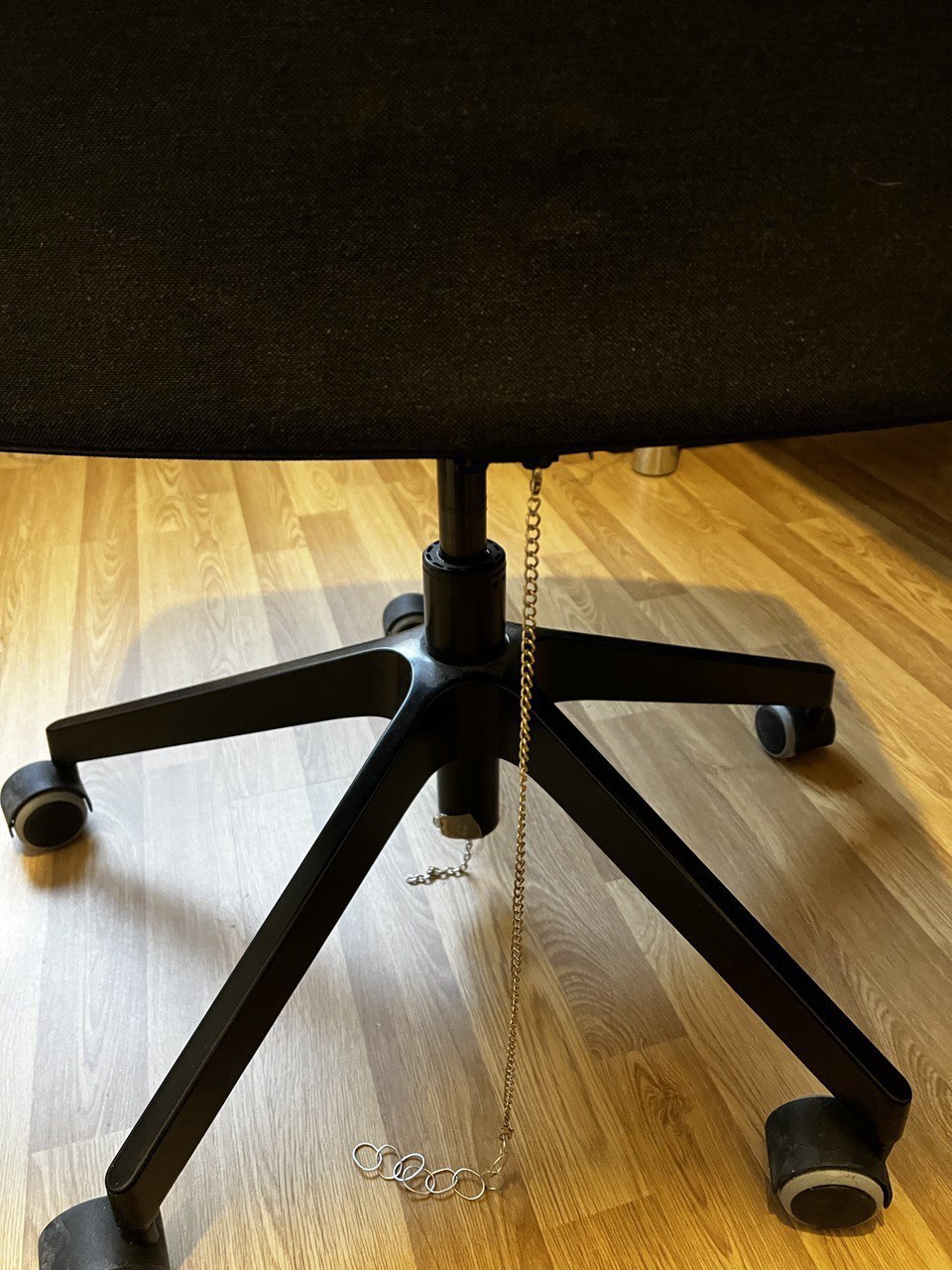
> In my particular case, my chair wheels are made out of plastic (non-conductive), so my solution was to “ground” my chair by adding a metallic chain from the chair to my room floor. I got the idea from reddit.
The chain grounded chair is used all the time in ESD rooms. The floors in these rooms use semi-conductive flooring which is tied to a ground rod. The chair is grounded to the floor which is in turn ground bonded to earth.
It’s pretty clear that most modern standards (HDMI, DisplayPort, thunderbolt, etc) are so close to their physical limits that there’s no more room for errors.
Now I'm wondering if I should ground my chair to the shelf my PC is sitting on.
As pretty obvious evidence this is static related, it only happens in the winter.
Since then I got a 4K display, and it likes to drop out in thunderstorms. I switched to a better DP to HDMI adapter, and the chunky original Samsung cable. I'm waiting for the next storm to see if it helps.
And yeah, we're pretty close to the limits. We always have been, though: At all points on the timeline of digital electronics, we've been pushing speeds to be as fast as we can manage today. But tomorrow (and the next day, and the day after that), we'll solve more of the problems and yet-again make it even faster.
Which brings us back to...ferrite beads, and problems.
I got introduced to Monoprice back when HDMI was still new and somewhat finicky, when stores like Best Buy were fond of selling $180 HDMI cables (and even Wal-Mart wanted something like $60). In that crazy world, Monoprice was the place to buy inexpensive cables that worked.
And it was clear that HDMI was the future, so I placed an order for a half-dozen or so different-colored HDMI cables with ferrites pre-installed near each end.
They showed up, and... they barely worked. They were glitchy, touchy, and intermittent. I was frustrated, and I felt like I'd made a poor decision that cost me money instead of saved me money. In fact, I was rather pissed off by all of this.
With nothing to lose, I used a knife to cut away the plastic overmolding on the ferrites on one of the cables that was being particularly problematic. And then I smashed those ferrites with a hammer.
With the ferrites thus-removed, the cable immediately began working perfectly. It was glitch-free. I couldn't get it to misbehave even if I tried. I repeated this with all of the other cables from that order and they all started working perfectly, too.
---
So, ferrites. Their presence adds a little bit of series-mode inductance. And that's something that can be useful. It slows down the edge of things like transient voltage spikes. And since the spikes are transient, slowing their rise-time in this way reduces their bandwidth and peak amplitude. Adding a snap-on ferrite bead can be enough to turn a problematic data bus into a well-behaved data bus.
But! They're just dumb hunks of minerals. They're indiscriminate. They can't distinguish betwixt the bad signals and the good signals -- everything is affected. So while ferrites can be useful in a fight against unwanted noise, they can also be destructive of the signals that we're trying to use.
They're good to have available, but they're also not necessarily something that someone should go forth and attach to every cable they find. If there's no problem that needs solved, then there's no solving to be done.
(These I days I make it a point to actively avoid buying cables that have ferrites pre-installed, both professionally and at home. But I've got a stash of snap-on ferrites in the top drawer of the toolbox just in case; it's good to have options.)
My guess is that, like OP, we're both getting interference in the our DP connections, and that that interference is in our cases causing the GPUs to crash.
Haven't had a chance to try ferrite cores yet but that was going to be my first test.
Curious what system specs you have in case we have overlap in anything that could isolate the issue. Mine: https://pcpartpicker.com/list/Xpdb8Z
On a side note, distilled water is highly recommended with ultrasonic humidifiers. Heat-based devices evaporate solely the water and leave mineral deposits behind. Ultrasonics create tiny droplets _along with the dissolved minerals_. Hard tap water or mineralized drinking water will coat your work area in chalk-like dust.
Also, y'know, your lungs. Deep inside your lungs.
Running tap water in an ultrasonic humidifer's going to spike the particulate pollution (PM1/2.5/10) throughout your entire house by hundreds of ug/m^3. And it seems that children are particularly prone to inhaling this stuff and having it deposited in their lungs (~2x more particles and ~3.5x more mass).
They really shouldn't be used with anything except distilled water. The things should come with a continuity tester that disables them if the water's conductive or something.
Hi there! Today, I come with a very unusual post, based on a true history that was happening to me before. If you are reading this, chances are that this is happening to you too, or just you are a curious person whose mind exploded when you read the title of this post.
I was suffering from an annoying issue for a few days. I work from home, and I use a MacBook pro attached to an external 4K monitor. along with an Ikea Markus chair. For whatever reason I’m not figured out yet, it’s generating a lot of static electricity every time I move a little, or every time I stand up. (Yes, it probably is related with the clothes or shoes I’m using, but tested different ones for a few days and didn’t notice any difference).
The problem with that static electricity is not only the annoying electrical “shocks” I receive every time I took a conductive surface (like my metallic MacBook), but also that the external monitor plugged to my MacBook goes black, blinks, or directly turns off. Sometimes, it even won’t reconnect at all or recognize it, and I need to unplug and plug-in again the video cable.
But even more. Sometimes, when I stand up without touching anything else (like the table or the MacBook) I get the same issue, so it couldn’t be only the static electricity. As a curious person (and a bit nerd one, to be honest), I started to investigate what was happening. I found out that some gas lift office chairs (like the one I’m using) can generate an EMI spike when people stand or sit on it, which is picked up on the video cables, and generates this issue.
“An EMI spike? I don’t believe you”, you said. And you know what? You don’t have to. There is a lot of people with the same issues out there in the internet. To provide some authority references, the official support page of DisplayLink talks about this issue, and there is even a White Paper about it. It seems that this issue is specially notorious with Display Port (DP) video cables, and also when some adapters (USB-C to DP, DP to HDMI, etc.) are used. In my personal case, I had this problem with two different cables I used: one DP to USB-C cable (without adapter), a USB-C to USB-C thunderbolt 3 cable (my monitor allows using it as an input and it will also charge the MacBook while in use).
Still don’t believe me? They say that a image worths a thousand words, so here is a video I found in YouTube that shows the issue, even using a oscilloscope to capture the EMI.
If what I already told sounds familiar to you, it’s highly probable. In fact, it’s happening to other people too. In that link, you can check a person asking the same question in SuperUser, but the answers there provided were not satisfactory for me, either because they were too generic, cause I found them impractical/annoying, or because they didn’t work for me.
For me, we have two different problems:
The first one is the static electricity. This is due to the chair not being able to discharge itself. In my particular case, my chair wheels are made out of plastic (non-conductive), so my solution was to “ground” my chair by adding a metallic chain from the chair to my room floor. I got the idea from reddit. I have a wooden floor and it’s working pretty well. Electrical shocks have been reduced by a lot (from +20 per day to just one every few days). This is my chair now:
Click on image to enlarge
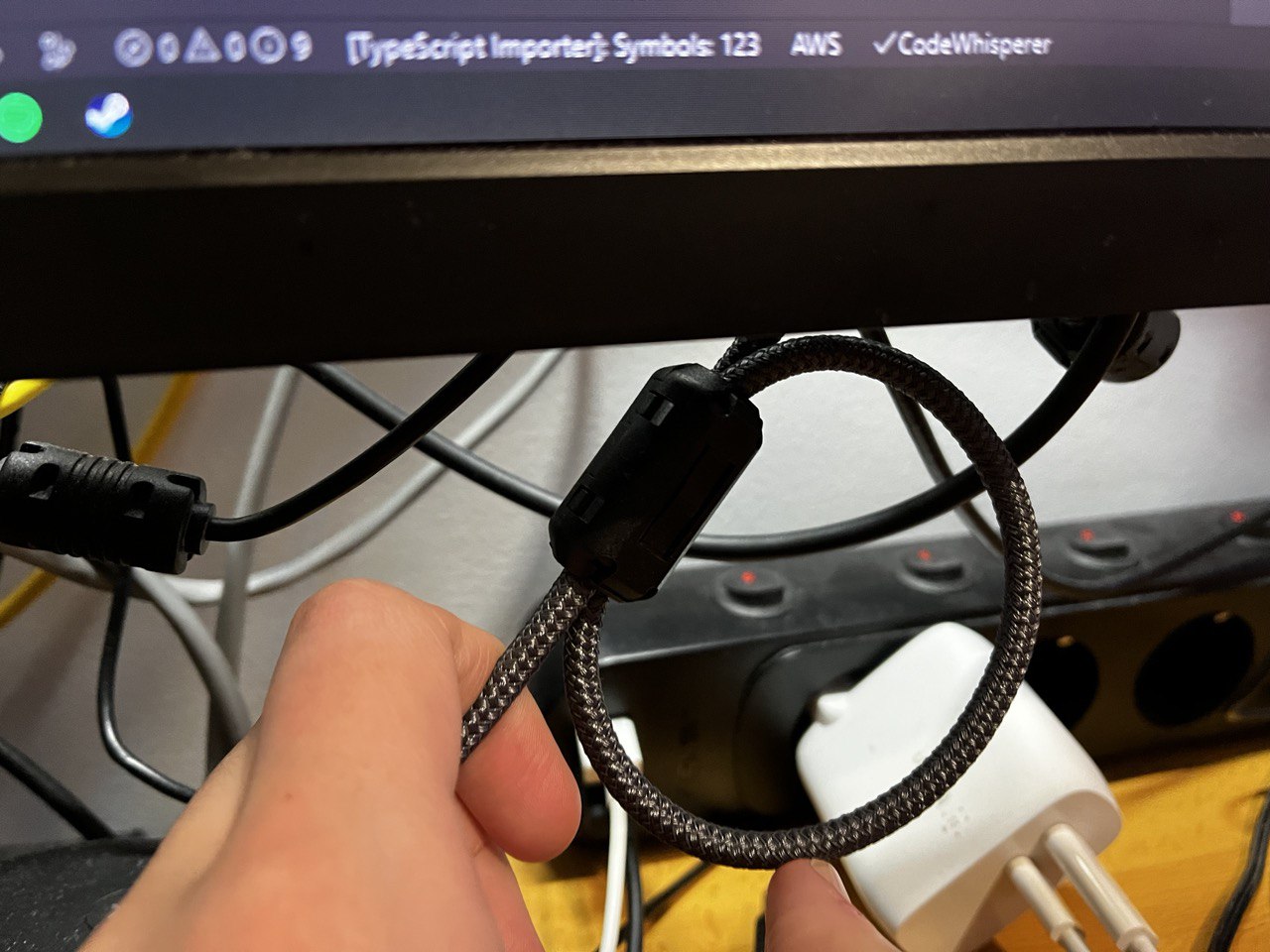
The other problem are the EMI spikes. We cannot avoid the chair generating them, but we can reduce their effect by using ferrite ring around our video cables, as suggested in the previous mentioned Display Link support page. Another user came to the same solution also in reddit. I bought a pack of 10 ferrite rings in Amazon Spain (afiliate link), and I’m using them in my video cables.
Click on image to enlarge
I have to say that the monitor stills goes black when I stand up quickly or in a fast way, but it’s not as often as before. If I stand up slowly, it doesn’t happen at all. I think that the ferrite rings are reducing the effect of the EMI spikes, but they are not completely eliminating them.
And that’s my story. I hope it helps you if you are suffering from the same issue. If you have any other solution, please let me know. You can contact me from my social media accounts in the footer of this page, or by email (my email is public under my GitHub profile to logged GitHub users).