I recently tried Claude Cowork for PowerPoint and I was stunned by the content as well as design quality of the deck it produced. That's a threat for Microsoft because now you don't need the editing tools of PowerPoint, AI replaces it, so all you need is the presentation mode of PowerPoint.
Copilot for Excel is useless. Ask it what is in cell A1 and it can't answer. I am looking forward to trying ChatGPT for Excel.
We came up with what I still consider a pretty cool batch-rpc mechanism under the hood so that you wouldn't have to cross the process boundary on every OM calls (which is especially costly on Excel Web). I remember fighting so hard to have it be called `context.sync()` instead of `context.executeAsync()`...
That being said, done poorly it can be slow as the round-trip time on web can be on the order of seconds (at least back then).
This seems like a security nightmare, which is especially relevant because sensitive data is often stored in Excel files.
Damn that OAI valuation is like a sore boil that is about to explode.
Also once again, a lack of imagination from OAI. Damn vision really is super scarce huh.
Instead of answering with 6, it came up with 15. The comment was "If AI is doing this, a global financial crash is inevitable."
Might not be real but it is something to keep an eye on. Hopefully, they are a bit more cautious on how this is implemented.
[for] ... users outside the EU.
hmmI am surprised that Microsoft's own copilot product is so far behind though.
You're not wrong, but you'd think that given their 27% stake in OpenAI they'd put more weight behind ChatGPT integration.
meanwhile not that ant is genius, except the timing of dow drama right before Iran war.
They (OAI+Anthropic) very much do not get exactly what these people are doing in the job (accounting+corporate finance+valuation+asset management) and what the actual production process is. These tools are irrelevant, disrupt flow and if anything just add noise to what one is doing.
If you were working on the platform itself, then I would be interested in hearing your more detailed thoughts on the matters you mentioned (especially since I am developing an open source Excel Add-In Webcellar (https://github.com/Acmeon/Webcellar)).
What do you mean with a "OM" call? And why are they especially costly on Excel web (currently my add-in is only developed for desktop Excel, but I might consider adding support for Excel web in the future)?
In any case, `context.sync()` is much better than `context.executeAsync()`.
HN discussion: https://news.ycombinator.com/item?id=47603231
They don't do the job, reliably or well. No amount of wishful thinking or extra tokens will change that.
The reason those calls are expensive on Excel Web is that you're running your add-in in the browser, so every `.sync()` call has to go all the way to the server and back in order to see any changes. If you're doing those calls in a loop, you're looking at 500ms to 2-3s latency for every call (that was back then, it might be better now). On the desktop app it's not as bad since the add-in and the Excel process are on the same machine so what you're paying is mostly serialization costs.
Happy to answer more questions, though I left MSFT in 2017 so some things might have changed since.
I asked GPT-5.4 High to draw up an architecture diagram in SVG and left it running. It took over an hour to generate something and had some spacing wrong, things overlapping, etc. I thought it was stuck, but it actually came back with the output.
Then I asked it to make it with HTML and CSS instead, and it made a better output in five seconds (no arrows/lines though).
SVG looks similar to the XML format of spreadsheets. I wonder if LLMs struggle with that?
I know there are employees of those firms here that would love to know. But nah lmao.
Remember when Steve said 'The computers for the rest of us'?
I suppose it isn't a surprise. Are researchers/generally geeky people meant to be able to relate to the average person's day-to-day beyond their sphere? Lmao.
You can't produce stuff for people you don't understand. Understand being a very key term.
Just this past week I used it to generate a simple model of a few different scenarios related to an investment property I own.
The first problem I ran into is that it was unable to output a downloadable XLS file. Not a huge deal - it suggested generating CSV tables I could copy/paste into a spreadsheet. The outputs it gave me included commas in a handful of numbers over 1,000 (but not all of them!) which of course shifted cells around when brought into Google Sheets. We pivoted our approach to TSV and solved this problem. Big deal? No. Seemingly basic oversight? Absolutely.
This is where the real fun began. Once I started to scrutinize and understand the model it built, I found incorrect references buried all over the place, some of which would have been extremely hard to spot. Here's my actual exchange with ChatGPT:
- - - - - - - - - -
> Can you check the reference in cell F3? It looks like it's calling back to the wrong cell on the inputs tab. Are there similarly incorrect references elsewhere?
> Yes, F3 is incorrect, and there are multiple other incorrect references elsewhere: (It listed about 30 bulleted incorrect references)
Bottom line - - Many formulas point to the wrong Inputs row because of the blank lines - The Sell + Condo section also has a structural design problem, not just bad references.
The cleanest fix is for me to regenerate the entire AnnualModel TSV with: - all references corrected - all 15 years included - the condo scenario modeled properly with a separate housing asset column
- - - - - - - - - -
This was me asking about the exact output I had just received (not something I had made any changes to or reworked.)
There are plenty of domains where I have enough faith and error tolerance to use ChatGPT all day, but this just sends a chill down my spine. How many users are really going to proof every single formula? And if I need to scrutinize to that level of detail, what's the point in the first place?
> (…) you can verify each step and revert edits if needed.
I wish there were different workflows.
It feels like current most popular way of working with GenAI requires the operator to perform significant QA. The net time savings are usually positive. But it still feels inefficient, risky and frustrating, especially with more complex and/or niche problem areas.
Are there GenAI products that focus more on skill enhancement than replacement? Or any other workflows that improve reliability?
Building an agent that can securely access systems of records, external data sources, and other files in your workspace—with context for the work you do outside of Excel—is where the revolution is at.
So, yes but no. Not that I care, but the answer to the above question is a no, and should start with No.
Show HN: I've built a C# IDE, Runtime, and AppStore inside Excel
670 points | 179 comments
One of the main use cases was to analyze Excel data with SQL. I'm the kind of nerd that loves stuff like that, but stuff like that seems completely obsolete now.
There are now just even more errors than there already were.
Now there's hope though: I take it at some point, just like we have AI that can already find (and fix and sometimes even properly fix) errors in code, we may end up with AI tools able to find all the broken assumptions and errors / wrong formulas the spreadsheets that make the corporate world are full of. But atm that's not where we are.
One such corporate-world company producing a gigantic turd would the "biggest" (but it's really not that big) european software company, SAP... They're going full on "business AI" as they see (rightly so?) AI as a terminal death threat to their revenue model. Market cap went from $360 bn to $200 bn: don't know if it's related to their "genius" AI-move.
And so now we have countless corporate drones who were already incapable of doing any kind of financial/accounting/math computation in a rigorous way who are now double-speeding on the errors, but this time AI-augmented.
It's the "let's add an AI chatbot to our site" (which so many companies are adding to their websites right now), but corporate version: "let's add AI to our corporate tools".
Just to be clear: I think this cannot fail. Failure and bogus numbers are the norm in spreadsheets, not the exception. More failure, more bogus computations, actually won't change a thing.
Microsoft, being Microsoft, will find a way to win no matter who that vendor ends up being.
I just spent a few hours trying to get GPT5.4 to write strict, git compatible patches and concluded this is a huge waste of time. It's a lot easier and more stable to do simple find/replace or overwrite the whole file each time. Same story in places like Unity or Blender. The ability to coordinate things in 3d is really bad still. You can get clean output using parametric scenes, but that's about it.
Nowadays I just make single-purpose websites with Claude Code because Google Sheets has such poor AI integration and is outrageously tedious to edit.
They had all the parts and I have a subscription and it still does terrible things like prompt me to use pandas after exporting as a CSV. It will mention some cell and then can’t read it. It can’t edit tables so they just get overwritten with other tables it generates.
It reminds me of something a friend told me: he heard that Google employees do dogfood their products; some even multiple times every year. There’s no way anyone internal uses Sheets even that often.
Maybe(?) from a product catalogue perspective... But from a strategic perspective less so because they own ~27% of OpenAI.[0]
[0] - https://openai.com/index/next-chapter-of-microsoft-openai-pa...
Honestly, I struggle to think about what has actually changed between Office 2013 and Office 2024 (and their Office 365 equivalents); I know the LAMBDA function was a big deal, but they made the UI objectively worse by wasting screen-space with ever-increasingly phatter non-touch UI elements; and the Python announcement was huge... before deflating like a popped party balloon when we learned how horribly compromised it was.
...but other than that, Excel remains exactly as frustrating to use for even simple tasks - like parsing a date string - today just as it was 15 years ago[1].
[1]: https://stackoverflow.com/questions/4896116/parsing-an-iso86...
Obviously doesn't apply to everything, and there are some features that are very hard to replicate. But still.
I was hyped when I heard about Copilot. "I can tell it to make pivot tables now!" When I tried to use it I was shocked how underbaked it was. Below even my worst expectations. This really was someone shoving ChatGPT into Excel with almost zero additional effort. Copilot can't DO anything useful.
The MCP ecosystem is what makes this interesting. Claude isn't just a chat panel bolted onto existing software, it's building integrations that actually manipulate the files. Microsoft had the distribution advantage but they're losing on capability.
Claude for Excel (I work in finance) was one of the absolutely critical reasons we added Anthropic enterprise licenses. But they've turned out to be quite expensive ($100/day for heavy users). We'll see what OpenAI's quotas are.
This is counter to the old (security nightmare) COM model where processing could be local.
What is the data model that you use for the spreadsheet itself? I found I could create a chat completion persona that believed it is one of the developers of a popular open source spreadsheet, and I put this "agent" directly inside the open source spreadsheet. I did this before tool calling was available at all, so I made my own system for that, and the "tools" are the API of that open source spreadsheet. My agent(s) that operate like this can do anything the spreadsheet can do, including operate the spreadsheet engine from the inside.
I made a CLI (+skill) so agents could edit files with verbs like `insert A1:A3 '[1,2,3]'`, but did some evals and found it underperformed Anthropic's approach (just write Python).
This time even for pro.
Regardless, I have always preferred Excel desktop over Excel web (and other web based spreadsheet alternatives). This information makes me somewhat less interested in Excel web. Nonetheless, I find Excel Add-Ins useful, primarily because they bring the capabilities of JavaScript to Excel.
You get models that are formatted and structured and which balance - but there are errors introduced which an analyst / human wouldn’t make.
Stuff like hard coded values, or incorrect cell logic which guarantees the model balances.
I would never use Copilot for anything useful, but I do use OpenAI products.
It doesn't matter when you use something else wholesale under the covers, if you botch the token spent...
That’s without talking about the poor UI and security story of COM add-ins and the inability to run on Excel for iOS.
I bet the bozos at OAI and Anthropic think a person who deals with stuff like cost of capital is going to go ask an LLM for it.. when in reality the individual needs to know how/why they chose what they did.
Comical stuff.
However, it may be important to note that these security considerations are relevant for most Office Add-Ins (and not just the ChatGPT add-in).
Given how well the API works, that we are discussing Googlers, my guess is that's how they dog food their services. Programmers don't get hired by Google for mouse skills.
The GUI is for spot checking results, final presentation.
If you're sitting there point-n-clicking everything into place perhaps consider you are doing it wrong.
The libraries themselves are OK, but MS uses them stupidly. If you want to fill out some form in DOCX or XSLX format you will get broken formatting. And this is from Office company.
It seems one of the biggest barriers to people's adoption is concern over data leaving their ecosystem and then not being protected or being retained in some way.
Is this is an SLA that a small or medium sized company could get?
Excel has this legacy (but extremely powerful) core with very few people left that knows all of it. It has legacy bugs preserved for compatibility reasons as whole businesses are ran on spreadsheet that break if the bug is fixed (I’m not exaggerating). The view code for xldesktop is not layered particularly well either leading to a lot of dependencies on Win32 in xlshared (at least back then).
Is it doable? I’m sure. But the benefits are probably not worth the cost.
Regardless, I just tried to log in with my work MS account, and I can't do so.
I don’t get good results when I just have Claude build things on its own - but for these types of specific productivity tasks I can save a couple of hours here and there.
Does this remove (or at least increase) the upload limit?
Claude one-shot something with a Python script that was pretty okay.
Now that’s an acronym that I had forgotten about.
Would love to hear more about this. Especially history and comparison to Lotus etc.
No limits.
It's here: https://github.com/tmustier/pi-for-excel
I have no idea if they do or not, but it's a plausible explanation...
Do you mean restricted workflow? Googles APIs are pretty much 1:1 to the GUI
And using Python makes it trivial to copy-paste out of files and other APIs with one run of Python
Versus all the fiddling in browser tabs with a mouse, it actually affords an incredibly wide set of options to quickly collate and format data
And so, a lot of the core code is used to that. Cell formatting data for example is super tightly packed in deeply nested unions to ensure that as little memory is used to store that info. If something only needs 3 bits, it'll only use 3 bits. The calc engine compiles all of your formulas to its own (IIRC variable-instruction-width) bytecode to make sure that huge spreadsheets can still fit in memory and calc fast.
And a lot of it still carries the same coding and naming practices that it started with in the 80s: Hungarian notation, terse variable and file names, etc. Now, IMO, Hungarian notation by itself is pretty harmless (and even maybe useful in absence of an IDE), but it seemed to encourage programmers to eschew any form of useful information from variable names, requiring you to have more context to understand "why" something is happening. Like, cool, I have a pszxoper now (pointer to zero terminated string of XOper), but why?
So the code is tight, has a lot of optimization baked in and assumes you know a lot about what's happening already.
But more importantly, a lot of "why" information also just lives in people's head. Yes, some teams would have documentation in an ungodly web of OneNote notebooks, or spread across SharePoint pages, which had the least useful search functionality I've ever witnessed, but finding anything you wanted was hard. But that didn't use to matter, since the core team had been there for a long time, so you could ask them question.
That being said, I joined MSFT in 2012 and started working on Excel closer to 2014. At that point, heavyweight like DuaneC (who wrote like 10% of Excel and I don't think I'm exaggerating) had already retired and while others people were very knowledgeable in some areas, nobody seemed to have a good cross view of the whole thing.
You have to understand that I was in the Office Extensibility team. We were building APIs for the whole thing. I had to touch the calc system, the cells and range, the formatting, tables, charts and images (the whole shared oart system was interesting), etc. Answering "How do I do X" was always a quest because you would usually:
- Find 3 different ways of achieving it
- One of them was definitely the wrong way and could make the app crash in some situations (or leak memory)
- All the people on the "blame" had left
- One of them was via the VBA layer which did some weird stuff (good ol' pbobj)
- Be grateful that this wasn't Word because their codebase was much worse
And so, a lot of the API implementation was trial and error and hunting down someone who understood the data structures. The fact that full sync and rebuild took about 6 hours (you ran a command called `ohome` and then you went home) meant that experimenting was sometimes slow (at least incremental builds were OK fast). The only lifeline back then was this tool called ReSearch2 that allowed you to search the codebase efficiently.
But the thing is, once you got thing to work, they worked really well. The core was solid and performant. Just slightly inscrutable at time and not the kind of code you're use to reading outside of Excel.
So I mean yes, you viewed Excel docs through a webpage just like you do today via ODSP or OneDrive consumer. The backend is completely different in the cloud service, though.
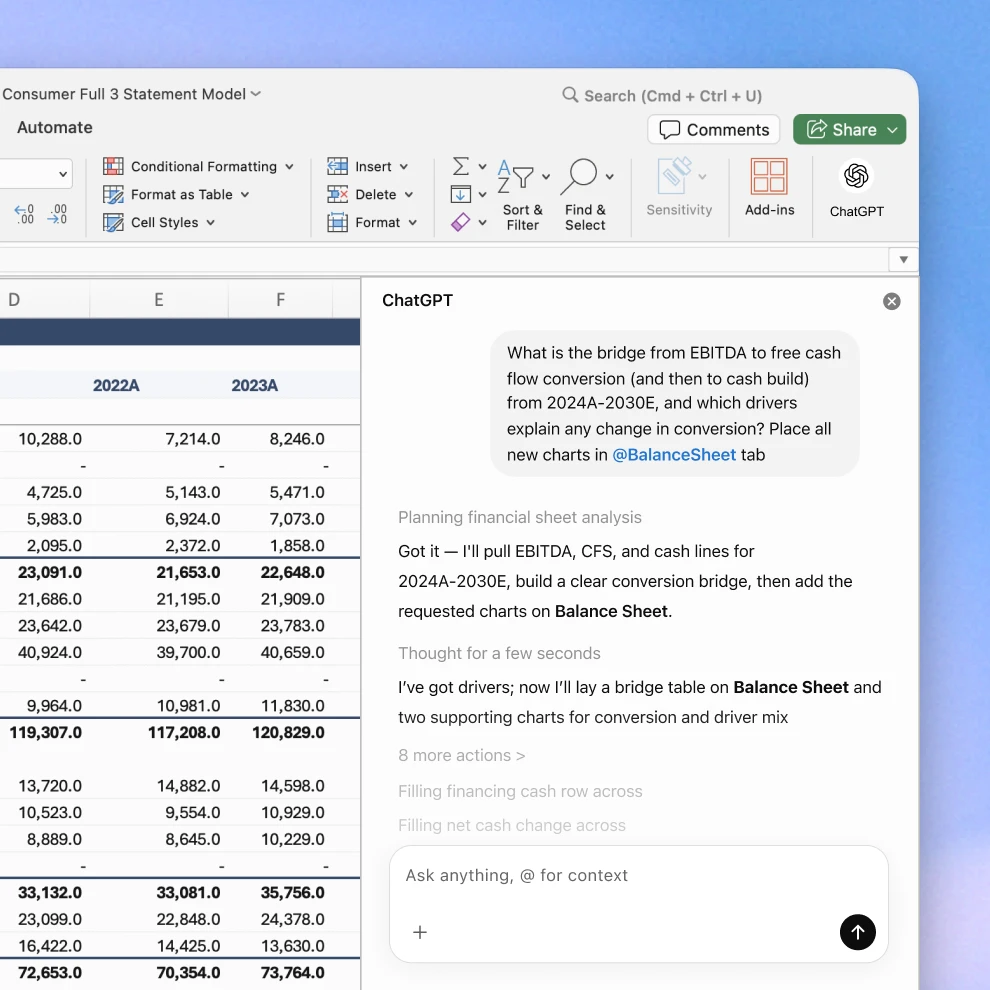
Ask ChatGPT to build full spreadsheets, get insights across tabs and formulas, and update workbooks in real time so projects move forward faster.
Available globally for ChatGPT Business, Enterprise, Edu, Teachers, and K-12 users, and for ChatGPT Pro and Plus users outside the EU.
Turn conversations into spreadsheets in minutes
Start with a blank spreadsheet or edit an existing one by describing what you need, like a survey results analysis, a discounted cash flow model, or business plan proposal. ChatGPT can build a formatted sheet with formulas included, so you don’t have to start from scratch.
Ask questions about what’s in your spreadsheet and get clear summaries across tabs. Understand formulas, find and fix errors, spot patterns, and quickly turn data into insights you can act on.
ChatGPT explains what it’s doing, links answers to the cells it references and updates, preserves your formulas and formatting, and asks for permission before making changes, so you can verify each step and revert edits if needed.
ChatGPT works directly in Excel
Install ChatGPT for Excel to build, analyze, and update spreadsheets without switching tools.
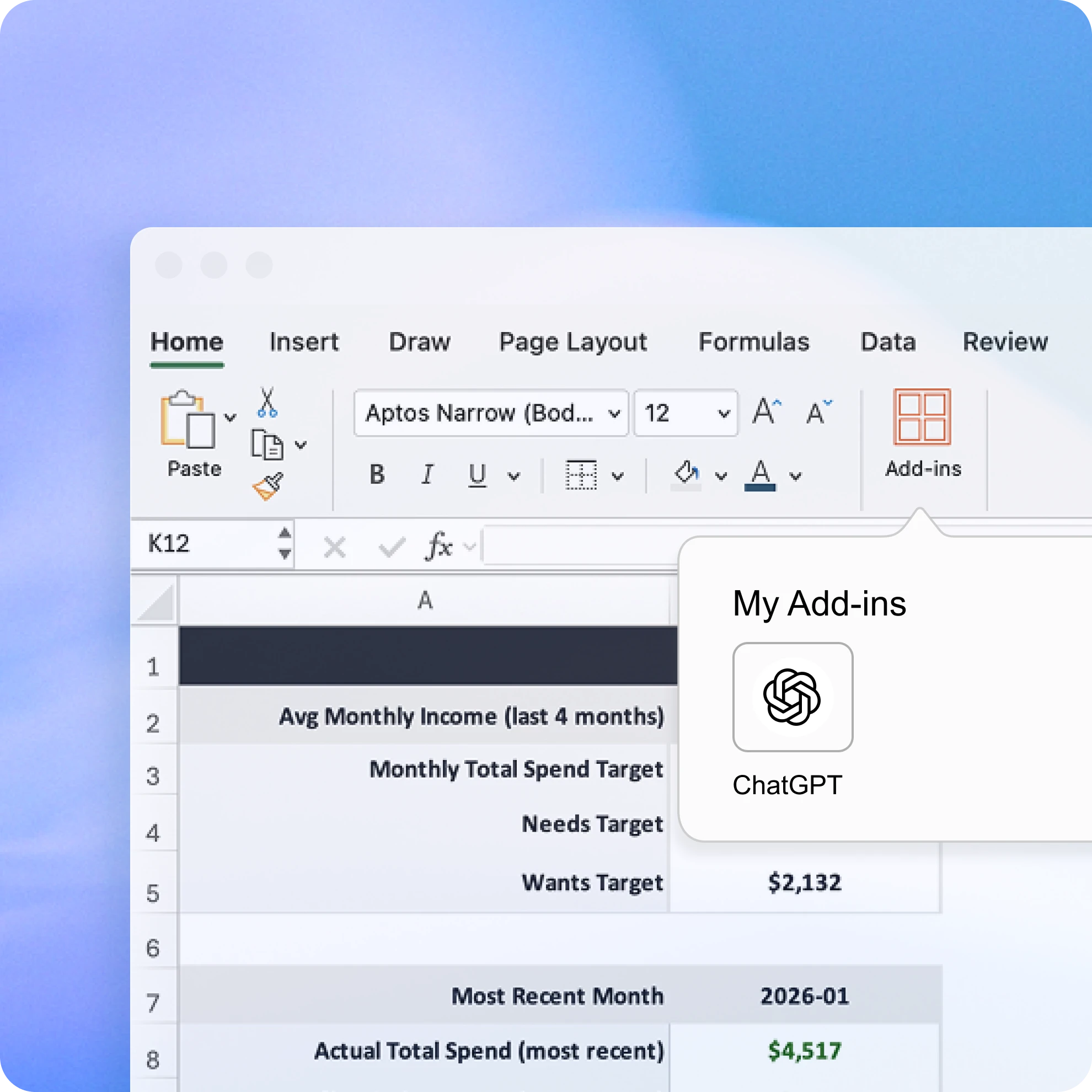
Add ChatGPT for Excel from Home → Add-ins, then search for ChatGPT. You should then see ChatGPT in the ribbon above your workbook. Open it and sign in with the OpenAI account that has your ChatGPT Plus, Pro, Business, or Enterprise plan.
Ways to use ChatGPT for Excel
Frequently asked questions
Understand data faster, fix formulas confidently, and turn raw numbers into clear insights and templates.
Analyze financial statements in seconds, summarize reports instantly, and automate routine tasks.
Connect apps like Google Drive, Slack, and GitHub so ChatGPT can pull information, organize it, and help you get more done.