But you’re not going to do that in a lab/personal machine, usually.
However, reading the summary left me confused like you don't understand what's happening at Microsoft.
> Hopefully Microsoft will spend more time in the future on their server product strategy and less on Copilot ;-)
The future product strategy is clear, it's Linux for servers. .Net runs on Linux, generally with much better performance. Microsoft internally on Azure is using Linux a ton and Windows Server is legacy and hell, MSSQL is legacy. Sure, they will continue to sell it because if you want to give them thousands of dollars, they would be idiots to turn it down but it's no longer a focus.
Not clear how both Amd and Intel not only lost the smartphone fight but also lost in their own field (aka servers, laptops, desktops)
15 years ago if I told you that windows would be running better on ARM you would call me crazy.
This could be tested even on the existing desktop hardware, by disabling "Turbo" in the BIOS settings, so that the Intel CPU would run at the base clock frequency, providing a lower, but stable and predictable performance.
1. ARM64 is actually less "smart" than x64. While Intel's Core i9 tries to be clever by aggressive boosting and throttling, Snapdragon just delivers steady and consistent performance. This lack of variability makes it easier for the OS to schedule tasks.
2. It is possible that the ARM build is more efficient than the x64 build, because Windows has less historical clutter on ARM than x64.
So, has CPU throttling become too smart to the point it hurts?
They blogged everything to generate the setup, including the hunch and test code but the anecdotal results are missing. It's a little suspect. How much faster is ARM??
Its possible ARM is a better architecture. But a lot of benchmarks end up stressing one part of the system more than any other. And if thats the case, faster RAM or faster syscalls or faster SSD performance or something could be whats really driving this performance difference.
A bit of backstory: there are two, totally independent implementations behind the Windows heap allocation APIs (i.e. the implementation code behind RtlHeapAlloc and RtlHeapFree, which are called by malloc/free). The older of the two, developed uring the Dave Cutler era, is known as the "NT heap". The newer implementation, developed in the 2010s, is known as "segment heap". This is all documented online if anyone wants to read more. When development on segment heap was completed, it was known to be superior to the NT heap in many ways. In particular, it was more efficient in terms of memory footprint, due to lower fragmentation-related waste. Segment heap was smarter about reusing small allocations slots that were recently free'd. But, as ever, Windows was very serious about legacy app compat. Joel Spolsky calls this the 'Raymond Chen camp'. So, they didn't want to turn segment heap on universally. It was known that a small portion of legacy software would misbehave and do things like, rely on doing a bit of use-after-free as a treat. Or worse, it took dependencies on casting addresses to internal NT heap data structures. So, the decision at the time was to make segment heap the default for packaged executables. At that time, Windows Phone still existed, and Microsoft was pushing super hard on the Universal platform being the new, recommended way to make apps on Windows. So they thought we'd see a gradual transition from unpackaged executables to packaged, and thus, a gradual transition from NT heap to segment heap. The dream of UWP died, and the Windows framework landscape is more fragmented than ever. Most important software on Windows is still unpackaged, and most of it runs on x64.
Why does this matter? Because segment heap is also enabled by default on arm. Same logic as the packaged vs unpackaged decision. Arm64 binaries on Windows are guaranteed not to be ancient, unmaintained legacy code. Arm64 windows devices have been a big success, and users widely report that they feel more responsive than x64 devices.
A not insignificant part of why Windows feels better on arm is because segment heap is enabled by default on arm.
I'd be interested to see how this test turns out if you force segment heap on x64. You can do it on a per-executable basis via creating a DWORD value named FrontEndHeapDebugOptions under HKEY_LOCAL_MACHINE\SOFTWARE\Microsoft\Windows NT\CurrentVersion\Image File Execution Options\<myExeName>.exe, and giving it a value of 8.
You can turn it on globally for all processes by creating a DWORD value named "Enabled" under HKLM\SYSTEM\CurrentControlSet\Control\Session Manager\Segment Heap, and giving it a value of 3. I do this on my dev machine and have encountered zero problems. The memory footprint savings are pretty crazy. About 15% in my testing.
Maybe not boost clocks, but every arm system I've used supports some form of frequency scaling and behaves the same as any x86 machine I've used in comparison. The only difference is how high can you go... /shrug
I wish we could separate the paid/oss aspects from the technical ones because Microsoft absolutely runs circles around every other stack when it comes to serious business software solutions, especially in resource constrained teams. I agree that oss and free software is conceptually ideal, but I also see why you might want to try different models.
Much of the Microsoft hate seems to come back to this notion that paid, COTS software is inherently evil or bad. Also, windows 11 is genuinely bad, but at least it boots up without weird issues that take an entire afternoon to resolve. I've never had a Linux experience that didn't kick me in the balls in some way. Not even the Steam Deck was smooth.
I happily throw my wallet at Microsoft if they solve my problem. Adobe, IBM, Oracle, The Empire, etc. Doesn't matter anymore. If it provides value to me and my clients, I'm going to use it or advocate for it. Spending money on good tools is not a bad thing. This world is about to get way more competitive than many of us would like for it to be. This level of petty tooling tribalism is going to become absolutely lethal.
Azure networking is Linux.
EDIT: Marvel at the NT4 style Task Manager [0].
[0] https://techcommunity.microsoft.com/blog/windowsosplatform/a...
Even Apple and Google run AD internally.
Gotta support all those CAD workstations running Windows.
Is Apple hardware still designed on Windows PCs?
Windows server is actually kind of awesome for when you need a Windows machine. Linux is great for servers but Windows server is the real Windows pro. Rock solid and none of the crap.
The worst part of Windows server is knowing that Microsoft can make a good operating system and chooses not to.
Does that global registry key require a reboot, or does it just take effect on executable launch?
Also assuming that most Microsoft first party applications in Windows server (DNS, etc etc) would all be optimised for segment heap ?
Our GIS clients run WS as a Deskstop OS with ESRIs ArcGIS Pro. Incredibly common.
And once you have that - add in Active directory, DFS and random Windows Servers for running archaic proprietary licensing services.
Apple A18 Pro (Q1 2026): Multithread 11977, Single Thread 4043
Intel Core i5-1235U (Q1 2022): Multithread 12605, Single Thread 3084
--
On the high-end we got i9-13900KS at about 60k, M5 Max 18 scores about the same. But when you move on to server CPUs like Threadripper and EPYC things are about 3x faster.
Lets see if the brand new Arm AGI changes this situation in a few months.
There still are applications where ISA matters, like technical/scientific computing, where the performance can be dominated by array operations or operations with big numbers. For such workloads the x86 CPUs with AVX-512 can provide a performance per watt and per dollar that cannot be reached by the current ARM-based CPUs.
I had previously seen this described as 0 vs non-zero. Since you have some inside experience :), anything special about 3 instead? What about 2? How would I find these value meanings out on my own (if that's even possible)?
Thanks!
P.S. In Windows 95 - Windows Vista era, there was a good tradition of "Compatible with Windows XXX" certifications for apps. If MS did something like that for Windows 10/11 and included the segment heap tick mark into it, a considerably larger amount of apps and its users would benefit from increased performance. Think better energy consumption and eco-friendliness as additional bonuses.
P.S. 2: The problem with UWP was not the technology itself, it was the stubbornness to have it packaged and tied to The Store, all of which contradicts the very existence of Windows as an OS.
At least in my experience I’m based in Korea and have worked on code that goes into enterprise systems — most MES and related systems are still built around MS SQL. SQL Server is very much alive in that space. It may feel outdated from a modern app development perspective, but the reality is that it’s deeply embedded through vendor lock-in.
What’s often called “legacy” is also, in another sense, a massive accumulation of layers built on top of it. That history has weight.
In most environments I’ve seen, the architecture ends up being hybrid: Windows on one side (for equipment control, MES, vendor tools), and Linux on the other (for backend services, data processing, etc.).
From the perspective of the companies I’ve worked with, there’s also a different way of looking at Linux. I often hear that “there’s no clear owner” — meaning no single vendor they can hold accountable. With Windows-based stacks, they feel like there’s at least a defined support boundary.
In the end, I think it comes down to perspective.
The x86 server CPUs, like AMD Epyc or Intel Xeon, have a lower range within which the clock frequency may vary and their policies for changing the clock frequency are less aggressive than for desktop CPUs, so they provide a more constant and predictable performance, which favors multi-threaded workloads, unlike in desktop CPUs, where the clock frequency control algorithms are tuned for obtaining the best single-thread performance, even if that hurts multi-threaded performance.
It's not a dominant database anywhere on the outside.
mild \s
(I know, I know. That question might be a bit too loaded. I'm really very sorry. No, there's no need that; I'll see myself out.)
You can recreate Windows Server on other platforms by stringing together bits and pieces, but there is nothing that comes even close in terms of integration and how everything works together. Nothing.
The next best alterative would be a Mac Studio with Thunderbolt enclosures, but that would be notably more expensive, and macOS isn't great as a server OS.
It's a beast in terms of complexity, in my opinion. But the vendor only supports running it on specific configurations.
1) They’d distract from the main point (I wasn’t aiming to write a benchmarking post), and
2) They can be misleading, since results will vary across ARM hardware and even between Snapdragon X Elite variants.
Instead, I included the PowerShell snippets so anyone interested can reproduce the results themselves.
For a rough sense of the outcome: the Snapdragon VM outperformed the Intel VM by ~20–80%, depending on the test (DNS ~20%, IIS ~50%, all others closer to ~80%).
I can't really complain, though. If UWP would've broken through, the Steam Deck would've probably been a much more massive undertaking to get working right.
As long as developers can opt into the new system (which they can with the manifest approach), I don't think it matters whether you're doing UWP or traditional Windows applications.
Microsoft has added a mishmash of flags in the app manifest and transparently supports manifest-less applications, so developers don't have a need to ever bother including a manifest either.
It'd annoy a lot of people, but if Windows would show a "this app has been written for an older version of Windows and may be slower than modern applications" warning for old .exes (or maybe one of those popups they now like about which apps are slower than they could be), developers would have an incentive to add a manifest to their applications and Microsoft could enable a lot more of these optimisations for a lot more applications.
> The x86 server CPUs, like AMD Epyc or Intel Xeon, have a lower range within which the clock frequency may vary and their policies for changing the clock frequency are less aggressive than for desktop CPUs
Probably we need to compare Xeon/EPYC with something like AWS Graviton or Ampere Altra to get an accurate picture of the server space. That said, I think "Windows Server works fast on Snapdragon" is both crazy and fascinating; I wasn't even sure if that was possible.
They have all been dotnet ecosystem, but self hosted rather than Azure
I think the latest versions of SQL Server also run on Linux now.
Very seldom I use something like Postegres, last time was in 2018.
Using the application manifest approach is the right way to ship software that opts into segment heap. The registry thing is just a convenience for local testing.
However since we now got the tools for running on both, and experience migrating, we might be moving to PostgreSQL at some point in not too distant future. Managed MSSQL in Azure is not cheap.
The problem was that the cost was not fixed and predictable, because every now and then we wanted to extend our activities, and that was conditioned by buying extra Microsoft licenses, for additional users, additional CPU cores or sockets, additional services, and so on.
This was extremely annoying in comparison with using a FreeBSD or Linux server, where the operating costs were the same regardless of how we decided to use it.
I agree that in a less dynamic environment, where the requirements for the server are stable and unlikely to ever be changed, using a Windows server may be OK.
However in any organization where this is not true, I believe that using any Windows server is a loser strategy, due to the financial friction that it causes against any improvements in the IT environment.
Could even enable XP themes IIRC.
To give you an idea of how bad things have gotten, there's like one guy working on developer tooling for SQL Server and he's "too busy" to implement SDK-style SQL Server Data Projects for Visual Studio. He's distracted by, you guessed it, support for Fabric's dialect of SQL for which the only tooling is Visual Studio Code (not VS 2026).
There's people screaming at Microsoft that they have VS solutions with hundreds of .NET 10 and SQL projects, and now they can't open it their flagship IDE product because the SQL team office at Redmond has cloth draped over the furnite and the lights are all off except over one cubicle.
Also: There still isn't support for Microsoft Azure v6 or v7 virtual machines in Microsoft SQL Server because they just don't have the staff to keep up with the low-level code changes required to support SSD over NVMe with 8 KB atomicity. Think about how insanely understaffed they must be if they're unable to implement 8 KB cluster support in a database engine that uses 8 KB pages!!!
Im not sure is CAD stuff is just served by a basic graphics card at this point or if there is some server side work going on.
OS doesnt mean that much when every industry decided that Chrome was going to be their VM
Weird reasoning.
You already caught our attention with your article. But not everyone has the time or means to go and re-do the tests.
However such information is really important to surface when making infra decisions. And if one of the brain cells pops up and says something about 20-80% perf improvement VS there were some perf improvements - which would be more convincing to research the topic when the time comes for the reader to benefit from your research?
Anyway to globally turn it on when a blacklist or denylist or whatever in case something individual acts up ?
You're testing "variability" and latency, and you even mention that "modern Intel CPUs tend to ramp frequency..." but entirely neglect to mention which specific Windows Power Profile you were using.
Fundamentally, you're benchmarking a server operating system on laptops and/or desktop-class hardware, and not the same spec either. I.e.: you're not controlling for differences in memory bandwidth, SSD performance, etc...
Even on server hardware the power profiles matter! A lot more than you think!
One of my gimmicks in my consulting gig is to change Intel server power settings from "Balanced" to "Maximum Performance" and gloat as the customer makes the Shocked Pikachu face because their $$$ "enterprise grade server" instantly triples in performance for the cost of a button press.
Not to mention that by testing this in VMs, you're benchmarking three layers: The outer OS (and its power management), the hypervisor stack, and the inner guest OS.
And "Holy crap, this is not cheap" is why I see plenty of companies transitioning off MSSQL.
Microsoft is heavily investing in Postgres in fact which is why they bought PostGres sharding company, Citus and looking at commit history on PostGres, they have several employees actively working on it. They also contributed DocumentDB which is Mongo over Postgres.
It will take a long time to die and Microsoft will still continue to do little work on the product and stack your money in their vault while giggling.
As somebody who's been procrastinating on getting my main project off of SSDT,
We can all tell.
I'd be curious what a better/non-legacy solution is! (as I do this stuff haha, and don't see much else other than full cloud options, sf etc)
Knowing nothing about this, I wonder if they're getting ready to retire Windows Server, and wanted to get their server products off it?
Edit: How they did it is also quite fascinating:
https://www.microsoft.com/en-us/sql-server/blog/2016/12/16/s...
https://www.microsoft.com/en-us/research/project/drawbridge/
>a key contribution of Drawbridge is a version of Windows that has been enlightened to run within a single Drawbridge picoprocess.
MSSQL on Linux only seems to use parts of that project (a smaller abstraction layer), but that's still super cool.
It’s completely dominant in its industry and has no real competition. Pricing starts at $200 a month for the most basic, single user setup and goes up (way up) from there.
And no, it doesn’t work on ARM, at all. I tried.
(What's that? Well, if you ever walk into a place like a gigantic oil refinery, you'll see a bunch of people working there. If you look long enough, you'll notice that each of them have an expensive-looking radio ("walkie talkie") on their hip. Some of those radios may be my fault -- and of those that are, there's an MS SQL database that knows exactly how it was programmed. But I didn't pick it; that's just how the system operates.)
First reason is MS SQL team read the writing on the wall and realized if they wanted a chance to stay relevant, they needed to support Linux. I'm not sure that play really worked for them but it also gave benefits for number 2.
Second, they had to eat their own dogfood operationally with Azure and hated the taste of dealing with Windows. Linux offered lower RAM/CPU footprint along with much more ease of use with Kubernetes/Containers. Yes, Windows containers exists but as someone who has had to use them, it's rough experience.
I think it is essentially "complete drawbridge", too. I haven't played around with it in a while, but from memory, you can coerce it to run arbitrary Windows executables, basically anything without graphics (which are missing from the PAL they ship).
It's quite impressive, though also necessary if you think about it. SQL Server requires the legacy dot net stack, AND it also ships with a full copy of the msvc compiler/linker! Not sure if that's ever used by the Linux port, but it is installed. MSSQL kind of exercises every inch of the Windows API surface.
You can even run e.g. xp_dirtree and see an overlay of the host disk along with Drawbridge's copy of Windows.
For example, the Aspire.NET orchestrator pulls the Linux docker image of SQL Server in much the same way as it does for MySQL or Postgres.
https://www.solidworks.com/product/solidworks-xdesign
but like I said I just see what gets advertised at me in youtube ads
Windows Server is doing alright.
I would bet there are at least some people using Onshape at their job. https://www.onshape.com/en/resource-center/case-studies/
> Processors are always locked at the highest performance state (including "turbo" frequencies). All cores are unparked. Thermal output may be significant.
You might be benchmarking the chassis fans more than the CPUs!

I’m currently working on the next edition of my Windows Server book for Cengage, updating everything from Windows Server 2022 to 2025. As you’d expect, my primary lab machine is a high-end 14th Gen Intel Core i9 system running Windows 11, hosting multiple Hyper-V virtual machines (VMs) for roles like Active Directory, IIS, DNS, DHCP, and more.
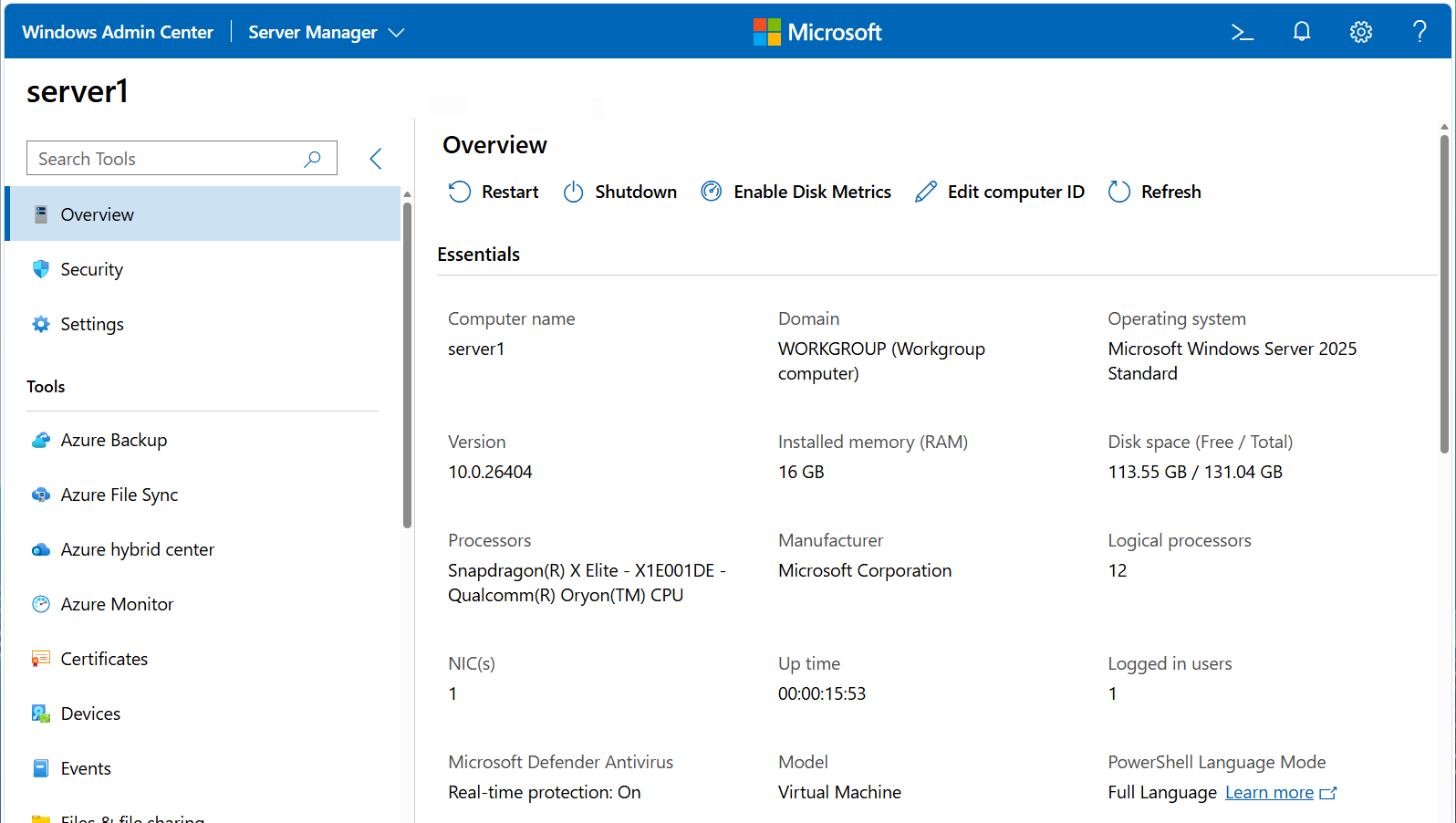
Out of curiosity (and honestly, just for fun), I decided to spin up the same Windows Server 2025 environment in Hyper-V on my Snapdragon X Elite system running Windows 11 on ARM. Microsoft does not provide an official installation ISO image of Windows Server 2025 for ARM on their website, so I used UUP dump to generate one from Microsoft’s update servers and installed the same set of VMs with it.
It was stable, functional, and fully usable as you’d expect… but there was one big difference: Everything felt much, much faster! Services started more quickly (including Active Directory, which is usually a bit of a slog), management consoles opened faster, and the same hands-on tasks I was writing for my textbook consistently completed in less time.
The Hyper-V VMs are configured identically in terms of memory, virtual processors, and installed roles for their native CPU architectures:
At this point, it may look like the architecture is the only real difference, and the major contributor to the performance, but that’s a bit misleading. The systems differ in more than just CPU architecture. Storage, memory, power management, and thermal behavior can all influence results. So rather than claiming “ARM is faster,” it’s better to look at how performance differs holistically.
Any good IT admin will tell you that workload type matters when it comes to performance. Both VMs are running the typical services you’d expect on a Windows Server: Active Directory, DNS, DHCP, IIS, File services (SMB/NFS/DFS), Print Services, Certificate Services, Remote Desktop Services, Routing and Remote Access, NPS, and so on. These services are typically thread-heavy and often have frequent-but-small CPU and I/O (read/write) operations, which means they are sensitive to latency and context switching (where a computer’s CPU stops one task to start another). In other words, they don’t tolerate variability well, and benefit from a system that provides consistent performance all the time.
This partially explains why the Snapdragon seems faster. Like many ARM systems, it doesn’t chase high boost clocks and instead delivers steady, sustained performance (including I/O). In contrast, modern Intel CPUs tend to ramp frequency quickly and throttle dynamically under load. That approach can deliver excellent peak performance, but it also introduces more variability in scheduling and latency under sustained or mixed workloads.
That variability matters even more in a virtualized environment. Hypervisors like Hyper-V are basically hardware schedulers. If the underlying hardware delivers more predictable execution timing, the hypervisor can make more consistent scheduling decisions. That, in turn, benefits the VMs and the services running inside them.
There may also be differences in the Windows Server ARM64 build itself. Various release notes I found online suggest that the ARM64 version of Windows Server avoids some legacy compatibility layers and uses more modern, optimized binaries. In other words, it’s likely a cleaner build than the x64 version. And anyone who has been tasked with refactoring code can tell you that those small efficiencies add up.
To test this, I ran a series of measurements. First, I added the following counters to Performance Monitor on both Windows 11 hosts:
\Processor(_Total)\% Processor Time (overall CPU utilization across all cores)\System\Processor Queue Length (# of threads waiting in the processor queue for CPU time - should be zero if everything is optimal)\Hyper-V Hypervisor Virtual Processor(*)\CPU Wait Time Per Dispatch (average time virtual processors wait to be scheduled on the CPU)Then, I ran the following within PowerShell on each VM to generate some load, and watched the results in Performance Monitor:
1..8 | ForEach-Object {
while ($true) { Get-Process | Sort-Object CPU -Descending | Select-Object -First 5 | Out-Null }
}
The Snapdragon had that steady, sustained performance I expected while the Intel had the typical boost/throttle variation. % Processor Time fluctuated far less on the Snapdragon system. Processor Queue Length stayed at zero on Snapdragon, but periodically spiked on Intel. CPU Wait Time Per Dispatch was flat and consistent on Snapdragon, but varied significantly on Intel.
In PowerShell on each VM, I also used Measure-Command to test how long common operations took for several of the services running. For example, I ran the following to see how long it took to hit the IIS web server 1000 times:
Measure-Command { 1..1000 | foreach { Invoke-WebRequest http://localhost -UseBasicParsing | Out-Null } }
I repeated this process but replaced the Invoke-WebRequest command to test:
DNS (Resolve-DnsName "domainX.com" -Server 127.0.0.1 | Out-Null)
Active Directory lookups (Get-ADUser -Filter * -ResultSetSize 1 | Out-Null)
Domain authentication latency (Test-ComputerSecureChannel -Verbose:$false)
And even some file I/O:
$path = "C:\TestFiles" mkdir $path -ea 0
Measure-Command { 1..2000 | foreach { $file = "$path\file$_.txt" Set-Content $file "test" Get-Content $file | Out-Null Remove-Item $file } }
Across multiple runs of each test, the Snapdragon system produced consistent, repeatable timings nearly every time. On the Intel system, results varied significantly, occasionally beating the Snapdragon, but most of the time falling behind. The Snapdragon was the clear winner on each test overall.
The common thread across these results is latency consistency. These Windows Server workloads need predictable scheduling and fast response to small, frequent operations… especially under virtualization. If your workloads depend on peak throughput, x64 systems still have clear advantages. But if your environment looks like a typical Windows Server deployment with many small, latency-sensitive operations running under virtualization, then consistency may matter more than raw speed.
And in that context, ARM64 looks very attractive. Plus, it’s already widely used in cloud environments where the performance-to-cost ratio is much better than x64… which begs the question: If Windows Server workloads benefit from this kind of performance, shouldn’t Microsoft be making ARM64 play a larger role in its future? Right now, Microsoft doesn’t fully support Windows Server on ARM64, yet 33% of all new Microsoft Azure VM instances last year were ARM64 (50% for Amazon’s AWS).
Hopefully Microsoft will spend more time in the future on their server product strategy and less on Copilot ;-)
Note: For my Cengage textbook, I’m still standardizing on x64. The reason is simple: nested virtualization is part of the lab setup, and that’s not yet supported on ARM64 in Hyper-V. Students could adapt the labs to work around this, but one of the goals of the book is reproducibility… having everything “just work” step by step. For now, x64 remains the practical choice for teaching.
Was a research project gone out of hand, arm64 macOS wasn't on the radar and the IoT product it was released for didn't succeed.
> I think it is essentially "complete drawbridge", too. I haven't played around with it in a while, but from memory, you can coerce it to run arbitrary Windows executables, basically anything without graphics (which are missing from the PAL they ship).
sbtrans (for arm64) was static binary translation only. No JIT fallback whatsoever.
> It's quite impressive, though also necessary if you think about it. SQL Server requires the legacy dot net stack,
The arm64 sbtrans-based version had that gone too, and it didn't have a nice engineering path towards supporting those. It'll come back later though I'm pretty sure, with using a more native arm64 version (or arm64EC which exists nowadays)
> AND it also ships with a full copy of the msvc compiler/linker! Not sure if that's ever used by the Linux port, but it is installed. MSSQL kind of exercises every inch of the Windows API surface.
Yes that's used for dynamic query optimisation. It was disabled in Azure SQL Edge for arm64 as that was a JIT-less translated version.
We almost got into bits of the P25 side to help service $giant_government_entity's system, but the GTR 8000 training was complete ass. Mostly what we got out of it was long periods of the dude fretting about the clutch job that his Hyundai was in the shop for and talking on the phone about that, interspersed with a repeated slogan of "I was a Navy man. I don't know what makes sense to you, but I do things by memorizing steps instead of understanding how they work."
Sometimes, he'd get around to mentioning some of those steps.
Much waste, very disappoint.
We all very thoroughly failed the test at the end of that week.
> Processors are always locked at the highest performance state (including "turbo" frequencies).
Unless performance state means something idiosyncratic in MS terminology.
Normally you'd want to let idle apply power saving measures including downclocking to donate some unused power envelope to busy cores, increasing overall performance.
But this varies across various Linux based platforms. For example on RHEL (https://docs.redhat.com/en/documentation/red_hat_enterprise_...):
"throughput-performance:
A server profile optimized for high throughput that disables power savings mechanisms. It also enables sysctl settings to improve the throughput performance of the disk and network IO.
accelerator-performance: A profile that contains the same tuning as the throughput-performance profile. Additionally, it locks the CPU to low C states so that the latency is less than 100us. This improves the performance of certain accelerators, such as GPUs.
latency-performance: A server profile optimized for low latency and disables power savings mechanisms and enables sysctl settings that improve latency. CPU governor is set to performance and the CPU is locked to the low C states (by PM QoS). "
Here the latency-performance profile sounds most like the Windows Server mode (but differnet from throughput-performance).