Weirdly enough, the same time this was added to Geckko is when I started implementing the adblock-rs library for Waterfox - I stumbled across the bindings by accident when using searchfox on the main branch instead of esr140! Quite the coincidence doing it at the same time.
I'm actually glad to see Mozilla has grown a little bit "predatorial" if it can bring good to the users. The implementation is polite too, as it lets you know there was an ad been muted.
There's a lot of things that can still be done in the browser space. For example, one-click login even without entering email, easy purchase without the website ever collecting your card number (or other financial detail beyond necessary), etc etc. Ads can also be improved too, by making them not violating nor annoying.
The possibilities are still great, I hope Mozilla can figure out a way to tap into it.
> - We are not, and have no plans to abandon MV2 extensions. This will ensure certain types of add-ons, like ad-blockers, continue to work best in Firefox.
> - Firefox supports several ad-blockers as add-ons on Desktop and Android, including uBlock Origin.
> - We are not bundling Brave's ad-blocking system, we're testing one of their open source Rust components to improve how Firefox processes tracker lists.
https://www.reddit.com/r/firefox/comments/1sttf82/firefox_wi...
This is what the official Firefox account had to say when this came up on reddit.
My favorite recent feature has been Brave Scriptlets, which are just little javascript functions you can run on specific sites. I've replaced most of the add ons I used with small scripts. Pretty nice.
I would prefer an engine not built on Chromium... but I've lost faith in Mozilla. I'm glad that Firefox added a built in adblock engine, but it seems too late too late. Brave has been awesome, and being Chromium based gives them time to keep working on stuff that matters.
Maybe uBlock Origin for Firefox could be updated to make use of this
Cromite - Chromium, MV2 extensions, good new tab page with 4x4 shortcuts (2x4 pinnable) with direct access to bookmarks
https://github.com/uazo/cromite/releases
Ultimatum - Chromium, MV2 extensions, not so good new tab page similar to original Chrome with only like 4 shortcuts without swiping, limitec customization, no password manager AFAIR
https://github.com/gonzazoid/Ultimatum/releases
Helium - Chromium, only MV3 extensions, built in browser from Graphene
https://github.com/jqssun/android-helium-browser/releases
Elixir - Chromium, only MV3, tabbed interface suitable for tablets
https://github.com/SF-FLAM/ElixirBrowser/releases
Former Kiwi Browser, then for about year IceRaven (Firefox) user up until recently when they fckd up already bad illogical UI and made it even worse, which was the last drop to again give up on this users hating browser (will never forget users begged for 10 years so dear devs will implement simple pull down to refresh).
On desktop the recommendation is much easier:
Vivaldi - Chromium, MV2, no AI, amazing customization compared to primitive Brave, faster than FF
Oof, so even people that should really know better are now equating MV3 with "no more ad blocking"? I think at this point the entire thing just needs to be renamed.
(Only Chrome removed the request blocking API from their MV3 implementation; Firefox did not.)
That said, if this is writing on the wall I’d hope they’ll listen to the community this time and allow the engine to be extended / make it such that a block all ads feature always exists. I’m cautiously optimistic given Mozilla’s track record just over the past year-ish. They have released some great new features that help bring Firefox closer to feature parity with other browsers.
I am a Firefox hopeful and recently switched back to using it as my daily driver when Arc went belly up (but mainly for uBlock Origin support).
However, I am also concerned that this is an "embrace extend extinguish" move.
Fantastic first impression. I'm good, thanks.
I'm living under a rock, but my first thought was that you turned off TLS.
Brave, Vivaldi, Opera, Tor Browser, Librewolf, they're all little more than reconfigurations and reskins of Chromium when you look at the entire code base. Yes, the Brave as block engine and Operas power saving modes are non-trivial, but the engine they're built on is the size of an operating system.
It's an entirely different management team.
It wouldn't be the first time tech gossip rags would take something Mozilla did out of proportion to make outrage videos about that become a hit on Reddit.
When Mozilla added some weird AI thing (I think it was page summaries?) I was asked by people whose algorithm picked up this nonsense whether it'd be better for their privacy to switch back to Chrome or Edge.
Many people seem to treat it synonymously with "no more procedural request blocking", but that's not a thing Mozilla ever did:
> For Manifest V3 extensions, Chrome no longer supports the "webRequestBlocking" permission (except for policy-installed extensions). Instead, the "webRequest" and "webRequestAuthProvider" permissions enable you to supply credentials asynchronously. Firefox continues to support "webRequestBlocking" in Manifest V3 and provides "webRequestAuthProvider" to offer cross-browser compatibility.
The permission model also seems much more reasonable (less permissions have to be requested upfront at install time) than MV2, so I actually hope Firefox does deprecate it at some point.
https://developer.mozilla.org/en-US/docs/Mozilla/Add-ons/Web...
https://blog.mozilla.org/en/firefox/firefox-manifest-v3-adbl...
At least that's the nonsense you hear when you recommend Brave as a decent alternative to someone.
On desktops/laptops, keyboard shortcuts save reaching for a mouse, aiming (on the relativley large screen), and clicking. On handhelds, I don't think it's faster to use a shortcut than to simply tap something an inch away.
Also, on handhelds, the keyboard blocks a significant part of the screen. And keyboard shortcuts typically use accelerator keys, which are hard to use on handhelds.
Do you use Android with a physical keyboard?
though it doesn’t seem to work as well as ublock, the ad slots are still there with just the ad missing so there’s a giant ugly blank spot.
You have to walk the walk too Mozilla! Saying that as a FF for years.
In case of the extension manifest, that's probably layered on top of the JS engine which does get attention and scrutiny. It's not like an API needs to be updated. If you'd always do that, nothing would ever be interoperable and we'd likely have a hard time trying to communicate.
The feature that better adblockers need is one callback that's similar to one that's still in V3. It's not difficult to keep if it's your own codebase.
Chrome also used to natively support userscripts back in 2010 [2] but they mostly killed it off
[1] https://en.wikipedia.org/wiki/Userscript
[2] https://lifehacker.com/chrome-4-supports-greasemonkey-usersc...
I don't think there is or ever will be a "new internet explorer". If your page works in Chrome, there's a 99% chance it'll work in Firefox and Safari. Web standards have been unified to the point painting and layout algorithms are now part of the spec. It's why Ladybird managed to get a decently compatible engine in an extremely short time frame.
It's still the best Chromelike that's easily available, but I'm not switching my default any time soon.
Brave still allows you to install uBlock & some other extensions that should technically not be supported under MV3, but they still ship it with support for those.
Just heard about Helium browser, which is just dechromium + uBlock and it's still beta.
There is no feature Firefox provides that is more differentiating than ublock origin. As long as pages load and security issues are patched it is the reason to choose Firefox as a browser. What would they prioritize over it?
I use uBlock Origin in Firefox and network ad blocker. Wondering what other options are there.
To sell for $60 a web browser that technically has all the features removed is a pretty goofy move.
My last hope is ladybird right now, I don't use Firefox or Chrome as my main browsers anymore, and use them only within temporary sandboxes. Without history, without cookies, without logins for the most part.
Nope, FF is being infiltrated by adtech for last year or two. Last holdout is Safari now :)
I’m not familiar with off the shelf solutions for this that have ad blocking built in. Also ads are injected by JS so you need a mechanism to detect that.
More and more ads are now served from the same domain as the site making it harder to distinguish them from real content.
I'm doing a goofy thing and buying it, despite knowing I can debloat Brave, because I already do that. I didn't know this existed till I read this thread. I've been benefitting from Brave for many years now; it's great that they've provided a way to pay for this without dealing with the crypto stuff, and I'm extremely happy to do so, because they deserve some of my money.
If you can't afford it or don't want to pay, fine. But why are you trying to influence other people to do that by labelling it "goofy"?
How would you strip those things out mobile, by the way?
At that rate one needs to abolish all modern technology and go tribal. Cause I’m certain my toothbrush runs JavaScript.
Why do people say crap like this... Safari was the first browser to completely remove mv2. From all the major browsers Safari has the worse adblocking experience and support for adblocking extensions...
Brave Just Released a Paid Browser: Here's What You Need to Know https://youtube.com/watch?v=3i5KH0l895o
Edit: also crazy that someone who doesn’t want to support the Brave guy would support the browser using the Brave guy’s stuff, but I guess I see lots of chick-fil-a haters shopping in Amazon these days, so who am I to question what’s in vogue?
Sources? I can't find anything on that via google/ddg (Germany)
edit: oof.
While far from being perfect, I find it good enough for keeping things separated, especially when using a desktop/workspace workflow. For example, in workspace/desktop 2 I have a Firefox window opened with the first tab set to "container A", so hitting ctrl-t there opens new tabs with the same container "A", so I'm logged-in for all projects A. In another Firefox window in workspace 3 I work with "business project B" tabs (where I'm logged into different atlassian, github, cloud, gmail, ...)
Then with a Window Manager like i3wm or Sway I set keybinds to jump directly to the window (and workspace), using the mark feature [1]
It's also possible to open websites directly in specific containers so it's flexible. For example on my desktop 8 I have all my AI webchats in "wherever my company pay for it" tabs: `firefox --new-window 'ext+container:name=loggedInPersonnal&url=https://chat.mistral.ai' 'ext+container:name=loggedInBusinessA&url=https://chatgpt.com' 'ext+container:name=loggedInBusinessB&url=https://gemini.google.com' 'ext+container:name=loggedInBusinessB&url=https://claude.ai'`
It's also the only way I found to keep opened multiple chat apps (Teams, Slack, Discord, ...). The alternative electron apps are as resource-hungry, and in my experience never handled multiple accounts well (especially Teams).
[O] https://addons.mozilla.org/en-US/firefox/addon/sticky-window...
I don't trust Brave though and don't want to use chromium.
I built my own tools on top of it, mostly to use internet websites and selfhosted kiwix archives with my local agentic env.
I guess what I am saying is that I don't have a primary browser anymore. Not a browser where I just can trust it that it doesn't do shit with my data. Being able to selfhost kiwix is a superb internet experience if you build your own search dashboard for it, I can fully recommend it.
Have to merge my things upstream with ZIMdex when I have the time (probably around June).
https://apps.apple.com/us/app/ublock-origin-lite/id674534269...
1. Third-party cookie blocking by default — 2003 (Safari 1.0); industry first.
2. Intelligent Tracking Prevention (ITP), using on-device machine learning to identify and limit cross-site trackers — 2017; industry first.
3. Storage Access API prompts for embedded third-party content (e.g., social login widgets) — 2018 (ITP 2.0); industry first (co-developed by WebKit, later adopted as a web standard).
4. Full third-party cookie blocking (no exceptions) — 2020 (ITP in Safari 13.1); industry first for a major browser.
Back in March, Firefox 149 was released with many changes, like a free built-in VPN, a Split View that allows the loading of two pages side by side, and the XDG portal file picker as the new default on Linux.
However, an interesting addition had gone mostly unnoticed until now.

Shivan Kaul Sahib, the VP of Privacy and Security at Brave, has put out a blog post about something that didn't make it into the Firefox 149 release notes at all. The browser now ships adblock-rust, Brave's open source Rust-based ad and tracker blocking engine.
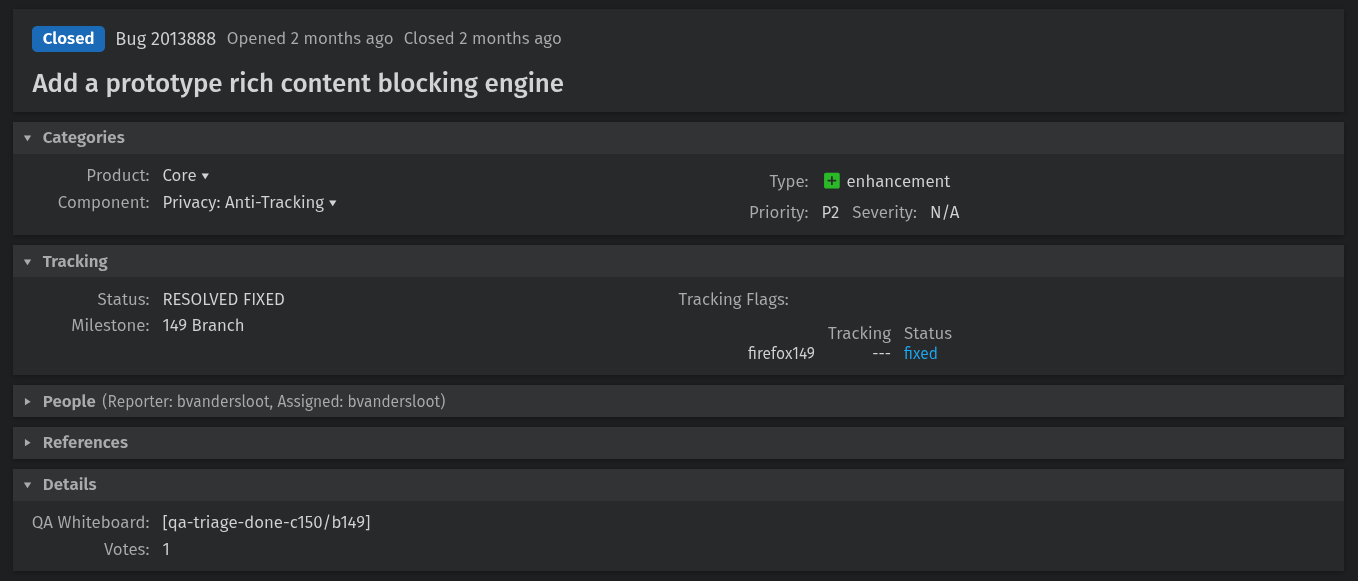
The change landed via Bugzilla Bug 2013888, which was filed and handled by Mozilla engineer Benjamin VanderSloot. The bug is titled "Add a prototype rich content blocking engine," and keeps the engine disabled by default with no user interface or filter lists included.
For informational purposes, adblock-rust is the engine behind Brave's native content blocker (aka ad blocker). It is written in Rust and licensed under MPL-2.0, handling network request blocking, cosmetic filtering, and features a uBlock Origin-compatible filter list syntax.
Shivan also mentions that Waterfox, the popular Firefox fork, has adopted adblock-rust, building directly upon Firefox's own implementation.
Before starting, head to Enhanced Tracking Protection's shield icon in the address bar and turn it off for the website you will be testing this with. This way, adblock-rust is doing the work, not Firefox's existing feature.
🚧
I suggest testing this experimental feature on a throwaway installation of Firefox.
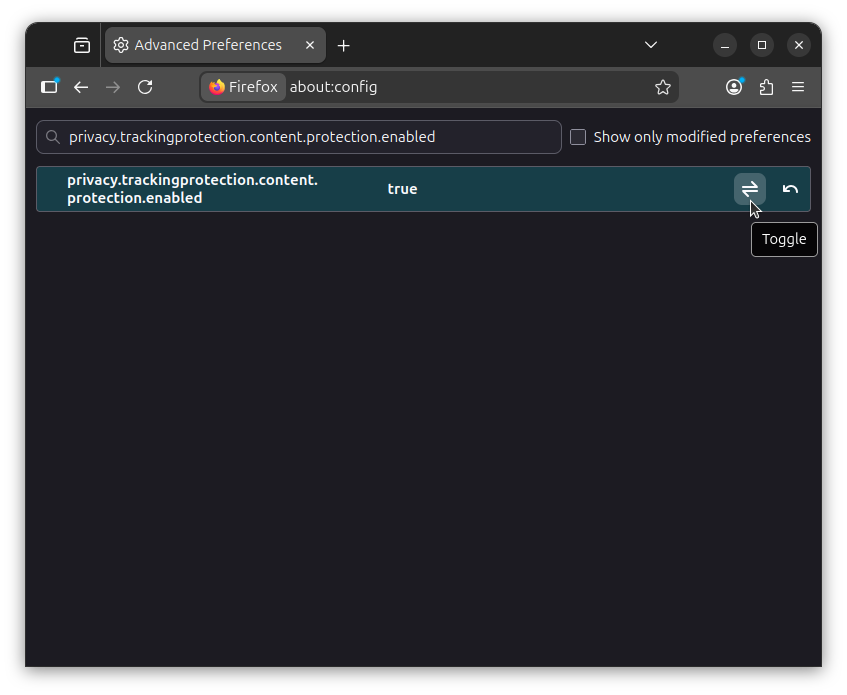
Now open a new tab and go to about:config. Accept the warning when it shows up. Search for privacy.trackingprotection.content.protection.enabled and set it to "true" by clicking on the toggle. 👇
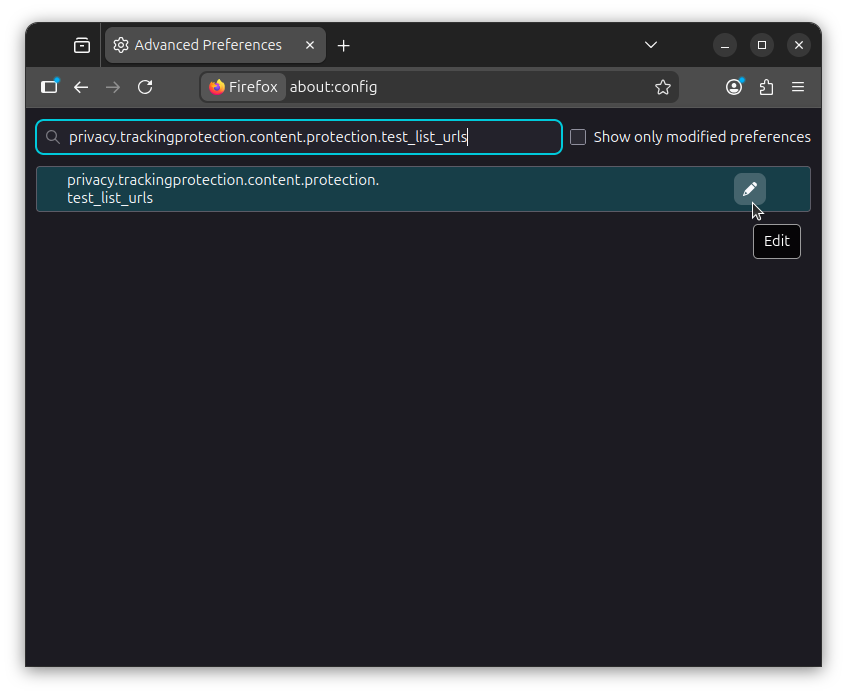
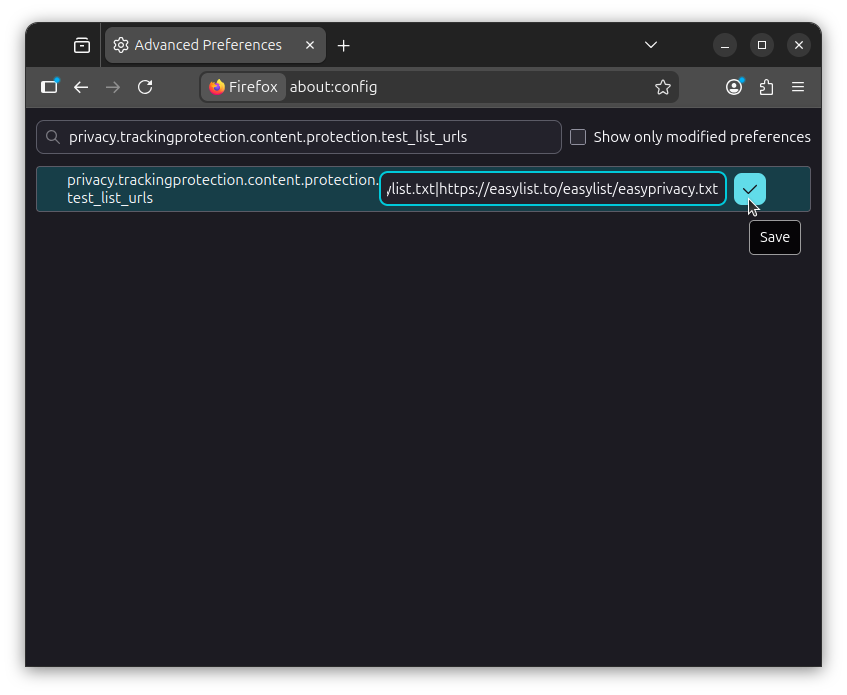
Next, search for privacy.trackingprotection.content.protection.test_list_urls, click on the "Edit" button, and paste the following value to add the EasyList and EasyPrivacy filter lists to Firefox:
https://easylist.to/easylist/easylist.txt|https://easylist.to/easylist/easyprivacy.txt
Remember to click on the blue-colored "Save" button before moving on.
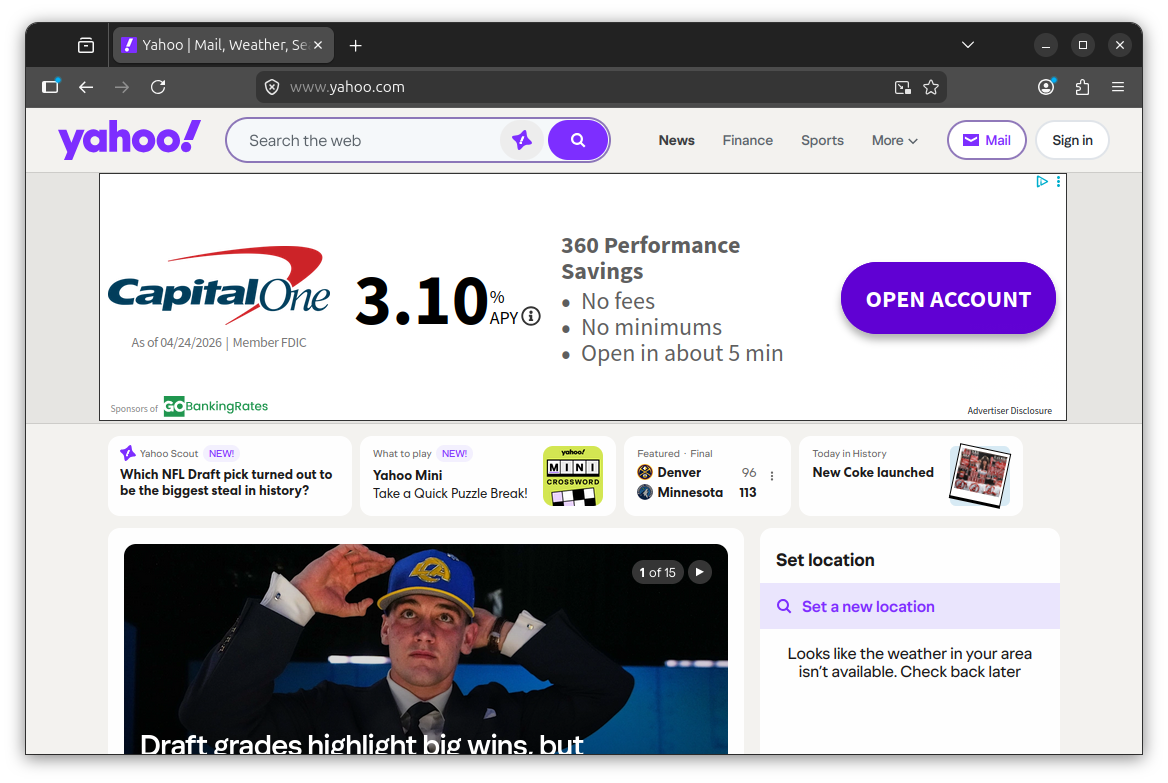
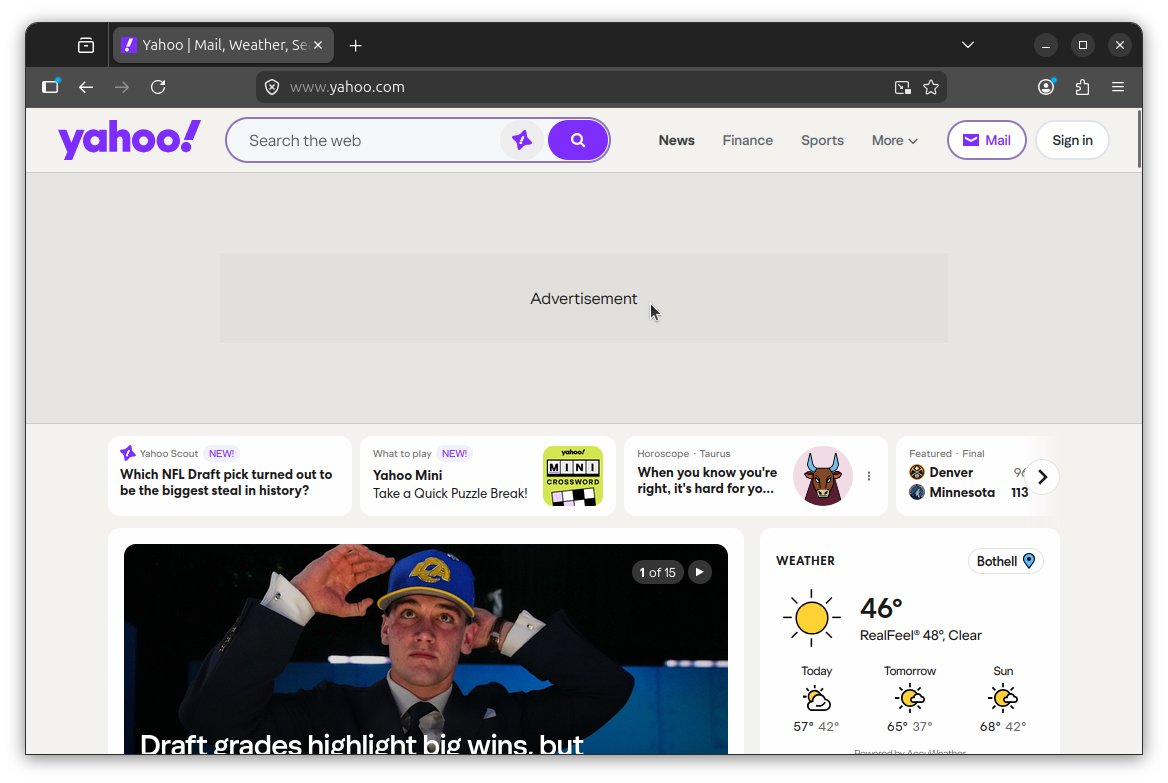
Left: advertisement shown; Right: advertisement blocked
Now visit a site with known ads, like Yahoo (as I did above). If it's working, ad slots will still render in the page layout, but the actual ad content will be blocked. In my test, the banner on Yahoo came up showing only the text "Advertisement" with the advert bit stripped out.
Support independent Linux journalism! If you think we are doing a good job at helping people use Linux on their personal computers, support us by opting for Plus membership.
Here's what you get with It's FOSS Plus membership:
✅ 5 Free eBooks on Linux, Docker and Bash
✅ Ad-free reading experience
✅ Badges in the comment section and forum
✅ Support creation of educational Linux materials
About the author

A nerd with a passion for open source software, custom PC builds, motorsports, and exploring the endless possibilities of this world.
Ad/tracking blocking is one of the things that can only be trusted if it's open source, i.e. uBlock Origin.
By the way, does this Adblock Engine actually block trackers? Or it just stops the ads from displaying?