PortalVR Motion turns VR into Wii-style gaming, bringing natural motion controls to thousands of VR games and creative apps on SteamVR — using your Joy-Con controllers and the iPhone you already own.
Download for Windows Plays all SteamVR titles Buy PortalVR Motion
iPhone-based tracking Joy-Con 1 + 2 ready Works with SteamVR

VRChat — desktop · no headset An iPhone watches your Joy-Cons. Your hands do the rest.
What you need
Two paths to motion. Pick yours.
Motion runs on hardware you probably already own. Use your iPhone with Joy-Cons for the easiest setup, or pair a VR headset's controllers for studio-grade tracking.
Path A · Easiest Recommended
iPhone + Joy-Con 1 or 2
Your iPhone's FaceID camera tracks the Joy-Cons in 6 DoF. No base stations, no headset, no extra gear.
- Any iPhone with FaceID (front-facing depth camera)
- A pair of Joy-Con 1 or Joy-Con 2 controllers
- A Windows PC that can already run SteamVR
- An iPhone stand for your desk
Path B · Pro Highest precision
Quest or PICO VR controllers
Plug a headset into your PC and use its controllers as the tracking source. The headset's onboard cameras do the heavy lifting.
- A Quest or PICO headset
- Headset put into developer mode
- A USB cable connecting it to your PC
- A Windows PC that can already run SteamVR
How it Works
PortalVR Motion uses your iPhone's FaceID camera to track your Joy-Con controllers in 3D—no base stations, no extra gear.
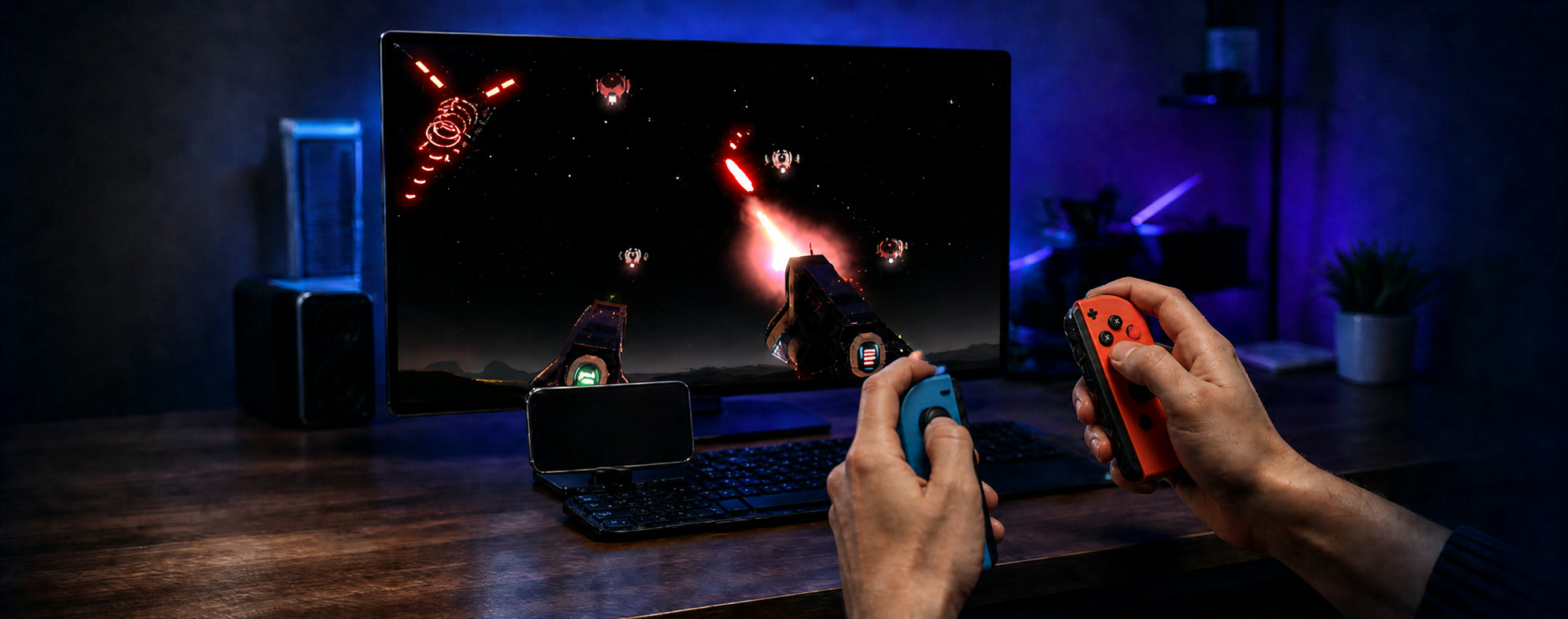
Dock or mount your iPhone
Position it so the camera can see your hands.
Connect your Joy-Con controllers
Bluetooth connect in seconds.
Launch any SteamVR game
Jump into thousands of VR experiences instantly.
SteamVR · 6,000+ titles
Every SteamVR title
now in Motion
Motion registers as a SteamVR runtime, so any title that runs in SteamVR sees standard tracked controllers and launches normally — from Beat Saber and Half-Life: Alyx to VRChat, Gravity Sketch, and the long tail of indie experiments.
No per-game patching Standard tracked controllers Same launchers, same saves
Introducing Camera Drag
Press and hold the shoulder button on your Joy-Con and the in-game camera locks to its motion.
Your hand now spins a virtual 3D trackball that lets you use any VR content seamlessly.
The library · 6,000+ titles
A whole universe of VR — now in Motion
From action and rhythm to creative tools and sketchpads — Motion plugs into SteamVR, so anything that runs there runs here.
We're still exploring which titles work best — Join the Discord to help us find the gems.
Try before you buy
Free to download. Free to try.
Take Motion for a spin in shorter play sessions before deciding — no payment, no signup, no spam. Pick a license after you've found the fun.
What is PortalVR Motion?
PortalVR Motion is a SteamVR addon that brings natural motion controls to thousands of VR games and apps on SteamVR. Instead of a headset and base stations, it uses your iPhone's camera to track Joy-Con controllers in 6 DoF — so you play VR titles at your desk, on the screen you already have.
What hardware do I need?
A Windows PC capable of running SteamVR, an iPhone (placed on a stand facing you), and a pair of Joy-Con controllers. No headset, no base stations, no extra trackers. 3D monitors like the Samsung Odyssey 3D are fully supported, so you can play in true stereoscopic 3D on the desk. If you don't have a 3D monitor, Motion can render in anaglyph for any regular display — just grab a pair of anaglyph 3D glasses.
A few accessories we recommend:
- iPhone stand — Nulaxy foldable stand (sits at the front edge of your desk and angles the camera nicely toward your hands).
- Joy-Con 2 charger — Hounyoln charging dock.
- Joy-Con 1 charger — two-slot charging stand.
Don't have any Joy-Cons yet? Grab a pair of Joy-Con 2 controllers on Amazon.
Motion also supports using Quest or PICO VR controllers as a tracking source — they offer extremely high precision, since the headset itself does the optical tracking. To use them, put the headset in developer mode and plug it into your PC.
How do I get the best tracking?
The single biggest tip: place your iPhone directly in front of you, not off to one side. The depth camera tracks best when it's facing you head-on. Next, make sure your hands are well lit — Motion locates your hands first and uses their pose to estimate where the controllers are, so dim or backlit hands hurt overall tracking. Drop the phone on a stand near the front edge of your desk so nothing on the desk blocks the camera, and angle it so the lens looks toward your body and hands rather than tilted up at your face.
From there, distance is the dial — for titles that need fine finger control, keep your hands closer to the camera so Motion can track each finger; for wider arm-motion titles like Beat Saber, scoot back so the camera can see your full upper body. If you have an iPhone Pro, switch to the rear LiDAR camera for those wider, full-body titles — it gives noticeably better depth at longer distances than the front FaceID camera.
Use Joy-Con 2 if you can — the built-in magnetometer keeps rotational tracking steadier.
If you want the highest tracking fidelity available, plug in a Quest or PICO headset and use its controllers as the tracking source — the headset's onboard cameras provide excellent precision. Put the headset in developer mode first, then connect it to your PC over USB.
Should I use Joy-Con 1 or Joy-Con 2?
Joy-Con 2 is recommended. It has a built-in magnetometer that measures direction relative to Earth's magnetic field, which gives noticeably steadier rotational tracking. Joy-Con 1 still works great — it can just see drift in its forward heading bit more during rapid motions.
One of my Joy-Con 1 controllers is laggy
Some PC Bluetooth radios queue packets in a way that introduces noticeable lag with Joy-Con 1. Joy-Con 2 doesn't trigger this behavior. To fix it, either swap to Joy-Con 2, or grab a small USB Bluetooth dongle off Amazon — that bypasses the built-in radio and resolves the queueing issue.
Why an iPhone — does Android work?
Motion leans on the iPhone's FaceID depth camera and the LiDAR sensor on the rear camera to track your Joy-Con in 3D. Most Android phones don't have those sensors yet — but as more Android devices ship with depth + LiDAR hardware, support is on the table. Track our Discord for updates.
Can I really play any SteamVR game?
Motion registers as a SteamVR runtime, so any title that runs in SteamVR sees standard tracked controllers and launches normally. The catch is that some titles ask for extremely precise fast motion or sharp full-body movement (like spinning around to face an enemy behind you) — those can be awkward to translate onto a 2D screen. That said: we've managed to beat a few Hard levels in Beat Saber through Motion, so it's not too bad.
Does this support hand tracking?
Yes! Motion tracks your fingers in addition to the controller — as you can see in the VRChat and Half-Life: Alyx clips above, full finger articulation comes through, which is great for expression, gestures, and natural object interaction.
Does this support face tracking?
Yes — your webcam tracks your head in real time, which adds 3D parallax to the view when you lean side-to-side or forward, plus the ability to dodge obstacles and duck under enemy fire during gameplay.
How does Camera Drag work?
Hold the shoulder button — or one of the SL/SR side buttons — and the in-game camera locks onto your controller's motion. Your hand is now spinning a virtual 3D trackball, dragging the view in 6 DoF; reach forward and the camera reaches forward with you, which makes picking up far-away objects feel natural. Release to anchor the view.
Do I need a powerful PC?
If your PC can already run a given SteamVR title, it can run it through Motion. Tracking runs on the iPhone — your PC just sees a tracked pair of controllers.
Is there a free trial?
Yes — you can download PortalVR Motion and try it out in short play sessions for free. The Subscription and Commercial-Use plans both include a 7-day trial; Lifetime is a one-time purchase for personal use — see Pricing.
Can I use it for streaming and content?
Yes. PortalVR Motion is the easiest way to use VR without wearing a headset, which makes it a great fit for streaming, live demos, marketing shoots, trade-show kiosks, and anywhere a head-mounted display is awkward. Camera Drag also makes framing shots far easier than steering by stick.
What about latency?
Latency feels great because we've pulled out all the stops. Tracking data streams over USB from the iPhone to the PC (no Wi-Fi hop), the iPhone camera is configured for maximum tracking speed and precision, and Joy-Con 1 and 2 IMU readings are fused with the camera data in real time — so even between camera frames you get near-instant responsiveness from your wrists.
What's the difference between PortalVR Motion and PortalVR Cast?
Motion is a SteamVR add-on that lets you run any SteamVR content in 2D with motion controls. Cast takes a different angle — it streams VR content directly into the browser from a Quest or PICO headset and lets you play in a similar way, but is limited to sideloaded or pushed APKs.