I do not know bitlocker/TPMs a lot, do they also prevent this sort of thing ?
What will it take for more companies to truly understand their risks with Windows and being locked into Microsoft’s platforms?
I had someone demo me preserving PCR values by patching SMM module in firmware without triggering any bitlocker lockout, this also means that you can externally write bios with the smm module as long as you have ~2 minutes to disassemble the laptop or desktop and flash firmware.
This hurts the most when you don't have PIN authentication which means you just need to steal the laptop to exfiltrate data, if you do then you have to have the user boot which then drops a payload exfiltrating data over network or just stealing the laptop again as you can write back decryption keys into non encrypted partition or corrupt some sectors at the end of the disk and write them there.
* modifying smm allows you to patch the boot process loading a malicious payload into hypervisor/kernel.
It also strikes me that these are several very high value (all but one complete) exploits.
Surely the value of these on the market would be astronomical and best suited to law enforcement agencies using unlock as a service businesses.
So I have to say I applaud the open disclosure
Back in the windows 7 days you could stick a windows installer CD in and press Shift+F7 or something and get a system command prompt with the drive unlocked.
Surely when someone said 'we're gonna let the installer unlock bitlocker' they immediately thought 'That means the whole installer needs to be as secure as the login screen' right? Seemingly not.
I know my bike lock can be cut within seconds by someone who is sufficiently skilled and determined. I'm still going to lock my bike.
That's what this is about. Microsoft doing bad security practices while trying to get away with it, leading to this outcome.
The researcher also claims to have another version ready which allows to also bypass TPM+PIN via a similar backdoor, which I'm inclined to believe.
Why do I believe that? 5 ring 0 zero days within 3 months are so statistically unlikely to be found, by the same person, in such a short time. Whoever this person is really knows their exploits, and must be in the league of Juan Sacco.
Majority of hard disk encryption done in the HDD/SSD controller is 100 times more crap than BitLocker itself. It's littered with bugs and security vulns. Anybody using it is insane.
On my birthday iirc once long time ago I think in 5-6th class not sure, my brother gave me his laptop, I wanted to do python but python wanted admin password on windows to install properly. So what I did was I dont even remember how, but download one operating system which could then crack the windows password so that I can set new and I used that to then set a new password to then install python. to then only print hello world :D (I think only because one of the cousins I really admire mentioned that he made 2k loc of python once and I thought during that time, python is the endgame). We are talking about windows 7 but I think that windows 10 security must've gotten better. So these are some things that I have done, I wouldn't call it coding as much as tinkering but I love doing these things from as long as I can remember :D
I just remembered this paragraph from one of the comments that I had written sometime ago, source: https://news.ycombinator.com/item?id=47663383
Though if TrueCrypt was killed to try and get people to switch to encryption that could be backdoored, then why allow its successor VeraCrypt to exist? It's open source and independently audited, so it really shouldn't be backdoored.
I've seen every variant of:
1) "this is an authentication/privilege escalation bug, not a bitlocker exploit" (? what are you even trying to say)
2) "even though the attacker explicitly warns that this is capable of bypassing TPM+PIN, that isn't actually true or what he meant"
3) "we shouldn't jump to conclusions that this is a backdoor"
4) "we already knew BitLocker with just TPM isn't secure" (? except many organizations depend on it to be)
You either need to enter a 128-bit entropy password on every boot (good luck with that) or you need to hold it on some external device, with some variant of USB / smartcard / NFC / Bluetooth to transmit it. NB. this is one of the cases where the usual "key for signing only, never leaves device, ephemeral DH and ZK protocols" like for SSH will not work on its own; you need the high-entropy key physically separate from the device.
The NSA realised this a while ago: https://en.wikipedia.org/wiki/KSD-64
Linux/LUKS etc. doesn't change any of this, by the way.
P.S. If Eclipse really has beef with Microsoft, he could always make an exploit that lets you set up a PC without making a Microsoft account.
I can't imagine there would be a way to bypass that if a password is required, unless it was a situation where like, there was originally some secret secondary key made that needs no password... or the password was never tied to the key in the first place.
Oversimplified and not accurate. Some manufacturers had flawed implementations, others did not. Also, that was a long time ago. There are advantages to hardware encryption. It preserves performance and mitigates other vectors like cold-boot attacks without having to encrypt RAM, which also comes with a performance penalty. By the way, both software and hardware-based encryption can be combined. Cryptsetup on Linux actually offers this, and before you ask, the keys are split. If one is compromised, the other remains secure.
you use veracrypt which doesn't have any hardware attestation (convenience) features, but it does still leave you vulnerable to the same surface PIN+TPM is vulnerable to. the real defense is making it so opening your laptop/desktop physically fuses something via latch and wipes the key off your system requiring re-entry.
of course, who wants to own a laptop/desktop that you can't open we have enough of that with our phones.
so I call bullshit on the PIN bypass
> (Note: The YellowKey author disagrees that PIN is a protection
You just have to skip reading them because it seems there's no stopping those 100% genuine replies
2) Is it unreasonable to say "show it"?
3) Correct, we shouldn't jump to conclusions.
4) It's not known-insecure but it is known-enormous-attack-surface.
Businesses use Microsoft because they figure if it’s backdoored it doesn’t matter and won’t affect them (because they aren’t terrorists or child pornographers or whatever, and they’d comply with a subpoena regardless of if Bitlocker is backdoored or not) and individuals who care about security and privacy put their shit on a Veracrypt drive somewhere else.
[1]: https://deadeclipse666.blogspot.com/2026/05/were-doing-silen...
Ideally you'd want that key to be further protected with a password or some other mechanism because it's not impossible to extract TPM keys.
That said, I think this is a thing with BitLocker? I remember coming across YubiKeys being able to do this via something called PIV (Personal Identity Verification). Found this guide now after giving it a quick search: https://gist.github.com/daemonhorn/03301a66da7d1f4de6cdc8c8b...
Not sure how sound of a design it is though, didn't dig into it much at all.
God I hate this stupid design of burying the decryption key in the TPM and hoping the software does not get fooled to reveal it.
Microsoft always sucks. Why don’t you ask for the password at boot time and derive the key from it. So much simpler and makes this kind of attacks impossible. Nobody is going to bypass LUKS or FileVault like this.
Less emotionally but mostly equivalently, the expense and non-cryptographic skill requirements of breaking mass-storage crypto are quite high while the rewards are comparable to those from breaking much softer targets, so the absence of results since that one paper only changes my mind very slightly. Besides, we know plenty of examples of what these kinds of opaque, serious-business, pay-to-play environments produce: cellular crypto is an uninterrupted series of disasters, so is Wi-Fi, and the things that we do know about storage devices don’t point to an outstanding culture of cryptographic competence there either. Once you’ve done enough to slap an “OPAL” label on it (which says nothing about the internals), there’s just no competitive pressure to improve.
There is a right way to do all this, and it’s essentially what NICs do: allow the host to offload symmetric crypto to the device, but keep the results of said crypto accessible at any moment. And it’s not like there are even that many modes used in full-disk encryption, let alone ciphers.
A USB stick containing a masterkey to decrypt a bitlocker volume is literally the definition of a backdoor.
Go on, try it out. It works.
This is why operating systems like GrapheneOS disable the USB port on the initial boot to limit the attack surface that an attacker has.
Which makes me think, it's becoming more and more urgent to make an open source mobile OS happen.
2) I'm sure many organizations are thankful that the researcher has decided not to release that exploit chain at this time. I am hopeful that Microsoft will not be as dismissive and will resolve it before it is publicly released.
3) It distracts from the point. The point is that Microsoft's security record is so bad that many of the vulnerabilities appear deliberate and obvious enough to be backdoors.
4) Yes, this also fits the definition of downplaying.
Nadella gives a press release, "Alright guys, you got us fair and square. Backdoor on Bootlocker. Various versions of it for years on behalf of the spooks."
You are unlikely to ever get a confirmation of wrong doing. That being said, for a first line security posture, there is no way external media should have anything to do with the encryption process. Even if the OS chose to read a USB drive, to also delete the magical files is ridiculously suspect.
It could always be plain old incompetence, but that is a damning level of technical ineptitude assigned to such critical infrastructure. This is not a project you assign to the intern, but paranoid security experts. Multiple levels of code review and red-teaming.
They also seem suitable for using a secret sharing scheme.
I have Microsoft authenticator requests all day every day. Using aliases has helped but somehow they continue. It's only a matter of time before somehow accidentally I approve.
Which has simply led to me not putting anything of high value in my Microsoft account and not using it for my email.
Does anyone really trust these shitty Windows laptop/desktop manufacturers to get these things right? These guys couldn't even get basic hardware features like trackpad drivers right.
Since there's a ton of misunderstanding in this thread, I'm going to go into how disk encryption works conceptually.
First, there's a symmetric key to encrypt blocks on the disk. Since you want to be able to change your unlocking password/mechanism without re-encrypting everything on the disk, this has nothing to do with unlocking the disk. This is what you want to get BY unlocking the disk. Let's call this the "data encryption key".
Then, there's something you use to encrypt the data encryption key. Let's call this the "key encryption key" (abbreviated KEK from here on in).
When you use a TPM, the KEK is stored inside the TPM. When you use a TPM PIN, the TPM refuses to release the KEK for use by the OS unless that PIN is provided.
You could say "why not make the KEK be a hash-mixed combination of a PIN and something inside the TPM?". One could do that! But that's not how Bitlocker works. There is a reason it doesn't work that way: the TPM is supposed to let company admins in charge of the device access it even if the original PIN is forgotten, by using other policies letting them get at the KEK. I personally set my own devices up such that the passphrase IS part of the KEK itself.
Interestingly, LUKS does not have a composite key mode natively that lets you combine a password with TPM material, but there are some good reasons not to use JUST a password:
1. The strength of your disk encryption reduces to the strength of the password, where a TPM can have a 256-bit truly random key
2. If someone keylogs the password, or tricks you into disclosing it, they can later decrypt your drive from anywhere, where a TPM binds the attack to those with posession of the TPM
3. There is no protection against brute force attacks (rate limiting), where a TPM does - or tries to - impose a rate limit
Now, let's go on to what YellowKey attacks.
A TPM can have inside itself "registers", called PCRs. These PCRs can be updated but not reset - think of it like you can add numbers to them but not subtract, and they only go back to zero when you reboot.
Using a passwordless encrypted boot, the TPM is configured to only release the key when the PCRs are in the exact correct state. As the OS boots it adds numbers to those PCRs. If you boot "the wrong" software, the numbers in those registers won't match the expectations, and you cannot unlock the disk.
Speculation on my part: the reason there's an exploit here is that the Windows Recovery Environment apparently can match the PCR values for the booted OS, causing the TPM to release the key, but WinRE doesn't require you to get your password right before it gives you access to the data. So far as I know, protecting the TPM key with a PIN would mitigate this issue, but it's still bad.
Or maybe the exploit actually does something inside the TPM itself, causing it to unconditionally release the key even when protected by a PIN: that would be even worse, but **NOT*** a problem with Windows. That would be a problem with the TPM.
author could become famous by being the first to proove an actual backdoor in an OS disk encryption
thats an LPE, not an encryption backdoor
the USB stick doesnt decrypt bitlocker, it just gives you root after bitlocker was AUTOMATICALLY decrypted
This is like finding out that an OS accepts an SSH private key circulating online that the sysadmin for those OS boxes never authorized, and saying "wait, we don't know that this is a backdoor into that system, the attackers just found a bug".
Does this exploit have external media having anything to do with the encryption process? If yes, how do we know that? Remember that the OS normally unlocks the drive on boot, when no exploits are happening.
> Even if the OS chose to read a USB drive, to also delete the magical files is ridiculously suspect.
It's files in System Volume Information describing a transaction or something. It makes sense for it to resolve that transaction when mounting the external drive, and to then delete the files. And that's if it's even windows itself triggering the deletion.
That's the thing, we don't actually know how involved the PIN is in relation to the key... it might be completely separate (and hence bypassable).
Similarly I also wonder if password-based pre-boot auth is affected.
It's not semantics. A true bitlocker backdoor would let you in even if it's passworded.
And is it really downplaying? The ability to shove in a USB stick and get control over the drive is mostly equivalent to a bitlocker exploit when it comes to laptop theft. But for quick access to a desktop without bitlocker, and without the ability to open it and pull the drive, it's actually more damaging than a bitlocker exploit.
2) I am not personally being dismissive of the claim. I'm saying it's fine to hold off, and even if we assume the PIN version is real we shouldn't assume we know exactly what it looks like.
3) Saying it's not a backdoor distracts from the point? Can't agree with you there at all. The comments saying it's definitely a backdoor are the ones I point to as distracted.
4) Maybe it's downplaying but it's true. Replying on TPM-based bitlocker is a lot more dangerous than having a secure password. It's chosen because it's easier to enforce.
Do you know how hard discovering even one of those is? And how many months of work it takes?
True. It's unfortunate, amd a lot of false information being spread there.
> the KEK is stored inside the TPM
That's not how it works. The KEK is not stored inside the TPM, but encrypted/decrypted by the TPM.
> You could say "why not make the KEK be a hash-mixed combination of a PIN and something inside the TPM?".
Bitlocker does that. Cryptenroll doesn't (https://github.com/systemd/systemd/pull/27502), which is bad but has not been fixed.
TPMs are a nice idea, but there are a few problems:
- The KEK should also depend on the PIN. Cryptpentroll does not do this at all and Bitlocker limits the PIN to 20 characters.
- There are various manufacturers of TPMs and all of them have different implementations. Some of them had been broken in the past, which is why it's important to make secrets PIN-dependent.
I seriously doubt the author found a way to bypass PIN protected setups in general. This should only be possible in combination with a vendor/model specific vulnerability. Maybe an fTPM?
As of this moment, I would rather look at it as a convenience feature. A high entropy password + a proper KDF (not possible on Windows) like scrypt or argon2 is the better choice. Encryption should be handled by SoC engines like on Macs, iPhones or some Android phones to mitigate other attacks and preserve performance anyway. Panther Lake CPUs with vPro support do on Windows.
So this only affects a particular mode of bitlocker in which the drive is automatically decrypted on boot without the user providing any secret. Meaning the key is basically stored in plaintext on-device, albeit in a convoluted way.
To me it seems intuitive that such a mode isn't secure. It's a bit like protecting your door with an unpickable unbreakable lock, but then putting the key in a lockbox on the wall with a flimsy padlock that can be raked or cut off in seconds.
It seems roughly equivalent to not encrypting the drive at all so it doesn't seem surprising that there's a way to bypass it.
For example, storing a second, hidden copy of the master data encryption key, in an obfuscated form on a region of the disk that is unused or somehow reserved for the OS.
That's enough proof.
Someone else claimed this doesn't affect people who actually care about security and enable boot-time password protection.
It’s also a way of saying that the entire approach taken by hardware disk encryption (unspecified crypto done inside the device in an unverifiable manner) has, with the benefit of hindsight, proven fundamentally flawed despite its reasonable appearance (in every system which had used it, not just storage), and I wish there was a way to pressure (consumer) storage vendors into going in a different direction. It is simply never a wise choice to trust people’s opaque crypto, however competent they are.
That is not what happens. There is nothing wrong with decrypting the drive. If you just powered on the computer normally, it will "trigger the decryption." There just isn't way to read a file from the lock screen. This exploit is getting you to a state where the drive is unlocked but the user has access to a command prompt. A command prompt, unlike a basic login screen gives the user the ability to actually see the contents of arbitrary files.
>specific file name
It's a specific file name because Windows stores transaction logs under that name. If it was a random name it wouldn't be able to exercise this vulnerable code.
>also removing said files after this is achieved
It doesn't seem farfetched for a transaction log to be deleted after it is successfully replayed.
But Windows for personal private use? No.
(I'm aware that there's going to be a significant gap between the theory and what happens in practice though)
> thats an LPE, not an encryption backdoor
No. RedSun and Bluehammer were LPEs
> the USB stick doesnt decrypt bitlocker, it just gives you root after bitlocker was AUTOMATICALLY decrypted
No, that's not what the bypass does. Maybe go try it out and verify it before you come to your quickly made conclusions?
It's not tied to "automatically decrypted" volumes, whatever that would imply for your setup requiring a pretty pointless TPM keystore for that.
If your case were true, it would also imply that any bitlocker cryptography never really worked because it was automatically decryptable without the need for a password/hash/whatever to get your keys from the keystore, which actually makes it so much worse. Even worse than the previously known coldboot attacks.
This exploit is only ever relevant with BitLocker enabled (as a method to "bypass" BitLocker's security premise [categorically classifying this as, dare I say, a "BitLocker bypass"]).
To avoid typing 1)2)3)4) a bunch of more times, I'll just say 2/3/4) all still fit the definition of downplaying the situation.
If the TPM is properly designed and manufactured, and the software relying on it is again properly designed and implemented, then it would be perfectly secure. The problem is more the difference between the theory and the real world; the flimsy lockbox analogy doesn't hold.
Encrypting the disk using a secret password provides advantages over encrypting the disk using a public password.
Encrypting the disk using a public password again provides advantages over not encrypting the disk (such as being able to securely "delete" data by removing the data encryption key).
I agree with your core point that attempting to use measured boot and secure boot to control whether the disk can be decrypted is full of holes. But if you want the computer to have an encrypted drive and to be able to boot up without a network or human intervention, what are your options really?
An un-exploited system is booted with a modified version of the Windows Recovery Environment.
Like I said, I think the not-well-described problem here is that (effectively) the lock screen on Windows RE is not secure, so you can have a PCR match in the TPM, but then access the disk as an administrator without typing the admin's user account password. That's not a vulnerability of the TPM itself, and it's not some kind of persistent exploit. It's a flaw in the Windows RE.
I'll also point out it grants access to do only what Microsoft themselves could do at any point. Anyone who has the ability to make a validly-signed copy of Windows could break into a TPM-locked Bitlocker setup exactly this way. People who use Bitlocker without a PIN are implicitly accepting that risk.
For this hypothetical, assume the owner took basic precautions to lock booting to the hard drive and password protect the BIOS.
But I'm not 100% familiar with how recovery mode normally works, so maybe it doesn't matter.
> To avoid typing 1)2)3)4) a bunch of more times, I'll just say 2/3/4) all still fit the definition of downplaying the situation.
I think that level of pushback against the claims is a valid (and small) amount of "downplaying". I haven't seen anyone claiming this isn't a serious issue.
How could anybody besides a Microsoft employee, given the appearance of this bypass technique?
> I think that level of pushback against the claims is a valid (and small) amount of "downplaying". I haven't seen anyone claiming this isn't a serious issue.
If you look in the other threads about this, it's much more obvious. Look for brand new users. There's comparatively few in this thread, but the pattern is there: if the user's name is green, they're downplaying this.
In the default BitLocker configuration, Windows puts all the key material in the TPM, locked behind the usual trusted-boot stuff: known-good BIOS hashes the bootloader and tells the TPM, bootloader hashes the kernel and tells the TPM, kernel hashes the initial process and tells the TPM, (I’m not sure how far it goes in this specific application,) and at the end of it the TPM won’t release the keys unless the entire chain was correct. This process does (modulo TPM flaws) ensure the disk will only be decryptable when in the original computer running the original OS. It does not ensure that the original OS will not subsequently give a root shell to anyone who walks up to the keyboard and types in a cheat code, and that’s essentially what’s happening here.
Celebrite et al. take a similar approach: after your Android phone boots and you first enter your PIN (which, unlike with BitLocker defaults, is required to unlock the TPM, thus the distinguished status of “before first unlock” aka BFU vs “after first unlock” aka AFU), the key material is already in RAM and breaking dm-crypt is not necessary; all that’s needed is find a USB stack vulnerability or a Bluetooth stack vulnerability or whatnot that can be leveraged into a root shell.

(Image credit: Getty Images)
There's nothing more dangerous than a bored engineer with a screwdriver, and hell hath no fury like a security researcher scorned. Last month, Security researcher Chaotic Eclipse (aka Nightmare-Eclipse) published two zero-day exploits, BlueHammer and RedSun, that made Windows Defender offer up system administrator privileges. They did this after their disclosure reports were allegedly dismissed by Microsoft's security team, resulting in a vendetta of sorts. Eclipse has now done it again, posting two new zero-day exploits, the first one an extremely serious BitLocker exploit named Yellow Key that grants full access to a locked drive. The second one, GreenPlasma, doesn't have a complete proof-of-concept (PoC), but it allegedly performs a local privilege escalation and gains system-level access. Given Eclipse's track record, it's a fair bet that it works as advertised.
YellowKey can be triggered simply by merely copying some files to a USB stick and rebooting to the Windows Recovery Environment. We tested this ourselves, and sure enough, not only does it work, it bears all the hallmarks of a backdoor, down to the exploit's files disappearing from the USB stick after it's used once.
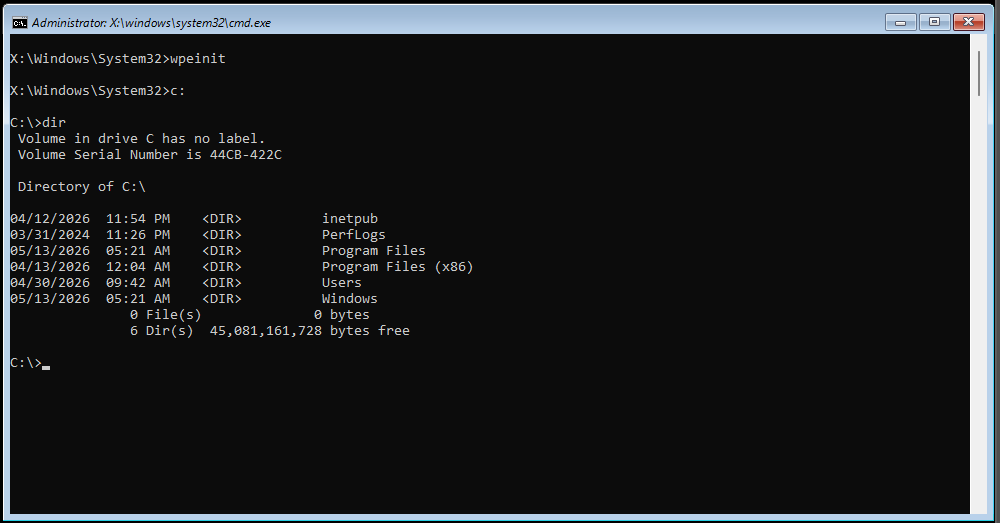
Look ma, no keys! (Image credit: Future)
To say that this is dangerous is an understatement. Not only is it an immediate concern as BitLocker cannot be trusted for encrypting drives, but the way the exploit executes and its files disappear also raises very uncomfortable corporate and/or political questions. YellowKey also reportedly works in Windows Server 2022 and 2025, but not in Windows 10.
BitLocker protects millions of machines worldwide across home, enterprises, and governments, especially as it's enabled by default in Windows 11. As far as we can tell, a drive can't be taken from machine Alice and opened in machine Bob because the encryption keys are in Alice's TPM, but it's not hard to just up and steal a laptop, mini-PC, or even desktop.
Eclipse notes that using a full TPM-and-PIN setup doesn't help, as apparently, they have a variant for that scenario that they haven't published a PoC for. They also state the vulnerability is well-hidden, and that they "could have made some insane cash selling this, but no amount of money will stand between me and my determination against Microsoft."
As for GreenPlasma, it's supposed to get an attacker full system-level access (even higher than administrator) by manipulating the CTFMon process into placing a crafted memory section object — a slice of memory that can be shared between processes or mapped to a file — in any Windows' Object Manager section the SYSTEM user has write access to, bypassing regular access controls.
Get Tom's Hardware's best news and in-depth reviews, straight to your inbox.
From thereon, the exploit code can get access to regions of memory they're not meant to and leverage that for any number of shenanigans, the most obvious one being getting full system access. This is bad enough for a desktop system, as any program can get full access, but it's particularly bad for server environments, where any regular user can get control of the server and, by extension, everyone else's data.
Meanwhile, as of this writing, there is no official response from the company about YellowKey or GreenPlasma. BlueHammer has already been patched, and Chaotic claims that Microsoft silently patched RedSun, but there's no official word on that either.

Follow Tom's Hardware on Google News, or add us as a preferred source, to get our latest news, analysis, & reviews in your feeds.
Bruno Ferreira is a contributing writer for Tom's Hardware. He has decades of experience with PC hardware and assorted sundries, alongside a career as a developer. He's obsessed with detail and has a tendency to ramble on the topics he loves. When not doing that, he's usually playing games, or at live music shows and festivals.