I'm not affiliated. Happy user.
Moreover, Vivaldi has a great advantage over both Firefox and Chrome, in it the command to print a Web page usually works fine, while in both Firefox and Chrome it almost never works correctly.
Both Firefox and Chrome are almost never able to render correctly a "printed" page, even if they render the same page perfectly on screen. In the printed page, the graphic elements have almost always wrong sizes, which results in overlapped or invisible page elements. I suppose that this is caused by the fact that many Web pages stupidly use element sizes in pixels, instead of using length units, e.g. points or inches or mm, and both Firefox and Chrome might scale pixels wrongly when rendering for resolutions that differ from that of the screen, while Vivaldi scales them correctly.
Besides the "Print" command, the second feature that I like in Vivaldi better than in Firefox or Chrome is that it accepts mouse gestures for most commands, as alternatives to keyboard shortcuts, so you do not need to move the hand from the mouse while browsing.
There's way to much stuff, to many feature and when the rendering engine is just Blink, I don't really see much of a reason to use it over Firefox.
Nice work though and wonderful to see a 3rd party browser maker giving it a go.
The only browser that allows me to tile 3,4,5... pages in the same view. Or to group pages into "stacks" or many other small but useful perks.
I use Aerospace for tiling everything now but it breaks Safari scrolling performance so when that becomes annoying I force the Safari window to floating mode.
I appreciate the intention to protect my privacy. How does that square with Manifest V2 deprecation as dictated by the adtech company (Google)?
Also, for years I’ve been uncomfortable using Chromium as I’m uncomfortable raising that statistic any more, since I don’t want the Internet to be designed for one particular engine. Maybe Vivaldi 9.0 will be the biggest design overhaul of all time and even refactor based on Gecko like Firefox :)
One of the main reasons I switched to Vivaldi a few years ago was that it allowed and even advertised a "classic" browser experience. By which I mean: tabs that behaved like tabs, visual separation, not a lot of useless whitespace and corner-radius-maxxed borders everywhere.
Looks like that's all gone now and Vivaldi is just yet another generic "flat design" browser. Time to look for something else...
> You deserve better
Probably better to avoid (Chromium-based) Vivaldi then.
It's also fantastic for tab hoarders like me.
Wonder if the site dev was thinking of the astronaut pointing a gun at another astronaut meme when they put this in.
Ah nevermind I see a chromium fork, I skip
"Blink is a browser engine developed as part of the free and open-source Chromium project. Blink is by far the most-used browser engine, due to the market share dominance of Google Chrome and the fact that many other browsers are based on the Chromium code."
Do they do any sort of third-party auditing of the closed parts?
[1] https://vivaldi.com/blog/technology/why-isnt-vivaldi-browser...
I hope they keep it up.
I eventually switched to Edge a few years ago because it was nice and lite. Now I’m seeing the same pattern play out as they add copilot, shopping, and rewards programs.
What browser should I check out next? Some must haves: workspaces, vertical tabs, and chromium extension support.
Imo extension is the ultimate way to customize your browser experience.
It's not technical difficulties, there are open source projects that have such support.
I also don't believe it's against any TOS because some of these browser are available in the Google play store.
I just don't get why they refuse to do that.
You wouldn't be able to even if you wanted because there is no good way to export/import your changes for the trade to happen
Otherwise removing a few borders seems a bit underwhelming for a major version bump
I just wish the address bar were expanding fully to the right when selected, with the "Show Full Address" setting on and right-side vertical tabs. Otherwise, one has to jump around the visible part of the address bar in order to find the right part.
Edit: details.
I understand if you want to stick with Firefox, but until Ladybird and co are ready for prime time, I'm sticking with Vivaldi.
This major release bump is a bit disapointing though. Was expecting some more headlining features than just a bit of a UI clean up.
can't we just have tabs + tiling (either tiles in tabs, or tabs in tiles, both can work), and call it a day?
that's all I need from browsing today
- Partner deals with search engines - Partner deals with bookmark partners - Partner deals through Direct Match - https://vivaldi.com/blog/privacy-without-compromise-proton-v...
How are integrated ads and dispatch of user data to third-parties sustainable sources of income?
beware, their sync will go down for weeks and you may lose all your data. https://www.reddit.com/r/browsers/comments/1hgfmoh/vivaldi_s... https://www.reddit.com/r/vivaldibrowser/comments/1htf6l7/all...
You can open whatsapp web or a pdf or most other websites and just scroll. The difference is massive.
To put more simply, just look at how many preferences its preference dialog has compared to other browsers. It feels like nobody else is even doing anything except coming up with a new CSS property nobody is going to use every 3 months.
Everyone says they love Firefox, but every time Firefox adds a new feature it's a feature Vivaldi already had for years.
And it is built on firefox's web engine itself which imo is an added benefit compared to blink on which vivaldi is from, @AegirLeet's comments about Blink hegemoney is true but also there shouldn't necessarily just be one web browser engine imo and that too created by google (blink), one can criticize mozilla/firefox and that is true but you aren't limited to firefox, there are zen browser, floorp, librewolf etc.
I highly recommend you to test zen-browser if you haven't already!
- The choice in the wizard defaults to no blocking of ads and trackers
- Third Party cookies enabled by default
- WebRTC IP leaking is the default
- No option not to persist history/permanent incognito mode
Etc
I imagine it leaks your list of extensions just like chromium too
Page tiling is perhaps the killer feature, but overall I like how Vivaldi is a browser for power users who know how they want to use the web. I find it refreshing in the era of browsers trying to be very thin terminals. The only thing missing from Vivaldi is being truly FOSS instead of their hybrid source-available model.
That's their thing. Though a lot can be disabled.
> can't we just have tabs + tiling
Maybe Min or Zen Browser is more your thing?
Sorry, couldn't resist... :)
First release was 11 years ago. Why not?
Also there is no standard for version releases. I mean there probably is, but none that you have to follow.
> how can you trust closed source?
Same as using Android or windows or iOS.
Ladybird seems to be the only hope, once available.
Vivaldi is made by people who left Opera after it was bought by a Chinese company, and the mouse gestures are similar. Ny favorites: "Hold right mouse button, click left" is the browser back gesture, and "hold left, click right" is forward.
vivaldi was doing something weird for me, can’t exactly remember what now. seemingly unprompted it would switch tabs or go back in history or something.
turns out i’d tried to be clever, set up a mouse gesture and forgotten about it. xD
* on my phone, can’t inspect the tars
I would rather have this experience with Firefox but they are probably more busy focusing on email, vpn and whatever the flavor of the month is.
It is very much in the spirit of the old Opera browser. I miss the days when software was trying to be as cool as possible instead of trying to be as lame as possible. (God what a concept!)
It's good to see someone still trying.
Some sites also simply to not test their stuff on Firefox since it has such a small market share, and Firefox _does_ have minor incompatibilities that only tend to show up when using overly fancy Javascript or CSS frameworks. (But this is far less common than the first point above.)
ProTip: Try to do your thing in Guest Mode. It will almost certainly work there.
Have been a Vivaldi user for many years.
https://addons.mozilla.org/en-US/firefox/addon/print-edit-we...
You can tell the Vivaldi devs care about that kind of stuff. I don't want to use a chromium-based browser as my daily driver, but I like a lot of what they're doing.
Classic
To do list: make huge spreadsheet of hotkeys across programs and periodically feed them back to myself as flashcards based on [lack of] usage
KeyCue didn’t seem to cut it but maybe skill issue
It might not be the best security idea to rely on a relatively obscure browser like this, but I find it very pleasant to use.
Then we need to have a discussion about that because in case of Vivaldi you are in fact not the product.
I am talking about limited width of the address bar (when it’s part of the right column with tabs, taking a third of screen’s width at max), not its height or any other elements.
And how does that "ownership" look like in practice? Has Google ever decided how things should be done "or else"? What Google does is pay a protection tax. Without Firefox around and independent, the EU is almost sure to break Chrome away from Google, especially with the warm EU-US relations now. So Google pays and is going to pay as much as it takes to keep Firefox alive, kicking, and doing whatever it wants.
Google Chrome needs Firefox to be moderately successful more than Firefox needs that money. Or else it might become someone else's Chrome.
> Follow the money
Everyone has this revelation once. If it was that easy then customers would practically own the company providing them the services. Do you and your fellow paying customers feel like you own any company, especially big-tech? Do you all control Netflix? Amazon? Apple?
That doesn't really seem relevant these days though. Although I guess duopolies are totally fine.
It's open in all of the ways that matter, basically they just want to protect their look and feel.
Firefox on Linux has much more problems than Firefox on Windows, mostly because it does not support many GPUs, so it frequently disables WebGL or it cannot use hardware support for playing videos, even now, in 2026. This breaks many sites.
Unlike Firefox, the Linux versions of Vivaldi/Chromium/Chrome do not appear to have any deficiencies in comparison with their Windows versions.
It scales up with usage as well. Not that Safari needed funding, but Google pays Apple upwards of $20,000,000,000 per year for the privilege of being the default for that user base.
*screw Google and their AI search
https://help.vivaldi.com/desktop/privacy/is-vivaldi-open-sou...
I don't trust them one bit. There was that telemetry analysis that showed Vivaldi as a very noisy browser.
If you don't have the ability to police extensions you're basically putting your users up for sale?
Whenever I encounter a broken site, it's because I blocked some advertising scripts and the whole thing fell apart with a slew of JavaScript errors. I'm quite happy to avoid such shoddy sites.
So the answer seems to be:
- search partnerships
- direct match partnerships
- bookmarks partnerships
- donation
- cut when people sign up for advertised products (proton vpn, not sure if others)
Or at least that was the case in 2019
https://stockanalysis.com/stocks/googl/metrics/revenue-by-se...
Someone mirrored it.
The problem you linked to also happened on desktop because there is no VSCode for phones.
I'm not sure if this [1] is still relevant, but it appears that Vivaldi makes money by promoting search engines and bookmarks to their users via their closed source, secret, Chromium fork.
If my usage of their Chromium clone is being used to sell search engines/website bookmarks, then I am indeed the product.
There does also seem to be a VPN option on their site that I'm assuming I can pay for, which seems it could be an actually buyable product rather than selling my usage of their browser.
I’m really curious what gave you this impression. Vivaldi doesn’t hide its business model, yet you were so confident!
None of these approaches is any more correct than the other and theres zero chance of getting everyone to agree only one should be used. You just have to understand which delivery approach is being taken to consume it accordingly.
E.g. 1.4.8, 14.8, and 148 all tell their own story. 1.4.8 implies many small releases with a few decent size changes along the way. 14.8 implies a medium speed (perhaps ~yearly) regular delivery if bigger enhancements with minor patches/fixes in between. 148 implies a long running continuous rapid delivery of all things as they become available.
A million individual voices is just noise which is what your "fellow paying customers" line equates. A single monetary contributor is not that. It is the sugar daddy of Firefox. Conflating the two seems to be a bad faith comparison.
> A new project based on our code might implement features that are fundamentally in opposition to our ethics (e.g., damaging to privacy, human rights or to the environment). Even though we would not be associated with the project in any way, it can deeply affect how people see Vivaldi (and how we see ourselves), damaging a reputation we have taken pains to earn.
> You can’t test drive open-source and then close everything back off if it turns out that open-source isn’t working out.
At the same time they express regret that the Presto engine from their Opera roots didn't get open-sourced. Which was much more novel than just a Chromium re-skin.
The entire article can be summarized as "we worry that others might make a better product off our code" and "can't be arsed to meet the quality standards of the free software community".
No thank you.
how so? how do you know this?
>our biggest design overhaul, ever
>A new look for a new era
Oh god no, just STOP. It's fine the way it is! I dread these headlines from any software project, because it's always worse. Always - and I have to spend time trying restore things back to how it was. Why do software developers do this?> "can't be arsed to meet the quality standards of the free software community".
Lol literally all the code is visible. Also all the Firefox forks I've seen are low-effort forks that even piggyback off Mozilla's servers for stuff like user authentication.
The problem is not stability, but the fact that there are multiple APIs, and it is unknown which of them will be available on the user system, so a browser may need to support all of them.
For instance, for video decoding on a GPU, the Linux APIs differ depending on the GPU vendor, unless you use Vulkan, but Vulkan video decoding is not available in old computers. Even so, Firefox could have used some higher-level API that takes care of the low-level GPU-dependent details (e.g. ffmpeg).
More baffling is the failure of Firefox to use OpenGL or Vulkan for implementing WebGL, depending on the GPU vendor, because at least the OpenGL API has not changed in a very long time. I have no idea which is the reason (because Firefox does not provide adequate error messages), unless they depend on some vendor-specific OpenGL extensions. I use an NVIDIA GPU, on which I cannot enable WebGL in Firefox, despite the fact that WebGL works fine in Vivaldi and Chromium/Chrome and I use a very great number of OpenGL and Vulkan applications, including some written by myself, all of which work perfectly, with no problems whatsoever.
I have it configured to be ultra minimal with the look of Arc that I loved.

More than thirteen years in, and I am still as excited about building this browser as I was on day one. Maybe more.
That excitement comes from a genuine belief that the people who use Vivaldi deserve a browser that takes them seriously. We respect your time, your privacy, your preferences, your intelligence. Every release we ship is another expression of that belief.
Vivaldi 8.0 is the biggest expression of that idea we have shipped in years. A new design direction that makes the browser feel more alive and more unified than any version before it.
In other words: there is more control, more capability, more choice. And a brand new look.
With 8.0, Vivaldi has a new look. We call it “Unified”.
We have approached the Vivaldi interface less as a collection of components, and more as a layered system. Previously, those layers (tabs, toolbars, panels and content) have had subtle separations. This was useful, but also a bit fragmented. With Unified, those boundaries are removed.
All toolbars now live on a single, continuous surface: a Unified frame that wraps the entire browser. Instead of stacked regions, everything is composed within the same visual plane. That shift makes the interface feel more cohesive and easier to read. Alignment becomes more precise, spacing more intentional, and interaction more direct, because elements no longer sit in isolated layers.
When you pick a theme, it flows through everything. A dark theme is dark, all the way through. A warm theme carries that warmth into every corner. All elements of the browser belong together in a way that immediately feels… well … Unified.
It also changes how themes work.
With a single surface, your theme can flow across the entire window. Backgrounds are no longer confined; they can extend from the tab bar through panels and edges without interruption. Wallpapers feel less like decoration and more like part of the environment, especially when combined with translucency and blur. From a system perspective, this reduces complexity. Fewer layers, fewer exceptions and a more consistent foundation to build on.
This isn’t about making the browser look simpler. It’s about making the structure behind it more coherent. This makes everything you see feel like part of the same system.
You can see the new UI’s possibilities with our new default themes, such as Zen, Soria Moria, Sunset Forest and Kawaii Clouds, and our updated light and dark themes. If you can’t find something that hits the right spot for default, there are more than 7000 to choose from at themes.vivaldi.net. And if you have built a custom theme you love, you’re free to decide if you want the new look, or keep your own (Settings →Themes → Editor → Coloring mode). Of course; this is Vivaldi.
One of the things that makes Vivaldi special is also one of the things that can feel like a lot on day one: the sheer range of settings you can configure. If you have been using Vivaldi for years, you have your setup exactly as you want it and you would not trade it for anything. If you are brand new, figuring out where to start can be a real question.
Vivaldi 8.0 answers it with six preset layouts, available right from onboarding (and from Settings → Appearance → Layout whenever you feel like a change). Each one is a thoughtfully curated starting point.
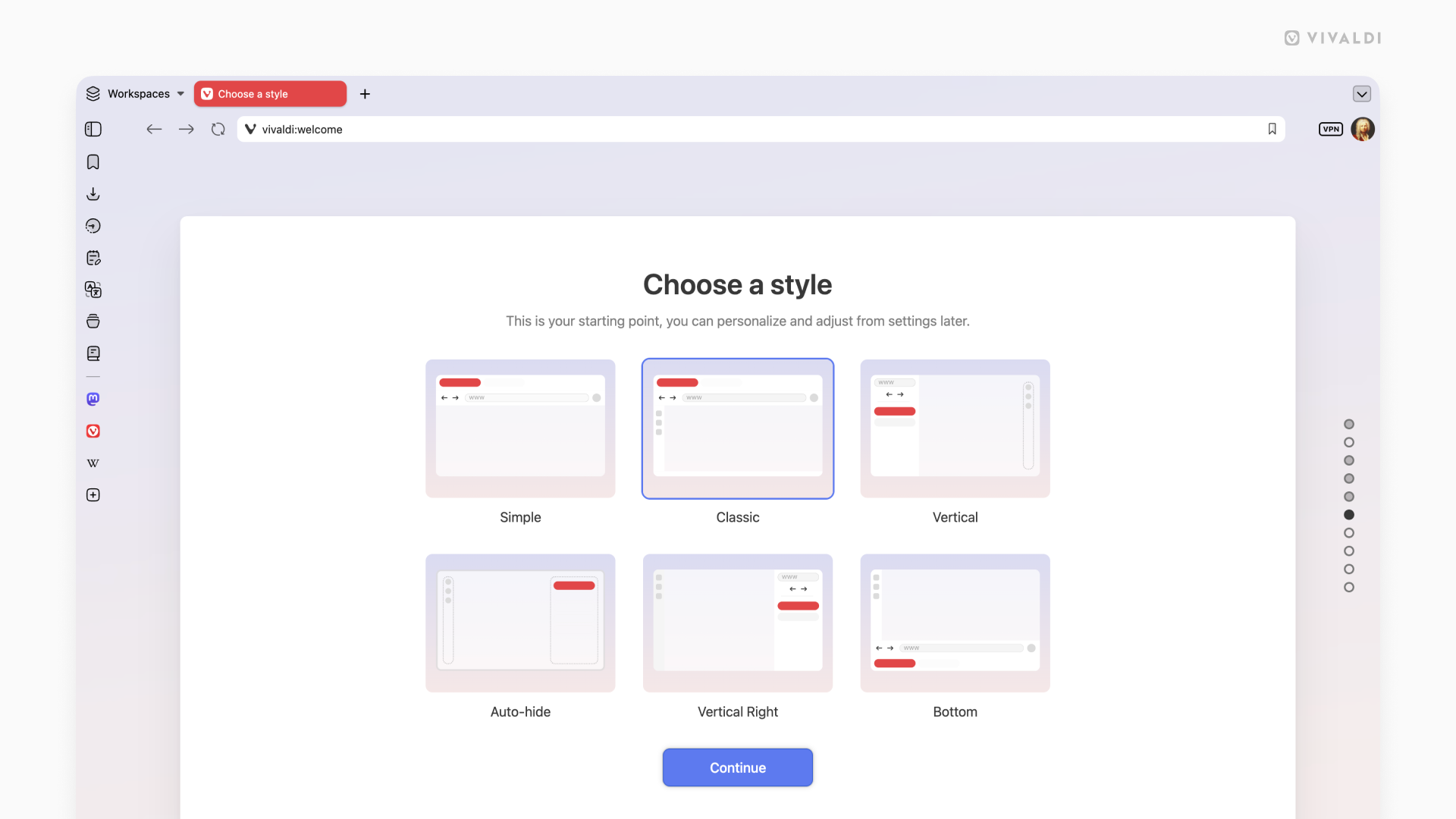
Simple gives you a clean, focused experience: tabs on top, nothing in the way, everything ready to go. It is Vivaldi in its purest form and it is already more capable than anything the mainstream browsers will offer.
Classic is the Vivaldi you know and love. Toolbar, panels, all the controls in their natural places, now wearing the new Unified look. This is home for a lot of you, and it is as good as it has ever been.
Vertical Right is similar to our classic look, but for people who prefer to have their tabs on the right. You’ll find the URL field on top, and panels on the left, as usual.
Vertical Left puts your tabs and address bar on the left side of the screen. Once you try this on a wide monitor, it tends to become permanent. It uses your horizontal screen space in ways that a top tab bar simply cannot. With Panels available on hover from the right side of your screen, it changes how browsing feels.
Auto Hide is built for users who want the web to fill their entire screen. Your toolbar, tab bar, panel, and address bar step aside while you read, watch, or work, and reappear the moment your cursor reaches for any edge of the screen. It is edge to edge content with full Vivaldi capability sitting right behind it, and it is a way of experiencing the web that the other browsers have not figured out.
Bottom moves your tab bar and address bar to the bottom of the screen. Your eye travels down naturally as you read, and your navigation is already there waiting. More people work this way than you might expect, and Vivaldi has always been happy to accommodate them.
Click on each of the layouts to make them bigger:
Each of these layouts is a launchpad, not a limit. With all the powerful features and tools in Vivaldi, you have everything you need to make the web work exactly the way you want it to.
Vivaldi has a tab management system unlike any other browser. Tile as many pages as you want, just how you want. Use Follower Tab to explore links from an article without ever losing your place in it. Stack your tabs into named, colour-coded groups. Use the Tab Button to search everything at once: open tabs, synced tabs from your other devices, recently closed tabs. Your mail, your calendar, your notes, your reading list: all of it lives inside Vivaldi, organised on your terms, always within reach.
Vivaldi is truly the browser that adapts to you. We’ve proven this with every release. We even go as far as getting completely out of your way. With UI Auto-hide, even the interface itself knows when to let the content take centre stage. Vivaldi bends to how you work. It always has and always will.
We do not answer to investors telling us which features to build. We do not track your behaviour or treat your data as inventory. Other browsers are adding AI to decide what you see. Vivaldi adds tools that give you more power when deciding for yourself. That has always been the difference. We build Vivaldi because we believe you deserve a better browser.
Download it today. Take your time with it. Come find us in the Forum if there is anything, we read everything.
As always, thank you for being part of the Vivaldi community. Together, we’re fighting for a better web, one release at a time.
***
Check the changelog with the full list of changes from Vivaldi 7.9 to 8.0.
Swap packages for extensions in the above and let me know how that's different
If anything, wouldn't a phone extension be more sandboxed than most desktop environments?