Some people may think I am a shill for .NET.
With my previous post, they may be right.
However, as much as I like .NET, there are some things that just really do not make any sense to me, and they frustrate me to no end.
Given that I maintain a PE parsing library and thus am deeply familiar with the anatomy of .NET binaries, I feel I am qualified to complain about some of the design choices Microsoft made for this file format :).
In this post, I will rant about Custom Attributes and why their underlying storage mechanism is among the poorest design choices Microsoft has ever made in .NET. It has caused me so much grief over the past few years, it has become a meme in the AsmResolver core maintainers group. I am truly convinced that custom attributes are the source of all evil.
 I literally have nightmares about custom attributes.
What are Custom Attributes?
For the unfamiliar, custom attributes are extra pieces of metadata you can attach to classes, methods, fields, parameters, etc. They are typically used to instruct the C# compiler to do something extra.
A classic example is the ObsoleteAttribute, which lets the compiler produce a warning if an object marked with this attribute is used in some user code:
<table><tbody><tr><td><pre>1 2 3 4 </pre></td><td><pre><span>[</span><span>Obsolete</span><span>]</span> <span>// Custom attribute that marks MyClass obsolete.</span> <span>public</span> <span>class</span> <span>MyClass</span> <span>{</span> <span>/* ... */</span> <span>}</span> <span>var</span> <span>x</span> <span>=</span> <span>new</span> <span>MyClass</span><span>();</span> <span>// <-- Compiler warns: "warning CS0612: 'MyClass' is obsolete"</span> </pre></td></tr></tbody></table>
You can define your own custom attributes, and they can also define parameters:
<table><tbody><tr><td><pre>1 2 3 4 </pre></td><td><pre><span>public</span> <span>class</span> <span>MyAttribute</span><span>(</span><span>int</span> <span>x</span><span>,</span> <span>string</span> <span>y</span><span>)</span> <span>:</span> <span>Attribute</span> <span>{</span> <span>/* ... */</span> <span>}</span> <span>[</span><span>MyAttribute</span><span>(</span><span>0x1337</span><span>,</span> <span>"Hello, world!"</span><span>)]</span> <span>public</span> <span>class</span> <span>MyClass</span> <span>{</span> <span>/* ... */</span> <span>}</span> </pre></td></tr></tbody></table>
Custom attributes are a great way to extend the normal metadata that exists around a function, variable, or type. It is used mainly by analyzers, source generators, or dynamic initialization/inspection and is great for meta-programming and use cases like automatic serialization and deserialization of objects.
Anatomy of a Custom Attribute
In the .NET file format, everything is stored in a database of metadata tables. Types, fields, methods, parameters, etc. will all reside in their own table. This allows for each object to be referenced and looked up efficiently by a metadata token, i.e., a table + row index.
You can view the raw contents of these metadata tables in a .NET binary with a tool like CFF Explorer:
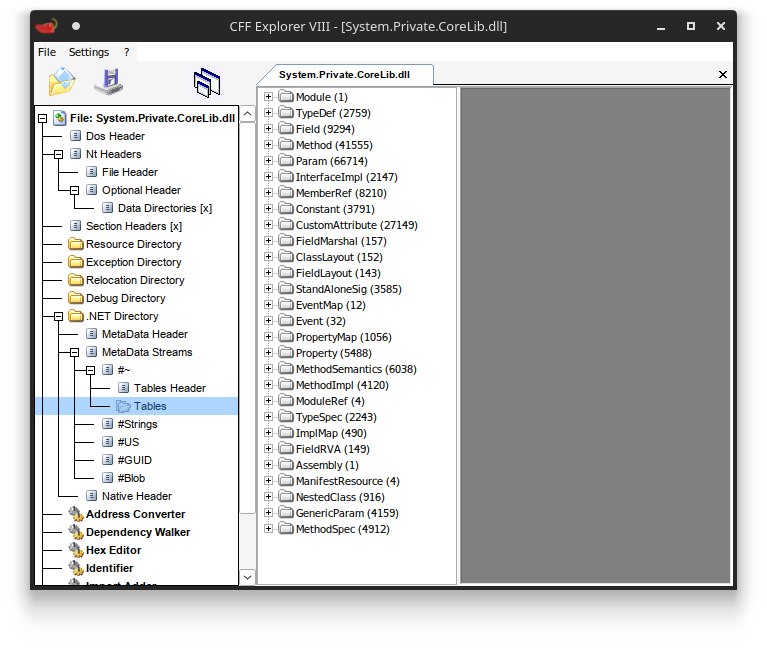 Metadata tables in a .NET binary.
Custom attributes are no exception to this. Each row in the CustomAttribute table represents one instantiation of an attribute. It contains a reference to the member the attribute is attached to, a reference to the attribute’s constructor, and an index into the blob stream referencing an array of arguments to call this constructor with.
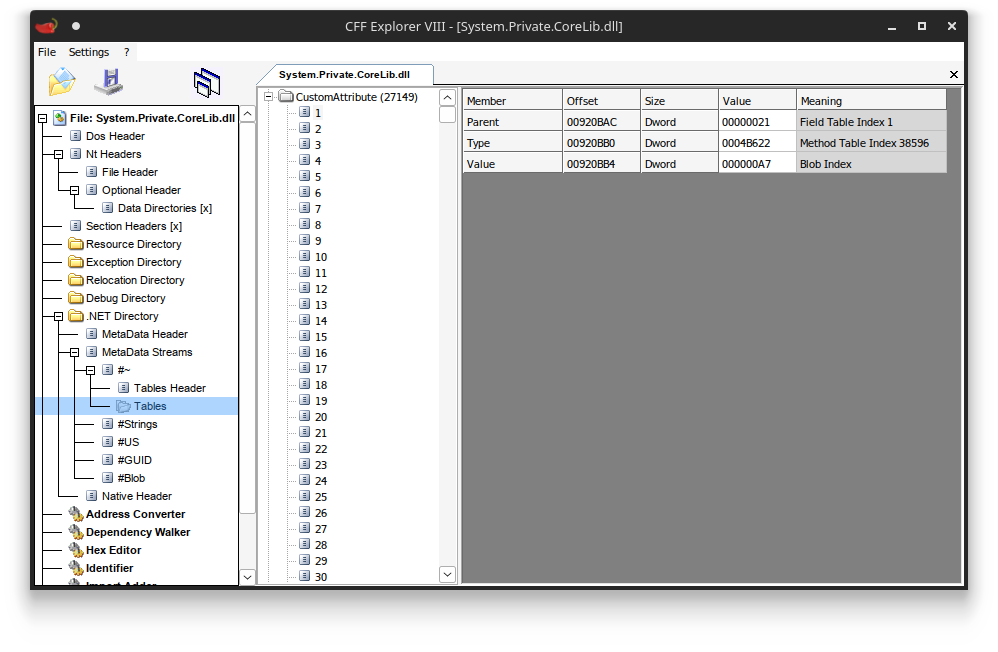 A single custom attribute row
The blob signature is the interesting part for this post.
The Custom Attribute Signature
All arguments in a custom attribute signature are serialized to their binary representation and concatenated in sequence. It is important to note that this binary representation is fully implied by the parameter types of the attribute’s constructor. For example, if the first argument’s type is int, the first four bytes encode an integer. If the second argument is a string, you follow it up by reading a length-prefixed array of characters. You keep going until you read all the arguments, and if you did everything right, you would be at the end of the blob signature.
<table><tbody><tr><td><pre>1 2 </pre></td><td><pre><span>00000000</span> <span>37</span> <span>13</span> <span>00</span> <span>00</span> <span>13</span> <span>48</span> <span>65</span> <span>6</span><span>c</span> <span>6</span><span>c</span> <span>6</span><span>f</span> <span>2</span><span>c</span> <span>20</span> <span>77</span> <span>6</span><span>f</span> <span>72</span> <span>6</span><span>c</span> <span>|</span><span>.....</span><span>Hello</span><span>,</span> <span>worl</span><span>|</span> <span>00000010</span> <span>64</span> <span>21</span> <span>|</span><span>d</span><span>!|</span> </pre></td></tr></tbody></table>
This is intuitive; there are no problems here. Things go downhill very fast after this, though.
Custom Attributes with Enum Values
The vast majority of attributes do not actually take in primitive arguments like int or string, but often include parameters defined as an enum type. The specification stipulates that enum values are serialized in the same way as their underlying type.
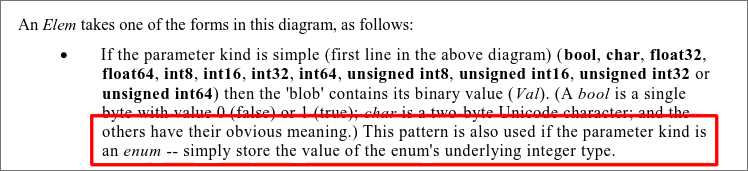 ECMA specification on enum values.
Consider the following example:
<table><tbody><tr><td><pre>1 2 3 4 5 6 7 8 9 10 11 12 13 14 15 16 17 18 19 20 </pre></td><td><pre><span>public</span> <span>enum</span> <span>MyIntEnum</span> <span>// `int` is the default in C#</span> <span>{</span> <span>Value1</span> <span>=</span> <span>1</span><span>,</span> <span>Value2</span> <span>=</span> <span>2</span><span>,</span> <span>Value3</span> <span>=</span> <span>3</span><span>,</span> <span>// ...</span> <span>}</span> <span>public</span> <span>enum</span> <span>MyShortEnum</span> <span>:</span> <span>short</span> <span>// explicit underlying type `short`</span> <span>{</span> <span>Value1</span> <span>=</span> <span>1</span><span>,</span> <span>Value2</span> <span>=</span> <span>2</span><span>,</span> <span>Value3</span> <span>=</span> <span>3</span><span>,</span> <span>// ...</span> <span>}</span> <span>public</span> <span>class</span> <span>FooAttribute</span><span>(</span><span>MyIntEnum</span> <span>a</span><span>,</span> <span>MyShortEnum</span> <span>b</span><span>)</span> <span>:</span> <span>Attribute</span> <span>{</span> <span>/* ... */</span> <span>}</span> <span>[</span><span>Foo</span><span>(</span><span>MyIntEnum</span><span>.</span><span>Value2</span><span>,</span> <span>MyShortEnum</span><span>.</span><span>Value3</span><span>)]</span> <span>public</span> <span>class</span> <span>SomeClass</span><span>;</span> </pre></td></tr></tbody></table>
Because MyIntEnum implicitly subclasses int and MyShortEnum subclasses short, the first argument of the instantiated Foo attribute would occupy 4 bytes (02 00 00 00), and the second argument only 2 bytes (03 00). This results in the full argument sequence:
<table><tbody><tr><td><pre>1 </pre></td><td><pre><span>02</span> <span>00</span> <span>00</span> <span>00</span> <span>03</span> <span>00</span> </pre></td></tr></tbody></table>
To correctly read back enum arguments, you have to know the enum’s underlying type and read the appropriate number of bytes from the signature. If you don’t, you risk misinterpreting the bytes for subsequent arguments.
Here is an important fact about this:
Determining the enum underlying type is an incredibly expensive operation.
Here is why:
Resolving the Enum type
Since there is no indication of an enum’s underlying type in the attribute nor in the constructor’s signature, determining this underlying type is a huge pain because it requires resolving the enum type itself so that we can inspect its metadata structure.
Type resolution involves the following steps:
Assembly resolution: We first need to figure out which assembly the type is stored in. This involves probing DLL files on the disk in various directories (using complicated probing algorithms that differ across .NET versions, sometimes requiring parsing one or two JSON or XML files shipped with the binary), parsing all the relevant headers, traversing its metadata streams, and verifying whether it is really the assembly we’re looking for (i.e., checking its name, version, public key token, etc.). This is not a trivial operation.
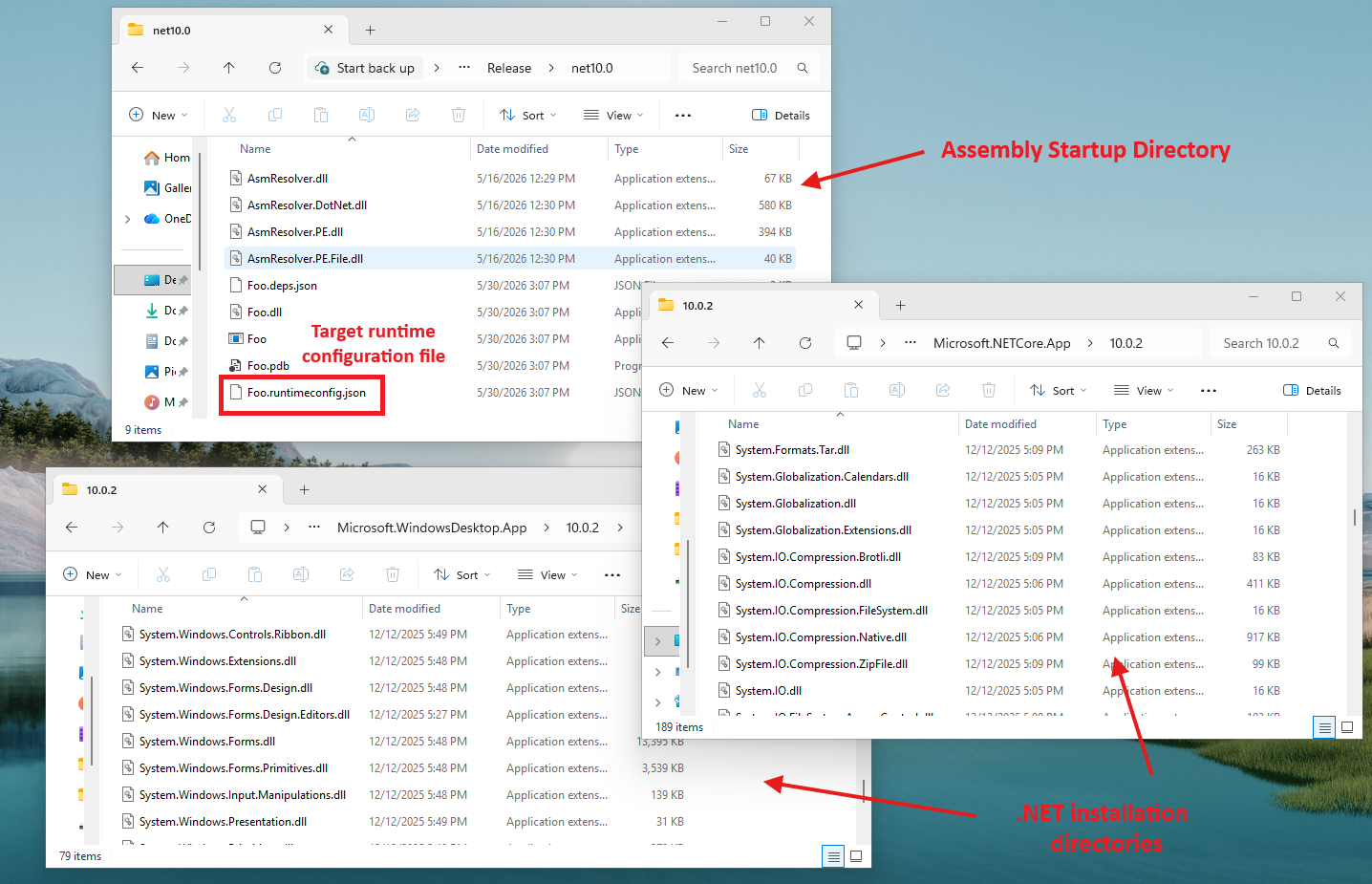 Finding the right DLLs is not trivial.
Type tree traversal: Once we have found a candidate assembly, we need to actually search for a type that matches the enum reference. This means going through its
TypeDeftable (which can contain hundreds if not thousands of rows for larger DLLs likemscorlib.dll), resolving the names of each entry, and checking whether there is any match.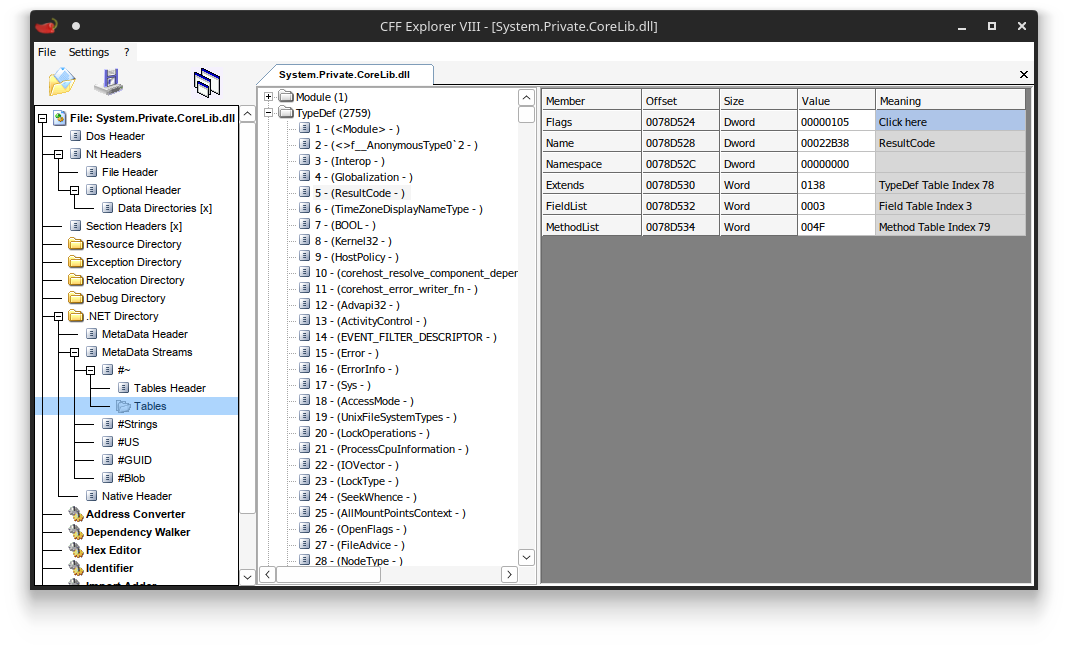 TypeDef table of System.Private.CoreLib.dll with 2759 rows.
Things get more complicated if the enum type is a nested type. The rows in the
TypeDeftable only specify theNameandNamespace(typicallynullfor nested types), and store no information about their enclosing parent types. For this, we need to consult a second table,NestedClass, which associates nested types with their direct enclosing type.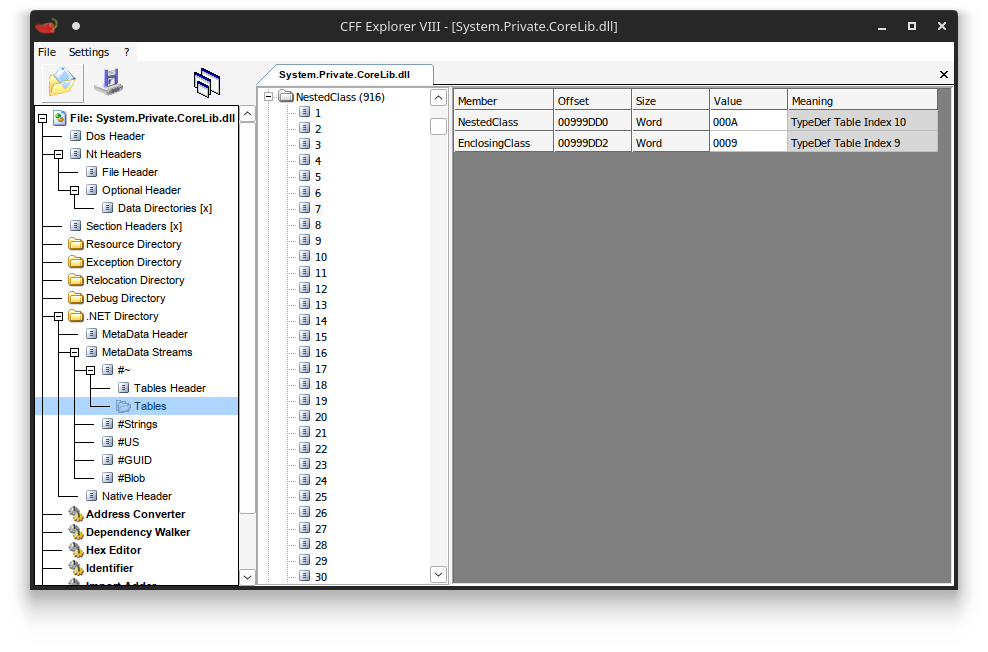 NestedClass table
This also means we need to do this recursively. A class
Cthat is enclosed by two classesBandAwill require traversing two rows in theNestedClasstable (one placingCinsideB, and one placingBinsideA).Type forwarders: To make matters worse, a type may not even be defined in the assembly we just found! Instead, it may be forwarded to another assembly. This mechanism is heavily used by the standard libraries of .NET themselves. For example, using the enum
System.DebuggableAttribute.DebuggingModesin your C# code adds a reference toSystem.Runtime.dllas the declaring assembly.<table><tbody><tr><td><pre>1 </pre></td><td><pre><span>[</span><span>assembly</span><span>:</span> <span>Debuggable</span><span>(</span><span>DebuggableAttribute</span><span>.</span><span>DebuggingModes</span><span>.</span><span>Default</span><span>)]</span> <span>// References System.Runtime.dll</span> </pre></td></tr></tbody></table>However, once you have found and parsed
System.Runtime.dllcorrectly, you will see thatSystem.DebuggableAttribute.DebuggingModesis not there! In fact, no types are defined here at all: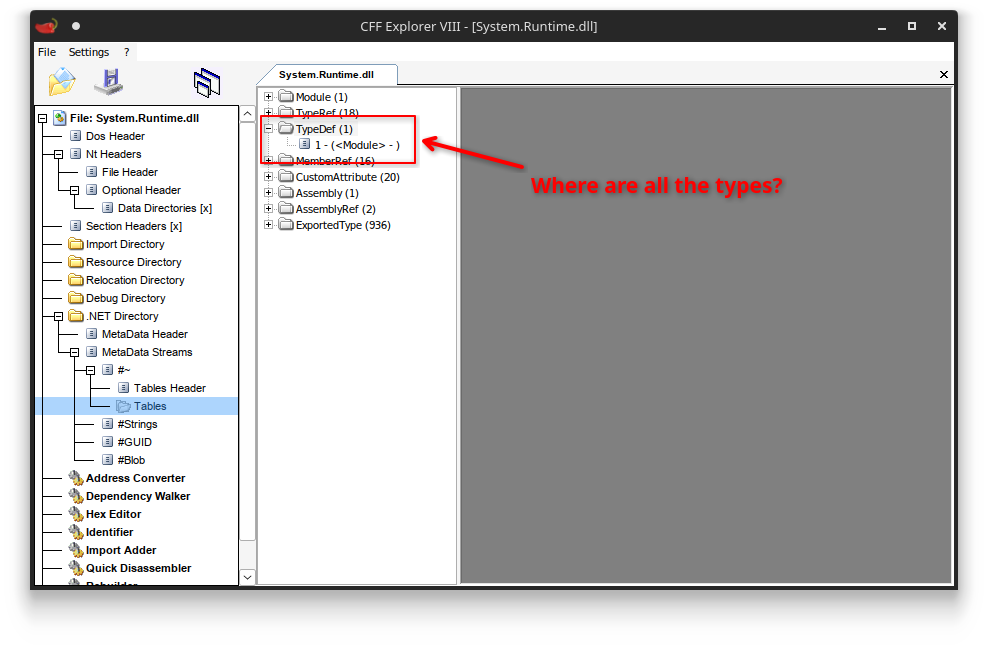 Where are all the types?
Instead, it is defined as an exported type (stored in yet another table), which forwards you to
System.Private.CoreLib.dllon modern .NET versions.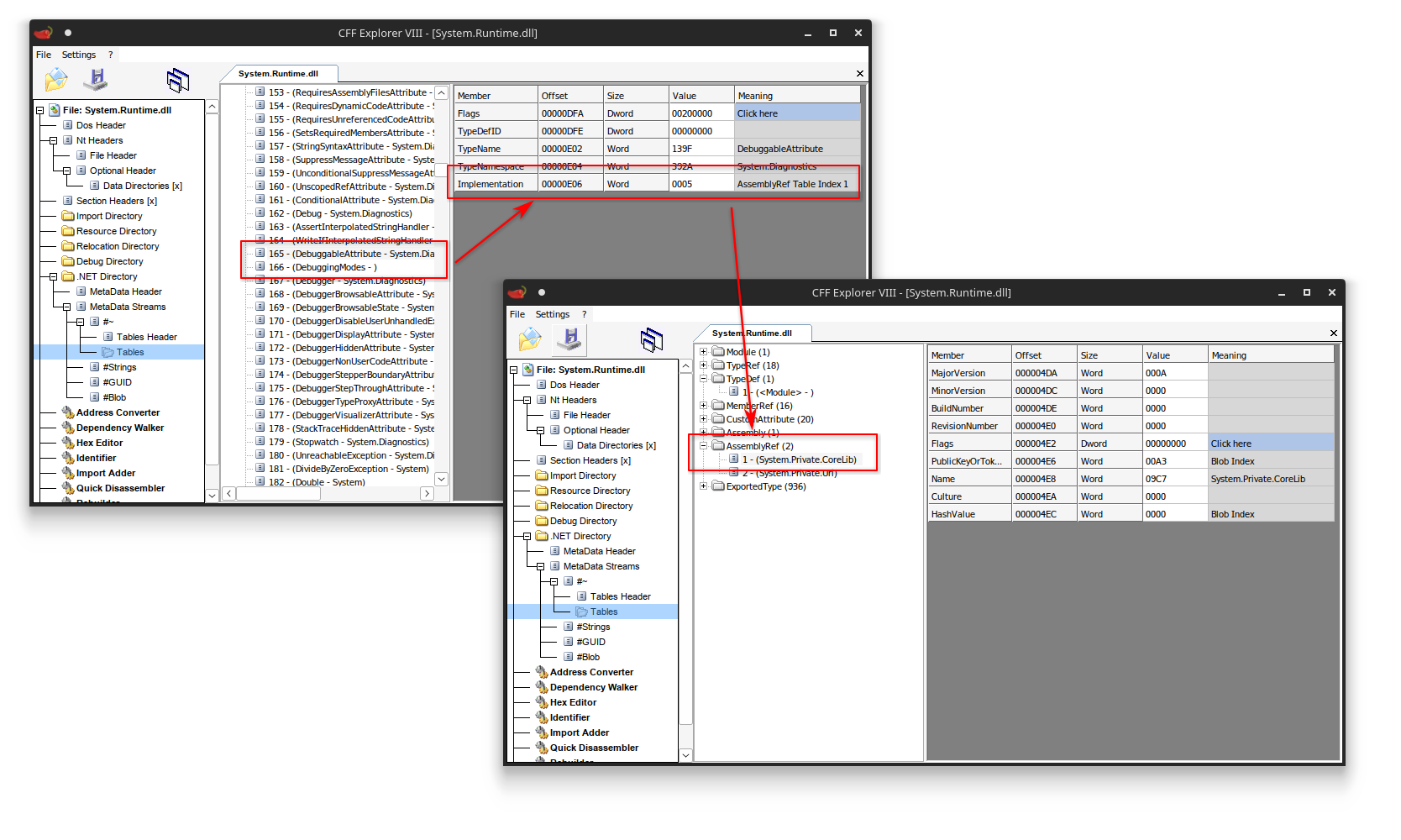 Type forwarder to System.Private.CoreLib.dll
In theory, you can have as many type forwarders as you want. They will all trigger new assembly and type resolutions over and over again until you finally get to the type you are trying to resolve.
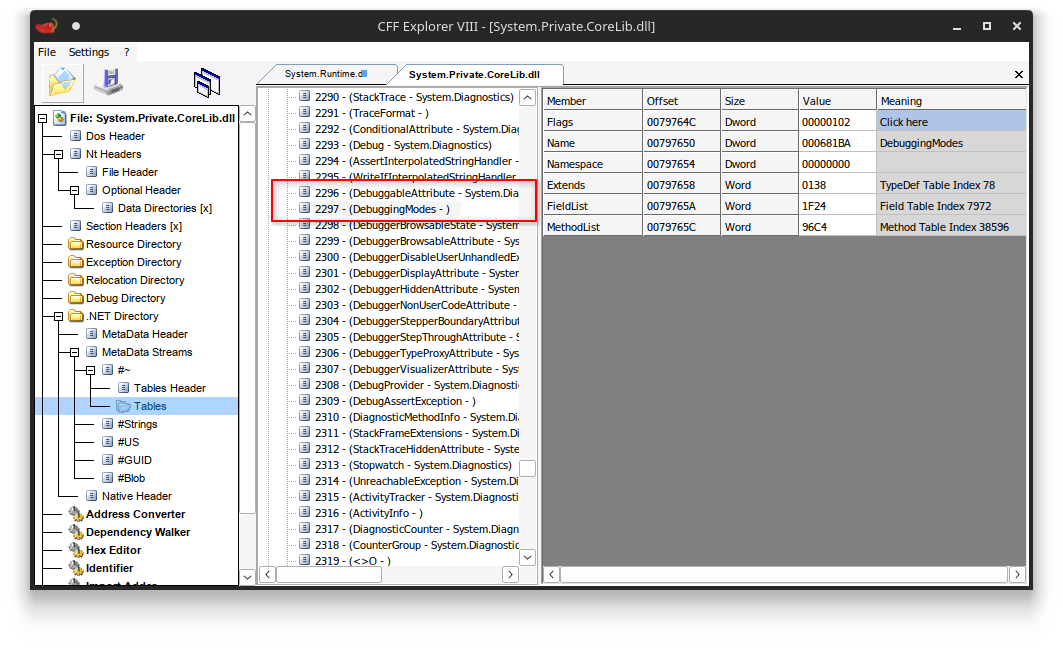 There it is!
Bottom line: Type resolution is a non-trivial operation. Even if you implement heavy caching (e.g., assembly and type resolutions), it still is orders of magnitude more complex and error-prone than just reading a byte.
Traversing the Enum type
Once we have finally resolved the enum type, we must figure out its underlying enum type.
Given the syntax C# uses, you may think this is the Extends column in the TypeDef table (as would be the case for other types), but for enum types this is always set to System.Enum.
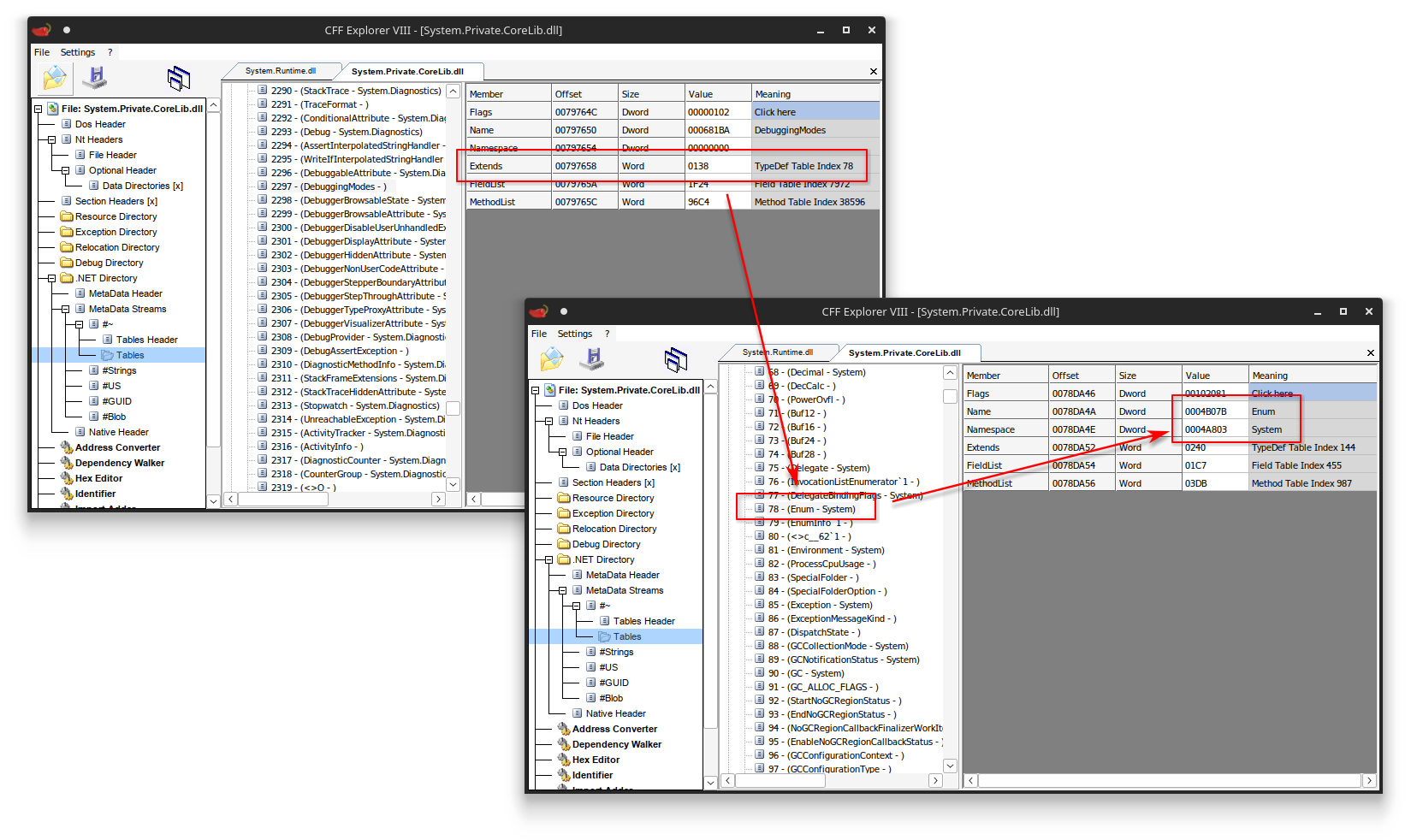 Base type of enum typedefs
Instead, you need to find a special hidden non-static field (typically called value__) defined in the enum type, which requires iterating a subset of yet another table (Field). Once you have found this field, you need to parse its field signature to figure out its field type.
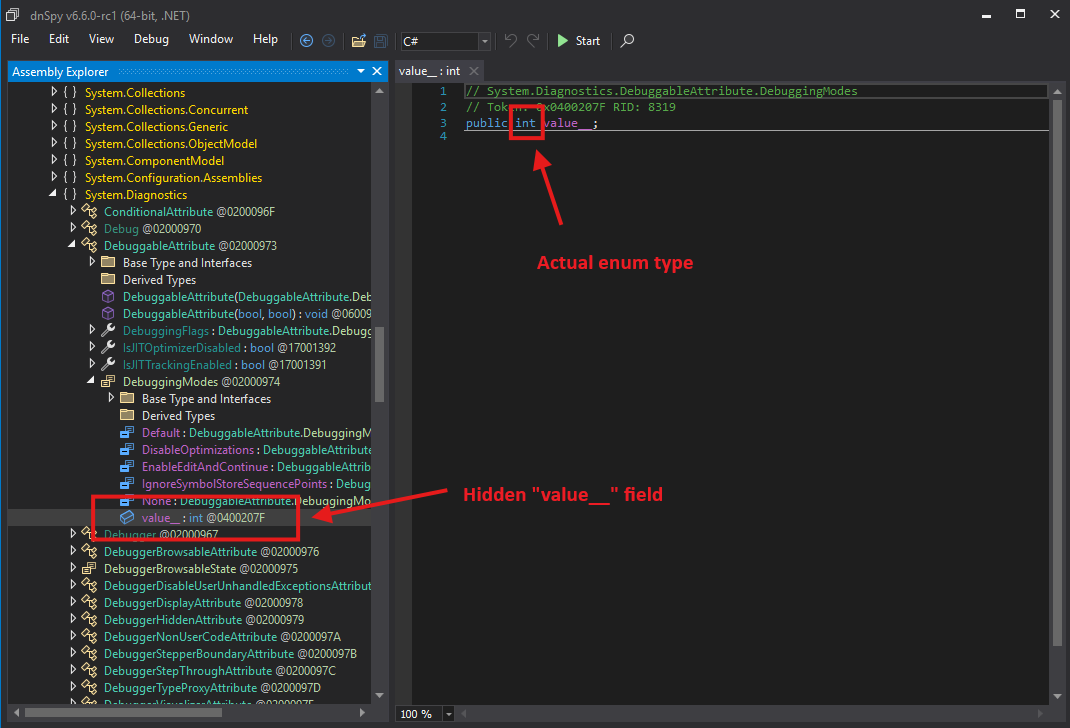 Field type
Congratulations, you have finally found the underlying enum type!
Now you can finally use it to decide whether you need to consume 1, 2, 4, or 8 bytes from the signature for a single enum-based argument. If your custom attribute defines another enum argument, you have to go through this process all over again :).
My thoughts on enum values
This system is so convoluted, especially since 99.97% of all enums ever used in custom attributes are using a normal 32-bit integer value as their underlying storage mechanism [citation needed]. But some don’t, and thus you need to have this system in place. You also better hope all assemblies that the signature depends on are nearby, or else assembly resolution will fail and you will never be able to determine the size of the enum argument.
The system is also extremely unnecessary. If you consider there are only a very small set of “valid” enum underlying types (i.e., sbyte, short, int, …), I feel this could have easily been solved by simply prefixing the raw value with a CorElementType indicator byte (i.e., ELEMENT_TYPE_I1, ELEMENT_TYPE_I2, ELEMENT_TYPE_I4 …). These indicators are used throughout the rest of the file format as well, and the compiler should have this information at build time anyway.
I don’t know why they made it like this.
Custom Attributes with Type Values
But wait, it gets worse! Attributes can also have Types as argument:
<table><tbody><tr><td><pre>1 2 3 4 </pre></td><td><pre><span>public</span> <span>class</span> <span>FooAttribute</span><span>(</span><span>System</span><span>.</span><span>Type</span> <span>type</span><span>)</span> <span>:</span> <span>Attribute</span> <span>{</span> <span>/* ... */</span> <span>}</span> <span>[</span><span>Foo</span><span>(</span><span>typeof</span><span>(</span><span>int</span><span>))]</span> <span>public</span> <span>class</span> <span>SomeClass</span><span>;</span> </pre></td></tr></tbody></table>
When a type is referenced in an attribute, the compiler does not store a token but actually stores the Fully Qualified Name (FQN) of the type.
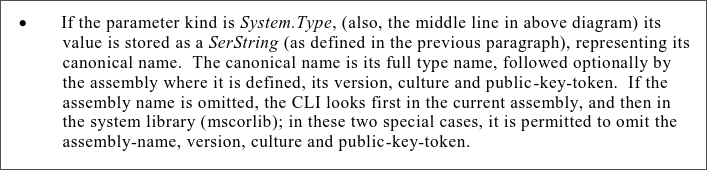 ECMA specification on type values.
For example, the typeof(int) argument may get serialized to:
<table><tbody><tr><td><pre>1 </pre></td><td><pre><span>"System.Int32, mscorlib, Version=4.0.0.0, Culture=neutral, PublicKeyToken=b77a5c561934e089"</span> </pre></td></tr></tbody></table>
Values assigned to an object parameter behave similarly. Since you cannot directly infer what type of value is going to be at such a slot, you need some indication baked into the value’s binary representation that tells you how to interpret the bytes. The .NET team decided to implement this by prefixing the binary representation with the type of the value, which means every boxed value is preceded by an FQN string as well.
 ECMA specification on boxed values.
<table><tbody><tr><td><pre>1 2 3 4 </pre></td><td><pre><span>public</span> <span>class</span> <span>BarAttribute</span><span>(</span><span>object</span> <span>value</span><span>)</span> <span>:</span> <span>Attribute</span> <span>{</span> <span>/* ... */</span> <span>}</span> <span>[</span><span>Bar</span><span>(</span><span>0x1337</span><span>)]</span> <span>// boxed int32</span> <span>public</span> <span>class</span> <span>SomeClass</span><span>;</span> </pre></td></tr></tbody></table>
<table><tbody><tr><td><pre>1 2 3 4 5 6 </pre></td><td><pre>00000000 53 79 73 74 65 6d 2e 49 6e 74 33 32 2c 20 6d 73 |System.Int32, ms| 00000010 63 6f 72 6c 69 62 2c 20 56 65 72 73 69 6f 6e 3d |corlib, Version=| 00000020 34 2e 30 2e 30 2e 30 2c 20 43 75 6c 74 75 72 65 |4.0.0.0, Culture| 00000030 3d 6e 65 75 74 72 61 6c 2c 20 50 75 62 6c 69 63 |=neutral, Public| 00000040 4b 65 79 54 6f 6b 65 6e 3d 62 37 37 61 35 63 35 |KeyToken=b77a5c5| 00000050 36 31 39 33 34 65 30 38 39 37 13 00 00 |61934e0897...| </pre></td></tr></tbody></table>
What is interesting is that this approach is completely different from anything else in the .NET file format. The vast majority of signatures elsewhere use the same CorElementType tagged union (e.g., ELEMENT_TYPE_I4 for integers or ELEMENT_TYPE_CLASS followed by a metadata token to reference entries in the tables). For some reason the .NET team inexplicably abandoned this highly efficient lookup system for custom attribute arguments, and uses these types of strings instead.
Why are we talking about this?
Using strings to reference types in custom attributes is a terrible idea
It is a bad idea for many reasons. Let’s go over them.
Type names are space inefficient
If it wasn’t obvious already, FQN strings are extremely big and clunky. Much larger than metadata tokens or indices.
This wouldn’t be as much of a problem if it weren’t for the fact that they also cannot be deduplicated. Every attribute that specifies typeof(int) or a boxed int will have a new copy of the entire FQN string "System.Int32, mscorlib, Version=4.0.0.0, Culture=neutral, PublicKeyToken=b77a5c561934e089", which is 89 characters each. In other words, going from 4 bytes to represent an integer to 89+4 bytes to represent a single boxed integer, means an overhead of over 2000% per instance!
What’s worse is that there is also no deduplication within a single custom attribute either. Referencing typeof(int) twice in the same attribute results in 180 characters stored for information that could’ve been two bytes in a normal method signature (i.e., two ELEMENT_TYPE_I4 bytes). Generic types are even worse. For example, encoding typeof(Dictionary<int, int>) requires a hilarious number of bytes (over 300 characters) to encode:
<table><tbody><tr><td><pre>1 </pre></td><td><pre><span>"System.Collections.Generic.Dictionary`2[[System.Int32, mscorlib, Version=4.0.0.0, Culture=neutral, PublicKeyToken=b77a5c561934e089],[System.Int32, mscorlib, Version=4.0.0.0, Culture=neutral, PublicKeyToken=b77a5c561934e089]], mscorlib, Version=4.0.0.0, Culture=neutral, PublicKeyToken=b77a5c561934e089"</span> </pre></td></tr></tbody></table>
<table><tbody><tr><td><pre>1 2 3 4 5 6 7 8 9 10 11 12 13 14 15 16 17 18 19 </pre></td><td><pre>00000000 53 79 73 74 65 6d 2e 43 6f 6c 6c 65 63 74 69 6f |System.Collectio| 00000010 6e 73 2e 47 65 6e 65 72 69 63 2e 44 69 63 74 69 |ns.Generic.Dicti| 00000020 6f 6e 61 72 79 60 32 5b 5b 53 79 73 74 65 6d 2e |onary`2[[System.| 00000030 49 6e 74 33 32 2c 20 6d 73 63 6f 72 6c 69 62 2c |Int32, mscorlib,| 00000040 20 56 65 72 73 69 6f 6e 3d 34 2e 30 2e 30 2e 30 | Version=4.0.0.0| 00000050 2c 20 43 75 6c 74 75 72 65 3d 6e 65 75 74 72 61 |, Culture=neutra| 00000060 6c 2c 20 50 75 62 6c 69 63 4b 65 79 54 6f 6b 65 |l, PublicKeyToke| 00000070 6e 3d 62 37 37 61 35 63 35 36 31 39 33 34 65 30 |n=b77a5c561934e0| 00000080 38 39 5d 2c 5b 53 79 73 74 65 6d 2e 49 6e 74 33 |89],[System.Int3| 00000090 32 2c 20 6d 73 63 6f 72 6c 69 62 2c 20 56 65 72 |2, mscorlib, Ver| 000000a0 73 69 6f 6e 3d 34 2e 30 2e 30 2e 30 2c 20 43 75 |sion=4.0.0.0, Cu| 000000b0 6c 74 75 72 65 3d 6e 65 75 74 72 61 6c 2c 20 50 |lture=neutral, P| 000000c0 75 62 6c 69 63 4b 65 79 54 6f 6b 65 6e 3d 62 37 |ublicKeyToken=b7| 000000d0 37 61 35 63 35 36 31 39 33 34 65 30 38 39 5d 5d |7a5c561934e089]]| 000000e0 2c 20 6d 73 63 6f 72 6c 69 62 2c 20 56 65 72 73 |, mscorlib, Vers| 000000f0 69 6f 6e 3d 34 2e 30 2e 30 2e 30 2c 20 43 75 6c |ion=4.0.0.0, Cul| 00000100 74 75 72 65 3d 6e 65 75 74 72 61 6c 2c 20 50 75 |ture=neutral, Pu| 00000110 62 6c 69 63 4b 65 79 54 6f 6b 65 6e 3d 62 37 37 |blicKeyToken=b77| 00000120 61 35 63 35 36 31 39 33 34 65 30 38 39 |a5c561934e089| </pre></td></tr></tbody></table>
This string redefines the same assembly scope mscorlib (including its version, culture, and public key token) three separate times, and the type System.Int32 is redefined twice as well. If it were using the existing database system, the System.Int32 references would all collapse to single ELEMENT_TYPE_I4 bytes, and the references to System.Collections.Generic.Dictionary`2 and mscorlib would be replaced with a token (4 bytes max) likely referencing an already existing row in the TypeRef and AssemblyRef tables since they are very commonly used references.
The use of FQNs unnecessarily increases the size of everything.
Type name parsing is slow and complex
Because these strings are so chunky, things also slow down unnecessarily. Parsing a string is a much more involved process than just a simple table index lookup.
There are five components in an FQN:
- Type name,
- Assembly name,
- Version,
- Culture,
- Public key or public key token
Each component has its own parsing rules and its own expected syntax, and everything after the type and assembly name can be arranged in any order. This is a lot of extra complexity that is just eating precious CPU cycles for no real reason, especially considering that we already have a system that can do fast lookups (i.e., metadata tables) for everything else.
Type name parsing requires a grammar with escaping rules
This is a huge pain and one of the biggest sources of all evil. While C# does not support types with weird symbols, it is possible to have type names with spaces, commas, brackets, unprintable characters, and more. This is also heavily (ab)used by code obfuscators.
Since FQNs follow syntax rules, you would have to escape characters reserved by the grammar with backslashes:
<table><tbody><tr><td><pre>1 </pre></td><td><pre><span>"SomeType\,With\=Special\+Characters, SomeAssembly, Version=1.0.0.0"</span> </pre></td></tr></tbody></table>
The set of reserved characters also varies per component. For example, a type name may not have an unescaped whitespace character in it, but it is perfectly fine for the assembly name following it to have spaces without having to escape them:
<table><tbody><tr><td><pre>1 </pre></td><td><pre><span>"SomeNamespace.SomeType, Some Assembly, Version=1.0.0.0"</span> </pre></td></tr></tbody></table>
This results in a lot of confusion on what is allowed and what is not in each component, what breaks in one version and what doesn’t in others. You can try following the official grammar rules, but they are incomplete and, in practice, different from what runtimes actually implement. For this reason, PE processors have lots of trouble following up on all these details, even the ones from Microsoft themselves!
Type names are unintuitive or unpredictable
Speaking of vague rules, some of the design choices result in highly unintuitive behavior in practice.
The one I want to highlight is that the entire assembly specification part of an FQN is actually optional.
Consider the following type name:
<table><tbody><tr><td><pre>1 </pre></td><td><pre><span>"System.IO.Stream, System.Runtime, Version=10.0.0.0, Culture=neutral, PublicKeyToken=b03f5f7f11d50a3a"</span> </pre></td></tr></tbody></table>
The above type could also be represented as just:
<table><tbody><tr><td><pre>1 </pre></td><td><pre><span>"System.IO.Stream"</span> </pre></td></tr></tbody></table>
When no assembly specification is given, the runtime starts a guessing game where the type may be defined:
- It first tries to find the type in the current assembly.
- If it is not there, it tries to find it in the base core library (corelib) of .NET itself.
Since corelib defines a type System.IO.Stream, the string "System.IO.Stream" will resolve properly.
However, here is a commonly overlooked detail: The runtime only considers the main implementation corelib and not any reference assemblies in front of corelib, nor any other implementation assemblies. On legacy .NET Framework 4.x and below, this is not a problem because there is just one corelib called mscorlib.dll. But on modern .NET, the corelib was split up into multiple separate implementation DLLs (including System.Private.CoreLib.dll, System.Private.Xml.dll, System.Private.Uri.dll …).
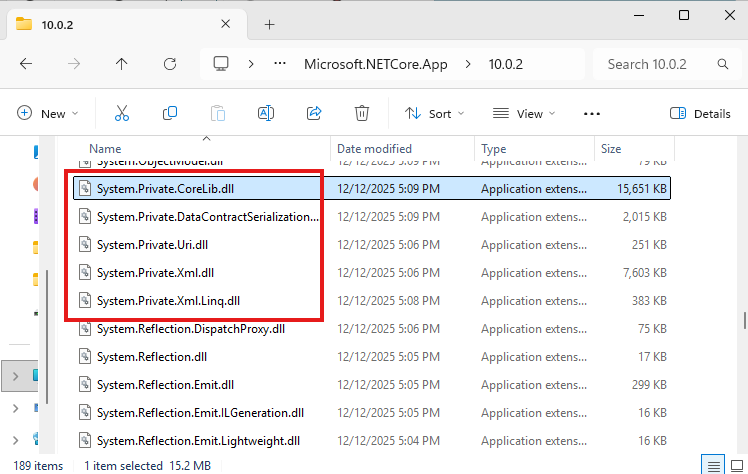 The different private implementation corelibs in .NET 10.
There is one reference assembly System.Runtime.dll acting as a facade corelib, forwarding type resolution requests to the DLL they are actually defined in. For this reason, this facade corelib is usually also the corelib you compile against when writing C#.
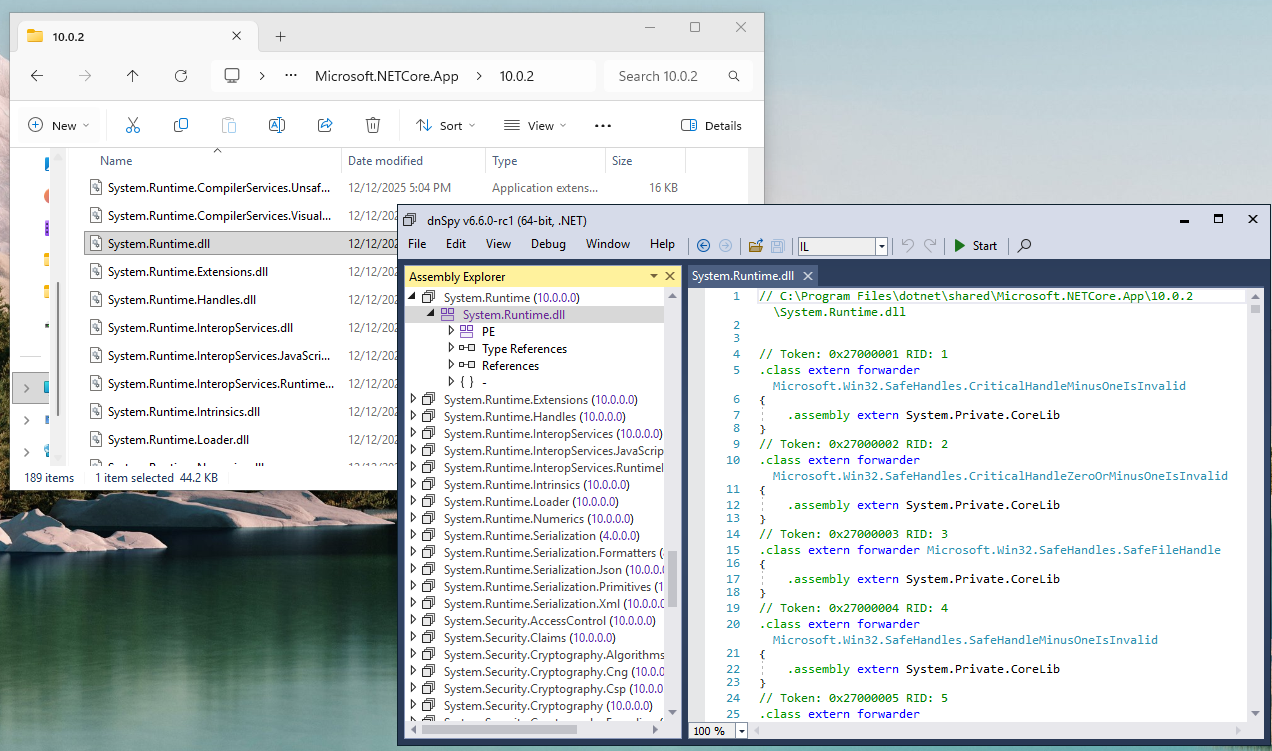 System.Runtime facade in .NET 10.
This causes a lot of confusion, because some types will thus be exposed by System.Runtime.dll but not be defined in the “main” implementation corelib (currently defined as System.Private.CoreLib.dll). For example, consider the following type name without an assembly specifier:
<table><tbody><tr><td><pre>1 </pre></td><td><pre><span>"System.Uri"</span> </pre></td></tr></tbody></table>
You may think resolving this should succeed because it is defined in System.Runtime.dll, and System.Runtime.dll is a corelib. However, System.Runtime.dll defines System.Uri as a type forwarder referencing System.Private.Uri.dll.
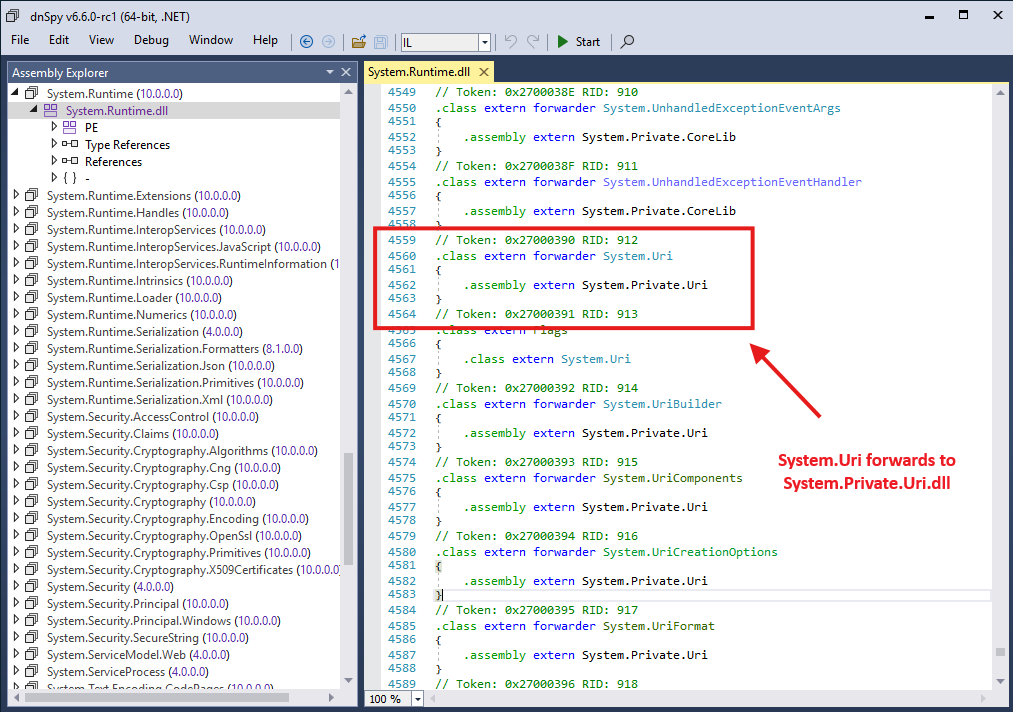 Forwarder type of System.Uri.
This DLL is not the main corelib of .NET, and as such the runtime will never even consider looking into it when looking for System.Uri, and resolution will fail. Therefore, in this case you will need the assembly specification to make the type resolution work:
<table><tbody><tr><td><pre>1 </pre></td><td><pre><span>"System.Uri, System.Runtime, Version=10.0.0.0, Culture=neutral, PublicKeyToken=b03f5f7f11d50a3a"</span> </pre></td></tr></tbody></table>
This is inconsistent: "System.IO.Stream" without an assembly specifier resolves fine while "System.Uri" does not, even though they are both exposed by the same public corelib System.Runtime.dll!
It is really unintuitive and not at all obvious until you dive deep into the inner mechanisms of it all.
My thoughts on FQNs
I do not work at Microsoft, so I have no way to verify this claim, but my conspiracy theory is that this extremely bizarre way of referencing types was designed by people that also worked on the JVM. It feels very much like the approach Java takes in .class files, which also uses strings for everything.
On a personal note, this mess has been the source of a very large number of bugs in AsmResolver (e.g., #109, #110, #222, #223, #224, #576, #598, #616, #646, #648, #748), and I am convinced there are at least a few more bugs lurking in my implementation by the time of writing this post.
But even if we ignore my skill issues, the choices just do not make any sense to me. It is a lot of extra logic for no apparent reason. The file format already features an entire system for storing metadata references efficiently that is nicely indexed and deduplicated using database tables. Why not use it?
Can we fix this?
One thing Microsoft has going for itself is backwards compatibility. Things that worked 10 years ago, usually still work today because their public API surfaces do not change every other week.
.NET is no exception to this. The file format has been surprisingly stable over its 20+ years of existence. There only have been a few minor metadata table format changes in .NET 2.0, and some previously unused bit-flags now have a meaning in .NET 10. This is actually a great feat! It really shows how well thought out and robust its design is and how much we can do with just runtime changes.
Custom attributes are just a bit of a sore spot. They work™, and for this reason, I doubt Microsoft will change anything about it. Somewhere along the way, the decision was made to make custom attributes the way they are, and we’re kind of stuck with it now.
 Probably Microsoft’s perspective
It is a bit strange, though, that there has not been a change at all yet. The format of custom attribute blobs is actually designed with versioning in mind. Each signature blob starts with 2 bytes indicating a version number. The runtime currently only recognizes version 0x0001 but in theory there could be a 0x0002 in the future.
 My perspective
My guess is that Microsoft just does not think it is worth creating an update (especially since attributes usually do not affect runtime behavior).
Which means I will probably keep being haunted by custom attributes until I stop being a .NET reverse engineer :).