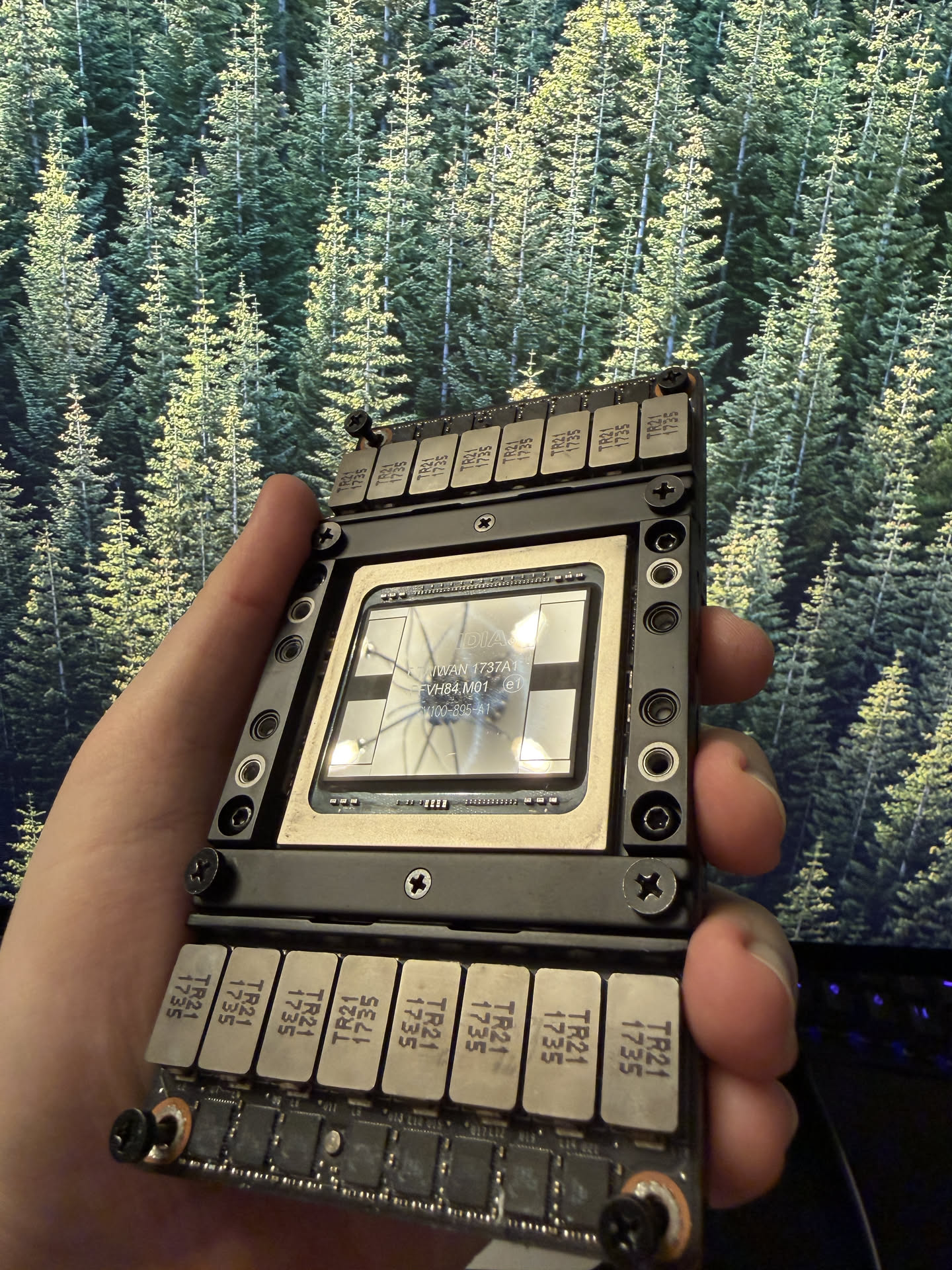
Decommissioned NVIDIA V100s and AMD MI50s are fairly cheap, $200 for 16gb and $400-500 for 32gb, for local experimentation. They are also very old. There's an enthusiast community keeping these two cards alive and working with current platforms and models.
Nitpick, but the V100 doesn't support bfloat16. The performance hit is not a big deal if you're fiddling with local models, but the card is on it's way out in terms of hardware features.
The MI50 does support bf16, but not the current edition of AMD ROCm. Vulkan support is good and the MI50 works with most major platforms (llama.cpp, vllm, etc.), but it's not without some pain points like manual recompilation. Fortunately the open source community has already paid most of your way.
The cooling requirements for these cards cannot be understated. A consumer grade GPU may throttle if in a small case without additional fans, but if given the same treatment a datacenter GPU will overheat itself idling. You will need to buy, at least, a bunch of decent 120mm fans to prevent this or invest in some water cooling.
I ultimately went with an AMD MI100 32GB ($950). I'm an AMD fan, current ROCm editions support it, and it was low-fuss to get things working. I'm debating getting a second so I can try out bigger models like qwen3-coder-next.
Had to stop there. Annoying. I can't stand AI use for writing. It makes any otherwise great article feel so disingenuous.
i've ran some multi vendor frankenstein setups before and sometimes it even works, so i'm curious to hear your experience with it.
It's prefill; slow prefill kills agentic workloads dead.
If you have 100,000 tokens at ~150tok/s per the OP, you're looking at:
You have: 100000 / (150/s)
You want: hms
11 min + 6.6666667 sec
Which is quite a wait indeed.Could you also do this for music and specifically sound synthesis? It would be awesome to vibe synthesize sounds and then see the VSTi parameters surrounding it.
In case anyone is interested, I’m using PCIE passthrough on a FreeBSD host to a Linux guest with an older Pascal card. It’s worked great and I’ve been thinking about putting a nicer card in there. The SXM route seems great, but I’ve been burned (almost literally because of the heat) by DC components before.
I also use Qwen 3.7 27b at work and I agree with the author: it is perfectly capable of the jobs I give it.
sigh
Some of us just write that. AIs had to learn it from somewhere.
I don't think this is a fair characterization of the situation. I use frontier models via API pre-paid tokens every single day, and I can barely rack up $100 per month. The fact that we figured out how to burn double this in 20 minutes is impressive, but I don't think it reflects the reality that many are experiencing right now. There are some exceptionally gluttonous approaches to harnessing LLMs that I think are serving as convenient straw men in these discussions.
Paying for the API will almost always be more economical than self-hosting equivalent infrastructure. I am not against self-hosting, but the article suggests a primarily economic motivation for this effort. If you are consuming fewer than 10^9 tokens per month, I really don't think it's worth your time to try and compete with the hyperscalars. Most of the money is to be found in the integration of this technology with existing businesses.
- In 2017, the v100 was a ~$10,000 GPU. I believe there was a PCI-e version but this is probably so cheap because SXM2 is going to be harder to use;
- A 5090 has 1800GB/s of internal memory bandwidth (compared to 900GB/s in the 9 year old GPU). Of course a 5090 is substantially more expensive;
- A 5090 has ~21k CUDA cores vs ~5k;
- The current $10k NVidia GPU is the RTX 6000 Pro w/ 96GB of VRAM. It has slightly more CUDA cores but it otherwise pretty much just a 5090. This is unsurprising. NVidia uses VRAM for market segmentation.
Consider this: in 5-10 years, the trillions spent on AI data centers will likewise be sold for scrap most likely. That's how short the runway is for OpenAI and Anthropic to recover that investment.
Anyway, I'm kind of impressed the author managed to get this all to work. I don't think it even would've occurred to me that someone had made an SXM2 adapter, particularly because it's not even used anymore. Like props to whoever did that.
Because humans write exactly like this /s
Also, the cheap HPE pulls on eBay need some proprietary HPE magic to work, and I have yet to see anyone figure that out.
I've been playing with picking up a card in this class but haven't been able to justify it when running the Qwen3.6 MOE model on a 6800xt is tolerable for the type of projects I've been willing to point local AI at.
For a language like C++ where modules are split into definition (.h) and implementation (.cpp) parts, one choice of prefix would be all the header files for the project (which aren't likely to change much).
More generally the idea would be to have an agent that had cached-prefix reuse as it's primary context management goal.
Another possibility, to support caching of files that have since changed, would be for the agent to build the context as a fixed prefix reflecting some or all of the codebase in its start-of-session state, then append any changes to that, with appropriate prompting to only use the latest definition of a function.
e.g.
Say file A initially contains functions X, Y and Z, then the prompt prefix is built to include X Y Z. If the user then modifies Y -> Y', then just add that to the context, so that the cached prefix is unchanged, giving X Y Z Y'.
V100 came as sxm2 and sxm3. And it was 16 and 32gb.
HGX is DGX with extra toppings.
Isn't a rasbpi with 16gb of RAM $300 now?
This is also a problem for all of the Mac local LLMs. Macs are a great way to get a lot of high bandwidth memory, but their compute is very far behind current gen dedicated GPUs. Some of the expensive Mac Studio setups allow you to run very large models with usable tokens/s, but you can be waiting a long time for it to get to the point of generating those tokens.
Classic LLM writing style.
Even more interesting: it'll devalue all of SaaS and the entire US tech sector.
We might have just shot our most valuable non-AI tech products in the foot.
I can write competently, but it's natural direction is towards emotional rhythmic flow that can convey emotion/passion...but which for scientific writing, can get in the way of clear clean communication. So, I write what I mean,and Claude straightens it out...and these days (i.e. not last year), it doesn't lose my meaning that often. And since I wrote it first, these AI-isms appear less frequently, and if they do, I revise them away.
There's some virtualized desktop server stuff too. Run a bunch of desktop sessions on a beefy computer and send a video stream to desktop players. With the right codec settings, the latency is probably ok for many games.
I'm sure manufacturers would love saving a dollar per card, and OEMs would appreciate eliminating the support calls from "I just bought a new $2500 gaming PC and no video" because they plugged the monitor into the iGPU instead of dGPU.
2X NVIDIA Tesla V100 32GB NVLink Water Cooled X99 E5-2686v4 AI Workstation PC
Item Quantity
Intel Xeon E5-2686 v4 CPU 1
2U CPU Cooler 1
Jingyue X99 Motherboard 1
DDR3 Memory 32GB
SSD 480GB
AMD Radeon R5 240 4K Display Card 1
NVIDIA Tesla V100 32GB SXM2 GPU 2
NVLink SXM2 Dual-GPU Baseboard 1
Corsair Water Cooling System 2
850W Bronze Power Supply 1
Dual-GPU 300G NVLink SXM2 Baseboard 1
8654 Data Cable 2
8654 to PCIe Adapter Card 1The thought of throwing away working cards sounds so bizarre to me. I can't believe companies would dispose them into the landfill like that, it is at least worth giving away for refuse.
Counterpoint: the fiber buildout during the dotcom boost. That crashed the economy pretty hard when the bubble burst, but we are still benefitting from all the dark fiber that was arranged for and built out back in that era. A lot of today's ISPs were able to grab up that fiber after the bust for cents on the dollar.
Assume that OpenAI and Anthropic go bust, which at least one of them likely will, and possibly a fair few of the datacenters that are under construction will also collapse. Someone will be able to snatch these physical assets again for cents on the dollar and run open-weight models on them or train new ones.
The problem isn't (and no, this is not an AI tell, everything I write here got typed on a 2022 M2 MBA by hand) the assets, they will be put up for productive usage, just as with any other large bankruptcy or bubble in history. The problem is the "IOU" that is being passed from one hand to the next like a hot potato. Assuming a recovery of, maybe, 20% after the collapse, at 1.6 trillion dollars of assets under management by some kind of private investment/debt we're looking at about 1.3 trillion dollars in valuation that is going to be wiped out.
And given that a lot of the investment market is actually backed by pension funds... this is going to be a bloodbath. Not only will there be a lot of people laid off in addition to the layoffs we already saw "due to AI", but when the pension funds and thus their payouts collapse? We'll see retirees flooding the employment markets who just try to make a living, rendering the situation for everyone else even worse. Flipping burgers used to be a gig for students, these days students compete with people of all ages desperate to survive - and thus desperate to undercut others in wages.
Another problem will be the capacity buildout in the semiconductor industry. It's already heading toward an oligopoly after numerous boom-bust cycles: you only have two and a half GPU chip vendors (NV, AMD, Intel), two vendors of general-purpose CPU vendors (Intel and AMD - I exclude Apple because they do not sell their CPUs to any third party and ARM because 99% of non-Apple ARM chips do not go towards servers, desktops and laptops), three RAM manufacturers (Samsung, SKhynix, Micron) and two and a half physical chip manufacturers (TSMC, Samsung, Intel). When the AI bubble bursts, it will be one of a hell of an effort to prevent at least one actor from going bankrupt.
[1] https://prospect.org/2025/11/19/ai-bubble-bigger-than-you-th...
Slowly but surely, I had to remove my beloved lists, emojis (though LLMs do less of that now, maybe I can incorporate them back), and emdashes.
I’m really in the “who gives a shit” camp on something like this. A lot of people probably have an LLM punch up a blog post. It is good at turning bullet points and notes into prose, fixing run-ons, etc. Maybe I’m naive but I trust that the kind of person who posts a clearly noncommercial post like this on HN gives a crap enough that they read the final draft and confirmed it isn’t inaccurate.
This pearl-clutching about the mere use of AI regardless of how responsible or appropriate the use is, seems like a professor in 1985 throwing an essay back in a student’s face as “this was obviously printed from a computer and not typewritten like a PROPER essay! I can tell just by looking at it!”
In any event, not all of us have a unique writing style worth preserving just like not all of us can write clear and clean code. Just saying.
The project is still very cool, but it’s a little less enjoyable to read when everything sounds the same. It would be just as annoying for people to manually write in a corporate/marketing style, because humanity is what makes the small web interesting.
Not from individual human content, that's for sure - maybe MLM marketing copy? Sleazy 4AM ads?
I mean, every time this response comes up, I keep asking the person to point at something written prior to 2022 that gets 80%+ on the LLM detectors, and yet no one can find anything.
Maybe you, postalrat, can find something written in this style that was published prior to 2022.
The resulting economic crash will affect everyone, we're (IMHO) looking towards a dotcom-bust level wipeout. And many SaaS and other companies run asset-lean (i.e. they have no server hardware because that's all cloud, no real estate because it's all either wework or conventionally rented), margin-lean (the VC business model requires that, as the basic recipe is to achieve market domination by burning cash) and cash-lean (often enough, it's less than a quarter of expenses on the bank accounts).
All that "lean-ness" looks great on an investor's quarterly release sheet: no massive amounts of wealth tied up in assets and no cash sitting around on bank accounts that could be released towards investors as dividends or, if it comes from third parties, costs the company interest... but it prevents resiliency against crises.
What multiplies it very quickly is when you start feeding them with test suites and "Ralph loops" that run until the test suites pass, or complex chains with lots of sub-agents being triggered.
If you're sitting there watching everything, it will be hard to burn all that much even if you're running multiple things in paralle.
A lot of the current AI business is FOMO and vanity metrics. Nobody really wants to acknowledge the support tickets where the first three responses are the customer cursing because they didn't appreciate being handed off to a chatbot, or the reworks, or the compliance/policy/privacy concerns, or the internal friction and brand damage it's causing.
Right now, a lot of that is being dazzled away by how "cheap" the alternative is, since it's built on an unsustainable cost base. It's like someone opened a "restaurant" where the food was actually supplied by making a bazillion new DoorDash accounts to claim promotional credits and having them drop the food at the "kitchen". During the initial phase, the customers will forgive that the burger was cold because it was $1.79.
Once the funny money runs out and services start shuttering or pricing for actual profitability, people are going to ask about actual quality and return on investment. There will be a demand rollback.
Even if you can do it cheaper with an open-model running on fire-sale hardware, we probably don't need 500 "chatbot listens and transcribes your meeting" services that weren't that much better than dictation software running locally on a Pentium III. We probably don't need AI-powered support experiences that manage to be worse than actually keyword-searching your company's Confluence. We probably don't need to be spinning up coding agents to spend 15 minutes discombobulating and bibblewabbling and re-reading 82 billion tokens of context before making a two-line change that an actual developer with learned experience in the code would make in 15 seconds.
I’m much more willing to read typos and bad writing than LLM writing. If I want to read the LLM rewritten version, I can run an LLM over the original writing myself. I have not yet found true that anyone is better at prompting than anyone else in a way that suggests that I wouldn’t get substantially the same results myself. Thus, I don’t think providing the version that has passed through the telephone game is accomplishing something that couldn’t be done by readers later. I have spent the vast majority of my life reading the original writing styles of people and didn’t have an issue then. I’m not convinced a problem I had was solved when we started post-processing writing with an LLM.
I feel like writing could use a similar harness, where it attempts to minimally reword the authors sentences, perhaps just tweaking grammar, spelling, etc. In the coding example i think the human code would be near unchangeable, the LLM would pivot around it - but in the writing example i think the human writing would have to be more mutable. I imagine it would be a configurable setting.
I've not really seen a system which focuses on this human<->LLM look, but it feels interesting to me.
It grinds my gears how so many people just talk about my writing style instead of the content.
If they way you thought was to run a bunch of if statements, generate content, then feed that content back to get a "score" of what seems the most plausible, run the if statements again, and adjust / merge responses, then you would write similarly. The recognizable cadence of LLM generated content is pretty clearly the result of a lot of if statements being fused together.
I have then used a blog post of mine from 2021. QuillBot gave me 8%...
The King James version of the Bible came out at almost 100% AI generated a while ago. It was the HN front page.
Stop thinking that if someone writes in a way that is fun or looks like what you would think an AI writes, then it is AI generated. Loads of the time it is, but sometimes it's not, and it really hurts those like me.
Don't use Quillbot; not sure why, but their model is reluctant to classify anything as AI generated. I ran into this when proof-reading a students Phd - ChatGPT, Gemini, CLaude (and others) all agreed it was AI generated, but Quillbot said it wasn't.
So the language harness makes sense to me, but corps are already cracking down on token use ( and such a harness would likely only add to the cost ). The other question is whether the people, who could benefit it would even recognize it as a problem though.
Your previous blog posts didn't trigger any LLM detector (go on - check for yourself).
I don't think that commenting on every article is going to make the posters suddenly decide to go back and rewrite it by hand. Some of them probably don't even speak English natively. The comments are getting more tiresome than the AI prose at this point.
Hopefully in a year or so the LLM output won't be so janky and obvious, so this might just be a phase everyone has to pull through.
Running Alpine/Gentoo/Devuan isn't that expensive. (I'm assuming the cost is time/effort when I say this; let me know if there's another relevant metric)
FWIW, I tried Void and Devuan, but that may have been too early for me then. Naturally, now that stuff mostly works, I am debating whether I can make that attempt again;p
None of the 3x older blogs of yours that I tried went above 5% AI generated.
Maybe you're spending so much of time with the LLM that you are talking like it; in which case, take an old blog and a recent blog, give the prose from them both to you favourite LLM and ask them if the same author wrote both. I just did that on ChatGPT and on Gemini, and both found that it is extremely unlikely that the same author wrote both.
Look, if all the SOTA LLMs agree that your recent blogs sounds generated, you can't blame the reader, can you?
It thinks this is AI: “I bought a datacenter GPU that doesn’t even have a normal PCIe connector, stuck it in my gaming PC with an adapter, and now I have 32GB of VRAM across two GPUs running a 27 billion parameter model at 32 tokens per second.”
There’s nothing AI about that. Not all SOTA LLMs agree, hell, none of them do. The same exact example I sent here gives me 0% in some, 10% in others, 100% in GPTzero.
I already had an RTX 4080. 16GB of VRAM. Good enough for gaming, not good enough for the models I wanted to run locally. The next step up in GPU land is either spend a fortune on a card with more VRAM, or find another way.
I found another way.
I bought a datacenter GPU that doesn’t even have a normal PCIe connector, stuck it in my gaming PC with an adapter, and now I have 32GB of VRAM across two GPUs running a 27 billion parameter model at 32 tokens per second. The whole thing cost me £200.

This is a Tesla V100 SXM2 16GB. It was designed for NVIDIA’s DGX servers and hyperscaler racks. The SXM2 form factor means it does not have a PCIe slot. It does not have display outputs. It does not have a normal power connector. It sits on a proprietary board inside a server rack and communicates over NVLink.
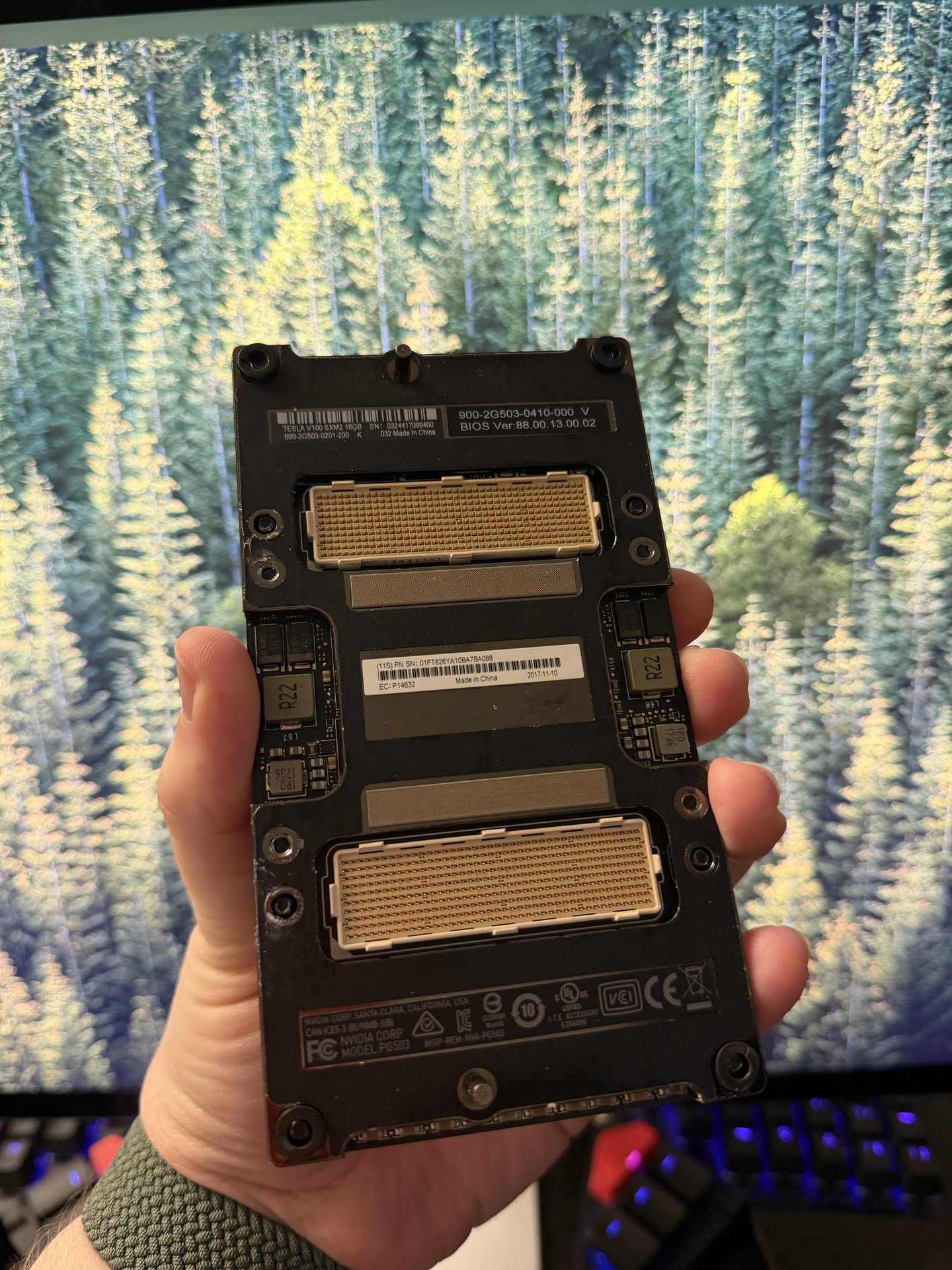
You cannot plug this into a motherboard. Not without help.
But here is the thing: this is a Volta GPU with 16GB of HBM2 memory, 5120 CUDA cores, and I picked it up for about £150 on eBay. The compute is still real. The VRAM is still real. And the memory bandwidth is where it gets genuinely surprising.
HBM2 is a different class of memory. The V100 has a 4096-bit memory bus delivering 900 GB/s of bandwidth. To put that in perspective, my RTX 4080 with its fancy GDDR6X manages 736 GB/s. The V100 from 2017 has 22% more memory bandwidth than a GPU that launched in 2022.
And it is not just NVIDIA’s consumer cards that lose. Apple’s M3 Max does 400 GB/s. The M4 Max does 546 GB/s. The brand new M5 Max, which will set you back over £3,000 for a laptop, manages 614 GB/s. A GPU from 2017 beats every Mac on the market.
The closest AMD competition to my 4080 is the RX 7900 XTX, which does 960 GB/s on its 24GB of GDDR6. Technically that edges out the V100, but the 7900 XTX costs £700+ and ROCm support for LLM inference is still rough compared to CUDA. The V100 gives you 94% of that bandwidth for less than a quarter of the price, and it just works with llama.cpp.
The only consumer GPU that comfortably beats it is the RTX 5090 at 1,792 GB/s, and that card costs over £2,000. For LLM inference, where memory bandwidth is the bottleneck that determines your tokens per second, this matters more than almost anything else.
The only problem is the connector.
Turns out, someone makes an SXM2-to-PCIe adapter. It is not made by NVIDIA. It is not officially supported by anyone. It is a bare PCB with the SXM2 socket on one side and a PCIe edge connector on the other. I paid about £50 for it. Half of that might just be the copper.
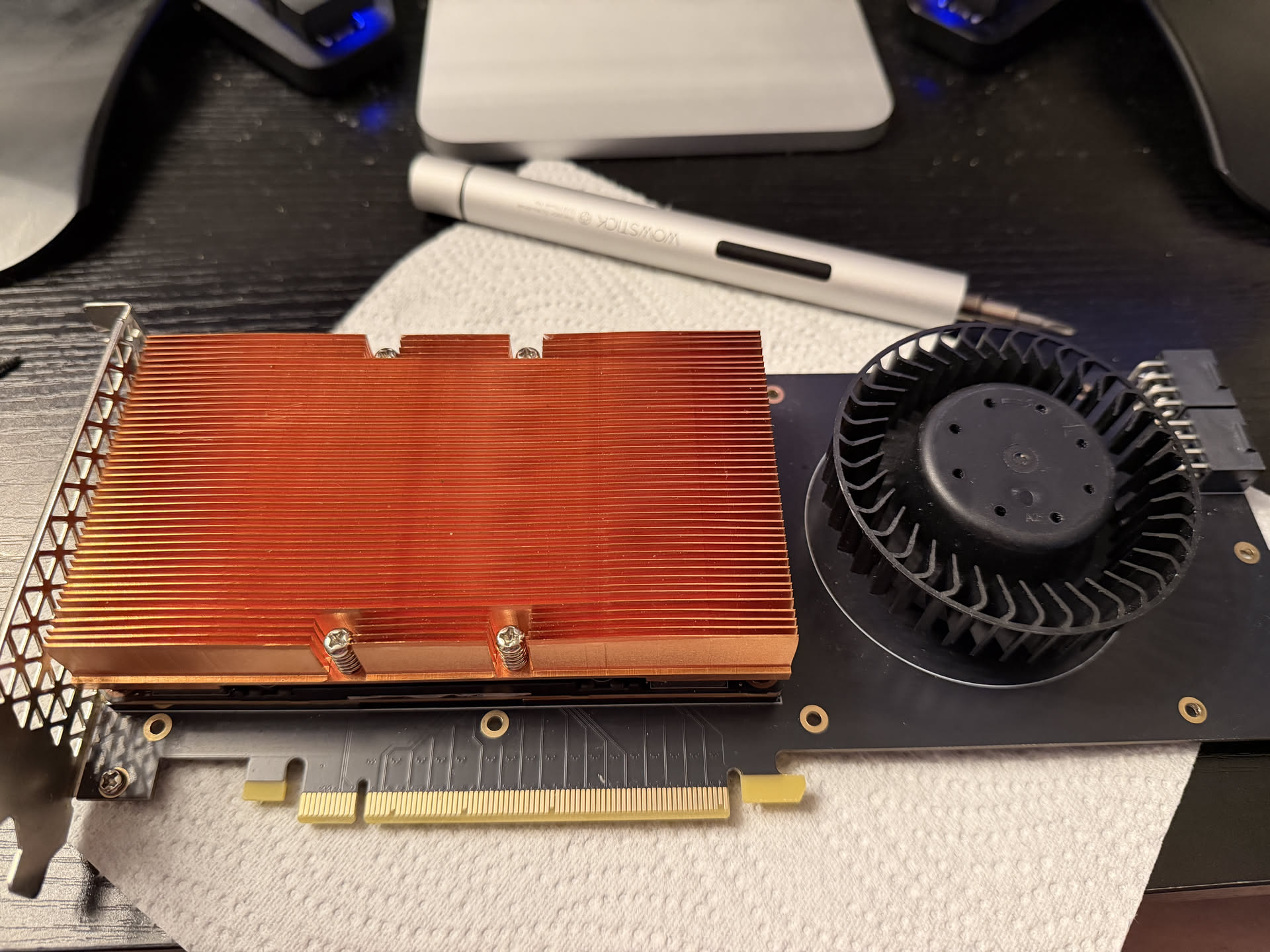
So for about £200 total, I had a 16GB VRAM GPU that could slot into my motherboard alongside my RTX 4080. That is 32GB of total VRAM. A single RTX 5090 with 32GB costs over £2,000. I am not saying this is the same experience. I am saying the VRAM is the same.
Before I could do anything useful with the V100, I had to deal with the fan.
The V100 SXM2 was designed to live inside a 2U server with industrial cooling. The fan on the adapter is not subtle. It is not quiet. It is not something you want in a room you also sleep in.
I measured it with my Apple Watch:
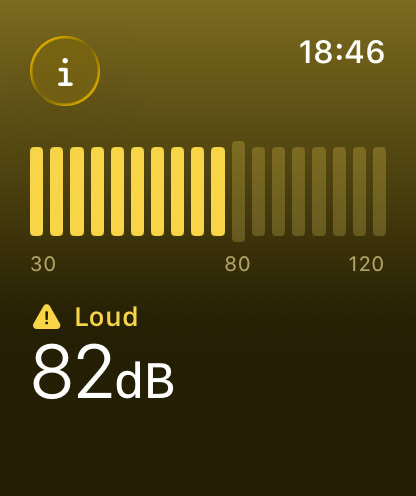
82 decibels. That is somewhere between a garbage disposal and a lawnmower, well past “loud PC” and into “should I be wearing earplugs in my own house” territory.
And the worst part: you cannot control it. I tried nvidia-smi, I tried scanning for it on Linux, I even tried Afterburner on Windows (more on that later, the whole setup barely works on Windows). Nothing. The fan on this adapter is not designed to be controlled. It is designed to run at 100%, forever, inside a server rack where nobody has to hear it.
Here is me trying to figure out the fan pinout. I guessed it might be a standard case fan pinout on a weird connector, so I jammed two jumper wires into VCC and ground and prodded a 9V battery against them. It spun. And it was so much quieter than the 12V it normally gets:
Your browser does not support the video tag.
That confirmed the pinout and gave me hope that the fan could actually be tamed.
The 9V battery test told me the pinout was standard case fan territory, just with a weird connector. The next question was whether the fan would actually respond to PWM control if I wired the tachometer and PWM pins to my motherboard.
So I shoved some jumper wires into the connector and jammed the other ends into a spare fan header (turn your volume up):
Your browser does not support the video tag.
It works. The motherboard can read the RPM and the fan responds to PWM. I keep it at 10%. It never goes above 50C even at full load, and I cannot really hear it.
Now I just needed a proper cable instead of jumper wires held in by hope.
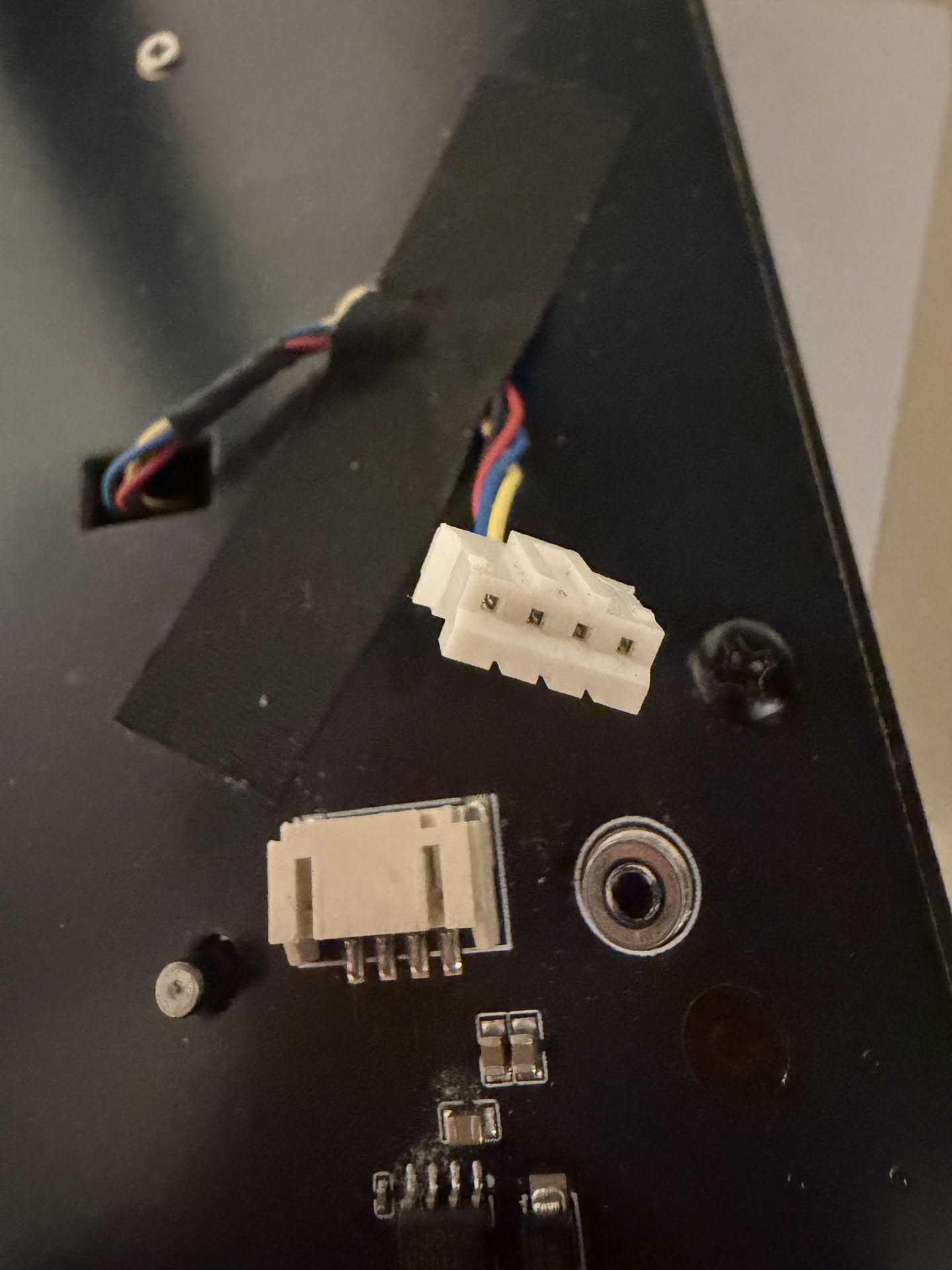
The fan connector on the adapter is a small JST PH2.0 plug with four pins. Motherboard fan headers use a standard 0.1 inch (2.54mm) pitch. The GPU fan uses a 2.0mm JST PH connector. The pins are closer together and the plug is smaller.
The solution was a 2.54mm male to PH2.0 female jumper cable. The female PH2.0 end plugs into the fan’s tachometer and PWM pins, and the male 2.54mm end goes into a spare fan header on the motherboard:
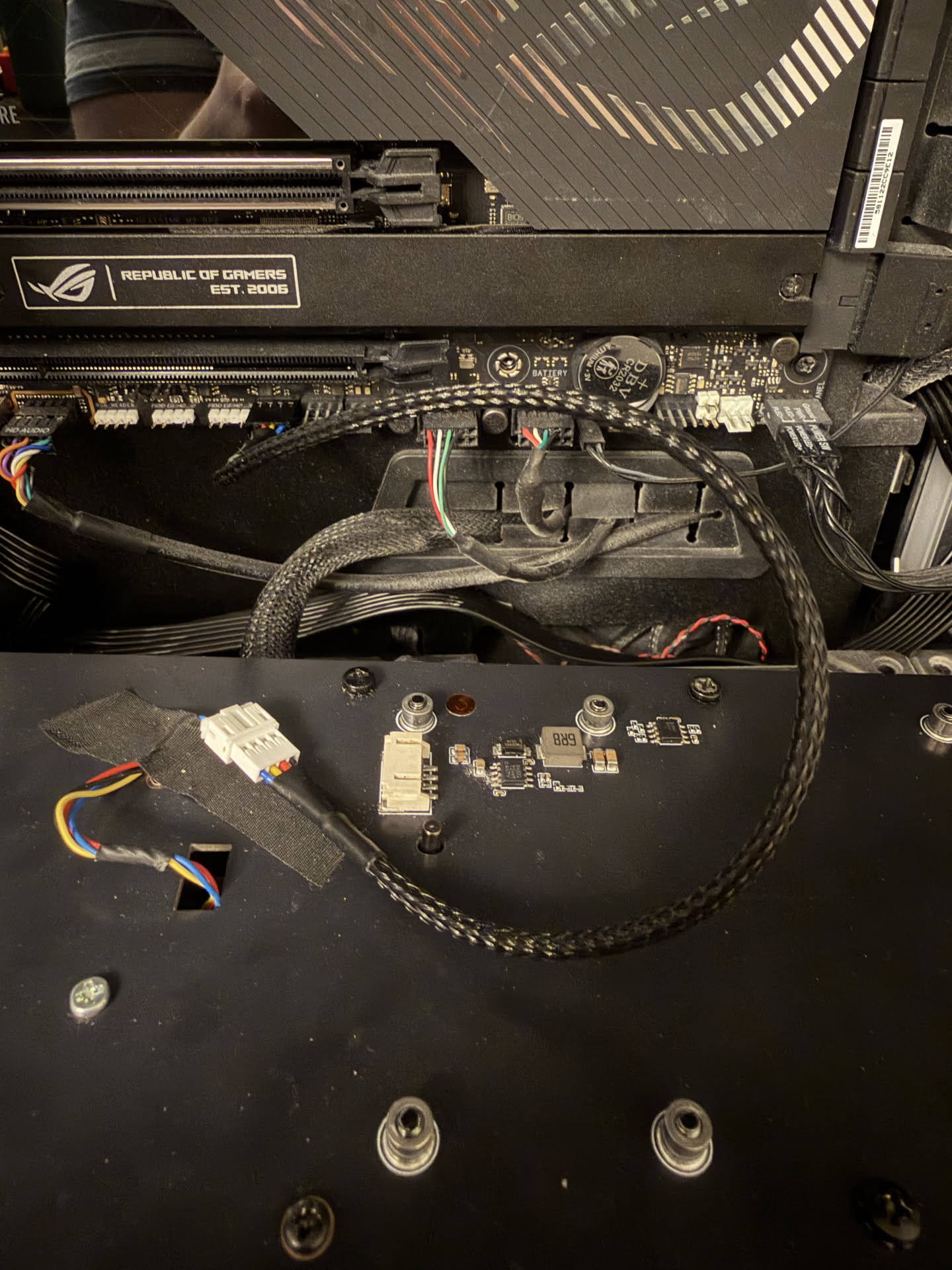
That went from 82dB ear damage to something I can actually live with.
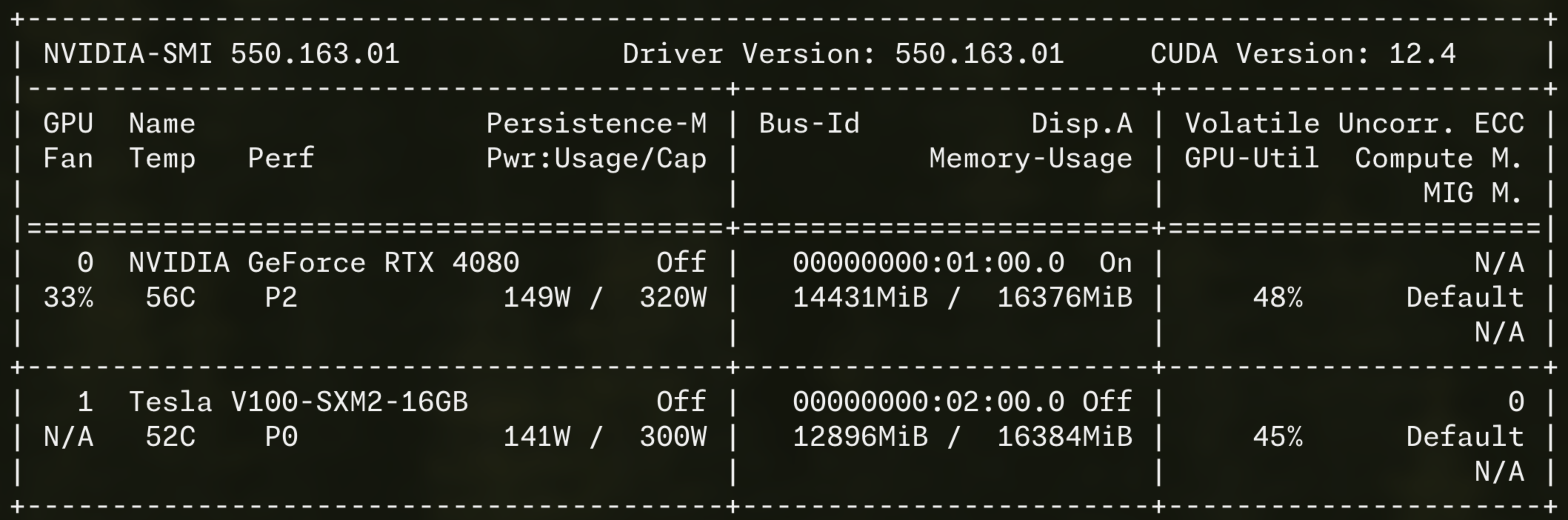
With the fan situation handled, the V100 slotted right in alongside my 4080:
llama.cpp can split the model across both GPUs using tensor splitting. It pipelines the layers across the PCIe bus so the 4080 handles some layers and the V100 handles the rest. It is not as fast as having a single GPU with 32GB, but it works, and it cost me roughly 10% of what a 32GB GPU would cost. For what it is worth, the most I have ever seen the V100 pull is around 150W. That is not nothing, but it is not out of this world for a GPU running local LLM inference.
The V100 also comes in a 32GB variant. It costs more than double what I paid, but we are still talking about a few hundred pounds for 32GB of HBM2 memory on a single card. Two of those would give you 64GB of VRAM for roughly 20% of what an RTX 5090 costs in today’s market.
You can also cluster them. The SXM2 format supports NVLink natively, which means if you are building a proper multi-GPU setup, these cards can talk to each other at very high bandwidth. Even through the PCIe adapter, the tensor split performance is solid.
This part was surprisingly smooth thanks to NixOS. The V100 is a Volta chip. NVIDIA dropped Volta support starting with driver branch 560. The last driver that supports both my RTX 4080 (Ada) and the V100 (Volta) is branch 550.x, which maps to nvidiaPackages.legacy_535 on NixOS.
That driver only supports CUDA up to 12.2. Current nixpkgs ships CUDA 12.6 minimum. So I had to pull CUDA 12.2 from nixpkgs 24.05.
Also, the driver requires kernel 6.6. Newer kernels are not supported with the legacy driver.
And here is a weird one: even though this is a headless inference server, services.xserver.enable = true is required. Without it, the NVIDIA kernel modules do not load.
NixOS made most of this straightforward. Here is the key configuration for getting the driver and kernel right:
boot.kernelPackages = pkgs.linuxPackages_6_6;
hardware.nvidia.package = config.boot.kernelPackages.nvidiaPackages.legacy_535;
services.xserver.enable = true;
services.xserver.videoDrivers = [ "nvidia" ];
And for loading CUDA 12.2 from an older nixpkgs since the current one only ships 12.6+:
nixpkgs.overlays = [
(final: prev: {
cudaPackages_12_2 = nixpkgs-cuda.legacyPackages.${prev.system}.cudaPackages_12_2;
})
];
The important thing is: it works. Both GPUs show up, CUDA is functional, and NixOS handled the whole thing elegantly. If you want to replicate this, the entire machine definition is in this commit on my dotfiles repo, including the llama.cpp service definition and the custom build pinned to the right version.
I am running Qwen3.6-27B-MTP quantized at Q5_K_M, which comes in at about 19GB. With both GPUs, the entire model fits in VRAM with room for context:
| Setting | Value |
|---|---|
| Model | Qwen3.6-27B-MTP Q5_K_M (19GB) |
| Context size | 128k tokens |
| GPU layers | 99 (all offloaded) |
| Tensor split | -ts 1.0,1.0 (even across both GPUs) |
And the performance:
| Metric | Value |
|---|---|
| Inference speed | ~32 tok/s |
| Prompt processing | ~133-160 tok/s |
32 tokens per second is fast enough for interactive use. It is faster than most cloud API endpoints when you factor in network latency. And this is with tensor splitting across two different GPU architectures connected by PCIe.
I want to be clear about something. This is not “good for a local model.” This is not “acceptable if you lower your expectations.” Qwen3.6-27B ties with Claude Sonnet 4.6 on Artificial Analysis’s Agentic Index. It beats Sonnet 4.6 on MMMU-Pro and Terminal-Bench 2.0. A 27 billion parameter model running on secondhand hardware is genuinely competitive with the latest cloud models from Anthropic.
Yes, Sonnet 4.6 edges it out on GPQA and SWE-Bench Verified. It should, it is a massive proprietary model. And yes, if you want the absolute best, Opus 4.8 exists. It also costs more per 20 minutes of heavy use than I paid for this entire GPU and adapter setup combined. But the gap is shockingly small. We have reached the point where the model you run in your bedroom is in the same conversation as the ones that charge you per token.
The MTP in the model name stands for Multi-Token Prediction. Normal LLM inference predicts one token at a time. Predict one token, accept it, predict the next token, repeat. MTP changes this by having the model predict several future tokens at once, then verifying which ones were correct. Accepted tokens are essentially free. Wrong predictions fall back to the normal path.
The result is roughly 1.5-2x faster generation with no accuracy loss. On my setup that means inference goes from around 32 tok/s to potentially 50-60 tok/s when MTP hits its stride, especially on predictable output like code.
The catch is that MTP support in llama.cpp is new. The version in nixpkgs does not support the Qwen3.6 MTP architecture, so I had to build llama.cpp from source at a specific commit that added support. On NixOS this is painless. I have a custom derivation pinned to the right commit, and the whole thing is reproducible. When I want to update the model or change the llama.cpp version, I change one line in my config, run nixos-rebuild switch, and I am done. No dependency hell, no reinstalling by hand, no wondering whether I built against the right CUDA version.
The Qwen3.6-27B model supports image input through a separate multimodal projector file (mmproj). This is about 928MB extra, and it is fascinating.
The way it works is that a vision encoder (similar to what ChatGPT and Claude use) takes image pixels and translates them into the LLM’s token embedding space. The model does not “see” the image the way a human does. Instead, the vision encoder compresses the image into a sequence of vectors that live in the same mathematical space as text tokens. The LLM then processes those vectors as if they were just another sequence of tokens.
What this means in practice: you send the model an image URL alongside your text prompt, and it can describe, analyze, and reason about what it sees. The entire vision capability adds about 1GB to the model size. That is it. One gigabyte and your local LLM can read images.
In llama.cpp, the flags are straightforward:
--mmproj /mnt/nas/llamacpp/mmproj-F16.gguf --mmproj-offload
The --mmproj-offload flag loads the vision encoder onto GPU alongside the model, so you still get fast inference even with images.
I use this setup with OpenCode, which is an AI coding assistant that can run against local models. The LLM server runs on my desktop, but I do not use it from that machine. I use it from any other machine in my house over the network, or from outside over Tailscale (but that is a blog post for another time). Pointing OpenCode at the llama.cpp server is as simple as setting the API URL. The model runs locally, the responses are fast, and nothing leaves my network.
All the models live on my TrueNAS server, mounted via NFS:
fileSystems."/mnt/nas" = {
device = "truenas-nfs.tymscar.com:/mnt/oasis/services";
fsType = "nfs";
options = [ "nfsvers=4" "_netdev" "auto" "nofail" ];
};
The llama.cpp service depends on mnt-nas.mount, so it does not start until the NAS is available. This means I can store terabytes of models without worrying about local disk space.
The entire OS runs from a Corsair MP600 MINI in a DockCase USB-C NVMe enclosure. No internal drive modification needed. When I want to game, I unplug the drive and reboot into my main Windows install, and game normally on the 4080. When I want to do LLM stuff, I plug the drive back in, reboot into NixOS, and both GPUs are available.
This is not as elegant as a dual-boot menu, but it is simple and it works. No GRUB, no bootloader conflicts, no partition management. Just a physical switch.
The V100 occasionally disappears from lspci and nvidia-smi after a warm reboot (where the OS restarts but the motherboard stays powered). This seems to be an ACPI enumeration issue with the PCIe slot. A cold reboot (physically power off, wait a few seconds, power back on) always restores it.
When the V100 is absent, llama.cpp fails to start because it cannot fit the model on a single 16GB GPU. The service crash-loops until the GPU comes back. This is not a big deal in practice since I am usually around when I reboot, but it is worth knowing about. It gives me the same vibes as the infamous AMD GPU reset bug, where passing through an AMD GPU to a VM and then shutting it down leaves the GPU in a state that only a full host power cycle can fix.
For £200, I got:
The only real cost was the noise, and I solved that with £2 worth of jumper cables and a bit of connector spelunking. The V100 is not the fastest GPU for inference, and the tensor split across two different architectures is not as clean as a single GPU. But for the price, it is absurdly good value.
If you want to run proper models locally, look at the secondhand server GPU market. You do not even need an existing GPU. I happen to have a 4080 in my gaming PC, but a single V100 in a cheap server box would give you 16GB of VRAM and a perfectly usable local LLM for very little money. The V100 SXM2 is not the only option. The P40 gives you 24GB for similar money, though it is slower and has no Tensor Cores. The V100 32GB variant costs more but still undercuts any consumer GPU with that much VRAM.
Just be ready for the fan.