There are other great examples of TUIs that i've seen around the web:
https://github.com/ratatui/awesome-ratatui
https://terminaltrove.com/explore/
https://github.com/rothgar/awesome-tuis
But I think we will swing back to using GUIs when we find a performant way of making them, I don't know what it is yet but surely someone is working on this.
TUIs look good to look at though!
I think people are confused and think they like TUIs because they like them being keyboard driven etc. But this could all be done with a GUI.
The other factor is probably just fashion. Similar to how some kids are now listening to music on cassette tapes, which are objectively worse than other media in almost all respects. The less cynical take is it's like vinyl: it does come with compromises but gives us back some of the things we lost over the years.
The actual interesting text-based interface is the CLI. I've seen a few examples of TUIs that really should be a CLI and would be much more useful as such.
- frameworks for tui development, including react-like DOM shit
- further ad-hoc specs building on top of ANSI escape codes for finer control
- maybe a scripting language
Display technology has seen so much progress in the past decades. Apple marketing has taught us about "Retina" displays with pixels so small that you can't tell them apart without a microscope. We get these very rich and colorful desktop environments but we actively decide to not use any of that.
Now, I get that a TUI can look incredibly crisp with proper text rendering, kerning, ligatures, nerd fonts and so on, but still with all that, at the end of the day we still have a thingamajig that implements a VT100. It is a strict subset of what could potentially be drawn with a proper GUI framework.
I understand that TUIs can run over SSH channels, can be juggled with Zellij/tmux/mprocs -- as such they are composable in the sense that they can be used in a way the author(s) didn't think of. It's been a while since I've done any of that personally, and I for one think it's a bit of a cop-out that the Claude Code integration in PyCharm is just the TUI [1] inside a terminal emulator inside my IDE when it could be so much more, just to provide one example.
The article shows off an strace TUI, and it's not like I can't see the benefits of making strace output more browsable. What I don't understand is why that must happen inside a terminal window where (for instance) all text must have the same font and size.
So what is the appeal? I'm asking in good faith. Is it because the perceived alternative is another run-off-the-mill Electron RAM guzzler, because there aren't any _good_ GUI widget frameworks? Is it the multi-platform aspect?
If all we work in are these super-lean TUIs maybe we don't even need so powerful computers or such high-DPI displays anymore?
I'm genuinely puzzled, but interested to know how TUIs appeal to other people.
1) which, I understand, is itself a React app with a console renderer!
- TUI libraries like Lipgloss and Bubbletea really allow users to build a rich experience nowadays. Really anything from https://charm.land is well-polished and a joy to use.
- Kitty image format works great and allows for Avatars, image previews, etc, which helps immensely make slk feel like a Slack client and not an IRC client.
React-ncurses FTW
- It opens to the editor mode rather than the gameplay mode on launch
- It makes a .run/ directory next to the executable if one doesn't already exist
- It makes a timestamped directory within .run/ for this current debug run
- It automatically records stdout to stdout.txt, stderr to stderr.txt, and a crash.txt if the game crashes, in the directory for this run
- When the “take debug screenshot” function is invoked (which can be done by pressing F12), it saves a timestamped (based on time since executable launched) screenshot in the directory for this run
- Editor actions and 3D camera movements are recorded to playback.txt in the directory for this run
With all of this in place, I can do a debug build, run the game, do something in the editor, and take one or more screenshots where things went wrong. Then, Codex can see the log files and screenshots and try to diagnose the problem. When attempting to fix the problem, it can automatically recompile the debug build and rerun it with a launch option that plays back the latest recording file, which does the same sequence of editor actions/camera movements and takes screenshots at the same points in the process. Then it can compare this to the initial recorded run and see what needs to be fixed.
We could be having a GUI renaissance right now but for various primarily aesthetic reasons people are churning out TUIs, and personally I think it's a huge mistake.
Yes, there are things like https://github.com/ocornut/imgui, and some (especially open source) applications try and muddle a long with Qt or GTK, but many (most?) serious professional or power user applications have built their own GUI frameworks or at least custom controls to deal with this.
Whatever route you take, as a dev it's painful, especially for someone who remembers adding a couple of libraries to a Delphi project back in the Office 2000s era and getting full docking, configurable toolbars, etc. with little to no work.
So the easy fallback (especially with the recent proliferation of libraries) is TUI and CLI applications with the layout/docking and tabs provided by the terminal emulator itself or one of tmux/zellij/etc.
I've been thinking on and off for a few years now about the idea of a "graphical terminal", sitting somewhere between a GUI toolkit and a terminal emulator and a full blown OS for building inter-composable apps and tools and components that could replace TUI based workflows/apps/layouts. I have a vision of every "pro" app just being a different curation and configuration of underlying components rather than actually separate software.
> But I think we will swing back to using GUIs
I've been pushing on BubbleTea Kitty and Ghostty quite a bit to hybridize this. The TUI / GUI distinction to me is about task centrism and delivery. There's an appropriate surface and workflow for every task; beyond TUI/GUI sometime it needs to be a VR headset or an immersive room or a literal sandbox.
A demo of this is web-delivery of our BubbleTea TUI examples ('t' toggles between glyph/kitty):
https://nimblemarkets.github.io/ntcharts/demos/heatpicture-p...
The delivery uses our WIP Booba tool, which is Ghostty-based. The CLI tool can be used to remote or embed any TTY program, but was generally built for BubbleTea. https://github.com/NimbleMarkets/go-booba
I've recently made SVG, PDF, SVG, and OpenStreetMap widgets.... https://github.com/NimbleMarkets/ntcharts-svg https://github.com/NimbleMarkets/ntcharts-pdf https://github.com/NimbleMarkets/ntcharts-osm
Right now I'm working on multiple ds4 TUIs using this stack, for example generating SVGs from a prompt and then rendering it in TUI. Another generates CSG object graphs and renders/composites them in terminal. Here's a gist with screenshots:
https://gist.github.com/neomantra/ae47422c8daf7a458212c93992...
The upstream ds4 project is using C for their TUIs. I have done TUIs in C and C++ (and many other languages) and will not go back to that. Really fun engine though and a great place to stick a TUI. I am a Camel furry (https://cameltopia.org) but wouldn't use OCaml to make a TUI either (makes sense for Jane Street of course).
I like this new TUI renaissance as well, but if you wanna see what a symbiotic relationship between GUIs x TUIs could look like you need to see what Emacs does with Orgmode and the whole Org ecosystem of org-agenda, org-roam, etc. Lot's of these TUIs from the awesome are somewhat already inside Emacs.
https://orgmode.org/ https://orgmode.org/manual/Agenda-Views.html
The only software that is as fast as TUI is the Zed IDE. Apparently they use Rust + their own built GUI toolkit with GPU rendering.
And apparently it's tightly coupled with Zed.
I might be missing something here, but wouldn't any UI toolkit that doesn't live within a WebView work?
I think it's mostly due to the CLI being much more powerful than a full-blown IDE: when you try to make everything simple (in a menu, accessible with one mouse-click or a shortcut), then semi-advanced things (which haven't been thought of in the IDE) become impossible.
They also compose way more easily with the network: it's much easier to SSH/tmux TUIs than to try to network GUIs. That's very important in this day and age of incessant exploits and the need to run things in VMs to try to prevent exploits from pwning your entire world.
TUIs sadly doesn't entirely solve the bloat issue: look at Claude Code CLI... An Electron app because, as the Pi author mentioned, people at Anthropic thought they were writing a game. A full headless Electron app converted, on the fly, to pretend it's a TUI.
The madness is real (shitload of message of users not happy with characters shown on screen not being those saved to source files: and I've been bit by this) and the bloat issue hasn't been solved.
But in any case you cannot go back to a GUI and not have that problem of GUIs being too restrictive: invariably there shall be a need to chain several simple commands that do one thing and that excel at that one thing and that only become powerful when chained with other commands. GUIs cannot solve that.
LLMs have just proved what many knew all along: that the CLI is more powerful.
Instead of GUIs on the contrary I expect more TUIs, more command line, and more, much more, REPL usage by LLMs and by devs using LLMs.
What I do hope though is that we get more lean TUIs (like Pi by Mario Zechner, all the utils written in Rust etc.) and less madness like "headless Electron converted 60 times per second to a fake TUI".
Are you thinking about emacs?
The article shows off an strace TUI, and it's not like I can't see the benefits of making strace output more browsable. What I don't understand is why that must happen inside a terminal window where (for instance) all text must have the same font and size.
It doesn't technically have to. But if you want to do it in a different location than the terminal window and have it be cross-platform and easy to develop for your options are limited. There are not really very many text-first UI frameworks out there that are cross platform. It's similar I think to the way that the browser has become the dominant GUI platform for development. The Terminal standards are fast becoming the dominant platform for Text First Interfaces.Somewhere along the way, GUIs seemingly went from economy of use to a graphical resume for the developer (or their manager).
I personally prefer same font (one I choose) everywhere opposed to "whichever font developer likes for his app).
TUI apps are quick, efficient, portable and usable through ssh. If crisp graphics is the only downside I really don't mind.
I do this all the time.
One of my favourite applications is a tool called "autoexpect" and I use it every time I try a new program.
What it does is this: I run a program in it's virtual terminal, and it writes a TCL script that does what I did, and puts little regex tests in for the output of that program for me. I can then edit that program (or not: sometimes the first output is fine).
Once upon a time I used to use a program called DESQview: It had a "learn" feature that allowed you to record and playback even DOS programs, so it was very easy to pick up autoexpect.
DESQview/X was their X11 server, and it also had the "learn" feature, but unless the application could be driven entirely by the keyboard, it didn't work; most similar applications I've seen over the decades since need such care for reliable "scripts".
Yes sometimes you also have the possibility of using the GUI accessibility framework to "script" the app. This is barely ok if it works, but most GUIs that I want to script were designed so that would not work at all, and it is coding that requires me work with the app instead of asking a domain expert for a recording.
autoexpect on the other hand is just text, easy to read and modify, and easy to send by email. It is hard to make a terminal application hostile to autoexpect without a great deal of work that (in the text based environment) can usually be undone just by using tmux and mosh on loopback.
> What I don't understand is why that must happen inside a terminal window where (for instance) all text must have the same font and size.
Modern (as in, since the 1980s) terminals are very capable of multiple fonts and font-sizes. I usually use a non-proportional font for coding myself.
- Optimizing for fast, keyboard-only usage
- Allowing me to customize the presentation according to my preferences
- Not having to leave my terminal, where I spend most of my time (I do realize this is something of a chicken-and-egg situation)
We’ve always found strace useful but somewhat hard to work with. Its output is often inscrutable, it’s hard to follow subprocesses or threads, and if you want to filter syscalls you have to rerun the trace with a flag for each one. What you want in debugging is a tool for exploring, refining, etc., but strace can make this difficult.
Enter strace-ui, which turns strace into an interactive terminal UI:
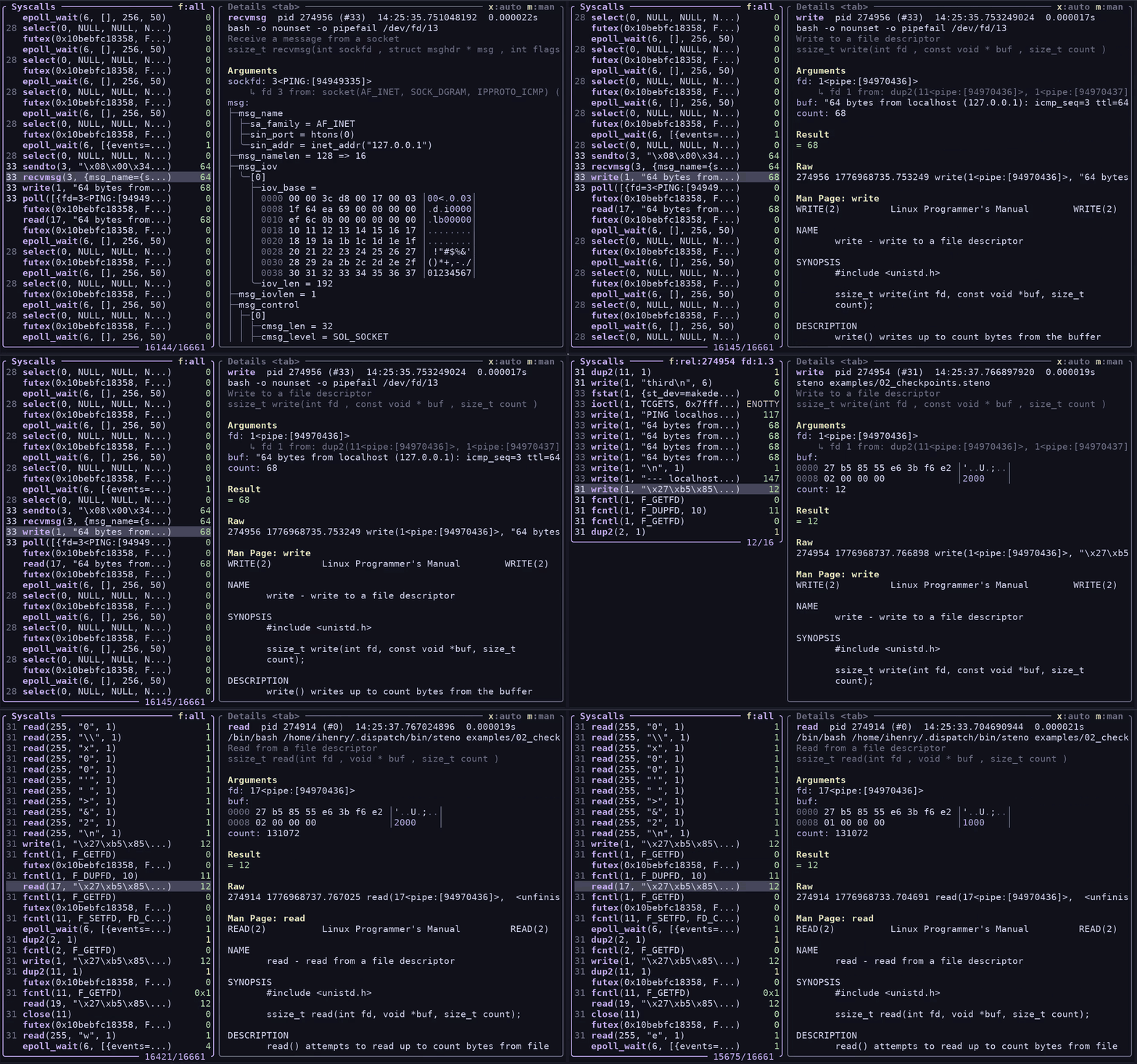
strace-ui assigns short IDs to PIDs to make them easier to scan, formats structs, and renders buffers as hexdumps instead of strings. It has some other nice features that you can’t see in the screenshot:
-e '!futex,timerfd_settime,epoll_wait'? Don’t worry: press h to hide any syscall you don’t care about.rt_sigprocmask? Press m to open the man page and find out.strace -f calls. (You can also filter by PID or exclude PIDs.)--decode-fds=all will print file descriptors as 14TCP:\[55.55.555.555:12345-11.11.11.11:56789]>, which is great. strace-ui goes one step further and prints 14TCP:\[a-real-hostname:12345-another-hostname:56789]> , which makes it easier to see at a glance exactly what your process is doing.Ian Henry, a dev here, made strace-ui to scratch his own itch. In 2017, he’d gone looking for such a tool but never found it. Having had experience building interactive terminal UIs (including in OCaml, using lambda_term), he knew how difficult and unpleasant it could be. The idea percolated over the years, never feeling worth it, until recently when a few forces converged to make terminal UI development actually kind of delightful.
For years now we’ve been building web applications with OCaml in a functional style, using a library we developed called Bonsai, loosely inspired by Elm. A simple Bonsai component with a little interactivity looks like this:
module Dice = struct
let faces = ...
let component (graph @ local) =
let face, set_face = Bonsai.state (List.hd_exn faces) graph in
let%arr face and set_face in
{%html|
<div>
You rolled a #{face}
<button
style=""
on_click=%{fun _ ->
let index = Random.int (List.length faces) in
set_face (List.nth_exn faces index)}
>Roll the dice</button>
</div>
|}
end
Components are implemented as purely functional state machines, and are easily composable. Incrementalization inside the framework means that values don’t get recomputed until necessary. This applies to every value, not just the view.
What’s neat about Bonsai is that it allows you to compose state and incrementality primitives a la carte. The same primitives that prevent re-rendering the entire page during user interaction can also be used to incrementalize an expensive business logic computation on a live-updating dataset. (If you’re used to React, imagine if everything used something very similar to hooks, and state was managed outside of the component hierarchy.)
And because Bonsai is written in OCaml, it becomes possible to use the same language and types on both the backend and frontend. It’s hard to overstate the impact this has on keeping a large web app’s codebase manageable, especially when you make pervasive use of OCaml’s type system.
So far we’ve actually been talking about Bonsai_web. Bonsai itself is agnostic to the frontend, because when you think about it, all UIs can fundamentally be expressed as stateful incremental computations, in which different components know how to render themselves as their underlying data changes.
If Bonsai is a library for managing the lifecycle and scoping of state, with a layer on top for expressing the particulars of a given UI surface, you can see how the same underlying core can be adapted. And that is where Bonsai_term came from.
When Ty Overby made Bonsai in 2019, the idea that it’d eventually end up being used for terminal apps was a running joke. In some ways the whole point of Bonsai was that at Jane Street we felt somewhat underpowered when it came to web development. Some of our most important apps were built on the ancient and somewhat difficult curses library, which lives up to its name.
Terminal apps are fast and keyboard-centric, which we like, but the web also has a lot going for it. It’s hard to beat the ergonomics of clicking a hyperlink; and of course the web gives you a vast palette for constructing UIs, including charts and graphics that aren’t practical on the command line, and integrated help (via tooltips and the like). In the years after the release of Bonsai_web there was a huge flowering of web apps, including many that were ported directly from the terminal.
But here we are in 2026 and it feels like another renaissance is afoot, this time in the opposite direction.
Bonsai_term began as a personal hobby project in the summer of 2024, when Jose Rodriguez—one of our devs—built it to write a manga reader with the kitty graphics protocol. It showed enough promise that he later made some ncdu-style tools for wider Jane Street use. In April 2025, Bonsai_term had enough traction that we started productionizing it in earnest.
It so happened that AI agents were coming onto the scene, and it was the arrival of Claude Code in February 2025 that kicked everything into gear. It became clear fairly quickly that a well-made terminal app was winning out over full-featured IDEs, in large part because of the speed, simplicity, and portability of the terminal itself. Terminal emulators are everywhere and deeply integrated into editors; TUIs met devs where they already were. In the beginning was the command line, and so it remains—ubiquitous and always at hand.
We doubled down on Bonsai_term, and pretty soon a feedback loop came into being. We developed our own Claude Code–ish tool, called AIDE, (which we built to maintain the freedom to choose between different model vendors, to suit our unusual development environment, and to better control the execution sandbox), which became both a demo of Bonsai_term and a partner in creating it. While building AIDE into a full-featured agent-harness, we threw off a rich library of UI components that other apps could then take advantage of.
Developers who became acquainted with this unusually good TUI were pleased to discover that they could make their own terminal apps with just as much polish thanks to the new framework it was built in. Bonsai_term would feel familiar to anyone who’d ever done web development here, and it had the huge advantage of being especially amenable to AI assistance. It was actually somewhat of a mystery to us how good the models were at writing Bonsai_term code, given how relatively obscure it is and how it relies, for example, on OxCaml-only features. (We think it might have something to do with the testing story, discussed below.)
Then, recently, with the advent of Bonsai_term and AI agents, Ian found he could make a working prototype in less than ten minutes. The prototype was useful enough to justify the ongoing time spent making it real.
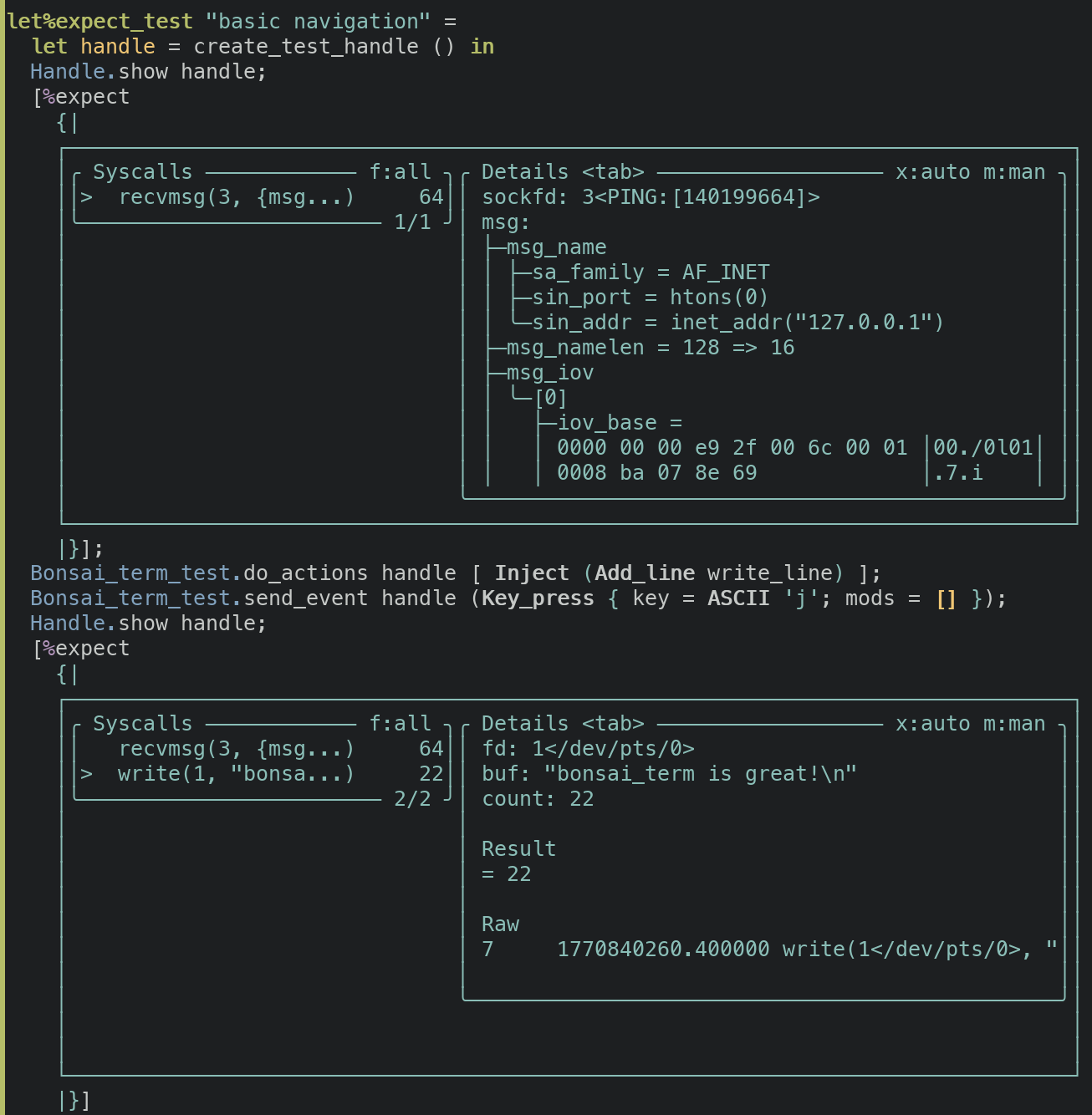
Notice how the 'expect' block in these tests contains a rendering of the actual UI
One of the most powerful features of Bonsai_term, which complements AI development nicely, is its testing framework. You can easily write integration tests that literally just walk through using the app in the terminal app and print its state—which looks like a screenshot—at any moment. Because everything is text, this is a straightforward application of our expect test framework, and as with regular expect tests, regressions or changes in behavior manifest as diffs.
Importantly, these tests are trivial for a coding agent to run and the output is legible for the agent too. That closed loop makes it easy for the AI to check its own work and results in features that are more often correct on the first try. The experience was so good in fact that much of the development time for strace-ui was focused on the kinds of output that the agent couldn’t see from the tests, for instance the performance characteristics of scrolling, filtering, and rendering. (It also had a really hard time with file-descriptor tracking.)
If you watched our internal search engine for mentions of Bonsai_term, you’d find that a handful of new apps are being built every day. Some examples:
We can’t show screenshots of all of these in a public post, but here are two we can share: proctopus, for managing multi-process applications, and dissect, for decomposing bloat in executables.
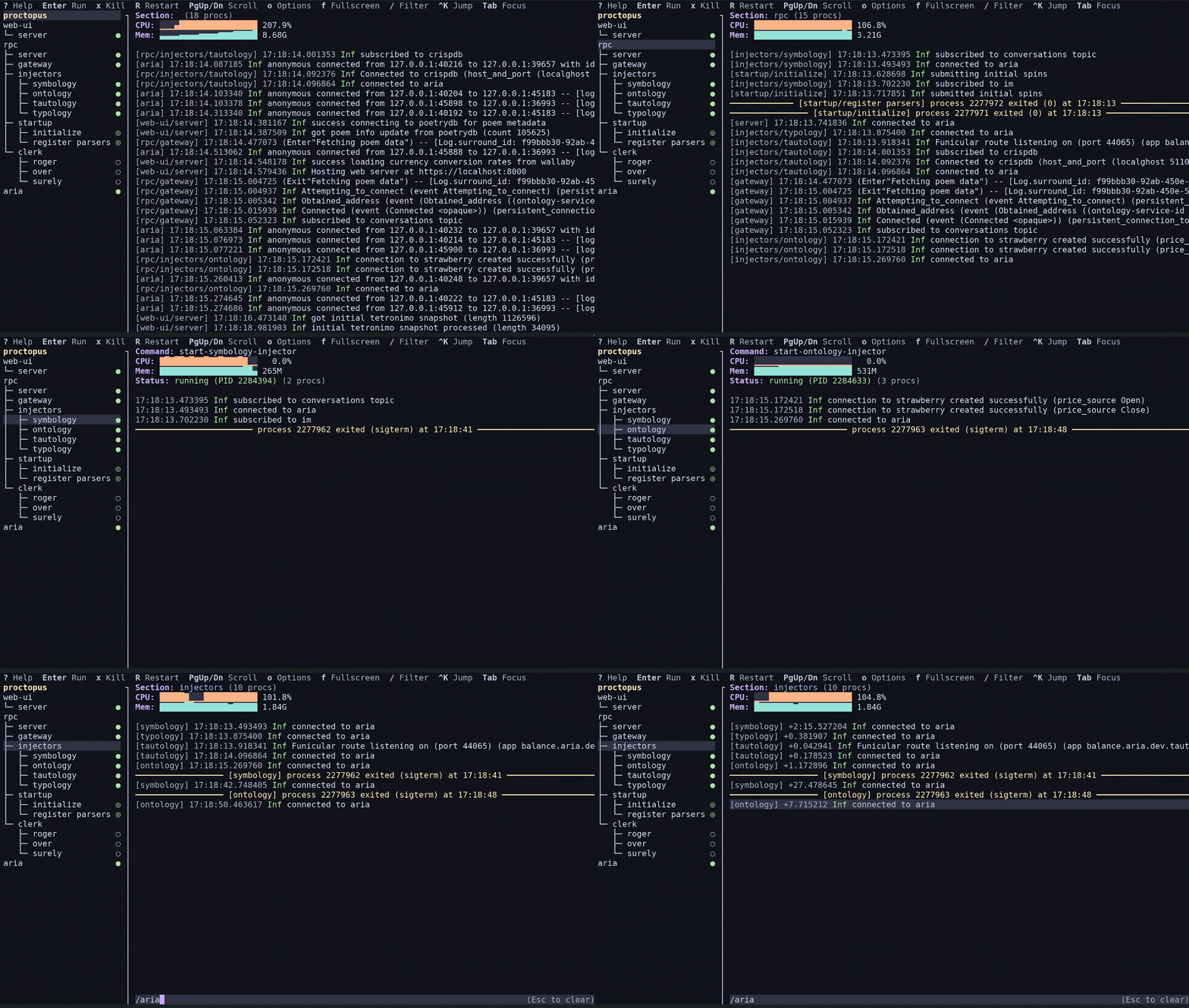
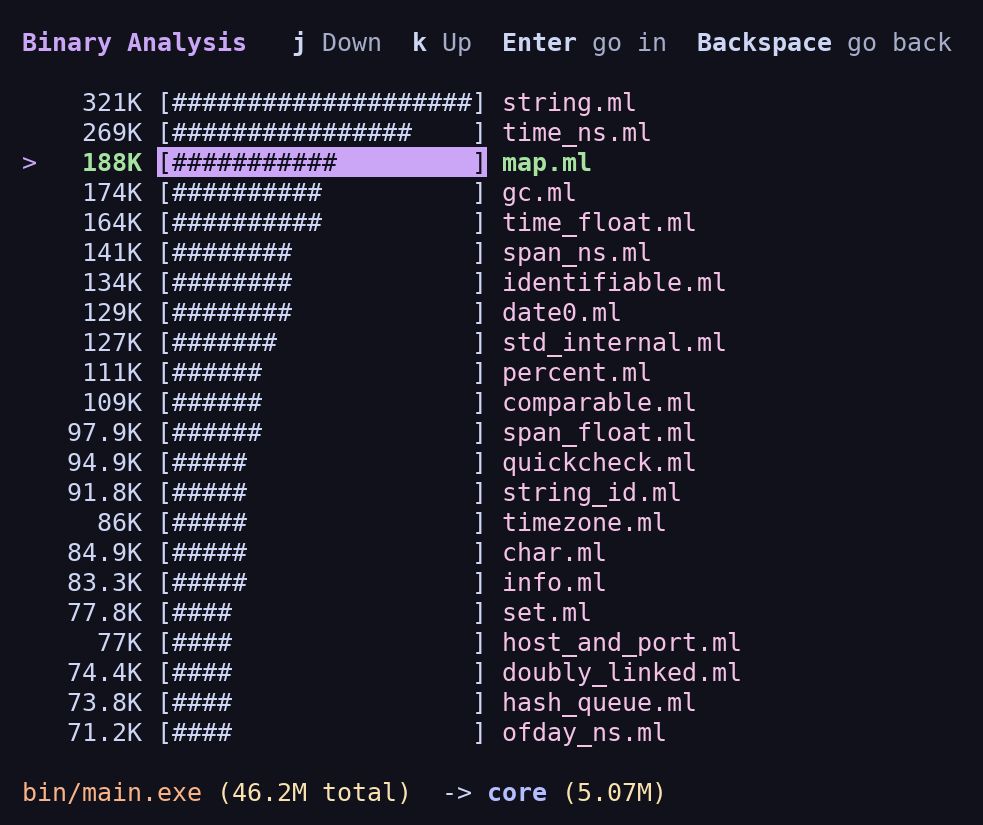
The uptick likely goes back to the same forces that led to strace-ui:
There’s one extra benefit that’s a quirk of how Bonsai_web works. Bonsai_web applications are written in OCaml but ported to JavaScript by a transpiler called js_of_ocaml. The vagaries of browser APIs mean that some libraries that work fine on a native platform can’t be linked into a js_of_ocaml program; and indeed one of the biggest blockers in writing a Bonsai_web app is in carefully carving out the Javascript-friendly parts of all of your dependent libraries. While much of this carving-out has already been done over the years to support our web-app work, it’s far from complete.
Bonsai_term doesn’t have this problem, which means that your TUI is more of a regular OCaml program, and can use all the same libraries and tools and services as any other application.
It’s been gratifying to see that getting the ergonomics right actually has a huge effect on developer interest. A lot of devs at Jane Street now reach for Bonsai_term when building little utilities for themselves or even sophisticated full-fledged applications, where before it might not have been worth the investment. And by dint of being in the terminal these apps are keyboard-driven, lightning-fast, and constrained in a useful way—optimized for usefulness over flash. The web isn’t going anywhere, but seeing terminal apps flourish again is like coming home.
Want to try Bonsai_term out? You can read our install instructions here. You can point your LLM at our examples repo and then ask it to build your own TUI. We highly recommend asking your LLM to write expect tests like this one for better results!
You can install proctopus and strace-ui by following their install instructions in their readmes here and here.
And, sometimes, all you want is to output text.
I mean, I don't even think that's true. Many TUIs are bloated, dogshit slow, and it's not trivial to write complex TUIs without glitches or flickering. The more people start making TUIs because it's the current fad, the worse they will get.
The latter is mostly because certain GUI patterns simply cannot be implemented with a TUI.
And then everyone has their own idea of what keyboard shortcuts should be like. Yuck
I think also a big problem of desktop apps is that you have to deal with window management. Now that I am on Niri it is really apparent to me how much I hated juggling windows in pretty much any other window manager that I ever used, except, interestingly enough, tmux.
[1] https://github.com/jrop/tuis.nvim [2] https://github.com/jrop/morph.nvim
Is that really true? Can I, in one terminal window, have prose with a serif font and code with a monospaced font at the same time? If I hover over something with my mouse, can I have a TUI tooltip at a smaller font size?
For those workflows (as opposed, to say, Photoshop), we could do without that. That's the whole benefit.
>and being self-explanatory and same-y.
GUIs are quite less same-y that TUI. Not to mention the same app GUI can be widely different between 2010 and 2026, whereas any TUIs from 1990s I still use look and work the same.
There once was a program called https://en.wikipedia.org/wiki/ManaGeR which appears at first blush to be some kind of X11-competitor, except it was using the VT330's regular terminal capabilities to do those fancy pixel-patterns and fonts, and so there's just some weird VT escape sequences you've never heard of in there.
You can also use SIXELs if you want even more control, and you can readily see such things in action because qemu can (in 2026) send its graphical VGA display into a sixel terminal, but in the 1980s such a thing would not have been performant (probably something like 3 frames per minute) because the VT330 was slow, and such a thing would not be popular you would "lose the text" at some layer which would be as inconvenient as using any other graphical application.