 May 3, 2026
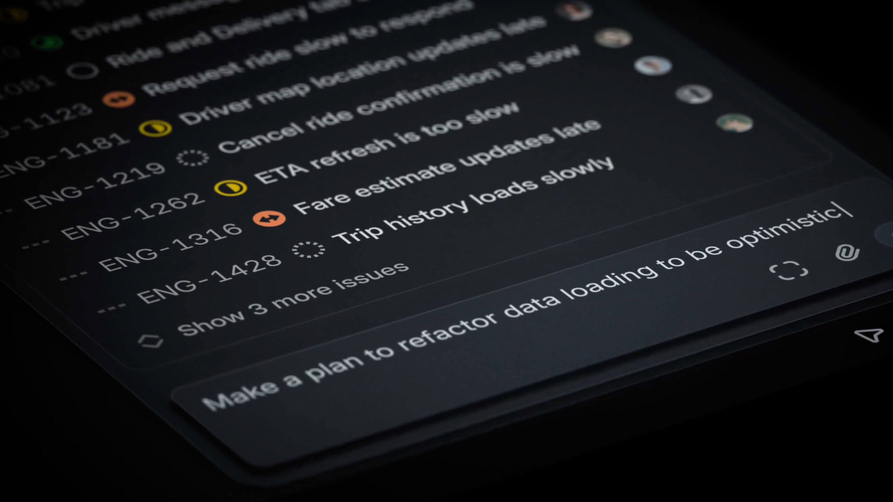
A few milliseconds is all it takes to update an issue in Linear. A traditional CRUD app doing the same thing takes about 300ms. How do they do it? There's no secret silver bullet to performance. The reality is that it's built from the ground up on the right foundation, then improved by countless decisions. My goal is to walk through some of the techniques that make Linear feel the way it does and help you implement the same.
What I'll cover
Database in the browser
Making the first load feel instant
The sync engine
Designed for speed
Animations
A quick disclaimer: I've never worked at Linear and have never seen their code. Everything I share comes from my personal experience, studying their app, reading their blog posts, or watching their conference talks. I simply love building web apps and have been using Linear since their beta launch. Also, the article’s hero image comes from a video by Meg Wayne, whose work for Linear is phenomenal.
Database in the browser
Most web apps live inside the same loop. The user clicks. The browser fires an HTTP request. A server queries a database and sends it back. The browser repaints. The end result is a spinner, a skeleton, or a frozen UI for a few hundred milliseconds while the app waits on the network.
Linear inverts the traditional relationship. The actual database the UI reads from is in the browser, in IndexedDB. Mutations apply locally first, then asynchronously push to the server, which broadcasts deltas back to other clients via WebSocket.
In my opinion, this is the most critical piece to Linear's performance. When your goal is to build a fast web app the biggest bottleneck you will fight is the network. Any data sent between the client and server costs hundreds of milliseconds. The best approach is to eliminate the need for a network request entirely: which is exactly what Linear does.
I'll be repeating this a lot, but the secret to building incredible web apps is by hiding all the network requests from the user. The more loading states you can avoid the better.
Here's an example of how simple Linear's requests are:
// A traditional web app updating the server
async function updateIssue({ issue }) {
  showSpinner();
  const response = await fetch(`/api/issues/${issue.id}`, {
    method: "PATCH",
    body: JSON.stringify({ title: issue.title }),
  });
  const updated = await response.json();
  setIssue(updated)
  hideSpinner();
}

// vs Linear
issue.title = "Faster app launch";
issue.save();
The first line, issue.title = "Faster app launch", updates an in-memory datastore (MobX observable in Linear's case) . The second line, issue.save();, queues a transaction that their sync engine batches and flushes to the server. The key here is that the UI re-renders synchronously off the local, in-memory, update. There are no spinners because there is nothing to wait for because the data is synced in the backround. This is the magic of treating the browser as the database for each user.
Tuomas, one of Linear's co-founders, said this at a conference in 2024: 'Literally the first lines of code that I wrote was the sync engine, which is very uncommon to what you usually do when you're a startup.' From day one, Linear knew the approach they wanted to take and the tradeoffs it would take.
Linear's issue creation no spinners or delays
I know most people won't build a custom sync engine like Linear just to make their app feel fast and they don't need to. For most use cases, libraries like Tanstack Query and SWR can get surprisingly close with optimistic updates. Most web apps feel slow because the UI waits for each network request to complete before updating state. For most usecases the network request will succeed so you should take advantage of that and optimistically update your state.
// optimistic mutation with SWR
mutate(
  `/api/issues/${issue.id}`,
  { ...issue, title: "Faster app launch" },
  false
);

// vs Linear
issue.title = "Faster app launch";
issue.save();
The key idea is simple: UI responsiveness should not depend on network latency. Users perceive speed based on how quickly the interface reacts, not how quickly the server responds.
Optmistic requests is one of the highest leverage improvements you can make:
eliminate unnecessary spinners
update state immediately
validate in the background
rollback only if needed
Linear's foundation is based on this exact principal and it makes the app feel native and fast.
A peek into Linear's stack
Linear is built on the simplest stacks you can find: React, TypeScript, MobX, Postgres, a CDN. There's no edge database, no React Server Components, or no fancy framework.
Frontend
  React + react-dom               (UI runtime)
  MobX                            (observable graph, granular re-renders)
  TypeScript                      (single language end-to-end)
  Rolldown-Vite + plugin-react-oxc(mid-2025; previously Rollup; previously Parcel)
  ProseMirror + y-prosemirror     (rich text editor; Yjs CRDT for live collab)
  Radix UI primitives             (popovers, menus, focus traps)
  Emotion + StyleX                (Emotion runtime + StyleX compiled to atomic CSS)
  Comlink                         (Worker RPC)
  idb                             (IndexedDB wrapper backing the local-first store)
  graphql-request                 (GraphQL transport to the sync server)
  Sentry                          (error monitoring)
  Inter Variable                  (single woff2, font-display: swap)

Backend
  Node.js + TypeScript            (single language for all server code)
  PostgreSQL on Cloud SQL         (issues table partitioned 300 ways)
  Memorystore Redis               (event bus + cache + sync cursors)
  turbopuffer                     (similar-issue detection, vector db)
  Kubernetes on GCP               (one workload per concern)
  Cloudflare Workers              (multi-region edge proxy)

Other clients
  Desktop: Electron               (same web JS, native chrome)
  Mobile:  Swift (iOS) + Kotlin   (a separate full reimplementation)

Marketing
  Next.js                         (static)
  styled-components
  Inline SVG sprite
The biggest standout to me is their decision to stick with client-side rendering. CSR often gets criticized for slow initial loads, but with the right architecture and design it can feel instant.
I'm also a big fan of the simplicity it brings. Keeping the app entirely client-side creates a much cleaner mental model and removes a lot of the complexity that comes with server-rendered apps. You don't have to constantly think if you're on the server or client. If window object is accessible or not. If you're setting the right cache headers or not. There's beauty in simplicity and the constraints you're forced into.
So how does Linear make their client side rendered app feel instant?
Making the first load feel instant
One thing I obsess over is the first load, and Linear clearly does as well. For productivity tools especially, the time it takes before you can actually start working is one of the most important details to consider. No one wants to be waiting for a new tab to load for multiple seconds
First, you have to understand what makes initial loads slow. For a client side app you have to request the index.html, then that requests all the JavaScript and CSS, which then runs some sort of authentication, and finally makes some API requests to show the app.
Linear's bundler arc: Parcel, Rollup, Vite, Rolldown
The first step to making an app feel instant happens long before runtime. It starts at build time. Remember, the network is the bottleneck, so shipping the least amount of JavaScript and CSS is critical to fast load times.
From what I can gather Linear has rewritten their build pipeline four times: Parcel → Rollup → Vite → Rolldown. Each migration was driven by the same goal: reduce the amount of JavaScript and CSS and improve the developer experience.
From their own blog posts they claim:
50% less code shipped.
30% smaller after compression.
Cold-cache page loads got 10 to 30% faster.
Time-to-first-paint of the active-issues view dropped 59% (on Safari).
Memory usage dropped 70 to 80%
Most of that came from a combination of decisions targeting only modern browsers, better dead-code elimination, and aggressive code splitting. Dropping legacy support is the big win (no polyfills, no ES5 transpilation, no nomodule fallback) but the dead-code and chunking work matters just as much.
Even with all of these optimizations, Linear still ships a substantial amount of code: roughly 21 MB of minified JavaScript. The difference is that it's aggressively code split into hundreds of route-level chunks that are fetched on demand.
// vite.config.ts (reconstruction; matches observed chunk graph)
export default defineConfig({
  plugins: [react()],
  build: {
    target: "esnext",            // no legacy syntax, no polyfills
    cssMinify: "lightningcss",
    modulePreload: { polyfill: false },
    rollupOptions: {
      output: {
        // One chunk per npm package > ~3 KB. Cache invalidation
        // becomes per-library instead of per-app-revision.
        manualChunks(id) {
          if (id.includes("node_modules")) {
            const pkg = id.match(/node_modules\/([^/]+)/)?.[1];
            if (pkg) return `vendor-${pkg}`;
          }
        },
      },
    },
  },
});
The lesson isn't which bundler to pick but the importance of dropping legacy browsers, going native ESM, and code splitting like crazy. Each step is small. Stacked, they cut Linear's first-load JavaScript roughly in half and their build time by an order of magnitude.
So, the first secret to instant load times is reducing the amount of JavaScript and CSS needed to render something for the user.
Preloading after initial load
Once you've split your JavaScript into the smallest chunks possible you can start doing work in the background.
But hold on, splitting the bundle into hundreds of chunks creates a new problem. Each chunk imports other chunks, and the browser doesn't know what those are until it parses the entry script. Without help, the load timeline becomes a waterfall: fetch the entry, parse it, fetch its imports, parse those, fetch their imports. Every level adds a network round-trip, which you want to avoid at all costs.
What Linear does is before any JavaScript runs, the browser sees the entire list and fires off the requests in parallel. By the time the entry script reaches its first import, the chunks are already in cache.
Here's what it looks like in the <head /> if their index.html
<script type=module crossorigin
  src="https://static.linear.app/client/assets/html.2_JBQs3Q.js"></script>
<link rel=modulepreload crossorigin
  href="https://static.linear.app/client/assets/vendor-mobx.Crhy2qQc.js">
<link rel=modulepreload crossorigin
  href="https://static.linear.app/client/assets/SyncWebSocket.Djw6l_Op.js">
<link rel=modulepreload crossorigin
  href="https://static.linear.app/client/assets/DatabaseManager.DKssGAN8.js">
<!-- ...around many more -->
The crossorigin attribute on each preload matches the crossorigin on the entry script, so the browser reuses the cached fetch instead of treating preload and import as separate resources. Same trick as the font preload, applied to every chunk on the critical path.
The cold-load timeline collapses from a sequential waterfall into a single parallel batch. The network still does the work. It just does it all at once. The beauty of this technique is you're able to do all this work in the background when the user first hits the login page. In a few seconds the full app is stored in cache and served instantly.
It's extremely important to understand how people will use your app. Once you have this understanding you can start using it to your advantage, such as preloading scripts in the background as Linear does.
The service worker for even more speed and offline capabilities
The rest of the Linear, the route-level chunks for views the user hasn't visited yet, gets cached in the background by a service worker. The worker has a precache manifest baked into its source, around 1,200 hashed assets covering route chunks, icons, and fonts, and pulls them down lazily after the first page load. Within a few seconds of hitting the login screen, the full app is sitting in cache.
Preloading all the chunked javascript files to ensure instant loads from cache
This buys two things. Subsequent navigations skip the network entirely; the service worker answers directly from its cache without even going through HTTP cache. And the app keeps working when the network doesn't. Combined with the local-first sync engine (which already has the user's data in IndexedDB), Linear is usable offline. You can read issues, create new ones, edit titles and descriptions, change statuses. Everything queues in the local transaction store and flushes the next time the connection comes back.
Modulepreload is for what the app needs now, parallel-fetched so the browser never blocks on a serial import chain. The service worker is for what the app needs next.
So, to get load times fast the steps for Linear is to elminate as much code as possible, split it into small pieces, and precache it in the background. Again, the goal of all this work is to make network requests as fast as possible or, even better, eliminate them completely.
Vendor bundle composition
I found it interesting that every package Linear uses gets its own chunk, cached independently. A traditional vendor.js invalidates the entire dependency graph on any bump. Linear's chunking turns vendor caching from a single massive file to fine-grained. Bumping a single dependency invalidates one chunk; the rest stay cached.
Seems like a no-brainer and yet another detail to ensure fast load times.
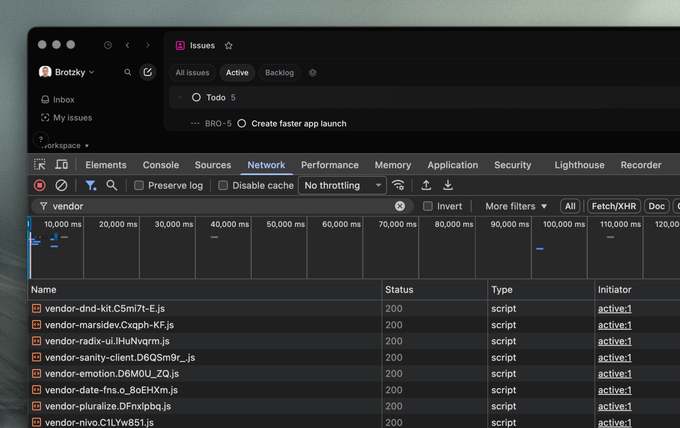
Each individual package split into its own js file
Loading massive font files
Font loading is one of those details a lot of apps get wrong. The failure modes are visible: invisible text for half a second, layout shifts as the real font swaps in, double-fetched resources because the preload didn't match. Linear's setup avoids all three:
<!-- in <head> of index.html -->
<link rel="preload"
      href="https://static.linear.app/fonts/InterVariable.woff2?v=4.1"
      as="font" type="font/woff2" crossorigin="anonymous">
<link rel="preconnect" href="https://static.linear.app" crossorigin>

@font-face {
  font-family: "Inter Variable";
  font-weight: 100 900;
  font-display: swap;
  src: url(https://static.linear.app/fonts/InterVariable.woff2?v=4.1)
       format("woff2");
}
/* Italic and Berkeley Mono follow the same shape, single woff2 each. */
Variable fonts cover the full 100–900 weight axis in a single woff2, eliminating per-weight requests. font-display: swap renders the fallback stack immediately and swaps to Inter when it loads. The trick that's easy to miss: crossorigin="anonymous" on the preload tag. Without it, the browser preloads the font, then fetches it again when CSS later references it, because the two requests have different CORS modes. crossorigin on the preload makes the browser reuse the cached one.
This all seems simple, but I'm always surprsied at how many apps load fonts incorrectly. Linear is a great example of thinking through the details and ensuring font loading is as fast and accurate as possible.
Inlined app shell
Another key technique to make the first load feel fast: Inlined in <head/> is just enough CSS to paint the loading state with no external stylesheet fetched. Remember, the network is the bottleneck and what you'll always be fighting to make your app feel fast. In this case, Linear elminates a network request by inlining the critical CSS required to show the user an app shell.
<style>
  :root {
    --bg-color: #f5f5f5;
    --bg-base-color: #fcfcfd;
    --bg-border-color: #e0e0e0;
    --sidebar-width: 244px;
  }
  html { background: var(--bg-color); height: 100%; }
  body { font-family: "Inter Variable", Arial, Helvetica, sans-serif; }

  #appBorders {
    border: 1px solid var(--bg-border-color);
    background: var(--bg-base-color);
    margin: 8px 8px 8px var(--sidebar-width);
    border-radius: 12px;
  }

  #logo { transform: translateZ(0); }

  @keyframes logoBackgroundPulse {
    0%   { opacity: 0; transform: scale(0.8); }
    70%  { opacity: 1; }
    100% { opacity: 0; transform: scale(1.0); }
  }
</style>
<script>performance.mark("appStart");</script>
Beyond CSS there is also a bunch of inlined JavaScript that's critical to loading the initial experience.
<script>
// Electron context — lets CSS branch on native chrome.
if (navigator.userAgent.includes("Electron") && navigator.userAgent.includes("Linear")) document.documentElement.classList.add("electron");

// No local store → no workspace data → render the auth layout.
if (localStorage.getItem("ApplicationStore") === null) document.documentElement.classList.add("logged-out");

// Restore last-known shell tokens (sidebar bg, width, dark mode) before paint.
const c = JSON.parse(localStorage.getItem("splashScreenConfig") || "{}");
if (c.bgSidebarColor) document.documentElement.style.setProperty("--bg-sidebar-color", c.bgSidebarColor);
if (c.sidebarWidth) document.documentElement.style.setProperty("--sidebar-width", c.sidebarWidth + "px");
if (c.darkMode) document.documentElement.classList.add("dark");

// Compact sidebar to a sliver when the user opens links in the desktop app.
if (JSON.parse(localStorage.getItem("userSettings") || "{}").openLinksInDesktop) document.documentElement.style.setProperty("--sidebar-width", "8px");

</script>
Before any bundle has parsed, the JavaScript from index.html reads localStorage.splashScreenConfig, merges any sessionStorage override on top, and applies the user's remembered shell tokens directly to document.documentElement.style: sidebar background, base color, border color, sidebar width, agent toolbar height. It detects color-scheme preference and Electron context. It checks whether localStorage.ApplicationStore exists, and if not, adds a logged-out class that switches the shell to the auth layout.
By the time the first JavaScript bundle comes from the network the loading screen is already correctly themed, sized, and positioned for whether the user is logged in.
This gives the user the feeling that the app is ready to go as soon as they hit enter in the URL bar. There's no faster way around this than sending down the initial app shell in the initial index.html response.
An example of how fast Linear's initial load is
Render first, authenticate second
Authentication is another step where most apps give up their performance budget. The conventional flow: fetch the HTML, load the bundle, validate the session, fetch the user, fetch the workspace, then render. One to three seconds before the user sees anything.
Linear treats auth the same way it treats mutations. Assume the happy path and verify in the background. This is probably one of my favorite parts of their architecture because it allows them to almost immediately render the full experience on load.
Most CRUD apps keep the real session in an HttpOnly cookie, then add a second JS-readable cookie or /me request so the frontend can tell whether the user is logged in during startup. Linear does something simpler. Instead of maintaining a parallel auth signal, the inline boot script just checks whether localStorage.ApplicationStore exists:
if (localStorage.getItem("ApplicationStore") === null) {
  document.documentElement.classList.add("logged-out");
}
If it's there, the user has used Linear in this browser before, which means their workspace is already sitting in IndexedDB. This goes back to the first section we covered where the database lives in the browser. If it's missing, there's nothing to render anyway, so the shell flips to its logged-out layout and the login flow takes over.
The initial flow for Linear isn't "do you have a valid session." It's "do we have anything to show you." Their actual session token sits in a cookie. The bundle never tries to be smart about it. It just renders what it has and lets the next request (the WebSocket handshake, a sync delta, any HTTP call) be the thing that fails with a 401 if the session has gone stale. When that happens, the client redirects to login.
The whole pattern is consistent with the rest of the architecture: the client trusts what's local, the server is the source of truth for correctness, and the two reconcile asynchronously. Just like a mutation. Just like their sync engine.
Manually deleting the auth session and refreshing the desktop app
This is maybe one of my favorite details about Linear that I wish more apps behaved this way. For authentication, assume happy path, and fallback if not. If there's data to be shown: show it! And leverage your browser's datastores to render immediately.
The sync engine
Most of what makes Linear fast lives downstream of one decision: the server is a sync target, not a source of truth for the UI. The internals of their sync engine been thoroughly reverse-engineered already, and Tuomas has given multiple excellent talks on the architecture. I'm not going to retrace them. What I want to do is name the three pillars that actually produce the speed, because the speed is a property of how they fit together, not of any single one.
1. The data is already there
When the app boots, it doesn't fetch the workspace from the server. It hydrates from IndexedDB into an in-memory MobX object pool, and every query from the UI goes to the pool first. There's no "loading issues" state because the issues are already on the user's machine.
Something I found interesting is as they've scaled they've chunked the data in the sync enginer using the similar fundamentals as their JavaScript bundles. Not everything is fetched at once: the two heaviest tables, Issue and Comment, lazy-hydrate on demand. This is data-level code splitting, and it's what lets the engine scale: startup cost tracks the workspace structure, not the workspace size. A 10,000-issue workspace boots about as fast as a 100-issue one.
Click into a project, the issues are there. Filter by assignee, the index is already built. There's nothing to fetch because there's nothing missing. It's either been immediately loaded from your browser or shortly after in a codesplit lazy chunk.
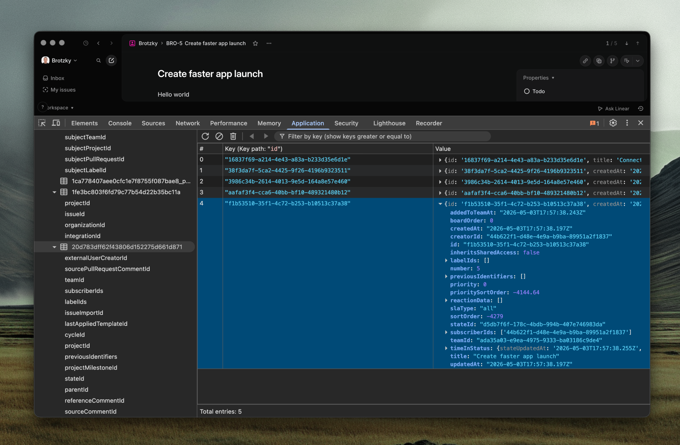
IndexedDB: the database is in your browser
2. Mutations don't wait for the network
When you change an issue's status, three things happen almost at once: the MobX observable updates so the UI reflects the change, the mutation is written to a durable transaction queue in IndexedDB, and it's queued for the server. The network hasn't been touched yet.
The user never waits to see their own change. The retry, the rollback, the durability across reloads, all background. If the server rejects, the observable reverts and there's a brief flicker, but in practice that almost never happens because most invalid mutations are caught before the transaction is even created.
As I keep saying: the network is the enemy and you must do everything you can to avoid it. Linear's flow starts with the local mutation and treats the server as a confirmation step, not a permission step.
3. One delta, one cell
When the server confirms a mutation (yours or someone else's), the change comes back as a small JSON envelope describing what moved. The client applies it by writing to the corresponding MobX observable.
Because every property on every model in Linear is its own observable, and every component that reads one is wrapped in observer(), MobX knows exactly which components depend on which fields. A change that updates one field of one issue re-renders exactly the components that read that field. Not the parent list, not the sidebar, one cell. A 50-issue update is 50 cell re-renders, not a list re-render. This is what lets a busy workspace stay smooth when ten people are editing things at once: the cost of receiving updates scales with what changed, not with what's on screen.
I've built real-time apps streaming in stock data and fundamentals and having atomic updates of individual components it key to making an app feel performant. You want to avoid cascading updates as much as possible and Linear does exactly that.
Updating an issue in the list and single issue row re-renders
Why the three fit together
Take any one away and the app starts to feel slow. A local database without optimistic writes still spins on save. Optimistic writes without granular observables still jank on every update. Granular observables without a local database still wait on initial load. Linear's speed isn't a property of any single layer. It's a property of the system.
The bundler and loader shell are what make the app feel fast on first paint. The sync engine is what keeps it feeling fast once you start using it.
Designed for speed
Speed isn’t just an engineering problem. It’s a design problem too. A perfectly built sync engine still loses to a slow input model: if the fastest path to an action requires a mouse, three menus, and a click, the user pays for those steps regardless of how fast the underlying engine runs.
Another cornerstrone to Linear's speed is how they've intergarated the keyobard as a priamry tool to navigate and complete your work. Every common action has a shortcut. The command palette is one keystroke away. The right-click menu is custom-built. None of these are accidents but instead thoughtful design decision from day one.
Every action has a shortcut
Single letters edit the focused issue. Two-letter combos navigate. Modifiers act globally.
Listening to the founders talk about Linear’s early days, it’s clear that shortcuts were foundational from the start. The sync engine was designed in part so that any action could be performed at any time. It feels like this combination of design and engineering is continues to be behind every feature.
If you look through their UI you'll notice shortcuts visible everywhere. The most frequent ones are single characters as they're used the most often. Furthermore, every action can be done with a mouse as not to alienate beginners.
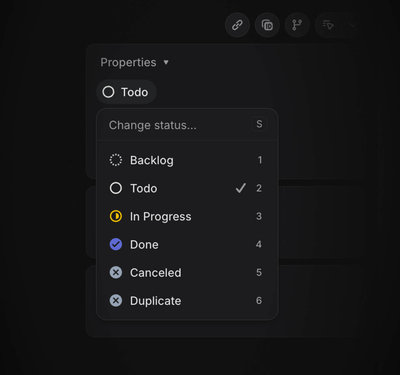
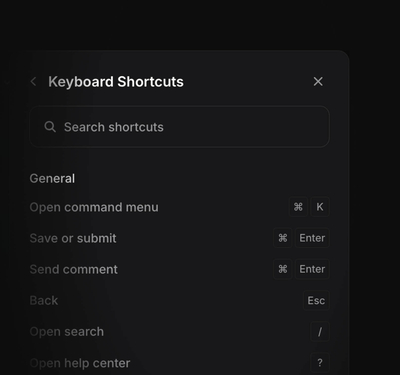
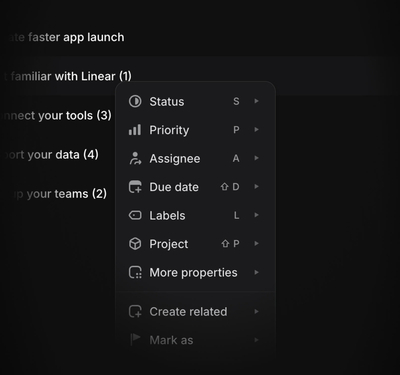
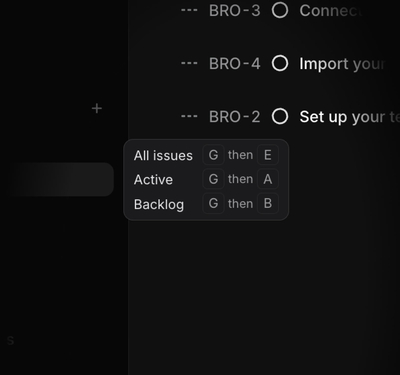
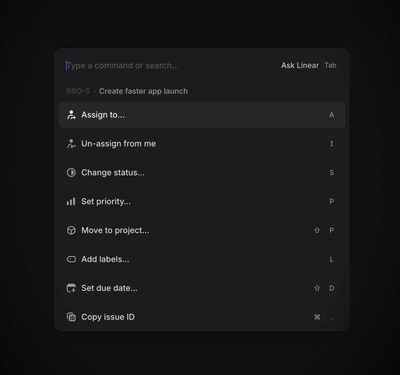
The command palette is always one keystroke away
⌘ k opens a command palette that lets users search over almost any action in Linear. Issues, projects, labels, status changes, navigation, issue creation, settings, theme toggles. The command is incredibly fast because it's searching the local MobX object pool, not a server. Remember, avoid the network.
The architectural payoff is that the entire app is accessible from a single pane. Navigation is search. Issue creation is search. Status changes are search scoped to statuses. Moreoever, the command is contextual and adapts to the what you're working on. A great way to teach key actions and shortcuts for any view. One primitive, used everywhere, running on data that's already in memory.
A fast app needs both incredible engineering and design. You can build a perfect sync engine and a flawless rendering pipeline, and still ship something that feels slow if the design is wrong. Engineering speed makes a single interaction fast. Design speed makes the path to each interaction short.
For a tool used all day, the difference between a shortcut and a two-second mouse path compounds over every action. Combine shortcuts with a global commmand palette and you've got yourself an app that's incredibly fast to use.
Animations
All the work up to now can still be undone by bad animations. Teams spend enormous effort making every part of their app fast. Initial load, updates, database queries, all of it. They shave off milliseconds so users never have to wait. Then, at the very last step, someone adds a 500ms height animation to an element.
There are only a handful of properties you should animate
Browsers have three tiers of property changes, and the cost scales with how high each one is on the rendering pipeline. Composited properties (transform, opacity) hand the work to the GPU and run independent of the main thread. Paint-triggering properties (color, background-color, border-color, fill) skip layout but still redraw pixels. Layout-triggering properties (width, height, top, left, margin, padding) force the browser to recompute the position of every subsequent element on the page. Never animate those. I mean never.
/* What Linear does */
.row:hover {
  background-color: var(--color-bg-hover);
  transition: background-color 0.12s;
}
.icon-arrow {
  transform: translateX(0);
  transition: transform 0.15s;
}

/* What you'd write if you didn't know better */
.row:hover {
  margin-left: 2px;       /* triggers layout for every row beneath */
  transition: all 0.2s;   /* and now you're animating margin */
}
The margin-left version recomputes the layout of every row beneath the hovered one, on every frame, for the full 200ms of the transition. On a long issue list that's the difference between buttery and jank.
If you go over every single property Linear animates in their app it's reserved to a handful, mostly those composited properties (transform and opacity) and sometimes properties like background-color and border-color.
Know when to hold back
In my opionion, what's almost as important as only animating composite properties is knowing when to not animate at all. It's easy to get carried away with animations. But in a tool used every day, the animations you'd love on a marketing site start to get in the way. Even a small hover delay, in the wrong place, becomes the thing the user notices.
Linear nails most of this. The command palette is the one I'd argue is too slow, but I've become a cranky old man over the years.
There are no transitions on list tiems to keep things snappy
The reason a lot of their animations work is that they reference their origin. The status popover scales out of the status pill. The agent panel slides in from its toggle. The motion is doing spatial work, telling the user where the new element came from, rather than fading in from nowhere as decoration.
Keep durations short and snappy
/* variables form Linear's stylesheet */

--speed-highlightFadeIn: 0s;
--speed-highlightFadeOut: .15s;
--speed-quickTransition: .1s;
--speed-regularTransition: .25s;
--speed-slowTransition: .35s;
Most design systems default longer than they should. Material's standard duration is 200ms, iOS's spring closer to 350ms. Defaulting to shorter transitions is one of the easiest ways to make an app feel faster, and Linear's defaults sit well below the industry norm.
Linear takes this one step further with asymmetric timing on enter and exit. Hover highlights, popovers, and the agent panel appear instantly when you summon them, then fade out over 150ms when you dismiss them.
The agent window appears instantly but fades out similar to macOS
As a small side note, one of Linear's Design Engineers, Emil Kowalski, created an incredible course at animations.dev. If you found the last couple of sections interesting, it's worth checking out. He dives deep into animation principles with plenty of examples and practical tutorials.
How Linear is so fast
There are so many more details I could cover that make Linear feel fast. The reality is there's no single thing that makes an app performant. It's the culmination of hundreds of decisions made correctly.
What I love about Linear's approach is how simple most of it is. No Next, no Tanstack, no fancy framework. They decided early on what architecture would serve their users best and have stayed true to it. The result is a client-side rendered app that's faster than server-rendered ones (and without the complexity)!
The shape of it is roughly this. The server is a sync target rather than a source of truth. The database lives in the browser. Mutations apply locally first and reconcile in the background. The first load ships less code in more pieces, with a service worker precaching the rest while the user is still on the login page. Auth is assumed based off state and verified later. The sync engine hydrates from IndexedDB into per-property MobX observables, so a 50-issue update is 50 cell re-renders rather than a list re-render. The input model is keyboard-first. Every common action has a shortcut with a global command palette. Animations stay on the GPU, durations sit below the 100ms cause-and-effect threshold, and layout-triggering properties are never animated.
The hard part isn't the implementation. It's the dedication to the craft over years, as the codebase matures, expands, and pushes up against new constraints.
If you haven't, I'd recommend checking out Linear to see it all in action.
Hope you learned a thing or two! It was fun writing this and diving into the details that make Linear what it is. I just love building the best web apps in the world and see how other people do it. If you have any feedback, suggestions, or want to connect you can find me on X.