I was reminded yesterday that macOS will happily let you create files that appear to have slashes in their name, as shown here by the Finder:
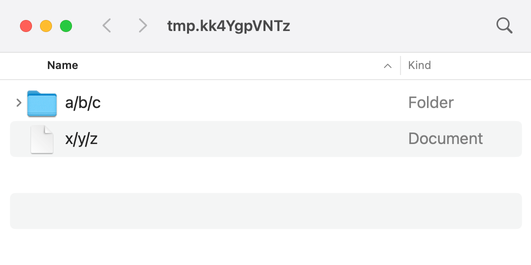
I made the folder with the “New Folder” button in Finder, and the text file by saving it in TextEdit. Even though I understand how this works, it breaks my brain a bit every time.
If you didn’t know how this works, you could get a clue by running ls:
$ ls
a:b:c/     x:y:z.txt
The files have either colons or slashes in their name, depending on how you look at them.
I don’t understand all the nuances, but I know this is a side-effect of the fact that macOS has not one but two path separators: the slash (/) and the colon (:). The two separators are used in different contexts, and the system will translate between them as needed.
These two separators reflect the two parent systems of modern macOS: classic Mac OS and the Unix-like NeXTSTEP. When they were joined together, Apple’s engineers had to build a file system that was compatible with both the classic Mac’s file system (the Mac OS Extended File System, aka HFS+), and with NeXTSTEP’s file system (the Unix file system, aka UFS). Among other differences, these systems had different path separators: HFS+ used a colon, while UFS used a slash.
There’s a Usenix 2000 paper written by several Apple engineers which describes the problems of combining classic Mac OS and Unix in more detail. It actually describes exactly what we’re seeing with the Finder and ls:
[The translation layer] can create a user-visible schizophrenia in the rare cases of file names containing colon characters, which appear to Carbon applications as slash characters, but to BSD programs and Cocoa applications as colons.
AppleScript is where you’re most likely to encounter colons as path separators in modern macOS:
$ which osascript
/usr/bin/osascript

$ osascript -e 'tell application "Finder" to get (path to me)'
alias Phoenix SSD:usr:bin:osascript
This is likely because AppleScript goes back to System 7, which only had to care about HFS+ and colons. It can give you a UNIX- (or POSIX-) style path, but you have to ask for it explicitly:
$ osascript -e 'tell application "Finder" to get POSIX path of (path to me)'
/usr/bin/osascript
In 2017, Apple replaced HFS+ with the Apple File System, aka APFS, but these dual path separators remain. I can’t find any documentation to confirm it, but I assume that’s for backward compatibility reasons – picking a single path separator would break an enormous amount of software.
The “slashes in filenames” breaks my brain because I started programming after Unix-style filesystems had become totally dominant. In my mind, slash is the directory separator, and Windows is weird for using the backwards slash (\). In reality, file systems have used a variety of directory separators, and it’s only the current Unix hegemony that makes this seem weird. On another timeline, forward slashes in a filename would seem totally normal.