Many or most developers work on existing projects that have all kinds of security defaults set somewhere in the past and no one bothers reviewing those.
[1] https://developer.mozilla.org/en-US/docs/Web/HTTP/Guides/COR...
- protocol itself is quite nuanced, like iirc requests with Authorization (or some other) headers don't obide by usual rules, and again for developer it's just an arbitrary convoluted set of rules, if they don't grasp the problematics
- backend and frontend should work in unison to have correctly configured cors, but as we know, devs hate communicating with each other
Count me in!
We easily form the intuition of the client being a by-default untrusted entity, and checking whether it has the privilege of accessing this data, where the server is the arbiter of that access.
CORS is so inherently different to that, and while the information is easily available, it requires a short but careful read to grok the idea -- which a dev tunnel-visioning towards getting their application code written may not wish to slow down for.
You get results where it's really difficult intuitively understand it because at that point you're not really meant to. Realistically, people just follow a guide, or some lib, and move on.
I would also say I think Firefox's network inspector is better in this area. (But I'm often having to ask others to "no, don't send the failing request, send the CORS preflight", we need to understand what happened with it.)
> Anecdotally, lots of developers I’ve talked with don’t understand well how CORS works.
Yeah, most FE devs I've worked with seem to not understand CORS.
> Is the CORS API too complex and confusing
I think it can be hard if you don't understand why the exceptions to preflights are what they are, but the moment you internalize "because the browser can already emit that request in other cases" then it becomes obvious what categories are what & why.
cors et al is a freaking mess because those things are designed by a comitee choke full of people who last promotion was their cool idea about how to monetize referrer, or how do cookie match across domains, or profile you with millisecond it takes to list your usb audio devices, or etc etc etc
The article does a nice job giving a concrete example.
I log in to social.net. I click on scam.org and change sites. I'm on scam.org and it triggers a request to social.net/friends.
No cookies are sent, no JWT. I'm not logged in and get a "Needs login" HTTP error. Nothing bad happens.
I thought that's how it works without CORS already.
contractors, "specialists", etc. who never took the time to read how CORS works and how simply you can handle a list of allowable sites, etc.
it's only complicated until you take the 5-10 minutes to properly understand what happens where. if you don't know, go do it now.
https://developer.mozilla.org/en-US/docs/Web/HTTP/Guides/Coo...
I'm saying this as someone who has learned about CORS protections many times, implemented the solutions with care they deserved, but forgot most of it soon after - each time. So I'd be very happy to invest even 15 minutes to break this cycle.
CORS literally exists only against XSS and CSRF for actively logged in human users. Anything else in CORS is absolutely pointless because every other attack scenario uses scripts or programs that fake HTTP headers anyways. It's just as useless as the Sec-CH (client hint) headers because some Browser made by a company that starts with Micro and ends with Slop decided that the User Agent always needs to be Windows 10 for compatibility reasons.
That is why you see everyone just enabling every CORS option anyways, even though that is literally the worst case that allows XSS and CSRF. And a lot of websites have user edited content at some place, at the very least in images that aren't filtered for embedded scripts (PNGs, anyone?).
A CORS error is not "an error message sent to the browser", it is an error generated by the browser, because the browser has decided it cannot permit the request. (Though certainly a server can not understand a CORS request as such, and returned a weird response, which would then end up getting translated to a CORS failure.)
At least so long as they don't have malicious extensions or a non-CORS browser?
It isn’t a knowledge thing (though it could be), or a capability thing, or intelligence. It’s pure mindset.
Ask yourself: is the average person noticing holes in fences and trying random doorknobs… probably not.
But on the other hand, most security people don’t think of product or UX (but some might) so that’s why you have roles.
Client hints are useful for all the shitty “responsive” websites that don’t know how to use media queries. And for ad tracking. Mostly the latter
This is really oversimplifying things, incorrectly IMO, and that sentence makes it sound like you're confusing a CSRF vulnerability with CORS protections. Normally when you write a backend server you implement some sort of authentication and access control, and in that scenario the threat model that lets "an attacker gets one your users to take an action on your site by visiting their site" is a CSRF vulnerability, unrelated to CORS.
The scenario presented in TFA is actually a very special case, because the bug is with a webserver running on localhost that doesn't (apparently) implement access control - not something most web apps entail.
In fact, one of the parts that confuses a lot of people is that CORS rules only prevent the JavaScript web client from reading the response from a remote endpoint - if the endpoint is available on the public Internet then anyone can still make a request to it.
The other thing that is confusing about CORS is that browsers already let you load lots of resources from cross origin servers - you can load images (as TFA points out that Zoom did as a workaround), scripts, stylesheets, form submissions, etc. The one thing you can't do, unless the server implements the appropriate CORS headers, is make a cross origin fetch request from JavaScript.
July 10, 2019 — Chris Foster
One of the best things about working in full stack consulting is that I get to work with a great number of developers with different skill levels in companies from various sizes and industries. This provides an opportunity to see what universal struggles come up. One that seems common and relevant recently is this: Too many web developers do not understand how CORS works.
This seems particularly timely to point out because of the recent Zoom vulnerability. Security researcher Jonathan Leitschuh found Zoom has a web server listening on the machine at http://localhost:19421. When you load a Zoom link, Zoom’s website sends a request to the localhost webserver and tells it to open up the native Zoom app. The whole article is worth a read, but these parts stuck out to me:
I also found that, instead of making a regular AJAX request, this page instead loads an image from the Zoom web server that is locally running. The different dimensions of the image dictate the error/status code of the server. You can see that case-switch logic here.
One question I asked is, why is this web server returning this data encoded in the dimensions of an image file? The reason is, it’s done to bypass Cross-Origin Resource Sharing (CORS). For very intentional reasons, the browser explicitly ignores any CORS policy for servers running on localhost.
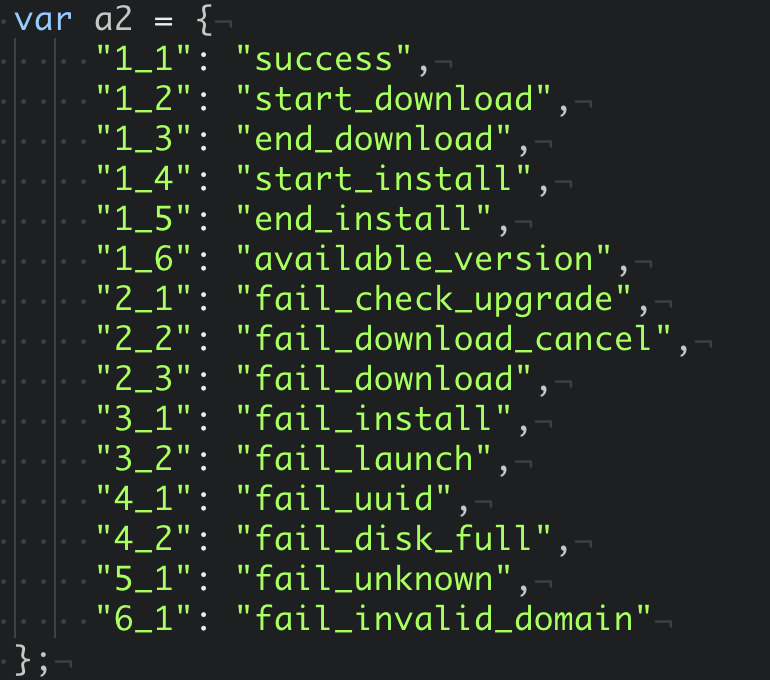
That last sentence is incorrect – Chrome does respect CORS headers for localhost webservers. If you’re a web developer you’ve probably done this when you have Create React App with your frontend app on one port and your backend API on another port. Your app is making cross origin requests against localhost, and this is supported in all browsers.
What this says to me is that Zoom may have needed to get this feature out and did not understand CORS. They couldn’t make the AJAX requests without the browser disallowing the attempt. Instead, they built this image hack to work around CORS. By doing this, they opened Zoom up to a big vulnerability because not only can the Zoom website trigger operations in the native client and access the response, but every other website on the internet can too.
So what would a secure implementation of this feature look like? The webserver listening in on localhost:19421 should implement a REST API and set a Access-Control-Allow-Origin header with the value https://zoom.us. This will ensure that only Javascript running on the zoom.us domain can talk to the localhost webserver. Further, to stop pages being able to open Zoom meetings automatically in the background zoom.us should have a Content Security Policy header that blocks rendering within an iframe.
This still leaves the vulnerability that any page can redirect your browser to a zoom.us link for a meeting that you didn’t expect, but this is a user experience decision that Zoom has made rather than a software vulnerability. Personally, I think the approach is wrong here too. They mention they desired a better user experience by opening the application directly, but one of the rules of good user experience design is that your software must be predictable.
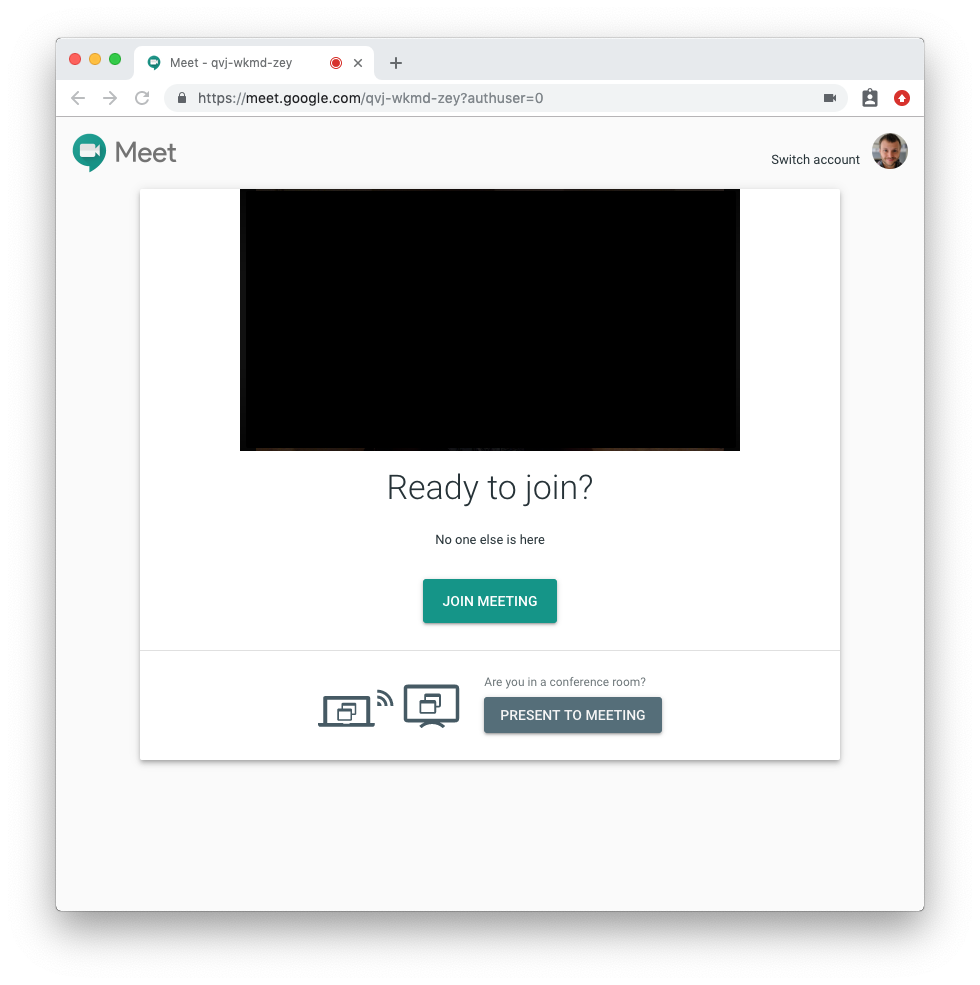
If I am clicking a link, I expect that it will not suddenly make my camera and microphone available to people I do not know. Zoom is breaking this expectation. Even if they don’t want the built-in browser popup for UX reasons, put this popup in-app! Google Meet does this well:
I don’t want to take away from the CORS focus of this post. Regardless of the user experience side of the argument, running a webserver on localhost is a risky endeavour to begin with. It should absolutely not be providing privileged access to functions, such as installing software, to every website on the internet. CORS enables you to securely do this – don’t hack around it!
I can’t know for sure if failure to understand CORS is why Zoom implemented the feature this way. However, I’ve talked to a few people and none of us can collectively find any legitimate reason to implement their existing approach. On reddit, lerunicorn did find and suggest that Firefox may block XHRs from secure to non-secure origins which could explain the motivation behind this approach. However, Firefox supports this when the origin is localhost. Further, native apps can generate a unique self-signed certificate. Alternatively, they could have used a browser extension. In any possible case, this is not a valid reason to forget to filter origins.
It’s not just Zoom. Anecdotally, lots of developers I’ve talked with don’t understand well how CORS works. There’s also very a generous quantity of examples from questions on Stack Overflow. Unfortunately, these are often paired with pages that recommend very insecure defaults like this one in express which would make your application vulnerable if copied verbatim. Other vendors have been caught with the exact same vulnerability found in Zoom.
Developers just want to get their code to work, and bypassing the same-origin policy entirely might get it to work, but when someone finds out what you’ve done you’ll get problems like Zoom has now.
I’ve seen CORS confusion from both experienced and new developers. Is the CORS API too complex and confusing, or do we only need better developer education around issues like CORS and CSP? I’m not sure, but the current approach definitely doesn’t seem like it’s working.