
Does this mean you effectively can't use them as long-lived developer environments? It sounds like even if you suspend them, this is the hard limit on the total time it can run.
This is why I have been avoiding the word sandbox for exe.dev. I don’t think developers agents need something “sandbox” shaped.
Apart from the above features.
1. We support more than 32GB disk (as a detachable device, ideal for agentic memory)
2. We provide egress control
3. We provide vault for secret injection (to counter prompt injection)
4. Snapshot / forking.
5. long lived sandboxes.
Everything supported in APIs and CLI for agents.Can be used via - npx skills add instavm/skills
> Containers launch in seconds, yet their shared-kernel architecture requires significant custom hardening to safely contain untrusted code
That's literally why they made Fargate. It's managed firecracker VMs with containers. They invented firecracker for this purpose. This new product is competing with Fargate, but they don't mention Fargate at all in the announcement. > you create a MicroVM Image by supplying a Dockerfile and code packaged as a zip artifact in Amazon S3
>
> MicroVMs support up to 8 hours of total runtime
So you're already using containers with this new thing, same as Fargate! And not only that, it's more limited in runtime than Fargate! The only thing different with this service is stateful file storage, which is actually a problem you later have to engineer around, which is why containers are stateless.This smells like a competing team building something to capitalize on AI hype, but the product isn't differentiated enough for this to make sense long term. If this was a service called managed AI agents, and you added features specific to AI agents, that has value. But "here's Fargate with a different name" isn't gonna last.
The startups in this space right now don't provide much value on top of the cloud providers they're wrapping. They don't tend to be run by experienced infra people either so they seem very vibecoded, insecure, janky, etc. They're also significantly overpriced because they're marking up already expensive providers.
Something surprising from my own experience is that while there's certainly a huge role for async agents in cloud sandboxes, async agents running locally seem more useful in many cases.
They do spike on different features like:
- snapshotting and forking
- good SSH and VPN access for end-users
- agent-friendly features, like obscuring secrets at network layer
Then there's also the option to use libkrun to run local sandboxes on your own computer. That doesn't scratch the itch for hosted services, but works if your goal is to run agents inside isolated environments for your own work.I've been working on some open-core stuff[1] to coordinate sandboxes, and we're making changes to have a library that lets people coordinate any number of remote or local sandboxes using any provider, kinda like how the Docker CLI works for managing containers, git repos, and coding agents. Flue[2] is another player in this space, and is more of a pure framework, while we're building it as an interactive product for using sandboxed agents and workflows.
[1] https://github.com/gofixpoint/amika/blob/main/ROADMAP.md
Which is more cheaper for me?
Ideally maybe self hosting would be better?
https://engine.build/lab/agent-sandboxes
Will add MicroVMs there today (and any others that are missing if you let me know!)
But I think the point is that they should be cheap to set up, and because of the short life, never really contain anything except the potential to compute when needed, not important data.
You just have to finish development in 8 hours.
Are you guys literally spinning up agents where a 100 ms boot time vs a 3 seconds boot time makes a difference?
I'm asking because I understand the appeal of micro VMs but every time the subject comes up people talk about "isolating agents": what's wrong about isolating agents in a regular VM (or in a container which, itself, is in a VM)?
FWIW I've got my stuff nicely isolated in regular VMs that are regularly up for hours and hours.
It's like the microVMs boots in 100 ms, then the agent does... What? And exits after another 100ms and now you need to launch another one?
What's the use case of "microVMs to isolate agents"?
Part of it might just be that I am old and inflation is catching up with my understanding of prices.
But as far as AWS I still have to say no thanks. Imagine some group actually started using my hosted AI agent service for something compute and network intensive. It could turn into $2000 overnight and if I didn't account for one of the numerous types of AWS charges, I might have only collected $500 for credits purchases.
Or it could easily be ten times that. But who am I kidding. No one is going to use my agents. So it doesn't matter if it's gvisor or Firecracker or whatever.
Using this for a long lived "developer environment" would be extraordinarily expensive anyhow. Scaling the vCPU + RAM cost of these to the same shape compute optimized Graviton On-Demand EC2 instance (16 vCPU x 32 GB RAM) shows about 4x the cost.
So don't do that. Just use an EC2 instance.
then when you launch the next one, its like you are still there?
also, there’s no lock-in, E2B is open-source and can be hosted on any cloud (AWS included).
plus supports bigger boxes, higher concurrency, longer timeouts (24hr).
disclaimer: i work at E2B
will have a hosted platform soon with GPU support (vulkan)
bwrap args -- gvisor args do -- sandboxee
bwrap will set up the environment and then gvisor elevates it into a true sandbox.Standalone gvisor (not the 'do' subcommand) used to be a mess with the OCI json requirement, but recently they began work on presenting their own bwrap interface (likely to pursue AI agent uses) though I wouldn't use it myself yet.
People often look down on gvisor because they think it's some kind of syscall filter, it is not. It can use one of ptrace, seccomp or even KVM to intercept ALL syscalls and service them with it's own logic. Basically it's a VMM and kernel in one.
We run quite a few Slicer instances on mini PCs and Ryzen builds - also on Hetzner (and yes ouch 120 EUR / mo up to ~ 550 EUR / mo for 16core / 128GB RAM feels almost unfair)
That said, Fargate does kind of seem like a superior option
Edit: I guess this supports suspend and fast resume so invocation time should be somewhat better than Fargate.
Most of the startups are just wrappers around AWS and significantly more expensive.
Agents need sandboxes that are cheaper so that they can run thousands
I feel that AWS, GCP and all the other cloud providers can provide this natively.
But still it would be nice to self host.
The best part of self hosting is that you own it as well, no rug pulls from the laundry list of reselling providers that could go away at anytime.
It would be nice to have a one click sandbox agent on a self hosted instance that is, free, fast (can pay a bit more for more intensive operations) and that is open source.
I am quite sure I'm not the only person working on post-firecracker KVM.
When we did AWS AgentCore Runtime last year we introduced session isolation, with MicroVMs per session. You can think of Lambda MicroVMs as the same stack, but generalized to fit a larger number of application patterns.
Daytona, E2B, OpenComputer, Freestyle, Blaxel, Vercel, Modal, Cloudflare, Tensorlake, Superserve, etc. etc.
Some of them work by pre-purchasing credits, so you can control the blast radius of spend.
Also, if you want a more embedded sandbox runtime as a library instead of a daemon + REST API, you can check out libkrun (and friendly layers on top of it like https://microsandbox.dev/ and https://smolmachines.com/)
Firecracker just has a ReSTful unix socket with a defined API and launches KVM vms with limited options.
For custom SMB I still think libvirt is a lower entry cost and may have transferable use cases to longer lived VMs, so you can just launch a qemu microvm[0] and use virsh and/or libvirt xml to set up the networking.
The ~400ms boot time of a qemu microvm vs ~120ms for firecracker may not be an issue for some loads, but qemu will also allow you a bit more density of placement than firecracker. qemu microvms will use a bit more memory individually, but they will also tend to use less real system memory with a larger number of microVMs.
It is all tradeoffs, and kata containers are yet another option that may apply depending on your use case.
You can run your own firecracker or qemu/kvm microvms on most instances that allow nested hypervisors, or on a local host. If cost containment is critical to you this is one possible way forward.
Really it just depends on if you want/need ReSTful control, or need to support short lived serverless functions, or if CLIs fit better and you many want to support full VMs.
They both are just Virtual Machine Monitors that targeted different use cases and decided on different tradeoffs.
Just be careful about hosting traditional containers and microVMs on the same system, that config is going to be problematic do to fundamental reasons that are too complex to properly address here.
[0] https://www.qemu.org/docs/master/system/i386/microvm.html
Also, MicroVMs can't be exposed directly to the web. Your code running in them can only be executed via API calls with attached auth tokens - so if you wanted to host a public facing API or website with them you'd need to implement your own additional layer in front.
Something I appreciate about Fly (disclaimer: they support my work) is that the pricing is fixed - you pay $1.94/month (less if you suspend your machine) for the smallest instance, up to $976.25/month for the largest (16 CPUs, 128GB) plus predictable costs for volume storage.
The only variable outside your control is bandwidth, and that's unlikely to cause a nasty shock.
Contrast with any of the more "elastic" hosting providers - Vercel, Cloud Run - and you're much less likely to get a horrifying bill if something gets overly-crawled or goes viral.
I think it's designed for building an image once and then reusing it many, many times.
That's exactly what you intended to do. That is the definition of advertising. It is true, many people might like it, so own it. Don't lie about it, even to yourself.
So that leaves faster boot times.
Faster boot times and then the agent does what? And at how many token/s? And what's the "time to first token" anyway?
How do the time to first token and then the token/s inherent limitations of LLMs not totally dominate the running time?
I just don't get the use case.
Though I did know about this one! (Because I saw the announcement.)
https://aws.amazon.com/blogs/aws/firecracker-lightweight-vir... says
> Battle-Tested – Firecracker has been battled-tested and is already powering multiple high-volume AWS services including AWS Lambda and AWS Fargate.
You'd have to build more of that with libkrun
The core tech of both are great though.
My personal belief is that the future of an "app" is a combo:
1. micro VM
2. agent on the VM
3. software bundled into the VM
So, it should be stupid simple to run these local sandboxed apps/agents. Right now, not too hard for technical users (esp. with things like https://smolmachines.com/ and https://microsandbox.dev/), but not as easy as clicking an app icon or typing `/path/to/binary` in the CLIAh, the significant compute overhead: https://josecastillolema.github.io/podman-wasm-libkrun/. Much more cpu and ram usage at worse performance.
Today, we are announcing AWS Lambda MicroVMs, a new serverless compute primitive within AWS Lambda that lets you run code generated by users or AI in isolated, stateful execution environments. You get virtual machine level isolation, near-instant launch and resume, and direct control over environment lifecycle and state, all without managing infrastructure or building expertise in complex virtualization technologies. Lambda MicroVMs are powered by Firecracker, the same lightweight virtualization technology that has powered over 15 trillions of monthly Lambda function invocations.
**Why customers need this
**Over the past few years a new class of multi-tenant applications has emerged that all share the need to hand each end user their own dedicated execution environment in which to safely run code that the application developer did not write. AI coding assistants, interactive code environments, data analytics platforms, vulnerability scanners, and game servers that run user-supplied scripts all fit this pattern. Building that capability today means making a difficult choice. Virtual machines deliver strong isolation but take minutes to start. Containers launch in seconds, yet their shared-kernel architecture requires significant custom hardening to safely contain untrusted code. Functions as a service are optimized for event-driven, request-response workloads, but are not designed for long-running interactive sessions that need to retain environment state across user interactions. That leaves developers either accepting tradeoffs between performance and isolation, or investing significant engineering resources to build and operate custom virtualization infrastructure to achieve isolated execution while delivering low-latency experiences to end-users. This presents an effort that demands deep expertise and pulls engineering time away from the product they are actually trying to build.
Lambda MicroVMs is purpose-built for exactly this gap. Each MicroVM gives a single end user or session its own isolated environment that launches rapidly, retains memory and disk state for the length of the session, and pauses to a low idle cost when the user steps away. Because the same Firecracker technology already underpins AWS Lambda Functions, you inherit the operational maturity of a service that has been running this stack at scale.
**Let’s try it out
**To get started, I navigated to the AWS Lambda console, where Lambda MicroVMs now appears in the left-hand navigation menu. I first need to create a MicroVM Image.
I packaged a Flask web app and its Dockerfile into a zip file, uploaded it to an Amazon Simple Storage Service (Amazon S3) bucket.
My Flask API – app.py
import logging
from flask import Flask, jsonify
app = Flask(__name__)
logging.basicConfig(level=logging.INFO)
@app.route("/")
def hello():
app.logger.info("Received request to hello world endpoint")
return jsonify(message="Hello, World!")
if __name__ == "__main__":
app.run(host="0.0.0.0", port=5000)
My Dockerfile
FROM public.ecr.aws/lambda/microvms:al2023-minimal
RUN dnf install -y python3 python3-pip && dnf clean all
WORKDIR /app
COPY requirements.txt .
RUN pip install --no-cache-dir -r requirements.txt
COPY app.py .
EXPOSE 5000
CMD ["gunicorn", "--bind", "0.0.0.0:5000", "app:app"]
I used the following command to create my MicroVM Image.
aws lambda-microvms create-microvm-image \
--code-artifact uri=<path/to/s3/artifact.zip> --name <VM_image_name> \
--base-image-arn arn:aws:lambda:us-east-1:aws:microvm-image:al2023-1 \
--build-role-arn <IAM role ARN>
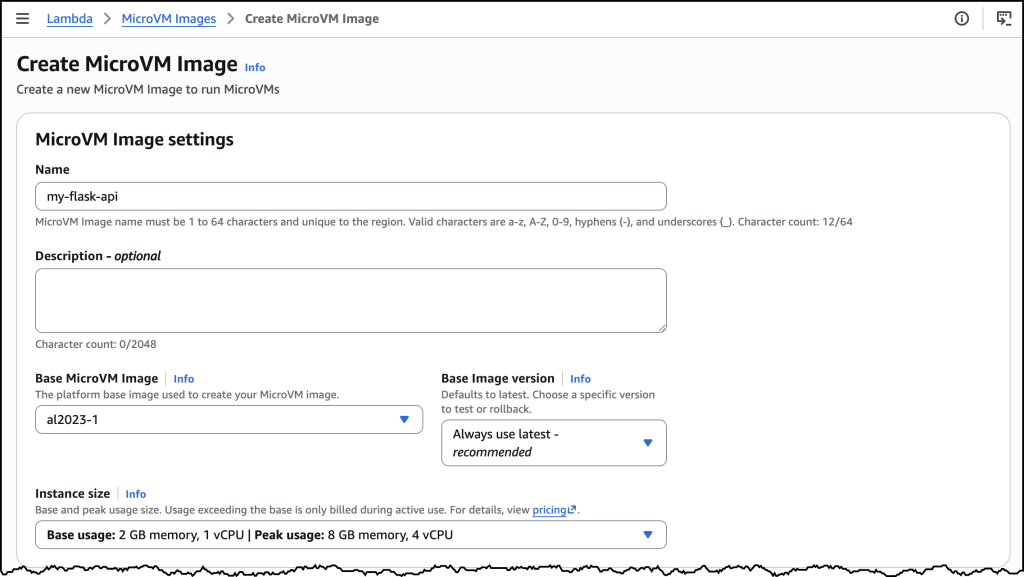
You can also create the MicroVM Image in the AWS Console as in the image above. Once I ran the command, Lambda retrieved the zip, ran the Dockerfile, initialized the application, and took a Firecracker snapshot of the running disk and memory state. Build logs streamed in real time to Amazon CloudWatch under /aws/lambda/microvms/<image-name>, and when the image was ready it appeared in the console with its Amazon Resource Name (ARN) and version number.
aws lambda-microvms run-microvm \
--image-identifier arn:aws:lambda:<region>:<acct>:microvm-image:my-image \
--execution-role-arn arn:aws:iam::<acct>:role/MicroVMExecutionRole \
--idle-policy '{"maxIdleDurationSeconds":900,"suspendedDurationSeconds":300,"autoResumeEnabled":true}'
Launching can also be done via the AWS Console or the CLI. I passed the image ARN and an idle policy configured to auto-suspend after 15 minutes of inactivity and auto-resume on the next incoming request. No networking setup was required. Lambda assigned the MicroVM a unique ID, returned a dedicated endpoint URL, and started a new MicroVM with my Flask app already running, since it was resumed from a snapshot. My Flask app was already running the moment the launch completed. One API call to get a fully initialized, bootstrapped compute environment.
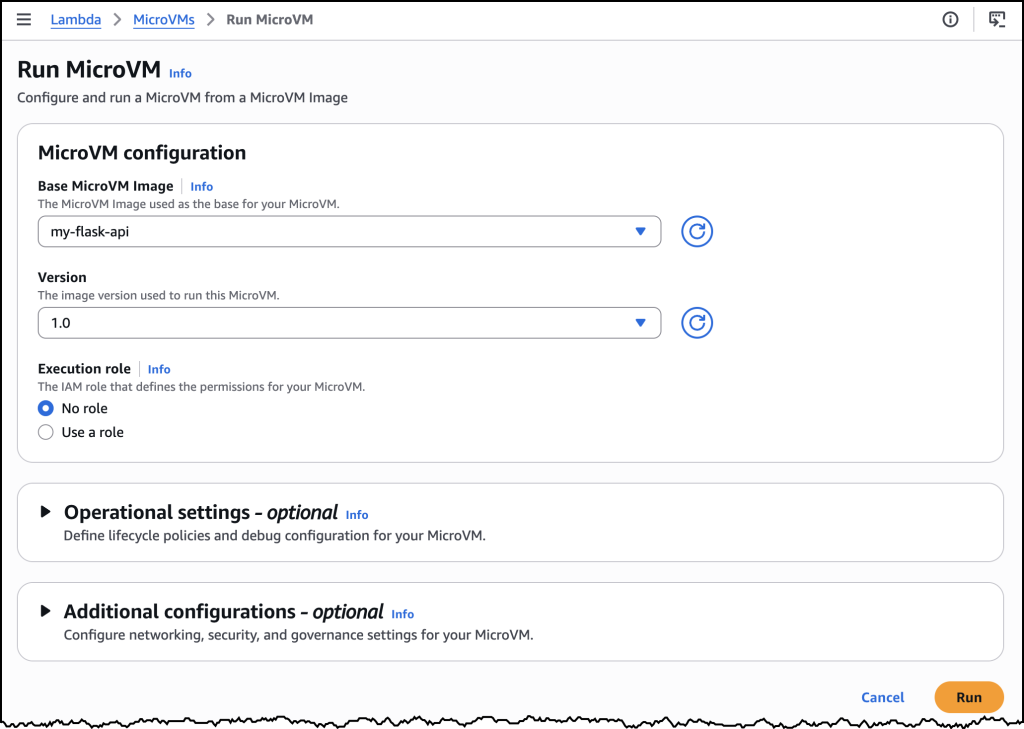
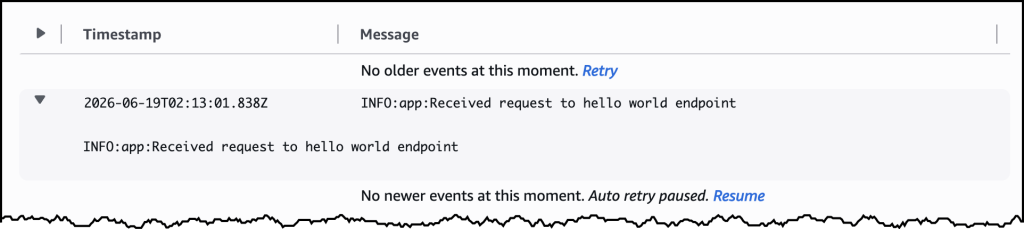
To send traffic, I generated a short-lived auth token with the CLI and attached it to a plain HTTPS request using the X-aws-proxy-auth header. The request landed on my Flask app immediately. I then let the MicroVM sit idle past the suspend threshold, at which point the MicroVM was suspended, with its memory and disk state snapshotted and stored. I then sent another request, and it resumed with the application state fully intact. From the client side, the pause never happened.
**How it works
**Under the covers, Lambda MicroVMs delivers three capabilities that, until today, no single AWS compute service offered together. The first is virtual machine level isolation, which comes from Firecracker. Each session runs in its own dedicated MicroVM with no shared kernel and no shared resources between users, so untrusted code supplied by one user is contained to their execution environment, without access to other environments or the underlying system. The second is rapid launch and resume. The model is image-then-launch: you create a MicroVM Image by supplying a Dockerfile and code packaged as a zip artifact in Amazon S3, and Lambda runs your Dockerfile, initializes your application, and takes a Firecracker snapshot of the running environment’s memory and disk state. Every subsequent MicroVM launched from that image resumes from the pre-initialized snapshot rather than booting cold, which means launches and idle resumes both achieve near-instant startup latency. Even a multi-gigabyte interactive session comes back online quickly enough to feel responsive to the end user. The third is stateful execution. A running MicroVM retains memory, disk, and running processes across the user’s session. During idle periods, a MicroVM can be suspended – with memory and disk state intact – and resumed when traffic arrives. Installed packages, loaded models, and working filesets are readily available when the user resumes their session. MicroVMs support up to 8 hours of total runtime and can be suspended automatically after a configurable idle window, which makes it straightforward to build products as varied as software vulnerability scans that complete in minutes, data analytics applications that run for hours, and interactive coding sessions with extended idle periods. As Lambda MicroVMs are started from pre-initialized snapshots, applications generating unique content, establishing network connections, or loading ephemeral data during initialization may need to integrate with service-provided hooks for compatibility.
Lambda MicroVMs is a new resource within AWS Lambda, with a distinct API surface. Lambda Functions remain the right choice for event-driven, request-response workloads, and Lambda MicroVMs is purpose-built for multi-tenant applications that need to hand each end user or session their own isolated environment to execute user- or AI-generated code. The two complement each other. An application using Lambda Functions for its event-driven backbone can call into Lambda MicroVMs for the steps that need to run untrusted code in isolation. You bring the application, and the service delivers the execution environment.
**Now available
**AWS Lambda MicroVMs is available today in the US East (N. Virginia, Ohio), US West (Oregon), Europe (Ireland) and Asia Pacific (Tokyo) Regions, on the ARM64 architecture, with up to 16 vCPUs, 32 GB of memory, and 32 GB of disk per MicroVM. Idle MicroVMs can be suspended explicitly through an API call or automatically through a lifecycle policy, which reduces the running cost while preserving full state for fast resume. Pricing details can be found on the AWS Lambda pricing page.
To get started, visit the AWS Lambda console, or learn more on the Lambda MicroVMs product page. For documentation, see the Lambda MicroVMs Developer Guide.