The same is true for 10 Gb/s Ethernet, whose speed is not exactly 10 Gb/s, but the difference from 10 Gb/s is also negligible.
Therefore, you do not need a 20 Gb/s USB to reach the maximum speed with a 10 Gb/s Ethernet interface, a 10 Gb/s USB port is good enough.
The overhead of data framing on USB is slightly higher than on Ethernet, so the maximum throughput on an USB 10 Gb/s Ethernet interface is a little lower than for a PCIe Ethernet NIC, but the difference is small enough to not matter. Usually other factors, like bad device drivers or inefficient programs, can cause much greater variations in Ethernet throughput.
The 9.4 Gb/s throughput obtained in TFA is perfectly reasonable when taking into account the packet overheads, which make impossible to reach 10 Gb/s for user data, regardless of hardware. A 20 Gb/s USB interface could not provide any serious improvement over that.
Honestly I don't see much of an use for 10Gbps in a notebook that can't be solved by a dongle when you actually need it
USB 3.2 Gen 2x2 is the very rarely supported 20Gb/s variant of USB 3, and making devices now that require that for full performance is a weird decision, with high-speed capable ports generally having wider support for either USB4 or Thunderbolt3+. I imagine the reason would be that some chip with an otherwise poor market fit got cheap...
Throwing this into the mix definitely doesn't improve the USB-C "what does this port support" conundrum, but this specific one predates USB-C and is not at all something you'd normally hit.
I appreciate the USB-C nature of the Framework's expansion ports, it does make real the entire reason that USB was created in the first place, hot plug slots. Still, I (and others) pointed out to Intel early on that using Ethernet with a specific packet type would be cheaper and just as fast (which the ATA over Ethernet folks proved), but then you wouldn't get the 'certification tax' that the USB consortium extracts. :-).
Cynicism aside, the design issues suggest that it might make sense in future laptops to have heat spreaders around the plug in port, although that makes things thicker and people obsess over thinness.
Expecting it to work full time in a laptop is a bit of a stretch of the heat dissipation budget.
Also, the laptop he is working has the AMD FP8 chipset - depending on how the ports are setup, he might only get 10G USB, if the ports are allocated to video instead.
If I'm on the go, I'll have to take it out of the chassis while it's in my bag so I don't damage it. In that case, it's easier to have a regular USB-C card in that port, and toss a dongle in my bag instead of the expansion card.
If I'm not on the go, I'm at a desk, and I'd still rather plug in a dongle than regularly swap an expansion card.
I'm not saying you'd never want the expansion card, but it feels pretty niche.
No one wants to address the elephant in the room: it's a crap design for proprietary modules. Sure the design is open, can you use them anywhere else? Nope.
You're paying a premium for USB-C dongles that can't be used on any other brand of laptop. Apple is probably upset they didn't think of it first.
That's like a weird hidden tax.
In a network world where 1GB Ethernet randomly can handshake at 100Mbit still, getting reliably more than 3/4 of the advertised Bandwith from the Adapter seems quite harmless.
https://frame.work/marketplace/expansion-cards?search=USB-C
No they dont come free in the base config either, you have to pay a minimum of 10 for every slush port.
That's probably the missing cherry on top, as having vpro once the framework motherboard gets reused as a home server it gives some manageability features.
Realtek makes some pretty affordable networking chips but their Linux drivers can be a real gamble. Either it works out of the box or you're in for years of messing around.
Colleagues borrow them all the time when they need a SD card or MicroSD card reader. Is it as pretty as a dedicated reader for those cards? No, but it does the job.
Saying they're proprietary is misleading a bit. The form factor makes it awkward to use elsewhere but they work just fine anywhere you plug them into.
My Framework ethernet dongle works perfectly fine with a Mac that I use for work, for instance.
-edit- here it is: https://community.frame.work/t/low-profile-ethernet-expansio...
For the niche enthusiast, that dongle is fine.
And yes, some of those links are above 1gbps so that the users can have individual 1gbps links.
I feel like things would not look like nickel-and-diming if those blanks came with the laptop, and they just priced them in the final price. Or even better, offered the option to "upgrade" one or several of those to whatever you need.
The main application of 20 Gb/s USB ports is to connect external NVMe SSDs, when faster USB 4 or Thunderbolt ports and SSDs are not available.
For an external NVMe SSD on USB, a 20 Gb/s USB port will double the throughput, unlike for a 10 Gb/s Ethernet interface where any improvements are completely negligible.
I do not think that 20 Gb/s USB Type C ports are "very rarely supported". Every mini-PC or desktop motherboard that I have bought during the last 10 years had at least one such USB port.
Such ports appear to be rare only on laptops, because most laptops have very few USB ports.
What difference does a docking station make? Sometimes you want to spend a minute or two setting up your laptop in a more serious way, and that's just as reasonable with or without a docking station.
Anyway it is probably just there to demonstrate the possibilities to consumers. What if a lower profile standard for networking gets popularized?
If it had a hinged or expanding[0] ethernet port so it could sit flush with the chassis when not in use it would make a lot more sense.
[0] It's easier to show what I mean https://www.reddit.com/r/TechnologyPorn/comments/hvlxep/orig...
I have seen the same with just usb-c multi-port dongles for macbooks (the ones they give you at work along with the macbooks).
in fairness to the docs/dongles though, they have an incredible amount of features that would have been science-fiction twenty years ago.
While a regular usb-c ethernet adapter has a flexible cable between the laptop and the bulky rigid part.
You can likewise put 26" rims on a Ford Fiesta but it will look and function equally poorly.
It is mechanically disagreeable.
The weight/shape of the module will break the USB-C port in short order because it is solely supported by the connector.
For instance, by bumping the spatula hanging off your Mac.
For that matter, USB-C are crap connectors, I don't care how many graphs and BS data you show me stating they're the most reliable connector ever. I do not believe it.
They're the only types of connectors I've seen damaged repeatedly, and the only one with which I've personally experienced damage, and I've been using laptops since before many of you were born.
These realtek 10gbe chips are more in the range of the Pi Zero class machines (0.5W idle, 2W loaded) which don't often come with heatsinks though they might benefit from them. If it has a good thermal connection to a good thick ground plane on the PCB, that's worth almost as much as a passive heatsink on the top of the chip.
usb-c < card edge < motherboard integrated in terms of how much heat can be transfered through the connection. Where the motherboard would have the largest ground plane to soak up heat from such an IC and dissipate it passively. The usb-c module is worst case by being a small enclosed box with very little thermal connection through the plastic insulating housing. An aluminum enclosure might dissipate enough heat passively to make it pleasant to use.
A wider bag doesn't solve it. The part that sticks out could still easily snag on something. I wouldn't want to take that risk, and I doubt many people would.
I feel like you're arguing just to argue...
Even with a heatsink and fan, I had to upgrade to a higher quality set to keep Jellyfin from thermal throttling a Pi5 while transcoding 4K video.
Yes, except that most devices use Ethernet. So, at the end of the day, you still need Ethernet cables unless you want to deal with an additional switch or converter in every room.
The current crop has been great for my needs — a couple models have 10G Ethernet built in (CalDigit is the one I'm using now), and most now have more than one Thunderbolt port that allows a high speed storage device to be used as well (in addition to a 5K or 4K display or two!).
I'm 1000% for wired connections where possible, but for laptops too thin to have one built inside of the frame the best choice is a proper docking station, ideally with a cable that isn't impossible to user replace.
The economics/upgrade math just does not make sense.
No, you wouldn't. You'd have one of these instead: https://frame.work/products/usb-c-expansion-card?v=FRACCQ000... (or the one matching a color you prefer and your particular model)
Sure. But this does not make them proprietary, they work fine with non-Framework laptops as well.
I disagree with that for two reasons. First, my central switch is probably capable of both copper and fiber. Second, how many wired devices do you have spread around your house? Let's say I have an above average number of devices: a router, a NAS, two access points, and three desktops. Router, NAS, and one access point can all be adjacent to the switch and avoid any conversion hassle. The desktops are using fiber so no conversion hassle there. That leaves one copper cable or converter needed for the other access point.
Can you slide them into a just-sized mechanical receptacle on a MacBook? On a Dell, HP, etc.
No.

I've been following WisdPi's development of various 5 Gbps and 10 Gbps Ethernet adapters for the past couple years.
They use newer Realtek Ethernet chips, which sometimes have performance quirks—most frequently encountered under Linux.
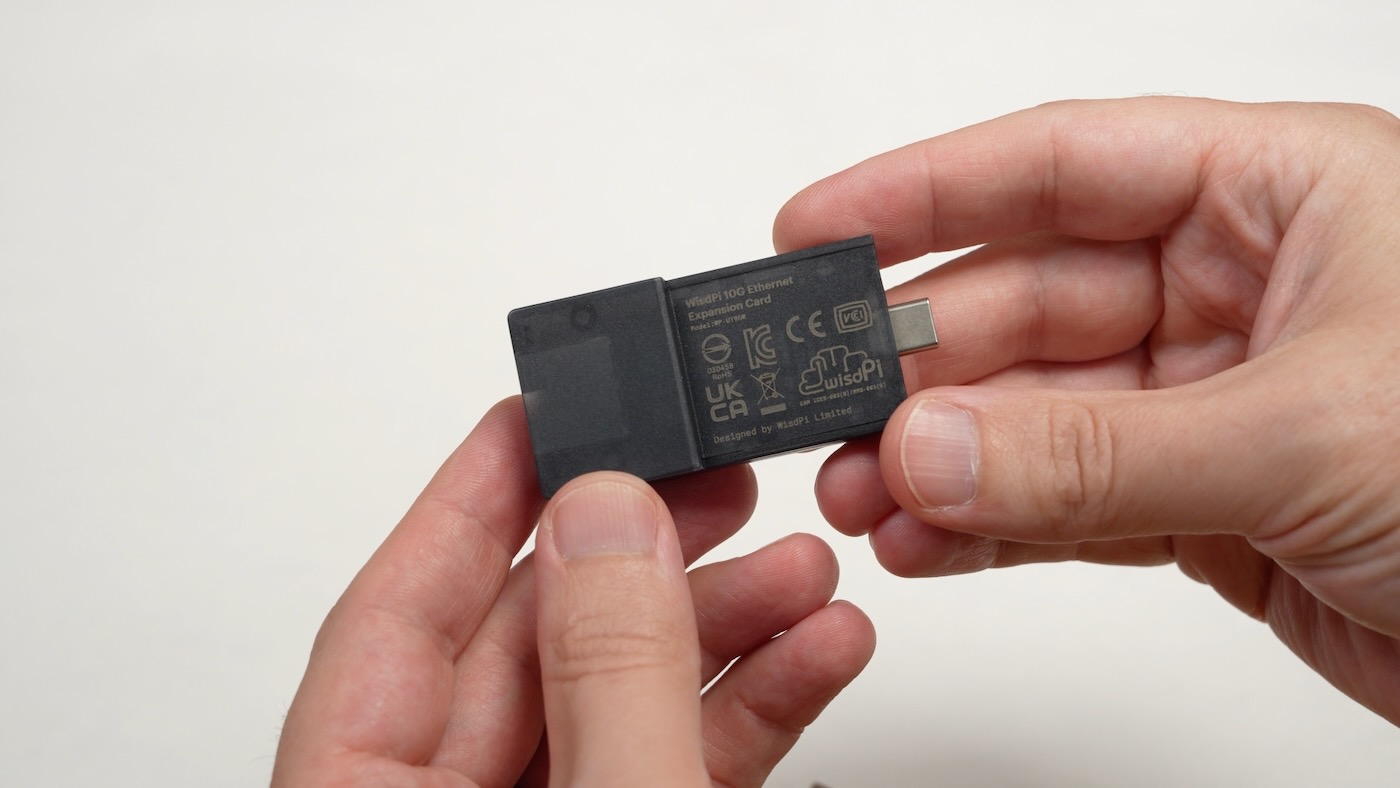
In today's video, I tested the new WisdPi 10G Ethernet Expansion Card for Framework computers. It fits in any available Framework Expansion slot—even on the Framework Desktop.
But Expansion Cards use USB-C for their connection to the mainboard—and therein lies the rub...
The main problem is USB-C's bandwidth complexity—especially when paired with the Realtek RTL8159 Ethernet controller, which requires USB 3.2 Gen 2x2 (20 Gbps) to get the full rated 10 Gbps speeds.
On many Framework laptops, you'll wind up getting considerably less than 10 Gbps (9.4 Gbps real-world max):
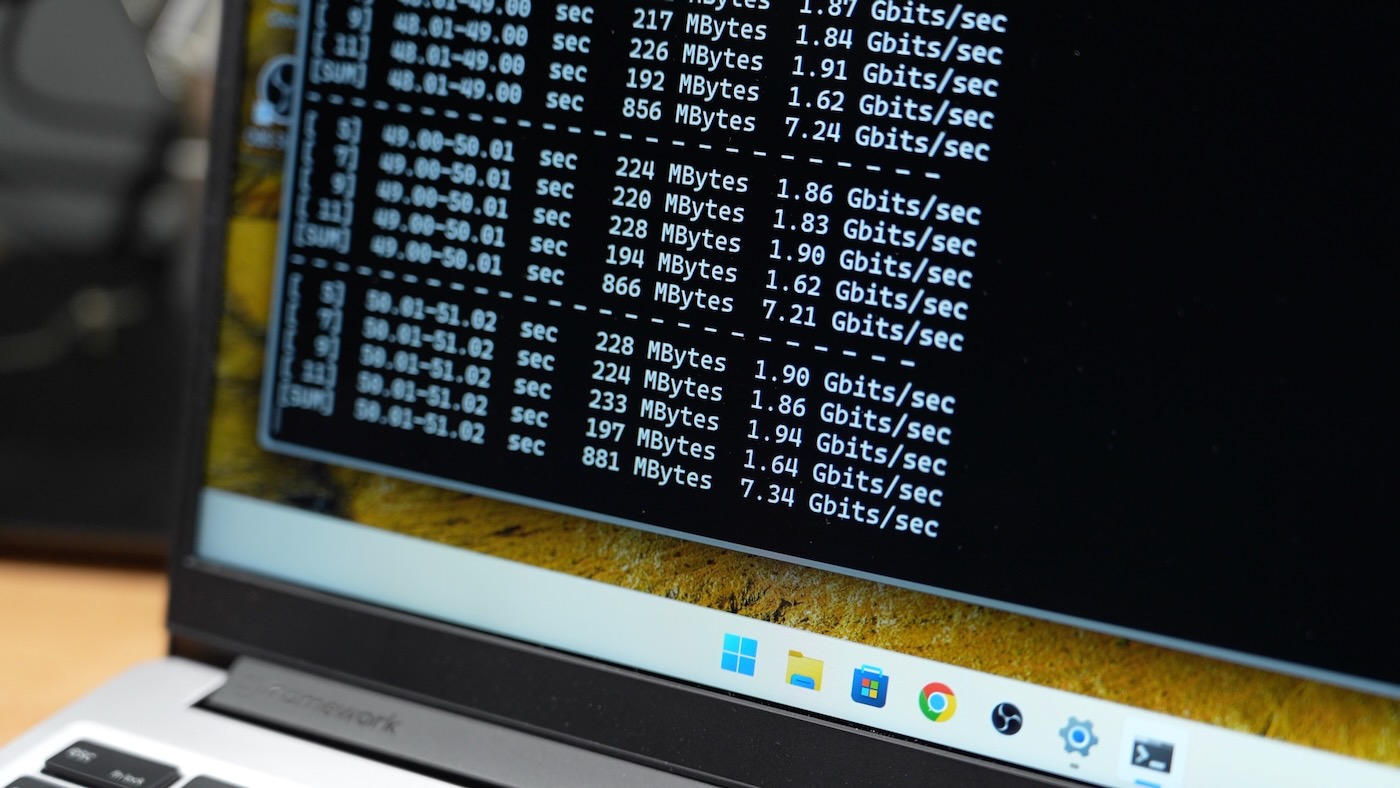
The above image shows the average bandwidth I get on Windows 11 on a Framework 13 with AMD's Ryzen AI 5 340. Linux fares slightly worse on that laptop, but it surprised me because Framework's own port documentation for my laptop says it should support USB 3.2 Gen 2x2—at least on ports 1 and 3!
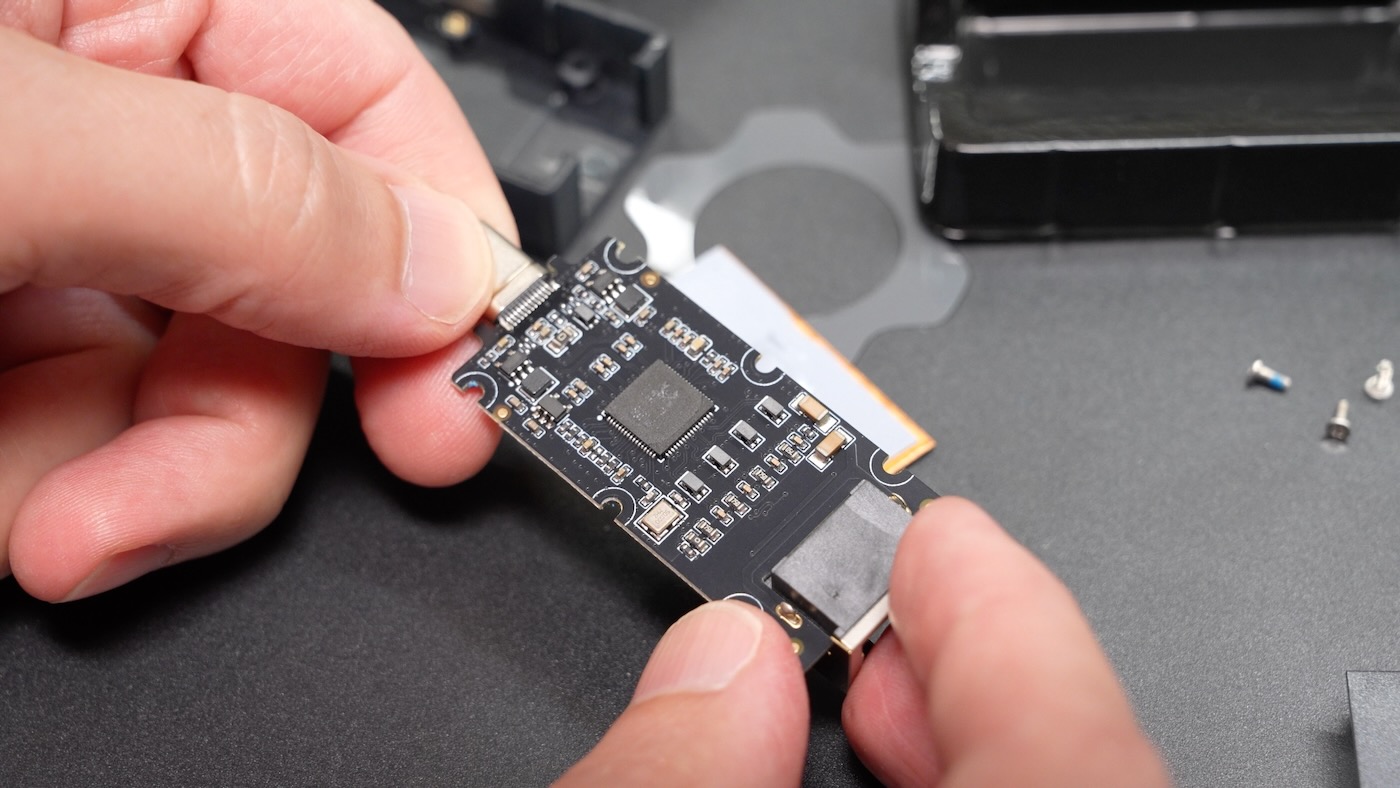
The RTL8159 is bottlenecked on a many USB4 and all USB 3.2 Gen 2x1 connections. Unfortunately, that caps the bandwidth well under 8 Gbps.
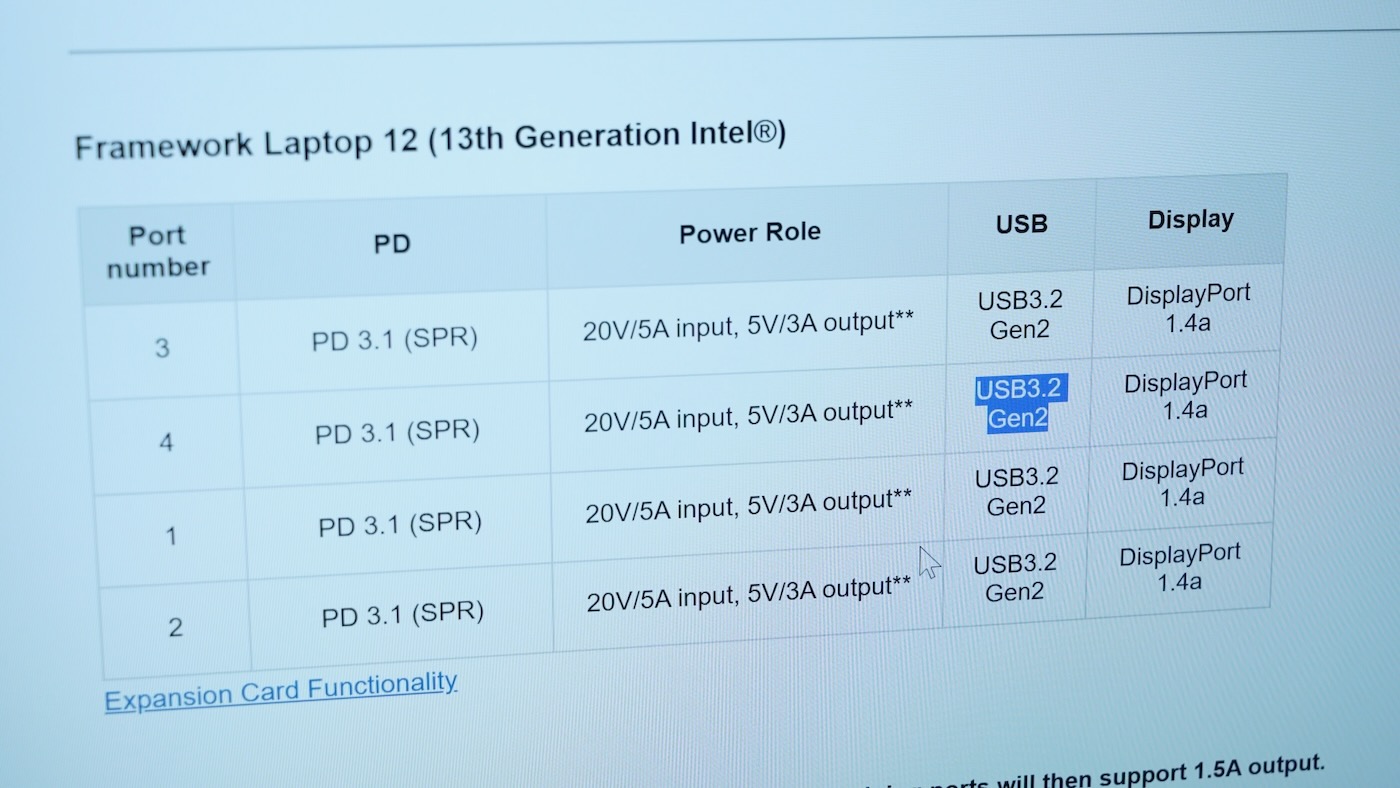
I tested on my Framework 12—with a slower Intel 13th Gen mobile CPU—and I found it does support USB 3.2 Gen 2x2 speeds as documented, and I should get closer to 10 Gbps.
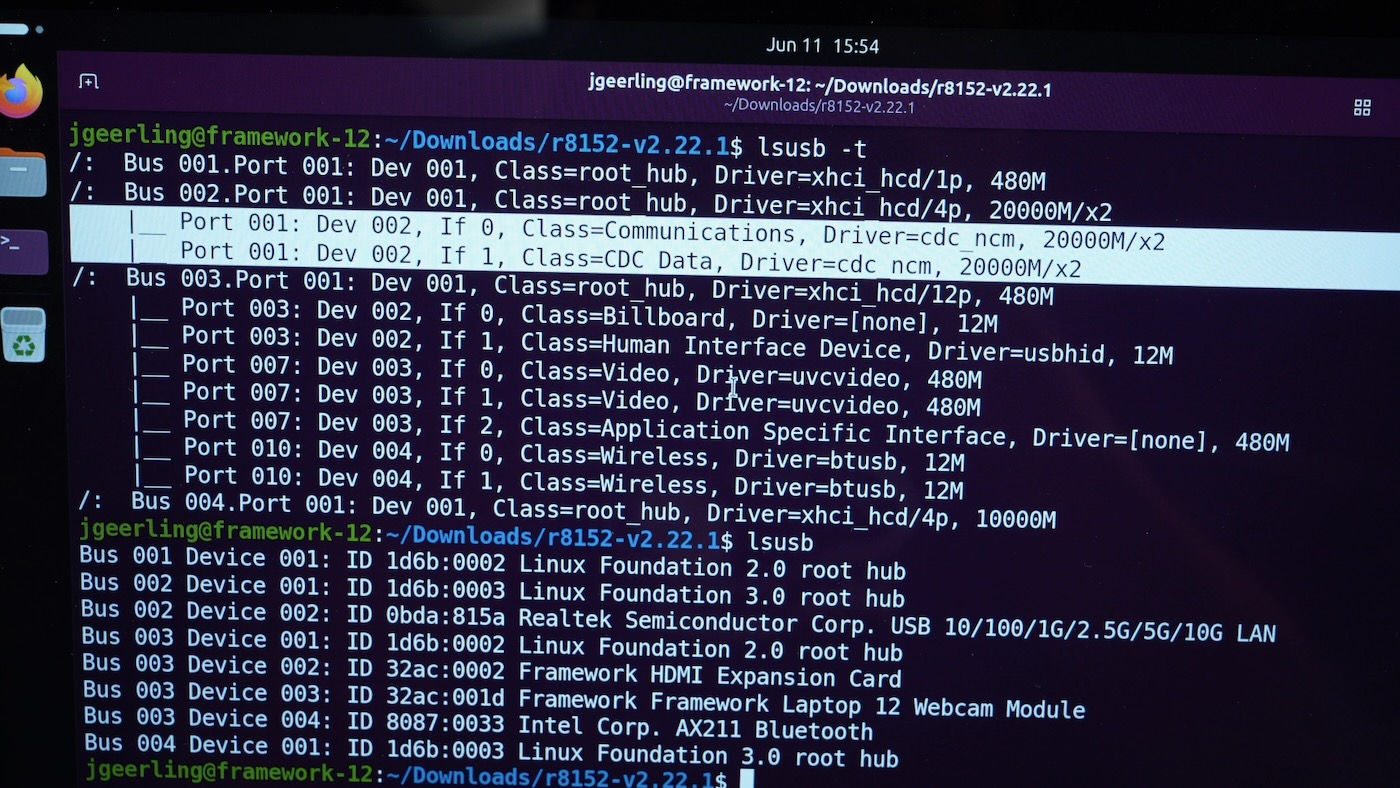
Except—at least in Linux—it didn't. The port showed up as 20000 Mbps (20 Gbps) via lsusb, but iperf3 only got me 7 Gbps. I tried to download and compile the Realtek driver, but it errored out on Ubuntu 26.04, presumably because the Linux kernel in that distro (7.x) is too new.
So I switched to Windows 11, and after confirming the port showed up as Gen 2x2 with USB Tree Viewer, I got the same iperf3 performance as in Linux—at least with the built-in driver.
On Windows, though, the Realtek driver installed without a problem, and I finally got the 9.4+ Gbps I was looking for:
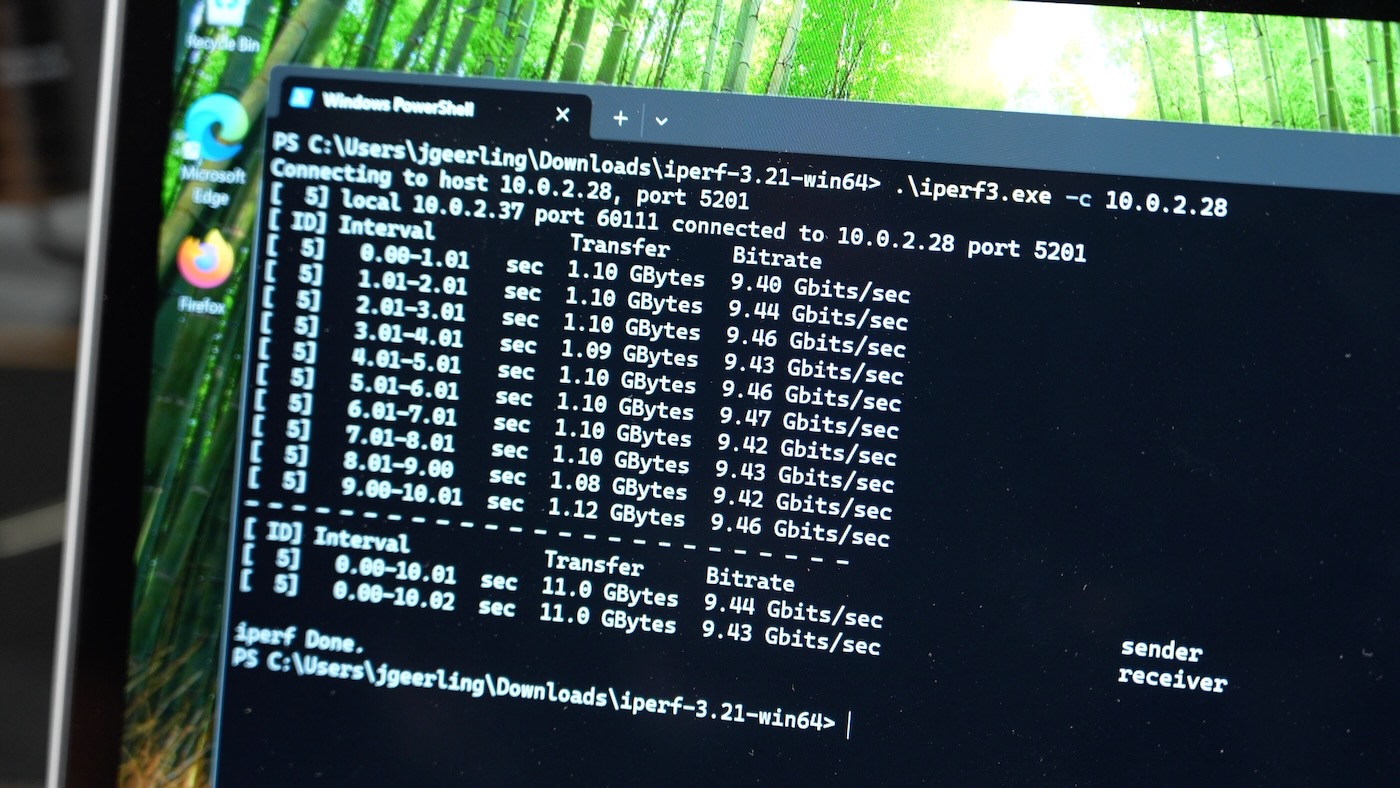
Doing a bidirectional test, I could get around 9 Gbps up, and 4-5 Gbps down, but after running these tests for a while, I ran into a new issue. The module was getting very hot. Enough that I pulled out my thermal camera to check on it:
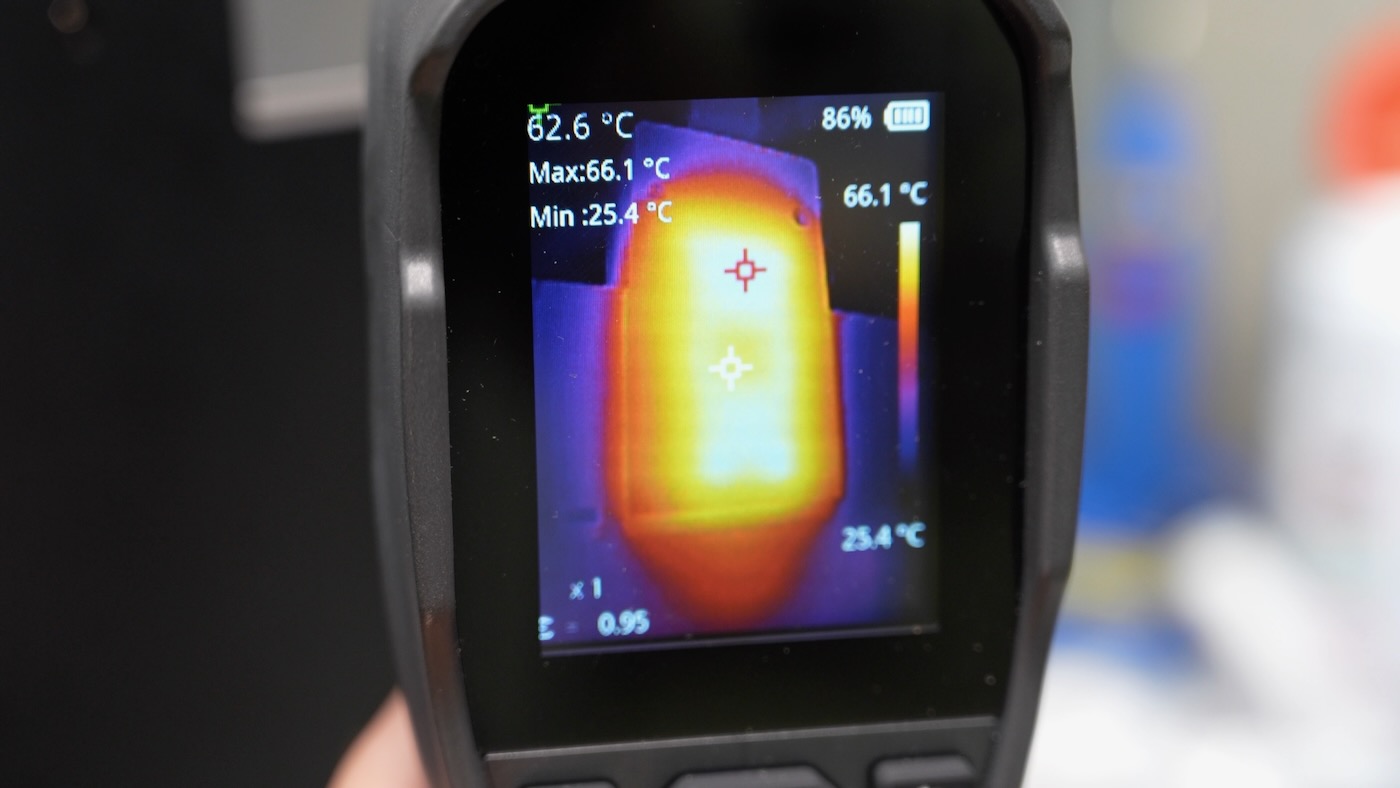
That's getting close to 70°C on the bottom plastic surface, and while it won't give you an immediate contact burn, it would certainly give you Toasted Skin Syndrome—something I remember hearing about back when MacBook Pros would leave marks on users' legs!
I asked WisdPi about this, and they said the plastic surface temperatures is in compliance with IEC 62368-1 temperature safety limits. As long as you don't keep skin in contact with the surface for more than 10 seconds, you're good to go.
But this is a laptop. And I use it on my lap frequently! In fact, I'm writing this blog post on it from my couch...
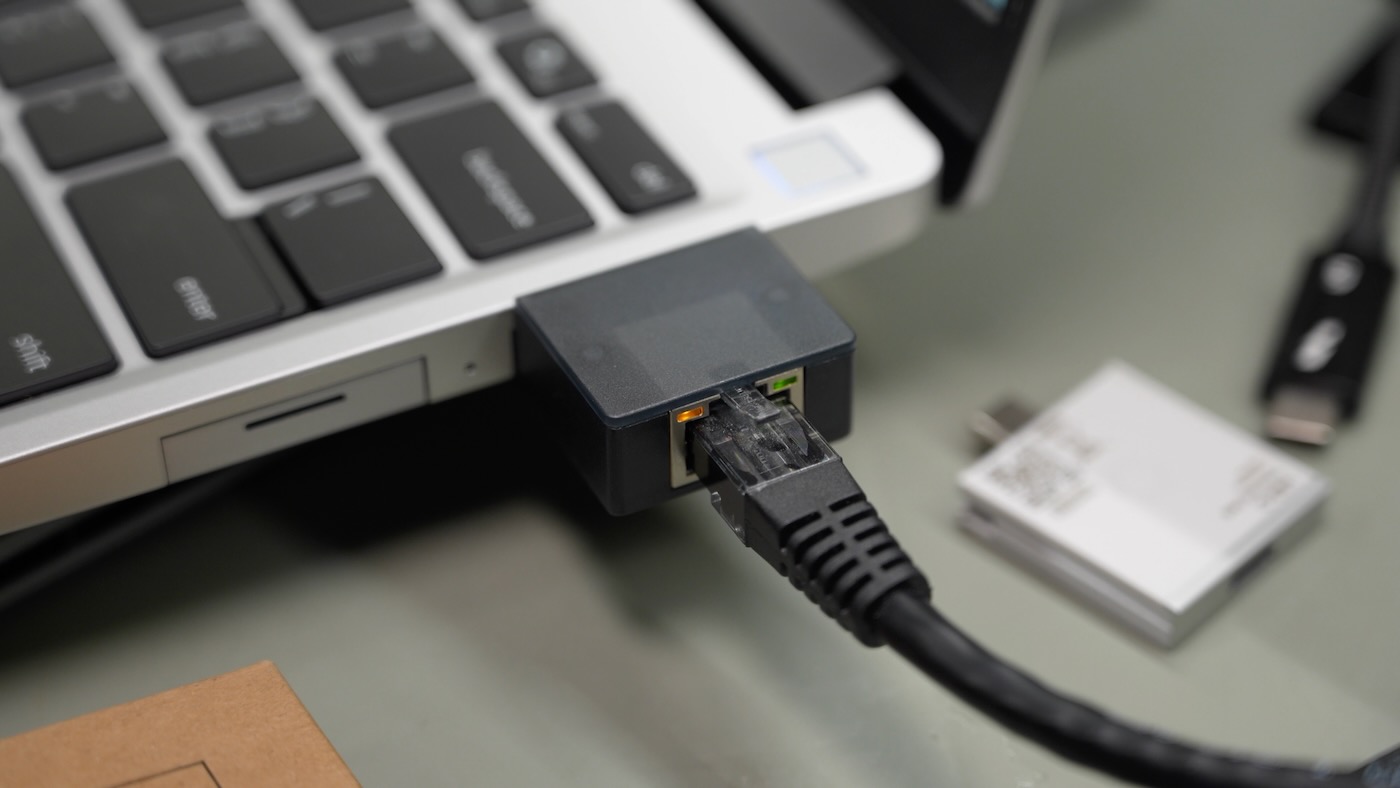
Of course, 99% of the time I have it in my lap, I'm on WiFi. Also, the module itself extends a couple cm out from the laptop, so you have to remove it if you're using a laptop sleeve or have a snug-fitting bag.
So in terms of heat, my recommendation is to only use this module in scenarios where you won't be using it on your lap.
And in terms of getting the best performance, I've compiled the following chart, with bandwidth results from WisdPi's and my own tests, showing the best case scenario for different Framework computers:
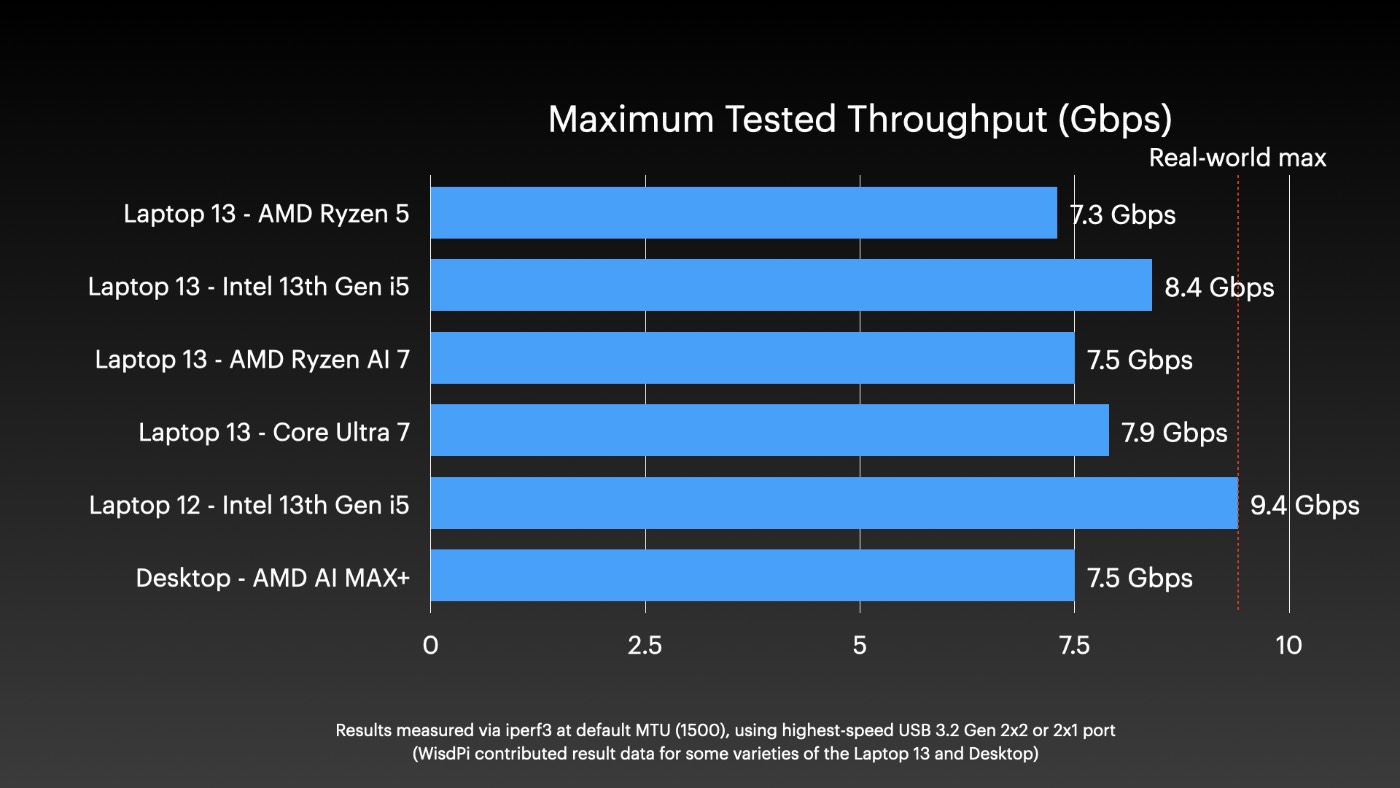
My recommendation for most people, then, is to consider the regular ol' Ethernet Expansion Card, which is good for 2.5 Gbps and costs about $40.
If you need something faster, and don't want an external USB-C dongle, then and only then should you consider the $99 WisdPi 10G Card. As of this writing, the card was out of stock.
The unit I tested was sent to me by WisdPi for testing and review.
Unless you're crazy and leave the expansion ports unpopulated.
My best guess for Apple's actions is that despite there being a very real demand for a smaller phone, they don't think the discomfort is bad enough for people to switch to Android, so they don't even try. A small phone makes a lot of profit, but ignoring the demand also makes a lot of profit.
The Air was a real flop.
While this may be theoretically (almost) possible, I’m quite sure this is absolutely not the case in practice.
For example see these benchmarks of one of the more recent USB to Ethernet chipsets [1], that can reach ~9.5 Gb/s on USB 3.2 Gen 2x2 but only between ~6.2 to ~7.3 on 3.2 Gen 2x1 laptops.
1. https://www.jeffgeerling.com/blog/2026/new-10-gbe-usb-adapte...
Edit: Haha, didn’t realise TFA was by the same author as these benchmarks but he’s done a lot of testing and benchmarking of these kind of devices over a long time, and it agrees with all the other benchmarking from other people I’ve seen too!
https://frame.work/pl/en/products/dual-m-2-adapter
People have been making custom OCuLink adapters and recently Framework developed its own:
Are you talking about USB 3.2 Gen 2x2 though? Because I've never seen any MiniPC with this port and as for motherboards, I checked my local retailer and only ~15% of currently sold ones have Gen 2x2 (mostly high-end ones).
Try to load any modern website on dial-up. The connection will likely timeout before a full page load.
Subsequently, in 1967, Black of Motorola experimentally derived a median time to failure (MTTF, i.e., operational lifetime) model for EM in Al interconnects, showing that the time to failure due to EM is inversely proportional to both the current density and the absolute temperature of the interconnect.
[1]: https://infinitalab.com/blog/ic-failure-analysis-defect-type...
[2]: https://resources.system-analysis.cadence.com/blog/msa2020-b...
[3]: https://www.mdpi.com/2079-9292/14/15/3151#sec3-electronics-1...
With mini-PCs, I frequently use external SSDs, so I certainly used those ports at their full speed.
The only mini-PCs that I had in recent years without such a fast USB port were Arm-CPU based, as those are typically starved in fast peripheral interfaces in comparison with the Intel/AMD CPUs.
So the their maximum speed is approximately 9.7 Gb/s.
Then for Ethernet there is a protocol-dependent overhead, e.c. depending on whether TCP or UDP is used, and depending on whether standard packets or jumbo packets are used.
The TCP overhead can reach in the worst case up to close to another 3%, reducing the achievable TCP throughput to around 9.4 Gb/s.
The USB frames add some extra overhead, but it is normally not important in comparison with other factors that can reduce the throughput.
All that a 20 Gb/s USB port can do is to reduce the overhead of the USB frames, but that is a negligible improvement. Using jumbo Ethernet frames (which are 6 times bigger than standard frames), if both ends support them, is likely more useful for increasing the throughput, than using a 20 Gb/s USB port.
I am of the opinion that 5Gbe is a much more sensible speed for a laptop adapter right now as it uses half the power and can obviously run full wack on 10Gb/s USB so you're looking at like 5Gbe vs ~9.4Gbe.
Once 5g became pervasive and data cheap, no one gaf about a cold load weight fitting on a floppy.
I’m still clutching my iphone mini, which after ios 26 just boggs down under the absurd weight of many pages and turns in to a space heater before reloading entire page b/c of error. No need for forced obsolescence when the enshittification of basic websites takes care of that for you. :-/
At distances where Cat.6A is even an option the demands on the fiber are very low. And it uses less power than the BASE-T PHY. The cable at least without integrated power is very thin as well, unless you can't respect it enough to not kink it, in which case you'd want a thicker one just to prevent you from being able to break the fiber.
And you get much better future proofing with SMF. And if you do need a long fast run, SMF is what you want.