AMD Strix Halo RDMA Cluster Setup Guide
This guide details how to configure a two-node AMD Strix Halo cluster linked via Intel E810 (RoCE v2) for distributed vLLM inference using Tensor Parallelism.
Table of Contents
- TL;DR (Quick Start)
- Concepts & Architecture
- Hardware Prerequisites
- Host Configuration (Fedora)
- Toolbox Installation & Network Verification
- Running the Cluster
- Troubleshooting
- References & Acknowledgements
1. TL;DR (Quick Start)
On Both Nodes:
- Preparation:
- Install/Update Fedora 43 and the E810 NICs (Check firmware:
ethtool -i <iface>). - BIOS/Kernel: Set iGPU to 512MB and apply kernel params (
iommu=pt,pci=realloc, etc.). - SSH: Configure passwordless SSH between nodes.
- Install/Update Fedora 43 and the E810 NICs (Check firmware:
- Networking: Assign static IPs (
192.168.100.1&.2), set MTU 9000, and trust the interface in firewall. - Install Toolbox: Run
./refresh_toolbox.sh(this automatically installs the container with RDMA support and the customlibrccl.sopatch). - Run Cluster:
- Run
start-vllm-cluster. - Select "2. Start Ray Cluster" (Follow prompts using the TUI).
- Select "4. Launch VLLM Serve" and choose your model. (Export
HF_TOKENfirst for gated models!)
- Run
Key Note: The refresh_toolbox.sh script detects your Infiniband/RDMA devices and automatically configures the container to expose them.
2. Concepts & Architecture
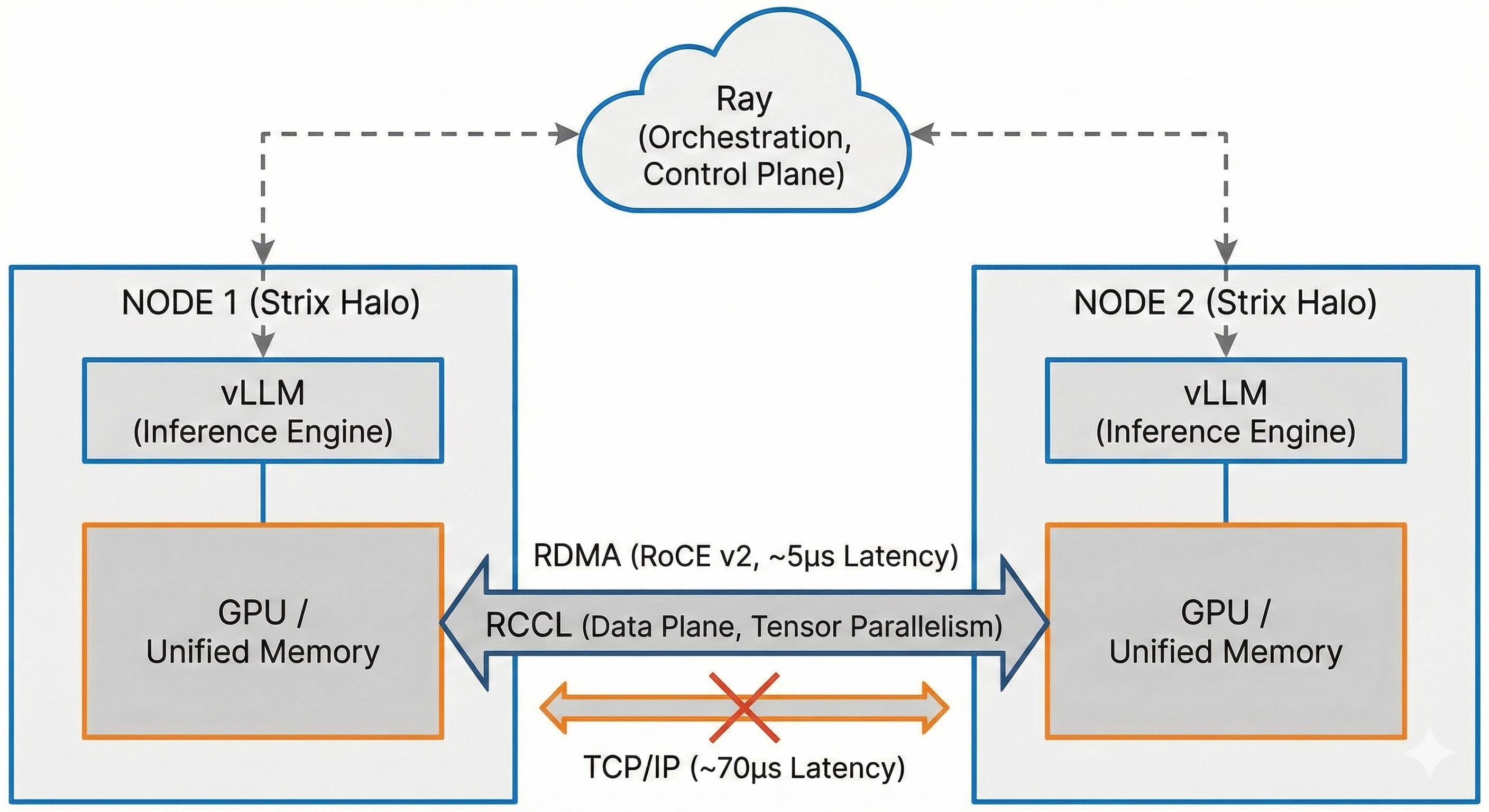
To fully utilize the Strix Halo cluster, it is helpful to understand the technologies involved:
- vLLM: A high-performance inference engine. To run models larger than a single GPU (or APU) can handle, it splits the model using Tensor Parallelism (TP).
- Ray: A distributed computing framework. vLLM uses Ray to orchestrate the cluster, manage the "worker" processes on each node, and ensure they start up correctly. Ray handles the control plane (issuing commands).
- RCCL (ROCm Collective Communication Library): The AMD equivalent of NVIDIA's NCCL. This library handles the data plane—specifically, the extremely fast synchronization of tensor data between GPUs. When TP=2, the two nodes must exchange partial results after every single layer of the neural network. This happens thousands of times per second.
- RoCE v2 (RDMA over Converged Ethernet): The protocol that allows RCCL to write data directly from one Node's memory to the other Node's memory, bypassing the CPU and OS kernel.
- Without RDMA: Latency is ~70-100µs (TCP/IP overhead).
- With RDMA: Latency is ~5µs.
- Why it matters: For interactive token generation, high latency kills performance. RoCE makes the two nodes feel like a single machine.
3. Hardware Prerequisites
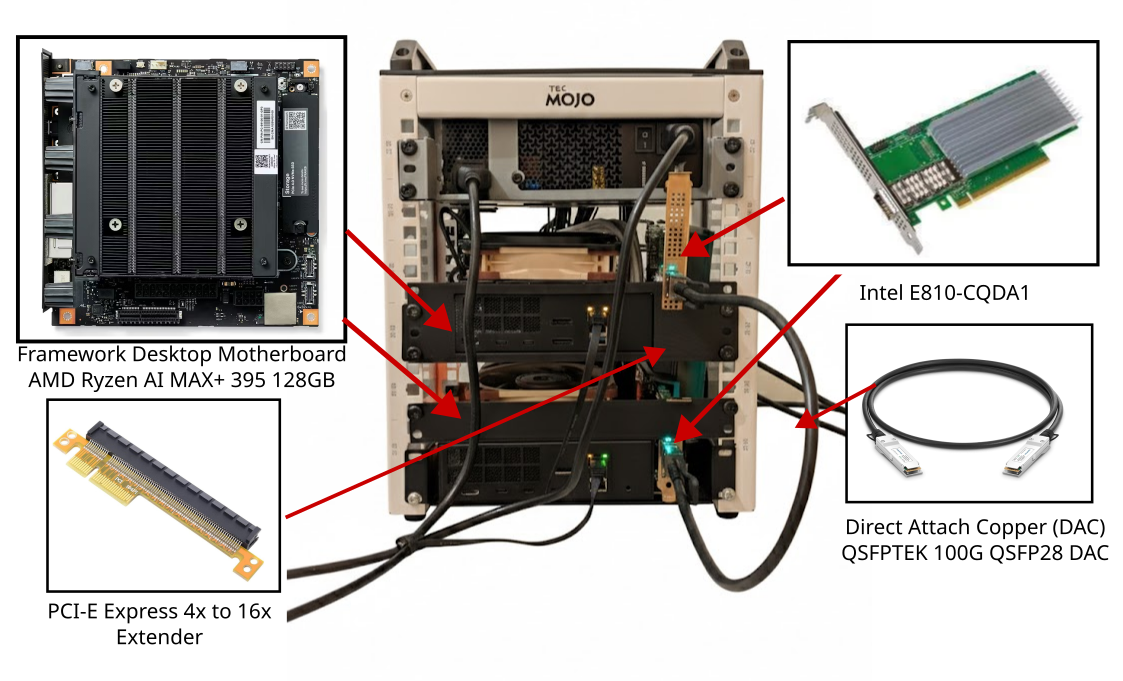
- Nodes: 2x Framework Desktop Mainboards with AMD Ryzen AI MAX+ "Strix Halo", 128GB of Unified Memory.
- Network Cards: Intel Ethernet Controller E810-CQDA1 (or similar 100GbE QSFP28).
- Connection: Direct Attach Copper (DAC) cable (e.g., QSFPTEK 100G QSFP28 DAC). No switch required for 2 nodes.
- PCIe Note: The Framework motherboard PCIe slot is physically x4, so a riser is required to plug in a 16x card (e.g., CY PCI-E Express 4x to 16x Extender). Test Setup Note: One of the boards in this setup has a modified PCIe slot (cut by Framework using an ultrasonic knife) to accept x16 cards directly. This is not recommended for users. Risers are the cheaper, safer, and easier solution. Performance is identical (~50Gbps bandwidth, ~5µs latency).
4. Host Configuration (Fedora)
Perform these steps on the Host OS (Fedora 43) of both nodes.
Tested Host Configuration:
| Node | Kernel | OS | IP (RDMA Interface) |
|---|---|---|---|
| Node 1 | 6.18.5-200.fc43.x86_64 |
Fedora Linux 43 | 192.168.100.1/30 |
| Node 2 | 6.18.6-200.fc43.x86_64 |
Fedora Linux 43 | 192.168.100.2/30 |
Note: These specific kernel versions were verified to work. Fedora 43 is recommended.
4.1 Install Packages
Install the core RDMA userspace tools. You do not need proprietary Intel drivers; the in-kernel drivers work perfectly.
- Ethernet Driver:
ice - RDMA Driver:
irdma(Unified driver for RoCE v2 & iWARP)
sudo dnf install rdma-core libibverbs-utils perftest
rdma-core: The userspace components for the RDMA subsystem (libraries, daemons, and configuration tools).libibverbs-utils: Utilities for querying RDMA devices (e.g.,ibv_devinfo).perftest: A suite of benchmarks (e.g.,ib_write_bw,ib_send_lat) to verify RDMA bandwidth and latency.
4.2 Check Native Firmware
Use ethtool to check the current firmware version of your Intel E810 card.
ethtool -i enp194s0np0
Recommended Firmware:
Ensure your firmware is at least as new as the version shown below (Firmware 4.91...). If your firmware is older, please update it using the Intel® Ethernet NVM Update Tool for E810 Series.
Example Output:
driver: ice
version: 6.18.5-200.fc43.x86_64
firmware-version: 4.91 0x800214b5 1.3909.0
expansion-rom-version:
bus-info: 0000:c2:00.0
supports-statistics: yes
supports-test: yes
supports-eeprom-access: yes
supports-register-dump: yes
supports-priv-flags: yes
4.3 Network Configuration
This guide assumes a subnet of 192.168.100.0/30.
Identify your interface:
Run ip link to find your 100GbE card (e.g., enp194s0np0).
Node 1 (Head - 192.168.100.1):
# Bring link up
sudo ip link set enp194s0np0 up

# Assign IP
sudo ip addr add 192.168.100.1/30 dev enp194s0np0

# Set MTU (Jumbo Frames)
sudo nmcli connection modify "rdma0" ethernet.mtu 9000
sudo nmcli connection up "rdma0"
Node 2 (Worker - 192.168.100.2):
# Bring link up
sudo ip link set enp194s0np0 up

# Assign IP
sudo ip addr add 192.168.100.2/30 dev enp194s0np0

# Set MTU
sudo nmcli connection modify "rdma0" ethernet.mtu 9000
sudo nmcli connection up "rdma0"
Verify Routing: Ensure the route exists on both:
sudo ip route add 192.168.100.0/30 dev enp194s0np0
Verify Link:
rdma link
# Output should show: state ACTIVE physical_state LINK_UP used_usec X ...
4.4 BIOS & Kernel Configuration
1. BIOS Settings: Set the iGPU Memory Allocation to the minimum possible (512MB). We will use the GTT (Graphics Translation Table) to dynamically allocate system memory as "Unified Memory" for the GPU.
2. Kernel Parameters: Update GRUB to enable unified memory, optimize RDMA performance, and fix PCI resource allocation.
Edit /etc/default/grub and append to GRUB_CMDLINE_LINUX:
iommu=pt pci=realloc pcie_aspm=off amdgpu.gttsize=126976 ttm.pages_limit=32505856
Explanation of Parameters:
iommu=pt: Sets IOMMU to "Pass-Through" mode. This is critical for performance, reducing overhead for both the RDMA NIC and the iGPU unified memory access.pci=realloc: Reallocates PCI BARs. Often needed on consumer platforms to properly map large address spaces for devices like the E810 or Strix Halo.pcie_aspm=off: Disables PCIe Active State Power Management. Prevents latency spikes and link negotiation issues on the 100GbE connection.amdgpu.gttsize=126976: Caps the GPU GTT size to ~124GiB (126976MB). This defines how much system RAM the GPU can address as its own "VRAM".ttm.pages_limit=32505856: Limits the Translation Table Manager to ~124GiB (in 4KB pages), matching the GTT size.
3. Apply Changes:
sudo grub2-mkconfig -o /boot/grub2/grub.cfg
sudo reboot
4.5 Firewall Rules
Applications like Ray and NCCL use random high ports. It is easiest to trust the internal RDMA interface completely.
# Assign the interface to the trusted zone permanently
sudo firewall-cmd --permanent --zone=trusted --add-interface=enp194s0np0

# Reload firewall
sudo firewall-cmd --reload
5. Toolbox Installation & Network Verification
5.1 Prerequisites: Passwordless SSH
The cluster management and verification scripts rely on SSH to execute commands on remote nodes. You must configure passwordless SSH between both nodes (root or sudo-enabled user).
- Guide: How to Set Up SSH Keys on Linux (DigitalOcean)
- Quick Check: Run
ssh <other-node-ip> datefrom each node. It should print the date without asking for a password.
5.2 Installation
The toolbox container provided in this repo includes a critical patch: a custom-built librccl.so that enables gfx1151 (Strix Halo) support for RDMA (https://github.com/kyuz0/rocm-systems/tree/gfx1151-rccl), which is currently missing in upstream ROCm packages. This library is automatically compiled using the build-rccl GitHub Action in this repository, which generates the artifact that is then bundled into the Docker container.
To install the toolbox on both nodes, run:
./refresh_toolbox.sh
What this does:
- Pulls the latest
kyuz0/vllm-therock-gfx1151image. - Detects if
/dev/infinibandexists on your host. - Creates the toolbox with flags to expose:
- iGPU Access:
/dev/dri,/dev/kfd(Required for ROCm) - RDMA Access:
/dev/infiniband,--group-add rdma - Memory Pinning:
--ulimit memlock=-1(Required for DMA)
- iGPU Access:
5.3 Verify RDMA Connection
Before proceeding to run the cluster, verify that RDMA is active and providing low latency (~5µs vs ~70µs for Ethernet).
Run the provided verification script from the Head Node:
# Inside toolbox
/opt/compare_eth_vs_rdma.sh
Expected Results:
Path                 Latency      Bandwidth
------------------------------------------------
Ethernet (1G LAN)    0.074 ms     0.94 Gbps
Ethernet (RoCE NIC)  0.068 ms     55.70 Gbps
RDMA (RoCE)          5.23 us      50.64 Gbps
Note the massive latency drop (milliseconds to microseconds) for RDMA.
6. Running the Cluster
A TUI utility, start-vllm-cluster, is provided to manage the Ray cluster and vLLM.
6.1 Setup & Verify
- Enter the toolbox:
toolbox enter vllm - Run the Cluster Manager:
start-vllm-cluster - Configure IPs (Option 1):
- Ensure Head is
192.168.100.1and Worker is192.168.100.2.
- Ensure Head is
- Start Ray Cluster (Option 2):
- On Node 1: Select "Head" when prompted.
- On Node 2: Select "Worker" when prompted.
- The script effectively runs:
# Head
export NCCL_SOCKET_IFNAME=<rdma_iface>
ray start --head --node-ip-address=192.168.100.1 ...

# Worker
ray start --address=192.168.100.1:6379 ...
- Check Status (Option 3):
- Ensure you see 2 nodes and adequate GPU resources (e.g.,
2.0 GPU).
- Ensure you see 2 nodes and adequate GPU resources (e.g.,
6.2 Launching vLLM
Once the cluster is active (checked via Option 3):
- Select "4. Launch VLLM Serve" in the TUI.
- Choose a model (e.g.,
Meta-Llama-3.1-8B-Instruct). - Configuration Menu:
- Tensor Parallelism: Set to
2(one GPU per node). - Context Length: Auto or custom (e.g.,
131072). - Erase vLLM Cache: Select
YESif you are restarting after a crash. - Force Eager Mode: Select
YES.- Why? CUDA Graphs can be unstable on distributed APU clusters and cause deadlocks. Eager mode is safer, but you might be able to squeeze 1-3% more performance if you take a chance and disable it.
- Tensor Parallelism: Set to
- Launch: Select "LAUNCH SERVER".
Important Gotchas:
- First Run Download: When running a model for the first time, each node in the cluster must download the weights independently. This may take some time depending on your internet connection.
- Gated Models (e.g., Gemma):
- Models like
google/gemma-2-27b-itare "gated" and require you to request access on Hugging Face. - You must export your Hugging Face token before running the cluster script:
export HF_TOKEN=your_token_here start-vllm-cluster - If you don't provide a token or haven't accepted the license on Hugging Face, the download will fail.
- Models like
7. Troubleshooting
vLLM Deadlocks / Hangs
- Cause: CUDA Graph capture can freeze on distributed APU nodes.
- Fix: Enable "Force Eager Mode" in the start menu.
Firmware
If you see link issues, ensure your Intel E810 firmware is up to date using the Intel standard tools.
8. References & Acknowledgements
- Reddit - Strix Halo Batching with Tensor Parallel: Thread by Hungry_Elk_3276
- Special thanks to user Hungry_Elk_3276 for their initial experiments with vLLM RDMA, which highlighted the missing
gfx1151support in upstream RCCL.
- Special thanks to user Hungry_Elk_3276 for their initial experiments with vLLM RDMA, which highlighted the missing
9. Alternative: Thunderbolt Networking
If you do not have dedicated 100GbE RDMA network cards, you can directly connect the two nodes using a high-quality Thunderbolt 4 / USB4 cable. This will create a thunderbolt0 network interface.
While it lacks the ultra-low microprocessor-level latency of RDMA, it provides significantly more bandwidth than standard 1GbE/5GbE Ethernet and is easier to configure.
Note:
thunderbolt-netrelies on standard OS kernel TCP/IP stacks.
9.1 Thunderbolt Configuration
1. Establish Connection: Connect the nodes directly using a certified Thunderbolt 4 or USB4 cable. Verify the link is active:
ip link show thunderbolt0
2. Network Configuration (Head - Node 1):
Configure a persistent connection using nmcli with a static IP and Jumbo Frames (reduces CPU overhead).
Note: Jumbo Frames may be unsupported on some Thunderbolt host controllers.
sudo nmcli connection add type ethernet ifname thunderbolt0 con-name thunderbolt0 ipv4.method manual ipv4.addresses 192.168.2.1/24 mtu 9000
sudo nmcli connection up thunderbolt0
3. Network Configuration (Worker - Node 2):
sudo nmcli connection add type ethernet ifname thunderbolt0 con-name thunderbolt0 ipv4.method manual ipv4.addresses 192.168.2.2/24 mtu 9000
sudo nmcli connection up thunderbolt0
4. Firewall Rules: To ensure Ray and NCCL can communicate freely over this link:
# Assign the interface to the trusted zone permanently
sudo firewall-cmd --permanent --zone=trusted --add-interface=thunderbolt0
sudo firewall-cmd --reload
9.2 Running vLLM over Thunderbolt
Our cluster scripts dynamically detect the network interface based on the provided IPs. There is no need to manually export environment variables!
- Open the Toolbox:
toolbox enter vllm - Launch the cluster manager:
start-vllm-cluster - Select Option 1 (Configure IPs).
- Set the Head IP explicitly to
192.168.2.1and the Worker IP to192.168.2.2. - Start the cluster normally (Option 2). The script will automatically discover and utilize
thunderbolt0as the backend network for Ray orchestration and GPU synchronization.
9.3 Validating the Link
I have added Thunderbolt support to the compare_eth_vs_rdma.sh script. Run it from inside the toolbox to see the latency and bandwidth of your Thunderbolt link compared to your other network interfaces.
You can use the -t flag to ONLY benchmark the Thunderbolt connection (or -e, -r, -i for the others):
/opt/compare_eth_vs_rdma.sh -t