Check it out here: https://github.com/xfoa/humours. It's not finished yet, but the basic functionality works. It just has one widget at the moment that draws a spinning cube with temps, etc.
Too bad. The picture in the articles looks awesome. Like a device from some alternate reality. Neither retro nor the standard flat-panel LCD.
I don't want to mod a pre-build $1,049 device. I want it to be good our of the box and I'd rather pay more to get more. (If it was a $3K top-of-midrange machine, I would buy it in a second.)
"5.83inch E-Paper Display (G), E-ink Display, 648 Γ 480, Red/Yellow/Black/White, SPI Interface" https://www.waveshare.com/5.83inch-e-paper-g.htm?sku=32584
Compared to an average prebuilt? You can probably find large tower PCs at a lower price, but they'll likely have a low quality motherboard or power supply.
Compared to an average prebuilt that ships with Linux? Absolutely
The result is that for about 70 dollars less you can put together a somewhat more powerful PC than the Steam Machine, but not for that form factor, it would still be bigger.
IMO, the Steam Machine is not a bad purchase if you are in the market for that type of product.
For the same price I can get a prebuilt desktop PC with double the performance (Ryzen 7 5700 + RTX 5060 Ti)
Even if you go mini ITX you can get a better PC with 50% more performance (Ryzen 7 5600x + RTX 5060) https://pcpartpicker.com/forums/topic/498435-diy-45l-steam-m...
If you donβt care that much about size, HDMI-CEC or SteamOS there are faster alternatives for the price.
On the other hand, you probably don't want that glow of an active screen all the time. Status LEDs are annoying enough.
The steam controller would work just fine.
Valve supports SteamOS on other hardware.
The thing is, Eink's waveform is kind of secret afaik, everyone has different tuning.
> Image update time - 25 ΒΊC - - 4 - sec
I'm guessing you could probably push that somewhat by going beyond the specifications, would wager a guess how far though.
While Valve will not be making and providing their own e-ink display for the Steam Machine, they have opened it up so anyone can now do it. Valve originally teased it with the first lot of reviewers that got their hands on it.
All of it is available on their GitLab under the MIT license, which goes over everything you need to make your own and stick it on the front of your fancy new Steam Machine.
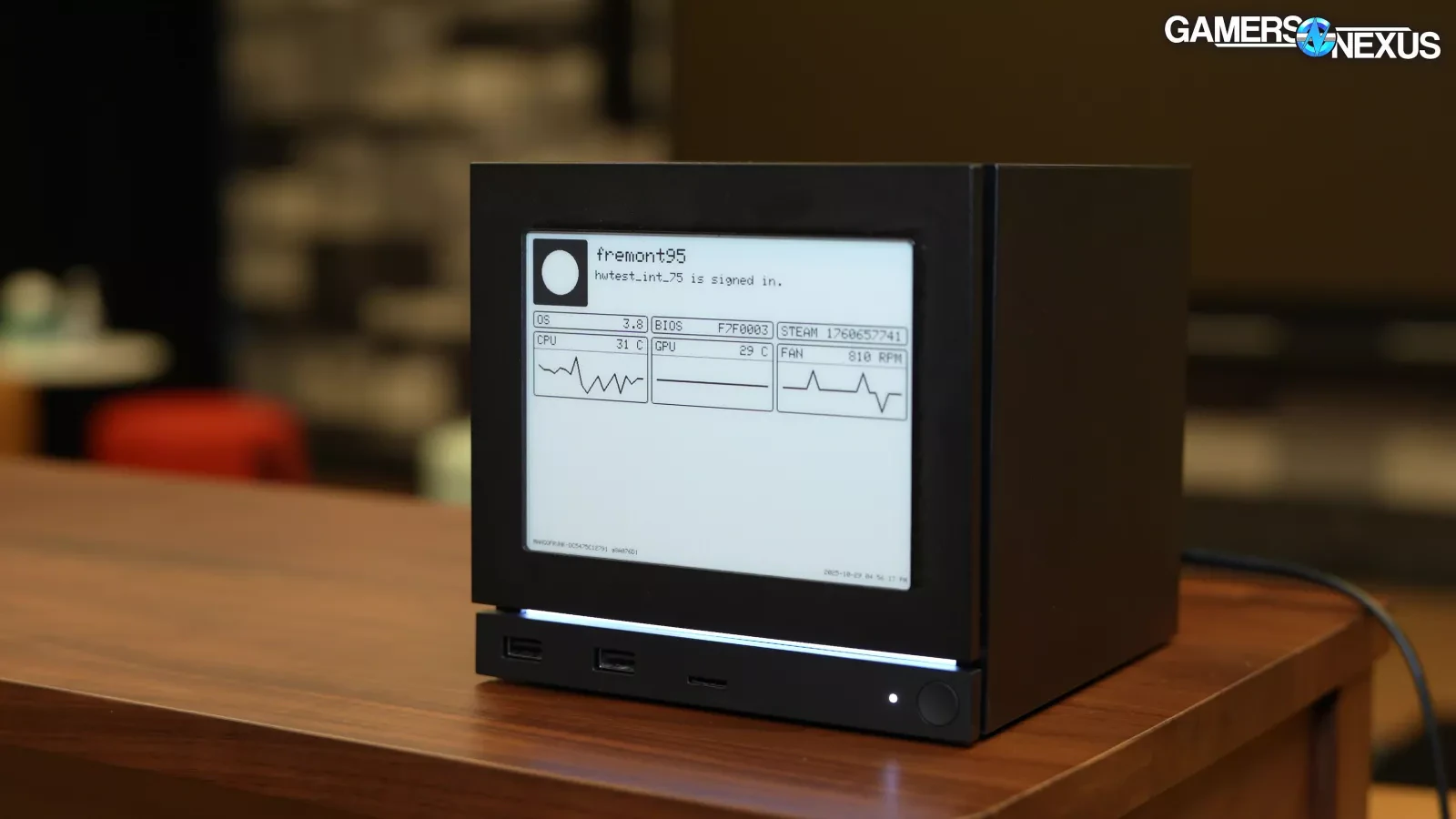
Image Credit - Gamers Nexus
They're now calling it the "Inkterface" and there's a good few things you'll need to make it including:
- 1 x Adafruit ESP32 Feather with 2MB PSRAM.
- 1 x Adafruit eInk Breakout Friend.
- 1 x Adafruit 5.83" Monochrome eInk Panel.
- 13 x M2.5 x 5mm Pan Head Machine Screws.
- 4 x 1/4" x 1/4" x 3/16" Stepped Magnet SB443-OUT.
Valve even provided a video on the GitLab showing it being put together, which we're re-hosting to make it easily viewable for you:
Pretty cool to see.
Maybe we will see some other vendors actually do them pre-built for us. JSAUX teased they would be doing it back in November 2025, and checking back today they've said they still plan to do "Ink & Pixel versions". If the Steam Machine is popular enough - no doubt we'll have other accessory brands do various versions of their own.
π External Sources: gitlab.steamos.cloud, x.com/jsauxofficial, gamersnexus.net Article taken from GamingOnLinux.com.
This is the real killer feature. So many people that I talk to know they want Linux, but are deathly afraid of installing it themselves.
And all of the reviews I've seen about the Steam Machine talk about how well both of those features work.
We had some secret eink sauce (propriety waveforms) to get the high refresh rates and colour contrast without a full flashing screen reset, but even then you need to run longer maintenance refreshes occasionally.
Pixels are just vertical columns of viscous fluid with charged ink particles. A waveform is just voltage changes over time to these columns to shift the particles up and down. More black to the top = darker shade of grey. Colour (in the gallery display, at least) is the same, just with each CMY particle group having different charges and responses to different waveforms.
Every once in awhile this vertical column gets messy with loose particles distributed through it (ghosting, muddy contrast) so performing a hard rail-to-rail voltage reset forces all the particles up and then down, and gives you a clean slate.
SteamDeck as a handheld is great plus or minus a few nits baked onto the power / battery life choices Valve made. SteamDeck -> TV and SteamDeck -> USB-C KVM are both workable, with caveats. I had hoped we would see the bug fixes you describe before the Steam Machine release. Alas, no.
SteamDeck supports HDMI-CEC as of 3.7 ~2 years ago, using the original dock or select third party docks.
---
How to Enable CEC:
Press the STEAM button and go to Settings.
Navigate to the Display tab.
On the right side of the screen, find and toggle on Enable HDMI CEC Support.
Ensure Wake TV when device resumes from sleep is also enabled.
Bluetooth wake made available for LCD Decks in September 2025 (it was already available in OLED models) https://store.steampowered.com/news/app/1675200/view/4983336...
I will say that the Deck has less than stellar bluetooth reception in my experience too. I settled on an 8bitdo controller because my XBox Elite couldn't stay connected from across the room. The Steam Machine has a dedicated antenna for Steam Controllers though.