It even looks incredible when building desktop apps. We used it to build DB Pro [1] and the DB Pro website, and everyone compliments us on our design.
I see it becoming the defacto choice for UIs especially when building with agents.
The copy paste approach may be easily modifiable but creates new problems - ie now there is an upgrade ai agent for something that should just be ticking up a version number.
Even if they’re more deterministic, I wonder if the days of codemods are numbered.
PrimeNG had a licensing change recently and I'm looking at a suitable alternatives for a fresh project.
So essentially they look and operate the same as Radix components at the shadcn level but you have low-level control later on should you need it.
Trying to decide between the two atm.
Grabbing an off-the-shelf UI library is easy in the short term, but it’s usually overcomplicated, implements things I won’t ever need, is hard to tweak if/when you want to distinguish your app from the thousand others using the same library, and when you do decide to upgrade it, all your tweaks break in subtle ways.
What I think would be the best approach is building your own UI library. You own it, you get to reuse it across different projects and maintain the same visual style (if desired), and you add features when you need them.
I’m trying out Ark UI on a side project. They do have some genuinely useful components, like tags input: https://ark-ui.com/docs/components/tags-input
They have a tabs/“segment group” component with a nice animated active element indicator which would probably be tricky to implement: https://ark-ui.com/docs/components/segment-group
And then they also have stuff like overcomplicated “click to copy” button and a <details> reimplementation: https://ark-ui.com/docs/components/clipboard, https://ark-ui.com/docs/components/collapsible
All with a verbose markup that renders as a div soup.
Both attempts [1] to surface this on HN failed but if you are using a PrimeTek component library you need to be aware of this change.
PrimeNG, PrimeReact, and PrimeVue are all going fully closed source and ongoing licencing will be $800 per developer seat in 2027. [2]
The previous repos have been archived. [3]
PrimeFaces remains open source but it's now developed and maintained by independent volunteer developers who are not employees of PrimeTek.
[1]: https://hn.algolia.com/?q=The+Next+Chapter+of+PrimeTek
With shadcn / the copy paste format, you’ll almost never see that happen. The button shadcn provides for example is just css / tailwind. And if you did ever for some reason want to bring in a dependency for your button component you wouldn’t have to consider its effect on your other UI elements. The rest of your components can live independently (for the most part)
We have customized UI components we got from shadcn and now some use radix and some use base ui, and some have other dependencies or no dependencies at all. Properly tree shaken this is not a big deal at all and we can upgrade components individually as needed.
For boring applications this may be a bit much. But even then if you wait too long and mantine falls behind more than a couple versions, who knows how easy it would be to get your whole project up to date.
Is it ever that simple?
Ah, but it's rarely just that in many systems. It can only be just that if the component library does exactly what you want. Unfortunately, it happens quite often that component doesn't entirely do what's needed.
People bolt on extra CSS to the components all the time. Two lines of CSS is very tempting if the alternatives are a few hours of work at least. But those two lines need to be verified against every new feature of the component library.
Do those two line fixes a lot, and upgrading becomes A Project.
If a component as basic as a button or a list view ever requires an “upgrade”, something is fundamentally wrong to begin with. HTML5, ARIA, etc. aren’t cutting edge technologies that the ecosystem still needs time to figure out. This should be pull once and forget.
Oh, and the target audience of movie you are watching are other people in the movie industry. Nearly everyone in the audience can tell where production cheaped out
Would be kind of funny if someone from the team came out and said it was written by a human.
If they used AI to write this and that gave them more time to volunteer their time towards developing this fantastic piece of open source software, then this all seems like a good thing to me.
Having a library not in anyway related to that to me feels like a big pro.
I have found React Aria to be very good. I really like how its a set of hooks, a set of premade components using said hooks, and I like how you can choose bits of either approach for your own components. Some of the hooks are very useful.
It's one more thing to maintain, and it's also difficult to push back on things. If you use off the shelf components it's much easier to say to designers and managers that a UX pattern is not available or not valid. You can point to the mature well known community owned UI library you use and make it authoritative. It's harder to do it if you build your own, suddenly each designer and developer is throwing things in there, adding features etc. It's also difficult to agree on the structure, so the components are well thought out, flexible, but also not so flexible to lose semantics. It's not an easy job, do you use slots, composition, rendering callbacks, there are too many decisions and you spend time building the UI library instead of actually shipping features.
I used "CD era MSDN reference and Raymond Chen blogging style" as a starting prompt for the styleguide and my work ability to digest AI plans raised a lot.
Couldn't recommend it more. Humble, insightful and respecting the reader
For what it's worth, I didn't get that vibe reading this post.
for example, in this article (if it was truly Claude written):
> Last year, Base UI tagged a beta and a lot of you asked if we are going to replace Radix with it. I said "the worst thing you can do for your production app is switch component libraries". I meant it, and it still holds. So instead of switching, we did the shadcn thing: we rebuilt every component for Base UI, kept the same abstraction, and let you choose. December brought npx shadcn create with both libraries. January brought full Base UI docs.
If an AI wrote this, why and how is it pretending to be a human and the humans on the team at that? That's impersonation, and it's a lie and deceptive. I personally don't want a culture where my AI agent is talking as though its me, when a pro-cooperative and honesty/truth preserving culture would instead say "My human said" or at least label correctly that this is an AI acting on behalf of a human.
Instead the humans who promoted and allowed the LLM content to post behind their human identity, didn't bother to update the LLM language and either do a) mark the post as AI generated or b) properly update those pronouns so it isn't an AI speaking through the humans point of view.
Consider this exaggerated example: Would it be ok for you if in a zoom meeting with your team someone was lip syncing an AI speaking on their behalf, both impersonating voice tonality, the words chosen, and even pretending to voice the humans thoughts themselves? Of course you wouldn't. So now extend this to the words people write in articles like this one where the "I said" perspective was used many times supposedly by an AI.
And I use Claude a lot, 24/7, but not for things like that. And I appreciate how much it elevates my productivity, but not like this. It usually prioritizes or highlights the wrong things, it overfixates on one thing I said and adds random content there out of nowhere.
So then I can't tell what part of it is slop, how slop, and it becomes impossible to trust.
Those short and punchy two-part sentence groups very much feel like the writing that Claude does, like: The writing feels familiar. Suspicion earns its keep. Ultimately, the judgement remains yours. Not conjecture, your thoughts.
Then again, I bet how much aversion people feel to that sort of thing depends on how much they’ve been exposed to that, especially in frustrating circumstances. Personally, that’s a lot (daily Claude Code) and sometimes that writing makes me really upset.
Or maybe people genuinely just write like that and overuse that style and Claude has ruined it for me, whereas otherwise I wouldn’t have given it a second look.
"Because you own the code. You've added variants, changed classes, threaded new props. A codemod handles the components you never touched and breaks on the ones you did."
MUI (who started Base UI) hired the Radix "original" developers and they were pushing that as it being Radix v2.
I see the same phenomenon at work. A year ago I’d read your two-sentence daily update in slack, all riddled with the quirks and oddities that made it yours. Today when I see the page of headings and emojis describing the couple things you did yesterday, I wince because now I’m the one who has to sift through the fluff to get to the point.
They think it's not worth investing human attention to write it, so why am I expected to invest my attention to read it?
If it's written as SEO spam, why link it here?
If it's written to be read by humans, do they think we're stupid?
The obvious response is of course, they're just completely unbothered by it. Why change it if it doesn't even matter (to me)? I presume the set of people who use AI like this for writing and the set of people who are annoyed by it are largely not overlapping, and there is a possibility that a lot of the text I read and think sounds human, might be written by an LLM with a style-guide like mine. Still though, if 5 words genuinely can reduce annoyance by a lot of people who read your article, why does it feel like so many people haven't picked up on it yet? Or is the LLM writing highly loved & popular amongst other people perhaps?
It's the same as with too marketing-speak, which conceivably this is. Maybe the actual work is good but Sturgeon's law, it's probably crud. If I really needed a UI library or whatever right now then maybe I'd dig deeper but in casual browsing HN mode? No time, catch them later.
So maybe all your maybes but who cares? It's not AI that made me think badly of them: I think badly of all software by default and it takes more than Claude to change my mind.
When people say LLM slop is disrespecting the reader, I don't think they are complaining about style.
They could have just written "we asked Claude to rewrite our project with Base UI because it eclipsed Radix in NPM downloads".
If you manage to write an AI assisted article that doesn't tediously follow the "what this means for you", "it's not this, it's that", "One thing. Two things. Three things." formula... I really doubt people would complain.
Maybe it's a style that's always existed in moderation, but now it feels like it's being applied to every paragraph in every document or social posting.
I think the broader phenomenon with the AI tells is it is revealing about a person's consumption. If they already interacted with and read material that resembled AI output, it wouldn't seem as weird. But if you encounter a particular pattern with the AI before you encounter the human patterns that trained it that way, it seems like an AI quirk.
Of course, the difference here is context. In a comment, you're not expecting well-written sentences, structure, and editing. So we jump at these things that seem out of place because of the context.
> sometimes that writing makes me really upset.
You know what makes me upset?
- No writing
- Or bad documentation
- Or just no documentation
- Or just nothing being written down about something
For me, at its core, the most important thing is accuracy. Is it accurate? If so, good. We can start from there. If your issue is style, fine, but that's a personal judgment. As long as it's accurate, I'm fine.
I'd rather read natural sounding, non-repetitive, and actually useful LLM text than the majority of reddit comments (including the serious ones) for instance.
I'm asking to scan projects on gitlab, go through some docs to find more grounding material, write a subarticle (in the same style), scan logs on the test env, issue some curls, etc.; until the whole article is digestible - in the "backing knowledge graph" department.
slop just means "I don't like this style"
when AI writes more reliably in a way that people do like, they will stop calling everything AI does slop.
It might also be the overuse of specific phrases and patterns. I sometimes scan over my own blog posts to see what appears too often and there are things that I overuse in my own writing as well.
Most humans speak in “garbage” and not perfectly correct sentences. Imperfection makes it human.
In this case, it’s not about unwanted sophistication, but fluff and specific sentence structures that tell you this was written by AI, not the actual people behind the project. I guess the closest analogy is to always being left on voicemail.
did i get that right?
Yes there's a quality component to the role of communication in how it respects other people.
There's also honesty, transparency, truth and vectors along the dimensions of "Are we claiming and presenting the truth or are we bending facts and creating impersonations and warping reality?" Most AI is used for the latter today: people are having AI's write their words and speech for them and then the AI says things as though it were the human like "I said xyz" when the AI is NOT the human who did those things. That's lying and deception and disrespect to the reader.
Obfuscating LLM output to trick the reader into thinking it wasn't LLM output is not respectful.
Some people let punctuation or grammar mistakes ruin an entire text or post for them, because they choose to focus on those flaws, rather than looking past them and taking in the content itself.
"this was written/assisted by AI" is starting to feel like next-gen "this has spelling/grammar mistakes in it, therefore it is invalid".
It's a single git project at my $USER home, that is referenced in global memory. It contains as much information about work things, as possible, to be productive.
I found that, if I allowed Claude to create the notes, it actually became more and more useful, but without the guideline, I just could barely get through reading it manually.
I'd never publish anything with such origin.
Starting today, Base UI is the default component library in shadcn/ui.
First, a bit of history. When shadcn/ui launched in January 2023, it was built on Radix. At the time, nothing else came close. Unstyled headless components, great APIs, great accessibility, battle-tested in millions of apps.
Fast forward a few years and the same folks who built Radix are building something new: Base UI. They've done it once. Now they get to do it again, with everything they learned the first time.
Last year, Base UI tagged a beta and a lot of you asked if we are going to replace Radix with it. I said "the worst thing you can do for your production app is switch component libraries". I meant it, and it still holds. So instead of switching, we did the shadcn thing: we rebuilt every component for Base UI, kept the same abstraction, and let you choose. December brought npx shadcn create with both libraries. January brought full Base UI docs.
Then we watched what you did with it.
The community already made the call. We're making it official.
npx shadcn init and Base UI is the default pick.Radix is not being deprecated. We still support it, and every update and new component will ship for both libraries (unless a component only exists in Base UI).
You do not need to migrate. Radix is a mature, tested library. We still run it in production today and we're not migrating. If your app works, keep shipping.
Prefer Radix for new projects? It's one flag away:
If you have scripts or CI running shadcn init non-interactively and expecting Radix, add -b radix to keep them on the same path.
Building a registry? Ship a registry:base config if you want to pin a specific library. Items without one now init as Base UI.
Starting something new? We recommend Base UI.
You don't need to migrate. But if you want to, we built a skill for it:
Then ask your coding agent:
migrate accordion to base-ui
It's progressive by default: migrate one component and its usage at a time while your project stays green and shippable. Both libraries coexist while you work. Stop halfway, ship, come back next week and it picks up where you left off. Or ask for the whole project in one go.
Because you own the code. You've added variants, changed classes, threaded new props. A codemod handles the components you never touched and breaks on the ones you did.
So we shipped knowledge instead: every rename, every prop change, every behavior difference, hand-checked against both libraries. Your agent reads it, figures out what you changed, and carries those changes over.
Mechanical things get fixed everywhere (asChild is now render). Behavior changes get flagged, never silently patched. You decide.
Every run leaves three things:
.migration/ at your project root: what changed, what was left alone, and a short checklist of things to verify by hand.Here's what a report looks like:
.migration/accordion.md
# accordion
<!-- date, strategy used, and the one-line verdict -->
## Changed
<!-- every file touched, with what changed and why -->
## Left alone
<!-- files that look related but were intentionally not touched -->
## Behavior changes
<!-- differences that compile fine but act differently. flagged, not patched -->
## Verify by hand
<!-- a short checklist: open, click, tab through. takes a minute -->
No hidden state. Progress lives in your files and git history, so any agent, any session, any day picks up where the last one stopped.
It works with Claude Code, Cursor, or any agent that supports skills. We tested it on real projects: 60+ components, 36 of them on Radix. A full migration ran in about 25 minutes at roughly 10k tokens per component. Clean builds, customizations intact.
Today, we’re releasing a new set of components for building chat interfaces: MessageScroller, Message, Bubble, Attachment, and Marker.
This is the first phase of the chat components work. We’re taking it one piece at a time, reimagining the abstraction behind each part, and shipping them as shadcn/ui components you can copy, compose, and adapt to your product.
We are starting with the conversation layer: scrolling, message rows, bubbles, attachments, and markers.
We asked ourselves: what makes a great streaming chat experience? Then we abstracted the core rules into a set of primitives: MessageScroller.
MessageScroller is the scroll container for a conversation. It handles the parts that are easy to get wrong: anchored turns, streamed replies, saved thread restore, prepended history, jump-to-message, scroll controls, and visibility tracking.
MessageScroller owns that behavior without owning your messages, AI state, transport, persistence, or model state. You bring the content renderer.
The MessageScroller is also available as an unstyled headless component in @shadcn/react.
The rest of the components cover the everyday pieces you need around the scroller.
Message lays out a row in the conversation with avatar, alignment, header, content, footer, and grouped messages.Bubble renders the message surface, with variants, alignment, reactions, links, buttons, and collapsible content.Attachment renders files and images with media, metadata, upload state, actions, and a full-card trigger that keeps actions separately clickable.Marker renders status updates, system notes, bordered rows, and labeled separators for things like streaming state, tool activity, and date breaks.They are intentionally small. Compose them together for AI chats, support inboxes, team threads, group chats, and product-specific conversations.
We also added two new CSS utilities for the details that make chat interfaces feel better.
scroll-fade adds scroll-aware edge fades to scroll containers. Use it on MessageScroller, ScrollArea, attachment rows, and any long list where you want to hint at more content without adding overlays or scroll listeners.
shimmer adds a text shimmer for live status. Use it for things like "Thinking…", "Generating response…", running tools, and streaming markers.
Both utilities ship with shadcn/tailwind.css, so projects initialized with npx shadcn@latest init already have them.
We also created @shadcn/react, a new package for unstyled, headless React components.
The first primitive is @shadcn/react/message-scroller. The registry component wraps it with shadcn/ui styles, but the scroll behavior lives in the package: anchoring, auto-follow, prepend preservation, scroll commands, and visibility.
This lets us ship behavior without locking it to a visual style. You still get copy-and-paste components that match your project, and the hard interaction logic stays tested in one place.
Available now for Radix and Base UI.
This does not replace AI Elements. You can keep using AI Elements for AI interface components and patterns. This release is about bringing the core pieces of chat into shadcn/ui, one component at a time.
If you are already using a component from AI Elements, you do not need to rewrite your app. Keep what works. Try the shadcn/ui version when you want the newer abstraction, the updated styling, or support across Radix and Base UI.
The goal is to make these pieces easy to adopt independently. Replace one part, compose it with what you already have, and keep building.
[
View Components
](https://ui.shadcn.com/docs/components)
You can now turn any public GitHub repository into a registry.
Add a registry.json file at the root of the repository, define the items you want to distribute, and users can install them directly from GitHub with the shadcn CLI.
For example, to install the project-conventions item from the acme/toolkit repository:
GitHub registries are source registries. You do not need to run shadcn build, publish generated item JSON files or set up a registry server. The CLI reads the root registry.json, resolves include entries, finds the requested item and installs the files declared by that item.
Registry items are not limited to components. A GitHub registry can distribute components, hooks, utilities, design tokens, feature kits, project conventions, agent instructions, testing setup, CI workflows, release workflows, templates, codemods, migration kits and other project files.
For example, a repository can expose a project-conventions item that installs shared docs, editor settings and agent instructions:
registry.json
{
"$schema": "https://ui.shadcn.com/schema/registry.json",
"name": "acme-toolkit",
"homepage": "https://github.com/acme/toolkit",
"items": [
{
"name": "project-conventions",
"type": "registry:item",
"files": [
{
"path": "AGENTS.md",
"type": "registry:file",
"target": "~/AGENTS.md"
},
{
"path": ".editorconfig",
"type": "registry:file",
"target": "~/.editorconfig"
},
{
"path": "docs/conventions.md",
"type": "registry:file",
"target": "~/docs/conventions.md"
}
]
}
]
}
GitHub registry addresses work with the same commands as other registry addresses.
List items from a GitHub registry:
Search items:
View an item:
Install an item:
See the GitHub Registries docs for the full guide.
When we added support for both Radix and Base UI, we needed a place for shared Tailwind utilities that both libraries depend on, e.g. custom variants like data-open: and data-closed: and utilities like no-scrollbar.
We also ran into a few bugs while working on RTL support that were easier to fix in one shared place rather than duplicating across every component.
So we created shadcn/tailwind.css. When you run init, it adds @import "shadcn/tailwind.css" to your global CSS file. It works just like other CSS imports such as tw-animate-css: a small dependency that is tree-shaken in production and resolved at build time.
If you prefer not to depend on the shadcn package for that CSS, we've added the shadcn eject command. It inlines shadcn/tailwind.css into your global CSS file and removes the shadcn dependency from your project.
Before
@import "tailwindcss";
@import "tw-animate-css";
@import "shadcn/tailwind.css";
After
@import "tailwindcss";
@import "tw-animate-css";
/* ejected from shadcn@4.8.3 */
@theme inline {
@keyframes accordion-down {
from {
height: 0;
}
to {
height: var(
--radix-accordion-content-height,
var(--accordion-panel-height, auto)
);
}
}
}
@custom-variant data-open {
&:where([data-state="open"]),
&:where([data-open]:not([data-open="false"])) {
@slot;
}
}
In a monorepo, run the command from the workspace that contains your components.json and global CSS file:
See the CLI documentation for more details.
Introducing Rhea, a new shadcn/ui style. A more compact Luma. Smaller spacing. Denser surfaces. Built for focused product interfaces.
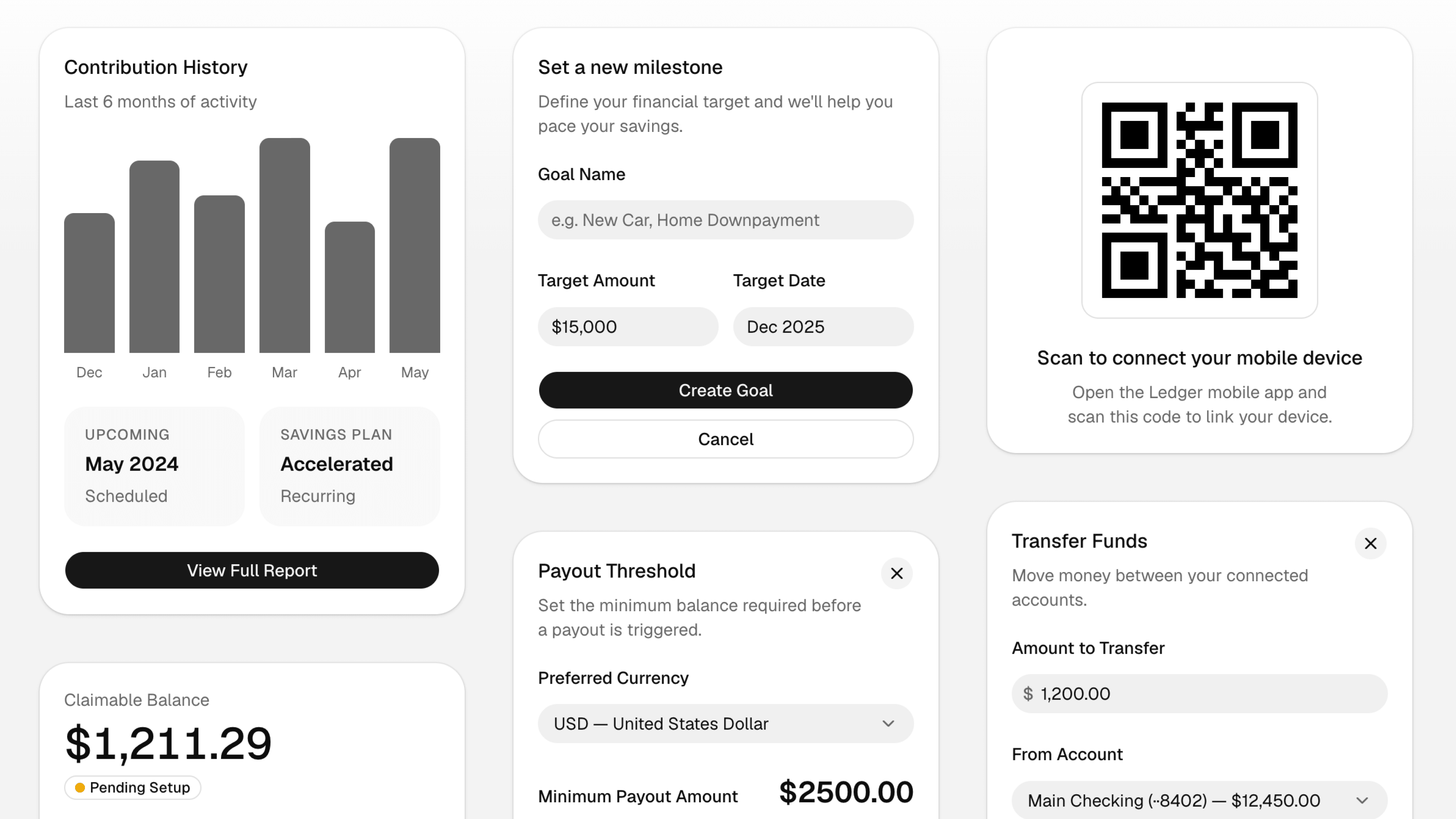
Rhea started from a simple request we've heard a lot: Luma, but more compact. We looked at how people were using the new styles and what they were asking for, and the pattern was clear. A lot of teams wanted the softness and shape of Luma with tighter spacing, smaller controls, and more information density.
Rhea keeps the same rounded foundation, but makes it more compact for product interfaces where space matters. Buttons, inputs, menus, cards, and lists all sit a little tighter so the UI can carry more without feeling crowded.
We considered making this a spacing tweak for Luma, but --spacing is a multiplier. Changing it would change what familiar utilities mean across your app. p-2, w-4, and m-16 would no longer mean the same size.
That tradeoff felt wrong. Compactness should not force you to relearn Tailwind's spacing scale or wonder whether a utility means something different in one style than another.
So Rhea is a new style instead. It lets us adjust component sizes, gaps, and density directly while keeping the underlying utility scale predictable.
Available now in shadcn/create for both Radix and Base UI.
[
Try Rhea