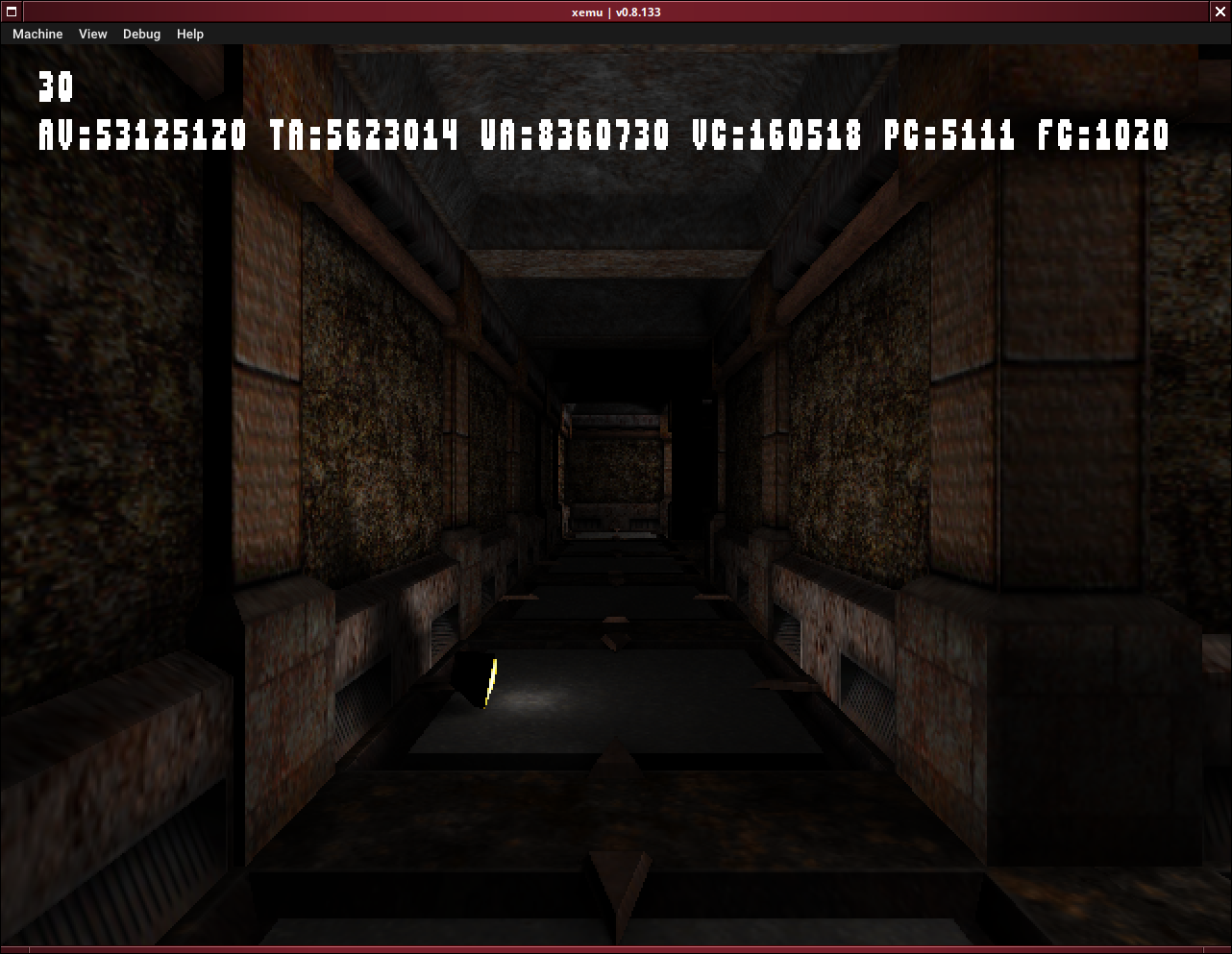
Note: this post has nothing to do with me being an employee under the Xbox umbrealla. i did not get any fund, support, hardware, assisstant, documentations from Xbox as a company or anyone under the Xbox. It was entirly a game developer’s passion sub-project as part of a larger passion project (game engine from scratch) that was initated years ago before i even join the Xbox family! The hardware used was bought from eBay long time ago.
There is no doubt that the original XBOX is not only one of my all time favorite gaming consoles, but also one of my top all time favorite development hardware/environments! When i started converting my Mirage engine from exclusive PC enigne based on Vulkan mainly to a much wider engine that has a good layering that could allow me easily supporting any platform and any rendering API, it was not an easy task to be fair! As my initial thought was not to just support current modern hardware such as Xbox One and PS4 or even the new genreation that will release soon (Xbox Series & PS5), but my mind was else where! i had in mind quite a few older consoles/handhelds that i would like to support out of the box, and to not spoil my list of platfomrs, let’s just assume i had only Xbox OG in mind back then (of course was not the only one!).
Going that far back in technology as a modern target hardware was quite the task i needed, the type of thing that i like that most. Porting my engine to a new Nintendo or Sony device is not a big deal nowadays as long as i got granted the access, just follow the SDK, and you won’t hit any wall…probably..even if you hit walls, just go to the dev forums, and will find pretty much a handful amount of folks hit that wall already and discussing solutions for it..Easy! But supporting a dead hardware, that has no support, and only obsolete SDKs & documentation and the elephant in the room, obsolete requirements, toolchain and tools that is not matching any modern software creation process or even friendly with most recent OS versions (Linux or Win 10/11). That was the challenge.
At that time i had my engine that was built in few years for Vulkan only, Win/Linux only and running on C++17 (and later moved to C++20), using most recent 3.x cmake version at that time (3.4-ish or something), and of course running on Visual Studio 19! Now we need that to be C++98 or C++03 at most, count on the most ancient version of cmake possible (1.4.x if i’m not mistaken, which is not great btw), and to run on Visual Studio 2003 and of course support some set of different file formats. I’ll leave the rest to your imagination, but successfully got rid of any features that are between C++17 and C++98, and that meant re-writing lots of functions from scratch, readapted the entire engine API, disable some features and/or adding new exclusive ones for older hardware, and because Visual Studio have to make life harder, the MSVC can’t compile C++ code pre C++14, so had to work on my projects generation in generating projects for GCC to at least test compilation on VSCode on a Windows 11 environment to make sure that my code compiles, before i put it in the time machine and take it to the old boy XP computer to re-compile and run it.

With CMak’s presets, at least i can now generate & compile most of targetd C++ versiosn and APIs side by side on my main Windows PC before moving any to an ancient OS version to build and test against the hardware.
Note, that screenshot showing Win64 only presets
Yes i know!!
Now you may be thinking, oh, how come he did not know about the nxdk or other homebrew solutions?!
i konw about nxdk and all other opensource nice projects out there (for Xbox, N64, Dreamcast,…etc.), and they’re really great resources!! it just happens that i like 2 things too much when it comes to console or writing for specific hardware and it have always been the case.
- Dive and read the official documentations for that hardware (pure RTFM kid), at this case the SDK/API docuements. And red through the samples that comes with the SDK, compile them, and learn even more tricks from them. Thankfully Xbox during its entire existence, have been shipping great documentation and samples that teased me over the years to dive through them!
- i like to write for platforms the way it meant to be writtin, using the toolchain and other things that were meant for that platform. So if i can write a C++23 on original Xbox is an option, it is absloutly not for me, at least if we talking about a hobby project like this one, commercial work is a different story, these would have budget and time constriains, and those constrians are not exist in a personal project.
First challenge was running my demo scene, the sponza! All the formats available for Sponza was very friendly for a today workflow, but not for a 2000-2005 development environment. The size of the file itself was larger than the entire memory installed in the original Xbox! Sponza OBJ out of the box was around 23.29MB that was for some reason when converted directly to the Xbox fomat, it resulted in a 82.3MB file! In order to make it kinda acceptable (and of course downgraded the poly count, which would’ve been visually okay if Sponza ran back then), i had to take the available FBX, convert it to OBJ (as a pure text format, OBJ is super portable not only in space, but in time), as the lowest FBX version i was able to convert to in Blender/Maya on Windows 11 was FBX2011 whcih still won’t work on my XP 2000-2005 environment if i tried to import in Maya (Blender did not have a FBX importer yet back then, and 3dsMax all what i knows and and all what it sees was *.3ds only, Maya & Blender were the best).
So converting to OBJ made perfect sense. Then taking that OBJ to an Maya 6.5 (in addition to exporter, geometry tools were greater than any other 3d software back then) and optimized it as much as possible, then converted it to another OBJ file.
That later OBJ file was opened in Blender 2.3, as Blender was the only software that could convert geometry to the DirectX (DirectX8)’s *.x file format. Finally opened that .x file and modify it manaully to cleanup any “null” values, as those will break in the next step, and there were no way to do that cleanup within any of the exporting steps, but i can live with that as long as i was able to spot the issue.

Here is an example of the “null” thing mentioned earlier as part of .x file.
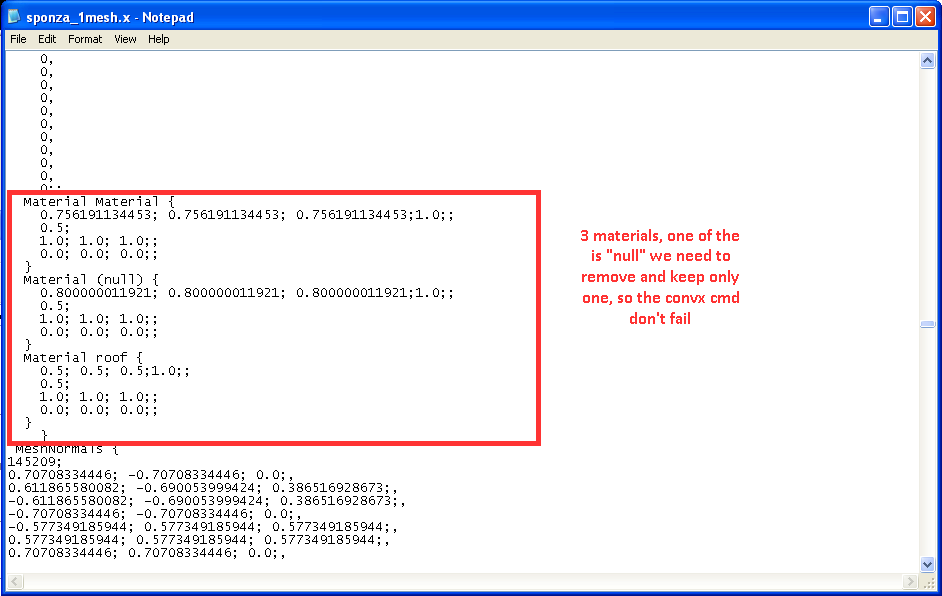
The “convx” thing in my red-text notes is the cmd tool used to convert the file (if name is not explaining itself :D). This is possibly an issue with Blender’s converter, as the materials list in the blender file did not inlcude more than 2 materials!
Finally taking the final .x file, and convert it to a binary compressed .xbg (xbox geometry) file through one of the SDK tools (only possible if all the presiouvs steps did not produce a large or corrupt file). Also surprisingly, this tool still holding up & can run on Windows 11 under DirexctX 12!

And all files together (origianl Sponze converted VS the simpilified one), you can see the sizes..
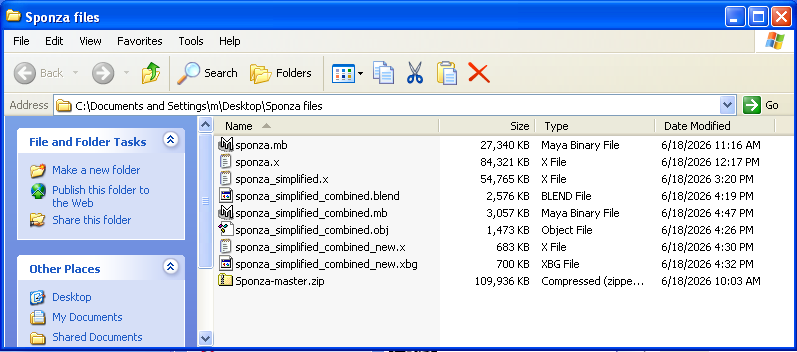
and you can look at the bottom to the .zip version donwloaded from github (~109.9MB with textures, wihtout texture about 23.29MB).

One thing to keep in mind, we could’ve reduced that amount of software & format jumps, only if 3dsMax 6.0 of that time was friendly! Xbox OG toolset had the support of converting directly from .3ds to .x right away with a 3ds dedicated commandline tools, but the issue with discreet’s 3dsMax at that time that it won’t accept FBX and the OBJ loads broken all the time, this is why i mentioned earlier that “3dsMax all what i knows and all what it sees was *.3ds only”.

Only now, the original Xbox branch of the loading code can work if directed to the right file format (from a .fbx to load on the modern systems, to a .xbg to load on the original Xbox).
Now not everything in a game is just environments or static meshes. But there has to some form of skeletal meshes if not for characters, then for animals or some other moving objects! i want to put something that moved on my samples, but what mesh i can use?
It happened that few weeks ago that i noticed the Unreal Engine 6 branch on github went public for everyone, so i decided to sync that branch and compile the engine locally to have a look at all the new feature or half features.
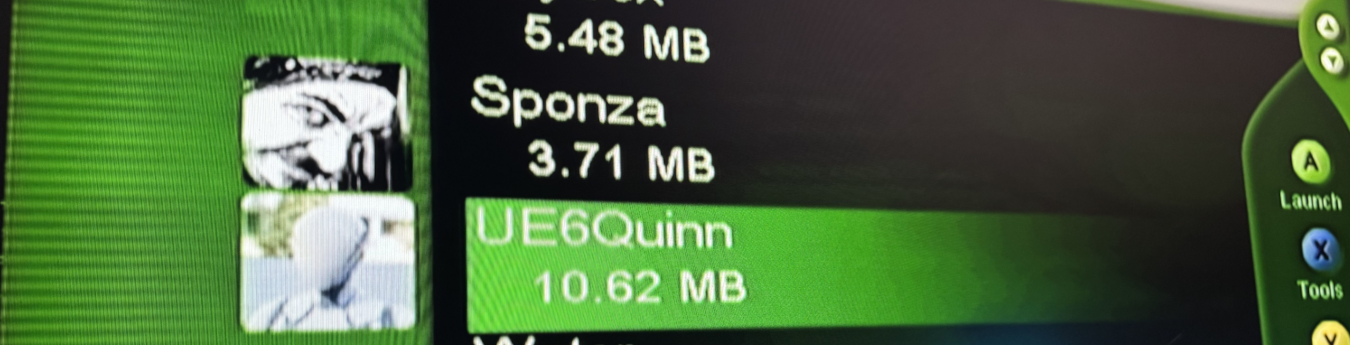
One thing i observed was probably the Quinn mesh looked different, i think Epic did the same for the jump from UE4.x to UE5.x with the Mannequin, and that sparked in my head, why not backporting that Quinn character from the Unreal 6.0 default starter project to the OG Xbox?! We can now launch engine on the device, load files, and render them. We also have a set of tools and workflow to use, so let’s port that Quinn to 25 years ago!
At this time i wanted to update the texturing as so far rendering on Xbox was only involving mehses, i do have base for texture loading and sampling, but the issue with Sponza that it was not built with optimization in mind, it has so many textures, som duplicates, sizes are large and not ready at all for such production. So i wanted to load the textures for the character i want to render, and Quinn (again) seemed a good candidate, it has only 2 textures, so i won’t be wasting too much time in preparing those textures. Preparation is not only in resizing and converting formats, but it is more beyond that.
On Xbox in order to load textures, the best approach is to write a redefination file (*.rdf), that file inlcude all textures you want, with identifiers/names and their directoris, dimensions, mips, formats,…etc. and then that file will go through one of the commandline tools, in order to compress all of them to a large block with offsets in a file called the “resources” or the .xpr file (alongside a .h includes all the offsets), that later you just load that resources xpr single file, and use the offsets from the auto-generated header in the C++ code to read the offset for each texture by the name you gave it in the redefination file. It may not sound unqiue or new technique, and may sound very familiar to you, but back then that was kinda innovative idea!

The other part was the animations part, in order to deliver humanoid or “soft” deforming animations on Xbox, there were usuallyt wo approaches all through vertex shaders of course:
- **Vertex Blending
**Also known as Surface Skinning. Vertex blending requires each vertex to have an associated blend weight (like skin weights). The trick here that this is not done in Maya/Max/Blender as you do it today, and you need to declare what so called flexible vertex format (or FVF) that is done throught one of the SDK tools. And the rest is as expected, just create a vertex buffer of the vertices that have a blend weight sett, and use the appropriate FVF. This is much more convinient method but requires more time in the setup phase. - **Tweening
**This works like a modern Geometry Cache, so in this method, the vertices of the character mesh for the current frame are interpolated from a number of source meshes of the character (the same 3d model in different positions, so vertcies count matching matters). And of course, the more key frames (key poses meshes) you give, the more complicated it gets. This is more simplified method, that doesn’t require too much to prepare.
I’ll leave you guess which appraoch i took!\
But all in all regardless which technique choosen, it would requires a vertex shader to be wrttine in assembly in the *.vsh format (to be compiled with commandline tools into a much lite binary *.xvu format).

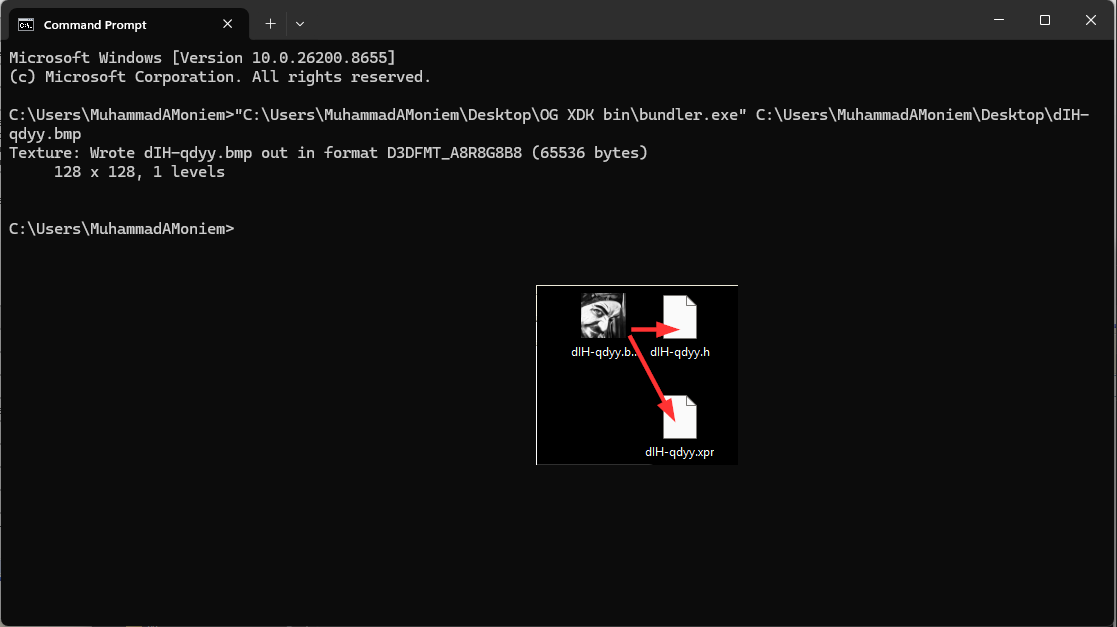
Final touches for an app, for icons and other texture media, there is a nice tool comes with the SDK called “Bundler” and it is used to generate files for more console friendly (and compressed enough) format. For example, to put an icon to the project, the Visual Studio build tools expects an icon given with the .xpr format. This one can be converted from *.bmp through the bunder, and then assigned as “Title Image” (as of image/texture) to the Xbox Image (as Iso/Snapshot image)—names are confusing i know!.

Last thing, i noticed while digging for solutions to some of the problems i met during my engine proting and during preparing these examples to run, these chms in my data. Thought about putthing them all in one screenshot for memory..Interesting how things have changed over the years,..It was quite a ride with the Xbox development..

-m