I particularly appreciate the fact that it lets you manually add IPA pronunciation guides. There have been some cases where an important word is a homograph and Kokoro assumed the wrong pronunciation.
The place where it falls a little short is in saying just a single word or two. Try having it say simply "six" and it almost always says something like "ah-six-ah". I found a way around that though. If you give it a longer sentence to say (eg "The word is: six") it will say it fine. The trick is that the Kokoro API gives you the timestamp of each word in the sentence. So you can have a Python script crop out just the word you care about. The intonation is a little flat this way, but is very reliable.
I asked about this on the discord, and was told that it is a limitation of the small parameter size. But in fairness to Kokoro, even eleven-labs' voices suffer from this occasionally.
> AMD Ryzen 7 8745HS: 1.5 seconds
These two can probably do it much faster on their iGPUs.
Just a few years ago, realistic local speech generation seemed unimaginable. Today, its quality is exceptional and, crucially, it delivers these results without compromising privacy.
The video above showcases audio generated from a sample text, running entirely on the local machine previously discussed in the GTX 1080 Ti for Local LLM article. While this machine has a dedicated GPU, the GPU is fully reserved for LLM inference and the speech synthesis is powered entirely by the CPU.
The model used is Kokoro, which, despite having only 82M parameters, produces realistic speech in multiple languages including English, Mandarin, and Hindi. It provides around 50 distinct voices, primarily optimized for English.
There are several ways to set up a server for Kokoro. The simplest method involves using a pre-made container image called Kokoro-FastAPI, which includes pre-downloaded voice models. Because of that, the container image is rather large, at about 5 GB in size.
To launch the container using Docker or Podman, use the following command:
podman run -p 8880:8880 ghcr.io/remsky/kokoro-fastapi-cpu
To quickly verify that it runs correcly, the container serves a simple web UI at localhost:8880/web. Here you can generate (and automatically play) an audio given some text.
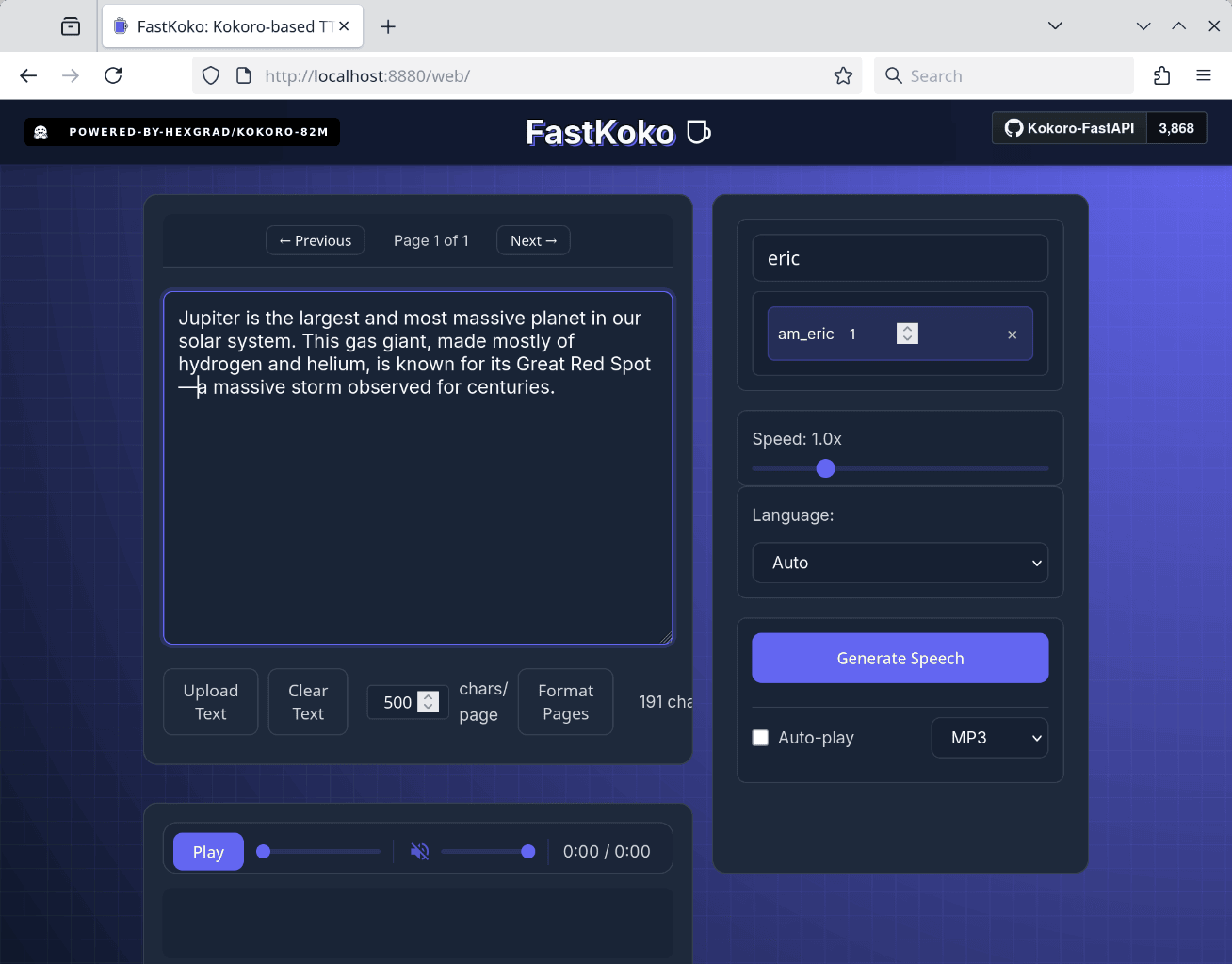
In addition to the simple web UI, this container also serves a TTS interface compatible with the OpenAI speech API, making it easy to adapt existing programs that already use the OpenAI speech API. To facilitate a quick test, sample code in both JavaScript and Python is available at github.com/remotebrowser/speak. Cloning this repository will enable you to follow the subsequent demonstration.
For JavaScript:
export TTS_API_BASE_URL=http://127.0.0.1:8880/v1
./speak.js "Good morning! How are you today?"
For Python, the command is very similar:
export TTS_API_BASE_URL=http://127.0.0.1:8880/v1
./speak.py "Good morning! How are you today?"
The generated audio will be saved as an MP3 file. If SoX or Sound eXchange (see sox.sf.net for details) is installed on your machine, the audio will also play back automatically.
You can also select a different voice by setting the TTS_VOICE environment variable:
export TTS_API_BASE_URL=http://127.0.0.1:8880/v1
export TTS_VOICE="am_eric"
./speak.js "Good morning! How are you today?"
A complete list of available voices can be found on the official Kokoro project page: huggingface.co/hexgrad/Kokoro-82M/blob/main/VOICES.md.
How fast is the synthesis? Here are some measurements using the am_eric voice on a short test paragraph:
Jupiter is the largest and most massive planet in our solar system. This gas giant, made mostly of hydrogen and helium, is known for its Great Red Spot—a massive storm observed for centuries.
The following list summarizes the generation time (best of 3 runs) across different CPUs:
The first CPU in the list was released 12 years ago. If that ancient CPU can do the job just fine, you know that this is a highly capable TTS system.
Finally, for an alternative OpenAI-compatible containerized TTS service, consider Speaches (speaches.ai). Unlike Kokoro-FastAPI, Speaches requires you to explicitly download voice weights via its API, as they are not bundled in the container image. However, Speaches offers an advantage by including Whisper, OpenAI’s renowned high-quality Speech-to-Text (STT) system. If your application needs both TTS and STT functionality, Speaches could be your one-stop solution.
When combined with a local LLM, a speech synthesis system like this allows you to enjoy listening to LLM answers instead of reading them!
Note: This article originally appeared on the Remote Browser Substack.
apt install festival
with the same installation simplicity.I do wish there were better support for SSML, as well as deeper documentation of how to influence inflection in-line, but the default does well with standard emphasis (e.g. putting asterisks around text elements). Both asks are getting outside the zone of reasonable asks for this sort of distribution, though, and I remain incredibly grateful for the quality of what hexgrad and nazdridoy have put out in the world.
You can tweak the pitch as well.
The various models of Kokoro TTS were theatrically conducted by Claude during an Anthropic hackathon. AI Voices were generated locally on a low-spec laptop to save up on API tokens and stretch the hackathon budget. Kokoro has the added benefit of being open-source.
Kokoro is a really good model, considered it’s released 1.5 years ago. It’s punching above its weight https://5uck1ess.github.io/tts-bench/scores.html
Rather than TTS I did STS (speech to speech) through Eleven Labs (you upload the video it alters the audio track to voice of choosing with some parameters you can control).
I showed it to a bunch of people and they could not believe it was non-human. The bit that got most was all the pausing, broken sentences ...essentially elements you don't put into text if your doing T2S.
An LLM over the original text could perhaps inject these elements though if prompted correctly.
Kokoro supports a limited number of languages. I've had to resort to other models to support Dutch, and they just aren't as good. And usually a lot slower and bigger (too big for my 8GB VRAM). I've had to resort to the Windows built-in TTS. It doesn't sound natural at all, but at least it can pronounce most words and is very fast.
https://chromewebstore.google.com/detail/local-reader-ai-on-...
If you're interested in an ONNX version and a permissively licensed TTS Tokenizer, I built a pipeline for that a while back: https://huggingface.co/NeuML/kokoro-base-onnx
Quality is very close.
Will vary in your setup, but here is my script: https://github.com/DavidVentura/translator-rs/blob/master/sc...
At some point I’d like to play with separate voices and see if I could build something like NotebookLM for kind of like a radio morning show of news items I’ve gathered.
I am aware of the Option + Esc shortcut on osx for the onboard TTS but wow is it hard to listen to in 2026.
Article refers to: https://huggingface.co/hexgrad/Kokoro-82M
Caught my eye for the related name to my book of Kakuro puzzles for sale at https://www.kakurokokoro.com
Kokoro comes from the Japanese word meaning something like heart or spirit, and not the literal ones.
I used to keep a version of whisperx around, because I think it's important to have not just transcription, but also timing and speaker identification (e.g. for subtitles)... It depends on pyannote, though, which has some wierd licensing (and is tougher to script the installs because of it), so I wanted to look at something that both had better transcription, and supported diarization (the speaker and timing). I decided on parakeet for the transcription with softformer (the diarization), but most of the available engines for it don't include softformer.
I coded up an OpenAI compatible server for parakeet-rs ( https://github.com/altunenes/parakeet-rs ) (which does support softformer) and I've been using it with OpenWhispr (a desktop app for transcription that handles all sorts of neat thing).
I'm doing CPU-only transcription (because I use my GPUs for other stuff and haven't gotten around to adding in the GPU-path), but it's incredibly empowering to be able to have local transcriptions at will.
Would I be able to use this voice I already have with Kokoro? If not, is there any way to convert it? I could always go looking if someone made this specific voice but in .pt format, but I barely mess with AI and don't know how I could search for this.
I speak over sonos speakers when certain events happen. And use it as my voice assistant.
the onnx version of pocket-tts does perform better. https://huggingface.co/KevinAHM/pocket-tts-onnx
I've been using my own solution since January. I'm on Linux, and can't use Aqua, Whipsrflow etc... So i made my own.
Recently cleaned it up and made it install friendly.
If anyone is interested, you can check it out here: https://github.com/Hugo0/voiceio
It's self-improving over time, runs on your local machine, and is generally decent software. 60% of my interaction with my PC nowadays is pure voice input.
Now this on a CPU is next level. When algorithms perform well on commodity hardware, the scale tips.
This gives hope that CPULLM's are not far off that'll be just fine for majority of use cases.
I'm using it in an open source tool I built for listening to coding agents instead of watching them work, and it's been great. Local, private, free to run, and enough voices that I can actually use a different one for each agent.
Wrote a bit more about the project here: https://jonmagic.com/posts/i-stopped-watching-my-agents-work...
Hard pass.
Why do these half baked projects get all the attention and thousands of clicks when it just takes a simple thing to bring the whole castle down?
Unfortunately it makes it unsuited for my use case, which is almost entirely single words, as I don't particularly want to deal with stitching/segmenting input/output.
My snippet expansion entry in Wispr is "Chess Knight" = "Knight" ("Knight to f3" without customization was more reliable than "Chess Knight")
I also use "dot bullet" = "•", as I like to separate thoughts with • more than ;
When given a large text, it nicely chunked them up (debug statements showed), generated the audio and played back nicely.
Well done!
For what you are doing, Senko works really well for diarization along with parakeet.
Faster and more accurate than Pyannote and whisper on my MacBook anyway.
https://github.com/Ashish-Patnaik/kokoclone
Generate audio with the voice and your first tool and use this to clone it into kokoro.
The pth/pt extension bit isn’t the problem. Those are PyTorch extensions and they’re synonymous like jpeg/jpg.
With something like this I can even try to make a more accurate voice than the one I already have, and tailor it to my liking!
However you're totally right that it's focused on STT. I probably use it 95% for STT and only occasionally for TTS (which also reflects itself in the amount of polish I put into each)
and thanks!
similar to openclaw
You’d definitely get to pay for it, not what I consider cheap. (“$15 per 1M characters”) But IMO just about best-in-class (maybe ElevenLabs has a voice I’d like even better).