GeoSQL
Claude, Codex, and GitHub Copilot skill for data scientists and analysts working with geospatial data on PostGIS, BigQuery, Snowflake, and Wherobots.
Note: No SaaS account needed. Works 100% locally or self-hosted.
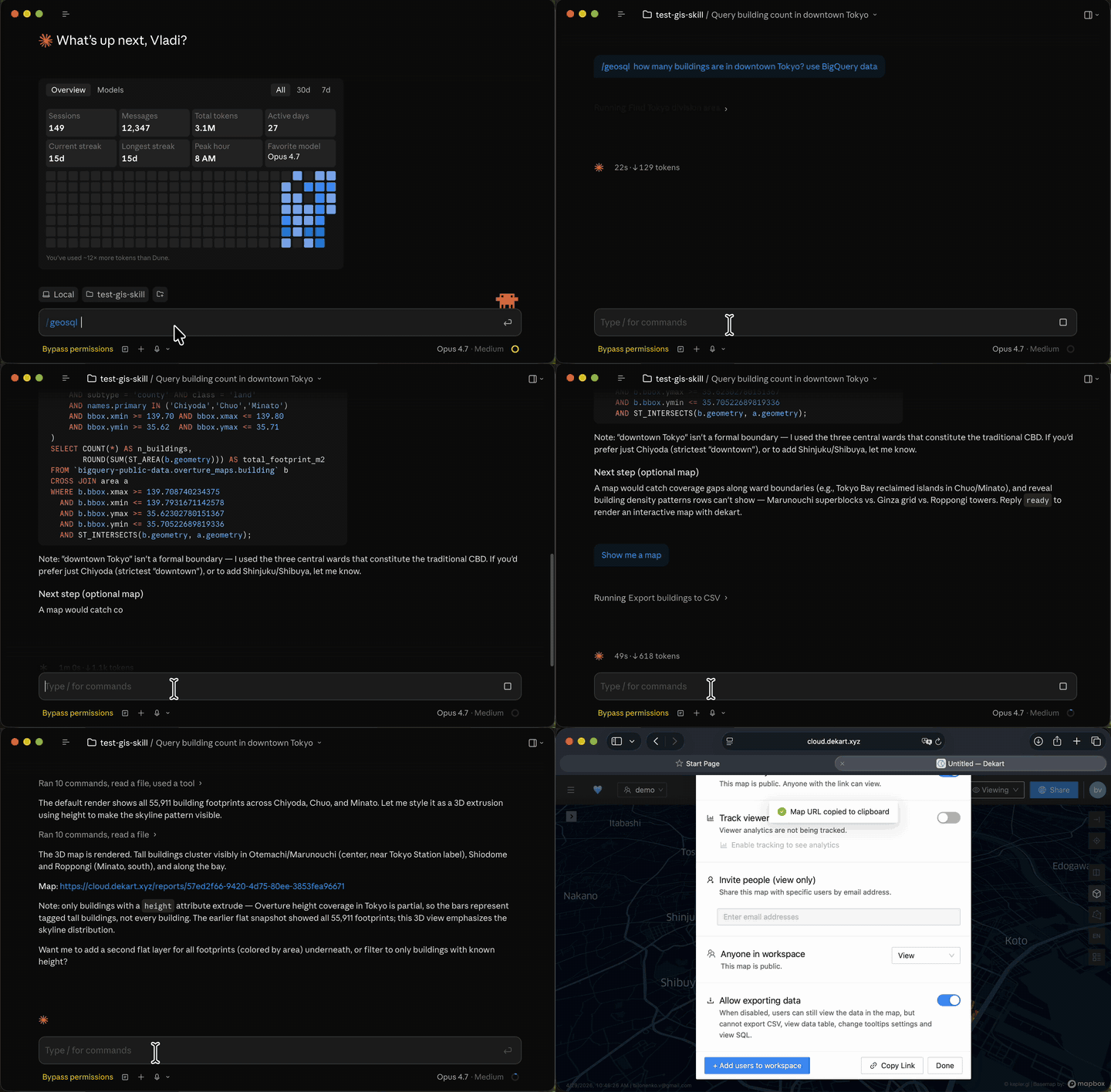
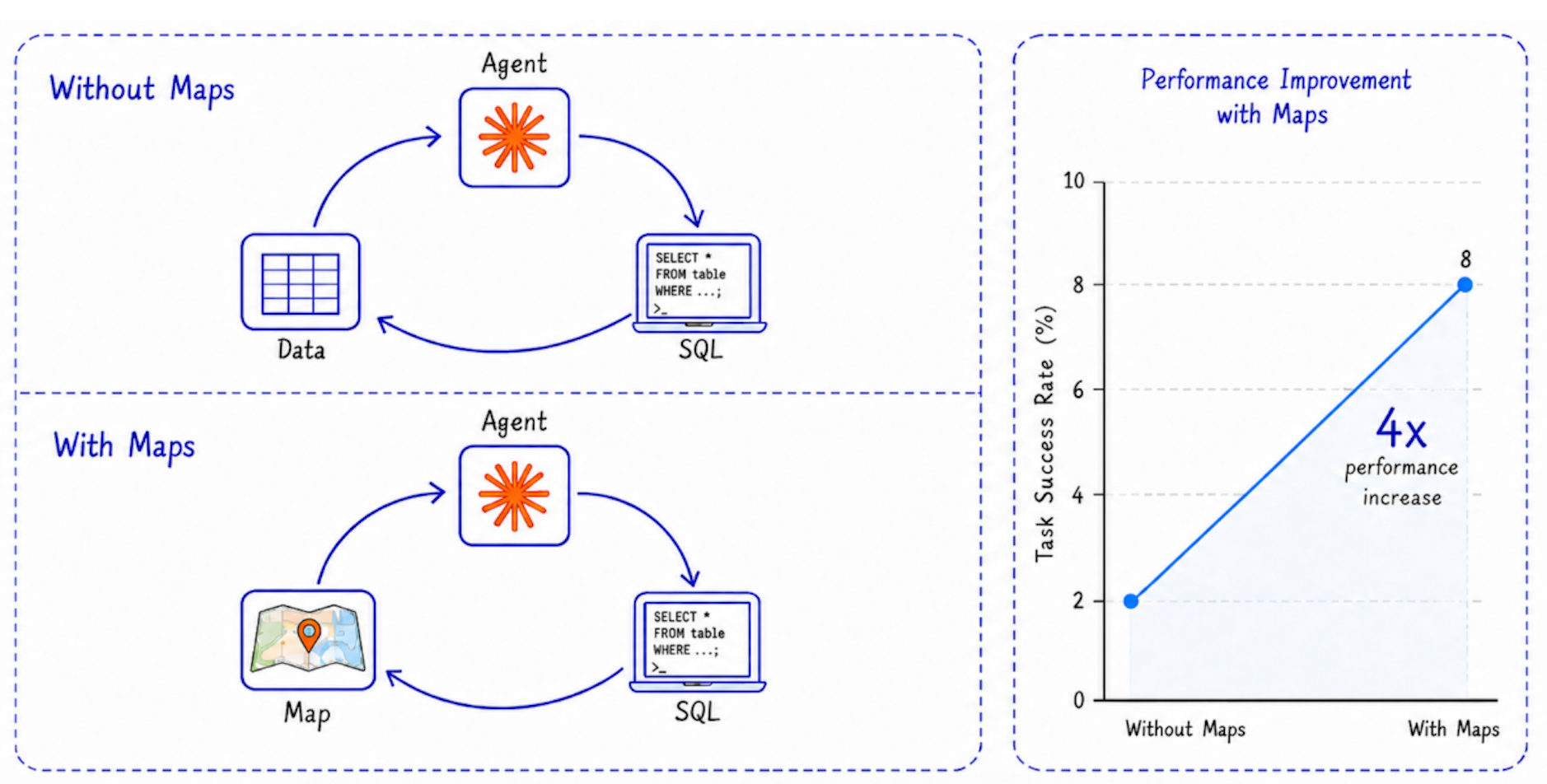
4x improvement on geospatial tasks with map in the loop.
Quick Start
With Python (interactive mode):
pip install geosql && geosql
Install directly into a supported agent:
geosql install claude
geosql install codex
geosql install copilot
Or in Claude Code:
/plugin marketplace add dekart-xyz/geosql
/plugin install geosql
After geosql install copilot, use GeoSQL from VS Code Copilot or Copilot CLI with prompts such as:
/geosql Show EV charger density along major roads and render a map
Install Dekart for map rendering and PostGIS support
GeoSQL optionally uses Dekart: an open-source Kepler.gl backend with connectors for PostGIS, BigQuery, and Snowflake. You can run Dekart locally with one docker command, self-host it on your own infrastructure, or use Dekart Cloud.
Run Dekart locally (skip this step to use Dekart Cloud):
docker run -p 8080:8080 dekartxyz/dekart
Install the Dekart CLI:
pip install dekart && dekart init
Follow CLI and dekart prompts to connect your PostGIS, BigQuery, Snowflake or Wherobots database.
Example prompts to try in your agent:
Real estate analysis:
/geosql Show buildings with low school accessibility in Ottawa, render as a map
Site selection:
/geosql Find the top 10 locations for Sporting Goods Store in Seattle based on POI co-location and distance to the nearest competitor. Create a map.
EV charging infrastructure:
/geosql create map EV charger density along major Romanian roads, highlighting how many charging stations are within 5 km of each motorway, trunk, or primary road segment.
How it works
GeoSQL runs an agent loop with a map in it.
- Discovery. The skill explores your warehouse metadata (tables, columns, types) instead of guessing schemas. Works with Overture Maps shares on BigQuery and Snowflake, and your private tables on PostGIS, BigQuery, Snowflake, or Wherobots.
- SQL. The agent writes spatial SQL using the right functions for your engine (
ST_INTERSECTS,ST_DISTANCE, H3, bbox overlap for partition pruning, and so on). - Cost check. On BigQuery, every query is dry-run first to estimate bytes scanned. A 10 GiB billing cap is enforced by default. Over-budget queries get rewritten cheaper (tighter bbox, lower H3 resolution, more filters) instead of executed.
- Geometry validation. The agent computes total area (polygons) or total length (lines) as a sanity check, and cross-checks against domain knowledge.
- Map feedback. When available, the agent renders the result through Dekart, looks at the rendered image, and corrects geometry mistakes the text-only loop would miss. This is the loop that gets the 4x improvement.
The skill uses your local CLI authentication (bq, snow, dekart), so warehouse credentials never go to the agent.
Benchmarks
GeoSQL ships with a reproducible eval suite under evals/. Each case asserts specific behaviors (cost guardrails, validation steps, correct result), not just "did the agent answer."
Current results on the included suite:
| Case | Assertions | Pass rate |
|---|---|---|
london-boroughs |
4 | 100% |
berlin-create-map |
3 | 100% |
paris-boundaries |
1 | 100% |
| Total | 8 | 100% |
Average: 3,085 tokens per turn, 72 s duration per turn.
The 4x improvement chart above compares the same task set with and without the map-in-loop step. Without maps, the agent's text-only validation misses geometry-class errors (mistaking a neighborhood polygon for a metro-area perimeter, double-counting overlapping features, picking the wrong join key on coordinate-reference systems). Adding the rendered map as a tool call lets the agent see those mistakes and self-correct.
Run the suite yourself:
python evals/run.py
See evals/RUNBOOK.md for setup and how to add new cases. PRs with new evals welcome.