Only because Lisp Machines, or variations thereof didn't took off in the mainstream.
"Symbolics Lisp Machine demo"
https://www.youtube.com/watch?v=o4-YnLpLgtk
"Emacs and Lisp"
https://funcall.blogspot.com/2025/04/emacs-and-lisp.html
While Emacs was forked by Lucid as XEmacs to make one of the very first ideas of LSP, nowadays most features have been integrated back into Emacs
https://dreamsongs.com/Cadillac.html
"Lucid Energize Demo"
Unfortunately, I failed to convince my employer to make everybody else switch to Emacs.
So, now I'm using lots of one-purpose tools, one for each separate task, a good deal less efficiently than I could use Emacs, and I'm still learning all the new UIs and keyboard mappings.
Not really. If they mandated all team members use telnet instead of ssh, would you say their position is valid?
Anyway, the important thing to learn is "You're not supposed to ask if you can use Emacs. Just use it!"
Incidentally, do they have a mandated general text editor? And if they do, will you get in trouble for firing up Notepad?
Do they have a mandated TODO tool (for your own tracking of work, not something like Jira meant for the whole group)? I've yet encountered a place that did.
Basically, find some category that Emacs does that they've not mandated, and then install Emacs and tell people you're using it for that category :-)
I have not updated my laptop (or got a new one) because I am concerned they will not allow me to install or continue to use Emacs. Honestly, I can vision how that conversation goes:-
[manager]: Hi, so what is Emacs
[me]: Emacs is a text editor I use daily and makes me efficient in my work
[manager]: OK. I would like us to start using Visual Studio Code with the new projects coming up
[me]: Why? The consumption models we are using has no VSCode support, anyway.
[manager]: It would just be good if we are all using the same tools
[me]: It should not matter what we use as long as we work with git and deployment. If someone else is great with a different text editor why force them to use something else?
[manager]: (Looks up emacs)
[manager]: I think its best we stopped using it because it is not supported by Microsoft and we need to be careful with the dangers of open source.
[me]: OK. Should we contact other IT departments to replace any open source tools they use?
[manager]: Its just emacs is not verified software for the business. I think you are complicating things a little (tries to belittle me)
[me]: Emacs is my daily driver! If it goes, I will hand in my resignation!
* Manager is not there to understand or reason.. he is just following orders from other IT departments. *
No. That's only a valid point if something about the tool must be shared between users, rather than just the output. Emacs is a text editor. It reads, modifies, and produces text. The correct tool for each team member to use is the one they're most productive with, full stop.
Jesus fucking Shiva while Odin watches, but I hate corporate management "thinking". It's just become more and more brain-dead over the decades.
Why?! It is a text editor for crying out loud. If you are more productive using the tools you want, don't cost anything to the company and doesn't force your colleagues to adopt your workflow, you could be working with notepad for all I care.
In fairness that used to be common to have in most IDEs.
I don’t know if it’s still the case but i remember that the first java language server was spun off the Eclipse’s java semantic parsing engine.
Why is that a valid point?
Where Emacs comes with all bells and whistles included in one big distribution, much like an operating system.
You could add lisp to mspaint and mspaint suddenly becomes awesome somehow? I don't follow the logic
Suggestions welcome.
-- Dan Ingalls
Technically, it is just a text editor. It was created to be a text editor, so you are right, but up to a point.
Emacs is written in lisp, what it means? It means that the only part of emacs written in C is a lisp machine. And even not the whole lisp machine is written in C: there is a rudimentary read-eval-print loop (REPL), and maybe a bytecode interpreted. This REPL I believe is just to boot up purposes and is replaced with proper lisp implementation on later boot up stages. It is not lisp added to a text editor, it is a text editor added to lisp. It means, in particular, you can add to that lisp not just text editor but anything else too, like mspaint for example.
And people do just that. They write software in emacs. In particular they wrote IDE in emacs, so while emacs by itself is not an IDE, you can turn it into one.
> some general purpose automation harness
Oh, it is. It is more general than any other automation harness you know. It is a lisp machine, you can automate anything in it. Well, technically you can, in practice it can take take too much time to be practical. In practice when choosing automation harness, you'd prefer not the most general, but the most specific harness for your task.
Norton Commander contains a text editor. Emacs operates at that level, whilst being reprogrammable.
For example, if I'm teaching a new hire to set up their vscode it is not very helpful to tell them "now you need to activate the python venv". It is much more helpful to be able to tell them "Now we're going to activate the python venv. To do that, open your command palette and search for 'select python interpreter'".
In my personal life, I still exclusively use emacs (which I have scripted to auto-detect venvs) but I put up with using vscode at work to be a greater utility to my team.
This arguable. I personally use emacs for text editing for sure, but not only: it also does emails (notmuch), git (magit), team & project management (org), mastodon, fleet management (nix + colmena + custom elisp functions), and, more importantly, all these “applications” can mutually share data.
So can you use emacs as a text editor only? Sure. Can you leverage its intrinsic abilities to reach what might be called an automation harness? Yes as well.
you add MCP (or an API)
suddenly with llama.cpp and a small model like qwen 3.6 35B, you can automate things by just asking.
emacs same thing, you can 'script' everything. Except no LLM needed
A simple example: I wrote a function that let me highlight an X.509 cert in a YAML document, regardless of indentation, and pass it to 'openssl x509' to show me what it is. This has saved me lots of time over the years not having to copy/paste, fiddle with whitespace, etc. But it's only valuable because the functionality is now right at my fingertips in the environment I'm already in!
How familiar are you with Emacs?
For general automation, my blog is built with Emacs Lisp.
It's all 3 and way more.
>You could add lisp to mspaint and mspaint suddenly becomes awesome somehow? I don't follow the logic
That much is a given (for both)
It's more correctly a Lisp execution environment with a text editor added as a bonus ;)
Admittedly, it doesn't help that there are some sibling comments that implicitly seem to be speaking that way.
However, Emacs is a 42-year-old software program that has been in constant development this entire time. Its git repository has over 180,000 commits right now on its main branch, which is still 20,000 ahead of VSCode. It doesn't just have a Lisp editor attached, it has 1.6 million lines of Lisp in it as well, and that's just the source repo, not all of the extensions you can get for it. Using "cloc" to count the total lines of source it has, it's still pretty close to 2/3rds the lines of code than VSCode has, at 2,613,748 for emacs versus 3,849,521 for VSCode. So that's the scale we're talking here, something on par with an IDE, not something on par with a simple text editor.
Yes, it gives you a lot of capabilities you didn't have before. The joke about it being a decent OS that needs a good text editor comes from the fact it has a large number of things it can do out of the box that aren't just text editing. It isn't just Notepad with a Lisp interpreter attached. It has vast capabilities that have been implemented and then also tested over the course of decades. Considering the set of disadvantages it carries with it, like weird key bindings and the fact that the variant of lisp it uses is more-or-less unique to emacs, somewhat analogously to the handicap principle [1] one should counterintuitively understand that as a sign that it must have extraordinary strengths that are able to offset that.
(I've used it for a long time, but I never really learned Lisp. AIs are making it much easier to customize than ever, though. I've said many times here on HN that I think every line of AI code should be reviewed. So yesterday I prompted Claude to build some Lisp functions so I can declare 1. a base directory 2. a regex of file names to match and produce 3. a function to walk over the entire directory forwards or backwards with CTRL-x CTRL-n or CTRL-x CTRL-p, thus allowing me to easily walk through an entire project for review purposes systematically. Nobody had to give me permission to do that. I didn't need to "create an extension". I don't have to care if anyone else in the world wants it. It's not the only editor that can do this as easily as emacs but it's a short list.)
TBH that does sound pretty awesome, assuming good primitive operations were exposed through the Lisp API.
"Emacs? What's that? Oh, sorry, I like things with an actual UI."
Or:
"Emacs? I remember that from my DEC days. I'm surprised it's still around!"
Edit: Looking up the quote it seems to just be the person being pedantic in how they define operating systems.
I don’t consider telling a manager that something is not a reasonable ask to be an act of disobedience.
There is too much power distance between yourself and your manager.
However, I believe Microsoft Intune is used within the Business to control what software can and cannot be installed. So my guess is Windows won't allow you to install via a typical .exe
I am not suggesting the above is 100% valid. I just don't want to get a new laptop and find out. Maybe I can still use Emacs via WSL... bypassing Intune????
At the end of the day, I understand Security is getting much more serious in recent years - and we even have a dedicated department - but controlling the software to install is crazy, especially for a development team.
Because the instruction was stupid, based on marketing instead of utility, or otherwise given without any thought to how it impacts the actual day-to-day work of their subordinates.
Why WOULDN'T you disobey a stupid instruction? What's the difference between "stop using this tool you're productive in and switch to this one that you're demonstrably LESS productive in for no reason other than I heard it was a good idea", and "Go strap some rocks onto your ankles and swim the English channel. I heard that was a good idea."?
The only difficulty is caused by the fact that already each Emacs mode may change some of the key bindings. Because of that, before deciding on some key bindings you prefer, it is wise to first check the bindings used in all the Emacs modes that you are likely to use frequently, in order to choose bindings that would not conflict with any of those modes.
I'm going to go through https://github.com/emacs-tw/awesome-emacs as well as https://www.masteringemacs.org/
To run? Absolutely not.
What a surprise
Pragmatism beats idealism in the real world
I disagree though. While there are benefits to that approach, I feel like language innovation would be stifled to a certain degree.
(I don't have any experience with Intune so pardon my ignorance.)
The point of the parent is that in an ideal situation, where everything works without flaw, theoretically it makes no difference which tools everyone uses. In real life, you having a homogeneous setup across a team makes the sysadmin's job a lot easier.
I'm not sure I completely understand which part you find backwards. Do you mean merging language runtimes and the OS is a bad idea, or that you think merging them would lead to more innovation?
I can see an argument for both (in terms of innovation), but being able to run only one language environment on a computer at a given time would make it much harder and heavy weight to use new languages. Or at the very least, new language runtimes.
A common refrain is that Emacs is an operating system (OS). This isn’t true, but what invites comparison to an OS is its ability to orchestrate applications and utilities above the OS kernel level. The diagram below suggests a truer picture of how Emacs’ relates to an OS and its capabilities.
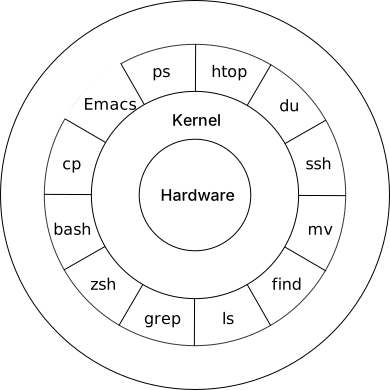
Emacs’ built-in access to OS system services (file system, network, etc.) coupled with the ability to run other programs makes it routine to improvise client behavior within it. Because of this, Emacs users are able to accomplish many of their computing needs from the different client modes that have been made for it. This gives credence to the notion of “living only in Emacs.”
In this post, we’ll examine some of the ways Emacs lets you build a client. By the end of this post, you’ll hopefully be convinced that from within Emacs, everything looks like a service.
Let’s first provide some definitions.
The Client–Server model is a common computer interaction pattern where a task is partitioned between the provider of a resource (the service) and the requester of that resource (the client). The client issues a request to the server, and the server in turn returns a response as shown in the diagram below.
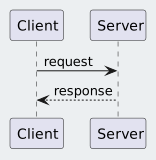
Depending on the implementation, the transaction (request + response) can occur over a network or be local to a system. Client-server models using a network has been most elaborated upon with REST-style software architectures. Shown in the sequence diagram below is a common implementation pattern for REST-style client server architecture.
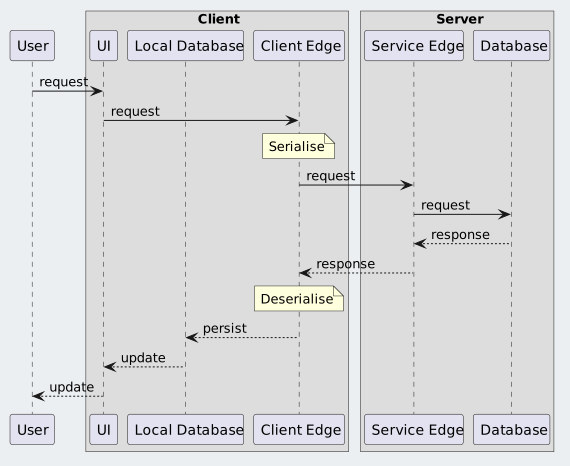
From the diagram above, there are three concerns the client is typically responsible for:
For the above concerns, Emacs provides numerous libraries both built-in and third-party which can implement a client. Listed below are some built-in libraries with their respective links for further reading:
UI
Client Edge
Local Database
Requirements dictate the amount of complexity required to implement the Emacs client. If there is an existing command line utility that can do the “heavy lifting”, said utility can be reframed as a “service” that can be accessed via a shell call.
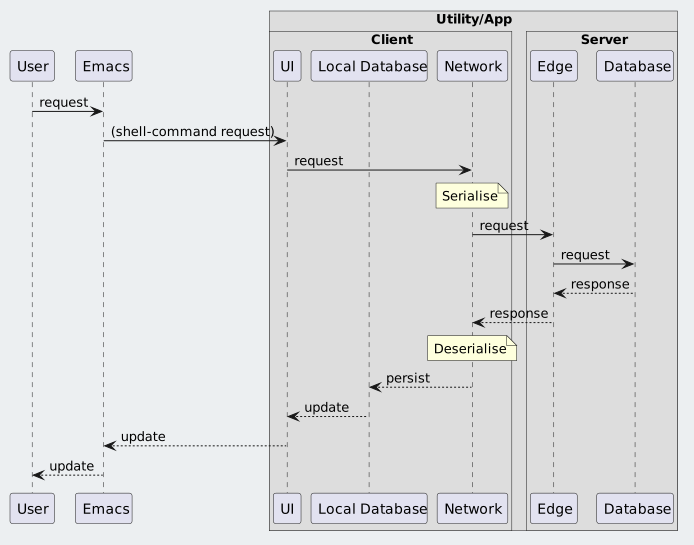
All the libraries mentioned above are accessed through the Emacs Lisp (Elisp) programming language. Elisp is a dynamic programming language which allows for a high degree of improvisation during run-time. This capability allows for complex orchestration of any behavior that is available to Emacs, from Elisp functions to shell commands.
wttr.in is a console-oriented weather forecast web-service. It supports JSON output so we can build an Emacs wttr command which will prompt for a location, make the HTTP request, process the JSON response and display the result in the mini-buffer.
The top-level command wttr is shown below.
1 2 3 4 5 6 7 8 9 10 11 12 13 14 |
|
The wttr.in URL is constructed by the function wttr--request-url shown below.
1 2 3 4 5 6 7 | |
We can subsequently pass that URL into fetch-json-as-hash-table which does the heavy lifting of retrieving the URL and parsing the JSON response into an Elisp hash-table.
1 2 3 4 5 6 7 8 9 10 11 12 13 | |
Finally we can extract the desired values from the JSON response (jsondb) to populate the message that will sent to the mini-buffer.
1 2 3 4 5 6 7 8 9 10 11 12 13 14 15 16 17 18 19 20 21 22 23 24 25 26 27 28 29 30 |
|
At this point, hopefully you are convinced of the title assertion that from Emacs, everything looks like a service. Furthermore, many of the APIs offered by Emacs work at a high-level of abstraction. Consider that the lines of code for wttr.el weighs in at 67. (Result using the cloc utility.)
If that’s too much, then imagine an alternate implementation where the actual network request and JSON processing is done in a Python script called weather. Then the Elisp command to invoke it is just the code shown below.
1 2 3 4 5 6 7 8 9 |
|
With the above implementation, the shell command becomes effectively the “service” to make a request to.
As Elisp is a dynamic programming language, it can allow for integration of Elisp libraries with command line utilities in an improvised fashion.
This capability is compelling to users who recognize the opportunities it can offer.