The 95th-percentile latency and packet-loss targets here seem much more meaningful than another 2x headline speed increase.
My only scepticism is how much of this survives real consumer hardware. Wi-Fi 6 had things like OFDMA that sounded great on paper, but support/implementation was pretty uneven.
One of the core features (MLO) is currently mostly scam. APs/Clients negotiate the protocol (and it shows up in the status) but doesn't it to either increase robustness or bandwidth (by combining/switching between two frequency bands).
Also the driver quality is a huge mess.
(We tested it using the latest generation Cisco Enterprise gear but also with Prosumer stuff like Ubiquiti or TP-Link)
But honestly: we need WiFi-8. It finally brings infrastructure-controlled roaming which is super important for any VoIP service.
Last year, I saw 1600 Mbit/s from the Internet at a normie's place with an ISP-provided router. Still have a cat 6 cable around the living room but haven't used it in the last 2 years. Not exactly wifi but I routinely get 600-800 Mbit on 5g networks in crowded areas.
In comparison, DECT has been flawless in the same space. Set and forget, just works. I always wondered if we could have a kind of DECT proxy on the LAN, and have the ERP application talk to that proxy using DECT... I mean, it's a few EANs and stuff, DECT could handle this easily.
Modern wifi is fast enough that using cables is often not required.
Set your channels to 6/149/37 and the lag will probably vanish. Exactly because of this, I only run those channels, even across multiple APs.
In Europe, you may need to use 44 instead of 149.
There is currently no good way to keep AWDL off other than a script that just turns it off every 200ms, because of course Apple. Also, not always an option with work issued Macs.
There is about 10m and a brick wall between my AP and my desk so yeah, a fancy new MCS that can theoretically deliver 25Gbps was just never gonna be useful to me.
Also I've worked on (other non-WiFi) 802.11 products where our competitive edge was all about interference motivation. Our competitors at trade shows would see the demos and say "that's fake, you guys are cheating". So I have the feeling that in general there might be alpha in more resilient wireless links.
Note to tech reports: do not EVER quote this metric as it is the most useless piece of information.
No. Just no. That speed is only possible when standing at a Nevada test range, in late spring, on a ladder, holding the router above your head, with a black cat sitting on your left shoulder. Any minor change from those parameters and your speeds will be 30% the theoretical maximum ... maybe 50% if you can only find a grey cat.
Off topic, but that sounds sort of contradictory, or misleading at the very least.
Like seamlessly switching between Wi-Fi, nG, Bluetooth, satellite, pigeons, cans-and-wire.. and still having a stable global address? (that you could change later of course)
Unfortunately IMO WiFi router brand selection is getting increasingly small. I have no issue or problem with using UniFI myself. But it is not something I could recommend to family and friends as they don't know how to set it up. Eero is not available to much of the world outside US. I just wish Apple revive its AirPort Express business.
[1] https://www.nokia.com/blog/advancing-connectivity-with-wi-fi...
There’s so much interference that the package dropout rate is around 40% at 2.4GHz usually.
I'm using 802.11ac and see no need for higher speeds.
802.11 r/k/v exists
I would expect this crowd here to not make these mistakes as ofte. :-)
B is defacto for storage…
So my only choice was to purchase a third-party router/WiFi. I did not want to make the network more complex, but if my ISP router couldn't provide WiFi, it would need to happen.
So now I have a working WiFi 7 router, and my ISP's device is permanently in Bridge Mode. I went to the hardware store and purchased a bunch of little cable staples, and I nailed up an Ethernet cable from the router to the bedroom. There are 3 desk positions in here that can be reached by Ethernet cable.
Unfortunately, if I am out on the balcony, I normally need to use WiFi, because I can't fully shut the door when a cable is snaking out of it. Also, I picked up a little USB-C-Ethernet dongle for my phone, if worse comes to worst. The bandwidth is great; besides, my downstream is only 100Mbps, so who needs overpowered LAN bandwidth?
It's under 5G standard but for non-cellular connectivity that means you can use it without base-station like Wi-Fi direct. It's geared toward IoT but its data rates are from 1 Mbps up to 1.3 Gbps depending on the operating frequency and the type of modulation being used [2].
[1] DECT NR+: A technical dive into non-cellular 5G (30 comnents):
https://news.ycombinator.com/item?id=39905644
[2] Technology: DECT NR+ [pdf]:
https://www.vdma.eu/documents/d/group-34568/technology_dect-...
That said, in theory at the level you're asking for it'd be acceptable to run the system as a single frequency network by using the AP locations as remote radio heads and just not telling the handhelds that there are multiple APs in listening range.
I'd probably aim for using the wifi support mechanisms to dynamically fake nearby APs as "mimo antennas" from the POV of the handheld, but not doing so would also suffice, just transmitting from the one AP that's nearest to the specific handheld/client would already basically do the trick and could probably run with hacked firmware on commodity AP hardware basically turning the entire setup into a soft-MAC with that very software juggling the army of radios.
The setup btw. would not have the clients aware they're dealing with more than one radio on the other side.
You could be forced to ask/ping the client from multiple APs one after another if you've not heard from it in a while and it moved, but otherwise, you just rely on hearing it from multiple APs and tracking it so you don't have to make APs across the facility speak up and risk interrupting other clients that try to get a word in.
Oh, and ban by building ordinance usage of any other Wi-Fi on the channel your doing this on, or that's gonna eventually get you problems with congestion.
So having the 5-6 AP is not the problem, then shouting at max power is the problem. Especially “gaming” routers tend to do this.
Turns out the 2.4 GHz radio of my router had died (Fritzbox 7590, apparently a common issue), thus forcing 2.4 GHz-only clients to use those other APs.
The AP does not have visibility into what the client actually sees, and no, a coordinator that has knowledge what the APs see isn't that much better.
Imagine a situation with two APs and a client being in the middle of the two in a RF-impeded situation (i.e. your typical office building). AP1 may "hear" the client better (i.e. it gets a higher RSSI and SNR), but the client may reject it in favor of AP2 because the client sees a better signal coming from AP2 due to reflections, a powerful RF signal from a floor above interfering with the channel of AP1 or God knows what else.
RF is a weird world.
Those two are the same thing, though!
Literally nobody is hitting those insane theoretical transmission speeds. Heck, most access points don't even have the uplink for it. So why bother? Easy: because it provides you margin. A 10Gbps link degrading to 100Mbps due to poor signal quality is a lot better than a 1Gbps link degrading to 10Mbps when you are trying to achieve that 20Mbps connection. The expectation is that your signal will degrade, so it is all about starting with a good-enough spec that you'll still have a reasonably-usable connection left at the end.
It's a similar story for multi-client connectivity. A 10Gbps link might sound overkill for a 500Mbps residential internet connection, until you've got legacy and poor-signal-quality clients taking of 95% of the airtime for 5Mbps of data. Being able to still get enough data through that remaining 5% airtime to saturate your internet connection is incredibly useful.
And before you praise DECT too much: its 2020 revision allows for a 1.2 Gbit/s transfer rate, with all the fancy stuff like MIMO and beamforming you might know from Wifi. Quite excessive for a few simple phone calls, wouldn't you think?
Higher speeds automatically means less latency and that does matter, especially if you are into stuff like games where every millisecond matters.
That's how I read it at least.
I feel like a lot of the problems people try to solve with wifi and dozens of access points could be better solved by a 450MHz-ish transceiver up on the roof with a downfire turnstile, and 9600bps radio modems in everything.
I'm going to embroider some red hats, going to put on them "MAKE SLOTTED ALOHA GREAT AGAIN".
Your router does not respond. Turn it off and on.
This comes close: https://www.getapp.com/all-software/a/breakdown/
I am not sure what that term means, but perhaps you meant "mitigation"?
You should get far better performance on 6GHz, though there are harsh power limits in most countries with various ways to enable it which may complicate things. But if you can get full power on 6GHz it should reach 10m no issues at all, and with 320MHz should be at least twice as fast.
If you can also get MLO working (which is not simple) you'd be able to bond another band with it.
Most improvements on that front has been happening on the application layer, where the app attempts to retain functionality even though the underlying network conditions are changing, to various degrees of success (mostly not that great).
There is about 3.. Broadcom, Qualcomm and MediaTek. Together they control I believe 100% of wifi chips used in routers and APs. Often it's sold as a package / system on chip so it's also the main cpu.
On the client side there is a little bit more competition but not much.
And I have cat5 in my walls that was installed 25 years ago (way before it was my house)... That gets me to 10g everywhere I tried, so no reason to pull anything else.
Aren't devices with Intel Wi-Fi 7 BE200/BE202 are supporting that?
As well as latest Samsung phones?
We basically miss all data (received stations/signal levels from both sides, Bit Rate errors, etc.) for making roaming decisions and then to softly connect them to an AP you want them to be on.
Enterprise WiFi is currently mostly "This is a list of APs you maybe can connect to.. have fun.. if you can connect we pre-seeded the AP with some crypto data, so it doesn't take ages to negotiate. Here's your (more or less friendly) disassoc. Fuck off bye."
It does somehow work for stationary setups - but as soon as you have mobile traffic (like walking around or machines moving) with multiple APs the quality hits the shitter brutally.
Currently this gap is being filled by industrial 5G with dedicated frequencies. It's crazy expensive.
The more clients you have on the same channel, the less bandwidth they all get (effectively). Using wires where you can will improve wireless for everyone else, including your neighbors.
When I travel, I try to use an eSIM that uses a network my home provider partners with. This seems to improve the chance that voice and data over LTE or 5G NR work simultaneously.
You have a bunch base stations forming a logical channel with a single uplink frequency, and either a single downlink frequency on which every base station is precisely synchronised in frequency and time (simulcast), or multiple downlink frequencies (a multicast system).
A comparator selects, or votes, the highest quality signal from the base receivers based on either lowest noise or lowest BER, and then repeats that through all of the base transmitters simultaneously.
At the same time, in a multicast system, the mobile scans for and selects the base transmitter with either the highest RSSI or lowest BER.
Sometimes we forget that for the communication to be reliable, signal must flow both ways. Clients will happily connect to far away APs, but won't be reliably heard back.
Solution is to use more APs and lower their radio tx power. A lot of customers push back on the approach because they have only one gaming router monstrosity in their country home and it works perfectly, not understanding that their downtown office with 150 devices have nothing in common.
I was so excited when I discovered it a few months back after struggling for years to set up reliable wifi for outdoor robotics, only to realize we can't have nice things. The struggle continues.
The AVM Fritz product line of consumer modem/routers all include a DECT modem for registering extra handsets for voice but they have their own proprietary handsets that support TCP/IP over DECT for things like audio streaming or sending extra media like a caller photo.
Maybe ok for your garden camera where the authorities just don't care. But no go for any industrial usage.
Everything with an Ethernet port is wired, wifi is for phones and tablets only (a few UniFi WiFi 6 APS).
Works great!
Internet has never dropped for me while working, family loves the always working NAS streaming via wired Apple TV.
You would never be able to predict this, which is an unfortunate thing about powerline IMO. You just have to buy the modems and see how they perform on your particular wiring.
Shouldn't that be our end goal with all this tech?
IIRC siri uses it and iOS (maybe macOS too?) exposes it to app developers.
People tend to want speed, speed, speed, but tons of use cases are totally fine with a reliable 100 Mbps. For a lot of remote monitoring stuff, even 1 kbps is enough if it works reliably. Not everything needs to serve up a webpage.
Now I have a Ubiquiti one, it's antithetical to my DIY instincts but I think I'm OK with my router being one of the proprietary appliances in my life.
Plus now the wired section of my LAN is really fast.
It's seriously impressive how it wasnt possible to set per device speed limits or even QoS which has been a thing since like 2007
A very expensive "up to 1000mbps" kit maxed out at ~200 when both devices were plugged into the same outlet. It just got worse with distance.
Dual SIM Dual Standby (two or more SIMs, one radio) is cheaper, less battery, less space, and usually good enough. It's literally a few dollars, not 200-300.
So yes, it's "too expensive" because it's higher than $0, but it's not "too expensive" as in it would cost a lot.
It will still try to roam, it will still cause issues.
A lot of the roaming logic is in the clients. Newer android and iOS versions have gotten better but there are tons of old and new devices with poor roaming logic and capabilities.
DECT is a much, MUCH more old, simple and robust protocol. Modern signal processing tech can get you insanely far there.
Your old devices won’t magically get more reliable because WiFi 8 comes out. You will benefit from this after it comes out by migrating to WiFi 8.
Meanwhile, you can benefit from existing reliability enhancements by upgrading to WiFi 6.
If your response to that is ‘I can’t use WiFi 6’ then presumably the putative benefits of WiFi 8 are even more remote.
Really there should be a world wide 900-1000MHz ISM band.
If you need consistent MB range traffic for cameras I wouldn’t advise it but for low (5kbs) traffic it can be attractive. A few thousand bits can encode quite a bit of information. Don’t be fooled by the “kbs”.
> MoCA (stands for Multimedia over Coax Alliance) is a technology that uses the existing coaxial cables
I recently decided to stop running anything too fancy on it and keep the router itself simple: just secure, robust networking. All the tinkering has moved to chained network VMs in QubesOS instead.
It was definitely nice having different LAN ports behave differently, multiple VPNs, policy-based routing, filtering, monitoring, and all that. But yeah, every extra thing I add is another chance to break the whole network.
All that said, I could never imagine going back from OpenWRT. The answer to basically any networking idea is always “yes.” There are pretty much no limits. I especially like that it doesn’t try to hide networking terminology or abstract everything away. You really get to understand what you’re actually doing and can choose the exact configuration you need, down to the smallest detail. Everything is exposed.
Rock solid and reliable networking =)
But they are the best cards around if you want to play with Wifi-7 on Linux. But always go for the latest wireless-next kernel + firmware blobs. Also they are not compatible with AMD mainboards (go for Qualcomm then).
It's highly variable in my experience. I've had it work pretty well in some situations and barely at all in others.
I have certainly never got 1000mbps. I think I have got 300 at best. In my office I can only get about 50 even though it works pretty well in other parts of the same small apartment.
... Which is kinda annoying coz they aren't really all that cheap for something you have to just buy and then find out later if it actually works!
I am also not sure of their exact market shares but I would suspect one or two are probably steering the majority of the "standards". I'd suspect Broadcom and Qualcomm to have the most influence.
DSDA in 5G is rare, and I can't reliably find a phone that can do it in EU or US (I can find higher end chipsets that can do it, but phone vendors don't seem to follow through with it). Usually it's 4G+5G or 4G+4G.
Support for VoWiFi is a bit weird. Some operators don't allow it outside of your region (for example, the EU), some others will allow it and even bill you as if it were a local call made from your country.
Also, although it's in theory made only for working through WiFi, seems like if you have a second SIM or eSIM with a data plan (for example, a travel SIM local for the country you're on vacations) and some combination of phone and/or operators, it can use the second SIM as the data provider for WiFi Calling.
Published Aug 22, 2026, 1:00 PM EDT
João has been covering the tech world for over 7 years, with a heavy focus on laptops and the Windows ecosystem. I also love all things tech and videogames, especially Nintendo, which he's always happy to talk about.
Prior to joining XDA in 2021, he worked at Neowin: https://www.neowin.net/news/poster/jo%C3%A3o-carrasqueira/
Wi-Fi upgrades have boiled down to a lot of similar talking points over the past decade or so. Every few years, a new generation of Wi-Fi comes along and promises more speed, more bandwidth, more range, and so on. But now, with Wi-Fi 7 still slowly making its way into homes around the world, things are looking different.
Wi-Fi 8 is already starting to take shape, and for the first time in a while, it isn't about speed at all. The IEEE has dubbed this version of Wi-Fi "Ultra High Reliability", and it's about time this became the focus. It may not be the most exciting upgrade on paper, but it could be the one you'll feel the most.

Since the introduction of Wi-Fi 4 (corresponding to the IEEE 802.11n standard) back in 2009, the maximum theoretical data rate for new versions of Wi-Fi has always increased significantly with each release. Wi-Fi 5 increased the maximum data rate by more than 10 times, and while further increments have been smaller in percentage, speeds have always increased very significantly.
Some improvements have been made to help fight interference and improve throughput in areas with lots of devices connected, but they always felt secondary to the improvements in maximum theoretical speeds. But with Wi-Fi 7 reaching a maximum theoretical throughput of 23Gbit per band, that's more than enough for the current internet speeds most users have, so it's arguably time to slow down.
While Wi-Fi 8 is still in development, the goal this time is very different. This new standard will have approximately the same maximum data rate, support the same number of spatial streams, use the same 4096-QAM modulation, work on the same bands, and support the same 320MHz channel bandwidth compared to Wi-Fi 7.
Instead, the organization is focusing on improving the reliability and the effective throughput of Wi-Fi networks by reducing interference and handling non-ideal conditions more effectively. The stated goals of Wi-Fi 8 include a 25% increase in throughput at different signal-to-interference-and-noise ratio (SINR) levels, reduce latency by 25% for the 95th percentile scenarios with latency, and decrease MAC protocol data unit loss (MPDU) by 25%.
The official introduction to Wi-Fi 8 pits it against cellular networks, specifically 6G, which it will likely be competing against for a good chunk of its life (Wi-Fi 8 is expected to be finalized in 2028, while 6G should arrive in the early 2030s). Cellular networks notoriously have to handle massive numbers of devices connected at once, so the focus with Wi-Fi 8 is to improve the experience when there are lots of Wi-Fi devices nearby as well.

Since the aim is to improve effective throughput and the overall experience in real-world scenarios, Wi-Fi 8 focuses on introducing or enhancing features that help with those specific aspects.
One example are Distributed-tone resource units, or DRUs, which allows devices distribute its transmissions across a wider range of bandwidth, resulting in higher transmit power without violating regulations around how much power can be transmitted in a given piece of bandwidth. In practice, this means devices with lower transmit power can still offer more reliable connectivity, which can be especially useful for things like smart home devices that may have weaker antennas.
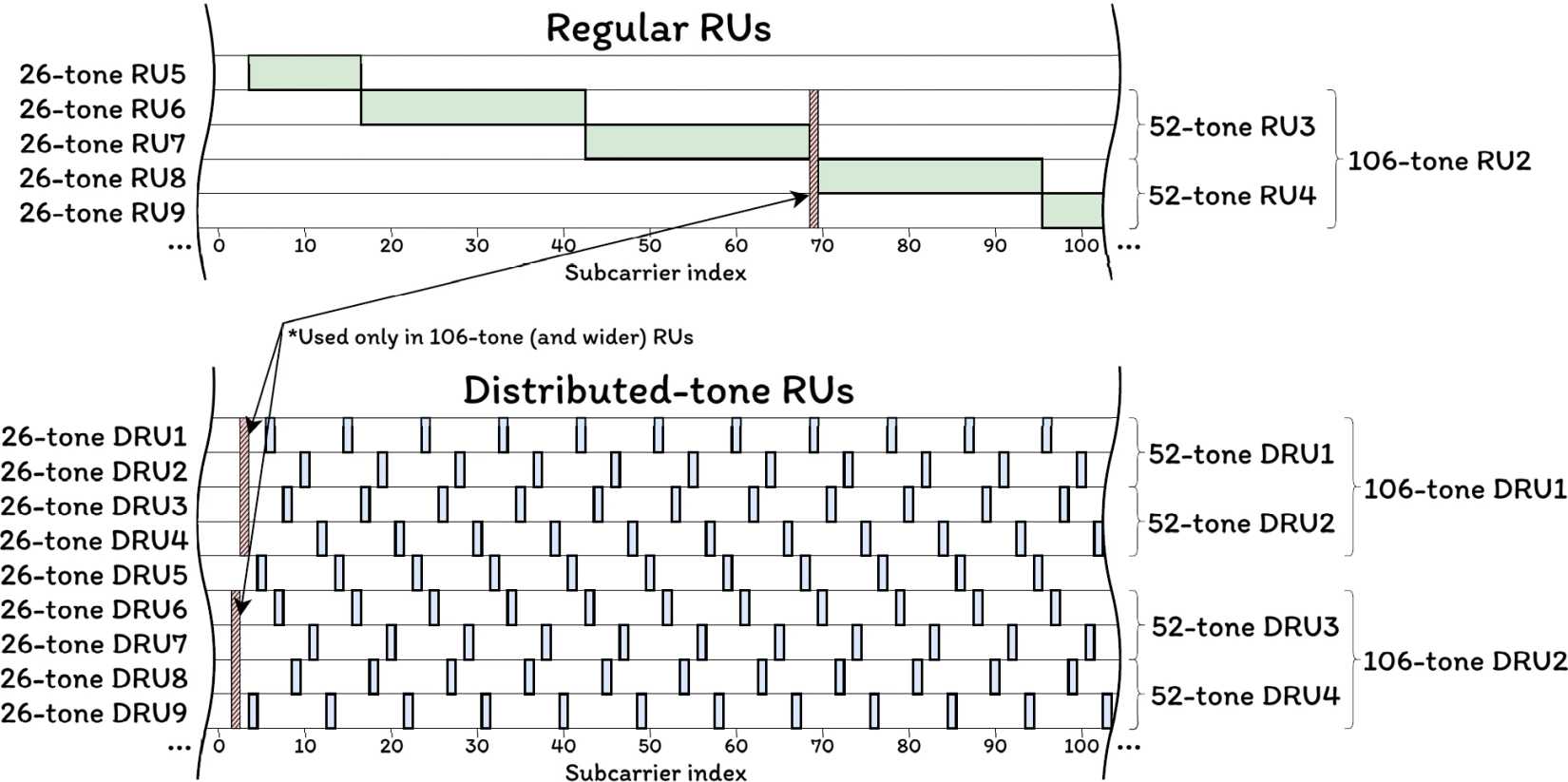
Credit: Karamyshev, A., Levitsky, I., Bankov, D.
Interference mitigation pilots are another notable feature, which aim to help resist interference from unexpected interferences, particularly in unlicensed bands. This new standard will also leverage unequal modulations, allowing each spatial stream to be used more efficiently by adjusting the modulation individually based on the SINR for each one. This also goes along with new Modulation and Coding Schemes (MCS) being added to improve throughput even more.
Latency reductions come from new features such as P-EDCA, which helps speed up channel access for prioritized devices while mitigating the effects on non-prioritized devices. Wi-Fi 8 also allows devices to communicate exclusively on non-primary channels, even when the primary channel is busy, allowing for throughput improvements by reducing wasted bandwidth.
Other scenarios being addressed include seamless roaming, meaning the transition from one access point to another. The goal is to ensure next to no downtime when moving between access points. Additionally, Wi-Fi 8 should improve connectivity when using multiple access points at the same time, leveraging various coordination features to ensure a more reliable connection and higher throughput in these scenarios.

As much as raw speed improvements are appreciated, the reliability focus for Wi-Fi 8 is sorely needed both at home and in work environments. There are simply massive numbers of devices connected to Wi-Fi networks nowadays, and they'll only keep increasing as smart home tech becomes more prevalent.
Smart lights and appliances, streaming boxes, and devices like phones and PCs continue to increase the demand for Wi-Fi networks to serve multiple devices at the same time. Even though smart home products often don't need a lot of bandwidth, their mere existence can slow down your more demanding connections, and Wi-Fi 8 is aiming to improve connectivity for all those devices.
At the same time, if you've been fighting off degrading network quality by adding more access points, Wi-Fi 8 is addressing that too, so it's looking like a very ambitious and well-rounded approach to improving connectivity in every scenario. It may actually be a more exciting upgrade than the past couple of iterations.
Wi-Fi 8 may look like it's slowing down in terms of innovation, but in reality, it's focusing on oft-overlooked aspects that are very important in real-life situations. Refining the connection and improving reliability make this a big step forward, but it will be some time before we can see it in action. The standard should be finalized by May 2028, and devices with early Wi-Fi 8 support should start appearing that year.
If you're thinking of upgrading your home Wi-Fi, it may actually be worth waiting for this new wave of devices rather than invest in Wi-Fi 7 right now. Wi-Fi 7 may have big throughput gains on paper, but unless you have multi-gigabit internet, those benefits may not even be all too noticeable.
Seriously. Only rich nerds in SAN FRANCISCO are using it.
But I agree, Broadcom and Qualcomm are the heavy hitters.
I was using a Samsung S5 running LineageOS for a while with Google voice for calls, but the no 911 thing is one of the main reasons I finally moved to a different phone. The S5 supports VoLTE but only with stock firmware.